To collect metrics data from a specific GPU-HPN node or virtual node, ACS provides different types of metrics through multiple collection endpoints. You can modify the Prometheus monitoring configuration to collect metrics from the target node.
Function introduction
In the ACS architecture design, multiple virtual nodes within the same cluster share the same IP address. Consequently, when you want to collect the metrics of a virtual node, the metrics of all virtual nodes are returned. The common collection configuration of Prometheus collects metrics from all nodes through the Kubelet Service, which causes duplicate metrics.
To solve this problem, ACS supports filtering metrics data by specifying the node name. The results will only include the Pod and Node data corresponding to that node, as shown below.
Collection endpoint | Parameter description | Metric type |
|
| Pod-level CPU, memory, GPU, and other usage metrics within the target node. |
|
| Important Only supports GPU-HPN type nodes. Node-level CPU, memory, GPU, and other usage metrics. For specific metrics, see ACS GPU-HPN node-level monitoring metrics. |
Prerequisites
The ACK Virtual Node component is installed with version v2.14.4 or later.
You can check the version of the ack-virtual-node component by selecting from the navigation pane on the left on the cluster management page. On the Core Components tab, you can view the version of the ack-virtual-node component or perform an upgrade operation.
Modify Prometheus monitoring configuration
You can modify the Prometheus monitoring configuration to collect metrics from a specific virtual node. Choose the configuration method based on the Prometheus solution you are using.
Alibaba Cloud Managed Service for Prometheus
Supported by default. No additional operations are required.
Please upgrade the Prometheus monitoring dashboard and agent to the latest version to ensure you can see the complete monitoring dashboard. For upgrade methods, see How do I upgrade the Prometheus monitoring dashboard for a cluster?.
Community Prometheus Operator
If you are using the community Prometheus Operator solution or the ack-prometheus-operator from the ACK marketplace, you need to add the following ServiceMonitor CR configuration.
apiVersion: monitoring.coreos.com/v1
kind: ServiceMonitor
metadata:
  name: virtual-kubelet-acs
  namespace: monitoring
  labels:
    k8s-app: kubelet
    # Add this label to automatically manage prometheus-operator.
    release: prometheus-operator
spec:
  jobLabel: k8s-app
  selector:
    matchLabels:
      k8s-app: kubelet
  namespaceSelector:
    matchNames:
    - kube-system
  endpoints:
  - port: https-metrics-cadvisor
    interval: 15s
    scheme: https
    path: /metrics/cadvisor
    bearerTokenFile: /var/run/secrets/kubernetes.io/serviceaccount/token
    tlsConfig:
      caFile: /var/run/secrets/kubernetes.io/serviceaccount/ca.crt
      insecureSkipVerify: true
    relabelings:
    # Add parameters to query based on the specified nodeName.
    - sourceLabels: [__meta_kubernetes_endpoint_address_target_name]
      targetLabel: __param_nodeName
      replacement: ${1}
      action: replace
  - port: https-metrics-node
    interval: 15s
    scheme: https
    path: /metrics/node
    bearerTokenFile: /var/run/secrets/kubernetes.io/serviceaccount/token
    tlsConfig:
      caFile: /var/run/secrets/kubernetes.io/serviceaccount/ca.crt
      insecureSkipVerify: true
    relabelings:
    # Add parameters to query based on the specified nodeName.
    - sourceLabels: [__meta_kubernetes_endpoint_address_target_name]
      targetLabel: __param_nodeName
      replacement: ${1}
      action: replace
Open source Prometheus
Find the Prometheus configuration file in the open source Prometheus (usually located in /etc/prometheus/prometheus.yml or in your custom configuration directory), and add the following collection configuration.
scrape_configs:

...Other job configuration.

- job_name: monitoring/acs-virtual-kubelet/cadvisor
  honor_timestamps: true
  scrape_interval: 15s
  scrape_timeout: 10s
  metrics_path: /metrics/cadvisor
  scheme: https
  bearer_token_file: /var/run/secrets/kubernetes.io/serviceaccount/token
  tls_config:
    ca_file: /var/run/secrets/kubernetes.io/serviceaccount/ca.crt
    insecure_skip_verify: true
  relabel_configs:
  - source_labels: [__meta_kubernetes_service_label_k8s_app]
    separator: ;
    regex: kubelet
    replacement: $1
    action: keep
  - source_labels: [__meta_kubernetes_endpoint_port_name]
    separator: ;
    regex: https-metrics
    replacement: $1
    action: keep
  - source_labels: [__meta_kubernetes_endpoint_address_target_kind, __meta_kubernetes_endpoint_address_target_name]
    separator: ;
    regex: Node;(.*)
    target_label: node
    replacement: ${1}
    action: replace
  - source_labels: [__meta_kubernetes_endpoint_address_target_kind, __meta_kubernetes_endpoint_address_target_name]
    separator: ;
    regex: Pod;(.*)
    target_label: pod
    replacement: ${1}
    action: replace
  - source_labels: [__meta_kubernetes_namespace]
    separator: ;
    regex: (.*)
    target_label: namespace
    replacement: $1
    action: replace
  - source_labels: [__meta_kubernetes_service_name]
    separator: ;
    regex: (.*)
    target_label: service
    replacement: $1
    action: replace
  - source_labels: [__meta_kubernetes_pod_name]
    separator: ;
    regex: (.*)
    target_label: pod
    replacement: $1
    action: replace
  - source_labels: [__meta_kubernetes_pod_container_name]
    separator: ;
    regex: (.*)
    target_label: container
    replacement: $1
    action: replace
  - source_labels: [__meta_kubernetes_service_name]
    separator: ;
    regex: (.*)
    target_label: job
    replacement: ${1}
    action: replace
  - source_labels: [__meta_kubernetes_service_label_k8s_app]
    separator: ;
    regex: (.+)
    target_label: job
    replacement: ${1}
    action: replace
  - separator: ;
    regex: (.*)
    target_label: endpoint
    replacement: https-metrics
    action: replace
  - source_labels: [__meta_kubernetes_endpoint_address_target_name]
    separator: ;
    replacement: $1
    action: keep
  - source_labels: [__meta_kubernetes_endpoint_address_target_name]
    separator: ;
    target_label: __param_nodeName
    replacement: ${1}
    action: replace
  kubernetes_sd_configs:
  - role: endpoints
    namespaces:
      names:
      - kube-system
- job_name: monitoring/acs-virutal-kubelet/node
  honor_timestamps: true
  scrape_interval: 15s
  scrape_timeout: 10s
  metrics_path: /metrics/node
  scheme: https
  bearer_token_file: /var/run/secrets/kubernetes.io/serviceaccount/token
  tls_config:
    ca_file: /var/run/secrets/kubernetes.io/serviceaccount/ca.crt
    insecure_skip_verify: true
  relabel_configs:
  - source_labels: [__meta_kubernetes_service_label_k8s_app]
    separator: ;
    regex: kubelet
    replacement: $1
    action: keep
  - source_labels: [__meta_kubernetes_endpoint_port_name]
    separator: ;
    regex: https-metrics
    replacement: $1
    action: keep
  - source_labels: [__meta_kubernetes_endpoint_address_target_kind, __meta_kubernetes_endpoint_address_target_name]
    separator: ;
    regex: Node;(.*)
    target_label: node
    replacement: ${1}
    action: replace
  - source_labels: [__meta_kubernetes_endpoint_address_target_kind, __meta_kubernetes_endpoint_address_target_name]
    separator: ;
    regex: Pod;(.*)
    target_label: pod
    replacement: ${1}
    action: replace
  - source_labels: [__meta_kubernetes_namespace]
    separator: ;
    regex: (.*)
    target_label: namespace
    replacement: $1
    action: replace
  - source_labels: [__meta_kubernetes_service_name]
    separator: ;
    regex: (.*)
    target_label: service
    replacement: $1
    action: replace
  - source_labels: [__meta_kubernetes_pod_name]
    separator: ;
    regex: (.*)
    target_label: pod
    replacement: $1
    action: replace
  - source_labels: [__meta_kubernetes_pod_container_name]
    separator: ;
    regex: (.*)
    target_label: container
    replacement: $1
    action: replace
  - source_labels: [__meta_kubernetes_service_name]
    separator: ;
    regex: (.*)
    target_label: job
    replacement: ${1}
    action: replace
  - source_labels: [__meta_kubernetes_service_label_k8s_app]
    separator: ;
    regex: (.+)
    target_label: job
    replacement: ${1}
    action: replace
  - separator: ;
    regex: (.*)
    target_label: endpoint
    replacement: https-metrics
    action: replace
  - source_labels: [__meta_kubernetes_endpoint_address_target_name]
    separator: ;
    replacement: $1
    action: keep
  - source_labels: [__meta_kubernetes_endpoint_address_target_name]
    separator: ;
    target_label: __param_nodeName
    replacement: ${1}
    action: replace
  kubernetes_sd_configs:
  - role: endpoints
    namespaces:
      names:
      - kube-system
FAQ
How do I quickly view the metrics content of a node?
How do I upgrade the Prometheus monitoring dashboard for a cluster?
Log on to the ARMS console and click Integration Management.
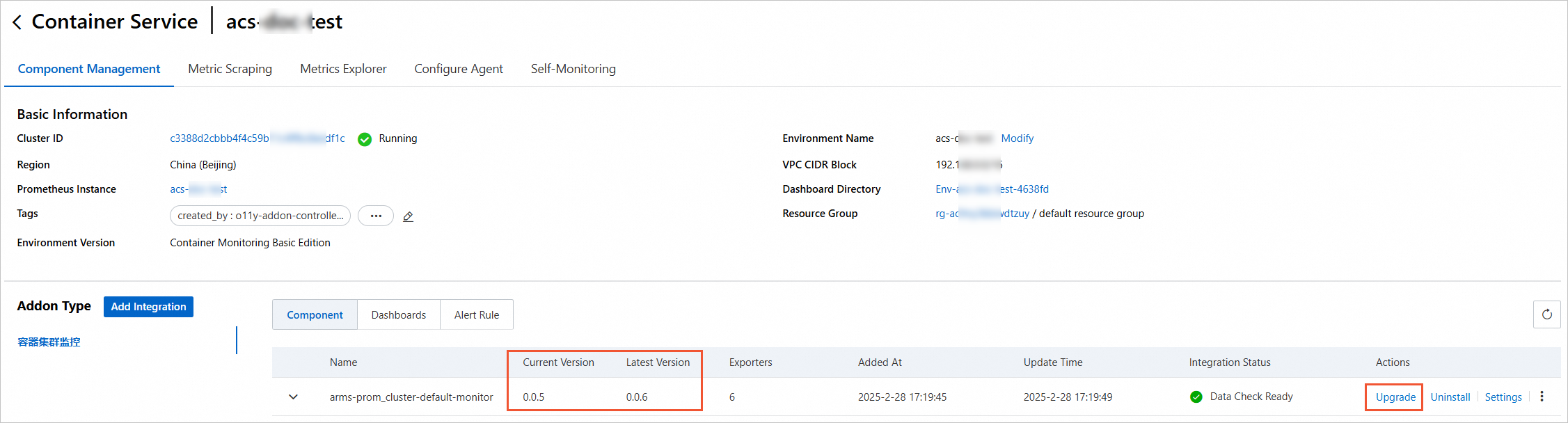
Click the Integrated Environments tab, find the container environment with the same name as your cluster in the container environments, and click the environment name to go to the details page.
Upgrade the agent
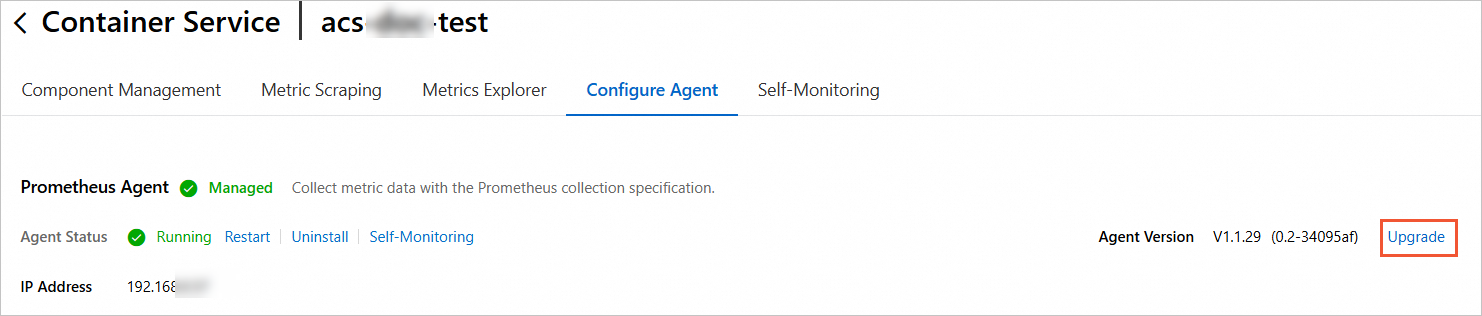
On the Configure Agent tab, check whether you need to upgrade the version of the Prometheus agent. If the agent version is not the latest, click Upgrade to upgrade to the latest version.
NoteIf there is no Upgrade button, it means the agent version is already the latest.
Upgrade the dashboard
On the Component Management tab, check whether you need to upgrade the components. If the current version of a component is not the latest, click Upgrade to upgrade the component to the latest version.