This topic guides you through deploying and running a typical reinforcement learning task on an ACK cluster with VeRL and the Qwen2.5-3B-Instruct model, including environment preparation, image building, task submission, resource monitoring, and best practices.
Container Service for Kubernetes (ACK) is a scalable containerization platform. Reinforcement learning (RL) requires substantial compute resources, distributed training, and complex environment simulations. ACK lets you deploy and scale RL training tasks with Kubernetes scheduling and Alibaba Cloud elastic infrastructure. The following diagram shows the component architecture.
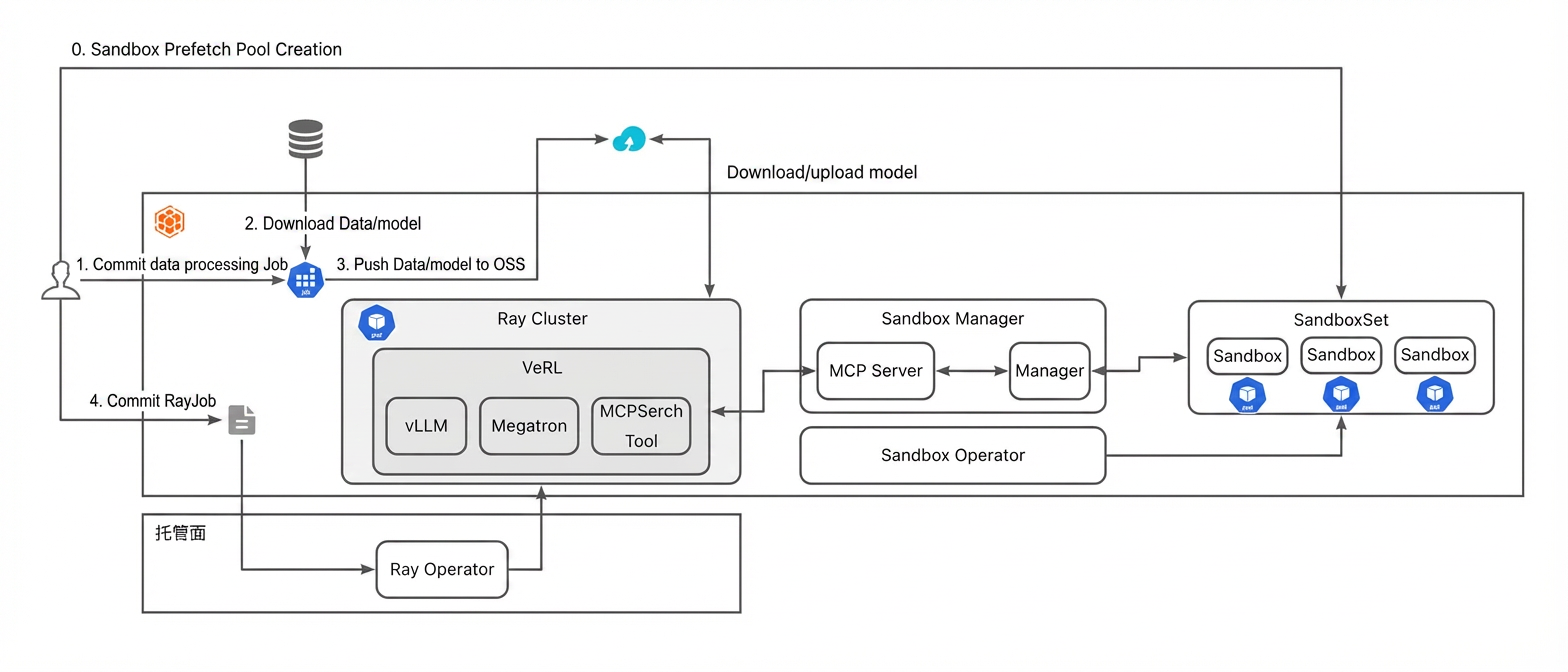
Prerequisites
-
A managed ACK cluster is created.
-
GPU nodes recommended. This example uses one 8-GPU GU8TF Lingjun node.
-
-
The cluster KubeConfig is obtained and kubectl is connected to the cluster.
-
The KubeRay Operator component is installed.
-
(Optional) Object Storage Service (OSS) is activated to persist model checkpoints, logs, and training data.
Step 1: Prepare the reinforcement learning training image
Use the official VeRL image or build your own. Custom images must include all required dependencies, such as VeRL, vLLM, SGLang, and Ray. Example Dockerfile:
from verl/verl:vllm012.latest
WORKDIR /home/verl
COPY . .
RUN apt update && apt install -y openssh-server vim
RUN apt remove python3-blinker -y; pip install -e .
Step 2: Configure the MCP Server and use ACS Sandbox
-
Install the MCP Server and Sandbox components.
Open source version
# Clone the code repository
git clone https://github.com/openkruise/agents
cd agents
# Generate the agents operator deployment YAML
kubectl kustomize config/default >operator-install.yaml
# Modify the configuration in operator-install.yaml as needed
kubectl apply -f operator-install.yaml
# Deploy the test sandbox-manager. For more information, see https://github.com/openkruise/agents/blob/master/config/sandbox-manager/README_en-US.md
kubectl kustomize config/sandbox-manager >sandbox-manager.yaml
# The MCP code is not yet merged, so you must manually change the sandbox-manager image to:
# baicun-business-registry.cn-beijing.cr.aliyuncs.com/baicun-dev/sandbox:sandbox-manager-v12
# Verify that the management pods are running correctly
kubectl get pod -l "app.kubernetes.io/name=sandbox-manager" -A
kubectl get pod -l "app.kubernetes.io/name=sandbox-controller-manager" -A
App marketplace version
-
On the Clusters page, click the name of the target cluster. In the left navigation pane, choose Add-ons.
-
Install the Ingress Controller and Sandbox-related components.
-
Install the
ack-agent-sandbox-controllercomponentInstall with default settings.
-
Install the
ack-sandbox-managercomponent-
Prepare an E2B domain name.
See Use in production environments for domain, DNS, and certificate setup.
-
Configure the component parameters.
Set
classNametoalb(requires an ALB Ingress Controller),domainto your domain name, andadminApiKeyto a custom API key. Keep defaults for other settings. After installation, asandbox-managerroute is created in thesandbox-systemnamespace. -
If you use ALB Ingress Controller, add an HTTPS:443 listener for both the ALB instance and the Ingress.
-
-
-
-
Save the following as
sandbox.yamland runkubectl apply -f sandbox.yaml. The SandboxSet creates a warm pool of 3 sandboxes. During RL training, SandboxManager fetches sandboxes from this pool.--- apiVersion: v1 kind: Service metadata: name: mcp-sandbox spec: selector: app.kubernetes.io/instance: release-name app.kubernetes.io/name: ack-sandbox-manager component: sandbox-manager type: ClusterIP sessionAffinity: None sessionAffinityConfig: clientIP: timeoutSeconds: 10800 ports: - name: vllm protocol: TCP port: 8000 targetPort: 18082 --- apiVersion: agents.kruise.io/v1alpha1 kind: SandboxSet metadata: annotations: # Enable the Envd initialization capability of SandboxManager. e2b.agents.kruise.io/should-init-envd: "true" name: code-interpreter namespace: default spec: # The size of the warm pool. We recommend setting this value slightly larger than the estimated request burst size. replicas: 3 template: spec: initContainers: - name: init image: registry-cn-hangzhou.ack.aliyuncs.com/acs/agent-runtime:v0.0.1 imagePullPolicy: IfNotPresent terminationMessagePolicy: File volumeMounts: - name: envd-volume mountPath: /mnt/envd env: - name: ENVD_DIR value: /mnt/envd restartPolicy: Always containers: - name: sandbox image: acs-image-test-01-registry.cn-hangzhou.cr.aliyuncs.com/e2b/code-interpreter:v1.6 imagePullPolicy: IfNotPresent terminationMessagePolicy: File env: - name: ENVD_DIR value: /mnt/envd volumeMounts: - name: envd-volume mountPath: /mnt/envd lifecycle: postStart: exec: command: - bash - /mnt/envd/envd-run.sh startupProbe: failureThreshold: 20 successThreshold: 1 httpGet: path: /health port: 49999 scheme: HTTP initialDelaySeconds: 1 periodSeconds: 2 timeoutSeconds: 1 # Speed up termination to improve the probability of reuse. terminationGracePeriodSeconds: 1 restartPolicy: Always dnsPolicy: ClusterFirst volumes: - name: envd-volume emptyDir: { }
(Optional) Step 3: Prepare the reinforcement learning dataset
VeRL can download datasets remotely via data.train_files. For large datasets that require preprocessing, use a job to download, process, and upload data to cloud storage.
-
Save the following as
data.yamland runkubectl apply -f data.yaml. This job downloads data from Hugging Face, preprocesses it, and uploads it to OSS.apiVersion: v1 kind: Secret metadata: name: hf-oss-credentials namespace: default type: Opaque stringData: # HuggingFace token HF_TOKEN: "hf_xxxxx" # Alibaba Cloud OSS credentials (the alibabacloud-oss-v2 SDK uses environment variables for authentication) akId: "xxx" akSecret: "xxx" OSS_REGION: "xxx" OSS_BUCKET: "xxx" --- apiVersion: v1 kind: ConfigMap metadata: name: preprocess-script namespace: default data: preprocess.py: | #!/usr/bin/env python3 """ Example dataset preprocessing script """ import os import json from datasets import load_from_disk def preprocess_dataset(input_dir, output_dir): """Preprocess the dataset""" print(f"Loading dataset from {input_dir}") dataset = load_from_disk(input_dir) train_dataset = dataset["train"] test_dataset = dataset["test"] instruction_following = "Let's think step by step and output the final answer after `####`." # add a row to each data item that represents a unique id def make_map_fn(split): def process_fn(example, idx): question_raw = example.pop("question") question = question_raw + " " + instruction_following answer_raw = example.pop("answer") solution = extract_solution(answer_raw) data = { "data_source": data_source, "agent_name": "tool_agent", "prompt": [ { "role": "system", "content": ( "You are a math expert. You are given a question and you need to solve it step by step. " "Reasoning step by step before any tool call. " "You should use the `calc_gsm8k_reward` tool after step by step solving the question, " "before generate final answer at least once and refine your answer if necessary. " "Put your final answer in the format of `#### <answer>`." ), }, { "role": "user", "content": question, }, ], "ability": "math", "reward_model": {"style": "rule", "ground_truth": solution}, "extra_info": { "split": split, "index": idx, "answer": answer_raw, "question": question_raw, "need_tools_kwargs": True, "tools_kwargs": { "calc_gsm8k_reward": { "create_kwargs": {"ground_truth": solution}, # "execute_kwargs": {}, # "calc_reward_kwargs": {}, # "release_kwargs": {}, }, }, "interaction_kwargs": { "query": question, "ground_truth": solution, }, }, } return data return process_fn train_dataset = train_dataset.map(function=make_map_fn("train"), with_indices=True, num_proc=8) test_dataset = test_dataset.map(function=make_map_fn("test"), with_indices=True, num_proc=8) # Save the processed dataset os.makedirs(output_dir, exist_ok=True) train_dataset.to_parquet(os.path.join(output_dir, "train.parquet")) test_dataset.to_parquet(os.path.join(output_dir, "test.parquet")) print(f"Processed dataset saved to {output_dir}") return output_dir if __name__ == "__main__": input_path = os.environ.get("INPUT_PATH", "/data/raw") output_path = os.environ.get("OUTPUT_PATH", "/data/processed") preprocess_dataset(input_path, output_path) --- apiVersion: batch/v1 kind: Job metadata: name: dataset-pipeline namespace: default labels: app: dataset-pipeline spec: backoffLimit: 3 template: metadata: labels: app: dataset-pipeline spec: restartPolicy: OnFailure volumes: # Preprocessing script - name: scripts configMap: name: preprocess-script defaultMode: 0755 containers: - name: dataset-pipeline image: python:3.10-slim command: - /bin/bash - -c - | set -e #========================================== # Step 1: Install dependencies #========================================== echo "=== Installing dependencies ===" pip install --no-cache-dir datasets huggingface_hub pandas numpy alibabacloud-oss-v2 Pillow #========================================== # Step 2: Download the dataset from Hugging Face #========================================== echo "=== Downloading dataset from HuggingFace ===" python3 << 'EOF' import os from datasets import load_dataset from huggingface_hub import login # Log in to Hugging Face (if you need to access a private dataset) hf_token = os.environ.get("HF_TOKEN") if hf_token: login(token=hf_token) # Download the dataset dataset_name = os.environ.get("DATASET_NAME", "hiyouga/geometry3k") dataset_config = os.environ.get("DATASET_CONFIG", None) print(f"Downloading dataset: {dataset_name}") dataset = load_dataset(dataset_name, dataset_config) # Save to a local path output_path = "/data/raw" dataset.save_to_disk(output_path) print(f"Dataset saved to {output_path}") EOF echo "=== Download completed ===" #========================================== # Step 3: Run the preprocessing script #========================================== echo "=== Running preprocessing script ===" python3 /scripts/preprocess.py echo "=== Preprocessing completed ===" #========================================== # Step 4: Upload to OSS (using the alibabacloud-oss-v2 SDK) #========================================== echo "=== Uploading to OSS ===" python3 << 'EOF' import os from pathlib import Path import alibabacloud_oss_v2 as oss # OSS configuration bucket_name = os.environ["OSS_BUCKET"] region = os.environ["OSS_REGION"] oss_prefix = os.environ.get("OSS_PREFIX", "data/geo3k-processed/") local_path = os.environ.get("OUTPUT_PATH", "/data/processed") # Use the environment variable credentials provider (automatically reads OSS_ACCESS_KEY_ID and OSS_ACCESS_KEY_SECRET) credentials_provider = oss.credentials.EnvironmentVariableCredentialsProvider() # Load the default configuration and set the credentials provider cfg = oss.config.load_default() cfg.credentials_provider = credentials_provider cfg.region = region # Create an OSS client client = oss.Client(cfg) def upload_directory(local_dir, oss_prefix): """Recursively upload a directory to OSS""" local_path = Path(local_dir) uploaded_count = 0 failed_count = 0 for file_path in local_path.rglob("*"): if file_path.is_file(): relative_path = file_path.relative_to(local_path) oss_key = f"{oss_prefix}{relative_path}" try: # Read file content with open(file_path, 'rb') as f: data = f.read() # Upload to OSS result = client.put_object(oss.PutObjectRequest( bucket=bucket_name, key=oss_key, body=data, )) print(f"Uploaded: {file_path} -> {oss_key} (status: {result.status_code})") uploaded_count += 1 except Exception as e: print(f"Failed to upload {file_path}: {e}") failed_count += 1 return uploaded_count, failed_count uploaded, failed = upload_directory(local_path, oss_prefix) print(f"=== Upload completed: {uploaded} files uploaded, {failed} files failed ===") if failed > 0: raise Exception(f"{failed} files failed to upload") EOF echo "=== Pipeline completed successfully ===" env: # HuggingFace configuration - name: HF_TOKEN valueFrom: secretKeyRef: name: hf-oss-credentials key: HF_TOKEN - name: DATASET_NAME value: "hiyouga/geometry3k" - name: HF_HOME value: "/tmp/huggingface" # Preprocessing configuration - name: INPUT_PATH value: "/data/raw" - name: OUTPUT_PATH value: "/data/processed" # OSS configuration - name: OSS_ACCESS_KEY_ID valueFrom: secretKeyRef: name: hf-oss-credentials key: akId - name: OSS_ACCESS_KEY_SECRET valueFrom: secretKeyRef: name: hf-oss-credentials key: akSecret - name: OSS_REGION valueFrom: secretKeyRef: name: hf-oss-credentials key: OSS_REGION - name: OSS_BUCKET valueFrom: secretKeyRef: name: hf-oss-credentials key: OSS_BUCKET - name: OSS_PREFIX value: "data/geo3k-processed/" volumeMounts: - name: scripts mountPath: /scripts resources: requests: memory: "2Gi" cpu: "1" limits: memory: "16Gi" cpu: "4"
Step 4: Submit the reinforcement learning task configuration
-
Save the following as
pvpvc.yamland runkubectl apply -f pvpvc.yamlto mount an OSS static volume with a PersistentVolume (PV) and PersistentVolumeClaim (PVC).This example uses AccessKey pair authentication. For RRSA, see Use an ossfs 2.0 static volume.
apiVersion: v1 kind: PersistentVolume metadata: name: ym-dataset labels: alicloud-pvname: ym-dataset spec: capacity: storage: 20Gi accessModes: - ReadWriteMany persistentVolumeReclaimPolicy: Retain csi: driver: ossplugin.csi.alibabacloud.com volumeHandle: ym-dataset # Must be the same as the PV name. nodePublishSecretRef: name: hf-oss-credentials namespace: default volumeAttributes: bucket: "xxxx" # Replace with the actual bucket name. url: "oss-ap-southeast-1-internal.aliyuncs.com" # Replace with the actual OSS endpoint. otherOpts: "-o umask=022 -o max_stat_cache_size=100000 -o allow_other -o dbglevel=debug -o curldbg" path: "/" --- apiVersion: v1 kind: PersistentVolumeClaim metadata: name: ym-dataset spec: accessModes: - ReadWriteMany resources: requests: storage: 20Gi selector: matchLabels: alicloud-pvname: ym-dataset # (Optional) The model can be downloaded in real time by passing the Hugging Face repository path. --- apiVersion: v1 kind: PersistentVolume metadata: name: ym-models labels: alicloud-pvname: ym-models spec: capacity: storage: 20Gi accessModes: - ReadWriteMany persistentVolumeReclaimPolicy: Retain csi: driver: ossplugin.csi.alibabacloud.com volumeHandle: ym-models # Must be the same as the PV name. nodePublishSecretRef: name: hf-oss-credentials namespace: default volumeAttributes: bucket: "xxxx" # Replace with the actual bucket name. url: "oss-ap-southeast-1-internal.aliyuncs.com" # Replace with the actual OSS endpoint. otherOpts: "-o umask=022 -o max_stat_cache_size=100000 -o allow_other -o dbglevel=debug -o curldbg" path: "/" --- apiVersion: v1 kind: PersistentVolumeClaim metadata: name: ym-models spec: accessModes: - ReadWriteMany resources: requests: storage: 20Gi selector: matchLabels: alicloud-pvname: ym-models -
Save the following as
configs.yamland runkubectl apply -f configs.yaml.--- apiVersion: v1 kind: ConfigMap metadata: name: gsm8k-configs namespace: default data: gsm8k_multiturn_grpo.yaml: | hydra: searchpath: - file://verl/trainer/config defaults: - ppo_trainer - _self_ data: max_prompt_length: 1024 max_response_length: 1024 train_batch_size: 256 return_raw_chat: True actor_rollout_ref: hybrid_engine: True rollout: name: vllm multi_turn: enable: True max_assistant_turns: 5 mcp_server.json: | { "mcpServers": { "Tavily Expert": { "url": "xxxxx", # Replace with the Sandbox MCP Ingress address. "api_key": "xxxxx" # If you need to add an API key, you can add an Nginx container in the Ray cluster to act as a proxy. } } } gsm8k_mcp_tool_config.yaml: | tools: - class_name: verl.tools.mcp_search_tool.MCPSearchTool config: rate_limit: 120 timeout: 120 type: mcp mcp: mcp_servers_config_path: /var/configs/mcp_server.json tool_selected_list: - run_code_once - class_name: "verl.tools.gsm8k_tool.Gsm8kTool" config: type: native tool_schema: type: "function" function: name: "calc_gsm8k_reward" description: "A tool for calculating the reward of gsm8k. (1.0 if parsed answer is correct, 0.0 if parsed answer is incorrect or not correctly parsed)" parameters: type: "object" properties: answer: type: "string" description: "The model's answer to the GSM8K math problem, must be a digits" required: ["answer"]
Step 5: Submit the reinforcement learning task
VeRL queries MCP Server tools through MCPSearchTool. AgentLoop connects to MCP Server at the start of each use case and calls tools in a multi-turn conversation.
-
Save the following as
rayjob.yamland runkubectl apply -f rayjob.yaml.--- apiVersion: ray.io/v1 kind: RayJob metadata: name: rayjob-example namespace: default spec: shutdownAfterJobFinishes: false # ttlSecondsAfterFinished: 300 runtimeEnvYAML: | working_dir: /home/verl submissionMode: SidecarMode entrypoint: | python3 -m verl.trainer.main_ppo \ --config-path=/var/configs \ --config-name='gsm8k_multiturn_grpo' \ algorithm.adv_estimator=grpo \ data.train_batch_size=16 \ data.max_prompt_length=1024 \ data.max_response_length=1024 \ data.filter_overlong_prompts=True \ data.truncation='error' \ data.return_raw_chat=True \ actor_rollout_ref.model.path=/var/model/Qwen2.5-3B-Instruct \ actor_rollout_ref.actor.optim.lr=1e-6 \ actor_rollout_ref.model.use_remove_padding=True \ actor_rollout_ref.actor.ppo_mini_batch_size=8 \ actor_rollout_ref.actor.ppo_micro_batch_size_per_gpu=1 \ actor_rollout_ref.actor.use_kl_loss=True \ actor_rollout_ref.actor.kl_loss_coef=0.001 \ actor_rollout_ref.actor.kl_loss_type=low_var_kl \ actor_rollout_ref.actor.entropy_coeff=0 \ actor_rollout_ref.model.enable_gradient_checkpointing=True \ actor_rollout_ref.actor.fsdp_config.param_offload=False \ actor_rollout_ref.actor.fsdp_config.optimizer_offload=False \ actor_rollout_ref.rollout.log_prob_micro_batch_size_per_gpu=1 \ actor_rollout_ref.rollout.tensor_model_parallel_size=2 \ actor_rollout_ref.rollout.name=vllm \ actor_rollout_ref.rollout.mode=async \ actor_rollout_ref.rollout.gpu_memory_utilization=0.5 \ actor_rollout_ref.rollout.n=16 \ actor_rollout_ref.ref.log_prob_micro_batch_size_per_gpu=1 \ actor_rollout_ref.ref.fsdp_config.param_offload=True \ actor_rollout_ref.rollout.trace.backend=mlflow \ actor_rollout_ref.rollout.trace.token2text=True \ algorithm.use_kl_in_reward=False \ trainer.critic_warmup=0 \ trainer.logger='["console","mlflow"]' \ trainer.project_name='gsm8k_tool-agent' \ trainer.experiment_name='qwen2.5-3b_function_rm-gsm8k-vllm-tool-agent-verify-n16' \ trainer.n_gpus_per_node=8 \ trainer.nnodes=1 \ trainer.save_freq=1 \ trainer.test_freq=20 \ trainer.total_training_steps=1 \ data.train_files=/var/model-dataset/processed-gsm8k/train20.parquet \ data.val_files=/var/model-dataset/processed-gsm8k/test100.parquet \ actor_rollout_ref.rollout.multi_turn.tool_config_path="/var/configs/gsm8k_mcp_tool_config.yaml" \ actor_rollout_ref.actor.checkpoint.save_contents='["hf_model", "model"]' \ trainer.total_epochs=1 rayClusterSpec: headGroupSpec: rayStartParams: dashboard-host: 0.0.0.0 serviceType: ClusterIP template: metadata: annotations: labels: spec: affinity: {} tolerations: - key: node-role.alibabacloud.com/lingjun containers: - env: - name: VERL_ROOT value: /home/verl image: registry-ap-southeast-1.ack.aliyuncs.com/dev/verl:vllm012.latest.43dc9a44 imagePullPolicy: IfNotPresent name: ray-head resources: limits: cpu: "100" memory: 500Gi nvidia.com/gpu: "8" securityContext: runAsUser: 0 volumeMounts: - mountPath: /var/configs name: configs - mountPath: /var/model name: model - mountPath: /var/model-dataset name: model-dataset imagePullSecrets: - name: regcred-hangzhou - name: regcred-ap-southeast volumes: - name: configs configMap: name: gsm8k-configs - name: model persistentVolumeClaim: claimName: ym-models - name: model-dataset persistentVolumeClaim: claimName: ym-dataset