Volume snapshots help you back up and restore application data. This topic explains how to create snapshots for disk volumes with VolumeSnapshot resources and how to restore data from snapshots.
Prerequisites
Ensure the following:
An ACK managed cluster running Kubernetes 1.18 or later
The Elastic Compute Service (ECS) Snapshot service is activated (free to activate; you pay only for snapshots you create).
How it works
ACK clusters use disk volumes for persistent StatefulSet storage. Volume snapshots build on ECS disk snapshots and two Kubernetes mechanisms:
VolumeSnapshot: backs up disk volume data
DataSource: a PersistentVolumeClaim (PVC) field that restores snapshot data into a new volume
ACK implements snapshots through three CustomResourceDefinitions (CRDs):
Resource | Description |
VolumeSnapshotContent | A cluster-scoped disk snapshot provisioned by a cluster administrator. Analogous to a PersistentVolume (PV). |
VolumeSnapshot | A namespace-scoped user request for a volume snapshot. Analogous to a PVC. |
VolumeSnapshotClass | Defines the driver and parameters for snapshot creation. Analogous to StorageClass but snapshot-specific—the same volume can have snapshots with different attributes (for example, different retention periods). |
VolumeSnapshot and VolumeSnapshotContent bind one-to-one, like PVC and PV:
If
volumeSnapshotClassNameis set to a valid VolumeSnapshotClass, ACK automatically provisions a VolumeSnapshotContent.If
volumeSnapshotClassNameis omitted or invalid, manually create a VolumeSnapshotContent and bind it to the VolumeSnapshot.
Deleting a VolumeSnapshotContent also deletes the related volume snapshot.
Billing
Volume snapshots are billed as ECS snapshots. See Snapshot billing.
Constraints
Before creating a snapshot, review the following constraints:
Condition | Behavior |
CSI add-on version < V1.22.12-b797ad9-aliyun | Snapshots can only be created from disk volumes with a PVC attached to a Running pod. |
CSI plug-in version >= V1.22.12-b797ad9-aliyun | Snapshots can be created from any used disk volume, regardless of pod state. |
By default, instance access is enabled for dynamic snapshots from Enhanced SSD (ESSD) and ESSD AutoPL volumes at PL0–PL3.
The lifecycle of the VolumeSnapshot and VolumeSnapshotContent resources created by the csdr-disk-snapshot snapshot class is managed by Backup center. To avoid accidental deletion of your resources, do not modify or use this snapshot class.
Create a volume snapshot dynamically
Snapshot a live ACK-managed disk volume. ACK automatically provisions the VolumeSnapshotContent and underlying ECS snapshot.
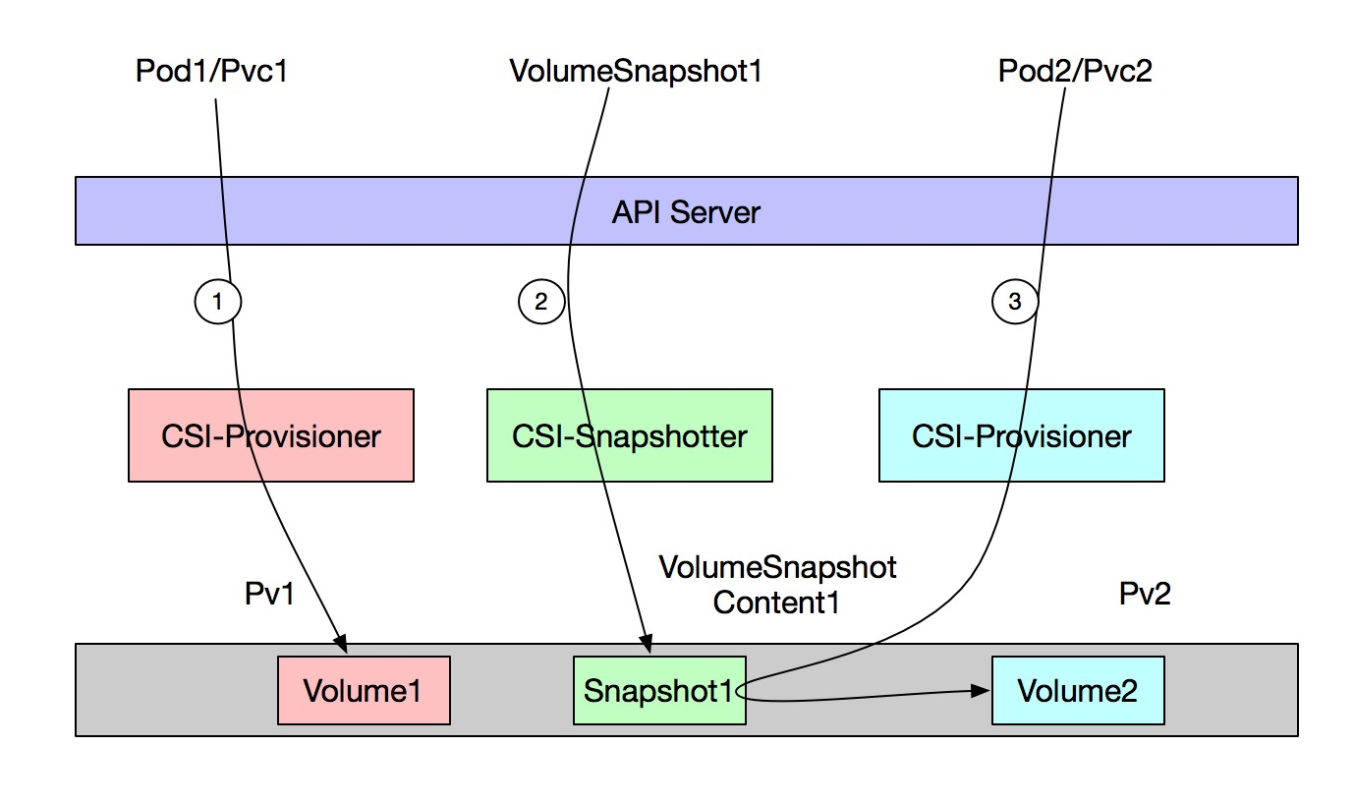
Overview: create a VolumeSnapshotClass (administrator) → deploy an app with a disk volume → create a VolumeSnapshot (ACK auto-creates VolumeSnapshotContent and the ECS snapshot) → restore data to a new volume from the snapshot via a PVC.
Step 1: Create a VolumeSnapshotClass
This is an administrator task. Skip to Step 2 if your cluster already has a VolumeSnapshotClass.
Create
volumesnapshotclass.yamlwith the following content:Parameter
Description
retentionDaysSnapshot retention period, in days.
forceDeleteBehavior on snapshot deletion.
"true"force-deletes all snapshots;"false"deletes only unused snapshots. Default:"false"for csi-provisioner 1.26.5-92f859a-aliyun and later;"true"for earlier versions.deletionPolicyDelete: deletes the VolumeSnapshotContent and ECS snapshot when the VolumeSnapshot is deleted.Retain: keeps both.apiVersion: snapshot.storage.k8s.io/v1 kind: VolumeSnapshotClass metadata: name: default-snapclass driver: diskplugin.csi.alibabacloud.com parameters: retentionDays: "5" forceDelete: "true" deletionPolicy: DeleteApply the manifest:
kubectl apply -f volumesnapshotclass.yaml
Step 2: Deploy an app and write data
Create
nginx.yamlwith the following content:apiVersion: apps/v1 kind: StatefulSet metadata: name: nginx spec: selector: matchLabels: app: nginx serviceName: "nginx" replicas: 1 template: metadata: labels: app: nginx spec: containers: - name: nginx image: anolis-registry.cn-zhangjiakou.cr.aliyuncs.com/openanolis/nginx:1.14.1-8.6 imagePullPolicy: IfNotPresent volumeMounts: - name: disk mountPath: /data volumeClaimTemplates: - metadata: name: disk spec: accessModes: [ "ReadWriteOnce" ] storageClassName: "alicloud-disk-topology-alltype" resources: requests: storage: 20GiDeploy the StatefulSet:
kubectl apply -f nginx.yamlVerify the pod is running:
kubectl get pod -l app=nginxExpected output:
NAME        READY   STATUS    RESTARTS   AGE
nginx-0     1/1     Running   0          82s
Write test data to the volume:
kubectl exec -it nginx-0 -- touch /data/test
kubectl exec -it nginx-0 -- ls /data
Expected output:
lost+found test
Step 3: Create a VolumeSnapshot
Create
snapshot-1.yamlwith the following content:apiVersion: snapshot.storage.k8s.io/v1 kind: VolumeSnapshot metadata: name: new-snapshot-demo namespace: default spec: volumeSnapshotClassName: default-snapclass # The VolumeSnapshotClass used by the VolumeSnapshot. source: persistentVolumeClaimName: disk-nginx-0Apply the manifest:
kubectl apply -f snapshot-1.yaml
Step 4: Verify the snapshot
Check the VolumeSnapshot status:
kubectl get volumesnapshotsExpected output:
NAME                READYTOUSE   SOURCEPVC      SOURCESNAPSHOTCONTENT   RESTORESIZE   SNAPSHOTCLASS       SNAPSHOTCONTENT                                    CREATIONTIME   AGE
new-snapshot-demo   true         disk-nginx-0                           20Gi          default-snapclass   snapcontent-48b04625-679a-490f-9ef3-f04b2b8e6c57   28s            28s
When
READYTOUSEistrue, the snapshot is ready.Check the VolumeSnapshotContent:
kubectl get VolumeSnapshotContentExpected output:
NAME                                               READYTOUSE   RESTORESIZE   DELETIONPOLICY   DRIVER                            VOLUMESNAPSHOTCLASS   VOLUMESNAPSHOT      VOLUMESNAPSHOTNAMESPACE   AGE
snapcontent-48b04625-679a-490f-9ef3-f04b2b8e6c57   true         21474836480   Delete           diskplugin.csi.alibabacloud.com   default-snapclass     new-snapshot-demo   default                   49s
The ECS disk snapshot also appears on the Snapshots page in the ECS console.
Step 5 (optional): Restore data to a new app
Reference the snapshot in a StatefulSet's volumeClaimTemplates to restore data into a new volume.
Create
nginx-restore.yaml. ThedataSourceblock references the snapshot you created:apiVersion: apps/v1 kind: StatefulSet metadata: name: nginx-restore spec: selector: matchLabels: app: nginx serviceName: "nginx" replicas: 1 template: metadata: labels: app: nginx spec: containers: - name: nginx image: anolis-registry.cn-zhangjiakou.cr.aliyuncs.com/openanolis/nginx:1.14.1-8.6 imagePullPolicy: IfNotPresent volumeMounts: - name: disk mountPath: /data volumeClaimTemplates: - metadata: name: disk spec: accessModes: [ "ReadWriteOnce" ] storageClassName: "alicloud-disk-topology-alltype" resources: requests: storage: 20Gi dataSource: name: new-snapshot-demo # Name of the VolumeSnapshot to restore from kind: VolumeSnapshot apiGroup: snapshot.storage.k8s.ioDeploy the StatefulSet:
kubectl apply -f nginx-restore.yamlVerify the data was restored:
kubectl exec -it nginx-restore-0 -- ls /dataExpected output:
lost+found test
Step 6 (optional): Restore data to a standalone PVC
To restore data without deploying a workload, create a PVC directly from the snapshot.
Create
pvc-restore.yamlwith the following content:apiVersion: v1 kind: PersistentVolumeClaim metadata: name: pvc-disk namespace: default spec: accessModes: - ReadWriteOnce resources: requests: storage: 20Gi dataSource: name: new-snapshot-demo # Name of the VolumeSnapshot to restore from kind: VolumeSnapshot apiGroup: snapshot.storage.k8s.io storageClassName: alicloud-disk-topology-alltype volumeMode: FilesystemCreate the PVC:
The
alicloud-disk-topology-alltypeStorageClass usesvolumeBindingMode: WaitForFirstConsumer. The PVC staysPendinguntil mounted to a pod. Do not delete the VolumeSnapshot, VolumeSnapshotContent, or underlying ECS snapshot before the PVC is bound.kubectl apply -f pvc-restore.yaml
Import an existing disk snapshot
Import an existing ECS disk snapshot into an ACK cluster without deploying an app first.
Step 1: Create a VolumeSnapshotContent
This is an administrator task.
Create
snapshot-content.yaml. Replace<YOUR-SNAPSHOTID>with the snapshot ID from the Snapshots page in the ECS console:Parameter
Description
snapshotHandleThe ID of the existing ECS disk snapshot.
volumeSnapshotRef.nameThe name of the VolumeSnapshot to bind. Must match
metadata.namein the VolumeSnapshot manifest.volumeSnapshotRef.namespaceThe namespace of the VolumeSnapshot.
apiVersion: snapshot.storage.k8s.io/v1
kind: VolumeSnapshotContent
metadata:
  name: new-snapshot-content-test
spec:
  deletionPolicy: Retain
  driver: diskplugin.csi.alibabacloud.com
  source:
    snapshotHandle: <YOUR-SNAPSHOTID>   # ID of the existing ECS disk snapshot
  volumeSnapshotRef:
    name: new-snapshot-demo             # Must match the VolumeSnapshot name below
    namespace: default
Apply the manifest:
kubectl apply -f snapshot-content.yaml
Step 2: Create a VolumeSnapshot and bind it
Create
snapshot-2.yamlwith the following content:Parameter
Description
metadata.nameThe VolumeSnapshot name. Must match
volumeSnapshotRef.namein the VolumeSnapshotContent.volumeSnapshotContentNameThe name of the VolumeSnapshotContent to bind.
apiVersion: snapshot.storage.k8s.io/v1
kind: VolumeSnapshot
metadata:
  name: new-snapshot-demo       # Must match volumeSnapshotRef.name in the VolumeSnapshotContent
  namespace: default
spec:
  source:
    volumeSnapshotContentName: new-snapshot-content-test   # Name of the VolumeSnapshotContent to bind
Apply the manifest:
kubectl apply -f snapshot-2.yaml
Step 3 (optional): Restore data
After binding, restore data as described in Step 5 and Step 6 of the dynamic snapshot workflow.