ACK uses the Scheduling Framework to select optimal on-node GPU combinations for TensorFlow distributed training, reducing cross-node sync overhead and improving throughput.
Prerequisites
Ensure you have:
-
ACK Pro cluster with Elastic GPU Service instance type. See Create an ACK managed cluster
-
Arena installed
-
Required component versions:
| Component | Required version | Check command |
|---|---|---|
| Kubernetes | 1.18.8 and later | kubectl version --short |
| NVIDIA driver | 418.87.01 and later | nvidia-smi --query-gpu=driver_version --format=csv,noheader |
| NCCL (NVIDIA Collective Communications Library) | 2.7 and later | python3 -c "import torch; print(torch.cuda.nccl.version())" |
| Operating system | CentOS 7.6, CentOS 7.7, Ubuntu 16.04, Ubuntu 18.04, Alibaba Cloud Linux 2, Alibaba Cloud Linux 3 | cat /etc/os-release |
| GPU | V100 | nvidia-smi --query-gpu=name --format=csv,noheader |
Complete prerequisites in order: create the ACK Pro cluster, install Arena, then install the topology-aware GPU scheduling add-on. Out-of-order installation may fail.
Limitations
Topology-aware GPU scheduling applies only to Message Passing Interface (MPI) jobs using a distributed framework.
Regular GPU scheduling assigns GPUs by availability only, ignoring interconnect topology. Workers may land on GPUs across nodes linked by slower networks, so cross-GPU communication becomes the bottleneck. Topology-aware scheduling groups workers on same-node GPUs with NVLink, reducing gradient sync latency.
Pods are created only when all requested resources are available (gang scheduling). If resources are insufficient, the job stays pending until enough GPUs are free.
Configure nodes
Label nodes to enable topology-aware GPU scheduling:
kubectl label node <your-node-name> ack.node.gpu.schedule=topologyTopology-aware scheduling on a node disables regular GPU scheduling for that node. To restore regular scheduling, run:
kubectl label node <your-node-name> ack.node.gpu.schedule=default --overwriteSubmit a job
Submit an MPI job with --gputopology=true and --gang:
arena submit mpi --gputopology=true --gang <other-parameters>Both flags are required: --gputopology=true enables topology-aware GPU selection; --gang enforces gang scheduling so all workers start together.
Example 1: Train VGG16
This example uses a cluster with two nodes, eight V100 GPUs each.
Topology-aware GPU scheduling
-
Submit the training job:
arena submit mpi \ --name=tensorflow-topo-4-vgg16 \ --gpus=1 \ --workers=4 \ --gang \ --gputopology=true \ --image=registry.cn-hangzhou.aliyuncs.com/kubernetes-image-hub/tensorflow-benchmark:tf2.3.0-py3.7-cuda10.1 \ "mpirun --allow-run-as-root -np 4 -bind-to none -map-by slot -x NCCL_DEBUG=INFO -x NCCL_SOCKET_IFNAME=eth0 -x LD_LIBRARY_PATH -x PATH --mca pml ob1 --mca btl_tcp_if_include eth0 --mca oob_tcp_if_include eth0 --mca orte_keep_fqdn_hostnames t --mca btl ^openib python /tensorflow/benchmarks/scripts/tf_cnn_benchmarks/tf_cnn_benchmarks.py --model=vgg16 --batch_size=64 --variable_update=horovod" -
Check the job status:
arena get tensorflow-topo-4-vgg16 --type mpijobExpected output:
Name:      tensorflow-topo-4-vgg16
Status:    RUNNING
Namespace: default
Priority:  N/A
Trainer:   MPIJOB
Duration:  2m

Instances:
  NAME                                    STATUS   AGE  IS_CHIEF  GPU(Requested)  NODE
  ----                                    ------   ---  --------  --------------  ----
  tensorflow-topo-4-vgg16-launcher-lmhjl  Running  2m   true      0               cn-shanghai.192.168.16.172
  tensorflow-topo-4-vgg16-worker-0        Running  2m   false     1               cn-shanghai.192.168.16.173
  tensorflow-topo-4-vgg16-worker-1        Running  2m   false     1               cn-shanghai.192.168.16.173
  tensorflow-topo-4-vgg16-worker-2        Running  2m   false     1               cn-shanghai.192.168.16.173
  tensorflow-topo-4-vgg16-worker-3        Running  2m   false     1               cn-shanghai.192.168.16.173
All four workers run on one node, sharing NVLink bandwidth.
-
View the training log:
arena logs -f tensorflow-topo-4-vgg16Expected output:
total images/sec: 991.92
Regular GPU scheduling
-
Submit the job without topology flags:
arena submit mpi \ --name=tensorflow-4-vgg16 \ --gpus=1 \ --workers=4 \ --image=registry.cn-hangzhou.aliyuncs.com/kubernetes-image-hub/tensorflow-benchmark:tf2.3.0-py3.7-cuda10.1 \ "mpirun --allow-run-as-root -np 4 -bind-to none -map-by slot -x NCCL_DEBUG=INFO -x NCCL_SOCKET_IFNAME=eth0 -x LD_LIBRARY_PATH -x PATH --mca pml ob1 --mca btl_tcp_if_include eth0 --mca oob_tcp_if_include eth0 --mca orte_keep_fqdn_hostnames t --mca btl ^openib python /tensorflow/benchmarks/scripts/tf_cnn_benchmarks/tf_cnn_benchmarks.py --model=vgg16 --batch_size=64 --variable_update=horovod" -
Check the job status:
arena get tensorflow-4-vgg16 --type mpijobExpected output:
Name:      tensorflow-4-vgg16
Status:    RUNNING
Namespace: default
Priority:  N/A
Trainer:   MPIJOB
Duration:  9s

Instances:
  NAME                               STATUS   AGE  IS_CHIEF  GPU(Requested)  NODE
  ----                               ------   ---  --------  --------------  ----
  tensorflow-4-vgg16-launcher-xc28k  Running  9s   true      0               cn-shanghai.192.168.16.172
  tensorflow-4-vgg16-worker-0        Running  9s   false     1               cn-shanghai.192.168.16.172
  tensorflow-4-vgg16-worker-1        Running  9s   false     1               cn-shanghai.192.168.16.173
  tensorflow-4-vgg16-worker-2        Running  9s   false     1               cn-shanghai.192.168.16.172
  tensorflow-4-vgg16-worker-3        Running  9s   false     1               cn-shanghai.192.168.16.173
Workers span two nodes, so each gradient sync step requires cross-node communication.
-
View the training log:
arena logs -f tensorflow-4-vgg16Expected output:
total images/sec: 200.47
Example 2: Train ResNet50
Topology-aware GPU scheduling
-
Submit the training job:
arena submit mpi \ --name=tensorflow-topo-4-resnet50 \ --gpus=1 \ --workers=4 \ --gang \ --gputopology=true \ --image=registry.cn-hangzhou.aliyuncs.com/kubernetes-image-hub/tensorflow-benchmark:tf2.3.0-py3.7-cuda10.1 \ "mpirun --allow-run-as-root -np 4 -bind-to none -map-by slot -x NCCL_DEBUG=INFO -x NCCL_SOCKET_IFNAME=eth0 -x LD_LIBRARY_PATH -x PATH --mca pml ob1 --mca btl_tcp_if_include eth0 --mca oob_tcp_if_include eth0 --mca orte_keep_fqdn_hostnames t --mca btl ^openib python /tensorflow/benchmarks/scripts/tf_cnn_benchmarks/tf_cnn_benchmarks.py --model=resnet50 --batch_size=64 --variable_update=horovod" -
Check the job status:
arena get tensorflow-topo-4-resnet50 --type mpijobExpected output:
Name: tensorflow-topo-4-resnet50 Status: RUNNING Namespace: default Priority: N/A Trainer: MPIJOB Duration: 8s Instances: NAME STATUS AGE IS_CHIEF GPU(Requested) NODE ---- ------ --- -------- -------------- ---- tensorflow-topo-4-resnet50-launcher-7ln8j Running 8s true 0 cn-shanghai.192.168.16.172 tensorflow-topo-4-resnet50-worker-0 Running 8s false 1 cn-shanghai.192.168.16.173 tensorflow-topo-4-resnet50-worker-1 Running 8s false 1 cn-shanghai.192.168.16.173 tensorflow-topo-4-resnet50-worker-2 Running 8s false 1 cn-shanghai.192.168.16.173 tensorflow-topo-4-resnet50-worker-3 Running 8s false 1 cn-shanghai.192.168.16.173 -
View the training log:
arena logs -f tensorflow-topo-4-resnet50Expected output:
total images/sec: 1471.55
Regular GPU scheduling
-
Submit the job without topology flags:
arena submit mpi \ --name=tensorflow-4-resnet50 \ --gpus=1 \ --workers=4 \ --image=registry.cn-hangzhou.aliyuncs.com/kubernetes-image-hub/tensorflow-benchmark:tf2.3.0-py3.7-cuda10.1 \ "mpirun --allow-run-as-root -np 4 -bind-to none -map-by slot -x NCCL_DEBUG=INFO -x NCCL_SOCKET_IFNAME=eth0 -x LD_LIBRARY_PATH -x PATH --mca pml ob1 --mca btl_tcp_if_include eth0 --mca oob_tcp_if_include eth0 --mca orte_keep_fqdn_hostnames t --mca btl ^openib python /tensorflow/benchmarks/scripts/tf_cnn_benchmarks/tf_cnn_benchmarks.py --model=resnet50 --batch_size=64 --variable_update=horovod" -
Check the job status:
arena get tensorflow-4-resnet50 --type mpijobExpected output:
Name: tensorflow-4-resnet50 Status: RUNNING Namespace: default Priority: N/A Trainer: MPIJOB Duration: 9s Instances: NAME STATUS AGE IS_CHIEF GPU(Requested) NODE ---- ------ --- -------- -------------- ---- tensorflow-4-resnet50-launcher-q24hv Running 9s true 0 cn-shanghai.192.168.16.172 tensorflow-4-resnet50-worker-0 Running 9s false 1 cn-shanghai.192.168.16.172 tensorflow-4-resnet50-worker-1 Running 9s false 1 cn-shanghai.192.168.16.173 tensorflow-4-resnet50-worker-2 Running 9s false 1 cn-shanghai.192.168.16.172 tensorflow-4-resnet50-worker-3 Running 9s false 1 cn-shanghai.192.168.16.173 -
View the training log:
arena logs -f tensorflow-4-resnet50Expected output:
total images/sec: 745.38
Performance comparison
Throughput for VGG16 and ResNet50 training under topology-aware and regular GPU scheduling:
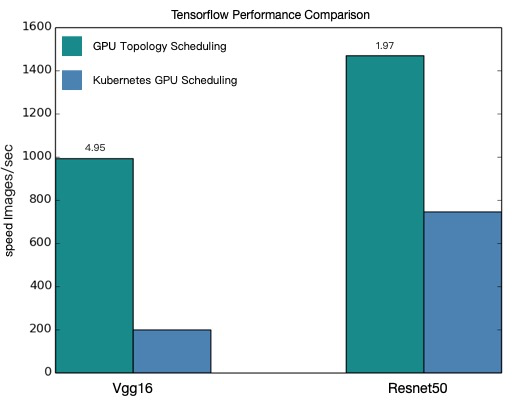
| Model | Topology-aware (images/sec) | Regular (images/sec) | Improvement |
|---|---|---|---|
| VGG16 | 991.92 | 200.47 | ~4.9x |
| ResNet50 | 1471.55 | 745.38 | ~2.0x |
Performance values are theoretical. Actual results vary by model, cluster configuration, and network conditions. Run the examples in your cluster to measure gains.