Topology-aware GPU scheduling selects the optimal combination of GPUs from GPU-accelerated nodes to minimize communication overhead between workers. ACK implements this feature using the Kubernetes Scheduling Framework, making it effective for distributed training jobs that rely on high-bandwidth GPU interconnects.
This topic shows how to enable topology-aware GPU scheduling on ACK and run PyTorch distributed training jobs using Arena.
Prerequisites
Before you begin, make sure you have:
-
An ACK Pro cluster. See Create an ACK Pro cluster
-
Arena installed. See the Arena GitHub repository
-
ack-ai-installer installed. See Install ack-ai-installer
-
Nodes that meet the following version requirements:
Component Required version Kubernetes V1.18.8 and later Helm 3.0 and later Nvidia 418.87.01 and later NVIDIA Collective Communications Library (NCCL) 2.7+ Docker 19.03.5 OS CentOS 7.6, CentOS 7.7, Ubuntu 16.04 and 18.04, and Alibaba Cloud Linux 2 GPU V100
Limitations
-
Topology-aware GPU scheduling applies only to Message Passing Interface (MPI) jobs trained with a distributed framework.
-
All pods in a job must be schedulable simultaneously before the job starts. If resources are insufficient, the job stays pending until all requested resources become available.
Step 1: Label nodes for topology-aware scheduling
Add the ack.node.gpu.schedule=topology label to each node where you want topology-aware scheduling enabled:
kubectl label node <your-node-name> ack.node.gpu.schedule=topologyNodes labeled for topology-aware scheduling cannot use regular GPU scheduling at the same time. To revert a node to regular GPU scheduling, run:
kubectl label node <your-node-name> ack.node.gpu.schedule=default --overwriteStep 2: Submit a distributed training job
Submit an MPI job with both --gputopology=true and --gang flags. The --gang flag enables gang scheduling, which ensures all workers are allocated simultaneously — preventing deadlocks when nodes have limited GPUs.
arena submit mpi --gputopology=true --gang <other-flags>(Optional) Benchmark examples and performance comparison
The following examples compare throughput between topology-aware and regular GPU scheduling using VGG16 and ResNet50 models. The test environment uses two servers, each with eight V100 GPUs. Run these benchmarks in your own environment to evaluate the improvement for your workloads.
Train VGG16 with topology-aware scheduling
-
Submit the job:
arena submit mpi \ --name=pytorch-topo-4-vgg16 \ --gpus=1 \ --workers=4 \ --gang \ --gputopology=true \ --image=registry.cn-hangzhou.aliyuncs.com/kubernetes-image-hub/pytorch-benchmark:torch1.6.0-py3.7-cuda10.1 \ "mpirun --allow-run-as-root -np "4" -bind-to none -map-by slot -x NCCL_DEBUG=INFO -x NCCL_SOCKET_IFNAME=eth0 -x LD_LIBRARY_PATH -x PATH --mca pml ob1 --mca btl_tcp_if_include eth0 --mca oob_tcp_if_include eth0 --mca orte_keep_fqdn_hostnames t --mca btl ^openib python /examples/pytorch_synthetic_benchmark.py --model=vgg16 --batch-size=64" -
Check job status:
arena get pytorch-topo-4-vgg16 --type mpijobExpected output:
Name: pytorch-topo-4-vgg16 Status: RUNNING Namespace: default Priority: N/A Trainer: MPIJOB Duration: 11s Instances: NAME STATUS AGE IS_CHIEF GPU(Requested) NODE ---- ------ --- -------- -------------- ---- pytorch-topo-4-vgg16-launcher-mnjzr Running 11s true 0 cn-shanghai.192.168.16.173 pytorch-topo-4-vgg16-worker-0 Running 11s false 1 cn-shanghai.192.168.16.173 pytorch-topo-4-vgg16-worker-1 Running 11s false 1 cn-shanghai.192.168.16.173 pytorch-topo-4-vgg16-worker-2 Running 11s false 1 cn-shanghai.192.168.16.173 pytorch-topo-4-vgg16-worker-3 Running 11s false 1 cn-shanghai.192.168.16.173 -
View job logs:
arena logs -f pytorch-topo-4-vgg16Expected output:
Model: vgg16
Batch size: 64
Number of GPUs: 4
Running warmup...
Running benchmark...
Iter #0: 205.5 img/sec per GPU
Iter #1: 205.2 img/sec per GPU
Iter #2: 205.1 img/sec per GPU
Iter #3: 205.5 img/sec per GPU
Iter #4: 205.1 img/sec per GPU
Iter #5: 205.1 img/sec per GPU
Iter #6: 205.3 img/sec per GPU
Iter #7: 204.3 img/sec per GPU
Iter #8: 205.0 img/sec per GPU
Iter #9: 204.9 img/sec per GPU
Img/sec per GPU: 205.1 +-0.6
Total img/sec on 4 GPU(s): 820.5 +-2.5
Train VGG16 with regular GPU scheduling
-
Submit the job:
arena submit mpi \ --name=pytorch-4-vgg16 \ --gpus=1 \ --workers=4 \ --image=registry.cn-hangzhou.aliyuncs.com/kubernetes-image-hub/pytorch-benchmark:torch1.6.0-py3.7-cuda10.1 \ "mpirun --allow-run-as-root -np "4" -bind-to none -map-by slot -x NCCL_DEBUG=INFO -x NCCL_SOCKET_IFNAME=eth0 -x LD_LIBRARY_PATH -x PATH --mca pml ob1 --mca btl_tcp_if_include eth0 --mca oob_tcp_if_include eth0 --mca orte_keep_fqdn_hostnames t --mca btl ^openib python /examples/pytorch_synthetic_benchmark.py --model=vgg16 --batch-size=64" -
Check job status:
arena get pytorch-4-vgg16 --type mpijobExpected output:
Name: pytorch-4-vgg16 Status: RUNNING Namespace: default Priority: N/A Trainer: MPIJOB Duration: 10s Instances: NAME STATUS AGE IS_CHIEF GPU(Requested) NODE ---- ------ --- -------- -------------- ---- pytorch-4-vgg16-launcher-qhnxl Running 10s true 0 cn-shanghai.192.168.16.173 pytorch-4-vgg16-worker-0 Running 10s false 1 cn-shanghai.192.168.16.173 pytorch-4-vgg16-worker-1 Running 10s false 1 cn-shanghai.192.168.16.173 pytorch-4-vgg16-worker-2 Running 10s false 1 cn-shanghai.192.168.16.173 pytorch-4-vgg16-worker-3 Running 10s false 1 cn-shanghai.192.168.16.173 -
View job logs:
arena logs -f pytorch-4-vgg16Expected output:
Model: vgg16
Batch size: 64
Number of GPUs: 4
Running warmup...
Running benchmark...
Iter #0: 113.1 img/sec per GPU
Iter #1: 109.5 img/sec per GPU
Iter #2: 106.5 img/sec per GPU
Iter #3: 108.5 img/sec per GPU
Iter #4: 108.1 img/sec per GPU
Iter #5: 111.2 img/sec per GPU
Iter #6: 110.7 img/sec per GPU
Iter #7: 109.8 img/sec per GPU
Iter #8: 102.8 img/sec per GPU
Iter #9: 107.9 img/sec per GPU
Img/sec per GPU: 108.8 +-5.3
Total img/sec on 4 GPU(s): 435.2 +-21.1
Train ResNet50 with topology-aware scheduling
-
Submit the job:
arena submit mpi \ --name=pytorch-topo-4-resnet50 \ --gpus=1 \ --workers=4 \ --gang \ --gputopology=true \ --image=registry.cn-hangzhou.aliyuncs.com/kubernetes-image-hub/pytorch-benchmark:torch1.6.0-py3.7-cuda10.1 \ "mpirun --allow-run-as-root -np "4" -bind-to none -map-by slot -x NCCL_DEBUG=INFO -x NCCL_SOCKET_IFNAME=eth0 -x LD_LIBRARY_PATH -x PATH --mca pml ob1 --mca btl_tcp_if_include eth0 --mca oob_tcp_if_include eth0 --mca orte_keep_fqdn_hostnames t --mca btl ^openib python /examples/pytorch_synthetic_benchmark.py --model=resnet50 --batch-size=64" -
Check job status:
arena get pytorch-topo-4-resnet50 --type mpijobExpected output:
Name: pytorch-topo-4-resnet50 Status: RUNNING Namespace: default Priority: N/A Trainer: MPIJOB Duration: 8s Instances: NAME STATUS AGE IS_CHIEF GPU(Requested) NODE ---- ------ --- -------- -------------- ---- pytorch-topo-4-resnet50-launcher-x7r2n Running 8s true 0 cn-shanghai.192.168.16.173 pytorch-topo-4-resnet50-worker-0 Running 8s false 1 cn-shanghai.192.168.16.173 pytorch-topo-4-resnet50-worker-1 Running 8s false 1 cn-shanghai.192.168.16.173 pytorch-topo-4-resnet50-worker-2 Running 8s false 1 cn-shanghai.192.168.16.173 pytorch-topo-4-resnet50-worker-3 Running 8s false 1 cn-shanghai.192.168.16.173 -
View job logs:
arena logs -f pytorch-topo-4-resnet50Expected output:
Model: resnet50
Batch size: 64
Number of GPUs: 4
Running warmup...
Running benchmark...
Iter #0: 331.0 img/sec per GPU
Iter #1: 330.6 img/sec per GPU
Iter #2: 330.9 img/sec per GPU
Iter #3: 330.4 img/sec per GPU
Iter #4: 330.7 img/sec per GPU
Iter #5: 330.8 img/sec per GPU
Iter #6: 329.9 img/sec per GPU
Iter #7: 330.5 img/sec per GPU
Iter #8: 330.4 img/sec per GPU
Iter #9: 329.7 img/sec per GPU
Img/sec per GPU: 330.5 +-0.8
Total img/sec on 4 GPU(s): 1321.9 +-3.2
Train ResNet50 with regular GPU scheduling
-
Submit the job:
arena submit mpi \ --name=pytorch-4-resnet50 \ --gpus=1 \ --workers=4 \ --image=registry.cn-hangzhou.aliyuncs.com/kubernetes-image-hub/pytorch-benchmark:torch1.6.0-py3.7-cuda10.1 \ "mpirun --allow-run-as-root -np "4" -bind-to none -map-by slot -x NCCL_DEBUG=INFO -x NCCL_SOCKET_IFNAME=eth0 -x LD_LIBRARY_PATH -x PATH --mca pml ob1 --mca btl_tcp_if_include eth0 --mca oob_tcp_if_include eth0 --mca orte_keep_fqdn_hostnames t --mca btl ^openib python /examples/pytorch_synthetic_benchmark.py --model=resnet50 --batch-size=64" -
Check job status:
arena get pytorch-4-resnet50 --type mpijobExpected output:
Name: pytorch-4-resnet50 Status: RUNNING Namespace: default Priority: N/A Trainer: MPIJOB Duration: 10s Instances: NAME STATUS AGE IS_CHIEF GPU(Requested) NODE ---- ------ --- -------- -------------- ---- pytorch-4-resnet50-launcher-qw5k6 Running 10s true 0 cn-shanghai.192.168.16.173 pytorch-4-resnet50-worker-0 Running 10s false 1 cn-shanghai.192.168.16.173 pytorch-4-resnet50-worker-1 Running 10s false 1 cn-shanghai.192.168.16.173 pytorch-4-resnet50-worker-2 Running 10s false 1 cn-shanghai.192.168.16.173 pytorch-4-resnet50-worker-3 Running 10s false 1 cn-shanghai.192.168.16.173 -
View job logs:
arena logs -f pytorch-4-resnet50Expected output:
Model: resnet50
Batch size: 64
Number of GPUs: 4
Running warmup...
Running benchmark...
Iter #0: 313.1 img/sec per GPU
Iter #1: 312.8 img/sec per GPU
Iter #2: 313.0 img/sec per GPU
Iter #3: 312.2 img/sec per GPU
Iter #4: 313.7 img/sec per GPU
Iter #5: 313.2 img/sec per GPU
Iter #6: 313.6 img/sec per GPU
Iter #7: 313.0 img/sec per GPU
Iter #8: 311.3 img/sec per GPU
Iter #9: 313.6 img/sec per GPU
Img/sec per GPU: 313.0 +-1.3
Total img/sec on 4 GPU(s): 1251.8 +-5.3
Performance comparison
The following figure compares throughput between topology-aware and regular GPU scheduling across both models.
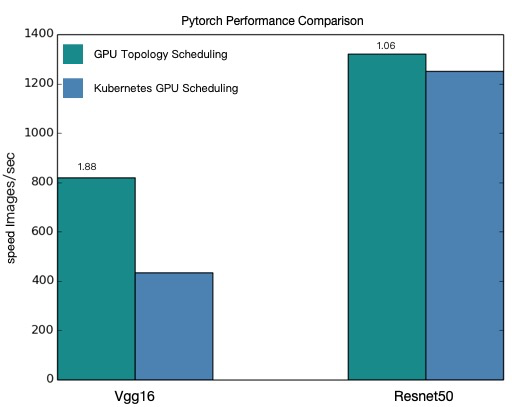
Topology-aware GPU scheduling delivers higher throughput for both VGG16 and ResNet50 distributed training jobs.
The performance values in this topic are theoretical values. The performance of topology-aware GPU scheduling varies based on your model architecture and cluster configuration. The actual performance statistics shall prevail.