Container Network File System (CNFS) auto-scaling lets you define a policy once — the storage-operator monitors your NAS volume usage and automatically expands capacity when usage crosses a threshold. No code changes, no manual intervention, and no need to monitor storage levels yourself.
How it works
The auto-scaling workflow is handled entirely by the storage-operator component.

-
Define a policy. Create a
StorageAutoScalerPolicyresource that specifies the target PersistentVolumeClaim (PVC), trigger conditions, and scale-out actions.The StorageClass used by the PVC must have
allowVolumeExpansion: true. -
Monitor continuously. The storage-operator monitors real-time storage usage of the target PVC.
-
Trigger scale-out. When conditions are met, the storage-operator sends a scale-out request to the PVC.
-
Execute scale-out. The Container Storage Interface (CSI) driver processes the request, and Alibaba Cloud NAS performs the actual file system expansion.
-
Synchronize status. The PVC status updates automatically to reflect the new capacity.
Prerequisites
Before you begin, ensure that you have:
-
csi-plugin and csi-provisioner at version v1.20.5-ff6490f-aliyun or later. To upgrade, see Upgrade CSI components.
-
storage-operator at version v1.18.8.56-2aa33ba-aliyun or later. To upgrade, see Manage the storage-operator component.
-
cnfs-controller installed. This is a managed component installed by default — verify it has not been uninstalled.
-
A CNFS with
Availablestatus. To create one, see Manage NAS file systems with CNFS.
For storage-operator versions earlier than v1.33.1: Run the following command to enable the auto-scaling feature in the ConfigMap before proceeding:
kubectl patch configmap/storage-operator \
  -n kube-system \
  --type merge \
  -p '{"data":{"storage-auto-expander":"{\"imageRep\":\"acs/storage-auto-expander\",\"imageTag\":\"\",\"install\":\"true\",\"template\":\"/acs/templates/storage-auto-expander/install.yaml\",\"type\":\"deployment\"}"}}'
To verify CNFS status:
# List all CNFS objects
kubectl get cnfs

# Check the status of a specific CNFS
kubectl get cnfs <CNFS_NAME> -o yaml | grep Available
Expected output:
NAME                                      AGE
default-cnfs-nas-837d6ea-20210819155623   14d
status: AvailableStep 1: Define the scale-out policy
Create a StorageAutoScalerPolicy resource to specify when and how the storage-operator expands your NAS volume.
The following example triggers a scale-out when capacity usage of a PVC labeled app: nginx (in the default or nginx namespace) exceeds 80%. Each expansion doubles the current capacity, up to a maximum of 200 GiB.
cat << EOF | kubectl apply -f -
apiVersion: storage.alibabacloud.com/v1alpha1
kind: StorageAutoScalerPolicy
metadata:
  name: hybrid-expand-policy
spec:
  # Match PVCs by label selector.
  pvcSelector:
    matchLabels:
      app: nginx  # Must match the labels on your PVC and Deployment.
  # Namespaces where this policy applies.
  namespaces:
    - default
    - nginx
  # Conditions that trigger a scale-out.
  conditions:
    - name: condition1
      key: volume-capacity-used-percentage  # Metric: capacity usage percentage.
      operator: Gt                          # Greater than.
      values:
        - "80"                              # Threshold: 80%.
  # Actions to perform when conditions are met.
  actions:
    - name: action1
      type: volume-expand
      params:
        scale: 100%    # Increase capacity by 100% of the current size.
        limits: 200Gi  # Cap total capacity at 200 GiB.
EOF
Policy parameters:
| Parameter | Description |
|---|---|
pvcSelector |
Label selector that matches the PVCs this policy applies to. |
namespaces |
Namespaces where the policy is active. Multiple namespaces use OR logic. Defaults to default if not set. |
conditions |
One or more trigger conditions. Multiple conditions use AND logic — all must be met before the policy fires. |
actions |
Actions to perform when conditions are met. The system runs the first matching action. |
conditions parameters:
| Parameter | Values | Description |
|---|---|---|
key |
volume-capacity-used-percentage |
Triggers when used capacity exceeds the threshold. |
volume-capacity-free-size |
Triggers when free space falls below the threshold. | |
volume-capacity-pvc-size |
Triggers when the original requested capacity (pvc.spec.resources.requests.storage) falls below the threshold. |
|
operator |
Gt, Lt, Eq, Ne |
Comparison operator. Not case-sensitive. |
values |
A numeric string | The threshold value for the condition. |
actions parameters:
| Parameter | Description |
|---|---|
type |
Action type. Only volume-expand is currently supported. |
scale |
Expansion step size. Use a percentage (e.g., 50%) or a static value (e.g., 100Gi). |
limits |
Maximum total capacity after expansion. Set this to control costs and prevent runaway growth. |
Step 2: Create a StorageClass
Create a StorageClass that references your existing CNFS NAS file system. Set allowVolumeExpansion: true — this establishes the capacity baseline that the auto-scaling policy uses to calculate usage.
cat << EOF | kubectl apply -f -
apiVersion: storage.k8s.io/v1
kind: StorageClass
metadata:
  name: alibabacloud-cnfs-nas  # Referenced in the PVC in the next step.
mountOptions:
- nolock,tcp,noresvport
- vers=3
parameters:
  volumeAs: subpath
  # Format: <nas-server-address>:/<path>
  server: "0cd8b4a576-g****.cn-hangzhou.nas.aliyuncs.com:/k8s"
  archiveOnDelete: "true"
provisioner: nasplugin.csi.alibabacloud.com
reclaimPolicy: Retain
allowVolumeExpansion: true  # Required for auto-scaling.
EOF
For a full list of StorageClass parameters, see Manage NAS file systems with CNFS.
Step 3: Deploy the application and PVC
Create a PVC and a Deployment with labels that match the pvcSelector.matchLabels in your policy (app: nginx). The storage-operator uses these labels to associate the policy with the correct PVC.
cat << EOF | kubectl apply -f -
kind: PersistentVolumeClaim
apiVersion: v1
metadata:
  name: cnfs-nas-pvc
  labels:
    app: nginx  # Must match pvcSelector.matchLabels in the policy.
spec:
  accessModes:
    - ReadWriteMany
  storageClassName: alibabacloud-cnfs-nas  # References the StorageClass created earlier.
  resources:
    requests:
      storage: 20Gi
---
apiVersion: apps/v1
kind: Deployment
metadata:
  name: cnfs-nas-deployment
  labels:
    app: nginx
spec:
  selector:
    matchLabels:
      app: nginx  # Must match pvcSelector.matchLabels in the policy.
  template:
    metadata:
      labels:
        app: nginx
    spec:
      containers:
      - name: nginx
        image: anolis-registry.cn-zhangjiakou.cr.aliyuncs.com/openanolis/nginx:1.14.1-8.6
        volumeMounts:
        - mountPath: "/data"
          name: cnfs-nas-pvc
      volumes:
      - name: cnfs-nas-pvc
        persistentVolumeClaim:
          claimName: cnfs-nas-pvc
EOF
Step 4: Verify auto-scaling
Trigger a scale-out by writing test data, then confirm the expansion through events and the monitoring dashboard.
-
Confirm the Pod is running.
kubectl get pods -l app=nginxExpected output:
NAME READY STATUS RESTARTS AGE cnfs-nas-deployment-56dbcc7fb7-wh79z 1/1 Running 0 20m -
Record the initial PVC capacity before writing any data.
kubectl get pvc cnfs-nas-pvcExpected output (initial state, 20 GiB):
NAME STATUS VOLUME CAPACITY ACCESS MODES STORAGECLASS AGE cnfs-nas-pvc Bound ... 20Gi RWX alibabacloud-cnfs-nas 2m -
Write 20 GiB of test data to push usage above the 80% threshold.
The write operation may take several minutes depending on network throughput and storage performance.
kubectl exec -it <POD_NAME> -- dd if=/dev/zero of=/data/testfile bs=1G count=20 -
Check the events generated by the scale-out.
kubectl get events | grep cnfs-nas-pvcThe
StartExpandandVolumeResizeSuccessfulevents confirm the expansion completed. In this example, the PVC scaled from 20 GiB to 40 GiB (100% increase).12s Warning StartExpand persistentvolumeclaim/cnfs-nas-pvc Start to expand of pvc cnfs-nas-pvc from 20Gi to 40Gi, usedCapacityPercentage:99%, freeSize:204MB. 12s Normal ExternalExpanding persistentvolumeclaim/cnfs-nas-pvc waiting for an external controller to expand this PVC 12s Normal Resizing persistentvolumeclaim/cnfs-nas-pvc External resizer is resizing volume nas-462db2b2-717d-44fe-b0b6-fb4db03a**** 12s Normal VolumeResizeSuccessful persistentvolumeclaim/cnfs-nas-pvc Resize volume succeededConfirm the updated capacity:
kubectl get pvc cnfs-nas-pvc -
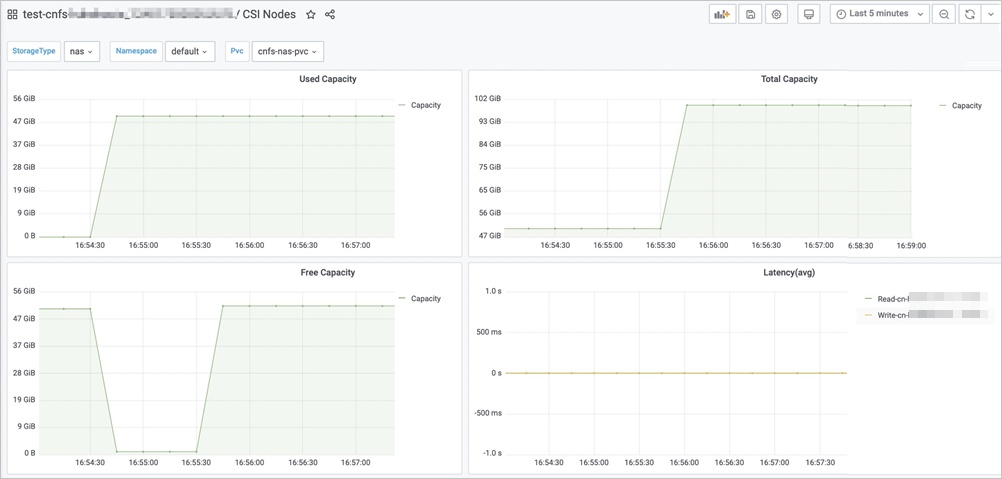
(Optional) View the usage trend on the CSI NAS monitoring dashboard. In this example, the scale-out was triggered at 10:23:30, and the capacity after expansion is 100 GiB.
Requires Alibaba Cloud Prometheus Monitoring.
-
On the Clusters page, click your cluster name. In the left navigation pane, choose Operations > Prometheus Monitoring.
-
Click the Storage Monitoring tab, then click CSI NAS.
-
Set Namespace to default and PVC Name to cnfs-nas-pvc to view capacity in the Total Capacity area.
-
Best practices
Apply these recommendations when using NAS volume auto-scaling in production.
| Dimension | Guidance |
|---|---|
| Cost control | Set limits in your scale-out policy to cap total capacity. For very large volumes, use a static scale value (e.g., 200Gi) instead of a percentage for more predictable cost control. |
| Threshold tuning | Set the trigger threshold between 75% and 80%. A threshold at or above 95% leaves insufficient time for the expansion to complete before the volume runs out of space. |
| Monitoring | Enable container storage monitoring and configure Alibaba Cloud Prometheus Monitoring for alerting on storage metrics. |
| Granular policies | Create separate StorageAutoScalerPolicy objects per application or environment to manage capacity independently. |
| Performance | Auto-scaling addresses capacity constraints, not performance bottlenecks. If your application is slow due to IOPS limits or many small file operations, choose a higher-performance NAS tier. |