When API traffic spikes, your application needs to scale quickly. This guide shows how to drive a Horizontal Pod Autoscaler (HPA) with live queries per second (QPS) data from Application Real-Time Monitoring Service (ARMS). Pods then scale on real request load, not just CPU or memory.
How it works
After you connect the Java applications in your Container Service for Kubernetes (ACK) cluster to ARMS Application Monitoring, the access details of each API are available in ARMS.
ARMS Application Monitoring instruments your Java application and exposes per-API request counts as Prometheus metrics. The ack-alibaba-cloud-metrics-adapter add-on converts the Managed Service for Prometheus metrics into external metrics that the HPA can use, and presents them through the External Metrics API. The HPA scales your Deployment up or down based on the threshold you configure.
The full data path is:
ARMS Application Monitoring collects per-API request counts from your Java application → Managed Service for Prometheus stores the metrics → ack-alibaba-cloud-metrics-adapter converts the Prometheus data into Kubernetes External Metrics API format → Kubernetes HPA reads the metric and scales your Deployment up or down.
This guide uses the arms-springboot-demo application and its /demo/queryUser/10 endpoint as a working example throughout.
Prerequisites
Before you begin, make sure you have:
-
Alibaba Cloud Prometheus monitoring deployed in your cluster. See Use Alibaba Cloud Prometheus for monitoring.
-
The
ack-alibaba-cloud-metrics-adapteradd-on deployed in thekube-systemnamespace, with itsprometheus.urlfield configured. See Deploy ack-alibaba-cloud-metrics-adapter. -
A namespace created for the demo. This guide uses
arms-demo. See Manage namespaces and quotas. -
A Java Development Kit (JDK) installed. For supported JDK versions, see Application Monitoring network settings.
Procedure
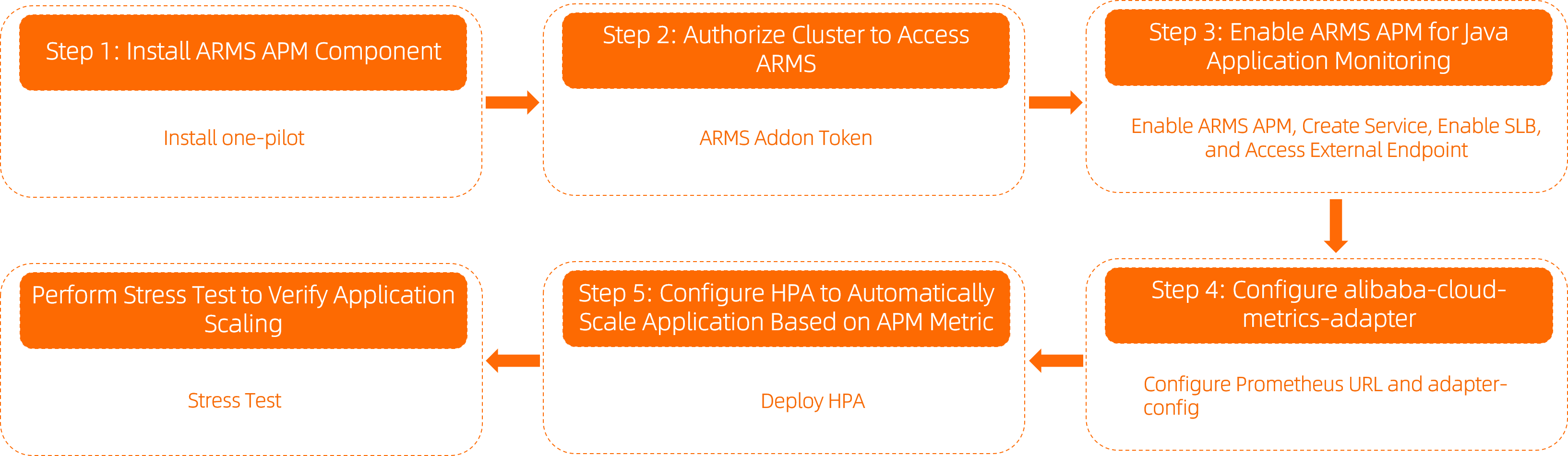
Step 1: Install the ARMS Application Monitoring add-on
Install the ack-onepilot add-on to connect your application to ARMS Application Monitoring.
-
Log on to the ACK console. In the left navigation pane, click Clusters.
-
On the Clusters page, click the cluster name. In the left navigation pane, click Add-ons.
-
Search for ack-onepilot, configure its parameters, and complete the installation.
Step 2: Grant ARMS access permissions
The required authorization depends on your cluster type.
For ACK Serverless clusters or applications in clusters connected to Elastic Container Instance (ECI):
Complete the authorization on the RAM Quick Authorization page, then restart all pods of the ack-onepilot add-on.
For standard ACK clusters:
Check whether an ARMS Addon Token exists in the cluster.
-
If the token exists: ARMS performs password-free authorization automatically.
ACK managed clusters include an ARMS Addon Token by default. Some older managed clusters may not have one—in that case, grant permissions manually using the steps below.
-
If the token does not exist: Grant permissions manually.
-
Create a custom policy with the following content. See Step 1: Create a custom policy.
{ "Action": "arms:*", "Resource": "*", "Effect": "Allow" } -
Attach the custom policy to the cluster's worker RAM role. See Step 2: Attach the custom policy to the worker RAM role.
-
Step 3: Enable ARMS Application Monitoring for your Java application
Enable monitoring by adding labels to your Deployment's spec.template.metadata section.
-
Log on to the ACK console. In the left navigation pane, click Clusters.
-
On the Clusters page, click the cluster name. In the left navigation pane, choose Workloads > Deployments.
-
On the Deployments page, click Create from YAML.
-
Select Sample Template, and then add the following
labelsunderspec.template.metadatain the Template (in YAML format):Enabling Application Security incurs additional charges. See What is Application Security? and Billing.
labels:
  armsPilotAutoEnable: "on"
  armsPilotCreateAppName: "<your-deployment-name>"  # Required: replace with your application name
  one-agent.jdk.version: "OpenJDK11"               # Required only for JDK 11
  armsSecAutoEnable: "on"                           # Optional: enables Application Security
The following YAML example template shows how to create a stateless (Deployment) application with ARMS Application Monitoring enabled.
-
Verify the deployment. On the Deployments page, the ARMS Console button appears in the Actions column for the target application. Click ARMS Console to view monitoring data. In the left navigation pane, click API Call to see access details for HTTP interfaces. The demo application automatically generates continuous interface calls.
The API Call page lists each API with its response time, request count, and error count. Examples include
/demo/randomRT/{id}(5.0 s),/demo/invokeConponent(1.2 s),/demo/queryUser/{id}(218.07 ms),/demo/queryNotExistDB/{id}(2.5 ms), and/demo/queryException/{id}(1.4 ms). The page also shows a call topology diagram and trend charts for request count and response time. -
Create a Service for
arms-springboot-demoand expose the application's API through Server Load Balancer (SLB).-
On the Clusters page, click the cluster name. In the left navigation pane, choose Network > Services.
-
Click Create to create a Service for the associated application, and then click Create. For more information about the parameters, see Create a Service.
-
After the Service is created, record the External IP of
arms-demo-svc(for example,47.94.XX.XX:8080). -
Access the
/demo/queryUser/10endpoint of the Service through the external port:curl http://47.94.XX.XX:8080/demo/queryUser/10Expected output:
{"id":1,"name":"KeyOfSpectator","password":"12****"}The output indicates that the endpoint is accessible.
-
Step 4: Configure the metrics adapter
Managed Service for Prometheus and the ack-alibaba-cloud-metrics-adapter add-on (deployed in kube-system) must both be running before you proceed.
This step maps ARMS Application Monitoring request-count data to a named external metric that the HPA can consume. The metric name used in hpa.yaml (Step 5) is generated from the name.as field you configure here.
4.1 Get the Prometheus URL
-
Log on to the ARMS console.
-
In the left navigation pane, choose Managed Service for Prometheus > Instance.
-
Click the target instance name (format:
arms_metrics_{RegionId}_XXX). In the left navigation pane, click Settings. -
At the bottom of the Settings tab, view and record the HTTP API Address (Grafana Read Address). This is your Prometheus URL.
The page displays the HTTP API Address (Grafana Read Address) with Network and URL columns:
-
Public:
https://{RegionId}.arms.aliyuncs.com:9443/api/v1/prometheus/{InstanceID}/{UserID}/{Secret}/cn-beijing -
Internal:
http://{RegionId}-intranet.arms.aliyuncs.com:9090/api/v1/prometheus/{InstanceID}/{UserID}/{Secret}/cn-beijing
Copy the public network address as the Prometheus URL for subsequent steps.
-
4.2 Set the Prometheus URL in the adapter
-
Log on to the ACK console. In the left navigation pane, click Clusters.
-
On the Clusters page, click the cluster name. In the left navigation pane, choose Applications > Helm.
-
On the Helm page, find ack-alibaba-cloud-metrics-adapter and click Update in the Actions column.
-
In the Update Release panel, insert the Prometheus URL recorded in Step 4.1.
custom:
    - metricsQuery: sum(sum(container_memory_working_set_bytes)by(pod)  * on(pod)
        group_right sum(<<.Series>>{<<.LabelMatchers>>}) by(pod)) / 1024 / 1024
        / 1024
      name:
        as: container_memory_working_total
        matches: ^(.*)_labels
      resources:
        overrides:
          namespace:
            resource: namespace
          pod:
            resource: pod
      seriesQuery: kube_pod_labels{namespace!="",pod!=""}
    default: false
    enabled: true
    logLevel: 4
    metricsRelistInterval: 1m
    tls:
      ca: ""
      certificate: ""
      enable: false
      key: ""
    url: http://cn-beijing-intranet.arms.aliyuncs.com:9090/api/v1/prometheus/
      8cba801fff65546a3012e9a6843xxx/xxx0538168824xxx   xxx a174ae4xxx2xxx xxx xxx xxx
    ramRoleType: restricted
    replicas: 1
    service:
      type: ClusterIP
    serviceAccountName: admin
    tolerations: []
  ConfigReloader:
    image:
      repository: registry.aliyuncs.com/acs/configmap-reload
      tag: v0.0.1
4.3 Add an ARMS metric rule to adapter-config
-
On the Helm page, click ack-alibaba-cloud-metrics-adapter.
-
On the Basic Information tab, click adapter-config.
-
In the upper-right corner, click Edit YAML.
-
Add the following rule to
adapter-config:rules: - metricsQuery: sum(sum_over_time_lorc(<<.Series>>{service="arms-k8s-demo",clusterId="cc13c8725******a9839190b7d1695d7",serverIp=~".*",callKind=~"http|rpc|custom_entry|server|consumer|schedule",source="apm",<<.LabelMatchers>>}[1m])) or vector(0) # ^^ Replace with your ARMS service name # ^^ Replace with your cluster ID name: as: "${1}_per_second" # Generates the HPA metric name: arms_app_requests_per_second matches: "^(.*)_count_ign_destid_endpoint_ppid_prpc" resources: namespaced: false seriesQuery: arms_app_requests_count_ign_destid_endpoint_ppid_prpc{service="arms-k8s-demo",clusterId="cc13c8725******a9839190b7d1695d7"} # ^^ Replace with your ARMS service name and cluster IDReplace
arms-k8s-demowith your ARMS service name andcc13c8725******a9839190b7d1695d7with your cluster ID.A complete example is as follows:
4.4 Verify the metric is available
-
Check that
arms_app_requests_per_secondappears in the External Metrics API:kubectl get --raw "/apis/external.metrics.k8s.io/v1beta1"Look for
"name":"arms_app_requests_per_second"in the output. -
Check that the metric returns real-time data:
kubectl get --raw "/apis/external.metrics.k8s.io/v1beta1/namespaces/arms-demo/arms_app_requests_per_second" | jq .Expected output:
{
  "kind": "ExternalMetricValueList",
  "apiVersion": "external.metrics.k8s.io/v1beta1",
  "metadata": {},
  "items": [
    {
      "metricName": "arms_app_requests_per_second",
      "metricLabels": {},
      "timestamp": "2025-02-13T02:51:31Z",
      "value": "2"
    }
  ]
}
Step 5: Create the HPA
Create hpa.yaml with the following content.
apiVersion: autoscaling/v2
kind: HorizontalPodAutoscaler
metadata:
  name: test-hpa
  namespace: arms-demo
spec:
  scaleTargetRef:
    apiVersion: apps/v1
    kind: Deployment
    name: arms-springboot-demo
  minReplicas: 1
  maxReplicas: 10
  metrics:
    - type: External
      external:
        metric:
          name: arms_app_requests_per_second   # Must match the name generated by adapter-config (name.as field in Step 4.3)
        target:
          type: AverageValue
          averageValue: 40                     # Scale out when QPS exceeds 40; External metrics support Value and AverageValue only
Apply the HPA:
kubectl apply -f hpa.yamlVerify it is picking up metric data:
kubectl get hpa -n arms-demoExpected output:
NAME       REFERENCE                         TARGETS       MINPODS   MAXPODS   REPLICAS   AGE
test-hpa   Deployment/arms-springboot-demo   12/40 (avg)   1         10        1          113s
A non-empty TARGETS value confirms the HPA is reading metric data successfully.
Step 6: Verify elastic scaling with a stress test
Run a stress test against the demo application. Replace 47.94.XX.XX:8080 with the external endpoint of arms-demo-svc.
ab -c 50 -n 2000 http://47.94.XX.XX:8080/demo/queryUser/10While the test runs, watch the HPA:
kubectl get hpa -n arms-demoExpected output after scaling:
NAME       REFERENCE                         TARGETS           MINPODS   MAXPODS   REPLICAS   AGE
test-hpa   Deployment/arms-springboot-demo   47500m/40 (avg)   1         10        10         6m43s
Check the scaling effect from three views:
-
ARMS console: The request volume for the interface spikes sharply during the stress test.
On the Overview tab of ARMS Application Monitoring, the following metric changes are observed during the stress test (approximately 10:58–10:59):
-
Requests per minute: HTTP entry requests surge from close to 0 to about 1,800.
-
Response time per minute: HTTP entry response time fluctuates between 800 ms and 1.6 s.
-
Slow calls per minute: The count rises to about 6 toward the end of the test.
-
HTTP status code statistics: The number of 200 status codes surges to about 2,400 in step with the request count, while the other status codes stay close to 0.
-
-
Prometheus dashboard: The HPA triggers scale-out when QPS exceeds the configured threshold.
In the Grafana dashboard, the line chart of the
arms_app_requests_countmetric shows a pronounced spike during the stress test. The value peaks at about 33.5 min and then falls back to 1.40 min. The panel statistics are min 8s, max 33.5 min, avg 2.61 min, and current 1.40 min. -
ACK cluster: The pod replica count scales in and out with the QPS of the interface calls.
To view the full scaling event history, run:
kubectl describe hpa test-hpa -n arms-demoAdvanced examples
The following examples show how to configure the metrics adapter for more specific scaling scenarios. All examples use sum_over_time_lorc to aggregate request counts over a 1-minute window.
Scale multiple services independently
Define one rule per service, giving each a unique metric name so the HPA can target them separately.
rules:
- metricsQuery: sum(sum_over_time_lorc(<<.Series>>{service="arms-k8s-demo",clusterId="cc13c8725******a9839190b7d1695d7",serverIp=~".*",callKind=~"http|rpc|custom_entry|server|consumer|schedule",source="apm",<<.LabelMatchers>>}[1m])) or vector(0)
  name:
    as: "${1}_per_second_arms_k8s_demo"
    matches: "^(.*)_count_ign_destid_endpoint_ppid_prpc"
  resources:
    namespaced: false
  seriesQuery: arms_app_requests_count_ign_destid_endpoint_ppid_prpc{service="arms-k8s-demo",clusterId="cc13c8725******a9839190b7d1695d7"}
- metricsQuery: sum(sum_over_time_lorc(<<.Series>>{service="arms-k8s-demo-subcomponent",clusterId="cc13c8725******a9839190b7d1695d7",serverIp=~".*",callKind=~"http|rpc|custom_entry|server|consumer|schedule",source="apm",<<.LabelMatchers>>}[1m])) or vector(0)
  name:
    as: "${1}_per_second_arms_k8s_demo_subcomponent"
    matches: "^(.*)_count_ign_destid_endpoint_ppid_prpc"
  resources:
    namespaced: false
  seriesQuery: arms_app_requests_count_ign_destid_endpoint_ppid_prpc{service="arms-k8s-demo-subcomponent",clusterId="cc13c8725******a9839190b7d1695d7"}
Scale based on a specific RPC endpoint
Add the rpc label to the query to target a single endpoint, rather than all traffic for a service.
rules:
- metricsQuery: sum(sum_over_time_lorc(<<.Series>>{service="arms-k8s-demo",rpc="/demo/queryUser/{id}",clusterId="cc13c8725******a9839190b7d1695d7",serverIp=~".*",callKind=~"http|rpc|custom_entry|server|consumer|schedule",source="apm",<<.LabelMatchers>>}[1m])) or vector(0)
  name:
    as: "${1}_per_second_arms_k8s_demo_queryUser"
    matches: "^(.*)_count_ign_destid_endpoint_ppid_prpc"
  resources:
    namespaced: false
  seriesQuery: arms_app_requests_count_ign_destid_endpoint_ppid_prpc{service="arms-k8s-demo",rpc="/demo/queryUser/{id}",clusterId="cc13c8725******a9839190b7d1695d7"}
- metricsQuery: sum(sum_over_time_lorc(<<.Series>>{service="arms-k8s-demo",rpc="/demo/queryException/{id}",clusterId="cc13c8725******a9839190b7d1695d7",serverIp=~".*",callKind=~"http|rpc|custom_entry|server|consumer|schedule",source="apm",<<.LabelMatchers>>}[1m])) or vector(0)
  name:
    as: "${1}_per_second__arms_k8s_demo_queryException"
    matches: "^(.*)_count_ign_destid_endpoint_ppid_prpc"
  resources:
    namespaced: false
  seriesQuery: arms_app_requests_count_ign_destid_endpoint_ppid_prpc{service="arms-k8s-demo",rpc="/demo/queryException/{id}",clusterId="cc13c8725******a9839190b7d1695d7"}
- metricsQuery: sum(sum_over_time_lorc(<<.Series>>{service="arms-k8s-demo",rpc="/demo/queryNotExistDB/{id}",clusterId="cc13c8725******a9839190b7d1695d7",serverIp=~".*",callKind=~"http|rpc|custom_entry|server|consumer|schedule",source="apm",<<.LabelMatchers>>}[1m])) or vector(0)
  name:
    as: "${1}_per_second__arms_k8s_demo_queryNotExistDB"
    matches: "^(.*)_count_ign_destid_endpoint_ppid_prpc"
  resources:
    namespaced: false
  seriesQuery: arms_app_requests_count_ign_destid_endpoint_ppid_prpc{service="arms-k8s-demo",rpc="/demo/queryNotExistDB/{id}",clusterId="cc13c8725******a9839190b7d1695d7"}
References
-
Application Monitoring metrics—full list of ARMS metrics available for use in adapter rules.