ARMS Application Security is a security product based on Runtime Application Self-Protection (RASP) technology that lets an application detect and block attacks against itself while the application runs, without any change to your application code.
Prerequisites and limits
Application Security supports only Java applications.
Connect the application to ARMS Application Monitoring before you use Application Security.
The Java agent of Application Monitoring must be version 2.7.1.3 or later. To check the agent version of a connected application, log on to the ARMS console and go to the Application Monitoring > Agents page.
Features
Defense against security vulnerability attacks
Application Security defends against attack techniques that threaten application security, including but not limited to SQL injection, malicious file reads and writes, malicious file uploads, command execution, arbitrary file reads, malicious outbound connections, thread injection, malicious DNS queries, and in-memory webshell injection. Application Security does not depend on a static rule library, so it also defends against attacks that exploit unknown vulnerabilities, such as zero-day vulnerabilities.
Security risk assessment for third-party components
Application Security automatically assesses third-party application components that contain security vulnerabilities. For each component, the assessment correlates the CVE vulnerabilities of the component, the detailed path of the component, the risk level and score of the vulnerability, and the related instance information. Your development and security teams can then take stock of the risks that third-party components introduce, locate risk details, and fix the risks by priority.
Defense modes
The Defense mode of Application Security determines how Application Security handles the attacks that it detects. In Monitor mode, Application Security records the attacks that it detects but does not block them, which lets you track the security status of the application and fix the corresponding vulnerabilities in a timely manner. In Monitor and Block mode, Application Security blocks the attacks that it detects.
After you connect an application, the default Defense mode is Monitor. Switch to Monitor and Block after the application runs stably. Treat every attack that Application Security reports as a real security threat: Application Security identifies attack behavior inside the application at runtime instead of matching traffic signatures, so its false positive rate is lower than that of traditional signature-based detection.
How it works
Application Security is built on the RASP technology of Alibaba Cloud Security. You install the Application Security agent on the instance that runs your application. The agent runs inside the application and hooks key functions to monitor in real time how the application interacts with other systems. When the application shows suspicious behavior, Application Security uses the current context to identify the attack and block it. The following figure shows how RASP protects an application from the inside.
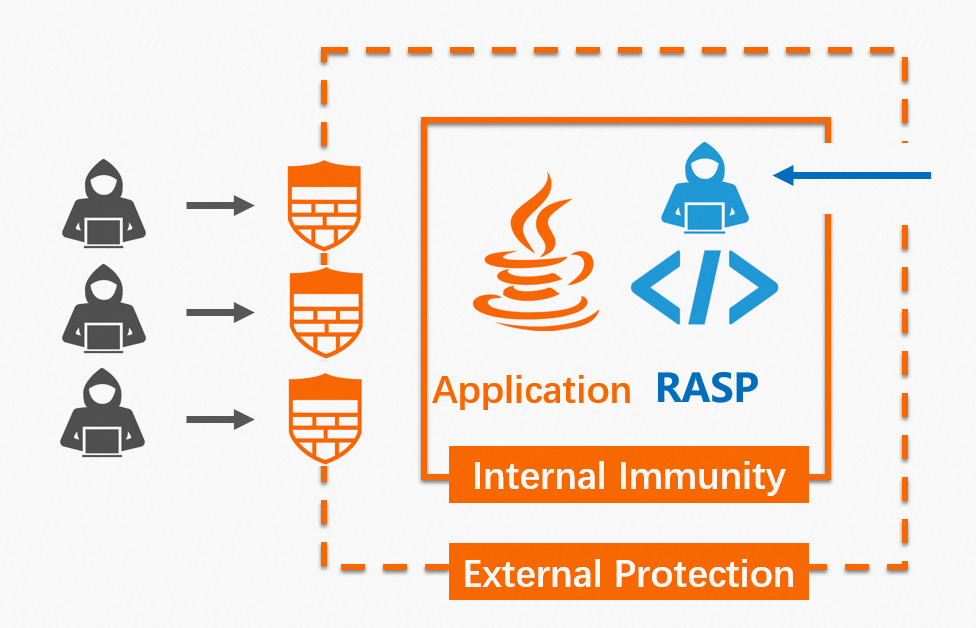
Consider an analogy with epidemic prevention. Traditional perimeter solutions such as firewalls and web application firewalls (WAF) work like protective suits and masks: they lower the risk of infection by blocking or filtering transmission paths. RASP works more like a vaccine: it creates antibodies inside the body and eliminates viruses when the viruses invade.
Using RASP and WAF together
Application Security and WAF protect an application at different positions and do not replace each other. WAF filters attacks at the perimeter, before traffic reaches the application, and Application Security detects and blocks attacks inside the running application. Each is suited to different business and security protection scenarios. Use ARMS Application Security together with Alibaba Cloud Web Application Firewall based on your business environment and requirements. This combination builds defense at both the perimeter and inside the application, and minimizes risks such as application intrusion, data leaks, and service unavailability.
Next steps
Connect your application to Application Security with a single click in the ARMS console, and then restart the instances of the target application. You do not need to modify any application code. For instructions, see Connect applications to Application Security.
FAQ
Does Application Security affect how an application runs?
The impact on a running application is negligible. In tests, the additional CPU overhead is less than 1%, the memory overhead is less than 30 MB, and the application latency (RT) is less than 1 ms. Treat these numbers as reference values measured in test environments. Application Security also provides Monitor mode and a soft circuit breaker escape mechanism to minimize interference with a running application.
For more frequently asked questions about Application Security, see Application security FAQ.