Run batch workloads on ECI pods that start in seconds and stop billing on completion.
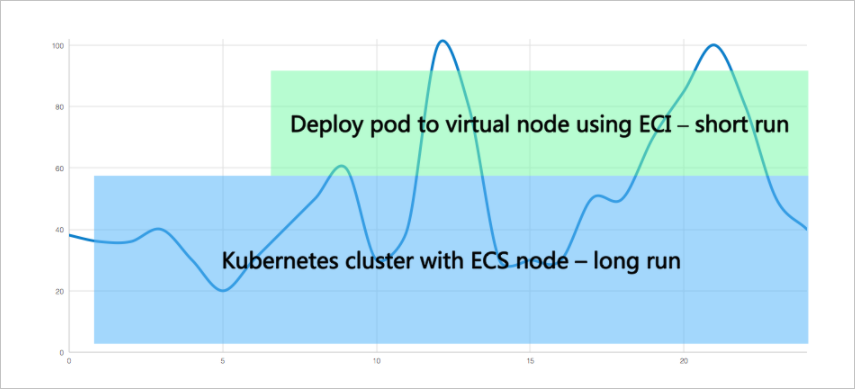
Because billing stops when a Job finishes, batch workloads avoid the cost of pre-provisioned nodes and idle compute. This makes ECI ideal for workloads with variable demand.
Prerequisites
Verify the following:
The ACK Virtual Node add-on is installed. See Deploy the ack-virtual-node component.
How scheduling works
To run a pod on ECI, label the pod or its namespace with alibabacloud.com/eci=true. The virtual node (virtual-kubelet) then intercepts the pod and schedules it on ECI instead of a regular cluster node.
This example uses a namespace-level label to schedule all pods in the namespace to virtual nodes. For other methods, see Schedule pods to virtual nodes.
Procedure
Step 1: Create a namespace and add the ECI label
kubectl create ns vk
kubectl label namespace vk alibabacloud.com/eci=true
All pods in the vk namespace run as ECI pods on virtual nodes.
Step 2: Create the Job
Save the following YAML as
job.yaml. This Job uses 16 CPU cores and 32 GiB memory to compute pi to 2,000 digits.apiVersion: batch/v1 kind: Job metadata: name: pi namespace: vk # Pods in this namespace are scheduled to Elastic Container Instances spec: template: spec: containers: - name: pi image: registry.cn-shanghai.aliyuncs.com/eci_open/perl:5.32 command: ["perl", "-Mbignum=bpi", "-wle", "print bpi(2000)"] resources: requests: cpu: 16 memory: 32Gi restartPolicy: Never backoffLimit: 4Apply the YAML file.
kubectl -n vk apply -f job.yaml
Step 3: Verify the Job completed
Check the pod status.
kubectl -n vk get pod -o wideA Completed status and a virtual-kubelet node name prefix confirm the pod ran on a virtual node.
NAME       READY   STATUS      RESTARTS   AGE   IP              NODE                            NOMINATED NODE   READINESS GATES
pi-zw2lc   0/1     Completed   0          15m   192.168.XX.XX   virtual-kubelet-cn-shanghai-b   <none>           <none>
Step 4: Confirm billing has stopped
Inspect the pod events.
kubectl -n vk describe pod <pod-name>A StopCharge event in the Events section confirms the ECI pod finished and billing stopped.
Events:
  Type     Reason            Age   From        Message
  ----     ------            ----  ----        -------
  Warning  ImageCacheMissed  16m   EciService  [eci.imagecache]Missed image cache.
  Normal   Pulling           16m   kubelet     Pulling image "registry.cn--shanghai.aliyuncs.com/eci_open/perl:5.32"
  Normal   Pulled            15m   kubelet     Successfully pulled image "registry.cn-shanghai.aliyuncs.com/eci_open/perl:5.32" in 12.951s (12.951s including waiting). Image size: 336066994 bytes.
  Normal   Created           15m   kubelet     Created container: pi
  Normal   Started           15m   kubelet     Started container pi
  Normal   StopCharge        15m   EciService  [eci.containergroup]The charge of current ECI instance has been stopped, but the related resources are still being cleaned.
ECI pods are billed by actual resource usage and stop billing on completion. See Billing of elastic container instances and Lifecycle of elastic container instance pods.
Next steps
To further reduce costs, use preemptible ECI pods. See Use preemptible elastic container instances to run Jobs.