Before installing an NVIDIA driver on a node, ensure the version is on the ACK-supported list. This topic lists supported NVIDIA driver versions.
CUDA
CUDA is a parallel computing platform and programming model from NVIDIA that uses GPUs to accelerate computing performance.
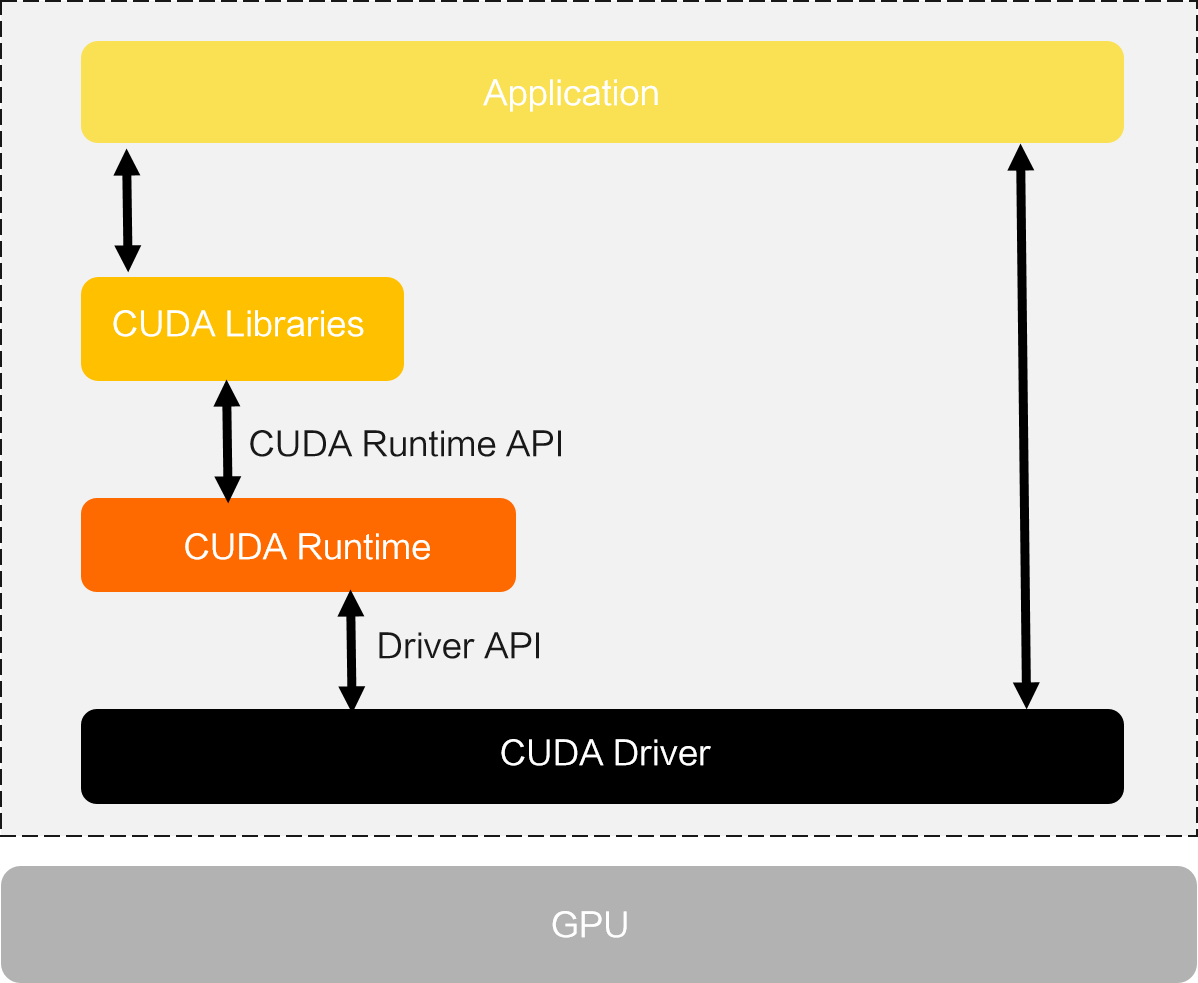
The following figure shows the CUDA architecture. The Driver API and Runtime API differ as follows:
Driver API: More feature-rich but more complex.
Runtime API: Wraps Driver API functions and hides initialization details for simpler usage.
The NVIDIA Driver package provides the CUDA Driver API, while the CUDA Toolkit package provides the CUDA Library and CUDA Runtime.
Driver and cluster version compatibility
Choosing and maintaining driver versions
ACK periodically updates the default driver version, so newly scaled-out GPU nodes may use a different version. To prevent this, specify a driver version for your node pool.
If the specified driver version is not listed in Driver and OS kernel version compatibility, ACK installs the default version. If you specify a version incompatible with the latest OS, node addition may fail. Select the latest supported driver version.
After an OS kernel upgrade, the GPU driver may become unavailable. Remove the node from the node pool and re-add it (which automatically adds the existing node back), or manually upgrade the GPU driver on a node.
-
If you customize the GPU driver version by specifying a version number or by using an OSS URL, the OS and driver may become incompatible after the update. See Supported NVIDIA driver versions in ACK to select a compatible driver.
Known issues in specific driver versions
Driver versions 510 and later may occasionally cause XID 119 or XID 120 errors. If this occurs, see Troubleshoot GPU failures caused by XID 119 or XID 120 errors.
Driver version 550 resolves issues such as frequent XID 119, 120, and 31 errors, and kernel panics in certain applications. We recommend upgrading existing GPU nodes to driver version 550.
When using a 570-series or later driver with the monitoring add-on, ensure ack-arms-prometheus is 1.1.33 or later and ack-gpu-exporter is 2.3.0 or later.
Driver requirements for specific instance types
For the
gn9tinstance family, do not use driver versions earlier than 570.153.02. Earlier versions may cause frequent GPU device disconnections. Symptoms:The
nvidia-smicommand reports fewer GPUs than physically installed, or outputsNo devices were found.The
lspci | grep -i nvidiacommand still detects the device, but its status shows[rev b0].
For L20N GPU instance types (
ecs.ebmgn9g,ecs.ebmgn9gc, andecs.ebmgn9ge), you must use GPU driver version 580 or later.
The following table lists NVIDIA GPU driver versions supported by each ACK cluster version.
For ACK Lingjun clusters and Lingjun nodes in ACK managed Pro clusters, GPU drivers are built into the OS image. Installing a specific GPU driver version by node label is not supported. Edge node pools in ACK Edge clusters do not support installing a specific GPU driver version through node labels either.
Cluster version | Default driver version | Custom driver support | Supported driver versions |
1.28 and later | 535.161.07 570.169 (for ecs.gn9t and ecs.ebmgn9t instance types) | Yes |
The following driver versions are incompatible with the latest operating systems.
|
1.26 | Yes | ||
1.24 | Yes | ||
1.22 | Yes | ||
1.20 | Yes |
| |
1.18.8 | 418.181.07 | Yes | |
1.16.9 | 418.181.07 | Yes | |
1.16.6 | 418.87.01 | No | |
1.14.8 | 418.181.07 | Yes |
Driver and GPU compatibility
Driver and OS kernel version compatibility
See the kernel version and image ID mapping table below for kernel-to-image-ID mappings.
Driver version | Alibaba Cloud Linux 2 | Alibaba Cloud Linux 3 | CentOS 7 | Ubuntu 22.04 |
580.126.20 | Supported range: [4.19.81-17.1.al7.x86_64, ∞) | Supported range: [5.10.23-5.al8.x86_64, ∞) | Unsupported range: [3.10.0-862.14.4.el7.x86_64, ∞) | Supported range: [5.15.0-40-generic, ∞) |
580.126.09 | Supported range: [4.19.81-17.1.al7.x86_64, ∞) | Supported range: [5.10.23-5.al8.x86_64, ∞) | Unsupported range: [3.10.0-862.14.4.el7.x86_64, ∞) | Supported range: [5.15.0-40-generic, ∞) |
570.195.03 | Supported range: [4.19.81-17.1.al7.x86_64, ∞) | Supported range: [5.10.23-5.al8.x86_64, ∞) | Unsupported range: [3.10.0-862.14.4.el7.x86_64, ∞) | Supported range: [5.15.0-40-generic, ∞) |
570.169 | Supported range: [4.19.81-17.1.al7.x86_64, ∞) | Supported range: [5.10.23-5.al8.x86_64, ∞) | Unsupported range: [3.10.0-862.14.4.el7.x86_64, ∞) | Supported range: [5.15.0-40-generic, ∞) |
570.133.20 | Supported range: [4.19.81-17.1.al7.x86_64, ∞) | Supported range: [5.10.23-5.al8.x86_64, ∞) | Unsupported range: [3.10.0-862.14.4.el7.x86_64, ∞) | Supported range: [5.15.0-40-generic, ∞) |
550.163.01 | Supported range: [4.19.81-17.1.al7.x86_64, ∞) | Supported range: [5.10.23-5.al8.x86_64, ∞) | Supported range: [3.10.0-862.14.4.el7.x86_64, ∞) | Supported range: [5.15.0-40-generic, ∞) |
550.144.03 | Supported range: [4.19.81-17.1.al7.x86_64, ∞) | Supported range: [5.10.23-5.al8.x86_64, ∞) | Supported range: [3.10.0-862.14.4.el7.x86_64, ∞) | Supported range: [5.15.0-40-generic, ∞) |
550.90.07 | Supported range: [4.19.81-17.1.al7.x86_64, ∞) | Supported range: [5.10.23-5.al8.x86_64, ∞) | Supported range: [3.10.0-862.14.4.el7.x86_64, ∞) | Supported range: [5.15.0-40-generic, ∞) |
550.54.15 | Supported range: [4.19.81-17.1.al7.x86_64, ∞) | Supported range: [5.10.23-5.al8.x86_64, ∞) | Supported range: [3.10.0-862.14.4.el7.x86_64, ∞) | Supported range: [5.15.0-40-generic, ∞) |
550.54.14 | Supported range: [4.19.81-17.1.al7.x86_64, ∞) | Supported range: [5.10.23-5.al8.x86_64, ∞) | Supported range: [3.10.0-862.14.4.el7.x86_64, ∞) | Supported range: [5.15.0-40-generic, ∞) |
535.247.01 | Supported range: [4.19.81-17.1.al7.x86_64, ∞) | Supported range: [5.10.23-5.al8.x86_64, ∞) | Supported range: [3.10.0-862.14.4.el7.x86_64, ∞) | Supported range: [5.15.0-40-generic, ∞) |
535.230.02 | Supported range: [4.19.81-17.1.al7.x86_64, ∞) | Supported range: [5.10.23-5.al8.x86_64, ∞) | Supported range: [3.10.0-862.14.4.el7.x86_64, ∞) | Supported range: [5.15.0-40-generic, ∞) |
535.161.07 | Supported range: [4.19.81-17.1.al7.x86_64, ∞) | Supported range: [5.10.23-5.al8.x86_64, ∞) | Supported range: [3.10.0-862.14.4.el7.x86_64, ∞) | Supported range: [5.15.0-40-generic, ∞) |
535.129.03 | Supported range: [4.19.81-17.1.al7.x86_64, ∞) | Supported range: [5.10.23-5.al8.x86_64, 5.10.134-17.3.al8.x86_64] Unsupported range: [5.10.134-18.al8.x86_64, ∞) | Supported range: [3.10.0-862.14.4.el7.x86_64, ∞) | Supported range: [5.15.0-40-generic, 5.15.0-101-generic] Unsupported range: [5.15.0-106-generic, ∞) |
535.98 | Supported range: [4.19.81-17.1.al7.x86_64, ∞) | Supported range: [5.10.23-5.al8.x86_64, 5.10.134-17.3.al8.x86_64] Unsupported range: [5.10.134-18.al8.x86_64, ∞) | Supported range: [3.10.0-862.14.4.el7.x86_64, ∞) | Supported range: [5.15.0-40-generic, 5.15.0-101-generic] Unsupported range: [5.15.0-106-generic, ∞) |
535.54.03 | Supported range: [4.19.81-17.1.al7.x86_64, ∞) | Supported range: [5.10.23-5.al8.x86_64, 5.10.134-17.3.al8.x86_64] Unsupported range: [5.10.134-18.al8.x86_64, ∞) | Supported range: [3.10.0-862.14.4.el7.x86_64, ∞) | Supported range: [5.15.0-40-generic, 5.15.0-101-generic] Unsupported range: [5.15.0-106-generic, ∞) |
525.147.05 | Supported range: [4.19.81-17.1.al7.x86_64, ∞) | Supported range: [5.10.23-5.al8.x86_64, 5.10.134-17.3.al8.x86_64] Unsupported range: [5.10.134-18.al8.x86_64, ∞) | Supported range: [3.10.0-862.14.4.el7.x86_64, ∞) | Supported range: [5.15.0-40-generic, 5.15.0-101-generic] Unsupported range: [5.15.0-106-generic, ∞) |
525.105.17 | Supported range: [4.19.81-17.1.al7.x86_64, ∞) | Supported range: [5.10.23-5.al8.x86_64, 5.10.134-17.3.al8.x86_64] Unsupported range: [5.10.134-18.al8.x86_64, ∞) | Supported range: [3.10.0-862.14.4.el7.x86_64, ∞) | Supported range: [5.15.0-40-generic, 5.15.0-101-generic] Unsupported range: [5.15.0-106-generic, ∞) |
515.105.01 | Supported range: [4.19.81-17.1.al7.x86_64, ∞) | Supported range: [5.10.23-5.al8.x86_64, 5.10.134-17.3.al8.x86_64] Unsupported range: [5.10.134-18.al8.x86_64, ∞) | Supported range: [3.10.0-862.14.4.el7.x86_64, ∞) | Supported range: [5.15.0-40-generic, 5.15.0-101-generic] Unsupported range: [5.15.0-106-generic, ∞) |
515.86.01 | Supported range: [4.19.81-17.1.al7.x86_64, ∞) | Supported range: [5.10.23-5.al8.x86_64, 5.10.134-17.3.al8.x86_64] Unsupported range: [5.10.134-18.al8.x86_64, ∞) | Supported range: [3.10.0-862.14.4.el7.x86_64, ∞) | Supported range: [5.15.0-40-generic, 5.15.0-101-generic] Unsupported range: [5.15.0-106-generic, ∞) |
510.108.03 | Supported range: [4.19.81-17.1.al7.x86_64, ∞) | Supported range: [5.10.23-5.al8.x86_64, 5.10.134-17.3.al8.x86_64] Unsupported range: [5.10.134-18.al8.x86_64, ∞) | Supported range: [3.10.0-862.14.4.el7.x86_64, ∞) | Supported range: [5.15.0-40-generic, 5.15.0-101-generic] Unsupported range: [5.15.0-106-generic, ∞) |
510.54 | Supported range: [4.19.81-17.1.al7.x86_64, ∞) | Supported range: [5.10.23-5.al8.x86_64, 5.10.134-14.al8.x86_64] Unsupported range: [5.10.134-15.al8.x86_64, ∞) | Supported range: [3.10.0-862.14.4.el7.x86_64, ∞) | Supported range: [5.15.0-40-generic, 5.15.0-101-generic] Unsupported range: [5.15.0-106-generic, ∞) |
510.47.03 | Supported range: [4.19.81-17.1.al7.x86_64, ∞) | Supported range: [5.10.23-5.al8.x86_64, 5.10.134-14.al8.x86_64] Unsupported range: [5.10.134-15.al8.x86_64, ∞) | Supported range: [3.10.0-862.14.4.el7.x86_64, ∞) | Supported range: [5.15.0-40-generic, 5.15.0-101-generic] Unsupported range: [5.15.0-106-generic, ∞) |
470.256.02 | Supported range: [4.19.81-17.1.al7.x86_64, ∞) | Supported range: [5.10.23-5.al8.x86_64, ∞) | Supported range: [3.10.0-862.14.4.el7.x86_64, ∞) | Supported range: [5.15.0-40-generic, ∞) |
470.161.03 | Supported range: [4.19.81-17.1.al7.x86_64, ∞) | Supported range: [5.10.23-5.al8.x86_64, 5.10.134-17.3.al8.x86_64] Unsupported range: [5.10.134-18.al8.x86_64, ∞) | Supported range: [3.10.0-862.14.4.el7.x86_64, ∞) | Supported range: [5.15.0-40-generic, 5.15.0-101-generic] Unsupported range: [5.15.0-106-generic, ∞) |
470.103.01 | Supported range: [4.19.81-17.1.al7.x86_64, ∞) | Supported range: [5.10.23-5.al8.x86_64, 5.10.134-14.al8.x86_64] Unsupported range: [5.10.134-15.al8.x86_64, ∞) | Supported range: [3.10.0-862.14.4.el7.x86_64, ∞) | Supported range: [5.15.0-40-generic, 5.15.0-101-generic] Unsupported range: [5.15.0-106-generic, ∞) |
470.82.01 | Supported range: [4.19.81-17.1.al7.x86_64, ∞) | Supported range: [5.10.23-5.al8.x86_64, 5.10.134-14.al8.x86_64] Unsupported range: [5.10.134-15.al8.x86_64, ∞) | Supported range: [3.10.0-862.14.4.el7.x86_64, ∞) | Supported range: [5.15.0-40-generic, 5.15.0-101-generic] Unsupported range: [5.15.0-106-generic, ∞) |
470.57.02 | Supported range: [4.19.81-17.1.al7.x86_64, ∞) | Supported range: [5.10.23-5.al8.x86_64, 5.10.134-14.al8.x86_64] Unsupported range: [5.10.134-15.al8.x86_64, ∞) | Supported range: [3.10.0-862.14.4.el7.x86_64, ∞) | Unsupported range: [5.15.0-40-generic, ∞) |
460.106.00 | Supported range: [4.19.81-17.1.al7.x86_64, ∞) | Supported range: [5.10.23-5.al8.x86_64, 5.10.134-14.al8.x86_64] Unsupported range: [5.10.134-15.al8.x86_64, ∞) | Supported range: [3.10.0-862.14.4.el7.x86_64, ∞) | Supported range: [5.15.0-40-generic, 5.15.0-101-generic] Unsupported range: [5.15.0-106-generic, ∞) |
460.91.03 | Supported range: [4.19.81-17.1.al7.x86_64, ∞) | Supported range: [5.10.23-5.al8.x86_64, 5.10.134-14.al8.x86_64] Unsupported range: [5.10.134-15.al8.x86_64, ∞) | Supported range: [3.10.0-862.14.4.el7.x86_64, ∞) | Unsupported range: [5.15.0-40-generic, ∞) |
460.73.01 | Supported range: [4.19.81-17.1.al7.x86_64, ∞) | Supported range: [5.10.23-5.al8.x86_64, 5.10.134-14.al8.x86_64] Unsupported range: [5.10.134-15.al8.x86_64, ∞) | Supported range: [3.10.0-862.14.4.el7.x86_64, ∞) | Unsupported range: [5.15.0-40-generic, ∞) |
460.32.03 | Supported range: [4.19.81-17.1.al7.x86_64, ∞) | Supported range: [5.10.23-5.al8.x86_64, 5.10.134-14.al8.x86_64] Unsupported range: [5.10.134-15.al8.x86_64, ∞) | Supported range: [3.10.0-862.14.4.el7.x86_64, ∞) | Unsupported range: [5.15.0-40-generic, ∞) |
450.119.04 | Supported range: [4.19.81-17.1.al7.x86_64, ∞) | Supported range: [5.10.23-5.al8.x86_64, 5.10.134-14.al8.x86_64] Unsupported range: [5.10.134-15.al8.x86_64, ∞) | Supported range: [3.10.0-862.14.4.el7.x86_64, ∞) | Unsupported range: [5.15.0-40-generic, ∞) |
450.102.04 | Supported range: [4.19.81-17.1.al7.x86_64, ∞) | Supported range: [5.10.23-5.al8.x86_64, 5.10.134-14.al8.x86_64] Unsupported range: [5.10.134-15.al8.x86_64, ∞) | Supported range: [3.10.0-862.14.4.el7.x86_64, ∞) | Unsupported range: [5.15.0-40-generic, ∞) |
450.80.02 | Supported range: [4.19.81-17.1.al7.x86_64, ∞) | Unsupported range: [5.10.23-5.al8.x86_64, ∞) | Supported range: [3.10.0-862.14.4.el7.x86_64, ∞) | Unsupported range: [5.15.0-40-generic, ∞) |
440.33.01 | Supported range: [4.19.81-17.1.al7.x86_64, ∞) | Unsupported range: [5.10.23-5.al8.x86_64, ∞) | Supported range: [3.10.0-862.14.4.el7.x86_64, ∞) | Unsupported range: [5.15.0-40-generic, ∞) |
418.181.07 | Supported range: [4.19.81-17.1.al7.x86_64, ∞) | Unsupported range: [5.10.23-5.al8.x86_64, ∞) | Supported range: [3.10.0-862.14.4.el7.x86_64, ∞) | Unsupported range: [5.15.0-40-generic, ∞) |
418.113 | Supported range: [4.19.81-17.1.al7.x86_64, ∞) | Unsupported range: [5.10.23-5.al8.x86_64, ∞) | Supported range: [3.10.0-862.14.4.el7.x86_64, ∞) | Unsupported range: [5.15.0-40-generic, ∞) |
418.87.01 | Supported range: [4.19.81-17.1.al7.x86_64, ∞) | Unsupported range: [5.10.23-5.al8.x86_64, ∞) | Supported range: [3.10.0-862.14.4.el7.x86_64, ∞) | Unsupported range: [5.15.0-40-generic, ∞) |
410.93 | Supported range: [4.19.81-17.1.al7.x86_64, 4.19.91-18.al7.x86_64] Unsupported range: [4.19.91-19.1.al7.x86_64, ∞) | Unsupported range: [5.10.23-5.al8.x86_64, ∞) | Supported range: [3.10.0-862.14.4.el7.x86_64, 3.10.0-957.21.3.el7.x86_64] Unsupported range: [3.10.0-1062.9.1.el7.x86_64, ∞) | Unsupported range: [5.15.0-40-generic, ∞) |
410.79 | Supported range: [4.19.81-17.1.al7.x86_64, 4.19.91-18.al7.x86_64] Unsupported range: [4.19.91-19.1.al7.x86_64, ∞) | Unsupported range: [5.10.23-5.al8.x86_64, ∞) | Supported range: [3.10.0-862.14.4.el7.x86_64, 3.10.0-957.21.3.el7.x86_64] Unsupported range: [3.10.0-1062.9.1.el7.x86_64, ∞) | Unsupported range: [5.15.0-40-generic, ∞) |
Driver and CUDA Toolkit compatibility
Select a driver version compatible with your application's CUDA Toolkit version. See CUDA Toolkit Release Notes for the compatibility matrix.
Checking CUDA Driver API version
Run the nvidia-smi command on a node to check the installed driver version and CUDA Driver API version. In the following output, 550.144.03 is the driver version, and CUDA version 12.6 indicates the driver supports the CUDA Runtime API up to version 12.6.
Mon Mar 24 08:51:55 2025
+-----------------------------------------------------------------------------------------+
| NVIDIA-SMI 550.144.03             Driver Version: 550.144.03     CUDA Version: 12.6     |
|-----------------------------------------+------------------------+----------------------+
| GPU  Name                 Persistence-M | Bus-Id          Disp.A | Volatile Uncorr. ECC |
| Fan  Temp   Perf          Pwr:Usage/Cap |           Memory-Usage | GPU-Util  Compute M. |
|                                         |                        |               MIG M. |
|=========================================+========================+======================|
|   0  Tesla P4                       On  |   00000000:00:07.0 Off |                    0 |
| N/A   33C    P8              7W /   75W |       0MiB /   7680MiB |      0%      Default |
|                                         |                        |                  N/A |
+-----------------------------------------+------------------------+----------------------+

+-----------------------------------------------------------------------------------------+
| Processes:                                                                              |
|  GPU   GI   CI        PID   Type   Process name                              GPU Memory |
|        ID   ID                                                               Usage      |
|=========================================================================================|
|  No running processes found                                                             |
+-----------------------------------------------------------------------------------------+
Runtime API version
NVIDIA provides official CUDA base images with the CUDA Toolkit pre-installed. Build your application image on a base image matching the toolkit version your application requires.
The CUDA base image of your Docker image determines the CUDA Runtime API version available to your application. For example, building on NVIDIA/CUDA:12.2.0-base-Ubuntu20.04 means the application uses CUDA Runtime API version 12.2.0.