The listeners field in an AlbConfig configures listeners for an Application Load Balancer (ALB). This topic covers the update behavior of the listeners field, and shows how to create, configure, and delete listeners.
Prerequisites
Before you begin, ensure that you have:
Two vSwitches in different zones, in the same VPC as your cluster, and in zones that support ALB. For more information, see Create and manage vSwitches.
The ALB Ingress controller installed in your cluster. For more information, see Manage the ALB Ingress controller.
To use an ALB Ingress to access services deployed in a dedicated ACK cluster, grant the cluster the permissions required by the ALB Ingress controller first. For more information, see Grant an ACK dedicated cluster access to the ALB Ingress controller.
An AlbConfig resource. For more information, see Create AlbConfig.
Usage notes
ALB instances created by ACK clusters are managed resources (ServiceManagedResource). The following restrictions and guidelines apply when you work with these instances.
ALB console restrictions
Do not create, modify, or delete listeners directly in the ALB console. For example, do not change listener ports or delete listeners in the console. ACK continuously synchronizes listener configuration from the AlbConfig CRD to the ALB instance. Any manual changes in the ALB console are overwritten during the next synchronization cycle.
Bypassing AlbConfig and modifying listener settings directly in the ALB console causes the following issues:
The ALB console returns an
OperationDenied.ServiceManagedResourceerror when you attempt to modify listener settings.Listeners that were manually added (for example, port 443) may be automatically deleted after ACK synchronizes the configuration.
When you reuse an existing ALB instance with ACK, manually configured listener settings do not persist.
Correct configuration path
All listener configuration, including HTTPS certificates, ports, and request timeouts, must be managed exclusively through the AlbConfig custom resource in your Kubernetes cluster. AlbConfig is the single source of truth for ALB listener configuration and must not be modified from the ALB console.
Listener parameters
The following table lists all parameters available under spec.listeners in an AlbConfig.
Parameter | Type | Default | Protocols | Description |
| integer | — | HTTP, HTTPS, QUIC | Listener port. Required. Changing this value deletes the original listener and creates a new one. |
| string | — | HTTP, HTTPS, QUIC | Listener protocol. Required. Changing this value deletes the original listener and creates a new one. |
| string | — | HTTPS | Certificate ID to assign to the listener. |
| boolean | — | HTTPS | Whether this is the default certificate. |
| boolean |
| HTTPS | Whether to enable CA certificate verification. |
| string | — | HTTPS | TLS security policy ID. For example, |
| integer |
| HTTP, HTTPS | Maximum time (in seconds) to wait for a backend response before returning HTTP 504. Valid values: 1–600. |
| string | — | — | Tag key. |
| string | — | — | Tag value. |
| boolean | — | HTTP, HTTPS | Whether to enable data compression. |
| boolean |
| HTTP, HTTPS | Whether to include the client IP in the |
| boolean | — | HTTP, HTTPS | Whether to include the listener protocol in request headers forwarded to backend servers. |
| boolean | — | HTTP, HTTPS | Whether to include the SLB instance ID in request headers forwarded to backend servers. |
| boolean | — | HTTP, HTTPS | Whether to include the listening port in request headers forwarded to backend servers. |
| boolean | — | HTTP, HTTPS | Whether to retrieve the real client IP from the |
| string | — | HTTP, HTTPS | Semicolon-separated list of trusted proxy IP addresses or CIDR blocks. Takes effect only when |
| string | — | HTTP, HTTPS | ACL type: |
| string | — | HTTP, HTTPS | CIDR blocks for access control. Each entry must be a complete CIDR block. |
How the listeners field updates
The listeners field is an array, so it updates by full replacement: the new configuration completely replaces the existing one. Understanding this behavior helps you predict what happens when you apply an updated AlbConfig.
Key terms
Object configuration file: The YAML file you apply, containing the desired state of the AlbConfig.
Existing object configuration file: The configuration already running in your cluster.
`last-applied-configuration`: A Kubernetes annotation that records the previous configuration. It is not updated in real time.
Update rules
Scenario | In new config | In existing config | In | Result |
① | Yes | Yes | — | Merge: apply values from the new config to update the existing object. |
② | Yes | No | — | Create: add the new listener. |
③ | No | — | Yes | Delete: remove the listener. May reset to default value. |
④ | No | Yes | No | Delete: remove the listener from the existing config. |
Example
The following example shows how the rules apply when updating the listeners field.
New config (object configuration file):
listeners:
- port: 8001
  protocol: HTTP
- port: 8003
  protocol: HTTP
- port: 8005     # New — will be added
  protocol: HTTP
Existing config:
listeners:
- port: 8001
  protocol: HTTP
- port: 8002     # Missing from new config and in last-applied-configuration — will be deleted
  protocol: HTTP
- port: 8003
  protocol: HTTP
- port: 8004     # Missing from new config but not in last-applied-configuration — will be deleted
  protocol: HTTP
`last-applied-configuration`:
listeners:
- port: 8001
  protocol: HTTP
- port: 8002
  protocol: HTTP
- port: 8003
  protocol: HTTP
Result after applying the new config:
listeners:
- port: 8001    # Meets condition ① — retained
  protocol: HTTP
- port: 8003    # Meets condition ① — retained
  protocol: HTTP
- port: 8005    # Meets condition ② — added
  protocol: HTTP
# port 8002 meets condition ③ — deleted
# port 8004 meets condition ④ — deleted
Create a listener
A listener is the entry point through which an ALB instance receives and distributes traffic based on application-layer information. The port and protocol fields together uniquely identify a listener.
Modifying port, protocol, or any other listener property deletes the original listener and creates a new one.
HTTP listeners automatically support WebSocket. No additional configuration is required.
Protocol options for protocol: HTTP, HTTPS, QUIC.
Console
Log in to the Container Service console and click Clusters in the left navigation pane.
Click the name of your cluster. In the left navigation pane, choose Workloads > Custom Resources.
On the Resource Objects tab, enter
AlbConfigin the search box and click the AlbConfig result.In the AlbConfig panel, find the AlbConfig resource (named
albby default) and click Edit YAML in the Actions column.In the Edit YAML panel, add the
spec.listeners.portandspec.listeners.protocolfields, then click OK.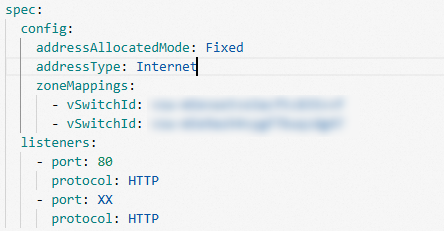
kubectl
Run the following command to edit the AlbConfig:
kubectl edit albconfig <AlbConfig_Name>Add the listeners field under spec:
apiVersion: alibabacloud.com/v1
kind: AlbConfig
metadata:
  name: alb-demo
spec:
  config:
    # ... other config fields
  listeners:
  - port: 80
    protocol: HTTP   # Options: HTTP, HTTPS, QUIC
Common causes of ALB instance auto-creation failure
If AlbConfig fails to automatically create an ALB instance, an incomplete listener configuration is one of the most common causes. For example, if your Ingress routes require TLS/HTTPS but the AlbConfig does not include both port 80 (HTTP) and port 443 (HTTPS) listeners, or the required HTTPS certificate is missing or misconfigured, the instance creation or synchronization may fail.
To prevent this issue, verify that your AlbConfig listener configuration matches your Ingress requirements before applying:
Both port 80 and port 443 listeners are defined when TLS/HTTPS Ingress routes are used.
A valid certificate is assigned to the HTTPS listener, or automatic certificate discovery based on domain name is correctly configured.
Configure HTTPS certificates
Set the certificates field to assign one or more certificates to an HTTPS listener. ALB sets the first certificate as the default certificate. ALB uses other certificates for request encryption only if the default certificate expires or is no longer applicable.
If you don't specify a certificate, the listener is not created immediately. Instead, it is created after an Ingress is associated and a certificate is automatically discovered based on the domain name. For details, see Configure HTTPS certificates for encrypted communication.
listeners:
- caEnabled: false
  certificates:
  - CertificateId: 756****-cn-hangzhou   # Certificate ID
    IsDefault: true
  port: 443
  protocol: HTTPS
Configure a TLS security policy
Set securityPolicyId to apply a TLS security policy to an HTTPS listener. Policies can be custom or predefined. For more information, see TLS security policy.
listeners:
- port: 443
  protocol: HTTPS
  securityPolicyId: tls_cipher_policy_1_1   # Security policy ID
Set the request timeout
Set requestTimeout to control how long Server Load Balancer (SLB) waits for a response from a backend server after it receives a client request. If no response is returned within the timeout, the SLB instance stops waiting and returns an HTTP 504 error to the client.
Default:
60secondsValid values: 1–600 (integer, in seconds)
To use a value above 600, request a quota increase in the Quota Center.
listeners:
- port: 80
  protocol: HTTP
  requestTimeout: 60   # Seconds. Default: 60. Valid values: 1–600.
Scope of effect
requestTimeout is a listener-level (port-level) parameter. It applies globally to all routes that use the same listener port on the ALB instance. Setting different frontend idle session timeouts for individual routes on the same listener is not supported.
AI streaming response support
ALB supports AI streaming response interfaces (for example, large language model streaming output). When using ALB with AI streaming workloads:
Set
requestTimeouthigh enough to cover the entire duration of the streaming transfer. A value too low causes the ALB to close the connection before the stream completes and return an HTTP 504 error to the client.Verify the timeout settings of all components in the request chain, such as WAF and backend services, to avoid premature connection termination that interrupts the streaming session.
Add listener tags
Use the tags field to add key-value tags to a listener.
listeners:
- port: 80
  protocol: HTTP
  tags:
  - key: "key"
    value: "value1"
Enable data compression
Set gzipEnabled to control whether ALB compresses response data before forwarding it to clients.
true: Compresses responses using Brotli or Gzip, depending on content type.false: Disables compression for all content types.
Compression is triggered only when Content-Length in the response header exceeds 1,024 bytes. The two compression algorithms work as follows:
Brotli: Compresses all content types.
Gzip: Compresses
text/plain,text/css,application/javascript,application/x-javascript,application/rss+xml,application/atom+xml,application/xml, andapplication/json.
The following example disables compression:
listeners:
- port: 80
  protocol: HTTP
  gzipEnabled: false   # true: compress specific content types. false: disable all compression.
Configure X-Forwarded-For headers
Use the xForwardedForConfig field to control what information ALB includes in request headers when forwarding traffic to backend servers.
All xForwardedForConfig parameters apply to HTTP and HTTPS listeners only.
Retrieve the client IP address
XForwardedForEnabled is always enabled and cannot be disabled. When enabled, ALB adds the client source IP to the X-Forwarded-For header.
listeners:
- port: 80
  protocol: HTTP
  xForwardedForConfig:
    XForwardedForEnabled: true
Retrieve the listener protocol
Set XForwardedForProtoEnabled to true to include the listener protocol in headers forwarded to backend servers.
listeners:
- port: 80
  protocol: HTTP
  xForwardedForConfig:
    XForwardedForProtoEnabled: true
Retrieve the SLB instance ID
Set XForwardedForSLBIdEnabled to true to include the SLB instance ID in headers forwarded to backend servers.
listeners:
- port: 80
  protocol: HTTP
  xForwardedForConfig:
    XForwardedForSLBIdEnabled: true   # true: include SLB instance ID. false: omit it.
Retrieve the listening port
Set XForwardedForSLBPortEnabled to true to include the listening port in headers forwarded to backend servers.
listeners:
- port: 80
  protocol: HTTP
  xForwardedForConfig:
    XForwardedForSLBPortEnabled: true   # true: include listening port. false: omit it.
Retrieve the real client IP behind proxies
When requests pass through proxies, the X-Forwarded-For header may contain a chain of IP addresses. Set XForwardedForClientSourceIpsEnabled to true to allow ALB to identify the real client IP by traversing the list from right to left and selecting the first IP not in the trusted list.
Use XForwardedForClientSourceIpsTrusted to specify which proxy IPs to trust. This supports scenarios such as rate limiting by source IP.
Format: semicolon-separated IP addresses or CIDR blocks, no spaces.
XForwardedForClientSourceIpsTrustedtakes effect only whenXForwardedForClientSourceIpsEnabledistrue.
listeners:
- port: 80
  protocol: HTTP
  xForwardedForConfig:
    XForwardedForClientSourceIpsEnabled: true
    XForwardedForClientSourceIpsTrusted: 192.168.x.x;192.168.x.x/16   # Semicolon-separated, no spaces
Set access control
Use the aclConfig field to enable access control on an ALB listener. Access control lets you allow or block specific IP addresses by configuring an allowlist or blocklist. For more information, see Configure ACLs for access control.
aclType: Set toWhitefor an allowlist orBlackfor a blocklist.aclEntries: List of CIDR blocks. Each entry must be a complete CIDR block.
listeners:
- port: 80
  protocol: HTTP
  aclConfig:
    aclEntries:
    - 127.0.0.1/32   # CIDR block must be complete
    aclType: White    # White: allowlist. Black: blocklist.
Delete a listener
To delete a listener, remove it from the albconfig.spec.listeners field.
Remove all Ingresses associated with the listener before deleting it. If any Ingress is still associated, the deletion fails.
Before:
listeners:
- port: 8001
  protocol: HTTP
- port: 8002     # Listener to delete
  protocol: HTTP
After:
listeners:
- port: 8001
  protocol: HTTP