MseIngressConfig is a CustomResourceDefinition (CRD) provided by Microservices Engine (MSE) Ingress Controller. Use it to create, reuse, and delete an MSE cloud-native gateway and to configure Ingress listening options and global settings such as IP access control, TLS hardware acceleration, access logging, and distributed tracing.
How it works
MSE Ingress Controller watches MseIngressConfig resources in your cluster and dynamically maintains the lifecycle of the corresponding cloud-native gateway and its association with ACK managed, ACK Serverless, and ACS clusters. After the gateway is associated with the API server of an ACK managed, ACK Serverless, or ACS cluster, its control plane syncs Ingress resource changes and updates routing rules in real time. When the gateway receives a request, it matches the request against Ingress routing rules and forwards traffic to the appropriate backend pod.
The following diagram shows the relationship between the components.
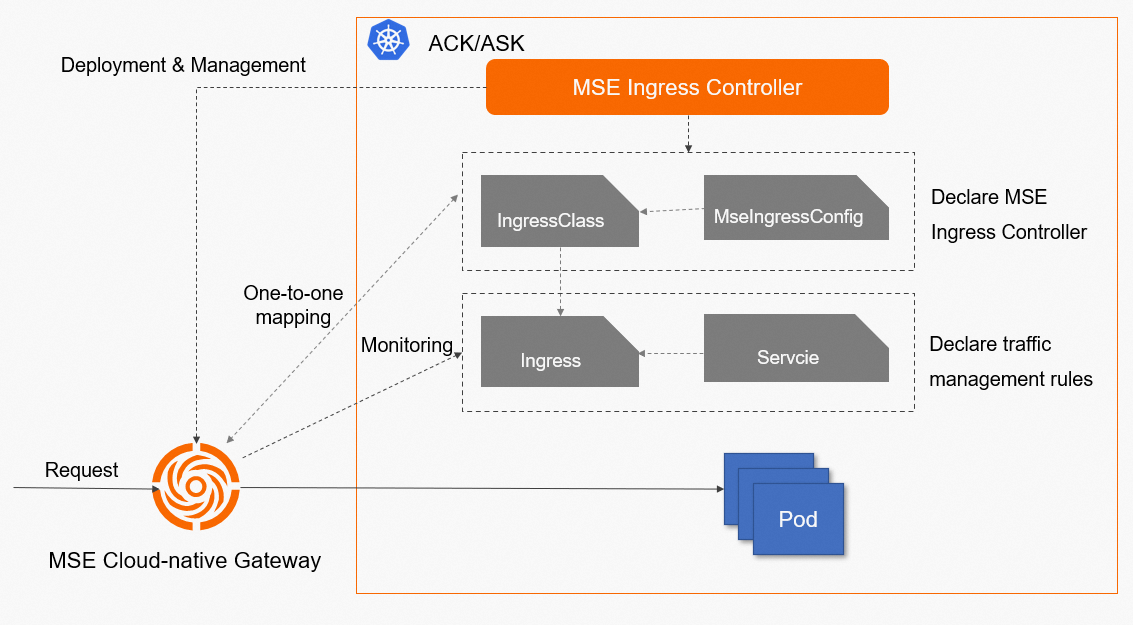
The key components are:
Service: An abstraction of backend services. A service represents a group of replicated pods.
Ingress: Contains reverse proxy rules that route HTTP or HTTPS requests to services based on hostnames and paths.
IngressClass: Declares which Ingress controller implementation handles a set of Ingress resources. Associate an IngressClass with an MseIngressConfig to activate the MSE cloud-native gateway for those Ingress resources.
MseIngressConfig: The CRD that provides gateway configuration—instance specs, network settings, global policies, and Ingress listening scope.
MSE Ingress Controller: The control plane that manages MSE cloud-native gateway instances and their configurations. It is not a network data plane. It watches MseIngressConfig resources in the cluster and coordinates MSE cloud-native gateway instances to implement the traffic management rules described by Ingress resources.
One MseIngressConfig maps to exactly one MSE cloud-native gateway. To run multiple gateways, create multiple MseIngressConfigs.
MseIngressConfig reference
Full configuration example
apiVersion: mse.alibabacloud.com/v1alpha1
kind: MseIngressConfig
metadata:
  name: test
spec:
  name: mse-ingress
  common:
    pay:
      payType: POSTPAY
    instance:
      spec: 4c8g
      replicas: 3
    network:
      vSwitches:
      - "vsw-1"
      - "vsw-2"
      publicSLBSpec: slb.s2.small
    securityGroupType: normal
  global:
    tls:
      enableHardwareAcceleration: true
    ipAccessControl:
      whitelist:
      - 1.1.XX.XX
      - 2.2.XX.XX
  monitor:
    logging:
      sls:
        reuseProject: "xxx"   # Leave blank to use the default project
    tracing:
      openTelemetry:
        sampleRate: "100"
  ingress:
    local:
      ingressClass: mse
      watchNamespace: ""      # Leave blank to listen to all namespaces
Parameters
Parameter | Description | Required | Default |
| Name of the gateway | No |
|
| Billing method. Only | No |
|
| Gateway instance size. Valid values: | No |
|
| Number of gateway replicas. Valid values: 0–30 | No |
|
| Primary and secondary vSwitches. Specify at least one and at most two. If not set, the vSwitch on the node running the MSE Ingress Controller pod is used. | No | None |
| Specifications for the Internet-facing Server Load Balancer (SLB) instance. Valid values: | No |
|
| Specifications for the internal-facing SLB instance. Same valid values as | No |
|
| Security group type. Valid values: | No |
|
| Enable Transport Layer Security (TLS) hardware acceleration to improve HTTPS processing performance. | No |
|
| Global IP address whitelist. Accepts individual IPs and CIDR blocks. | No | Not configured |
| Global IP address blacklist. Accepts individual IPs and CIDR blocks. | No | Not configured |
| Activate Simple Log Service (SLS) access logging. Grant SLS permissions to MSE Ingress Controller before enabling. | No | Disabled |
| SLS project for access logs. Leave blank to use the default project; specify a project name to use an existing project. | No | Blank (default project) |
| Enable xTrace tracing analysis. Cannot be enabled together with | No | Disabled |
| Sampling rate for xTrace, as a string percentage. For example, | No |
|
| Enable OpenTelemetry tracing analysis. Cannot be enabled together with | No | Disabled |
| Sampling rate for OpenTelemetry, as a string percentage. | No |
|
| IngressClass the gateway listens to. See the table below for valid values. | No | Not configured |
| Namespace to watch. Leave blank to listen to all namespaces. Only one namespace can be specified. | No | Blank (all namespaces) |
ingress.local.ingressClass valid values:
Value | Behavior |
Not configured | No Ingress resources are listened to. |
| Listens to Ingress resources with IngressClass |
| Listens to all Ingress resources in the cluster. |
| Listens to Ingress resources with IngressClass |
Any other value | Listens to Ingress resources associated with the specified IngressClass. |
An IngressClass resource that explicitly references an MseIngressConfig in itsspec.parameterstakes precedence over the value ofingress.local.ingressClass.
Status
Check the status of an MseIngressConfig:
kubectl get mseingressconfigExpected output:
NAME   STATUS     MESSAGE
test   Listening
The status progresses in the following order: Pending → Running → Listening.
Status | Description |
| The cloud-native gateway is being created. Creation takes approximately 3 minutes. |
| The gateway is created and running. |
| The gateway is running and listening to Ingress resources in the cluster. |
| The gateway is invalid. Check the |
Resource tags
MSE cloud-native gateways created or reused by an MseIngressConfig are automatically tagged. You can view the tags of a gateway in the basic information section of the gateway instance in the MSE console.
Do not edit these tags in the MSE console. Modifying them may disrupt gateway operation.
Tag | Description |
| Identifies the ACK cluster whose ingress traffic this gateway manages. |
| Identifies the MseIngressConfig associated with this gateway. |
| Marks the gateway as reused. Deleting the associated MseIngressConfig does not delete a tagged gateway. |
Create an MSE cloud-native gateway
Apply an MseIngressConfig to create the gateway. The following example creates a gateway named
mse-ingresswith 3 replicas at the2c4gspecification.apiVersion: mse.alibabacloud.com/v1alpha1 kind: MseIngressConfig metadata: name: test spec: name: mse-ingress common: instance: spec: 2c4g replicas: 3Create an IngressClass resource and link it to the MseIngressConfig.
apiVersion: networking.k8s.io/v1
kind: IngressClass
metadata:
  name: mse
spec:
  controller: mse.alibabacloud.com/ingress
  parameters:
    apiGroup: mse.alibabacloud.com
    kind: MseIngressConfig
    name: test
After applying both resources, Ingress resources with IngressClass
mseare processed by the associated cloud-native gateway.Verify the gateway is running.
kubectl get mseingressconfig testThe status progresses through
Pending→Running→Listening. When the status showsListening, the gateway is ready.
Reuse an existing MSE cloud-native gateway
To reuse a gateway that already exists, set spec.id to the gateway's ID (in gw-xxx format) and control whether to overwrite its configuration with spec.override.
apiVersion: mse.alibabacloud.com/v1alpha1
kind: MseIngressConfig
metadata:
  name: reuse
spec:
  id: gw-xxxx
  override: false
  ingress:
    local:
      ingressClass: mse
spec.override behavior:
| Effect on Ingress listening options, TLS acceleration, IP access control, and observability | Effect on cluster association |
| Existing gateway settings are preserved. | If the gateway is not yet associated with the cluster, automatically associates it and configures |
| Overwrites gateway settings with the values specified in this MseIngressConfig. If a parameter is omitted from the MseIngressConfig, the original setting is cleared. | Associates the gateway with the cluster. |
When setting spec.override: true, specify all parameters you want to keep. Parameters omitted from the MseIngressConfig are overwritten and your traffic may be negatively affected.
Delete an MSE cloud-native gateway
Deleting an MseIngressConfig deletes the associated gateway in most cases. The exception is reuse scenarios, where the gateway is preserved.
Run the following command to delete an MseIngressConfig:
kubectl delete mseingressconfig <your-config-name>Deletion behavior by scenario:
Billing method | Gateway created by MSE Ingress Controller | Gateway reused from the console |
Pay-as-you-go | Deleting the MseIngressConfig also deletes the gateway. | Deleting the MseIngressConfig retains the gateway. |
Subscription | N/A | Deleting the MseIngressConfig retains the gateway. |
Configure IP access control
Allow traffic from specific IPs (whitelist)
The following example allows only the IP address 1.1.XX.XX and the CIDR block 2.0.XX.XX/8 to access the gateway.
apiVersion: mse.alibabacloud.com/v1alpha1
kind: MseIngressConfig
metadata:
  name: test
spec:
  name: mse-ingress
  global:
    ipAccessControl:
      whitelist:
      - 1.1.XX.XX
      - 2.0.XX.XX/8
Block traffic from specific IPs (blacklist)
The following example blocks access from the IP address 1.1.XX.XX and the CIDR block 2.0.XX.XX/8.
apiVersion: mse.alibabacloud.com/v1alpha1
kind: MseIngressConfig
metadata:
  name: test
spec:
  name: mse-ingress
  global:
    ipAccessControl:
      blacklist:
      - 1.1.XX.XX
      - 2.0.XX.XX/8
Activate Simple Log Service
Before activating Simple Log Service (SLS), grant SLS permissions to MSE Ingress Controller for your cluster type:
For an ACK managed cluster or ACK dedicated cluster, follow the ACK dedicated cluster section of Grant permissions to MSE Ingress Controller.
For an ACK Serverless cluster, follow the ACK Serverless cluster section of Grant permissions to MSE Ingress Controller.
For an ACS cluster, follow the ACS cluster section of Grant permissions to MSE Ingress Controller.
The following example configures the gateway to deliver access logs to an SLS project named demo. To use the default project instead, leave reuseProject blank.
apiVersion: mse.alibabacloud.com/v1alpha1
kind: MseIngressConfig
metadata:
  name: test
spec:
  name: mse-ingress
  monitor:
    logging:
      sls:
        reuseProject: "demo"
Activate Managed Service for OpenTelemetry
Configuring Managed Service for OpenTelemetry enables end-to-end distributed tracing to help diagnose and locate production issues.
The following example sets the sampling rate to 100%.
apiVersion: mse.alibabacloud.com/v1alpha1
kind: MseIngressConfig
metadata:
  name: test
spec:
  name: mse-ingress
  monitor:
    tracing:
      openTelemetry:
        sampleRate: "100"
More configurations
The MSE cloud-native gateway instance used by MSE Ingress supports the following additional configurations.
To apply these configurations, log on to the MSE console, go to Cloud-native Gateway > Gateways, locate the existing or automatically created gateway instance that MSE Ingress Controller uses (the instance ID uses the mse_ingresspost-***** format), click the instance ID, and then click Parameters in the left-side navigation pane.
Configuration item | Type | Description |
| Bool | Applies to requests. When enabled, the gateway generates a |
| Bool | Applies to requests and responses. When enabled, gzip compresses requests and responses, which reduces gateway traffic but increases gateway CPU usage. |
| Bool | Applies to requests. Specifies whether to merge redundant slashes ( |
| Int. Valid values: [0, 2147483647] | Applies to gateway connections. The buffer size of a single connection. This value affects throughput and gateway memory usage. |
| Int. Valid values: [0, 10] | Applies to requests. The number of trusted proxies in front of the gateway. This value determines whether the gateway uses client-generated request headers such as |
| Int. Valid values: [0, 2147483647] | Applies to requests. The maximum number of concurrent streams on a single connection when the client uses HTTP/2. |
| Int. Valid values: [65535, 2147483647] (bytes) | Applies to requests. The initial stream window size negotiated between the gateway and the client when HTTP/2 is used. |
| Int. Valid values: [65535, 2147483647] (bytes) | Applies to requests. The connection-level initial window size used between the gateway and the client when HTTP/2 is used. |
| Bool | Specifies whether to support HTTP/3. HTTP/3 is incompatible with hardware acceleration. Disable hardware acceleration before you enable HTTP/3. |
| String. Valid values: [KEEP_UNCHANGED, REJECT_REQUEST, UNESCAPE_AND_REDIRECT, UNESCAPE_AND_FORWARD] | The action taken on requests whose URI path contains the escape characters |
| List<String>. Valid values: [brotli, gzip] | The algorithm used after compression is enabled. You can select brotli or gzip. If |
| Bool | Specifies whether to enable the Proxy protocol. If inbound gateway traffic arrives through a Network Load Balancer (NLB) instance, the gateway cannot obtain the real client IP address unless this item is enabled. Enabling it has no impact on requests that do not use the Proxy protocol. |
| Bool | Applies to scenarios that use a self-managed authentication service. When enabled, changes to authentication rules do not interrupt connections, which suits WebSocket and online business scenarios. |
| Int. Valid values: [0, 600] (seconds) | Used to generate the Keep-Alive response header returned to the client, which informs the client of the connection keepalive period. For example, if you set this item to 10, the gateway returns |
| Int. Valid values: [20, 900] (seconds) | The keepalive period maintained for WebSocket connections in scenarios that require connections to be closed, such as a gateway instance upgrade or restart. |
| Bool | Compresses data by using dedicated hardware. When enabled, requests and responses are compressed, which significantly reduces gateway traffic and provides higher performance and lower CPU usage than software-based gzip. You cannot enable this item in regions that do not support it, or on instances purchased without gzip hardware acceleration. After you enable it, |
| Bool | Filters Ingress, Service, and Pod resources by specified labels when you add a service source. Negated filtering is supported. |