The Expenses and Costs page lets you view billing statements and details for your Container Service for Kubernetes (ACK) cluster. ACK costs appear in two separate categories:
| Cost category | Billing label | Description |
|---|---|---|
| Cluster management fee | ACK Pro Pricing | Charged for ACK managed Pro clusters |
| Associated cloud service fees | For example, Elastic Compute Service | Charged separately by each cloud service (for example, ECS for worker nodes) |
ACK managed Pro clusters incur a cluster management fee, displayed in billing as ACK Pro Pricing.
-
Set Product to ProductProductProductProductContainer Service For Kubernetes.
-
(Optional) Search by cluster name or cluster ID to filter bills for a specific cluster.

Example 2: View bills for associated cloud services
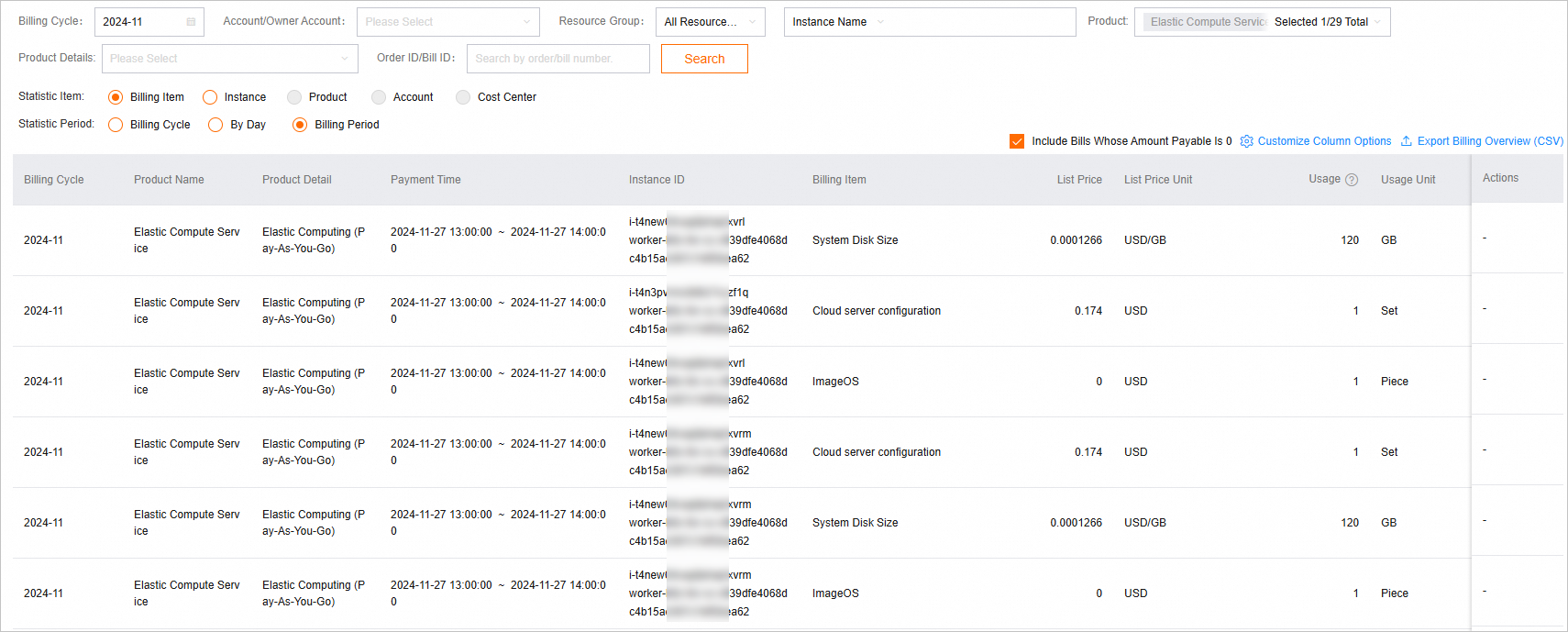
To view billing details for a cloud service associated with a cluster, set Product to the relevant service name and search by instance ID or name.
ECS example:
-
Set Product to Elastic Compute Service.
-
(Optional) Set Instance ID and enter an ECS instance ID.
The Instance ID filter accepts only one ID at a time. To get all ECS instance IDs associated with your cluster, go to the Nodes page in the ACK console. To view bills for all ECS instances in a cluster at once, leave Instance ID blank, filter by Product only, and export the results as a CSV file. Then filter the exported data by instance ID offline. By default, ECS instances created by ACK are named
worker-k8s-for-cs-<Cluster ID>. You can also filter by instance name using this pattern, but this may miss nodes with different names.
What's next
-
To analyze cluster resource usage and cost distribution across multiple dimensions and get cost-saving recommendations, use the Cost Insights feature. See Cost insights.
-
For a detailed breakdown of bill fields, see Billing details.
-
For a monthly consumption summary, see Overview of monthly bill.Overview of Monthly Bill