This topic answers common questions about ACK billing.
Billing items
What makes up the total cost of using an ACK managed cluster?
The total cost of an ACK managed cluster includes the following items:
These fees are charged per cluster and vary by cluster type. Only ACK Managed Cluster Pro Edition incurs cluster management fees. By default, these fees are billed on a pay-as-you-go basis and are calculated based on the number of clusters and their runtime. You can also purchase a resource plan to offset these fees.
If you manage Lingjun nodes using a Lingjun node pool, Lingjun node management fees apply.
When you use an ACK cluster, you may also use other cloud resources, such as Elastic Compute Service (ECS) instances as nodes or Elastic IP Addresses (EIPs) for Internet access. These resources are billed according to their own billing rules.
For more information, see Billing overview.
When I purchase an ACK cluster, what are the NAT Gateway CU fees and API Server LCU fees?
NAT Gateway
The NAT Gateway provides Internet connectivity for your cluster. The fees include instance fees and capacity unit (CU) fees. CU fees are based on your actual traffic usage. For more information, see NAT Gateway billing.
NoteYou can estimate your CU usage with the or the NAT CU estimator.
API Server
The Kubernetes API server is exposed via Classic Load Balancer (CLB) instances. Billing for CLB instances consists of:
Instance fee
Charges for Load Balancer Capacity Units (LCUs), which are based on actual traffic usage.
For billing details, see Billing overview of CLB.
NoteUse the CLB LCU Estimator to estimate your LCU consumption.
Switch between billing methods
Can I switch cluster management fees and associated cloud product fees to subscription billing?
By default, you are charged a cluster management fee for ACK Pro clusters on a pay-as-you-go basis. You cannot change the billing method of the cluster management fee to subscription.
To switch associated cloud product resources to subscription billing, follow the steps below.
Cloud product resource | Description |
ECS instance | Single node
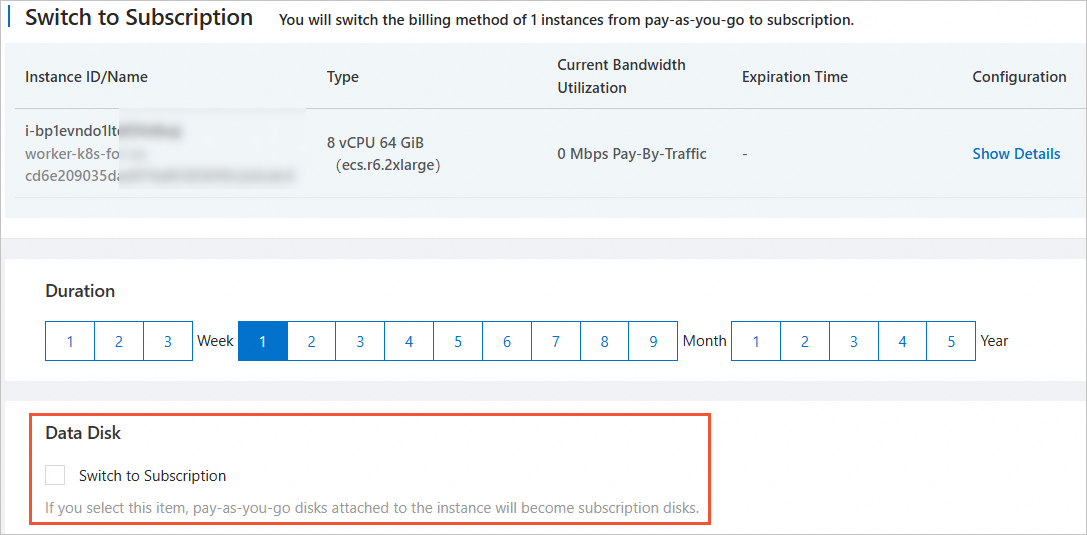
For more information, see Switch ECS from pay-as-you-go to subscription. Important When switching an ECS instance from pay-as-you-go to subscription, do not select Data Disk > Switch to Subscription. Subscription disks do not support containerized application restarts. This may affect your business. For more information, see Why does switching a data disk to subscription prevent applications from restarting?. Node pool The billing method you set for a node pool determines how new ECS instances in that pool are billed. To change it, see Edit a node pool. |
CLB instance | Not supported. |
Other cloud product resources | Refer to the billing documentation for each product, based on your usage. |
Why does switching an ECS instance's cloud disk to subscription prevent applications from restarting?
Subscription billing reserves a fixed compute resource. In containerized environments, resources are frequently restarted or destroyed. Therefore, compute resources cannot remain fixed. In an ACK cluster, if you use a cloud disk as a persistent volume (PV), the disk is attached to the ECS instance as a data disk. You cannot switch this disk to a subscription billing method. If you do, containerized applications cannot be restarted or upgraded.
If you switch an ECS instance in your ACK cluster from pay-as-you-go to subscription, do not select Data disk > Switch to subscription disk.
You can purchase a Storage Capacity Unit (SCU) to reduce cloud disk costs.
Cluster status
How are associated cloud product resources billed when my ACK cluster is deleting (Deleting/Delete_failed) or in an abnormal state (Inactive/Unavailable)?
All cluster versions, including Basic Edition, Pro Edition, and ACK dedicated clusters, continue to incur charges for associated resources, such as ECS and SLB, until those resources are released.
For more information, see Cluster lifecycle and Billing overview.
When does an ACK cluster stop incurring cluster management fees?
Only ACK Managed Cluster Pro Edition incurs cluster management fees. ACK Managed Cluster Basic Edition and ACK dedicated clusters do not incur cluster management fees.
Cluster management fees for ACK Managed Cluster Pro Edition stop accruing when the cluster enters any of the following states:
Initializing (initial)
Creation failed (failed)
Inactive (inactive)
Unavailable (unavailable)
Deleting (deleting)
Delete failed (delete_failed)
Deleted (deleted). The cluster is no longer visible in this state.
For more information, see Cluster lifecycle and Billing overview.
My ACK cluster version has expired. Do I still pay for the cluster?
An expired cluster version does not affect billing. Check your cluster's lifecycle state and associated cloud product usage to confirm whether billing continues. For more information, see Cluster lifecycle and Cloud product resource fees.
Other
Does upgrading an ACK cluster incur extra fees?
Upgrading a cluster does not incur extra fees. No new cloud resources are created during the upgrade. However, if you manually create new cloud resources during the upgrade, you may be charged for them.
My ACK cluster is idle. Can I pause billing?
ACK clusters do not support pausing billing by stopping or hibernating the cluster.
To reduce cloud product resource fees for an idle cluster, you can perform the following actions:
Remove and release idle ECS nodes. For more information, see Remove a node and Release an instance.
Enable economical mode for idle ECS nodes. For more information, see Economical mode.
Review associated cloud product resources. Delete unused resources and disable services that you do not currently need.
ImportantDo not delete the CLB instance associated with your cluster's API Server. This action causes your cluster to become unavailable and unrecoverable.
Why do I get an InvalidInstanceChargeType error when scaling out a subscription cluster?
By default, international site accounts without credit limits cannot create subscription nodes through Auto Scaling or OpenAPI.
Method 1: Change the billing method (recommended)
Update your node pool's Billing Method to Pay-As-You-Go. To change the billing method for existing nodes, go to the ECS console. For instructions, see Switch from subscription to pay-as-you-go.Method 2: Request a credit limit
If your business requires subscription-based Auto Scaling, request a credit limit from Alibaba Cloud. For instructions, see Manage credit limits.Method 3: Check account status and top up
Log on to the Fee Hub to check your account balance. Ensure that your available balance is greater than 0.
If your account is linked to a distributor, verify that the distributor's account is in good standing.
Check your internal messages or your registered email for instructions to complete 3D Secure authentication for your payment method.