ACK Edge clusters let you run large language model (LLM) inference services across both on-premises data centers and the cloud—serving traffic from on-premises GPUs during off-peak hours and bursting to cloud GPU nodes when on-premises capacity runs out. This keeps GPU resources fully utilized and avoids idle capacity in either environment.
How it works
The solution combines three ACK Edge components:
-
ACK Edge cluster manages computing resources across cloud and on-premises data centers from a single control plane.
-
KServe deploys the LLM as an inference service and monitors GPU utilization in real time. When GPU utilization exceeds the scaling threshold, KServe triggers Horizontal Pod Autoscaler (HPA) to scale out pod replicas.
-
ResourcePolicy assigns scheduling priority to on-premises resource pools over cloud pools. Pods run on on-premises GPUs first; only when on-premises GPU capacity is exhausted does cluster-autoscaler provision cloud GPU nodes from the pre-configured elastic node pool.

Traffic flow:
-
Inference requests arrive at the service endpoint.
-
The scheduler places pods on the on-premises resource pool first (higher priority).
-
When on-premises GPU capacity is exhausted, cluster-autoscaler launches cloud GPU nodes from the elastic node pool to host the overflow pods.
Prerequisites
Before you begin, ensure that you have:
After completing the prerequisites, classify the cluster resources into three node pools:
| Node pool | Type | Description | Example name |
|---|---|---|---|
| On-cloud control resource pool | On-cloud | Hosts ACK Edge cluster control components and KServe | default-nodepool |
| On-premises resource pool | Edge/dedicated | On-premises GPU nodes that serve inference traffic during normal load | GPU-V100-Edge |
| On-cloud elastic resource pool | On-cloud | Scales dynamically to handle peak traffic when on-premises GPUs are exhausted | GPU-V100-Elastic |
Deploy LLM inference with burst-to-cloud autoscaling
Step 1: Prepare model data
Upload the model to Object Storage Service (OSS) or File Storage NAS (NAS). For details, see Prepare model data and upload the model data to an OSS bucket.
Step 2: Configure resource scheduling priority
Create a ResourcePolicy to ensure pods are scheduled to on-premises GPUs first. The selector in the ResourcePolicy must match the labels you apply to the inference service pods in the next step.
When you deploy the inference service in Step 3, add the label app: isvc.qwen-predictor to the application pods. This label associates the pods with the scheduling policy defined here.
apiVersion: scheduling.alibabacloud.com/v1alpha1
kind: ResourcePolicy
metadata:
  name: qwen-chat
  namespace: default
spec:
  selector:
    app: isvc.qwen-predictor   # Must match the pod labels set on the inference service
  strategy: prefer             # Prefer higher-priority pools; fall back when capacity runs out
  units:
  - resource: ecs
    nodeSelector:
      alibabacloud.com/nodepool-id: npxxxxxx   # Replace with your on-premises resource pool ID
  - resource: elastic
    nodeSelector:
      alibabacloud.com/nodepool-id: npxxxxxy   # Replace with your on-cloud elastic resource pool ID
For more information, see Configure priority-based resource scheduling.
Step 3: Deploy the inference service
Run the following command on the Arena client to deploy the Qwen model as a KServe inference service.
The command uses GPU utilization (DCGM_CUSTOM_PROCESS_SM_UTIL) as the autoscaling metric. When GPU utilization exceeds 50%, HPA scales out pod replicas up to a maximum of 3.
GPU utilization works well as a scaling metric when inference load correlates tightly with GPU compute usage. If your workload has more variable GPU utilization patterns, consider using request concurrency instead. For details, see Configure HPA.
arena serve kserve \
   --name=qwen-chat \
   --image=kube-ai-registry.cn-shanghai.cr.aliyuncs.com/kube-ai/vllm:0.4.1 \
   --scale-metric=DCGM_CUSTOM_PROCESS_SM_UTIL \
   --scale-target=50 \
   --min-replicas=1 \
   --max-replicas=3 \
   --gpus=1 \
   --cpu=4 \
   --memory=12Gi \
   --data="llm-model:/mnt/models/Qwen" \
   "python3 -m vllm.entrypoints.openai.api_server --port 8080 --trust-remote-code --served-model-name qwen --model /mnt/models/Qwen --gpu-memory-utilization 0.95 --quantization gptq --max-model-len=6144"
Parameter reference:
| Parameter | Required | Description | Example |
|---|---|---|---|
--name |
Yes | Globally unique name for the inference service | qwen-chat |
--image |
Yes | Container image for the inference service. This example uses the vLLM inference framework. | kube-ai-registry.cn-shanghai.cr.aliyuncs.com/kube-ai/vllm:0.4.1 |
--scale-metric |
No | Autoscaling metric. Uses the GPU utilization metric DCGM_CUSTOM_PROCESS_SM_UTIL. |
DCGM_CUSTOM_PROCESS_SM_UTIL |
--scale-target |
No | Scaling threshold. When GPU utilization exceeds this value, HPA scales out pod replicas. | 50 (50%) |
--min-replicas |
No | Minimum number of pod replicas | 1 |
--max-replicas |
No | Maximum number of pod replicas | 3 |
--gpus |
No | Number of GPUs requested per replica. Default: 0. |
1 |
--cpu |
No | Number of vCores requested per replica | 4 |
--memory |
No | Memory requested per replica | 12Gi |
--data |
No | Model volume and mount path. The volume llm-model is mounted to /mnt/models/ in the container. |
"llm-model:/mnt/models/Qwen" |
Step 4: Verify the inference service
Send a test request to confirm the service is running. The Host header value comes from the Ingress that KServe creates automatically.
curl -H "Host: qwen-chat-default.example.com" \
-H "Content-Type: application/json" \
http://xx.xx.xx.xx:80/v1/chat/completions \
-X POST \
-d '{"model": "qwen", "messages": [{"role": "user", "content": "Hello"}], "max_tokens": 512, "temperature": 0.7, "top_p": 0.9, "seed": 10, "stop":["<|endoftext|>", "<|im_end|>", "<|im_start|>"]}'
Step 5: Test burst-to-cloud scaling
Use the hey load testing tool to simulate peak traffic and verify that cloud GPU nodes are provisioned when on-premises capacity runs out.
hey -z 2m -c 5 \
-m POST -host qwen-chat-default.example.com \
-H "Content-Type: application/json" \
-d '{"model": "qwen", "messages": [{"role": "user", "content": "Test"}], "max_tokens": 10, "temperature": 0.7, "top_p": 0.9, "seed": 10}' \
http://xx.xx.xx.xx:80/v1/chat/completions
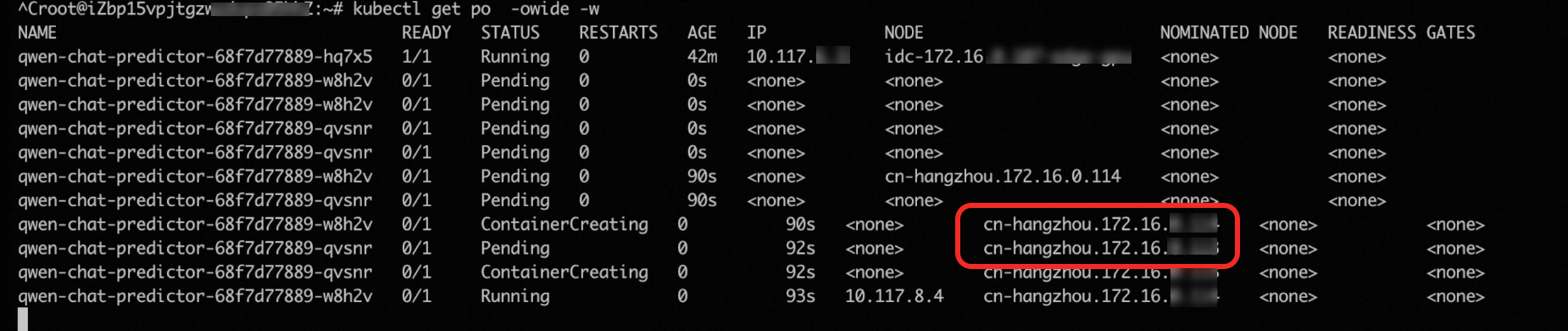
As requests ramp up, GPU utilization exceeds 50% and HPA scales the inference service from 1 to 3 pod replicas.

In this test environment, the on-premises data center has only one GPU. The two new pods cannot be scheduled on-premises and enter the Pending state. cluster-autoscaler detects the unschedulable pods and automatically launches two cloud GPU nodes to host them.