Container Service for Kubernetes (ACK) provides a security policy management feature that enforces admission control rules across your cluster. Built on the Open Policy Agent (OPA) Gatekeeper admission controller, it covers four policy categories — infrastructure, Kubernetes compliance, PSP replacement, and general security hardening — and lets you configure enforcement scope and action directly from the console.
PodSecurityPolicy (PSP) was deprecated in Kubernetes 1.21. ACK's security policy management feature replaces PSP capabilities using Gatekeeper-based policy instances.
Prerequisites
Before you begin, make sure that:
Your cluster runs Kubernetes 1.16 or later. To upgrade, see Manually upgrade an ACK cluster.
If you manage policies as a Resource Access Management (RAM) user, the RAM user has the following permissions: For instructions on creating a custom RAM policy, see Use RAM to grant access permissions to clusters and cloud resources.
Permission Description cs:DescribePoliciesLists the policy rule libraries cs:DescribePolicyDetailsRetrieves policy rule template details cs:DescribePolicyGovernanceInClusterRetrieves policy administration details for a cluster cs:DescribePolicyInstancesLists policy instances deployed in a cluster cs:DescribePolicyInstancesStatusRetrieves the deployment status of policy instances cs:DeployPolicyInstanceDeploys a policy rule instance in a cluster cs:DeletePolicyInstanceDeletes a policy rule instance from a cluster cs:ModifyPolicyInstanceModifies a policy rule instance in a cluster
Limitations
Security policies apply to Linux nodes only.
Custom policy rules are not supported. All rules come from ACK's built-in rule library.
Choose a component type
ACK provides two security policy component types: managed and unmanaged. Only one type can be active in a cluster at a time.
| Managed | Unmanaged | |
|---|---|---|
| Deployment | Hosted on the control plane; fully managed by ACK | Deployed as a workload in the cluster; installed in the kube-system namespace by default |
| Applicable clusters | ACK clusters in Auto Mode running Kubernetes 1.30 or later | ACK managed clusters and ACK dedicated clusters running Kubernetes 1.16 or later |
| Startup parameters | Set to system defaults; cannot be customized | Can be customized |
| Core components | managed-gatekeeper, managed-policy-template-controller | gatekeeper, policy-template-controller, log collection component (logtail-ds or loongcollector) |
| Policy log collection | Logs are sent to a specified Simple Log Service (SLS) project. See Collect logs from control plane components in ACK managed clusters. | A log collection component is installed in the cluster to collect and forward logs to an SLS project |
| Policy rule library | All predefined security policies of ACK | All predefined security policies of ACK, plus the proactive container defense feature from Security Center |
Recommendation: Use the managed component if your cluster runs in Auto Mode (Kubernetes 1.30 or later) and you don't need to customize component startup parameters. Use the unmanaged component if you need startup parameter customization, run ACK managed or dedicated clusters, or want to use Security Center's proactive container defense policies.
On the Add-ons page, managed components are marked with a badge on their cards.
Step 1: Install or upgrade the security policy management component
Log on to the ACK console. In the left navigation pane, click Clusters.
On the Clusters page, find your cluster and click its name. In the left navigation pane, choose Security > Policy Governance.
On the Policy Governance page, follow the prompts to install or upgrade the component.
The following components are installed. They are free of charge but consume pod resources on worker nodes.
| Component | Description |
|---|---|
gatekeeper | A Kubernetes admission controller based on the OPA policy engine. Manages and enforces OPA policies in your cluster, including namespace label management. Only the ACK-provided gatekeeper is supported. If you previously installed gatekeeper from another source, uninstall it first, then install the ACK version. For release notes, see gatekeeper. |
| Log collection component | Collects block and alert events that violate policy constraints. |
policy-template-controller | A Kubernetes controller based on Alibaba Cloud policy templates. Manages policy instances and tracks overall policy administration status across the cluster. |
Step 2: Configure and manage security policies
View policy execution status
Log on to the ACK console. In the left navigation pane, click Clusters.
On the Clusters page, find your cluster and click its name. In the left navigation pane, choose Security > Policy Governance.
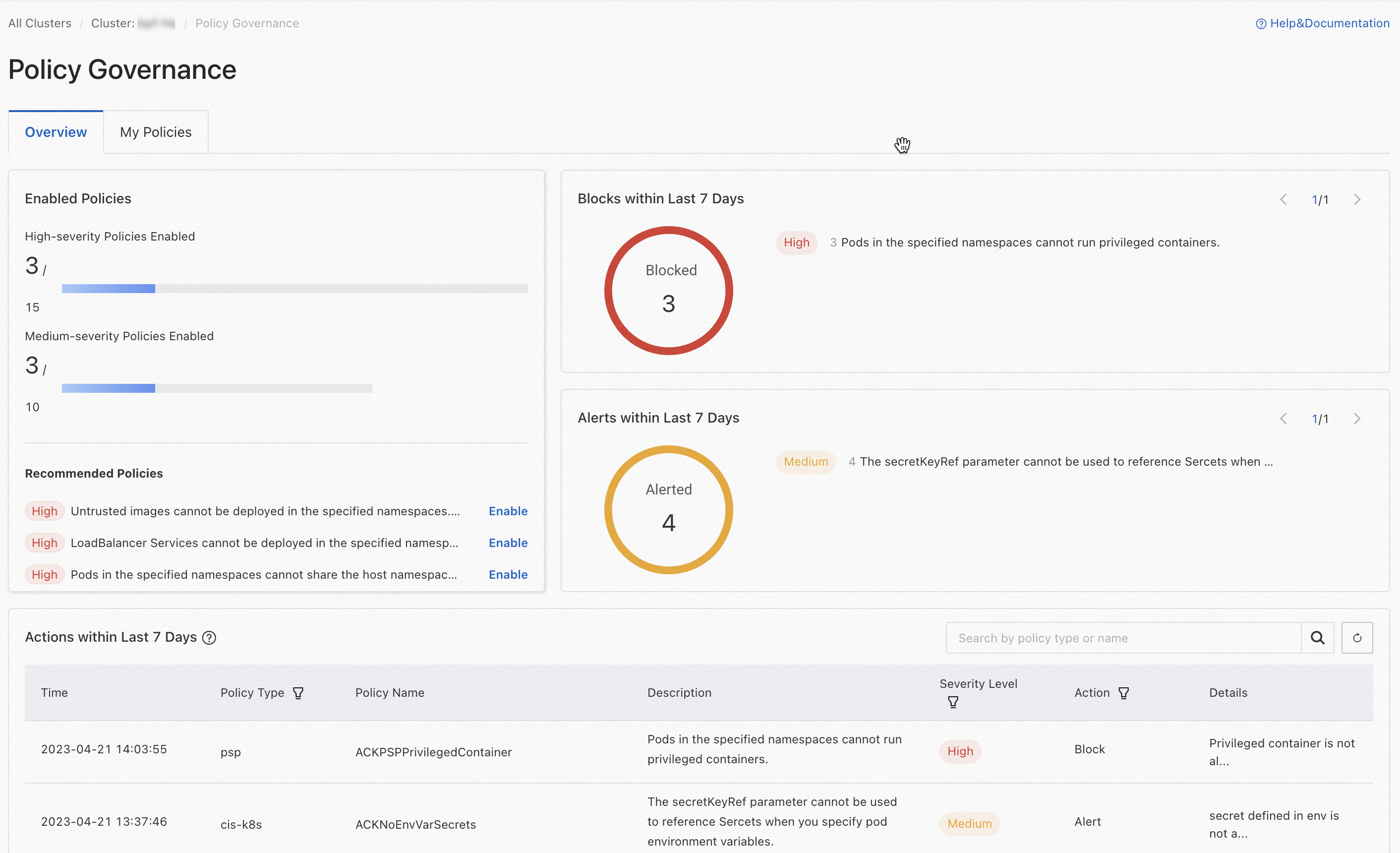
Click the Overview tab to see the current enforcement status of your cluster's security policies:
Policy enablement overview: Shows the total number and the number of enabled high-risk and medium-risk mitigation policies. Also lists recommended policies to enable.
Block and alert statistics: Displays counts for block and alert events over the last 7 days.
Policy implementation records: Lists the 100 most recent block or alert log entries from the last 7 days. To view the full audit history, click the
 icon next to Actions within Last 7 Days, then click the Simple Log Service link to open the logstore.
Create a security policy instance
Log on to the ACK console. In the left navigation pane, click Clusters.
On the Clusters page, find your cluster and click its name. In the left navigation pane, choose Security > Policy Governance.
Click the My Policies tab, then click Create Policy Instance.
Configure the parameters.
Parameter Description Policy type Select a policy category: infra(infrastructure resources),compliance(Kubernetes compliance specifications, such as Alibaba Cloud security hardening for Kubernetes),psp(PSP replacement policies), ork8s-general(general security hardening for Kubernetes resource configurations). For the full policy library, see Predefined security policies of ACK.Policy name Select a policy template from the drop-down list based on your selected policy type. Action Select the enforcement action. See the enforcement actions table below. Applicable scope Select the namespaces where the policy instance is enforced. Parameters If a parameter template appears, fill in the required values in the specified format. If the field is blank, no parameters are required. Enforcement actions:
Action Effect on violations Block Deployments that violate the policy are rejected. Alerting Deployments are allowed, but alert logs are generated for auditing. Tip: Start with Alerting to understand your cluster's current compliance posture before switching to Block. This lets you identify workloads that would be affected without disrupting running deployments.
View and manage existing policy instances
Log on to the ACK console. In the left navigation pane, click Clusters.
On the Clusters page, find your cluster and click its name. In the left navigation pane, choose Security > Policy Governance.
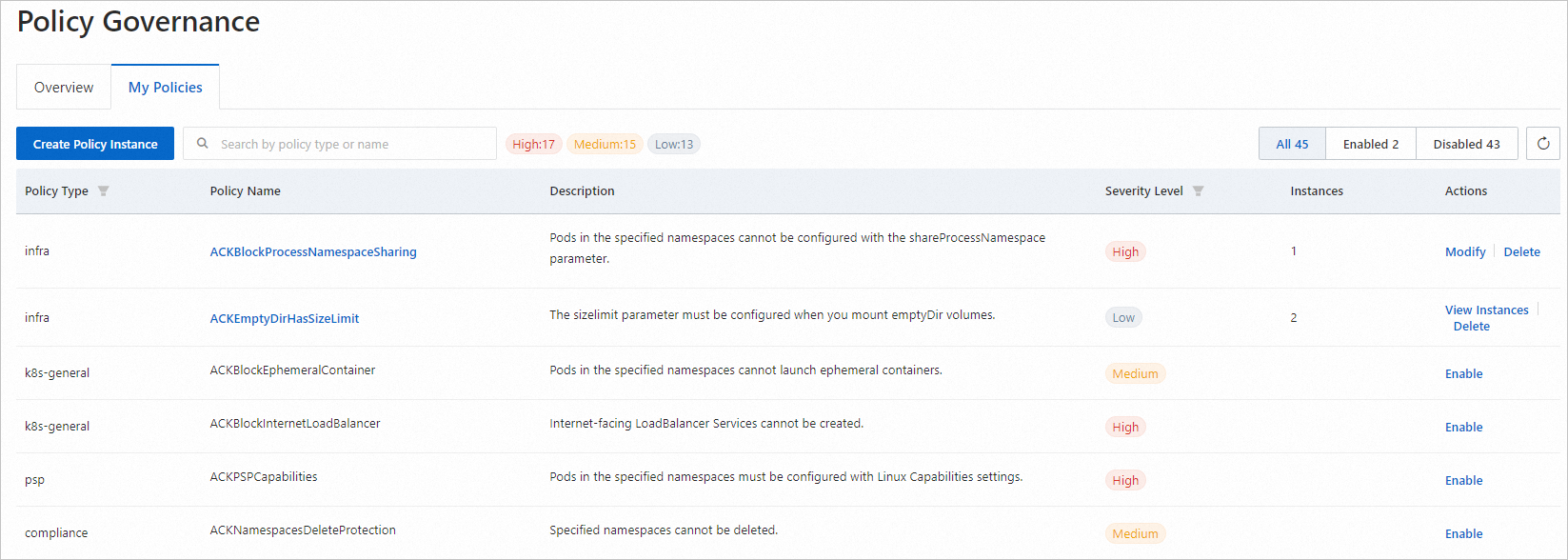
Click the My Policies tab to see all deployable policies in the cluster.
Filter and sort the policy list using the controls in the upper-right corner. Enabled policies appear at the top.
The number shown under a policy name indicates how many instances of that policy are deployed.
If a policy shows no instances, it is not yet deployed. Click Enable in the Actions column to configure and deploy it.
To manage an existing policy instance:
Modify: Click Modify in the Actions column. If multiple instances of the policy exist, click View Instances first, then click Modify on the specific instance.
Delete: Click Delete in the Actions column to remove all instances of the policy from the cluster.
For policy descriptions and parameter templates, see Predefined security policies of ACK.
Enable deletion protection for namespaces and services
After enabling security policy management, you can protect critical namespaces and services from accidental deletion. Once deletion protection is on, the resource can only be deleted after you manually turn it off.
Enable deletion protection for a namespace:
Log on to the ACK console. In the left navigation pane, click Clusters.
On the Clusters page, find your cluster and click its name. In the left navigation pane, click Namespaces and Quotas.
In the namespace list, find the target namespace. In the Actions column, click Edit, then enable deletion protection as prompted.
Enable deletion protection for a service:
Log on to the ACK console. In the left navigation pane, click Clusters.
On the Clusters page, find your cluster and click its name. In the left navigation pane, choose Network > Services.
In the service list, find the target service. In the Actions column, click the
 icon, then click Enable Deletion Protection and follow the prompts.
What's next
Run a security inspection on your cluster workloads to identify configuration risks. See Configure inspection to check cluster workloads.