To comply with local laws and regulations, you must complete identity verification for your Alibaba Cloud account if you plan to purchase or use cloud products and services deployed in the Chinese mainland. This guide explains the individual identity verification process. An account that passes individual identity verification is owned by the verified individual.
Individual identity verification process
Individual identity verification involves two steps: information submission and manual review. The review typically takes about 3 business days, and you will be notified of the result by email.
The account type cannot be changed after verification is complete. Before you start, confirm whether you need to complete enterprise identity verification. For a comparison, see Identity verification overview.
Before you begin
Before you start, ensure your Account Type is set to Personal. You will need a valid, government-issued ID from the same Country/Region registered to your account. Prepare a clear, complete, color scan or digital photo of the document. You can check your Account Type and Country/Region in the Basic Information section of the Account Center. For instructions, see Modify basic account information.
Your ID document must be issued by the government of the country or region where your Alibaba Cloud account is registered. IDs issued by a different country are not accepted, even if you legally hold them. For example, if your account is registered in Malaysia, you must provide a Malaysian-issued Passport or Driver's License. A Chinese passport cannot be used to verify an account registered in a non-Chinese region.
Overseas students: If your account is registered in your country of study, you must provide a valid ID issued by that country. If your account is still registered in China, you can use a Chinese passport for verification.
Alibaba Cloud accepts only the following two types of personal documents. No other document types are accepted (for example, national ID cards such as Brazil's RG card, or residence permits), and there are no alternative verification methods:
Passport
Driver's License
This guide is for individual users of Alibaba Cloud International (alibabacloud.com). If you only have a Chinese mainland resident ID card, please register and make purchases on Alibaba Cloud China (aliyun.com).
Tips for a successful submission
Dos:
File format: JPG, JPEG, PNG, or PDF.
File size: You can upload up to two files, each not exceeding 5 MB. The document must occupy at least 40% of the image area.
Ensure the photo is clear, with all four corners of the document visible. The text must be legible, with no glare or shadows. Upload a front-facing image of the document; do not rotate it by 90 or 180 degrees.
Do not submit screenshots, photocopies, or edited images.
Double-check that all entered information exactly matches your document before you submit.
Don'ts:
Do not upload a document that does not belong to you.
Do not alter or forge document information.
Do not submit an expired or invalid document.
Submit verification information
Log in to the Alibaba Cloud Account Center and navigate to the Identity Verification page. In the Verify Your Identity - Individual Account section, click Verify Now.
Submit the following required information:
|
|
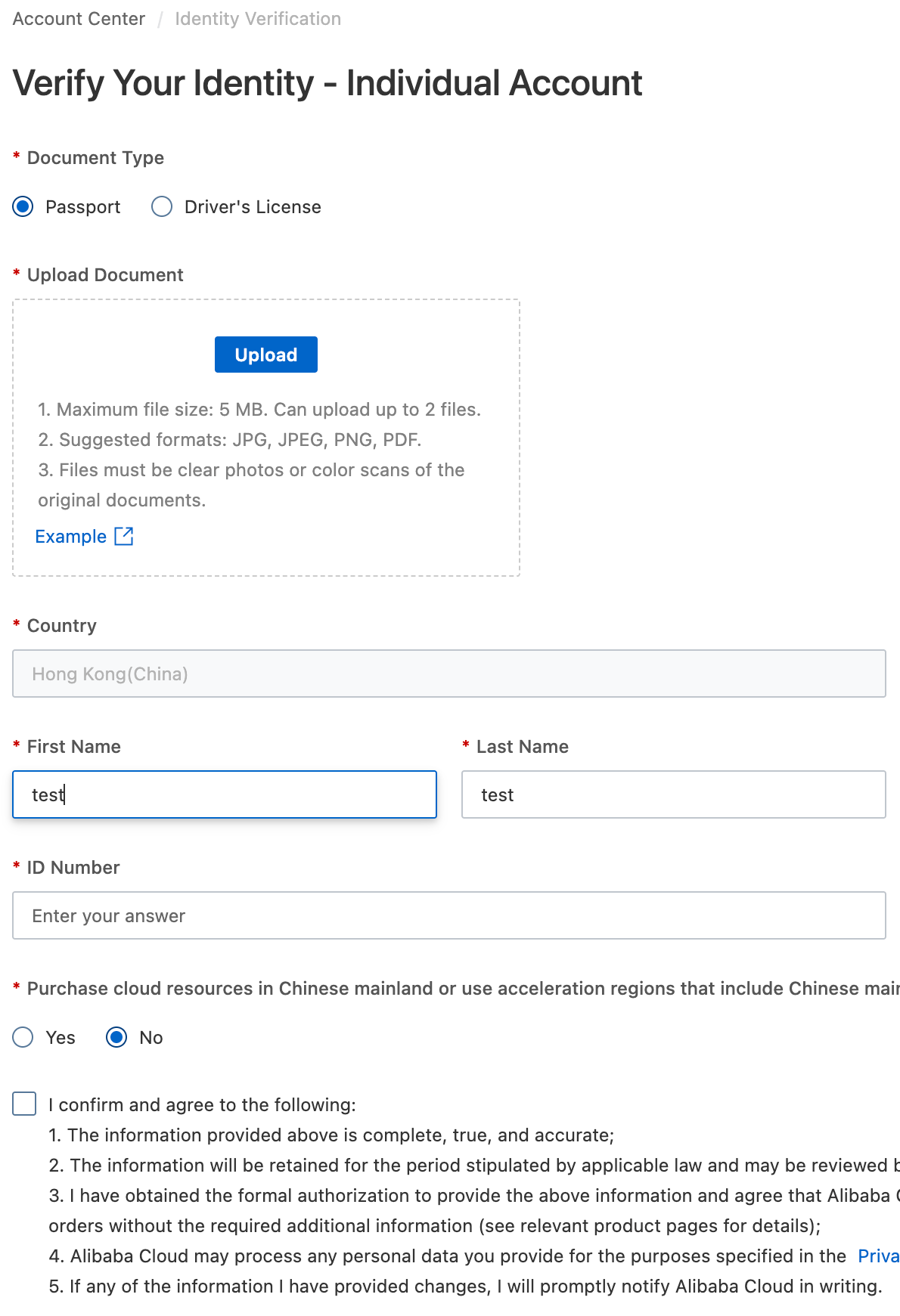
The name and ID number you enter must exactly match the information on your document, including capitalization, spacing, and punctuation. Any discrepancy, however minor, may cause your application to be rejected. If you receive an error indicating that your name or ID number does not match your document, carefully check your document and resubmit your application with the corrected information.
Verification status
After you submit your information, your application enters manual review. You can check the verification progress and current status at any time by logging in to Account Center and navigating to the Identity Verification page:
Under Review: Your application has been submitted and is being processed. The review typically takes about 3 business days.
Verification Successful: Your identity information has been verified. You can now purchase eligible products and services.
Failed: Your application was not approved. Check the reason provided on the page, correct your information, and resubmit.
If you do not receive a response within 3 business days, check your spam or junk mail folder. If you still cannot find the email, contact technical support.
If you have questions about a Failed result or believe there was an error, contact technical support.
FAQ
Serving mainland China users without verification
Q: If I cannot complete identity verification, how can I serve users in the Chinese mainland?
A: We recommend using the China (Hong Kong) region. This region:
Does not require identity verification.
Provides a low-latency access experience for users in the Chinese mainland.
Purchasing mainland China resources after verification
Q: After my account is successfully verified, what should I do if I later decide I need to purchase resources in the Chinese mainland?
A: You can update your purchasing intentions at any time:
Go to the Identity Verification results page and ensure your status is Verification Successful.
In the section for Purchase cloud resources in the Chinese mainland or use acceleration regions that include it, read and accept the terms, then click Confirm.
The system will automatically start a separate compliance review for accessing resources in the Chinese mainland.