You can enable the auto-renewal feature to eliminate the need for manual renewal and prevent service interruptions caused by overdue payments.
Subscription instances have expiration dates. If a subscription instance expires, your services may be interrupted or your data may be lost. For more information, see Impacts of overdue payments or expiration.
Pay-as-you-go and Serverless instances do not expire. You do not need to renew them.
Precautions
Auto-renewal: The first automatic payment is deducted at 08:00, three days before the instance expires. If the payment fails, the system retries the payment once per day until the instance expires or the payment is successful.
ImportantEnsure that your Alibaba Cloud account has a sufficient balance to prevent renewal failures. If the automatic renewal fails, you must manually renew the instance as soon as possible to prevent service interruptions and data loss.
If you manually renew an instance before the automatic payment date, the system automatically renews the instance before its next expiration date.
The auto-renewal feature takes effect on the following day. If you enable auto-renewal for an instance that expires on the following day, you must still manually renew the instance to prevent service interruptions.
Enable auto-renewal when you purchase an instance
When you purchase a subscription instance, you can select Enable Auto-renewal. If your subscription is monthly, the auto-renewal cycle is one month. If your subscription is yearly, the auto-renewal cycle is one year. For example, if you purchase an instance for six months and select Auto-renewal, the instance automatically renews for one month upon expiration.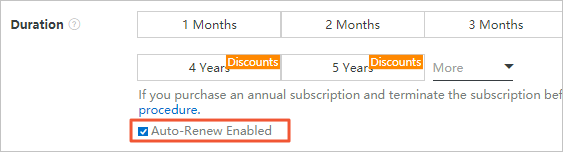
Enable auto-renewal after you purchase an instance
Log on to the RDS console.
In the upper-right corner of the RDS console, hover over Expenses and click Renewal Management to go to the Renewal page.

On the Manual Renewal or Nonrenewal upon Expiration tab, find the target instance using the search and filter features. You can enable auto-renewal for a single instance or for multiple instances in a batch.
Individual activation
To the right of the instance, click Enable Auto-renewal.
In the dialog box that appears, select an Auto-renewal Period and click Enable Auto-renewal.
NoteAfter you enable auto-renewal, the system automatically renews the instance based on the specified auto-renewal cycle. For example, if you select an auto-renewal cycle of three months, you are charged for three months at each auto-renewal.
Batch Activation
Select the target instances and click Enable Auto-renewal at the bottom of the page.
In the dialog box that appears, select an Auto-renewal Period and click Enable Auto-renewal.
Modify the auto-renewal cycle
Log on to the RDS console.
In the upper-right corner of the RDS console, hover over Expenses and click Renewal Management to go to the Renewal page.
On the Auto-renewal tab, find the target instance using the search and filter features. Then, to the right of the instance, click Modify Auto-renewal Settings.
In the dialog box that appears, modify the uniformed auto-renewal cycle and click OK.
Disable auto-renewal
Log on to the RDS console.
In the upper-right corner of the RDS console, hover over Expenses and click Renewal Management to go to the Renewal page.
On the Auto Renewal tab, find the target instance using the search and filter features. Then, to the right of the instance, click Nonrenewal or click
 > Enable Manual Renewal.
In the dialog box that appears, click OK.
Related API operations
API | Description |
Creates a database instance. Note You can enable auto-renewal when you create an instance. | |
Renews a subscription instance. Note You can enable or disable auto-renewal when you renew an instance. |