Elastic Container Instance (ECI) provides the container runtime environment for pods in Kubernetes, while Kubernetes provides capabilities such as service dependencies, load balancing, elastic scaling, and periodic scheduling. This topic describes how Container Service for Kubernetes (ACK) integrates with ECI to use ECI as the compute resource for pods.
Integration methods
ECI provides a hierarchical solution for Kubernetes: ECI handles the scheduling and management of pod container resources at the infrastructure layer, while Kubernetes acts as the PaaS layer on top of ECI to manage business workloads such as Deployments, Services, StatefulSets, and CronJobs.
Based on Virtual Kubelet (VK) from the Kubernetes community, ECI can be added to a Kubernetes cluster as a virtual node. The cluster then scales elastically without being constrained by the compute capacity of the cluster nodes. ECI manages the underlying pod infrastructure: it prepares the resources that pods require and starts the pod instances. Therefore, you do not need to monitor the resources of the underlying virtual machines. ECI ensures that the resources required by pods are always available. The cluster side still determines which pods run on ECI, based on your scheduling configuration.
Pods that run on ECI use a secure, isolated container runtime environment. Each pod corresponds to one ECI instance.
The following Kubernetes capabilities are supported when you run pods on ECI:
Workload controllers — Common controllers such as Deployment, ReplicaSet, Job, CronJob, and StatefulSet are supported and can be run directly.
Service discovery — PrivateZone is supported for service discovery.
Load balancing — Load balancing is supported. Configure a Service of the
LoadBalancertype.
ECI is integrated with Alibaba Cloud ACK. The following table describes the cluster types that can run pods on ECI and when to choose each one.
Cluster type | When to choose it | Virtual node requirement |
ACK Serverless cluster (Recommended) | You want a Kubernetes environment that runs entirely on ECI, for online and offline services, simulation environments, or development and testing environments. | None. You create ECI pods directly. |
ACK cluster (hybrid ECI and ECS) | You already have an ACK cluster and want to add ECI pods on demand, such as for the burst traffic of long-running workloads. | Deploy a virtual node based on VK. |
Self-managed Kubernetes cluster | Your Kubernetes cluster runs on Alibaba Cloud ECS or in an on-premises data center. | Deploy a virtual node based on VNode. |
ACK Serverless cluster (fully based on ECI)
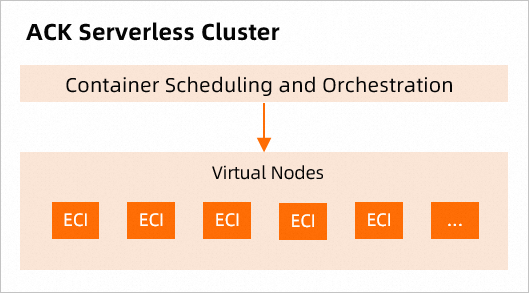
An ACK Serverless cluster provides a Kubernetes environment that runs entirely on ECI. All pods run on ECI, and Kubernetes is responsible only for managing business workloads.
(Recommended) If you are evaluating Kubernetes cluster types, select an ACK Serverless cluster for your online and offline services, simulation environments, and development and testing environments.
Cost-effective — You do not need to purchase nodes, perform node maintenance, or plan cluster capacity. Deploy containerized applications directly and pay only for the CPU and memory resources configured for your applications.
No infrastructure maintenance — Manage containerized applications directly by using the Kubernetes API or the command line. An ACK Serverless cluster also integrates with various Alibaba Cloud services to simplify Kubernetes development, so you can focus on building applications rather than managing infrastructure.
In an ACK Serverless cluster, you do not need to manually deploy virtual nodes. Create ECI pods directly. For more information, see ACK Serverless overview.
The following figure shows a cluster in which every pod runs on ECI.
ACK cluster (hybrid ECI and ECS)
ACK is among the first platforms in the world to pass Kubernetes conformance certification, and provides high-performance containerized application management services that integrate the virtualization, storage, networking, and security capabilities of Alibaba Cloud to simplify cluster creation and scaling.
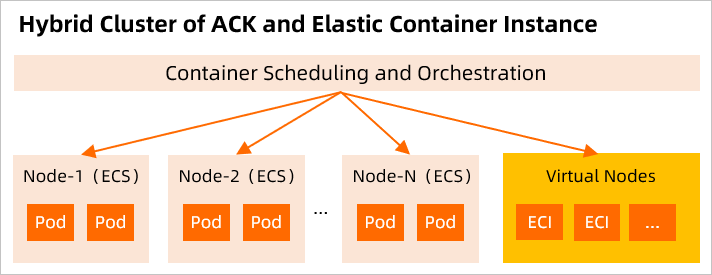
If you already have an ACK cluster, deploy a virtual node based on VK to use ECI. Then create ECI pods on demand to scale the cluster without planning node compute capacity. ECI pods can communicate with pods on real nodes in the cluster.
Scheduling burst traffic to ECI shortens scale-out time, reduces scaling costs, and makes full use of existing resources. When traffic decreases, you can quickly release the pods deployed on ECI to reduce costs.
For more information, see ACK product overview.
The following figure shows an ACK cluster in which pods run on both ECI and Elastic Compute Service (ECS) nodes.
Self-managed Kubernetes cluster
If you have a self-managed Kubernetes cluster on Alibaba Cloud ECS or in an on-premises data center, you must deploy a virtual node based on VNode to use ECI. For more information, see Integrate a self-managed Kubernetes cluster with ECI.
Limits and considerations
Because of public cloud security constraints and the inherent limitations of virtual nodes, ECI does not support some Kubernetes features, such as HostPath and DaemonSet, as described in the following table.
| Unsupported feature | Description | Recommended alternative |
|---|---|---|
| HostPath | Mounts files from the host into a container | Use emptyDir volumes, cloud disks, or File Storage NAS (NAS) |
| HostNetwork | A pod directly uses the network namespace of the host. The container port is the same as the host port. | Create a LoadBalancer Service |
| DaemonSet | Ensures that one pod replica runs on each node | Deploy multiple images in a pod by using sidecar containers |
| NodePort Service | Maps a host port to a container | Create a LoadBalancer Service |
Some of the following items must be decided before you create a cluster. When you use ECI with ACK, note the following:
Container images — Upload your container images to an image repository in advance for faster image pulling. As a best practice, use Alibaba Cloud Container Registry (ACR) and use the VPC endpoint address for the image repository, for example,
registry-vpc.xxx.Service discovery — (Recommended) Enable PrivateZone when you create a cluster.
Add-on version — To use new ECI-related features, you must upgrade the
ack-virtual-nodeadd-on of your ACK cluster.For information about
ack-virtual-nodecomponent versions, seeack-virtual-nodecomponent.For information about how to upgrade the component, see Manage components.
Workflow
ACK Serverless cluster
Create an ACK Serverless cluster. For instructions, see Create a cluster.
Prepare a container image and upload it to an image repository, as described in the Limits and considerations section of this topic.
Create an ECI pod. For instructions, see Create an ECI pod.
View the running status of the ECI instances that back your pods. For details, see the View and manage ECI instances section of this topic.
ACK cluster
Create an ACK cluster. For instructions, see Create a managed ACK cluster.
Deploy the
ack-virtual-nodeadd-on to create a virtual node. For instructions, see Deploy the ACK virtual node component.Prepare a container image and upload it to an image repository, as described in the Limits and considerations section of this topic.
Configure a scheduling method so that your pods run on ECI instead of the ECS nodes of the cluster. For details, see the Schedule pods to ECI section of this topic.
Create an ECI pod. For instructions, see Create an ECI pod.
View the running status of the ECI instances that back your pods. For details, see the View and manage ECI instances section of this topic.
Schedule pods to ECI
For an ACK Serverless cluster, the entire cluster runs on ECI and no specific scheduling is required. For a hybrid ACK cluster that uses both ECI and ECS nodes, you can schedule pods to run on ECI by using the following methods: schedule individual workloads manually, or schedule pods automatically by namespace or pod label.
Manually schedule pods to ECI
Manually schedule pods to run on ECI on a specified virtual node by configuring pod labels, adding a nodeSelector, or configuring topologySpreadConstraints. Choose the topic that matches the architecture of your virtual node:
(Preview by invitation) Schedule pods to a Windows virtual node
To distribute ECI pods across zones or apply affinity rules, see Spread ECI pods across zones or configure affinity.
Automatically schedule pods to ECI
eci-profile provides the ECI Scheduler capability, a new scheduling mechanism based on the mutating webhook. In the eci-profile configuration file, you can specify the namespaces or pod labels to match. Pods with matching labels are automatically scheduled to ECI. For details, see Configure an eci-profile.
Use ECI features
When you create pods on ECI in a Kubernetes cluster, you can add annotations to pod-level metadata to use ECI features without changing Kubernetes semantics. For a list of supported annotations and configuration examples, see ECI pod annotations.
Add annotations manually when you create a pod, or configure eci-profile to add annotations automatically to pods with matching labels. For more information about eci-profile, see the Schedule pods to ECI section of this topic.
View and manage ECI instances
Manage your Kubernetes cluster and monitor the running status of ECI instances by using the following tools. These tools apply to both ACK Serverless cluster and ACK clusters that use a virtual node.
Elastic Container Instance console
To view the running status of ECI instances in the Elastic Container Instance console, perform the following steps:
Log on to the Elastic Container Instance console.
In the top navigation bar, select a region.
On the Container Group page, view the ECI instances created in the selected region.
ACK console
Use the ACK console to manage ACK Serverless cluster or ACK clusters and view the running status of ECI instances. Perform the following steps to view ECI instances:
Log on to the ACK console.
In the top navigation bar, select a region.
In the left-side navigation pane, click Clusters.
On the Clusters page, find the target cluster and click the cluster ID to go to the details page.
In the left-side navigation pane, choose Workloads > Pods.
On the Pods page, select a namespace to view the ECI instances in that namespace.
Alibaba Cloud CloudShell
Use Alibaba Cloud CloudShell to access your Kubernetes cluster and use kubectl commands to manage the cluster. For instructions, see Use kubectl to connect to a cluster in Workbench or CloudShell.
kubectl client
Use a local kubectl client to access a remote Kubernetes cluster and use kubectl commands to manage the cluster. For instructions, see Connect to a Kubernetes cluster by using kubectl.