If you no longer need an Alibaba Cloud account—for example, because a project has ended, a company has closed, or for other business reasons—you can permanently delete the account by following the instructions in this topic.
After an account is successfully closed, the action is **permanent**. All data, resources, information, and assets associated with the account are completely deleted and **cannot be recovered by any means**. You will also no longer be able to log on to any Alibaba Cloud service using this account.
Process and timeline
Account closure is a multi-stage process that includes manual user preparation, automatic system checks, and a final cool-down period.
Preparations before closure: This user-led stage is the most critical step. Complete all financial settlements, data backups, resource releases, and dependency removals before initiating closure. The completeness of these preparations directly affects whether subsequent steps proceed smoothly.
Initiate the closure process: After you submit a closure request in the console, the system performs a comprehensive automated scan to verify that all closure conditions are met.
Enter the cool-down period: The cool-down period is an irreversible waiting period. Its main purpose is to accommodate billing system delays, ensuring that any final fees incurred after you submit the closure request are correctly settled. This prevents closure failures caused by unexpected overdue payments.
Confirm closure result: After the cool-down period ends, the account is permanently deleted. If issues are detected during this phase, the account is restored to an active state, and you receive a notification prompting you to restart the process.
The total time required to complete closure depends on whether workloads are still deployed in the account.
Accounts without workloads: You can initiate the closure process within a few minutes, followed by a cool-down period of several days.
Accounts with workloads: You should allow 2 to 5 business days to complete preparations such as resource backup and migration, then initiate the closure process, followed by a cool-down period of several days.
Note that if the account has associated domain names or ICP filings, an additional 7 to 15 business days are required to handle domain name transfers and ICP filing cancellations.
The cool-down period primarily accommodates billing system delays, so it is irreversible and cannot be shortened. Please wait patiently.
After entering the cool-down period, unsubscribed resources and released balances cannot be recovered. Proceed with caution.
Step 1: Preparations before closure
During this stage, manually clear all items that may block the closure process and back up critical data.
Account check recommendations before closure
Financial settlement
Settle overdue payments: Go to Fee Hub. Check and pay all issued bills and outstanding fees. Handle outstanding invoices—orders or bills for which invoices have been issued, but refunds were generated after unsubscription or downgrade, resulting in the actual consumption amount being less than the original invoiced amount.
If the account has a balance, you **cannot withdraw** it after closure. The system supports abandoning only small balances (1,000 USD or other local settlement currencies or less) or small overdue payments (10 USD or other local settlement currencies or less), which are canceled along with the account.
Data and credential backup (as needed)
Financial credentials: Batch export all historical bills, orders, and invoices from Fee Hub for audit purposes.
Business data: Back up all important business data, such as files in OSS, ApsaraDB RDS Database Backup, and ECS snapshots.
Configurations and logs: Export critical configuration information and operation logs.
Resource and dependency cleanup
Release resources: Ensure that all pay-as-you-go resources are fully released and all subscription resources have expired or been unsubscribed. Go to the console of the corresponding product to perform these operations.
Handle domain names and ICP filings
Domain names: Transfer all domain names under the account to another account or service provider.
ICP filings: Log on to the ICP filing system. Complete the cancellation of website ICP filings or transfer the ICP filing entity to another account.
Handle multi-account relationships: If the account is part of a multi-account system, you must first remove the relationship.
Multi-account type
Administrator
Member account
Resource directory
You cannot close the account directly. First, close the resource directory, then proceed with the closure.
Use the management account to remove the current member from the resource directory, then proceed with the closure. For more information, see Delete a resource account type member.
Finance trusteeship
You cannot close the account directly. First, remove all member accounts, then initiate the closure. For more information, see Associate and disassociate finance trusteeship.
See this topic.
If the account has a partnership with an Alibaba Cloud partner (reseller), contact the partner to cancel the partnership before closing the account.
Step 2: Initiate the closure process
You must log on to your Alibaba Cloud account to initiate account closure. Resource Access Management (RAM) users cannot close accounts.
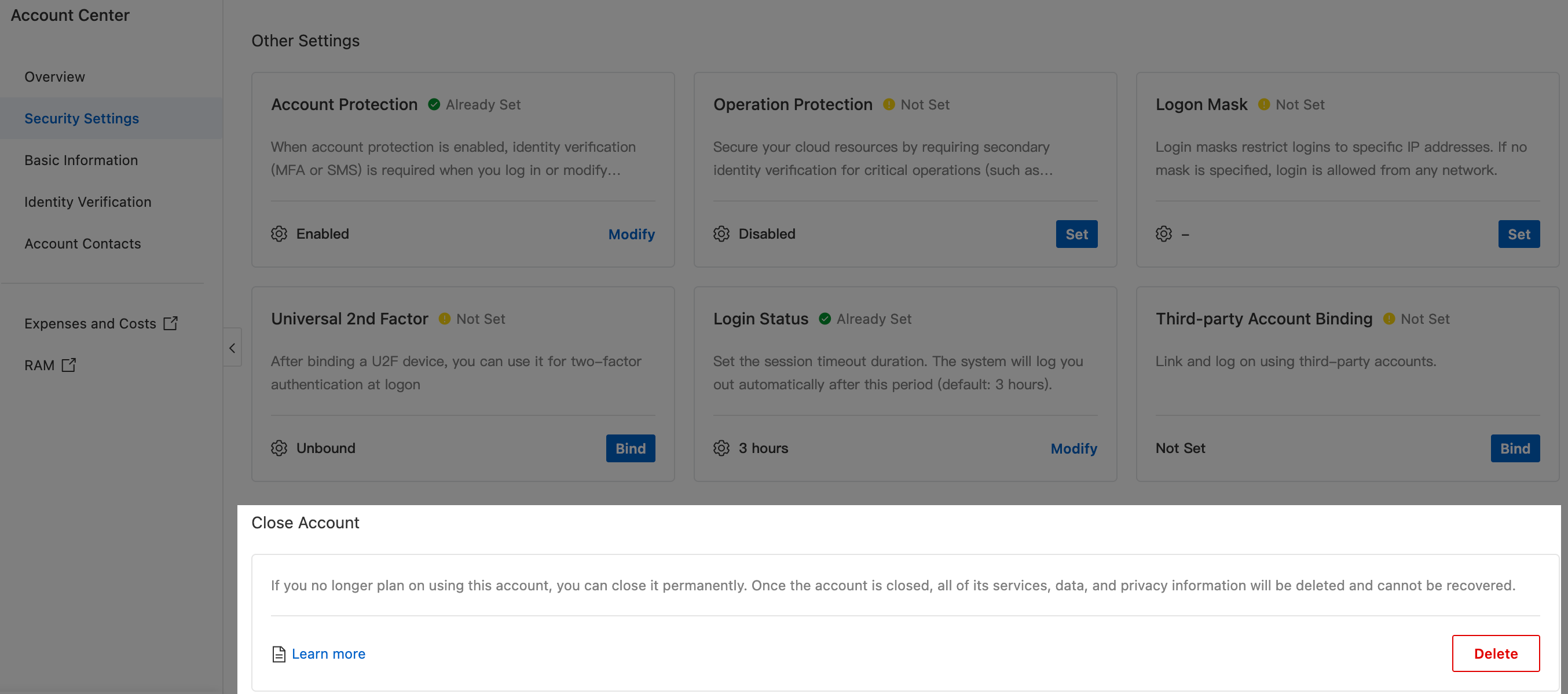
Log on to Account Center. Go to the Security Settings page. Next to Close Account, click Start deleting account. In the Identity Verification dialog box, complete account identity verification by email or text message.
Carefully read the pop-up **Alibaba Cloud Account Closure Agreement**. After confirming it is correct, select **Agree**, and click Next.
System check and processing: The system automatically scans the resources and financial status under the account. This process may take 3 to 5 minutes.
Check passed
After the system check passes, you are prompted that you can close the account. Click Confirm Closure in the lower-left corner to proceed to the final step.

Blocking items found during check
The system lists all pending resources, categorized as follows:

Manual handling required: Such as unexpired domain names, unsettled bills, and some cloud resource instances that cannot be abandoned. Click Go to Handle on the right of the corresponding item. After completing the operations as instructed, return to this page and click Recheck.
Can be abandoned: Such as small balances and cloud service instances that can be directly released. First, select all abandonable resources, then click Abandon/Release Selected Resources. In the pop-up risk prompt, confirm and agree.

ImportantNote that after submitting the closure, unsubscribed resources and released balances cannot be recovered. Proceed with caution.
After all items are processed and pass the check, in the **Confirm Closure** dialog box, select a closure reason and click Confirm Closure.
ImportantAfter confirming the closure, the system automatically executes the closure process. You cannot terminate it yourself. During this period, do not perform any operations with this account to avoid closure failure. After closure, all your resources in Alibaba Cloud are cleared and cannot be recovered. Proceed with caution.
Step 3: Enter the cool-down period
After confirming the closure, the account enters the irreversible **closure cool-down period** in about 5 minutes and automatically logs off. At the same time, the system creates a service-linked role named
AliyunServiceRoleForAccountDeletionto assist with resource cleanup. This role is cleaned up along with the account closure. You do not need to monitor or manage it.
During the cool-down period, you can log on to the Alibaba Cloud official website to check the remaining time before your account is unregistered, but you cannot perform any other operations or revoke the unregistration request.

After entering the cool-down period, unsubscribed resources and released balances cannot be recovered. Proceed with caution.
Step 4: Confirm closure result
After the cool-down period ends, you receive text message and email notifications indicating whether the closure was successful or failed.
Closure successful: The account and all data are permanently deleted.
Closure failed: This usually occurs because of billing delays, where new overdue payments are incurred during the cool-down period. In this case, the closure process is aborted, and the account is restored to a normal state. You must log on again, settle the overdue payments, and restart the entire closure process.
Impacts after account closure
Cannot log on: After an Alibaba Cloud account is closed, you cannot log on to the Alibaba Cloud website. To continue using Alibaba Cloud products, re-register for an Alibaba Cloud account.
Resources and information cannot be recovered: After an account is closed, resource instances, services, funds, bills, and invoices under that account **cannot be recovered**.
Third-party accounts are not affected: Closing an Alibaba Cloud account does not affect the use of other accounts, but the association with your bound third-party accounts is automatically removed.
FAQ
Why is there still a cool-down period after all resources are cleared?
Answer: Although the resources of the account to be closed have been released, some product usage data and billing records have delays. Bills may still need to be generated, so closure is only possible after the cool-down period.
Can I revoke a closure request during the cool-down period?
Answer: No. Once the cool-down period begins, the closure process is irreversible. You must wait for it to end.