If you encounter network connectivity issues after you configure an IPsec-VPN connection, refer to this document for troubleshooting.
1. Quick checklist (5-minute check)
Before you analyze logs, complete the following checklist to rule out common configuration errors. Many issues can be resolved at this stage.
Network connectivity: Can your on-premises gateway device
pingthe public IP address of the Alibaba Cloud VPN gateway?Action: On your on-premises gateway device, run the
ping <VPN gateway public IP>command. If it fails, check your internet connection and any intermediate firewalls.
Firewalls and security policies: Are the required ports open?
Action: Make sure that the firewall and access control policies on your on-premises gateway device (and Alibaba Cloud security groups, if applicable) allow both inbound and outbound traffic on UDP port 500 and UDP port 4500 (for NAT traversal).
Pre-shared key consistency: Are the pre-shared keys on both ends identical?
Action: Carefully check the pre-shared key in the IPsec-VPN connection configuration and on your on-premises gateway device. When you copy and paste, watch out for hidden spaces.
Customer gateway IP address: Is the IP address correct, especially if the on-premises gateway device is behind a NAT device?
Action: In the Alibaba Cloud Management Console, check the IP address of the customer gateway associated with the IPsec-VPN connection.
If the on-premises gateway device has a public IP address, this value must be that public IP address.
If the on-premises gateway device is behind a NAT device, this value must be the public IP address of the NAT device. An incorrect IP address is a common cause of the "no response from peer" error.
Route configuration: Do the routes point to the VPN?
Action:
Alibaba Cloud side: Check the VPC route table to make sure that traffic destined for the data center's CIDR block is routed to the VPN gateway.
Data center side: Check your on-premises router to make sure that traffic destined for the VPC's CIDR block is routed to the IPsec tunnel.
2. View error information
If the quick checklist does not resolve the issue, you can view the specific error codes or log information to identify the problem.
2.1 View error codes
Error codes provide direct clues for troubleshooting.
To retrieve the latest error status, you can trigger a new negotiation. A simple way to do this is to modify the IPsec-VPN connection, toggle the value of Effective Immediately, save the change, and then change it back.
VPN gateways created before March 21, 2019 must be upgraded before you can view error codes.
Console
View the error code in the Connection Status column of the target tunnel.
For single-tunnel mode: View the error code in the Connection Status column of the target IPsec-VPN connection.
API
Call the DiagnoseVpnConnections operation to retrieve the error code.
2.2 View logs
For a more detailed analysis, especially when no error code is displayed, you can view up to 180 days of IPsec-VPN logs. You can filter the logs by a specific time range (minimum 10 minutes).
Console
In the Actions column of the target tunnel, click View Logs.
For single-tunnel mode: In the Actions column of the target IPsec-VPN connection, click View Logs.
API
Call the Query the logs of an IPsec-VPN connection operation to retrieve the logs.
3. Find a solution for your scenario
Find your specific issue in the following categories and refer to the corresponding solution.
a. Phase 1 negotiation failed or timed out
This is the most common issue. It means the Alibaba Cloud VPN gateway sent a negotiation request but did not receive a response from the on-premises gateway device.
Possible cause | Troubleshooting method |
1. Network connectivity issues | Check: On the on-premises gateway device, run the Solution: If packets are lost, a network issue exists between your data center and Alibaba Cloud. Check your internet connection, Internet Service Provider (ISP), and any intermediate firewalls. VPN Gateway does not support cross-border IPsec-VPN connections. To create a cross-border connection, use Cloud Enterprise Network (CEN). |
2. Incorrect customer gateway IP address | Check: In the Alibaba Cloud Management Console, confirm the IP address of the customer gateway. Solution: This IP address must be the public IP address that the on-premises gateway device uses to connect to the internet. If the on-premises gateway device is behind a NAT device, this IP address must be the public IP address of the NAT device. Note: To change the IP address of a customer gateway, you must create a new customer gateway and re-associate it with the IPsec-VPN connection. This operation causes a service interruption. |
3. Peer firewall is blocking packets | Check: Check the access control policies of the on-premises gateway device and its upstream firewall. Solution: Make sure that traffic to and from the public IP address of the Alibaba Cloud VPN gateway is allowed on UDP port 500 (for IKE) and UDP port 4500 (for NAT traversal). |
4. IKE (Phase 1) policy mismatch | Check: Compare the IKE configurations on both ends. Solution: Make sure the following parameters are identical: - IKE Version ( - Negotiation Mode ( - Encryption Algorithm (such as - Authentication Algorithm (such as - DH Group (such as - SA Lifetime (seconds). We recommend that you keep this value consistent to avoid instability. |
5. On-premises gateway device issues | Check: Check the status and logs of the on-premises gateway device for errors or unexpected restarts. Solution: Make sure the device is working correctly and the IPsec service is running. For configuration examples, see On-premises gateway device configuration examples. Some devices require data traffic to trigger IPsec protocol negotiation. Contact the device vendor to learn how to trigger it. |
6. Miscellaneous | For more information, see Appendix: Error codes and log keywords. |
b. Phase 2 negotiation failed or timed out
Quick reference:
Always fails to negotiate?
Possible cause | Troubleshooting method |
1. IPsec (Phase 2) policy mismatch | Check: Compare the IPsec configurations on both ends. Solution: Make sure the following parameters are identical: - Encryption Algorithm (such as - Authentication Algorithm (such as - DH Group (Perfect Forward Secrecy - PFS): If one end enables PFS, the other end must also enable it and use the same DH group. If one end is set to |
2. Other | For more information, see Appendix: Error codes and log keywords. |
Previously "Phase 2 negotiation successful," now always "Phase 2 negotiation failed"?
Cause category | Cause | Solution |
Gateway is abnormal | The Alibaba Cloud VPN gateway instance has an overdue payment. | Add funds to your account or add a new payment method. For more information, see Payment methods. |
The on-premises gateway device is abnormal. | Troubleshoot the on-premises gateway device. For more information, contact the device vendor. | |
The access control policy of the on-premises gateway device has changed. | Check the access control policy of the on-premises gateway device to make sure that traffic is allowed between the data center and the VPC. | |
IPsec-VPN configuration changed | The IPsec-VPN configuration was deleted from the on-premises gateway device. | Re-add the IPsec-VPN configuration to the on-premises gateway device. Make sure that the configuration of the on-premises gateway device is consistent with the configuration of the IPsec-VPN connection. For some examples, see On-premises gateway device configuration examples. |
The IPsec-VPN configuration on the on-premises gateway device was modified and is now inconsistent with the parameter settings of the IPsec-VPN connection. | Modify the configuration of the on-premises gateway device to be consistent with the configuration of the IPsec-VPN connection. | |
A parameter in the IPsec-VPN configuration of the on-premises gateway device is assigned multiple values. For example, when you configure the on-premises gateway device, the Encryption Algorithm in the IKE configuration phase is set to both aes and aes192. | When you configure an IPsec-VPN connection on Alibaba Cloud, each parameter supports only a single value. Check the IPsec-VPN configuration of the on-premises gateway device to make sure that each parameter is assigned only one value and that the value is the same as the value specified for the IPsec-VPN connection. | |
The configuration of the IPsec-VPN connection was modified and is now inconsistent with the configuration of the on-premises gateway device. | Check the configuration of the IPsec-VPN connection to make sure it is consistent with the configuration of the on-premises gateway device. For more information, see IPsec-VPN connections. | |
A new IPv4 gateway and network ACL were configured for the VPC-connected instance that is associated with the IPsec-VPN connection. | Check the configurations of the IPv4 gateway and network ACL that are applied to the VPC-connected instance to make sure that they allow traffic between the data center and the VPC-connected instance. For more information, see IPv4 gateways and Network ACLs. | |
On-premises gateway device IP address changed | The IP address that the on-premises gateway device uses to establish the IPsec-VPN connection has changed. As a result, the IP address of the customer gateway instance on the Alibaba Cloud side is inconsistent with the IP address used by the on-premises gateway device. | Make sure that the IP address used by the on-premises gateway device to establish the IPsec-VPN connection is the same as the IP address configured for the customer gateway instance on the Alibaba Cloud side. |
The on-premises gateway device has multiple IP addresses. The IP address of the customer gateway instance on the Alibaba Cloud side is inconsistent with the IP address that the on-premises gateway device uses to establish the IPsec-VPN connection. | Make sure that the IP address used by the on-premises gateway device to establish the IPsec-VPN connection is the same as the IP address configured for the customer gateway instance on the Alibaba Cloud side. | |
The on-premises gateway device uses a dynamic IP address. The IP address of the customer gateway instance on the Alibaba Cloud side is inconsistent with the IP address that the on-premises gateway device uses to establish the IPsec-VPN connection. | The on-premises gateway device must use a static IP address to establish the IPsec-VPN connection. Make sure that the static IP address used by the on-premises gateway device is the same as the IP address configured for the customer gateway instance on the Alibaba Cloud side. |
Negotiation status intermittently fails?
Cause category | Cause | Solution |
IPsec-VPN configuration changed | The DH Group parameter, which is called PFS on some on-premises gateway devices, in the IPsec configuration phase is inconsistent between the IPsec-VPN connection and the on-premises gateway device. | Check the DH Group parameter (PFS) in the IPsec configuration phase of the IPsec-VPN connection or the on-premises gateway device. Make sure the values of the DH Group parameter (PFS) are the same on both ends. For information about how to configure this, see IPsec-VPN connections. |
A parameter in the IPsec-VPN configuration of the on-premises gateway device is assigned multiple values. For example, when you configure the on-premises gateway device, the Encryption Algorithm in the IKE configuration phase is set to both aes and aes192. | When you configure an IPsec-VPN connection on the Alibaba Cloud side:
| |
The on-premises gateway device is configured with a traffic-based SA lifetime. | IPsec-VPN connections on the Alibaba Cloud side do not support traffic-based SA lifetimes. They only support time-based SA lifetimes. We recommend that you do not configure a traffic-based SA lifetime on the on-premises gateway device, or set the traffic-based SA lifetime to 0 bytes. | |
Poor network quality | Poor network quality between the IPsec-VPN connection and the on-premises gateway device causes DPD protocol packets, health check probe packets, or IPsec protocol packets to be lost and time out. This leads to an IPsec-VPN connection interruption. | Check the network connectivity at the time the IPsec-VPN connection was interrupted. |
Peer limitations of the IPsec-VPN connection | Data traffic is required to trigger IPsec protocol negotiation due to a vendor limitation on the peer of the IPsec-VPN connection. | Confirm with the peer vendor whether the peer VPN gateway has this limitation. If it does, consult the peer vendor on how to trigger IPsec protocol negotiation. |
When you establish a dual-tunnel IPsec-VPN connection, the IPsec-VPN connection on the Alibaba Cloud side uses the interested traffic mode. By default, the interested traffic for both tunnels is the same. However, the on-premises gateway device of the IPsec-VPN connection may have related limitations, such as Cisco ASA firewall devices. If the interested traffic for both tunnels is the same, only one tunnel can be successfully negotiated at a time, and the two tunnels will take turns being successfully negotiated. | Confirm with the vendor whether the on-premises gateway device has this limitation. If it does, see On-premises gateway device configuration examples to modify the IPsec-VPN configuration of the on-premises gateway device. |
c. Phase 2 negotiation successful, but issues exist
Quick links:
An ECS instance in a VPC cannot access a server in the data center?
A server in the data center cannot access an ECS instance in a VPC?
In a multi-CIDR block scenario, some CIDR blocks have connectivity while others do not?
Ping is successful, but application access fails or access to some ports fails?
Packet loss occurs during private network access, and connectivity is intermittent?
Private network access is normal, but forwarding latency is high?
BGP routing protocol negotiation status is "Abnormal"?
Cause category | Cause | Solution |
Incorrect BGP configuration | The on-premises gateway device is not configured with the correct BGP IP address. | Check the BGP configurations of the IPsec-VPN connection and the on-premises gateway device. Make sure that the BGP IP addresses of the IPsec-VPN connection and the on-premises gateway device are in the same CIDR block and do not conflict. The CIDR block for the BGP IP addresses must be a /30 CIDR block within the 169.254.0.0/16 range. |
IPsec-VPN connection-related issues | Due to connectivity issues with the IPsec-VPN connection, the Alibaba Cloud side cannot receive BGP protocol packets from the on-premises gateway device. | Check the connectivity of the IPsec-VPN connection and confirm whether the Alibaba Cloud side has received BGP protocol packets from the on-premises gateway device. You can view the traffic monitoring data for the IPsec-VPN connection. If no inbound traffic is recorded, the Alibaba Cloud side has not received BGP protocol packets from the on-premises gateway device. |
The IPsec-VPN connection negotiation is interrupted. | Check the logs of the IPsec-VPN connection to determine whether the connection has been in the "Phase 2 negotiation successful" state. If the negotiation status is unstable, troubleshoot the IPsec-VPN connection based on the error codes and log keywords. |
An ECS instance in a VPC cannot access a server in the data center?
Cause: The route configuration or security group rules of the VPC, or the route configuration or access control policies of the data center do not allow the ECS instance in the VPC to access the server in the data center.
Solution: Check the following configurations.
VPC
Check the route configuration in the VPC route table. Make sure that routes are configured in the VPC route table to allow the ECS instance to access the server in the data center.
Check the security group rules applied to the VPC. Make sure that the security group rules allow mutual access between the ECS instance and the server.
Data center
Check the route configuration of the data center. Make sure that routes are configured in the data center to allow the server to respond to the ECS instance.
Check the access control policy of the data center. Make sure the data center allows mutual access between the ECS instance and the server.
If a public IP address is used as a private IP address in the data center, you must set the public IP CIDR block as a user CIDR block for the VPC to ensure that the VPC can access that public CIDR block.
A server in the data center cannot access an ECS instance in a VPC?
Cause: The route configuration or security group rules of the VPC, or the route configuration or access control policies of the data center do not allow the server in the data center to access the ECS instance in the VPC.
Solution: Check the following configurations.
VPC
Check the route configuration in the VPC route table. Make sure that routes are configured in the VPC route table to allow the ECS instance to respond to the server's access requests.
Check the security group rules applied to the VPC. Make sure that the security group rules allow mutual access between the ECS instance and the server.
Data center
Check the route configuration of the data center. Make sure that routes are configured in the data center to allow the server to access the ECS instance through the IPsec-VPN connection.
Check the access control policy of the data center. Make sure the data center allows mutual access between the ECS instance and the server.
In a multi-CIDR block scenario, some CIDR blocks have connectivity while others do not?
Cause: In a scenario where an IPsec-VPN connection is used to connect a data center and a VPC, if the VPN gateway is connected to devices from traditional vendors such as Cisco, H3C, or Huawei, and the IPsec-VPN connection uses the interested traffic routing mode with multiple CIDR blocks configured, only one CIDR block can communicate, while the others cannot.
This issue occurs when an Alibaba Cloud VPN gateway connects to devices from traditional vendors such as Cisco, H3C, or Huawei, because of IPsec protocol incompatibility between the two ends. When multiple CIDR blocks are configured for an IPsec-VPN connection, the Alibaba Cloud VPN gateway uses a single security association (SA) to negotiate with the peer gateway device, whereas the peer gateway device uses multiple SAs to negotiate with the VPN gateway in a multi-CIDR block scenario.
Solution: For more information, see Recommended multi-CIDR block configuration solutions.
Ping is successful, but application access fails or access to some ports fails?
Cause: The security group rules applied to the VPC or the access control policies applied to the data center do not allow the required IP addresses, protocol types, or port numbers.
Solution: Check the following configurations.
Check the security group rules applied to the VPC. Make sure that the security group rules allow the required IP addresses, protocol types, and port numbers for communication between the data center and the VPC.
Check the access control policies applied to the data center. Make sure that the access control policies allow the required IP addresses, protocol types, and port numbers for communication between the data center and the VPC.
If business policies, domain name resolution, or other configurations exist on the data center side, check them as well. Make sure that the IP addresses, protocol types, and port numbers required for communication between the data center and the VPC are allowed.
Packet loss occurs during private network access, and connectivity is intermittent?
Cause category | Cause | Solution |
VPN gateway specification issue | Traffic bursts during data transfer exceed the bandwidth of the VPN gateway instance. You can view the traffic monitoring information for the VPN gateway instance in the VPN Gateway console to confirm whether traffic bursts have occurred. | You can upgrade the VPN gateway instance or perform a temporary upgrade. For more information, see Upgrade/Downgrade and renewal with specification change (classic only). |
IPsec-VPN connection-related issues | The IPsec-VPN connection negotiation is interrupted. | Check the log information of the IPsec-VPN connection to determine whether the connection has been in the "Phase 2 negotiation successful" state. If the negotiation status is unstable and the tunnel frequently re-negotiates, which causes intermittent network interruptions, troubleshoot the IPsec-VPN connection based on the error codes and log keywords. |
MTU-related issue | The user MTU for the data center is configured to a value greater than 1300 bytes. | For VPN gateways created before April 1, 2021, if the user MTU for the data center is configured to a value greater than 1300 bytes, the IPsec-VPN connection may fail. We recommend that you upgrade the VPN gateway to the latest version to avoid this issue. |
During data transfer, large packets exceed the MTU value of the transmission path, which causes the packets to be fragmented. | VPN Gateway supports the transmission of pre-fragmented data packets but does not support packet fragmentation or reassembly. We recommend setting the user MTU to 1399 bytes. For more information, see MTU and MSS configuration. |
Private network access is normal, but forwarding latency is high?
Cause category | Cause | Solution |
VPN gateway specification issue | Traffic bursts during data transfer exceed the bandwidth specification of the VPN gateway instance. You can view the traffic monitoring information for the VPN gateway instance in the VPN Gateway console to confirm if traffic bursts have occurred. | You can upgrade the VPN gateway instance or perform a temporary upgrade. For more information, see Upgrade/Downgrade and renewal with specification change (classic only). |
Poor network quality | Poor network quality between the IPsec-VPN connection and the on-premises gateway device causes high network latency and packet loss during data transfer. | Use the |
The IPsec-VPN connection negotiates successfully even though the on-premises and cloud-side interested traffic configurations are different?
Cause:
As shown in the following figure, if the interested traffic CIDR block on the on-premises gateway device includes or is included by the interested traffic CIDR block for the IPsec-VPN connection, and both ends use IKEv2, the Alibaba Cloud VPN gateway considers the interested traffic to be a match during IPsec negotiation. If the on-premises gateway device also supports inclusive relationships (meaning it considers interested traffic with an inclusive relationship to be a match), the IPsec-VPN connection may negotiate successfully even if the interested traffic configurations are different.
For example, on-premises gateway device 1 supports inclusive relationships. When on-premises gateway device 1 negotiates with IPsec-VPN connection 1 and IPsec-VPN connection 2, the local CIDR block 10.55.0.0/16 on on-premises gateway device 1 includes the peer CIDR block 10.55.193.0/24 of IPsec-VPN connection 1 and the peer CIDR block 10.55.0.0/16 of IPsec-VPN connection 2. The peer CIDR block 10.66.88.0/22 of on-premises gateway device 1 includes the local CIDR block 10.66.90.0/24 of IPsec-VPN connection 1 and the local CIDR block 10.66.89.0/24 of IPsec-VPN connection 2. In this case, both on-premises gateway device 1 and the Alibaba Cloud VPN gateway consider the interested traffic to be a match, and both on-premises gateway device 1 and IPsec-VPN connections 1 and 2 negotiate successfully.
If the on-premises gateway device does not support inclusive relationships (meaning it does not consider interested traffic with an inclusive relationship to be a match), the IPsec-VPN connection cannot be negotiated successfully. Confirm with the vendor of the on-premises gateway device whether it supports inclusive relationships.
If both the on-premises gateway device and the IPsec-VPN connection use IKEv1, the interested traffic on both ends must be identical (no inclusive relationships) for the IPsec-VPN connection to be negotiated successfully.
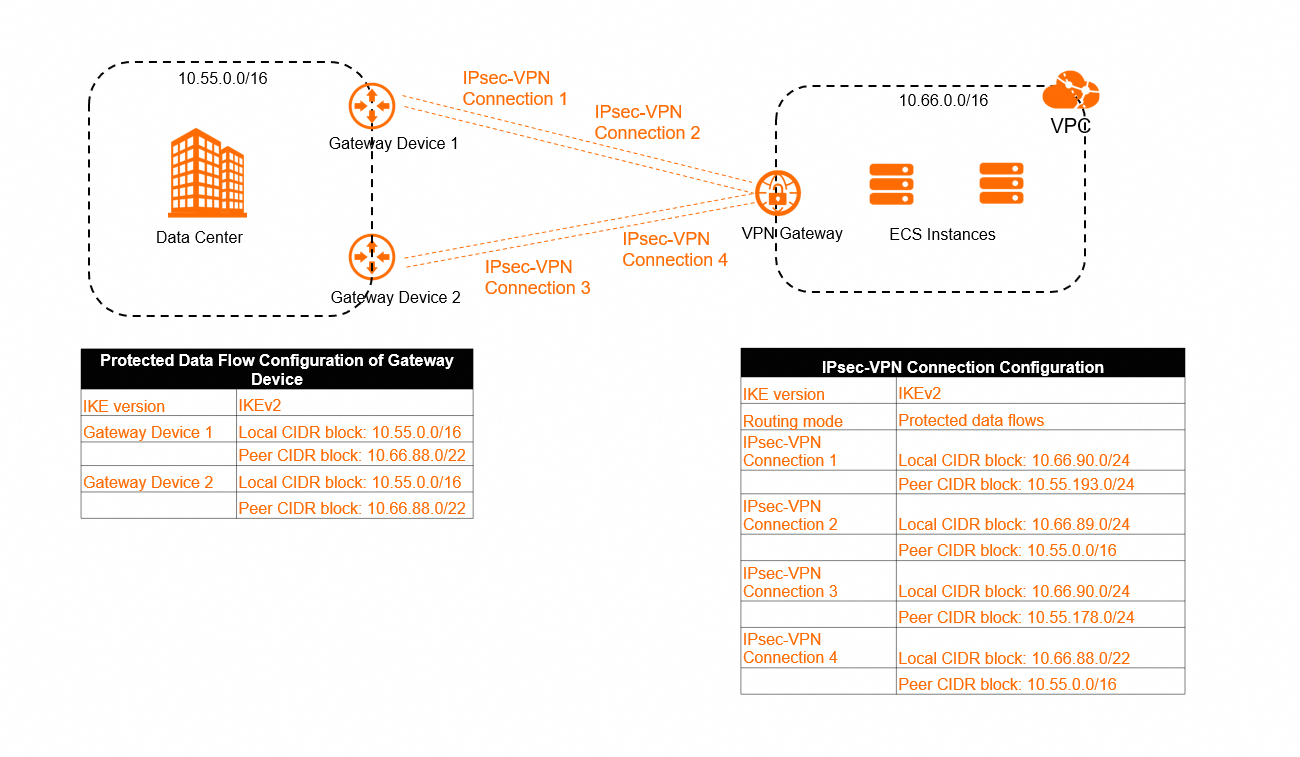
Possible impact:
As shown in the figure above, if there are multiple IPsec-VPN connections under one VPN gateway instance, and the interested traffic CIDR blocks of these connections have an inclusive relationship, traffic may not be forwarded along the intended path.
For an IPsec-VPN connection configured with interested traffic mode, after the IPsec-VPN connection is created, the system automatically adds relevant routes to the policy-based route table of the VPN gateway instance. Each route has the same policy priority. In the scenario shown in the figure, the system adds the following routes to the policy-based route table of the VPN gateway instance by default:
Route entry name | Source CIDR block | Destination CIDR block | Next hop | Weight | Policy priority |
Route Entry 1 | 10.66.90.0/24 | 10.55.193.0/24 | IPsec-VPN Connection 1 | 100 | 10 |
Route Entry 2 | 10.66.89.0/24 | 10.55.0.0/16 | IPsec-VPN Connection 2 | 100 | 10 |
Route Entry 3 | 10.66.90.0/24 | 10.55.178.0/24 | IPsec-VPN Connection 3 | 100 | 10 |
Route Entry 4 | 10.66.88.0/24 | 10.55.0.0/16 | IPsec-VPN Connection 4 | 100 | 10 |
According to the policy-based route matching rules, when policy priorities are the same, the system matches routes sequentially. As soon as a policy-based route is matched, traffic is forwarded according to that route. The order of policy-based routes is determined by the time they are sent to the system. Typically, the first configured policy-based route is sent to the system first, but this is not guaranteed. Therefore, a later configured policy-based route might be sent to the system first, which gives it a higher priority than an earlier configured one.
In the scenario shown above, it is possible that the data center sends a request packet to the VPC through IPsec-VPN connection 1, and the VPC sends a reply packet to the data center through IPsec-VPN connection 4, because route entry 4 might be sent to the system first and have a higher priority than route entry 1.
Solution:
Avoid adding interested traffic CIDR blocks with inclusive relationships to the on-premises gateway device and the IPsec-VPN connection. We recommend adding exactly matching interested traffic CIDR blocks to both ends. This method can improve the stability of the IPsec-VPN connection.
When you create an IPsec-VPN connection, add precise interested traffic CIDR blocks to ensure that there is no overlap between the interested traffic CIDR blocks of multiple IPsec-VPN connections under the VPN gateway instance.
Configure different policy priorities and weight values for each policy-based route to ensure that traffic matches only one policy-based route.
If your VPN gateway instance does not support configuring policy priorities, you can upgrade the VPN gateway instance. The upgraded VPN gateway instance supports configuring policy priorities for policy-based routes by default.
Health check fails (for single-tunnel mode only)?
Cause category | Cause | Solution |
Health check destination IP address issue | The health check destination IP address is unreachable. | On the host that is associated with the destination IP address, run the |
The host that is associated with the health check destination IP address is not working as expected and cannot respond to the probe packets (ICMP packets) from the IPsec-VPN connection in a timely manner. | Check whether the host associated with the destination IP address is working normally. For more information, contact the gateway device vendor. | |
The route configuration and security policy that are associated with the health check destination IP address have changed. For example, the security policy does not allow packets from the health check source IP address, destination IP address, or of the ICMP protocol type. | On the on-premises gateway device side, check the route configuration and security policy associated with the destination IP address to ensure that:
| |
The health check destination IP address did not respond to the health check probe packets from the original path. The original path is the path through which the destination IP address received the probe packets. | Use the | |
IPsec-VPN connection-related issues | The IPsec-VPN connection negotiation is interrupted. | Check the logs of the IPsec-VPN connection to determine whether the connection has been in the "Phase 2 negotiation successful" state. If the negotiation status is unstable, troubleshoot the IPsec-VPN connection based on the error codes and log keywords. Note: After an IPsec-VPN connection health check fails, the system resets the IPsec tunnel. In application scenarios that do not use active-standby IPsec-VPN connections, we do not recommend configuring health checks for the IPsec-VPN connection. |
Appendix: Error codes and log keywords
To find the troubleshooting method for an error code or log keyword, press Ctrl+F (Windows) or Cmd+F (Mac) to search this table.
Error code (Console) | Error code (API) | Error message | Log keyword | Troubleshooting method |
The peer does not match. | PeerMismatch | The received protocol packet does not match the customer gateway information. |
|
|
The algorithm does not match. | AlgorithmMismatch | The encryption algorithm, authentication algorithm, or DH group parameter does not match. |
|
|
The encryption algorithm does not match. | EncryptionAlgorithmMismatch | The IPsec encryption algorithm does not match. |
|
|
Check whether the authentication algorithm matches. | AuthenticationAlgorithmMismatch | The IKE authentication algorithm does not match. |
|
|
The DH groups do not match. | DhGroupMismatch | The IKE Phase 1 DH group parameter does not match. |
|
|
The pre-shared key does not match. | PskMismatch | The pre-shared key parameter does not match. |
|
|
PeerID does not match. | PeerIdMismatch | The LocalID or RemoteID does not match or is incompatible. |
|
|
DPD payload sequence is incompatible. | DpdHashNotifyCompatibility | DPD payload order compatibility |
| When the DPD feature is enabled for an IPsec-VPN connection, the DPD payload order defaults to |
DPD timed out. | DpdTimeout | DPD packet timeout |
|
|
The IKE version does not match. | IkeVersionMismatch | The IKE version number parameter or negotiation mode does not match. |
|
|
The negotiation mode does not match. | NegotiationModeMismatch | The negotiation mode does not match. |
|
|
NAT-T does not match. | NatTMismatch | NAT traversal does not match. |
| Check whether the NAT traversal feature has the same status for the IPsec-VPN connection and the on-premises gateway device. If they are different, modify them to ensure they are the same. If the on-premises gateway device is behind a NAT Gateway, we recommend enabling the NAT traversal feature on both the IPsec-VPN connection and the on-premises gateway device. |
SA Lifetime does not match. | LifetimeMismatch | The Lifetime parameter does not match. |
| Check whether the SA Lifetime (seconds) configured in the IKE configuration and IPsec configuration phases is the same for the IPsec-VPN connection and the on-premises gateway device. If they are different, modify them to ensure they are the same. The SA Lifetime (seconds) configured for the IPsec-VPN connection and the on-premises gateway device is not required to be the same, but due to differences between gateway device vendors, we recommend configuring the same SA Lifetime (seconds) on both ends to ensure the stability of the IPsec-VPN connection. |
The security protocol does not match. | SecurityProtocolMismatch | The security protocol parameter does not match. |
| Check whether the security protocol used by the on-premises gateway device is Encapsulating Security Payload (ESP). If not, change it to ESP. For the security protocol used by IPsec-VPN connections, Alibaba Cloud VPN Gateway only supports ESP, not Authentication Header (AH). |
The encapsulation mode does not match. | EncapsulationModeMismatch | The encapsulation mode does not match. |
| Check whether the encapsulation mode used by the on-premises gateway device is tunnel mode. If not, change it to tunnel mode. For the encapsulation mode used by IPsec-VPN connections, Alibaba Cloud VPN Gateway only supports tunnel mode, not transport mode. |
The algorithm is incompatible. | AlgorithmCompatibility | Algorithm compatibility | None | The Authentication Algorithm configured in the IKE configuration and IPsec configuration phases for the IPsec-VPN connection and the on-premises gateway device are incompatible. We recommend using a different Authentication Algorithm on both ends, such as md5. |
Protected Data Flow does not match. | TrafficSelectorMismatch | The interested traffic CIDR block parameter does not match. |
|
|
PFS does not match. | PfsMismatch | The IPsec Phase 2 DH group parameter does not match. |
| Check whether the PFS feature has the same configuration status in the IPsec configuration phase for the IPsec-VPN connection and the on-premises gateway device. If they are different, modify them to ensure they are the same.
|
The commit bit does not match. | CommitMismatch | The commit bit does not match. | None | Check whether the commit bit is enabled on the on-premises gateway device. If it is, disable it. The commit bit is used to ensure that the IPsec protocol negotiation is completed before protected data is sent. Alibaba Cloud VPN Gateway does not support configuring the commit bit. |
The proposal does not match. | ProposalMismatch | The proposal does not match. |
|
|
Negotiations failed. | NegotiationFailed | Protocol negotiation failed. |
| Reset the IPsec-VPN connection to trigger a re-negotiation of the IPsec protocol. The system will perform the check again. |
Phase 1 negotiations timed out. | Phase1NegotiationTimeout | Negotiation failed due to a timeout in receiving Phase 1 protocol packets. |
|
|
Check whether Phase 2 negotiations timed out. | Phase2NegotiationTimeout | Negotiation failed due to a timeout in receiving Phase 2 packets. | None |
|
Response packets cannot be received from the peer. | NoResponse | The peer gateway does not respond. |
|
|
The delete packet is received from the peer. | ReceiveDeleteNotify | Received a delete packet from the peer. |
| The IPsec-VPN connection side received a |
The reason for the negotiation exception is not found. | NoExceptionFound | No negotiation exception was diagnosed. | None | This result may be because the IPsec-VPN connection has not started negotiation. Reset the IPsec-VPN connection on the Alibaba Cloud side or the peer network device side. On the Alibaba Cloud side, you can modify the value of Effective Immediately for the IPsec-VPN connection, save it, and then change it back to the original value to trigger the IPsec protocol to start negotiation. Then, refresh the current page to view the check result. |