IPsec-VPN encrypts packets before transmitting them, which increases packet size. If the increased size exceeds the maximum transmission unit (MTU) of any network device along the path, packets fail to transmit. This topic explains how MTU values interact in an IPsec-VPN setup and how to configure them to ensure reliable packet delivery.
IPsec-VPN connections can carry fragmented packets but cannot fragment or reassemble packets themselves.
How it works
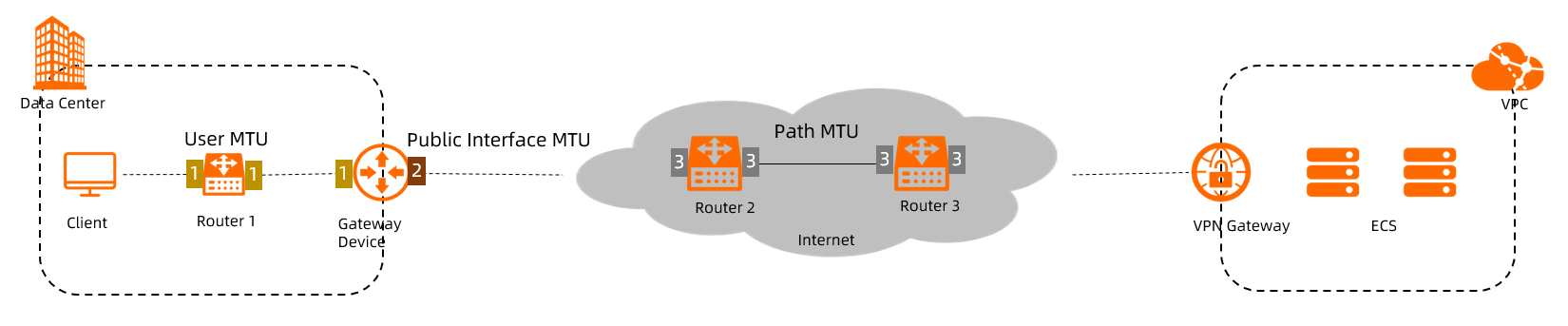
The diagram above shows a typical IPsec-VPN setup where a data center connects to a virtual private cloud (VPC) over IPsec-VPN. The client sends packets through the on-premises gateway device, which encrypts them and forwards them across the Internet to the VPN Gateway.
Three MTU values govern packet size at different points in this path.
User MTU
The user MTU is the minimum MTU across all network device interfaces between the client and the on-premises gateway device. It limits the size of packets the client sends.
In the diagram, the user MTU is the smallest MTU among the interfaces labeled "1".
Public interface MTU
The public interface MTU is the MTU of the on-premises gateway device's public-facing interface — the interface that connects to the VPN Gateway. It limits the size of encrypted packets leaving the data center.
In the diagram, the public interface MTU is the MTU of the interface labeled "2".
Path MTU
The path MTU is the minimum MTU across all Internet-facing network device interfaces between the on-premises gateway device and the VPN Gateway. It also limits the size of encrypted packets.
In the diagram, the path MTU is the smallest MTU among the interfaces labeled "3". Contact your Internet service provider (ISP) to get the path MTU. For standard Ethernet networks, the default path MTU is 1,500 bytes.
MTU formula
To ensure packets transmit without errors, configure the user MTU in the data center so it satisfies:
Maximum user MTU = Min{public interface MTU, path MTU} − 101The value 101 indicates the maximum bytes of a packet encrypted by IPsec.
If your VPN Gateway was created before April 1, 2021, and the user MTU in the data center is larger than 1,300 bytes, IPsec-VPN connections may fail. Upgrade your VPN Gateway to the latest version. For more information, see Upgrade a VPN gateway.
Example
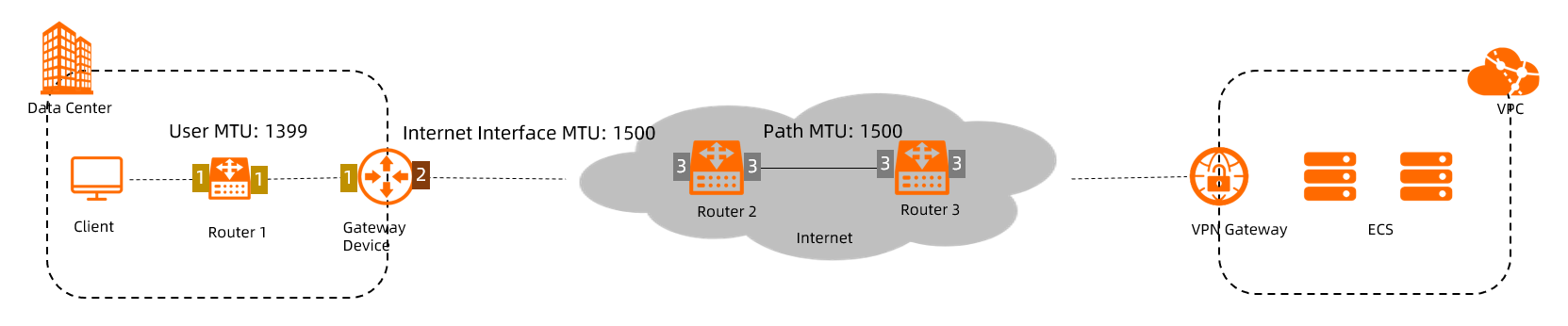
In this example, both the path MTU and the public interface MTU are 1,500 bytes:
Maximum user MTU = min{1,500, 1,500} − 101 = 1,399 bytesConfigure the client to send packets no larger than 1,399 bytes. Packets exceeding this size may fail to transmit.
MSS configuration
If you need TCP traffic to flow over the IPsec-VPN connection without segmentation, set the maximum segment size (MSS) using:
MSS = User MTU − IP header size − TCP header sizeUsing the example above, where the user MTU is 1,399 bytes and both the IP and TCP headers are 20 bytes each:
MSS = 1,399 − 20 − 20 = 1,359 bytesSet the MSS to no more than 1,359 bytes to prevent TCP segmentation.