This topic describes how to configure Resource Access Management (RAM) authorization for the Alibaba Cloud account that owns a database instance when you configure a cross-account Data Transmission Service (DTS) task.
If you do not need background information, you can directly configure RAM authorization for your cross-account task scenario. This applies when the Replicate Data Across Alibaba Cloud Accounts option is set to Yes for the database instances. For more information, see Scenario 1: Cross-account source database, Scenario 2: Cross-account destination database, and Scenario 3: Cross-account source and destination databases.
Background information
Before you configure a cross-account task, you must grant RAM authorization. This designates the Alibaba Cloud account that creates the DTS task as a trusted account, which allows it to access the cloud resources of the database instance's account through DTS. During task configuration, set Replicate Data Across Alibaba Cloud Accounts to Yes.
What is a cross-account task?
A cross-account task is a DTS task where the source or destination database instance belongs to a different Alibaba Cloud account than the one used to create the task.
Scenarios
There are three cross-account scenarios for DTS tasks.
For more information about accounts, see Account information.
Scenario | Scenario description | Configuration description |
Cross-account source database | Set Replicate Data Across Alibaba Cloud Accounts to Yes for the source database, and set Replicate Data Across Alibaba Cloud Accounts to No for the destination database. | Configure RAM authorization using the source database account (Account A). Create the DTS task using the destination database account (Account B). |
Cross-account destination database | Set Replicate Data Across Alibaba Cloud Accounts to No for the source database, and set Replicate Data Across Alibaba Cloud Accounts to Yes for the destination database. | Configure RAM authorization using the destination database account (Account B). Create the DTS task using the source database account (Account A). |
Cross-account source and destination databases | Set Replicate Data Across Alibaba Cloud Accounts to Yes for both the source and destination databases. | Configure RAM authorization using the source database account (Account A) and the destination database account (Account B). Create the DTS task using a designated account (Account C). |
Supported databases
A database instance supports cross-account access based only on its Database Type and Access Method. The following tables list the database instances that support cross-account access.
Configuring Replicate Data Across Alibaba Cloud Accounts for the source database does not affect the Database Type options for the destination database.
Source databases
Database type | Connection type |
MySQL | Alibaba Cloud Instance, Express Connect, VPN Gateway, or Smart Access Gateway, Self-managed Database on ECS |
PolarDB for MySQL | Alibaba Cloud Instance |
Tair/Redis | Alibaba Cloud Instance, Express Connect, VPN Gateway, or Smart Access Gateway, Self-managed Database on ECS, Cloud Enterprise Network (CEN), Database Gateway |
SQL Server | Alibaba Cloud Instance, Express Connect, VPN Gateway, or Smart Access Gateway |
PostgreSQL | Alibaba Cloud Instance, Express Connect, VPN Gateway, or Smart Access Gateway |
MongoDB | Alibaba Cloud Instance, Express Connect, VPN Gateway, or Smart Access Gateway, Self-managed Database on ECS, Cloud Enterprise Network (CEN) |
Oracle | Express Connect, VPN Gateway, or Smart Access Gateway |
PolarDB (Compatible with Oracle) | Alibaba Cloud Instance, Express Connect, VPN Gateway, or Smart Access Gateway |
PolarDB for PostgreSQL | Alibaba Cloud Instance |
PolarDB-X 1.0 | Alibaba Cloud Instance |
PolarDB-X 2.0 | Alibaba Cloud Instance |
DB2 for iSeries (AS/400) | Express Connect, VPN Gateway, or Smart Access Gateway |
DB2 for LUW | Express Connect, VPN Gateway, or Smart Access Gateway, Self-managed Database on ECS |
MariaDB | Alibaba Cloud Instance, Express Connect, VPN Gateway, or Smart Access Gateway, Self-managed Database on ECS |
ApsaraDB OceanBase for MySQL | Alibaba Cloud Instance, Express Connect, VPN Gateway, or Smart Access Gateway, Self-managed Database on ECS |
SLS | Alibaba Cloud Instance |
AnalyticDB for MySQL 3.0 | Alibaba Cloud Instance |
Kafka | Alibaba Cloud Instance, Express Connect, VPN Gateway, or Smart Access Gateway, Self-managed Database on ECS |
Destination databases
Database type | Connection type |
MySQL | Alibaba Cloud Instance |
PolarDB for MySQL | Alibaba Cloud Instance |
AnalyticDB for MySQL 3.0 | Alibaba Cloud Instance |
Tair/Redis | Alibaba Cloud Instance |
ClickHouse | Alibaba Cloud Instance |
SelectDB | Alibaba Cloud Instance |
MongoDB | Alibaba Cloud Instance |
Account information
In a cross-account task, the roles of the different Alibaba Cloud accounts (the accounts for the source database, destination database, and DTS task) depend on which database is cross-account.
Cross-account database: A database that is part of a cross-account scenario, which is enabled by setting Replicate Data Across Alibaba Cloud Accounts to Yes when you configure a DTS task.
To use this table, first determine whether the source database, the destination database, or both are cross-account. Then, find the corresponding row in the Cross-account database column to identify which Alibaba Cloud account to use at each stage.
Cross-account database | Alibaba Cloud account to log on to the RAM console | Alibaba Cloud account to enter in the trust policy | Alibaba Cloud account to create the DTS task | Cross-account Alibaba Cloud account to enter for the DTS task |
Source database | The Alibaba Cloud account that owns the source database. | The Alibaba Cloud account that owns the destination database. | The Alibaba Cloud account that owns the destination database. | In the Source Database section, enter the Alibaba Cloud account that owns the source database in the Alibaba Cloud Account field. |
Destination database | The Alibaba Cloud account that owns the destination database. | The Alibaba Cloud account that owns the source database. | The Alibaba Cloud account that owns the source database. | In the Destination Database section, in the Alibaba Cloud Account field, enter the Alibaba Cloud account that owns the destination database. |
Source and destination databases | The Alibaba Cloud accounts that own the source and destination databases. | The designated Alibaba Cloud account. | The designated Alibaba Cloud account. |
|
Procedure
Confirm the cross-account task scenario.
Determine the cross-account task scenario for a database instance where Replicate Data Across Alibaba Cloud Accounts is set to Yes.
Obtain the Alibaba Cloud account ID.
Obtain the IDs of the Alibaba Cloud accounts that own the database instances and that will be used to create the DTS task.
Create a RAM role.
Use the Alibaba Cloud account that owns the database instance to create the required RAM role.
Grant permissions.
Grant permissions to the created RAM role.
Modify the trust policy.
Modify the trust policy of the RAM role.
Prerequisites
DTS has the required permissions to access the cloud resources of the Alibaba Cloud account that owns the database instance. For more information, see Grant permissions to DTS to access cloud resources.
Usage notes
You can configure a two-way synchronization task across Alibaba Cloud accounts only between ApsaraDB RDS for MySQL instances, between ApsaraDB RDS for MySQL clusters, between Tair (Enterprise Edition) instances, between ApsaraDB for MongoDB replica set instances, or ApsaraDB for MongoDB sharded cluster instances.
A cross-account bidirectional synchronization task is a scenario where both the source and destination databases are cross-account. Therefore, you must configure RAM authorization for the Alibaba Cloud accounts that own the source and destination databases.
Synchronization tasks between accounts of different types, such as between an Alibaba Finance Cloud account and a government cloud account, are not supported.
Log on to the console using an Alibaba Cloud account, not a RAM user. If you use a RAM user, an authorization error may occur when you create the DTS task.
Preparations
Obtain the ID of the Alibaba Cloud account that owns the source database
In the Alibaba Cloud account that owns the source database, go to the or Security Settings page. find the Account ID.
Obtain the ID of the Alibaba Cloud account that owns the destination database
Use the Alibaba Cloud account that owns the destination database to navigate to the or Security Settings page. obtain the Account ID.
Obtain the ID of the Alibaba Cloud account used to create the DTS task
Go to the or Security Settings page for the Alibaba Cloud account that you will use to create the DTS task. obtain the Account ID.
Scenario 1: Cross-account source database
Step 1: Create a RAM role
Log on to the RAM console using the Alibaba Cloud account that owns the source database.
In the navigation pane on the left, choose .
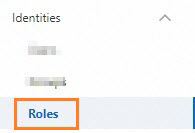 Important
Do not choose . Otherwise, DTS will fail to access the database instance and report an error.
On the Roles page, click Create Role.
In the Create Role panel, you can configure the RAM role.
For Principal Type, select Cloud Account.

Set Principal Name to Other Account, and enter the Alibaba Cloud account ID of the destination database.

At the bottom of the page, click OK.
In the Create Role panel, enter a name for the RAM role and click OK.
This example uses the
ram-for-dts.
Step 2: Grant permissions to the RAM role
From the page indicating the RAM role is created
On the Permissions tab, click Precise Permission.
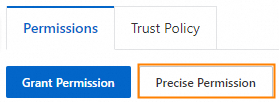
In the Precise Permission panel, you can set Policy Type to System Policy.

Enter
AliyunDTSRolePolicyin the Policy Name text box.Click OK.
Click the
 icon on the right side of the Permission tab to refresh the page. Verify that the precise authorization was successful.
From the RAM role list
Go to the details page of the RAM role.
Log on to the RAM console using the Alibaba Cloud account that owns the source database.
In the navigation pane on the left, choose .
ImportantDo not choose . Otherwise, DTS will fail to access the database instance and report an error.
On the Roles page, click the target RAM role.
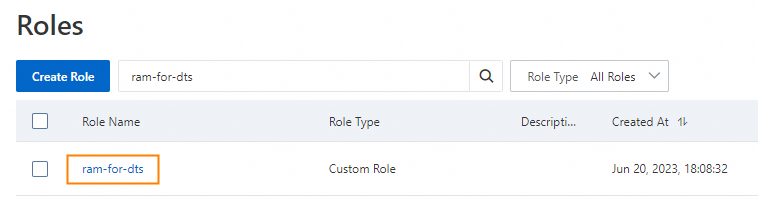
On the Permissions tab, click Precise Permission.
In the Precise Permission panel, you can set Policy Type to System Policy.
Enter
AliyunDTSRolePolicyin the Policy Name text box.Click OK.
Click the
icon on the right side of the Permission tab to refresh the page. Verify that the precise authorization was successful.
Step 3: Modify the trust policy of the RAM role
From the page indicating the permission is granted
Click the Trust Policy tab.
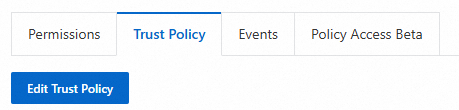
On the Trust Policy tab, click Edit Trust Policy.
On the JSON tab, replace the contents of the policy editor with the following code.
{
    "Statement": [
        {
            "Action": "sts:AssumeRole",
            "Effect": "Allow",
            "Principal": {
                "RAM": [
                    "acs:ram::<Alibaba Cloud account ID>:root"
                ],
                "Service": [
                    "<Alibaba Cloud account ID>@dts.aliyuncs.com"
                ]
            }
        }
    ],
    "Version": "1"
}
Replace the two
<Alibaba Cloud account ID>placeholders with the ID of the account that owns the destination database.Click OK to save the trust policy.
If
"<Alibaba Cloud account ID>@dts.aliyuncs.com"in the `Service` section of the code automatically changes to"dts.aliyuncs.com"after you save the trust policy, this means that the<Alibaba Cloud account ID>is incorrect. This occurs because you entered the ID of the source database account instead of the ID of the destination database account.NoteFor more information about the Alibaba Cloud account to use to log on to the RAM console and the account to specify in the trust policy, see Account information.
From the RAM role list
Go to the details page of the RAM role.
Log on to the RAM console using the Alibaba Cloud account that owns the source database.
In the navigation pane on the left, choose .
ImportantDo not choose . Otherwise, DTS will fail to access the database instance and report an error.
On the Roles page, click the target RAM role.
Click the Trust Policy tab.
On the Trust Policy tab, click Edit Trust Policy.
On the JSON tab, replace the contents of the policy editor with the following code.
{
    "Statement": [
        {
            "Action": "sts:AssumeRole",
            "Effect": "Allow",
            "Principal": {
                "RAM": [
                    "acs:ram::<Alibaba Cloud account ID>:root"
                ],
                "Service": [
                    "<Alibaba Cloud account ID>@dts.aliyuncs.com"
                ]
            }
        }
    ],
    "Version": "1"
}
Replace the two
<Alibaba Cloud account ID>placeholders with the ID of the account that owns the destination database.Click OK to save the trust policy.
If
"<Alibaba Cloud account ID>@dts.aliyuncs.com"in the `Service` section of the code automatically changes to"dts.aliyuncs.com"after you save the trust policy, this means that the<Alibaba Cloud account ID>is incorrect. This occurs because you entered the ID of the source database account instead of the ID of the destination database account.NoteFor more information about the Alibaba Cloud account to use to log on to the RAM console and the account to specify in the trust policy, see Account information.
Scenario 2: Cross-account destination database
Step 1: Create a RAM role
Log on to the RAM console using the Alibaba Cloud account that owns the destination database.
In the navigation pane on the left, choose .
ImportantDo not choose . Otherwise, DTS will fail to access the database instance and report an error.
On the Roles page, click Create Role.
In the Create Role panel, you can configure the RAM role.
For Principal Type, select Cloud Account.
For the Principal Name parameter, select Other Account and enter the ID of the Alibaba Cloud account that owns the source database.
At the bottom of the page, click OK.
In the Create Role panel, enter a name for the RAM role and click OK.
This example uses the
ram-for-dts.
Step 2: Grant permissions to the RAM role
From the page indicating the RAM role is created
On the Permissions tab, click Precise Permission.
In the Precise Permission panel, you can set Policy Type to System Policy.
Enter
AliyunDTSRolePolicyin the Policy Name text box.Click OK.
Click the
icon on the right side of the Permission tab to refresh the page. Verify that the precise authorization was successful.
From the RAM role list
Go to the RAM role details page.
Log on to the RAM console using the Alibaba Cloud account that owns the destination database.
In the navigation pane on the left, choose .
ImportantDo not choose . Otherwise, DTS will fail to access the database instance and report an error.
On the Roles page, click the target RAM role.
On the Permissions tab, click Precise Permission.
In the Precise Permission panel, you can set Policy Type to System Policy.
Enter
AliyunDTSRolePolicyin the Policy Name text box.Click OK.
Click the
icon on the right side of the Permission tab to refresh the page. Verify that the precise authorization was successful.
Step 3: Modify the trust policy of the RAM role
From the page indicating the permission is granted
Click the Trust Policy tab.
On the Trust Policy tab, click Edit Trust Policy.
On the JSON tab, replace the contents of the policy editor with the following code.
{
    "Statement": [
        {
            "Action": "sts:AssumeRole",
            "Effect": "Allow",
            "Principal": {
                "RAM": [
                    "acs:ram::<Alibaba Cloud account ID>:root"
                ],
                "Service": [
                    "<Alibaba Cloud account ID>@dts.aliyuncs.com"
                ]
            }
        }
    ],
    "Version": "1"
}
Replace the two
<Alibaba Cloud account ID>placeholders with the ID of the Alibaba Cloud account that owns the source database.Click OK to save the trust policy.
If the
"<Alibaba Cloud account ID>@dts.aliyuncs.com"value in the `Service` section of the code automatically changes to"dts.aliyuncs.com"after you save the trust policy, this indicates that the<Alibaba Cloud account ID>is incorrect. You have entered the ID of the destination database account instead of the ID of the source database account.NoteFor more information about the Alibaba Cloud account to use to log on to the RAM console and the account to specify in the trust policy, see Account information.
From the RAM role list
Go to the details page of the RAM role.
Log on to the RAM console using the Alibaba Cloud account that owns the destination database.
In the navigation pane on the left, choose .
ImportantDo not choose . Otherwise, DTS will fail to access the database instance and report an error.
On the Roles page, click the target RAM role.
Click the Trust Policy tab.
On the Trust Policy tab, click Edit Trust Policy.
On the JSON tab, replace the contents of the policy editor with the following code.
{
    "Statement": [
        {
            "Action": "sts:AssumeRole",
            "Effect": "Allow",
            "Principal": {
                "RAM": [
                    "acs:ram::<Alibaba Cloud account ID>:root"
                ],
                "Service": [
                    "<Alibaba Cloud account ID>@dts.aliyuncs.com"
                ]
            }
        }
    ],
    "Version": "1"
}
Replace the two
<Alibaba Cloud account ID>placeholders with the ID of the Alibaba Cloud account that owns the source database.Click OK to save the trust policy.
If the
"<Alibaba Cloud account ID>@dts.aliyuncs.com"value in the `Service` section of the code automatically changes to"dts.aliyuncs.com"after you save the trust policy, this indicates that the<Alibaba Cloud account ID>is incorrect. You have entered the ID of the destination database account instead of the ID of the source database account.NoteFor more information about the Alibaba Cloud account to use to log on to the RAM console and the account to specify in the trust policy, see Account information.
Scenario 3: Cross-account source and destination databases
Step 1: Configure RAM authorization using the Alibaba Cloud account that owns the source database
Create a RAM role.
Log on to the RAM console using the Alibaba Cloud account that owns the source database.
In the navigation pane on the left, choose .
ImportantDo not choose . Otherwise, DTS will fail to access the database instance and report an error.
On the Roles page, click Create Role.
In the Create Role panel, you can configure the RAM role.
For Principal Type, select Cloud Account.
Set Principal Name to Other Account and enter the ID of the Alibaba Cloud account that will create the DTS task.
At the bottom of the page, click OK.
In the Create Role panel, enter a name for the RAM role and click OK.
This example uses the
ram-for-dts.
Grant permissions to the RAM role.
From the page indicating the RAM role is created
On the Permissions tab, click Precise Permission.
In the Precise Permission panel, you can set Policy Type to System Policy.
Enter
AliyunDTSRolePolicyin the Policy Name text box.Click OK.
Click the
icon on the right side of the Permission tab to refresh the page. Verify that the precise authorization was successful.
From the RAM role list
Go to the details page of the RAM role.
Log on to the RAM console using the Alibaba Cloud account that owns the source database.
In the navigation pane on the left, choose .
ImportantDo not choose . Otherwise, DTS will fail to access the database instance and report an error.
On the Roles page, click the target RAM role.
On the Permissions tab, click Precise Permission.
In the Precise Permission panel, you can set Policy Type to System Policy.
Enter
AliyunDTSRolePolicyin the Policy Name text box.Click OK.
Click the
icon on the right side of the Permission tab to refresh the page. Verify that the precise authorization was successful.
Modify the trust policy of the RAM role.
From the page indicating the permission is granted
Click the Trust Policy tab.
On the Trust Policy tab, click Edit Trust Policy.
On the JSON tab, replace the contents of the policy editor with the following code.
{
    "Statement": [
        {
            "Action": "sts:AssumeRole",
            "Effect": "Allow",
            "Principal": {
                "RAM": [
                    "acs:ram::<Alibaba Cloud account ID>:root"
                ],
                "Service": [
                    "<Alibaba Cloud account ID>@dts.aliyuncs.com"
                ]
            }
        }
    ],
    "Version": "1"
}
Replace the two
<Alibaba Cloud account ID>placeholders with the ID of the Alibaba Cloud account that you will use to create the DTS task.Click OK to save the trust policy.
If the
"<Alibaba Cloud account ID>@dts.aliyuncs.com"in the `Service` section of the code automatically changes to"dts.aliyuncs.com"after you save the trust policy, this indicates that the<Alibaba Cloud account ID>is incorrect. You must enter the ID of the account used to create the DTS task, not the ID of the source database account.NoteFor more information about the Alibaba Cloud account to use to log on to the RAM console and the account to specify in the trust policy, see Account information.
From the RAM role list
Go to the details page of the RAM role.
Log on to the RAM console using the Alibaba Cloud account that owns the source database.
In the navigation pane on the left, choose .
ImportantDo not choose . Otherwise, DTS will fail to access the database instance and report an error.
On the Roles page, click the target RAM role.
Click the Trust Policy tab.
On the Trust Policy tab, click Edit Trust Policy.
On the JSON tab, replace the contents of the policy editor with the following code.
{
    "Statement": [
        {
            "Action": "sts:AssumeRole",
            "Effect": "Allow",
            "Principal": {
                "RAM": [
                    "acs:ram::<Alibaba Cloud account ID>:root"
                ],
                "Service": [
                    "<Alibaba Cloud account ID>@dts.aliyuncs.com"
                ]
            }
        }
    ],
    "Version": "1"
}
Replace the two
<Alibaba Cloud account ID>placeholders with the ID of the Alibaba Cloud account that you will use to create the DTS task.Click OK to save the trust policy.
If the
"<Alibaba Cloud account ID>@dts.aliyuncs.com"in the `Service` section of the code automatically changes to"dts.aliyuncs.com"after you save the trust policy, this indicates that the<Alibaba Cloud account ID>is incorrect. You must enter the ID of the account used to create the DTS task, not the ID of the source database account.NoteFor more information about the Alibaba Cloud account to use to log on to the RAM console and the account to specify in the trust policy, see Account information.
Step 2: Configure RAM authorization using the Alibaba Cloud account that owns the destination database
Create a RAM role.
Log on to the RAM console using the Alibaba Cloud account that owns the destination database.
In the navigation pane on the left, choose .
ImportantDo not choose . Otherwise, DTS will fail to access the database instance and report an error.
On the Roles page, click Create Role.
In the Create Role panel, you can configure the RAM role.
For Principal Type, select Cloud Account.
Set Principal Name to Other Account and enter the ID of the Alibaba Cloud account that will create the DTS task.
At the bottom of the page, click OK.
In the Create Role panel, enter a name for the RAM role and click OK.
This example uses the
ram-for-dts.
Grant permissions to the RAM role.
From the page indicating the RAM role is created
On the Permissions tab, click Precise Permission.
In the Precise Permission panel, you can set Policy Type to System Policy.
Enter
AliyunDTSRolePolicyin the Policy Name text box.Click OK.
Click the
icon on the right side of the Permission tab to refresh the page. Verify that the precise authorization was successful.
From the RAM role list
Go to the RAM role details page.
Log on to the RAM console using the Alibaba Cloud account that owns the destination database.
In the navigation pane on the left, choose .
ImportantDo not choose . Otherwise, DTS will fail to access the database instance and report an error.
On the Roles page, click the target RAM role.
On the Permissions tab, click Precise Permission.
In the Precise Permission panel, you can set Policy Type to System Policy.
Enter
AliyunDTSRolePolicyin the Policy Name text box.Click OK.
Click the
icon on the right side of the Permission tab to refresh the page. Verify that the precise authorization was successful.
Modify the trust policy of the RAM role.
From the page indicating the permission is granted
Click the Trust Policy tab.
On the Trust Policy tab, click Edit Trust Policy.
On the JSON tab, replace the contents of the policy editor with the following code.
{
    "Statement": [
        {
            "Action": "sts:AssumeRole",
            "Effect": "Allow",
            "Principal": {
                "RAM": [
                    "acs:ram::<Alibaba Cloud account ID>:root"
                ],
                "Service": [
                    "<Alibaba Cloud account ID>@dts.aliyuncs.com"
                ]
            }
        }
    ],
    "Version": "1"
}
Replace the two
<Alibaba Cloud account ID>placeholders with the ID of the Alibaba Cloud account that you will use to create the DTS task.Click OK to save the trust policy.
If the
"<Alibaba Cloud account ID>@dts.aliyuncs.com"in the `Service` section of the code automatically changes to"dts.aliyuncs.com"after you save the trust policy, this indicates that the<Alibaba Cloud account ID>is incorrect. You must enter the ID of the account used to create the DTS task, not the ID of the destination database account.NoteFor more information about the Alibaba Cloud account to use to log on to the RAM console and the account to specify in the trust policy, see Account information.
From the RAM role list
Go to the details page of the RAM role.
Log on to the RAM console using the Alibaba Cloud account that owns the destination database.
In the navigation pane on the left, choose .
ImportantDo not choose . Otherwise, DTS will fail to access the database instance and report an error.
On the Roles page, click the target RAM role.
Click the Trust Policy tab.
On the Trust Policy tab, click Edit Trust Policy.
On the JSON tab, replace the contents of the policy editor with the following code.
{
    "Statement": [
        {
            "Action": "sts:AssumeRole",
            "Effect": "Allow",
            "Principal": {
                "RAM": [
                    "acs:ram::<Alibaba Cloud account ID>:root"
                ],
                "Service": [
                    "<Alibaba Cloud account ID>@dts.aliyuncs.com"
                ]
            }
        }
    ],
    "Version": "1"
}
Replace the two
<Alibaba Cloud account ID>placeholders with the ID of the Alibaba Cloud account that you will use to create the DTS task.Click OK to save the trust policy.
If the
"<Alibaba Cloud account ID>@dts.aliyuncs.com"in the `Service` section of the code automatically changes to"dts.aliyuncs.com"after you save the trust policy, this indicates that the<Alibaba Cloud account ID>is incorrect. You must enter the ID of the account used to create the DTS task, not the ID of the destination database account.NoteFor more information about the Alibaba Cloud account to use to log on to the RAM console and the account to specify in the trust policy, see Account information.
What to do next
After you complete the RAM authorization, you can create a cross-account task. For more information, see Configure a cross-account task.