Deploy Web Application Firewall (WAF) behind Alibaba Cloud CDN to protect your web services from attacks while keeping content delivery fast. In this architecture, CDN accelerates static content at the edge, and WAF inspects and filters dynamic traffic before it reaches your origin servers.
Network architecture
Traffic flows through three layers:
CDN (ingress layer): accelerates content delivery to end users
WAF (intermediate layer): inspects traffic and blocks attacks
Origin servers: receive only clean, filtered traffic
Origin servers can run on Elastic Compute Service (ECS) instances, Server Load Balancer (SLB) instances, in virtual private clouds (VPCs), or in on-premises data centers.

Prerequisites
Before you begin, make sure you have:
Alibaba Cloud CDN enabled with a domain name already added. See Getting started with Alibaba Cloud CDN
A WAF instance purchased
Choose an access mode
WAF supports two ways to integrate with CDN. Pick the one that matches your infrastructure before starting the configuration steps.
| CNAME record mode | Transparent proxy mode | |
|---|---|---|
| How it works | CDN sends traffic to WAF's CNAME address; WAF forwards clean traffic to your origin | CDN sends traffic directly to your origin IP; WAF intercepts traffic transparently via SLB or ECS |
| What you configure in CDN | Set the CDN origin to WAF's CNAME | Set the CDN origin to your origin server's IP |
| Best for | Most deployments; simpler DNS-based routing | Environments where you want WAF to operate without changing DNS origin settings |
Step 1: Add a domain name to WAF
Log in to the WAF console. In the top navigation bar, select the resource group and the region where your WAF instance is deployed (Chinese Mainland or Outside Chinese Mainland).
In the left-side navigation pane, choose Asset Center > Website Access.
On the Domain Names tab, click Website Access.
Add the domain name using your chosen access mode:
CNAME record mode
NoteOn the Add Domain Name page, Access Mode defaults to CNAME Record. No change is needed.
In the Enter Your Website Information step, configure the following parameters and click Next.
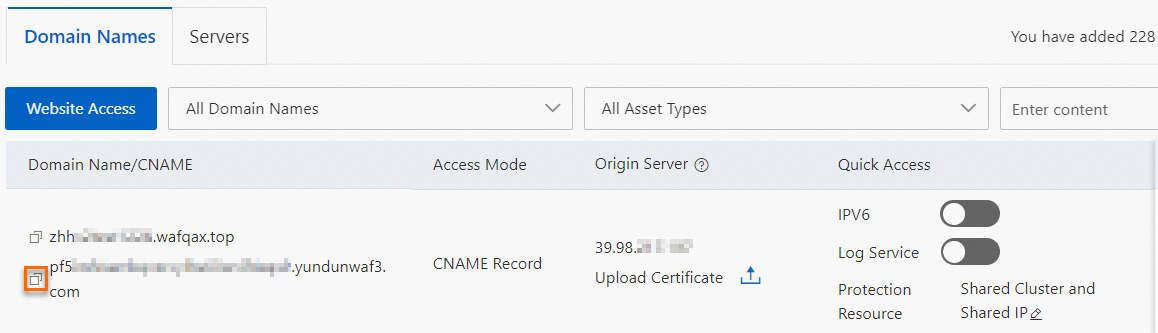
Parameter Description Domain Name The domain name of the website to protect Protection Resource The type of protection resource to use Protocol Type The protocol your website supports Origin Server Address IP: the public IP address of the SLB or ECS instance, or your non-Alibaba Cloud origin server IP Destination Server Port The port your origin server uses, based on the Protocol Type Load Balancing Algorithm If you have multiple origin server addresses, select the algorithm based on your requirements Whether Layer 7 Proxy, Such as Anti-DDoS Pro, Anti-DDoS Premium, or Alibaba Cloud CDN, Is Deployed in Front of WAF Set to Yes. Enable Traffic Mark Specify whether to enable WAF's traffic marking feature Resource Group Select the resource group for this domain name On the Domain Names tab, find the domain you added and copy the CNAME that WAF assigned to it.
Transparent proxy mode
On the Add Domain Name page, set Access Mode to Transparent Proxy Mode.
In the Add Domain Name step, configure the following parameters and click Next.
Parameter Description Domain Name The domain name of the website to protect SLB-based Domains, Layer 7 SLB-based Domains, Layer 4 SLB-based Domains, and ECS-based Domains Select the instance type and corresponding ports Whether Layer 7 Proxy, Such as Anti-DDoS Pro, Anti-DDoS Premium, or Alibaba Cloud CDN, Is Deployed in Front of WAF Set to Yes. Enable Traffic Mark Specify whether to enable WAF's traffic marking feature Resource Group Select the resource group for this domain name In the Check and Confirm Added Information step, review the information and click Next.
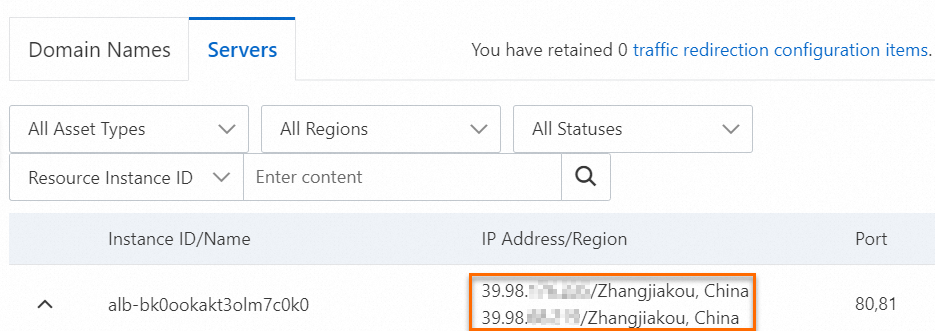
Click Completed. Return to the website list. On the Servers tab, select Resource Instance ID from the drop-down list and enter an instance ID to find the IP address and port of the instance you added.
Step 2: Point CDN to WAF
Log in to the Alibaba Cloud CDN console.
In the left-side navigation pane, click Domain Names.
Find the domain name and click Manage in the Actions column.
In the left-side navigation pane, click Basics. In the Origin Information section, click Add Origin Server. In the dialog box, configure the following parameters and click OK.
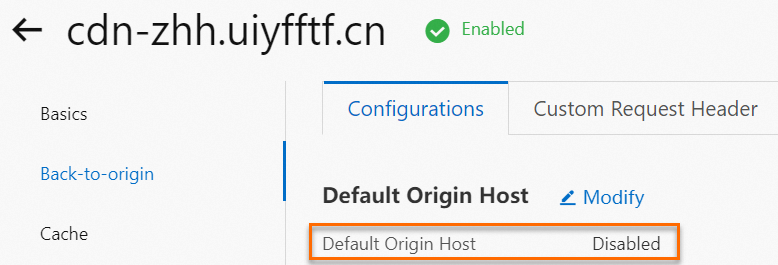
Parameter Description Origin Info CNAME record mode: select Site Domain and enter the WAF CNAME from Step 1. Transparent proxy mode: select IP and enter the public IP address of your origin server from Step 1. Priority A primary origin server has higher priority than a secondary one Weight When multiple origin servers share the same priority, CDN distributes requests by weight Port The port on the origin server that handles requests In the left-side navigation pane, click Back-to-origin. On the Configurations tab, confirm that Default Origin Host is disabled.
Update your DNS record to map the domain name to the CNAME assigned by Alibaba Cloud CDN. See Add a CNAME record for a domain name.
After these steps, CDN accelerates static content delivery, and WAF continues to inspect and protect dynamic traffic.
To forward traffic sent to Domain Name B to Domain Name A (which is added to WAF), add a URL forwarding record in the Alibaba Cloud DNS console. See the "Add an explicit or implicit URL forwarding record" section in Add a DNS record.
Verify the configuration
Run the following checks to confirm the setup is working:
Connectivity: Open the domain name in a browser. If the website loads, traffic is routing through CDN and WAF correctly.
Attack blocking: Append a test XSS payload to the URL — for example,
<your-domain>/alert(xss)andalert(xss). If a 405 error page appears, WAF is blocking the attack.
More operations
If you want to provide WAF protection for a domain that is accelerated by Dynamic Route for CDN, you can enable and configure Edge WAF in the DCDN console. After the configuration is complete, WAF protection is applied to the DCDN nodes. For more information, see Quick start for Edge WAF.
To protect a domain name that uses Dynamic Route for CDN (DCDN), enable WAF in the DCDN console. See Getting started with WAF (new).
What's next
Add a domain name to WAF — detailed guide for CNAME record mode
Transparent proxy mode — detailed guide for transparent proxy mode
Add a domain name — add a domain name to Alibaba Cloud CDN