Qwen Code is an AI coding assistant. This topic describes how to configure and use Alibaba Cloud Model Studio Token Plan Team Edition in Qwen Code (CLI and IDE plugin).
Installation and usage
Install Qwen Code
Run the installation command
macOS/Linux:
Press Command + Space on your keyboard, type "Terminal" in the search box, and press Enter. After opening the terminal, run the following command to install Qwen Code.
bash -c "$(curl -fsSL https://qwen-code-assets.oss-cn-hangzhou.aliyuncs.com/installation/install-qwen.sh)" -s --source bailianWindows:
Type
cmdin the taskbar search box, select Run as administrator, and run the following command in thecmdwindow to install Qwen Code.curl -fsSL -o %TEMP%\install-qwen.bat https://qwen-code-assets.oss-cn-hangzhou.aliyuncs.com/installation/install-qwen.bat && %TEMP%\install-qwen.bat --source bailian
Close and reopen the
cmdwindowOn Windows, after the installation is complete, close the current
cmdwindow for the environment variables to take effect. After reopeningcmd, run the following command to check the installed version.qwen --version
Configure and use Qwen Code
Manual configuration
Edit or create the settings.json file and replace YOUR_API_KEY with the Token Plan Team Edition API Key. The file path is as follows:
macOS/Linux:
~/.qwen/settings.jsonWindows:
C:\Users\<Windows username>\.qwen\settings.json
{
  "env": {
    "BAILIAN_TOKEN_PLAN_API_KEY": "YOUR_API_KEY"
  },
  "modelProviders": {
    "openai": [
      {
        "id": "qwen3.6-plus",
        "name": "[Token Plan Team Edition] qwen3.6-plus",
        "baseUrl": "https://token-plan.ap-southeast-1.maas.aliyuncs.com/compatible-mode/v1",
        "envKey": "BAILIAN_TOKEN_PLAN_API_KEY",
        "generationConfig": {
          "extra_body": {
            "enable_thinking": true
          }
        }
      },
      {
        "id": "glm-5",
        "name": "[Token Plan Team Edition] glm-5",
        "baseUrl": "https://token-plan.ap-southeast-1.maas.aliyuncs.com/compatible-mode/v1",
        "envKey": "BAILIAN_TOKEN_PLAN_API_KEY",
        "generationConfig": {
          "extra_body": {
            "enable_thinking": true
          }
        }
      },
      {
        "id": "MiniMax-M2.5",
        "name": "[Token Plan Team Edition] MiniMax-M2.5",
        "baseUrl": "https://token-plan.ap-southeast-1.maas.aliyuncs.com/compatible-mode/v1",
        "envKey": "BAILIAN_TOKEN_PLAN_API_KEY"
      },
      {
        "id": "deepseek-v3.2",
        "name": "[Token Plan Team Edition] deepseek-v3.2",
        "baseUrl": "https://token-plan.ap-southeast-1.maas.aliyuncs.com/compatible-mode/v1",
        "envKey": "BAILIAN_TOKEN_PLAN_API_KEY",
        "generationConfig": {
          "extra_body": {
            "enable_thinking": true
          }
        }
      }
    ]
  },
  "security": {
    "auth": {
      "selectedType": "openai"
    }
  },
  "tokenPlan": {
    "region": "global"
  },
  "model": {
    "name": "qwen3.6-plus"
  },
  "$version": 3
}
After configuration, run the following command in your project directory to start Qwen Code and begin chatting.
qwenCommon commands
The following commands apply to Qwen Code CLI. The IDE plugin only supports some of these commands. Refer to the actual usage for details.
Command | Description | Example |
| Switch the model used in the current session. |
|
| Change the authentication method. |
|
| Analyze the current directory and create an initial context file (QWEN.md) to define project-level instructions and context. |
|
| Clear the terminal screen and start a new conversation. |
|
| Replace the chat history with a summary to save tokens. |
|
| Open the settings editor to configure language, theme, and more. |
|
| Generate a project summary based on the conversation history. |
|
| Resume a previous conversation session. |
|
| Display detailed statistics for the current session. |
|
| Display help information for available commands. |
|
| Exit Qwen Code. |
|
For more advanced features of Qwen Code, refer to the Qwen Code official documentation.
Switch models (optional)
Enter /model to switch between models supported by Alibaba Cloud Model Studio Token Plan Team Edition.
If the required model (such as qwen3.6-plus, MiniMax-M2.5, or glm-5) does not appear in the list, update Qwen Code.
Enter
/quitto exit the current session.Run the
npm install -g @qwen-code/qwen-code@latestcommand to update Qwen Code.Run the
qwencommand again to start Qwen Code.Enter
/modelagain to select the newly added model.
Use Qwen Code IDE plugin (optional)
Qwen Code supports use as a plugin in VS Code and JetBrains IDE, providing AI coding capabilities within the IDE.
VS Code IDE
Before use, make sure your VS Code version is 1.85.0 or later.
Open VS Code and search for
Qwen Code Companionin the Extensions Marketplace, then install it.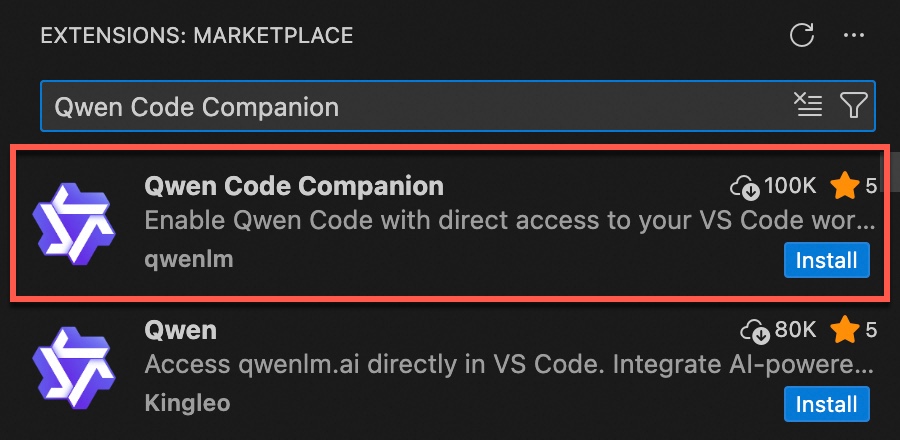
Edit or create the
settings.jsonfile with the following content. ReplaceYOUR_API_KEYwith the Token Plan Team Edition API Key. The file path is as follows:macOS/Linux:
~/.qwen/settings.jsonWindows:
C:\Users\<Windows username>\.qwen\settings.json
The CLI and IDE plugin share the same settings.json. If you have already completed the configuration above, skip this step.
{
  "env": {
    "BAILIAN_TOKEN_PLAN_API_KEY": "YOUR_API_KEY"
  },
  "modelProviders": {
    "openai": [
      {
        "id": "qwen3.6-plus",
        "name": "[Token Plan Team Edition] qwen3.6-plus",
        "baseUrl": "https://token-plan.ap-southeast-1.maas.aliyuncs.com/compatible-mode/v1",
        "envKey": "BAILIAN_TOKEN_PLAN_API_KEY",
        "generationConfig": {
          "extra_body": {
            "enable_thinking": true
          }
        }
      },
      {
        "id": "glm-5",
        "name": "[Token Plan Team Edition] glm-5",
        "baseUrl": "https://token-plan.ap-southeast-1.maas.aliyuncs.com/compatible-mode/v1",
        "envKey": "BAILIAN_TOKEN_PLAN_API_KEY",
        "generationConfig": {
          "extra_body": {
            "enable_thinking": true
          }
        }
      },
      {
        "id": "MiniMax-M2.5",
        "name": "[Token Plan Team Edition] MiniMax-M2.5",
        "baseUrl": "https://token-plan.ap-southeast-1.maas.aliyuncs.com/compatible-mode/v1",
        "envKey": "BAILIAN_TOKEN_PLAN_API_KEY"
      },
      {
        "id": "deepseek-v3.2",
        "name": "[Token Plan Team Edition] deepseek-v3.2",
        "baseUrl": "https://token-plan.ap-southeast-1.maas.aliyuncs.com/compatible-mode/v1",
        "envKey": "BAILIAN_TOKEN_PLAN_API_KEY",
        "generationConfig": {
          "extra_body": {
            "enable_thinking": true
          }
        }
      }
    ]
  },
  "security": {
    "auth": {
      "selectedType": "openai"
    }
  },
  "tokenPlan": {
    "region": "global"
  },
  "model": {
    "name": "qwen3.6-plus"
  },
  "$version": 3
}
Click the icon in the upper-right corner to start Qwen Code. Type or click
/, and selectSwitch modelto switch models.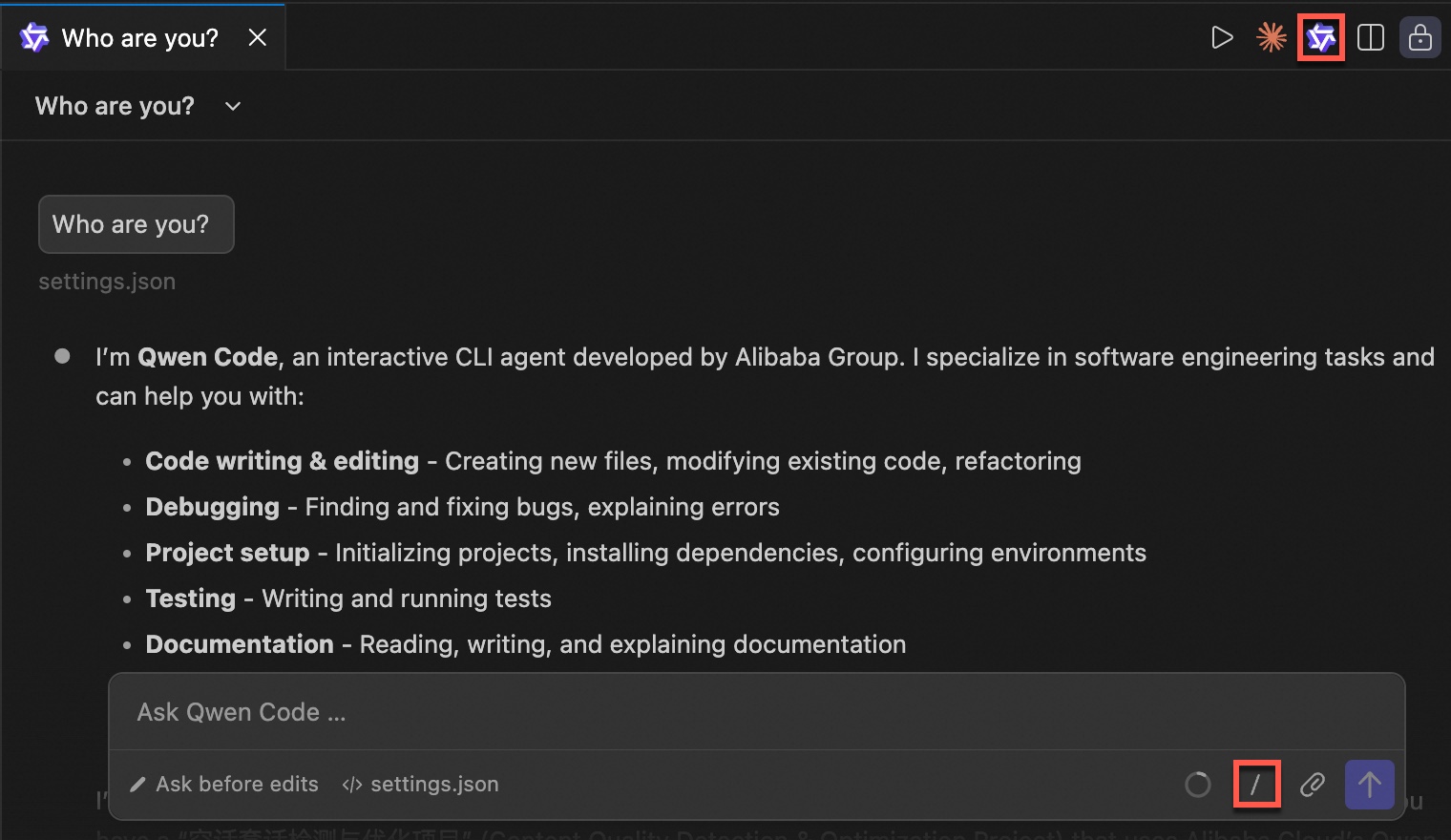
JetBrains IDE
Before use, make sure your JetBrains IDE supports Agent Client Protocol (ACP).
Qwen Code IDE depends on Qwen Code CLI. First refer to the Installation and usage section in this topic to install and configure Token Plan Team Edition.
Open JetBrains IDE, go to the AI Chat page, and click Install Plugin. IDEA will install the JetBrains AI Assistant plugin.
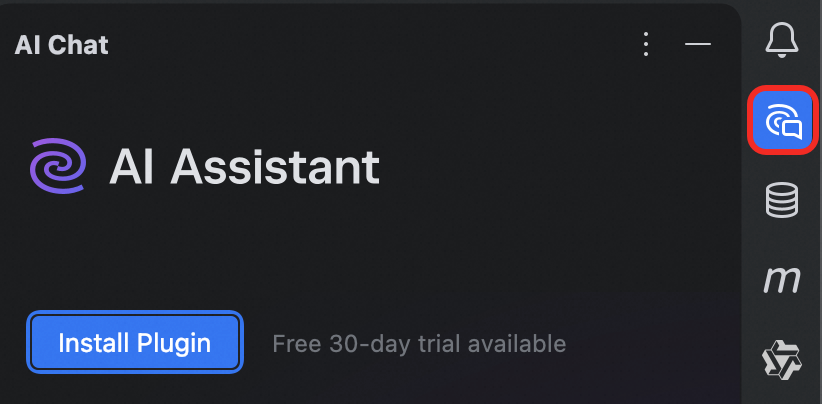
Click the three-dot menu in the upper-right corner of the AI Chat window and select Add Custom Agent. Fill in the configuration as follows. Replace
/path/to/qwenwith the Qwen Code installation path. You can run the following command to find the path:macOS/Linux:
which qwenWindows:
where qwen(CMD) orGet-Command qwen(PowerShell)
{
  "agent_servers": {
    "qwen": {
      "command": "/path/to/qwen",
      "args": ["--acp"],
      "env": {}
    }
  }
}
After configuration, Qwen Code will appear in the AI Chat panel. You can switch models in the lower-right corner.
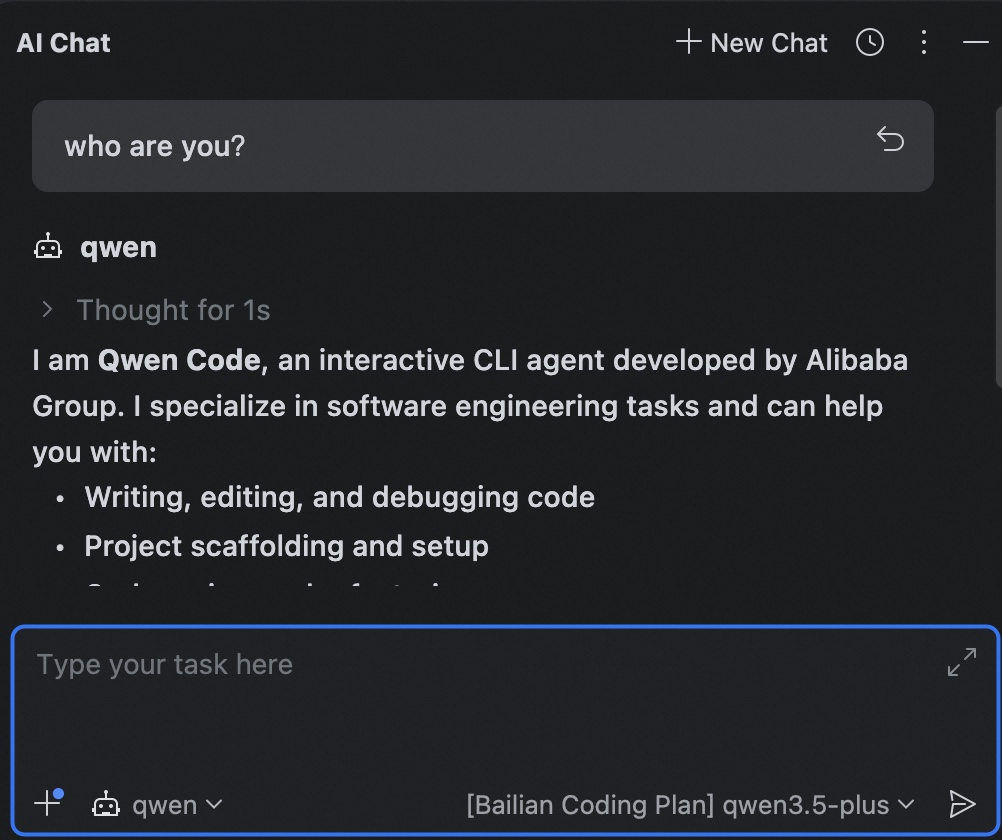
Learn more
For advanced features of Qwen Code such as sub-agents, MCP, and Skills, refer to the Qwen Code official documentation.
For Qwen Code use cases, refer to Use cases.
Error codes
For more information, see FAQ.
FAQ
For more information, see FAQ.