This topic describes common methods for storing models when you deploy AI inference applications using Function Compute. This topic also compares the pros, cons, and applicable scenarios for each method.
Background information
For more information about function storage classes, see Select a storage class for a function. The following two storage classes are suitable for storing models on GPU-accelerated instances.
In addition, GPU functions use custom container images to deploy services. Therefore, you can also package model files directly into the container image.
Each method has unique application scenarios and technical features. When you select a model storage method, you should consider your specific needs, execution environment, and team workflow to balance efficiency and cost.
Distribute models with container images
Packaging the trained model and related application code together in a container image is one of the most direct methods for distributing model files.
Pros and cons
Pros:
Convenience: After you create the image, you can run it directly for inference without additional configuration.
Consistency: Ensures that the model version is consistent across all environments. This reduces problems caused by version discrepancies.
Cons:
Image size: The image can be very large, especially for large models.
Time-consuming updates: You must rebuild and redistribute the image every time the model is updated, which is a time-consuming process.
Notes
The platform pre-processes container images to improve the cold start speed of function instances. However, if an image is too large, it might exceed the platform's image size limit and increase the time required for image acceleration pre-processing. For more information about the platform's image size limit, see What is the size limit for GPU images?.
Scenarios
The model size is relatively small, such as a few hundred megabytes.
If the model changes infrequently, you can package it in the container image.
If your model files are large, are updated frequently, or exceed the platform's image size limit when published with the image, you should separate the model from the image.
Store models in File Storage NAS
The Function Compute platform lets you mount a NAS file system to a specified directory of a function instance. After you store the model in the NAS file system, the application can load the model files by accessing the NAS mount target directory.
Pros and cons
Pros:
Compatibility: Compared with Filesystem in Userspace (FUSE)-based file systems, the
POSIXfile interface provided by NAS is more complete and mature. This results in better application compatibility.Capacity: NAS can provide petabytes of storage capacity.
Cons:
VPC network dependency: You must configure a VPC access channel for the function to access the NAS mount target. This involves a significant number of permissions for different cloud products. Additionally, during a cold start of a function instance, it takes several seconds for the platform to establish the VPC access channel for the instance.
Limited content management: A NAS file system must be mounted before use. You also need to establish a business process to distribute model files to the NAS instance.
Does not support active-active or multi-AZ deployments. For more information, see NAS FAQ.
Notes
When many containers start and load models simultaneously, the NAS bandwidth bottleneck is easily reached. This increases the instance startup time and can cause failures due to timeouts. For example, this can happen when a scheduled HPA starts reserved GPU-accelerated instances in batches or when a burst of traffic triggers the creation of many on-demand GPU-accelerated instances.
You can view NAS performance monitoring (read throughput) from the console.
You can increase the amount of data in NAS to improve its read and write throughput.
When you use NAS to store model files, select the Performance type for a General-purpose NAS file system. This is because this NAS type provides a high initial read bandwidth of about 600 MB/s. For more information, see General-purpose NAS file systems.
Scenarios
On-demand GPU scenarios that require extremely fast startup performance.
Store models in Object Storage Service (OSS)
The Function Compute platform lets you mount an OSS bucket to a specified directory of a function instance. The application can then directly load the model from the OSS mount target.
Pros
Bandwidth: OSS has a high bandwidth limit. Compared with NAS, bandwidth contention between function instances is less likely. For more information, see OSS limits and performance metrics. You can also enable the OSS accelerator to obtain higher throughput.
Multiple management methods:
OSS provides access channels such as the console and open APIs.
OSS provides a variety of locally available management tools. For more information, see OSS Developer Tools.
You can use the OSS cross-region replication feature for model synchronization and management.
Simple configuration: Compared with a NAS file system, mounting an OSS bucket to a function instance does not require VPC access and is ready to use immediately after configuration.
Cost: In general, OSS is more cost-effective than NAS.
Notes
In principle, OSS mounting is implemented using the Filesystem in Userspace (FUSE) mechanism. When an application accesses a file on an OSS mount target, the platform converts the access request into an OSS API call. Therefore, OSS mounting has the following characteristics:
It runs in user mode and consumes the resource quota of the function instance, such as CPU, memory, and temporary storage. Therefore, you should use it on GPU-accelerated instances with larger specifications.
Data is accessed using OSS APIs. The throughput and latency are ultimately limited by the OSS API service. Therefore, this method is more suitable for accessing a small number of large files, such as in model loading scenarios, and is not suitable for accessing many small files.
The current implementation does not enable the system's Page Cache. Unlike a NAS file system, this means that an application within a single instance cannot benefit from Page Cache acceleration if it needs to access the same model file multiple times.
Scenarios
Many instances load models in parallel, requiring higher storage throughput to avoid insufficient bandwidth between instances.
Scenarios that require locally redundant storage or multi-region deployments.
Accessing a small number of large files, such as in model loading scenarios.
Comparison summary
Item | Distribute with image | Mount NAS | Mount OSS |
Model size |
| None | None |
Throughput | Relatively fast |
|
|
Compatibility | Good | Good |
|
Management method | Container image | Mount and use within a VPC |
|
Multi-AZ | Supported | Not supported | Supported |
Page Cache enabled | Yes | Yes. | No |
Cost | No extra cost | In general, NAS is slightly more expensive than OSS. The actual cost is subject to the current billing rules of each product.
| |
Based on the comparison, the best practices for hosting models on FC GPU instances are as follows, considering different usage patterns, the number of concurrent container startups, and model management needs:
For on-demand GPU scenarios that require extremely fast startup performance, use a Performance-type General-purpose NAS file system.
For provisioned GPU scenarios where container startup time is not critical, use OSS.
For scenarios where many GPU containers start concurrently, use the OSS accelerator to avoid the single-point bandwidth bottleneck of NAS.
For multi-region unitized deployment scenarios, use OSS and the OSS accelerator to reduce model management complexity and cross-region synchronization difficulties.
Test data
This section compares the performance difference between model storage methods by measuring the time it takes to switch Stable Diffusion models. The models and their sizes used in this test are listed in the following table.
Model | Size (GB) |
Anything-v4.5-pruned-mergedVae.safetensors | 3.97 |
Anything-v5.0-PRT-RE.safetensors | 1.99 |
CounterfeitV30_v30.safetensors | 3.95 |
Deliberate_v2.safetensors | 1.99 |
DreamShaper_6_NoVae.safetensors | 5.55 |
cetusMix_Coda2.safetensors | 3.59 |
chilloutmix_NiPrunedFp32Fix.safetensors | 3.97 |
pastelmix-fp32.ckpt | 3.97 |
revAnimated_v122.safetensors | 5.13 |
sd_xl_base_1.0.safetensors | 6.46 |
Time to switch model (first time) (seconds) | Time to switch model (second time) (seconds) |
|
|
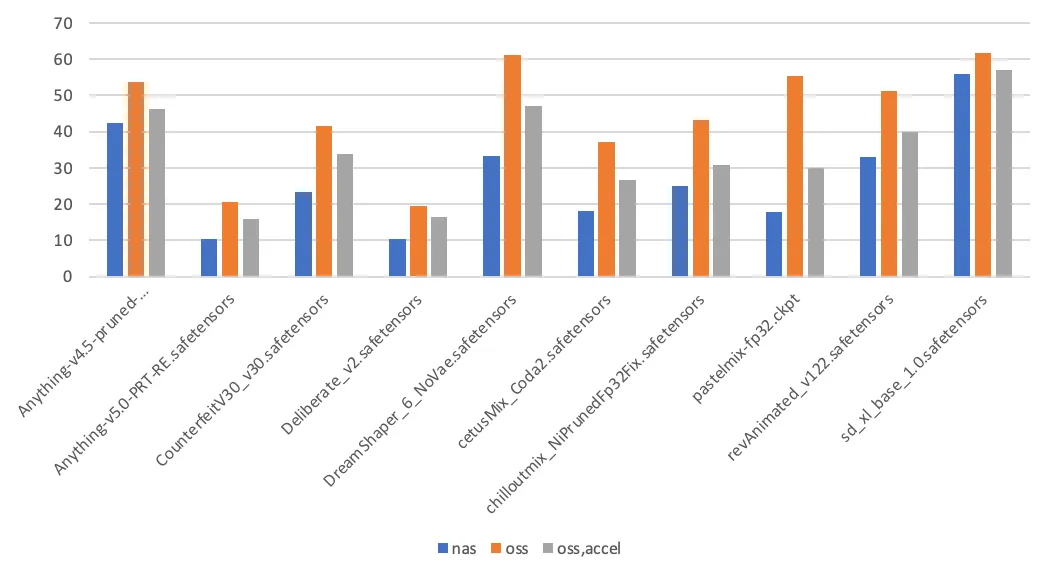
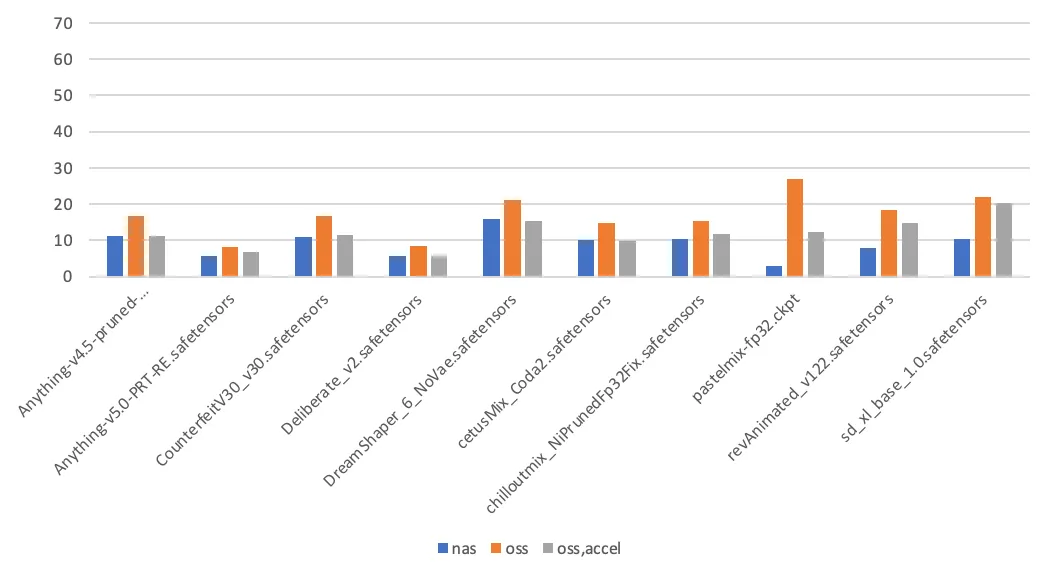
The test conclusions are as follows:
Page Cache enabled: When Stable Diffusion loads a model for the first time, it reads the model file twice: once to calculate the hash value of the model file and a second time for the actual load. Subsequent model loads read the model file only once. When a file on a NAS mount target is accessed for the first time, the kernel populates the Page Cache, which accelerates the second access. In contrast, accessing an OSS mount target does not use the Page Cache.
Other factors that affect load time: In addition to the storage medium, the time it takes to load a model is also related to the implementation details of the application. These details include the application's throughput capacity and the I/O mode used to read the model file (sequential read or random read).