This topic describes how to implement colocated scheduling for Slurm and Kubernetes in Container Service for Kubernetes (ACK) clusters. This solution helps you optimize resource allocation and workload scheduling for high-performance computing (HPC) jobs and containerized applications in your cluster. In addition, this solution improves resource utilization, cluster stability, and workload performance. You can use this solution to meet requirements in various computing scenarios and build a computing platform that features high efficiency and flexibility.
Overview
Why do we need to implement colocated scheduling in ACK clusters?
Default scheduling solution: ACK statically allocates resources. ACK and Slurm schedule workloads separately. In a Slurm cluster, each Slurm pod pre-occupies cluster resources. Kubernetes cannot use idle resources that are pre-occupied by Slurm pods. This results in cluster resource fragments. If you want to modify the resource configuration of a Slurm pod, you must delete and then recreate the pod. Therefore, in scenarios where there is a great gap between resources occupied by Slurm clusters and resources occupied by Kubernetes clusters, it is hard to migrate workloads to other nodes.
Colocated scheduling solution: ACK provides the ack-slurm-operator component to implement colocated scheduling for Slurm and Kubernetes in ACK clusters. This solution runs a copilot in the Kubernetes cluster and an extended resource plug-in in the Slurm cluster. This allows Kubernetes and Slurm to share cluster resources and avoids repetitively allocating resources.
The following figure shows the preceding resource sharing solutions.
Static resource allocation and separate workload scheduling | Colocated scheduling for Slurm and Kubernetes |
 |  |
The following figure shows how the colocated scheduling solution works.
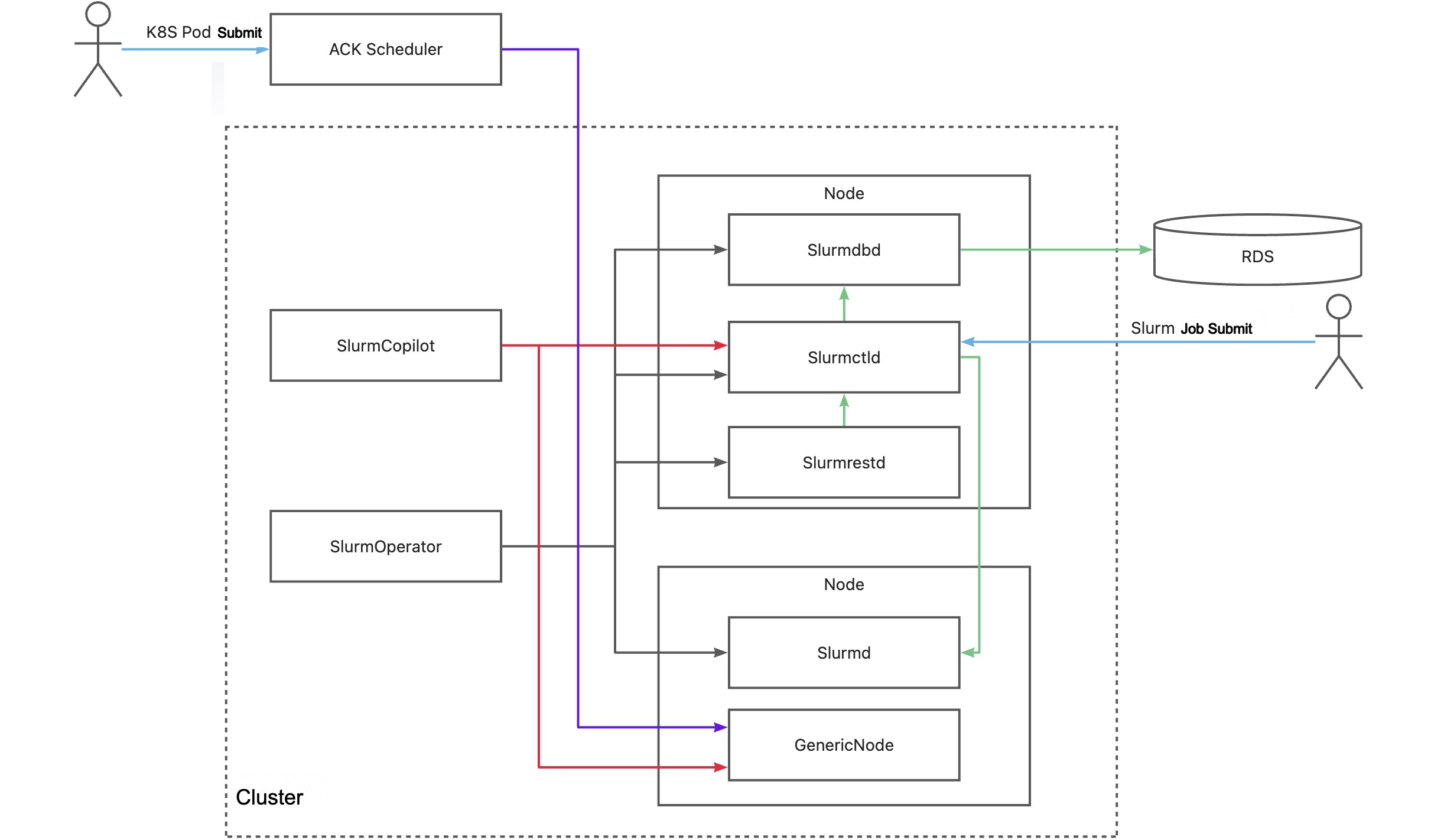
Key component | Description |
SlurmOperator | This component launches a Slurm cluster in an ACK cluster. The Slurm cluster is containerized and each Slurm worker pod runs on a separate node. Other Slurm system components are scheduled to random nodes. |
SlurmCopilot | This component uses the cluster token to coordinate with slurmctld on resource allocation. By default, when slurmctld is started, the component automatically generates a token and updates the token to a Secret by using kubectl. To manually update the token, you can use a custom initialization script or revoke the Secret update permissions. Then, you need to manually update the token to ack-slurm-jwt-token in the ack-slurm-operator namespace. ack-slurm-jwt-token is a key-value pair. The key is the cluster name and the value is the Base64-encoded content of the generated token (base64 --wrap=0). After an admission check is added to a GenericNode, this component modifies the amount of available resources on the corresponding node in slurmctld. After the modification is completed, the resource status is updated to the GenericNode. Then, this component notifies the ACK scheduler to perform workload scheduling. |
Slurmctld | The central manager of Slurm. This component monitors resources and jobs in the Slurm cluster, schedules jobs, and allocates resources. To improve the availability of slurmctld, you can configure a secondary pod for slurmctld. |
GenericNodes | This component is a custom resource that functions as a resource ledger between Kubernetes and Slurm. When the ACK scheduler schedules a pod to a node, an admission check is added to the GenericNode of the node to request the Slurm system to confirm resource allocation. |
Slurmd | A daemon that runs on each computing node. This component runs jobs and reports the status of nodes and jobs to slurmctld. |
Slurmdbd | The Slurm database daemon. This component records and manages the ledger information of different jobs and provides API operations for data queries and statistics. slurmdbd is an optional component. If you do not install slurmdbd, you can record the ledger information in files. |
Slurmrested | A RESTful API daemon that allows you to interact with Slurm and use the features of Slurm by calling RESTful APIs. slurmrestd is an optional component. If you do not install slurmrestd, you can use a command-line tool to interact with Slurm. |
1. Prepare the environment
1.1 Install ack-slurm-operator
An ACK cluster that runs Kubernetes 1.26 or later is created. For more information, see Add GPU-accelerated nodes to a cluster and Update clusters.
Install ack-slurm-operator and enable the Copilot feature. This way, you can use Slurm to schedule jobs and use Kubernetes to schedule pods on the same batch of physical servers.
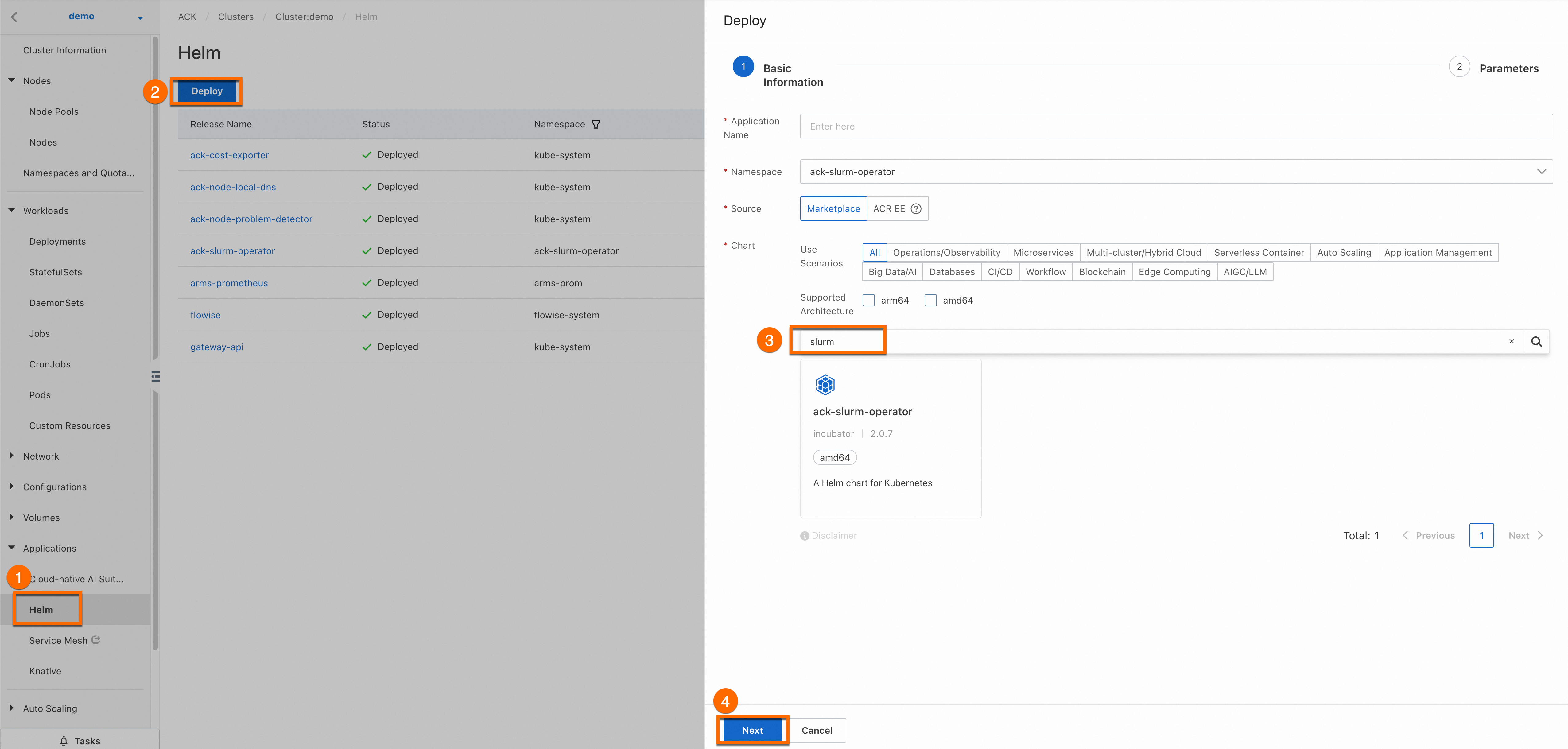
Log on to the ACK console. Click the name of the cluster you created. On the cluster details page, click the callouts in sequence to install ack-slurm-operator.
The Application Name and Namespace parameters are optional. Click Next (callout ④). In the Confirm message, click Yes. In this case, the default application ack-slurm-operator and the default namespace ack-slurm-operator are used.
Select the latest version for Chart Version. Set
enableCopilot(callout ②) totrueandwatchNamespace(callout ③) todefault. You can set watchNamespace to a custom namespace based on your business requirements. Then, click OK to install ack-slurm-operator.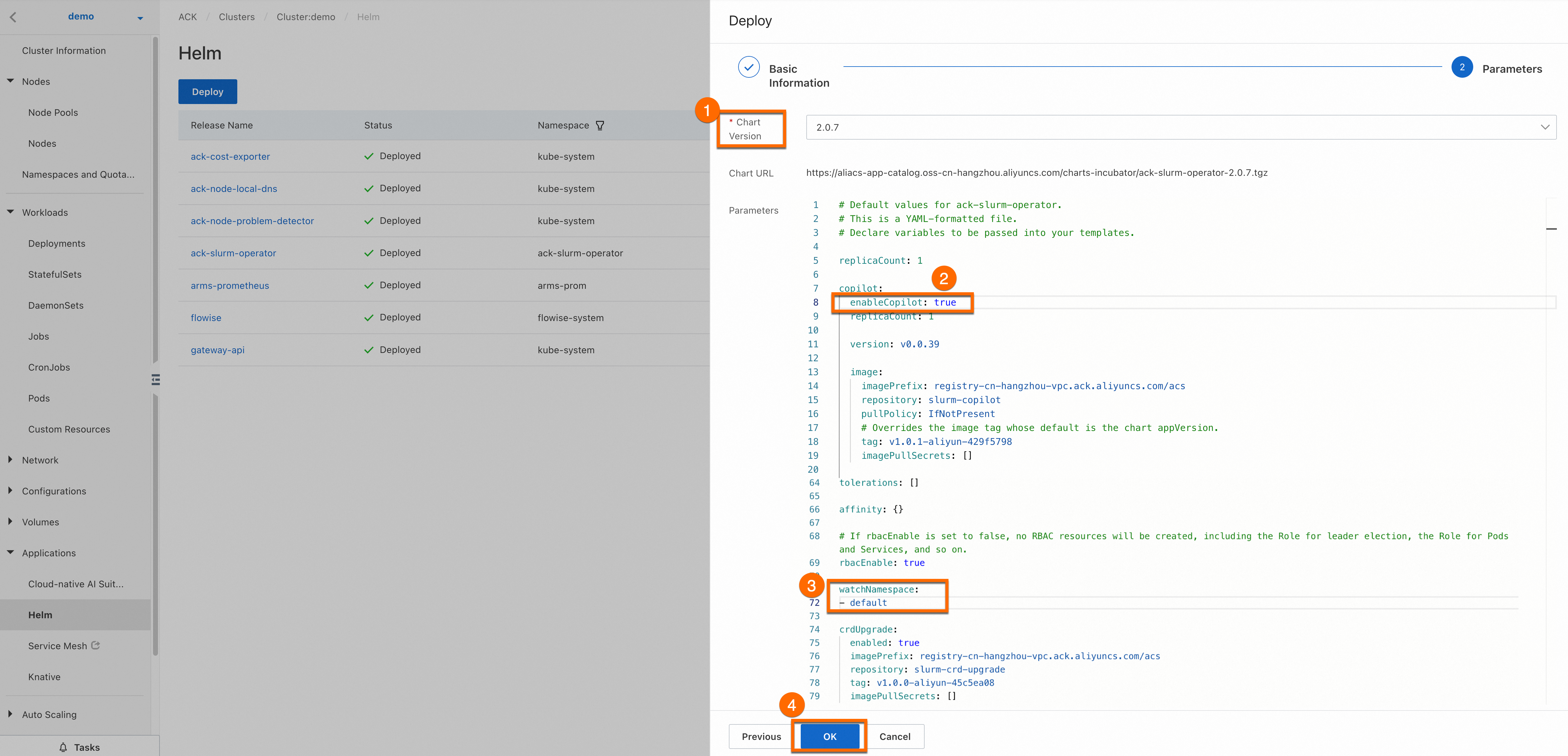
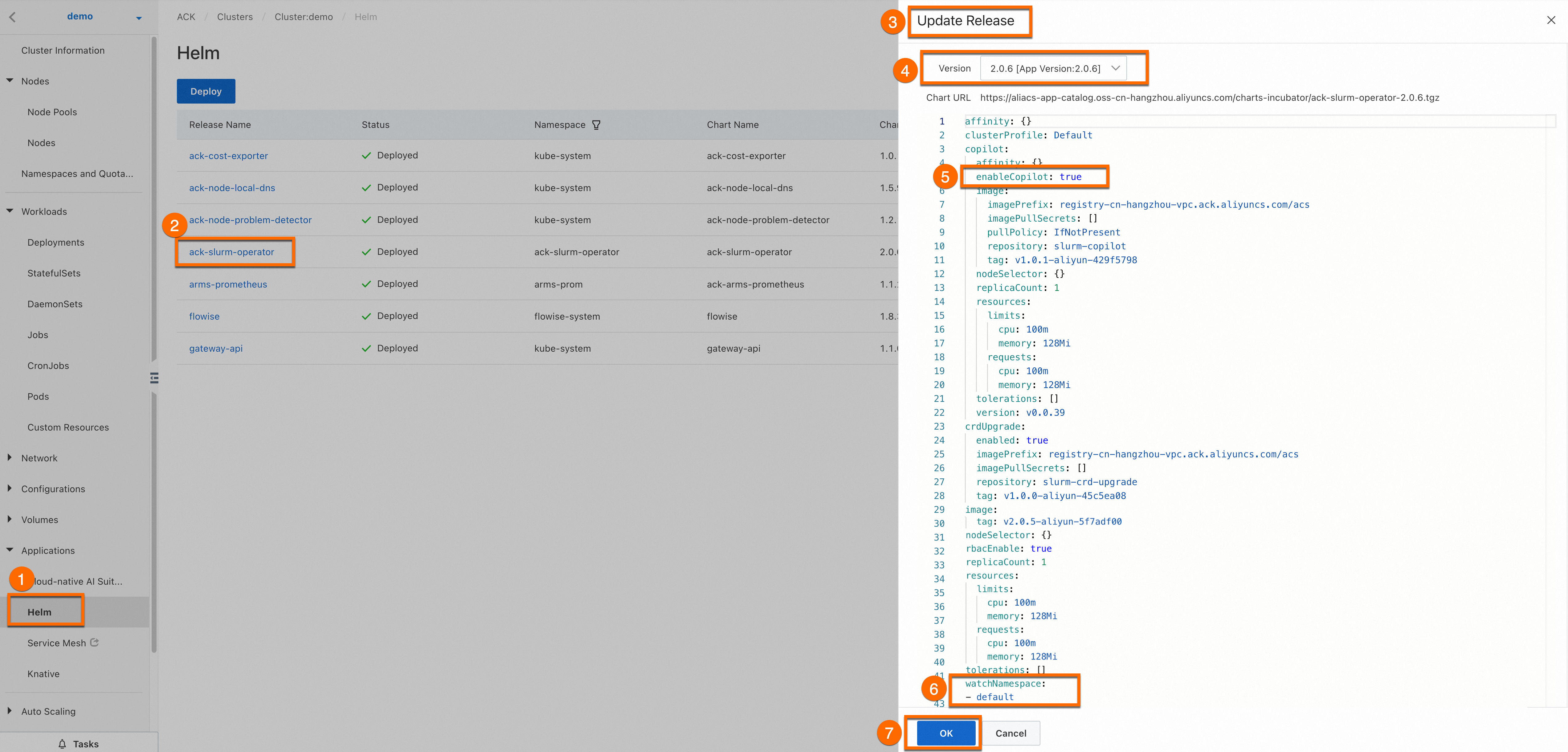
Optional: Update ack-slurm-operator.
Log on to the ACK console. On the Cluster Information page, choose Applications > Helm. On the Applications page, find ack-slurm-operator and click Update.
1.2 Install and configure ack-slurm-cluster
To quickly deploy and manage a Slurm cluster and flexibly modify the configurations of the cluster, you can use Helm to install the SlurmClusterart package provided by Alibaba Cloud. Download the Helm chart for a Slurm cluster from charts-incubator and set the relevant parameters. Then, Helm will create role-based access control (RBAC) resources, ConfigMaps, Secrets, and a Slurm cluster for you.
Perform the following operations:
Run the following command to add a chart repository provided by Alibaba Cloud to your Helm client: After the repository is added, you can access the Helm charts provided by Alibaba Cloud, such as the chart of the ack-slurm-cluster component.
helm repo add aliyun https://aliacs-app-catalog.oss-cn-hangzhou.aliyuncs.com/charts-incubator/Run the following command to pull and decompress the ack-slurm-cluster chart. This operation creates a subdirectory named
ack-slurm-clusterin the current directory. The ack-slurm-cluster directory contains all the files and templates included in the chart.helm pull aliyun/ack-slurm-cluster --untar=trueRun the following commands to modify the chart parameters in the values.yaml file.
The values.yaml file contains the default configurations of the chart. You can modify the parameter settings in the file based on your business requirements. The settings include Slurm configurations, resource requests and limits, and storage configurations.
cd ack-slurm-cluster vi values.yamlRun the following command to install the ack-slurm-cluster chart. If the ack-slurm-cluster chart is already installed, you can run the helm upgrade command to update the installed chart. After you update the installed chart, you must manually delete the existing pod and the StatefulSet created for slurmctld to make the update take effect.
cd ..
helm install my-slurm-cluster ack-slurm-cluster # Replace my-slurm-cluster with the actual value.
After installing the chart, run the
helm listcommand to check whether the ack-slurm-cluster chart is successfully installed.helm listExpected output:
NAME                    NAMESPACE       REVISION        UPDATED                                 STATUS          CHART                   APP VERSION
ack-slurm-cluster       default         1               2024-07-19 14:47:58.126357 +0800 CST    deployed        ack-slurm-cluster-2.0.0 2.0.0
Check whether slurmrestd and slurmdbd run as expected.
Use kubectl to connect to the cluster and check whether the slurmdbd pod runs as expected.
kubectl get podThe following sample output shows that one worker pod and three control plane pods run in the cluster.
NAME                          READY   STATUS    RESTARTS   AGE
slurm-test-slurmctld-dlncz    1/1     Running   0          3h49m
slurm-test-slurmdbd-8f75r     1/1     Running   0          3h49m
slurm-test-slurmrestd-mjdzt   1/1     Running   0          3h49m
slurm-test-worker-cpu-0       1/1     Running   0          166m
Run the following command to query logs. You can view the logs to check whether slurmdbd runs as expected.
kubectl exec slurm-test-slurmdbd-8f75r cat /var/log/slurmdbd.log | headExpected output:
kubectl exec [POD] [COMMAND] is DEPRECATED and will be removed in a future version. Use kubectl exec [POD] -- [COMMAND] instead.
[2024-07-22T19:52:55.727] accounting_storage/as_mysql: _check_mysql_concat_is_sane: MySQL server version is: 8.0.34
[2024-07-22T19:52:55.737] error: Database settings not recommended values: innodb_lock_wait_timeout
[2024-07-22T19:52:56.089] slurmdbd version 23.02.7 started
Click Show the steps to build a Slurm image to view how to install dependencies in Slurm.
2. Test colocated scheduling
2.1 Test colocated scheduling
Check the status of GenericNodes to view Slurm workloads and Kubernetes workloads.
kubectl get genericnodeExpected output:
NAME                    CLUSTERNAME   ALIAS                     TYPE    ALLOCATEDRESOURCES
cn-hongkong.10.1.0.19                 slurm-test-worker-cpu-0   Slurm   [{"allocated":{"cpu":"0","memory":"0"},"type":"Slurm"},{"allocated":{"cpu":"1735m","memory":"2393Mi"},"type":"Kubernetes"}]
Run the following commands to submit a job to the Slurm cluster and query GenericNodes. The returned GenericNode records the resource usage of a job in the Slurm cluster and the resource usage of a job in the Kubernetes cluster.
root@iZj6c1wf3c25dbynbna3qgZ ~]# kubectl exec slurm-test-slurmctld-dlncz -- nohup srun --cpus-per-task=3 --mem=4000 --gres=k8scpu:3,k8smemory:4000 sleep inf &
[1] 4132674

[root@iZj6c1wf3c25dbynbna3qgZ ~]# kubectl scale deployment nginx-deployment-basic --replicas 2
deployment.apps/nginx-deployment-basic scaled

[root@iZj6c1wf3c25dbynbna3qgZ ~]# kubectl get genericnode
NAME                    CLUSTERNAME   ALIAS                     TYPE    ALLOCATEDRESOURCES
cn-hongkong.10.1.0.19                 slurm-test-worker-cpu-0   Slurm   [{"allocated":{"cpu":"3","memory":"4000Mi"},"type":"Slurm"},{"allocated":{"cpu":"2735m","memory":"3417Mi"},"type":"Kubernetes"}]
In this case, if you submit another job to the Slurm cluster, the second job enters the Pending state.
[root@iZj6c1wf3c25dbynbna3qgZ ~]# kubectl exec slurm-test-slurmctld-dlncz -- nohup srun --cpus-per-task=3 --mem=4000 sleep inf &
[2] 4133454

[root@iZj6c1wf3c25dbynbna3qgZ ~]# srun: job 2 queued and waiting for resources

[root@iZj6c1wf3c25dbynbna3qgZ ~]# kubectl exec slurm-test-slurmctld-dlncz -- squeue
 JOBID PARTITION     NAME     USER ST       TIME  NODES NODELIST(REASON)
     2     debug    sleep     root PD       0:00      1 (Resources)
     1     debug    sleep     root  R       2:34      1 slurm-test-worker-cpu-0
In this example, no GREs are manually specified. However, GREs are still displayed in the preceding srun command. This is because the Slurm cluster is pre-installed with the job_resource_completion plug-in, which automatically adds GREs based on the CPU request and memory request. If job_resource_completion is not installed, you need to manually specify GREs. In this example, the following GRE configuration is specified: --gres=k8scpu:3,k8smemory:4000. Click Show the Slurm job script description to view how to specify parameters in the Slurm job script.
Optional: 2.2 Implement colocated scheduling in non-containerized Slurm clusters
SlurmCopilot uses the Slurm API to interact with Slurm. This interaction method also applies to non-containerized Slurm cluster scenarios.
In non-containerized Slurm cluster scenarios, specific Kubernetes resources can only be manually created, including the tokens mentioned in the preceding sections. The following section describes the Kubernetes resources that must be manually created.
Create a Service for each Slurm cluster.
SlurmCopilot queries information about Services from the cluster and submits API requests to the
${.metadata.name}.${.metadata.namespace}.svc.cluster.local:${.spec.ports[0].port}endpoint. In non-containerized Slurm cluster scenarios, you must create a Service for each Slurm cluster. The following code block provides an example of a Service configuration. Take note that the name of the Service of a Slurm cluster must be in the ${slurmCluster}-slurmrestd format. The ${slurmCluster} value must match the GenericNodes in the Slurm cluster.apiVersion: v1 kind: Service metadata: name: slurm-slurmrestd namespace: default spec: ports: - name: slurmrestd port: 8080 protocol: TCP targetPort: 8080Configure DNS records for each Slurm cluster.
To enable access to the slurmrestd process, you must configure DNS records in the SlurmCopilot configurations to point
${.metadata.name}.${.metadata.namespace}.svc.cluster.local:${.spec.ports[0].port}to the IP address of the slurmrestd process.Create GenericNodes for nodes in the Slurm cluster.
SlurmCopilot uses GenericNodes as the aliases of nodes in a Slurm cluster. If you do not create a GenericNode for a node in a Slurm cluster, SlurmCopolit cannot obtain information about the node. The name of a GenericNode for a node must be the same as the node name in the Kubernetes system. The value of the
.spec.aliasparameter must be the same as the node name in the Slurm system. Thekai.alibabacloud.com/cluster-nameandkai.alibabacloud.com/cluster-namespacelabels must match the Service of the Slurm cluster.apiVersion: kai.alibabacloud.com/v1alpha1 kind: GenericNode metadata: labels: kai.alibabacloud.com/cluster-name: slurm-test kai.alibabacloud.com/cluster-namespace: default name: cn-hongkong.10.1.0.19 spec: alias: slurm-test-worker-cpu-0 type: Slurm
Summary
In a workload colocation environment, you can use Slurm to schedule HPC jobs and use Kubernetes to orchestrate containerized workloads. This colocated scheduling solution allows you to use the Kubernetes ecosystem and services, including Helm charts, continuous integration/continuous delivery (CI/CD) pipelines, and monitoring tools. In addition, you can use a unified platform to schedule, submit, and manage both HPC jobs and containerized workloads. This way, HPC jobs and Kubernetes containerized workloads can be deployed in the same cluster to make full use of hardware resources.