This topic explains how to diagnose and resolve errors related to LoadBalancer Services in Alibaba Cloud Container Compute Service (ACS). When you create a Service of Type=LoadBalancer, the cloud controller manager (CCM) automatically creates and configures Server Load Balancer (SLB) resources, including the SLB instance, listeners, and backend server groups. For more information about how SLB resources are automatically updated, see Considerations for configuring a LoadBalancer Service.
Before you begin
Make sure the CCM version is 1.9.3.276-g372aa98-aliyun or later. Older CCM versions do not emit Service error events, which prevents effective troubleshooting.
To update the CCM, see Update the CCM.
For CCM release notes, see Cloud Controller Manager.
Diagnostic procedure
The following flowchart summarizes the diagnostic process.
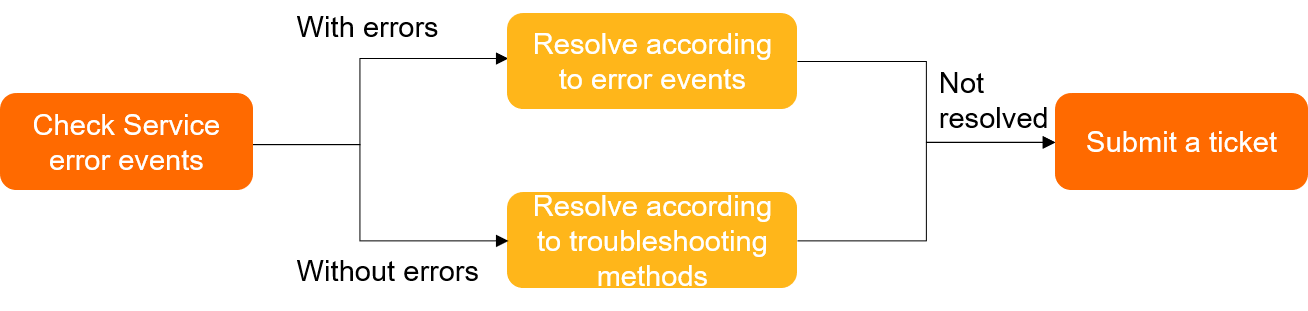
Use this systematic approach to identify the failure point. Start from the pod layer and work outward to the SLB layer.
Step 1: Verify pods and endpoints
Run the following command to check whether pods are running and endpoints are populated:
kubectl -n {your-namespace} get pods -o wide
kubectl -n {your-namespace} get endpoints {your-svc-name}
If no endpoints exist, check whether the pods are running and whether the pod labels match the Service selector.
Step 2: Find the Service associated with the SLB instance
Run the following command to find the Service by the SLB IP address:
kubectl get svc -A |grep -i LoadBalancer|grep ${XXX.XXX.XXX.XXX} #XXX.XXX.XXX.XXX is the IP address of the SLB instance.Step 3: Check for Service error events
Run the following command to check for Service error events:
kubectl -n {your-namespace} describe svc {your-svc-name}If no events appear, verify that the CCM version is 1.9.3.276-g372aa98-aliyun or later. For information about how to update the CCM, see Update the CCM.
If error events are present, see Service errors and solutions.
If no error events are present, see Troubleshooting.
Step 4: Escalate if needed
If the issue persists after troubleshooting, join the ACS DingTalk group for technical support.
Service errors and solutions
Use the following tables to identify and resolve Service errors. Errors are grouped by category.
SLB creation errors
| Error message | Description and solution |
|---|---|
The loadbalancer does not support backend servers of eni type | Shared-resource SLB instances do not support elastic network interfaces (ENIs). To use an ENI as a backend server, create a high-performance SLB instance. Add the following annotation to the Service: service.beta.kubernetes.io/alibaba-cloud-loadbalancer-spec: "slb.s1.small". Important Make sure the annotations meet the requirements of your CCM version. For more information, see Add annotations to the YAML file of a Service to configure CLB instances. |
Status Code: 400 Code: ShareSlbHaltSales Message: The share instance has been discontinued. | Earlier versions of CCM automatically create shared-resource SLB instances, which are no longer available for purchase. Update the CCM. |
can not change ResourceGroupId once created | The resource group of an SLB instance cannot be changed after creation. Delete the service.beta.kubernetes.io/alibaba-cloud-loadbalancer-resource-group-id:"rg-xxxx" annotation from the Service. |
There are no available nodes for LoadBalancer | No backend server is associated with the SLB instance. Check whether pods are associated with the Service and whether those pods are running normally. Solutions: 1. If no pod is associated with the Service, associate application pods with the Service. 2. If the associated pods are not running as expected, troubleshoot them. For more information, see Pod troubleshooting. 3. If no backend server is associated with the SLB instance but the pods are running normally, check whether the pods are deployed on master nodes. If so, evict the pods to worker nodes. Otherwise, join the ACS DingTalk group for technical support. |
SLB reuse errors
| Error message | Description and solution |
|---|---|
alicloud: not able to find loadbalancer named [%s] in openapi, but it's defined in service.loaderbalancer.ingress. this may happen when you removed loadbalancerid annotation / alicloud: can not find loadbalancer, but it's defined in service | The system cannot associate the Service with the SLB instance. Log on to the SLB console and search for the SLB instance in the Service region by EXTERNAL-IP. 1. If the SLB instance does not exist and the Service is no longer needed, delete the Service. 2. If the SLB instance exists: (a) If you created the SLB instance in the SLB console, add the service.beta.kubernetes.io/alibaba-cloud-loadbalancer-id annotation to the Service. For more information, see Add annotations to the YAML file of a Service to configure CLB instances. (b) If the CCM automatically created the SLB instance, check whether the kubernetes.do.not.delete label is present on the SLB instance. If not, add the label. For more information, see How do I rename an SLB instance when the CCM version is V1.9.3.10 or earlier? |
SyncLoadBalancerFailed the loadbalancer xxx can not be reused, can not reuse loadbalancer created by kubernetes. | An SLB instance created by the CCM is being reused. Solutions: 1. Check the YAML file of the related Service and note the SLB instance ID in the service.beta.kubernetes.io/alibaba-cloud-loadbalancer-id annotation. 2. Troubleshoot based on the Service state: (a) If the Service is in the Pending state, change the value of the service.beta.kubernetes.io/alibaba-cloud-loadbalancer-id annotation to the ID of an SLB instance that was manually created in the CLB console. (b) If the Service is not in the Pending state: If the SLB instance IP matches the external IP of the Service, delete the service.beta.kubernetes.io/alibaba-cloud-loadbalancer-id annotation. If the SLB instance IP differs from the external IP of the Service, log on to the CLB console, select the cluster region, find the SLB instance by the external IP of the Service, and change the service.beta.kubernetes.io/alibaba-cloud-loadbalancer-id annotation to the ID of a manually created SLB instance. If no matching SLB instance is found, change the annotation to the ID of a manually created SLB instance and recreate the Service. |
alicloud: can not change LoadBalancer AddressType once created. delete and retry | The type of an SLB instance cannot be changed after creation. Recreate the Service. |
the loadbalancer lb-xxxxx can not be reused, service has been associated with ip [xxx.xxx.xxx.xxx], cannot be bound to ip [xxx.xxx.xxx.xxx] | An SLB instance cannot be associated with a Service that is already associated with another SLB instance. The service.beta.kubernetes.io/alibaba-cloud-loadbalancer-id annotation cannot be modified to reuse a different SLB instance. Delete and recreate the Service to change the associated SLB instance. |
Status Code: 400 Code: RspoolVipExist Message: there are vips associating with this vServer group. | The listener associated with the vServer group cannot be deleted. Solutions: 1. Check whether the Service annotation contains the SLB instance ID. Example: service.beta.kubernetes.io/alibaba-cloud-loadbalancer-id: {your-slb-id}. If the annotation contains the SLB instance ID, the SLB instance is being reused. 2. Log on to the SLB console and delete the listener that uses the Service port. For more information about how to delete an SLB listener, see Manage forwarding rules for a listener. |
Network errors
| Error message | Description and solution |
|---|---|
Status Code: 400 Code: NetworkConflict | The reused internal-facing SLB instance and the cluster are not in the same virtual private cloud (VPC). Make sure the SLB instance and the cluster are in the same VPC. |
Status Code: 400 Code: VSwitchAvailableIpNotExist Message: The specified VSwitch has no available ip. | The vSwitch has insufficient available IP addresses. Specify another vSwitch in the same VPC by using the annotation: service.beta.kubernetes.io/alibaba-cloud-loadbalancer-vswitch-id: "${YOUR_VSWITCH_ID}" |
can not find eniid for ip x.x.x.x in vpc vpc-xxxx | The ENI IP address cannot be found in the VPC. Check whether the service.beta.kubernetes.io/backend-type: eni annotation is added to the Service. If it is, check whether Flannel is used as the network plug-in of the cluster. Flannel does not support ENI mode. If Flannel is used, delete the annotation from the Service. |
Billing and quota errors
| Error message | Description and solution |
|---|---|
ORDER.ARREARAGE Message: The account is arrearage. | Your account has overdue payments. |
PAY.INSUFFICIENT_BALANCE Message: Your account does not have enough balance. | The account balance is insufficient. |
Status Code: 400 Code: Throttlingxxx | API throttling is triggered for SLB. Solutions: 1. Go to the Quota Management page in the SLB console and check whether the SLB resource quotas are sufficient. 2. Run the following command to check for Service errors, then refer to this table to resolve them: kubectl -n {your-namespace} describe svc {your-svc-name} |
Configuration errors
| Error message | Description and solution |
|---|---|
The specified Port must be between 1 and 65535. | The targetPort field does not support STRING type values in ENI mode. Set targetPort to an INTEGER value in the Service YAML file, or update the CCM. For more information about how to update the CCM, see Update the CCM. |
The operation is not allowed because the instanceChargeType of loadbalancer is PayByCLCU. / User does not have permission modify InstanceChargeType to spec. | The billing method of the SLB instance cannot be changed from pay-as-you-go to pay-by-specification. Solutions: 1. Delete the service.beta.kubernetes.io/alibaba-cloud-loadbalancer-spec annotation from the Service. 2. If service.beta.kubernetes.io/alibaba-cloud-loadbalancer-instance-charge-type is added to the Service, set the value to PayByCLCU. |
Troubleshooting
Use the following information to troubleshoot issues that do not generate Service error events.
Issues when accessing an SLB instance
| Issue | Solution |
|---|---|
| The SLB instance does not evenly distribute traffic. | See The SLB instance does not evenly distribute traffic. |
| The 503 error occurs when accessing the SLB instance during application updates. | See 503 error during application updates. |
| The SLB instance cannot be accessed from within the cluster. | See The IP address of the SLB instance that is associated with the LoadBalancer Service cannot be accessed from within the cluster. |
| The SLB instance cannot be accessed from outside the cluster. | See The SLB instance cannot be accessed from outside the cluster. |
The The plain HTTP request was sent to HTTPS port error occurs when a request is sent to an HTTPS port. | See Backend HTTPS services cannot be accessed. |
Issues related to SLB configurations
| Issue | Solution |
|---|---|
| The annotations of the Service do not take effect. | See What do I do if the annotations of a Service do not take effect? |
| The configuration of the SLB instance is modified. | See Why is the configuration of an SLB instance modified? |
| The system fails to reuse an existing SLB instance. | See Why does the system fail to use an existing SLB instance for more than one Services? |
| No listener is created when an existing SLB instance is reused. | See Why is no listener created when I reuse an existing SLB instance? |
| The endpoint of the Service differs from the backend server of the SLB instance. | See What do I do if the vServer groups of an SLB instance are not updated? |
Issues related to SLB deletion
| Issue | Solution |
|---|---|
| The SLB instance is deleted. | See When is an SLB instance automatically deleted? |
| The SLB instance is not deleted together with the Service. | See When is an SLB instance automatically deleted? |
The SLB instance does not evenly distribute traffic
Cause
The scheduling algorithm specified for the SLB instance is improper.
Issue
Traffic is not evenly distributed to the backend servers of an SLB instance.
Solution
If long-lived connections are established to your Service, set the scheduling algorithm to Weighted Least Connections (WLC) by adding the following annotation:
service.beta.kubernetes.io/alibaba-cloud-loadbalancer-scheduler:"wlc"
503 error during application updates
Cause
Connection draining is not configured for the SLB listener, or graceful shutdown is not configured for the pod.
Issue
The 503 error occurs when accessing the SLB instance during application updates.
Solution
Add the
service.beta.kubernetes.io/alibaba-cloud-loadbalancer-connection-drainannotation to configure connection draining for the SLB listener. For more information about the annotation, see Common operations to manage listeners.Set the
preStopandreadinessProbeparameters for the pod based on the network mode of the pod. Pod configuration example:readinessProbechecks whether the container is ready to accept network traffic. The pod is added to the endpoint only after it passes the readiness probing. The pod is then attached to the SLB instance after ACS detects the endpoint update. Set a proper probing interval, delay period, and unhealthy threshold forreadinessProbe. Some applications may take longer to start. If you specify a short time period, the application pods may repeatedly restart.Set the value of
preStopto a time period that the application pods require to handle the remaining requests. Set the value ofterminationGracePeriodSecondsto a time period that is 30 seconds longer thanpreStop.
   apiVersion: v1
   kind: Pod
   metadata:
     name: nginx
     namespace: default
   spec:
     containers:
     - name: nginx
       image: nginx
       # Liveness probing
       livenessProbe:
         failureThreshold: 3
         initialDelaySeconds: 30
         periodSeconds: 30
         successThreshold: 1
         tcpSocket:
           port: 5084
         timeoutSeconds: 1
       # Readiness probing
       readinessProbe:
         failureThreshold: 3
         initialDelaySeconds: 30
         periodSeconds: 30
         successThreshold: 1
         tcpSocket:
           port: 5084
         timeoutSeconds: 1
       # Graceful shutdown
       lifecycle:
         preStop:
           exec:
             command:
             - sleep
             - "30"
     terminationGracePeriodSeconds: 60
The SLB instance cannot be accessed from outside the cluster
Cause
Access control list (ACL) rules are configured for the SLB instance, or the SLB instance is not running as expected.
Issue
The SLB instance cannot be accessed from outside the cluster.
Solution
Run the following command to query Service events and troubleshoot errors. For more information, see Service errors and solutions.
kubectl -n {your-namespace} describe svc {your-svc-name}Check whether ACL rules are configured for the SLB instance. If ACL rules are configured, check whether the client IP address is allowed to access the SLB instance. For more information about how to configure ACL rules, see Access control.
Check whether the SLB instance is associated with a vServer group. If no vServer group is associated, check whether the application pods are associated with the Service and whether they are running normally. If the pods are not running as expected, identify the causes and troubleshoot the errors. For more information, see Pod troubleshooting.
Check whether unhealthy backend servers are detected by the SLB listeners. If unhealthy backend servers are detected, check whether the application pods are running normally. For more information about health checks for SLB, see Execute a health check script.
If the issue persists, join the ACS DingTalk group for technical support.
Backend HTTPS services cannot be accessed
Cause
After you specify the certificate information in the SLB instance, the SLB instance decrypts HTTPS requests and sends HTTP requests to the backend pods.
Issue
Backend HTTPS services cannot be accessed.
Solution
Set targetPort to an HTTP port in the Service. For example, if the HTTPS port is 443 in the following NGINX Service, change the value of targetPort to 80.
Example:
apiVersion: v1
kind: Service
metadata:
  annotations:
    service.beta.kubernetes.io/alibaba-cloud-loadbalancer-protocol-port: "https:443"
    service.beta.kubernetes.io/alibaba-cloud-loadbalancer-cert-id: "${YOUR_CERT_ID}"
  name: nginx
  namespace: default
spec:
  ports:
  - port: 80
    protocol: TCP
    targetPort: 80
  - port: 443
    protocol: TCP
    targetPort: 80
  selector:
    run: nginx
  type: LoadBalancer
Quick reference: common annotations
The following table lists the annotations most frequently referenced in troubleshooting scenarios. For the full annotation reference, see Use annotations to configure CLB instances.
| Annotation | Purpose | Common scenario |
|---|---|---|
service.beta.kubernetes.io/alibaba-cloud-loadbalancer-id | Reuse an existing SLB instance | SLB association failures, SLB reuse errors |
service.beta.kubernetes.io/alibaba-cloud-loadbalancer-spec | Set SLB instance specification | ENI backend server compatibility, billing method conflicts |
service.beta.kubernetes.io/alibaba-cloud-loadbalancer-vswitch-id | Specify a vSwitch for the SLB instance | Insufficient vSwitch IP addresses |
service.beta.kubernetes.io/alibaba-cloud-loadbalancer-scheduler | Set the scheduling algorithm | Uneven traffic distribution |
service.beta.kubernetes.io/alibaba-cloud-loadbalancer-connection-drain | Enable connection draining | 503 errors during application updates |
service.beta.kubernetes.io/alibaba-cloud-loadbalancer-protocol-port | Set protocol per port | HTTPS backend access failures |
service.beta.kubernetes.io/alibaba-cloud-loadbalancer-cert-id | Set the SSL certificate | HTTPS backend access failures |
service.beta.kubernetes.io/alibaba-cloud-loadbalancer-resource-group-id | Set the resource group | Resource group modification errors |
service.beta.kubernetes.io/alibaba-cloud-loadbalancer-instance-charge-type | Set the billing method | Billing method change errors |
service.beta.kubernetes.io/backend-type | Set the backend type (for example, eni) | ENI IP not found, Flannel compatibility |