This topic describes how to manage instances in HoloWeb, including editing and deleting both logged-on and logged-off instances.
Background information
You can perform management operations on both logged-on and logged-off instances. The following table describes the operations.
|
Instance type |
Management operations |
|
You can perform the following operations on logged-off instances:
|
|
|
You can perform the following operations on logged-on instances:
|
Manage Unregistered Instances
You can log on to, edit, and delete logged-off instances.
-
Log on to the Hologres Management Console.
-
In the navigation pane on the left of the top menu bar, select the desired region.
-
You can click Go to HoloWeb to go to the HoloWeb development page.
-
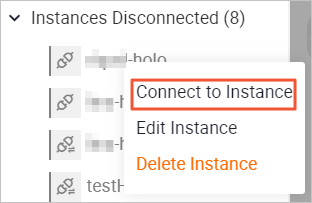
On the Metadata Management tab, right-click the target logged-off instance to perform management operations.
 Note
Note-
The logged-off instances section displays all instances in the current region under your Alibaba Cloud account for which you have access permissions.
-
When you activate a Hologres engine instance, the system automatically creates a logged-off instance of VPC network type. This instance is displayed in the list with a
 icon. You cannot edit its details or delete it.
You can perform the following operations:
-
Connect to Instance
Right-click the target instance and select Connect to Instance. For more information about logging on to an instance, see Log on to an instance.
-
Edit Instance
Right-click the target instance and select Edit Instance. For more information about editing instance parameters, see Edit instance parameter description.
Note-
The
 icon indicates an Internet-type instance, for which you can edit all parameters.
 -
For VPC-type instances, indicated by the
icon, you can only edit the Description field.
-
-
Delete Instance
Right-click the target instance and select Delete Instance. After confirming the instance information, click OK to delete the instance.
NoteCurrently, only instances with the
icon of the Internet type can be deleted, while instances with the icon of the VPC type cannot be deleted.
-
Manage logged-on instances
You can refresh, edit, manage users and permissions, switch databases, log off, and delete logged-on instances.
-
Log on to the Hologres Management Console.
-
In the navigation pane on the left of the top menu bar, select the desired region.
-
You can click Go to HoloWeb to go to the HoloWeb development page.
-
On the Metadata Management tab, right-click the target logged-on instance to perform management operations.
Note-
The Unlogged-in Instances section displays all instances in the current region that your Alibaba Cloud account has permission to access.
-
When you activate a Hologres engine instance, the system automatically creates a logged-off instance of VPC network type. This instance is displayed in the list with a
icon. You cannot edit its details or delete it.
You can perform the following operations:
-
Refresh
After modifying the instance, refresh it to synchronize the information.
-
Edit Instance
Right-click the target instance and select Edit Instance to edit the instance. For more information about editing instance parameters, see Edit instance parameter description.
Note-
The
icon indicates a public network-type instance, for which you can edit all parameters. -
For VPC-type instances, indicated by the
icon, you can only modify the description.
-
-
Copy Instance URL
Right-click the target instance and select Copy Instance URL. The system copies the Hologres instance link, which you can then paste.
-
Users
Right-click the target instance and select Users. On the Users page, you can add or delete users for the instance. For more information about user management, see User management.
-
DB Authorization
Right-click the target instance and select DB Authorization. On the DB Authorization page, you can create and authorize new databases, or modify the permissions of existing databases. For more information about DB authorization, see DB management.
-
IP address whitelist
Right-click the target instance and select IP address whitelist. On the IP address whitelist page, you can configure an IP address whitelist to manage access. For more information about IP address whitelists, see IP address whitelist.
-
Switch Database
Right-click the target instance and select Switch Database. On the Connect to Instance page, you can switch the database for the current instance. For more information about switching databases, see Log on to an instance.
-
Create Database
Right-click the target instance and select Create Database. On the Create Database page, you can create a new database for the current instance. The newly created database then appears in the list. For more information about creating a database, see Create a database.
-
Log Off
Right-click the target instance and select Log Off. After confirming the instance information, click OK to log off. The instance is then moved to the list of logged-off instances.
-
Delete Instance
You can delete the instance. Right-click the target instance and select Delete Instance. After confirming the instance information, click OK to delete the instance.
NoteYou can only delete public network-type instances, which are indicated by the
icon. VPC-type instances, indicated by the icon, cannot be deleted.
-