Authentication endpoints — registration and login interfaces — are the most targeted entry points for automated attacks. WAF's account security feature monitors these endpoints and detects credential stuffing, brute-force attacks, spam registration, weak password sniffing, and SMS interface abuse. This topic explains how to layer multiple protection strategies to defend these endpoints effectively.
For setup instructions, see Configure account security.
How it works
Attackers use automated tools, botnets, and rotating IP addresses to send high volumes of requests against authentication endpoints. Their goals range from credential theft and account takeover to fraudulent registrations that abuse promotions or launch phishing campaigns. Simple IP-based blocking fails against these tactics because attackers constantly rotate sources and proxies.
WAF addresses this by combining several complementary defenses:
| Defense | What it does | Best for |
|---|---|---|
| Verification services | Stops automated tools at the endpoint level | Web and HTML5 pages |
| SDK signatures | Verifies that requests originate from legitimate native apps | Mobile apps |
| Rate limiting | Blocks sources sending abnormally high request volumes based on shared identifiers | All endpoints |
| Log analysis | Reveals traffic patterns that automated detection may miss | Investigation and tuning |
| Bot threat intelligence | Blocks known credential-stuffing IP addresses using a dynamically updated blocklist | All endpoints |
Apply these strategies in combination. Each layer addresses a different attack vector.
Prerequisites
The following WAF features must be enabled before you can use certain defenses described in this topic:
| Defense | Required feature | Where to enable |
|---|---|---|
| SDK signatures | App Protection | WAF console |
| Log analysis | Log Service | WAF console |
| Bot threat intelligence | Bot Management | WAF console |
Protect web and HTML5 pages with verification services
Verification services are the most straightforward defense for browser-based authentication endpoints. Integration typically requires minor code changes and takes one to two business days.
Basic verification methods (such as simple CAPTCHAs) block unsophisticated scripts but can be bypassed as attack tools evolve. Use a professional verification service to provide stronger protection against adapted attack methods.
Protect native apps with SDK signatures
Verification services are not well-suited for native apps. For native apps, use the Alibaba Cloud SDK solution instead.
The SDK collects hardware and environment information from the mobile device, calculates a request signature, and validates it before forwarding the request. Only requests from verified apps reach the origin server. Requests from scripts, automated programs, simulators, and other unverified sources are blocked.
Enable App Protection in the WAF console before using the SDK solution. For details, see App protection overview.
Block attack sources with rate limiting
Rate limiting identifies and blocks sources that send abnormally high volumes of requests sharing a common field. This approach goes beyond IP-based blocking.
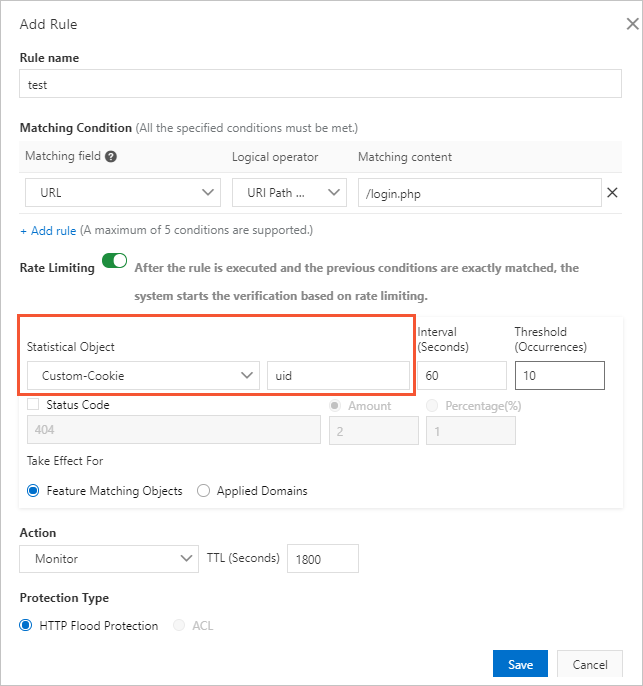
Attackers using proxies or rotating IP addresses often include the same identifier — such as a UID in a cookie — across all their requests. Configure rate limiting based on that shared identifier to block the malicious account rather than individual IP addresses.
Configure rate limiting on the Custom Protection Policy page in the WAF console. For instructions, see Create a custom protection policy.
All WAF editions support IP addresses and sessions as statistical objects. WAF Enterprise also supports custom cookies, custom headers, and custom parameters.
Analyze suspicious requests
Automated detection covers most attack patterns, but manual log analysis can uncover anomalies that rule-based systems miss. Look for these common characteristics of malicious requests:
| Characteristic | What to look for |
|---|---|
| Incomplete HTTP headers | Missing fields such as Referer, Cookie, or Content-Type |
| Abnormal User-Agent values | A Java or Python User-Agent on a standard consumer site, or a desktop browser User-Agent on a WeChat mini program endpoint |
| Missing cookies | Legitimate users typically carry multiple cookies (SessionID, userid, deviceid, lastvisit); crawlers often include only the minimum required for data retrieval |
| Abnormal parameters | Crawlers may omit optional parameters or submit the same parameter repeatedly |
| Suspicious field values | Unusual patterns in email addresses, phone numbers, or account information |
Use WAF's Log Service feature to query logs and analyze request characteristics, including top IP addresses and the proportion of requests that match suspicious patterns. After identifying malicious patterns, create custom protection rules to block or challenge those requests.
Enable Log Service from the WAF console before querying logs. For instructions, see Enable Log Service for WAF.
Enable bot threat intelligence
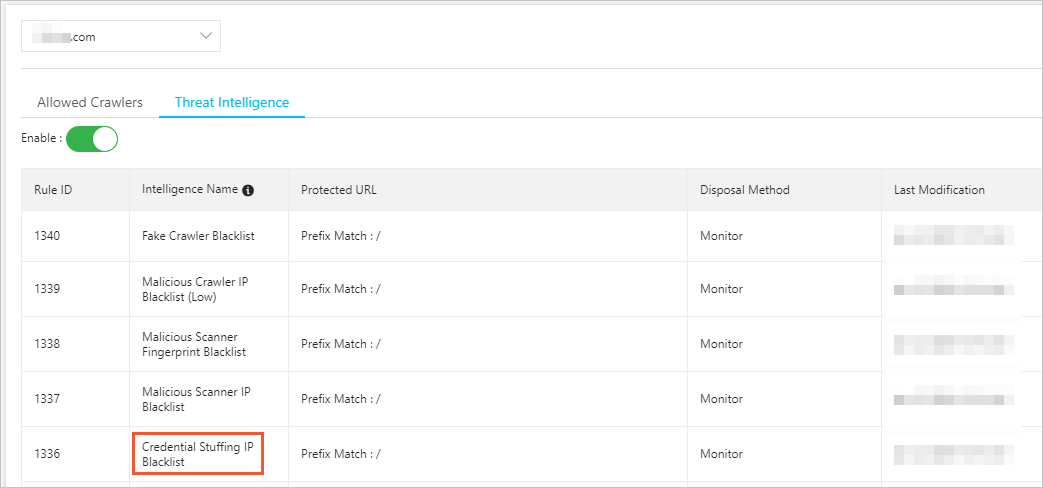
WAF's Bot Management feature maintains a dynamically updated credential-stuffing IP address blocklist, built from signals detected across Alibaba Cloud. Use the Bot Threat Intelligence function from the Bot Management tab to set how WAF responds to traffic from these IP addresses: Monitor, Block, or Captcha mode.
For configuration steps, see Set a bot threat intelligence rule.
Enable the Bot Management feature before using Bot Threat Intelligence.