The database proxy feature of ApsaraDB RDS for MySQL sits between your application and your database, intercepting all connections and requests. It provides read/write splitting to distribute load across instances, maintains persistent connections through operations and maintenance (O&M) events such as switchovers, and encrypts data transmission with SSL.
When to use the database proxy
Enable the database proxy when your RDS deployment encounters any of the following symptoms:
Too many connections or high CPU load: The primary RDS instance is overloaded by a large number of concurrent connections or transaction-heavy requests.
Frequent short-lived connection overhead: Most workloads use short-lived connections (for example, PHP applications), causing excessive reconnection cost.
Read-heavy workload overloading the primary instance: Read requests need to be distributed to read-only instances to relieve pressure on the primary RDS instance.
Application disruptions during switchovers or failovers: Applications drop connections when O&M events such as instance switchovers or failovers occur.
Read/write isolation across applications: Different applications need physically isolated routing — read-only workloads routed separately from read/write workloads.
For example, if your database system has one primary RDS instance and four read-only RDS instances serving two applications: bind two read-only instances to a proxy endpoint with the Read-only attribute for Application A (read-only traffic), and bind the primary instance and the other two read-only instances to a separate proxy endpoint with the Read/Write attribute for Application B (read/write traffic). The two applications are physically isolated within the same database system.
Key concepts
Database proxy endpoint
Database proxy endpoints are the core of the database proxy feature. Each RDS instance with the database proxy enabled supports up to seven proxy endpoints. For each endpoint, apply for one internal endpoint and one public endpoint. Configure connection settings per endpoint to meet different business requirements.
For more information, see Configure the connection settings for a database proxy endpoint and Database connection.
Read/write splitting
Proxy endpoints automatically route write requests to the primary RDS instance and read requests to read-only instances. Without read/write splitting, read-heavy workloads can overwhelm the primary instance and interrupt service.
For more information, see What is read/write splitting?
Persistent connections
When an O&M operation triggers a switchover, applications connected through proxy endpoints stay connected — no disconnection errors are reported.
For more information, see Configure persistent connection settings.
Transaction splitting
Transaction splitting is automatically enabled on all database proxies. Read requests that occur before a write operation within a transaction are forwarded to read-only instances, reducing load on the primary RDS instance.
For more information, see Transaction splitting.
Connection pooling
Connection pooling reduces the overhead of frequent new connections and excessive short-lived connections. This is effective for workloads that open and close connections at high frequency, such as PHP applications.
For more information, see Set the connection pool type.
Nearest access
For multi-zone proxy deployments, nearest access routes each application to the proxy node in the same zone. The application, proxy node, and read-only instance all stay in the same zone, significantly reducing network latency.
For more information, see Configure the nearest access feature.
SSL encryption
Enable SSL encryption on a proxy endpoint to protect data transmission.
For more information, see Configure SSL encryption for a dedicated proxy endpoint.
Zone
The zone is where a proxy node and its endpoints reside. Deploy the database proxy, proxy endpoints, and RDS instance in the same zone to avoid cross-zone latency. After enabling the database proxy, migrate proxy nodes across zones if needed.
For more information, see Migrate proxy nodes across zones.
Proxy deployment
The database proxy supports single-zone and dual-zone deployment:
Single-zone deployment: All proxy nodes are in the same zone.
Dual-zone deployment: Proxy nodes are distributed across two zones for cross-zone disaster recovery. No additional fees apply.
Deployment modes
Three deployment modes are available:
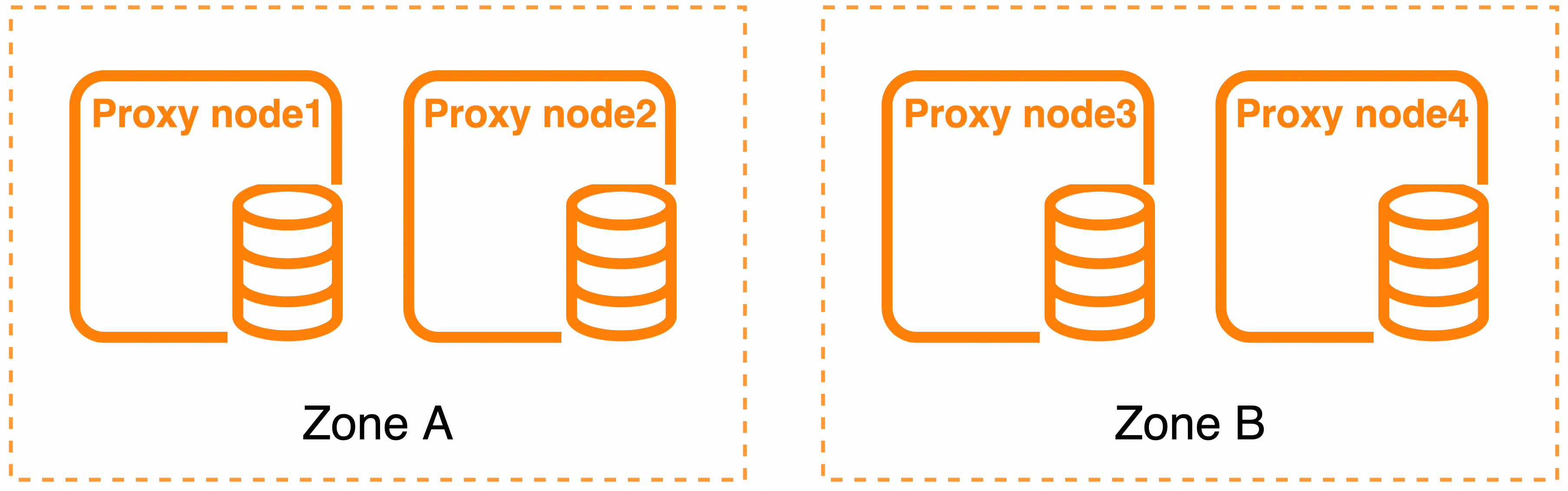
Deployment mode 1
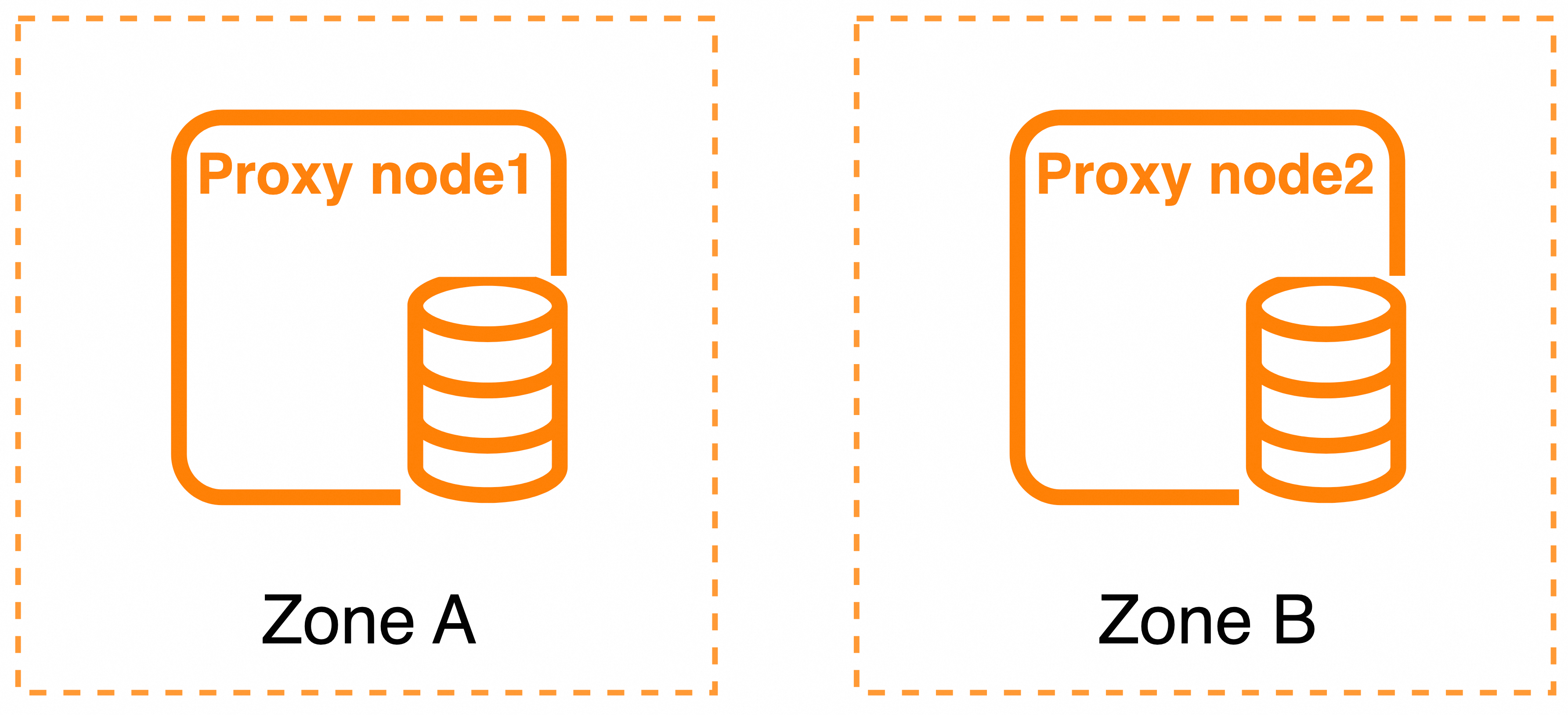
Deployment mode 2
Deployment mode 3

| Deployment mode | Zone | Total proxy nodes | Specification limit | Supported proxy type |
|---|---|---|---|---|
| Deployment mode 1 | Two zones | 4 | Specs of proxy nodes in the same zone must match | Dedicated |
| Deployment mode 2 | Two zones | 2 | Specs of all proxy nodes must match | Dedicated and general-purpose |
| Deployment mode 3 | Single zone | 2 | Specs of proxy nodes in the same zone must match | Dedicated and general-purpose |
After enabling the database proxy, change the deployment mode at any time. For more information, see Modify database proxy configurations.
Default mode and zones
| RDS instance deployment | Database proxy type | Default deployment mode | Default zone |
|---|---|---|---|
| Single-zone deployment | Dedicated | Deployment mode 3 | Same zone as the primary RDS instance |
| Single-zone deployment | General-purpose | Deployment mode 3 | Same zone as the primary RDS instance |
| Dual-zone deployment | Dedicated | Deployment mode 1 | Zone 1: same as the primary RDS instance zone; Zone 2: same as the secondary RDS instance zone |
| Dual-zone deployment | General-purpose | Deployment mode 2 | — |
Disaster recovery
Deployment mode 1
Node fault: The faulty node stops processing traffic. Traffic is rerouted to healthy proxy nodes in the same zone.
Zone fault: Traffic is rerouted to proxy nodes in the healthy zone. After the faulty zone recovers, new traffic routes to the recovered proxy node. Existing persistent connections are not rerouted and expire naturally.
If nearest access is enabled and a zone-level fault occurs, the feature may become unavailable because service availability takes priority over access latency.
Deployment mode 2
Two proxy nodes are deployed across two zones, so a node fault is equivalent to a zone fault. When a fault occurs, traffic is rerouted to the proxy node in the other zone.
Deployment mode 3
Node fault: The faulty node stops processing traffic. Traffic is rerouted to the other proxy node in the same zone.
Zone fault: The database proxy cannot provide service. Wait for the zone to recover, or manually change the deployment mode.
Database proxy types
ApsaraDB RDS for MySQL offers two proxy types:
General-purpose: Proxy nodes share physical CPU resources. Free of charge.
Dedicated: Proxy nodes exclusively occupy allocated physical CPU resources, delivering stable, predictable performance. Billed on a pay-as-you-go basis.
The following table compares the two types:
| Item | General-purpose | Dedicated |
|---|---|---|
| Billing method | Free of charge | Pay-as-you-go. See Billing rules for database proxies. |
| Resource type | Physical CPU resources are shared | Physical CPU resources are exclusively occupied |
| Spec range (single proxy node) | 1–8 CPU cores | 1–16 CPU cores |
| RDS instance | RDS High-availability Edition and Cluster Edition | RDS High-availability Edition and Cluster Edition |
| Deployment mode | Deployment modes 2 and 3 | Deployment modes 1, 2, and 3 |
| Single-zone deployment | Supported | Supported |
| Dual-zone deployment | Supported | Supported |
| Nearest access | Unsupported | Supported |
| Read/write splitting | Supported | Supported |
| Transaction splitting | Supported | Supported |
| Proxy endpoints | Up to 7 per instance; 1 internal + 1 public endpoint per proxy endpoint | Up to 7 per instance; 1 internal + 1 public endpoint per proxy endpoint |
| Persistent connections during switchovers | Supported | Supported |
| Persistent connections during failovers | Unsupported | Supported |
| Connection pooling | Supported | Supported |
| SSL encryption | Supported | Supported |
Proxy spec calculation: The specification of a database proxy equals the sum of all proxy node specifications. For example, with four dedicated nodes — two nodes at 1 CPU core in Zone A and two nodes at 2 CPU cores in Zone B — the proxy specification is 1 × 2 + 2 × 2 = 6 CPU cores.
Proxy node count: The number of proxy nodes equals the proxy specification divided by the unit specification per node (fixed at 2 CPU cores). For example, a 6-CPU-core proxy has 6 ÷ 2 = 3 proxy nodes.
Usage notes
For more information, see Usage notes of database proxies.
Billing
For more information, see Billing rules for database proxies.