The nearest access feature routes each application to a database proxy in the same zone, keeping traffic within a single zone from app to proxy to read-only instance. This eliminates cross-zone hops and reduces read latency.
How it works
Without nearest access, a proxy in Zone A may route requests to a database in Zone B, adding cross-zone latency to every read.
With nearest access enabled, each proxy endpoint only accepts and forwards traffic within its own zone. The database proxy endpoint routes requests only to databases in the same zone, so the entire read path stays local.
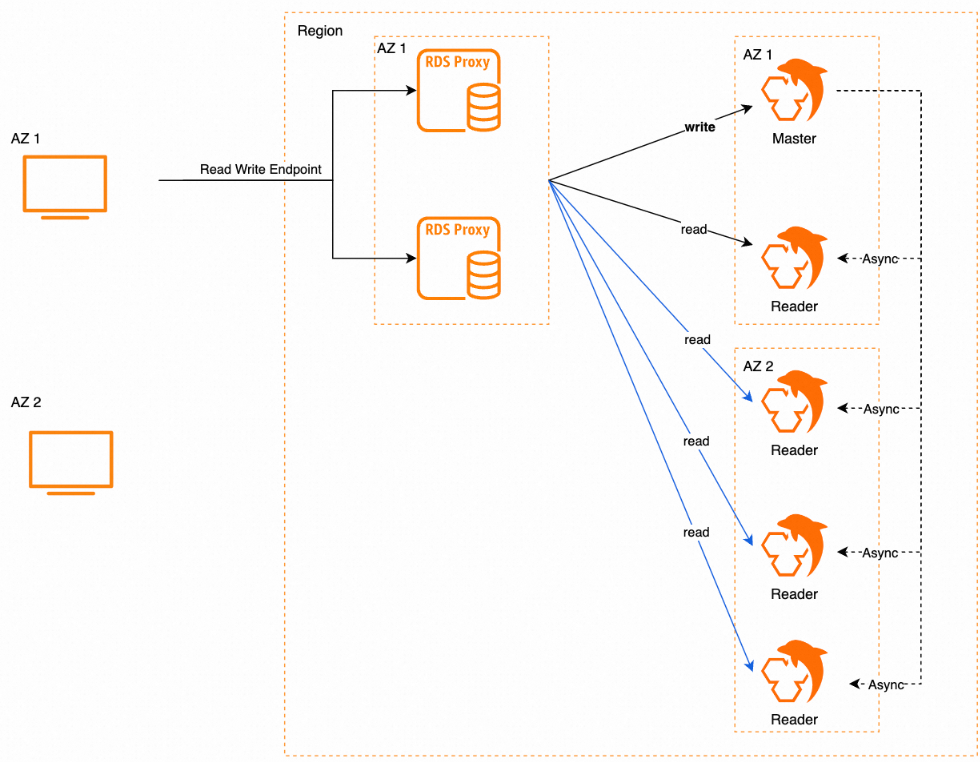
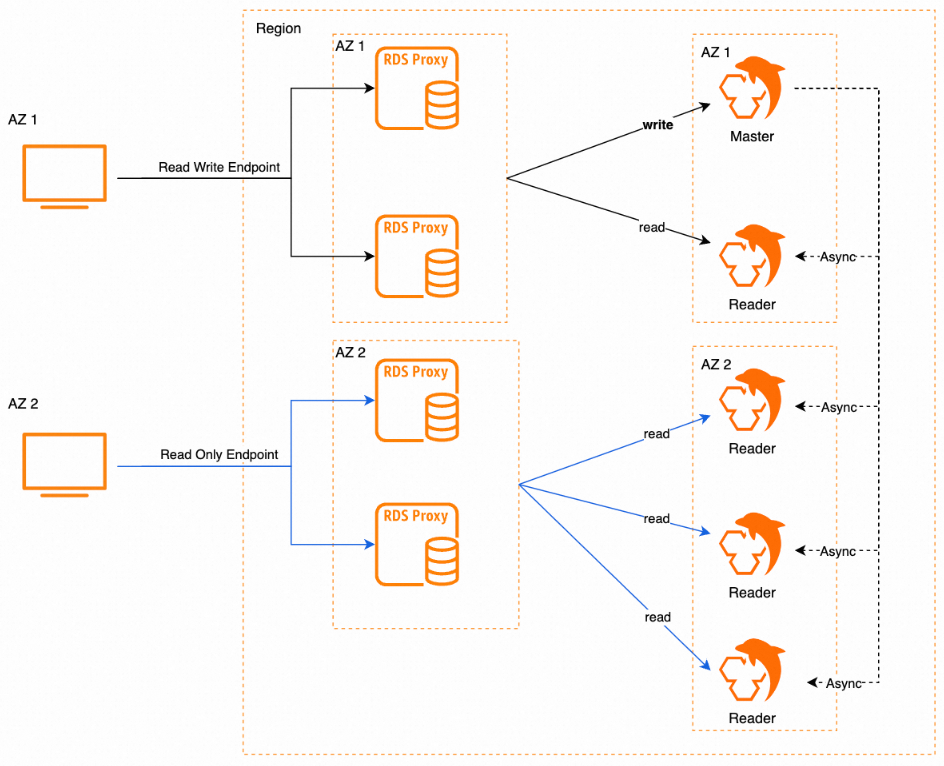
Benefits:
-
Lower read latency — traffic stays within one zone, cutting cross-zone round-trips
-
Fewer network hops — app, proxy, and read-only instance are always co-located
-
Faster data reads — reduced latency directly improves read throughput
-
Cross-zone disaster recovery — the dual-zone proxy setup provides zone-level redundancy
Prerequisites
Before you begin, make sure your RDS instance meets the following requirements:
-
MySQL 5.7 or MySQL 8.0
-
RDS High-availability Edition or RDS Cluster Edition
-
Cloud disks
-
Database proxy feature enabled with these settings:
-
Proxy type: dedicated database proxies
-
Deployment mode: dual-zone deployment
-
Four database proxies enabled
-
To enable the database proxy feature or verify its settings, see Enable the database proxy feature.
Billing
No additional fees apply when you use the nearest access feature.
Usage notes
Cross-zone proxy migration: To migrate database proxies to a different zone while nearest access is enabled, configure a destination vSwitch for each database proxy endpoint (formerly proxy terminal) before starting the migration. After migration completes, the endpoint settings remain unchanged, and the nearest access zone updates to match the destination vSwitch's zone.
Proxy specification changes: Nearest access requires four dedicated proxies in a dual-zone deployment. To switch to general-purpose database proxies or change the deployment mode, disable nearest access first. See Deployment architecture of database proxies.
Read weight allocation: Nearest access does not affect read weight configuration. Proxies continue to distribute read requests across the primary RDS instance and read-only instances based on the weights you set, regardless of zone placement.
Enable or disable nearest access
After you enable or disable the nearest access feature, the modification takes effect only on new connections to the RDS instance.
-
Go to the Instances page. In the top navigation bar, select the region where your RDS instance resides, then click the instance ID.
-
In the left-side navigation pane, click Database Proxy.
-
In the Connection Information section, find the database proxy endpoint to modify and click Modify Configuration in the Actions column.
-
In the dialog box, click Enable or Disable next to Nearest Access.
API reference
| Operation | Description |
|---|---|
| DescribeDBProxy | Queries the detailed database proxy settings of an RDS instance |
| DescribeDBProxyEndpoint | Queries information about a database proxy endpoint |
| ModifyDBProxyEndpoint | Modifies the connection settings for a database proxy endpoint |