Your AI Application Should Have a Traffic Entry Point: AI Gateway Serverless
By Ban Zhuang (Xushan) and Shao Dan (Yinghuo)
Three Real Challenges for AI Application Developers
If you are developing an AI application, you have probably encountered these problems:
- Model bills are becoming harder to understand. Whether it is simple text summarization or complex code generation, all requests go to the same flagship model. Your bill rises month after month, yet you cannot explain where the money went.
- As soon as the primary model is rate-limited, your business goes down. Rate limits and fluctuations in model services are common. Without automatic switching, all users see are errors.
- As the number of Agents grows, entry points become increasingly disorganized. Bailian applications, AgentTeams applications, Dify, Claude Code, in-house Agents... Each has its own integration method, authentication configuration, and logs, and management costs rise linearly with the number of Agents.
These problems share the same underlying issue: AI applications lack a unified traffic entry point.
This is exactly what AI Gateway is designed to address—unified access to LLM API, Agent API, and MCP Server, with unified routing, authentication, rate limiting, security protection, and usage monitoring.
In the complete AI application flow, AI Gateway sits in two places: the entry point where external traffic reaches an Agent, and the exit point where the Agent accesses models.
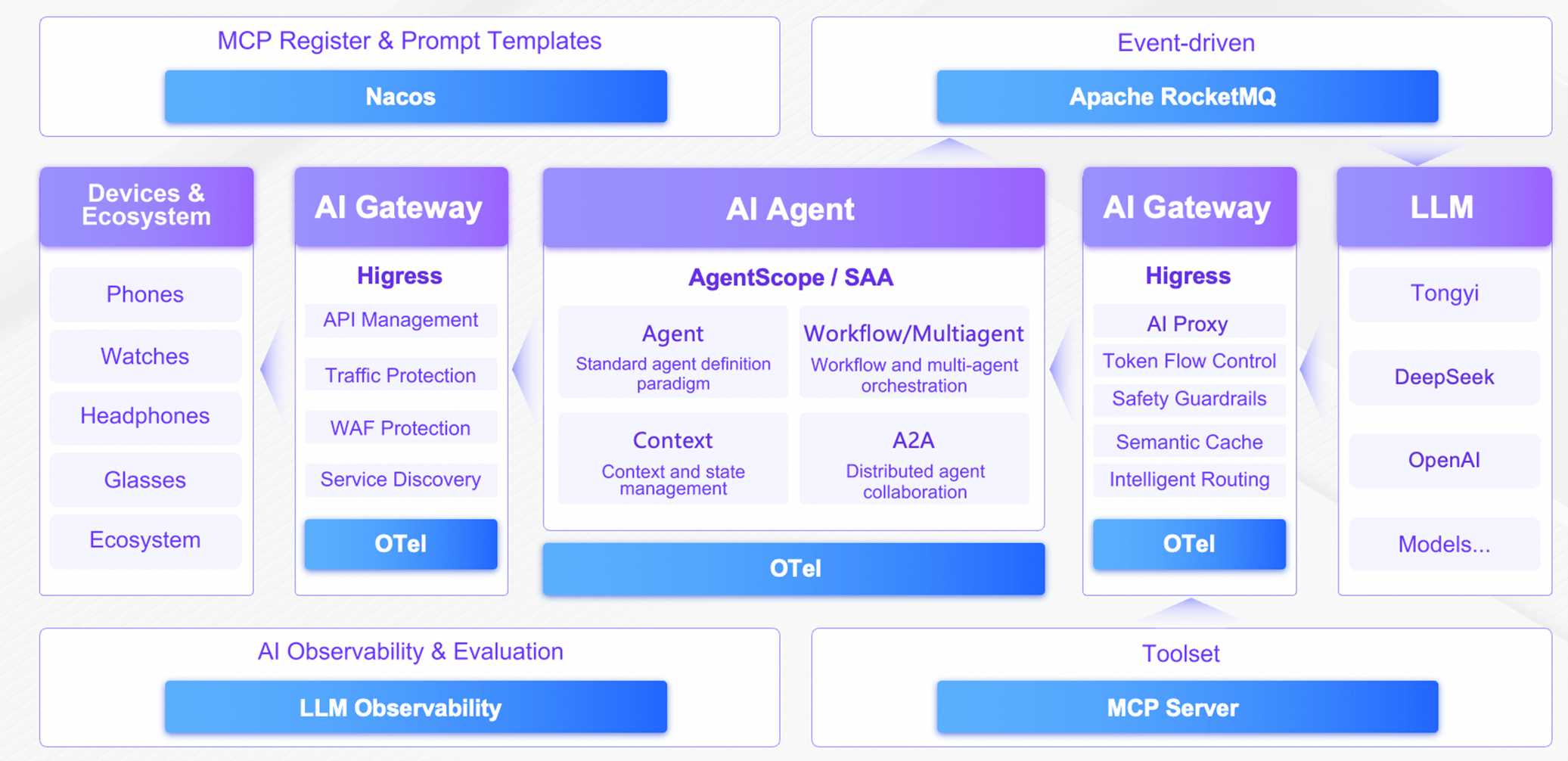
Figure: The position of AI Gateway in the overall AI application architecture.
An All-New Serverless Architecture: Start at CNY 0 and Pay for Actual Usage
Previously, using AI Gateway required an initial fee, which deterred many businesses that were just starting out and still had low traffic volumes.
The new version of AI Gateway Serverless has completed an architectural upgrade: rebuilt on an all-new architecture, it uses resources more efficiently, is faster to provision, and lets you pay for what you use. The new version offers two instance types:
| Serverless Standard Edition | Serverless Enterprise Edition | |
|---|---|---|
| Positioning | Small-scale production and low-traffic workloads | Full production and large-scale workloads |
| Starting cost | Start at CNY 0, with no instance fee | Instance fee + usage-based charges |
| Access entry point | Platform-assigned entry point | Dedicated entry point, with support for custom domain names and certificates |
| Service level | 99.9% | 99.95% |
Standard Edition lets you get a small-scale business running at zero cost without paying for idle resources. As your business grows, you can choose Enterprise Edition for a dedicated entry point, custom domain names, higher QPS, and a higher service level. A one-click upgrade from Standard Edition to Enterprise Edition without resource migration is also planned for the future.
What Has Changed Compared with the Original Serverless Version
- Start at CNY 0: Standard Edition removes the initial fee and charges solely for actual usage, making costs more manageable for small-scale businesses.
- Edition tiers: The new Standard Edition and Enterprise Edition are aimed at small-scale production and large-scale production respectively. You can choose according to your business scale without paying for specifications you do not need.
- Plugin system: The new version supports the platform's plugin system, allowing you to extend authentication and authorization, security protection, traffic governance, and observability and analytics capabilities.
- Capability evolution: Core capabilities such as LLM API, Agent management, MCP Server, and observability and analytics are all hosted in the new version. Future capabilities will also be rolled out in the new version first.
Existing instances of the original Serverless version can continue to be used, with no mandatory migration. For new instances, choosing the new version is recommended.
AI Fallback: Requests Automatically Switch to a Backup Model When the Primary Model Has Problems
Let us return to the second challenge at the beginning. Rate limits and fluctuations in model services are common, and this problem can be eliminated directly at the gateway—the corresponding capability is called AI Fallback.
What it does is simple: when the primary model service cannot respond normally because of an exception, failure, or high load, the gateway automatically switches to the backup model you configured in advance and returns the result as soon as the call succeeds. The application does not notice the fluctuation, and users do not see the error.
A Model API can be configured with one or more Fallback models, which the gateway calls in sequence. You can therefore build a multi-level chain such as "primary model → backup model with equivalent capabilities → lightweight fallback model", degrading step by step instead of returning an error to users after a single failure. The same service can also be reused across multiple policies, so you do not need to create it again for every API.
Switching is triggered in three categories of situations:
- Errors returned by the backend: Triggered when a model service call returns any 4xx or 5xx status code, including rate limiting, authentication failures, and server-side errors.
- Slow first-packet response: In streaming scenarios, if the first response packet has not arrived within the configured time, the gateway switches directly to another service. The time is measured in milliseconds, and setting it to 0 disables this trigger. Users are waiting for the first word to appear; when the primary model's queue takes too long, the gateway does not wait along with it.
- Gateway-side rate limiting or blocking: Also triggers Fallback by default. If you want fallback only when the backend actually encounters an error, enable "Fallback only on backend service errors" to exclude these situations.
Configuration does not require application changes either—just turn on the Fallback switch for the Model API and select a backup service from the service list. Model names are passed through unchanged by default; you can also specify a particular model when the primary and backup model names differ.
Reliability policies and business code are now decoupled. Changing a backup model, adjusting the order, or modifying a timeout threshold is simply a configuration change in the console. You do not need separate retry logic in every application, nor do you need a new release just to change a fallback policy.
Agent Management Upgrade: Manage All Agents with One Topology Diagram
Traffic in the Agent era flows in two directions: how external business systems access your Agent, and how the Agent itself accesses models. Previously, configuration for these two sides was scattered across different entry points. The new version brings them together into a single resource: Agent.
In "Agent Management" in the console, creating an Agent takes just two steps: give it a name and choose a type, with support for multiple Agent types such as Bailian, AgentTeams, Dify, Claude Code, and custom.
After creation, open the Agent topology page, which is centered on your Agent:
- Agent access is on the left: Configure domain names, routes, and consumer authentication for external business systems to access the Agent, allowing Bailian and Dify applications to provide external services through standard APIs.
- Model access is on the right: Configure the path through which the Agent calls models via the gateway. Claude Code users can follow the integration guide to switch model calls to the gateway in just a few minutes.
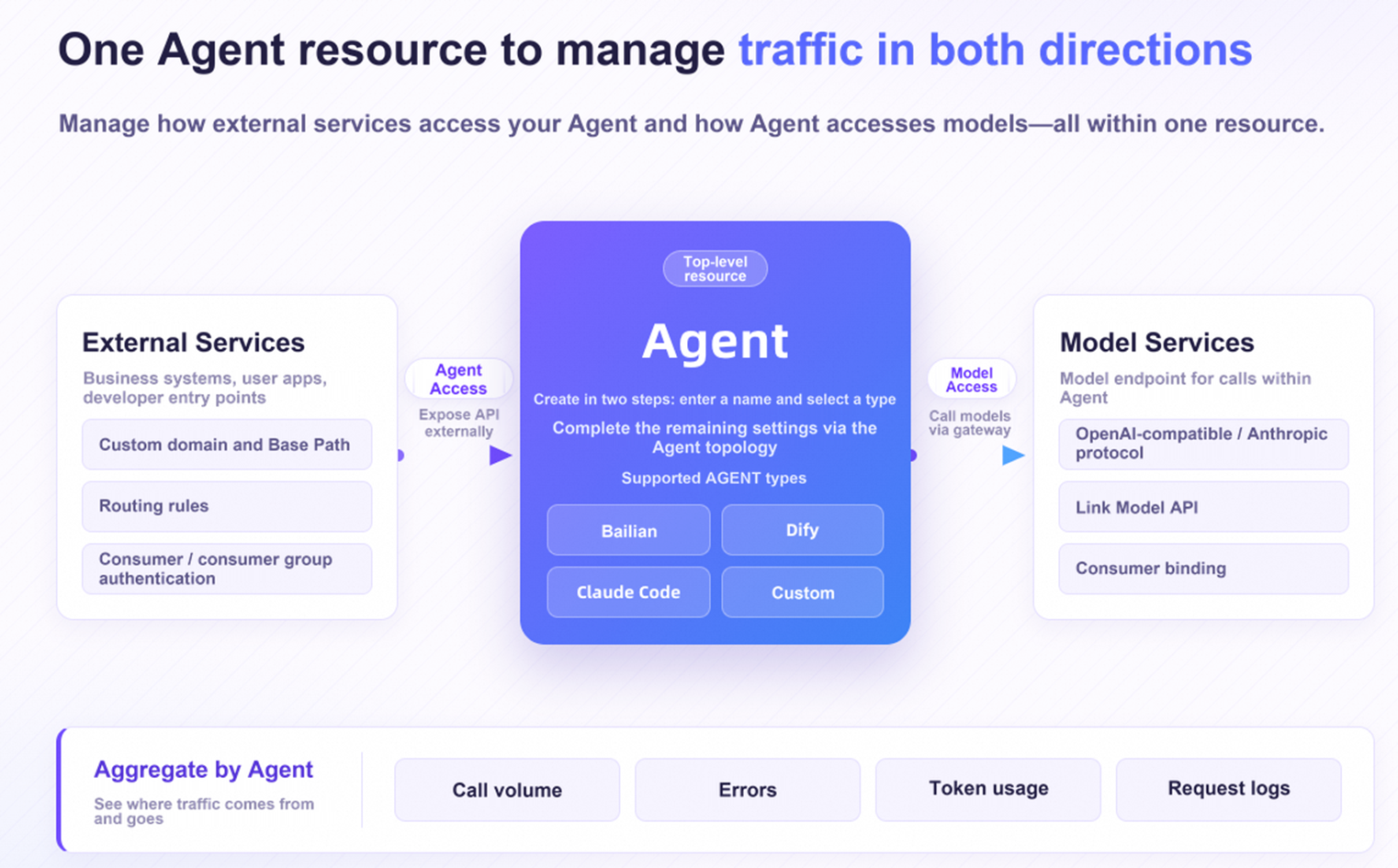
Figure: The Agent resource brings Agent access and model access together for management under a single resource.
Call volumes, errors, Token consumption, and request logs are aggregated and displayed by Agent. For each of your Agents, a single topology diagram clearly shows where traffic comes from and where it goes.
Major Capability: Intelligent Routing
What intelligent routing does is simple: it automatically selects a lower-cost, faster, or more capable model for each task, provided the model's capabilities are sufficient. Simple tasks go to lightweight models, while only complex tasks use flagship models, so model costs naturally decrease with the task mix.
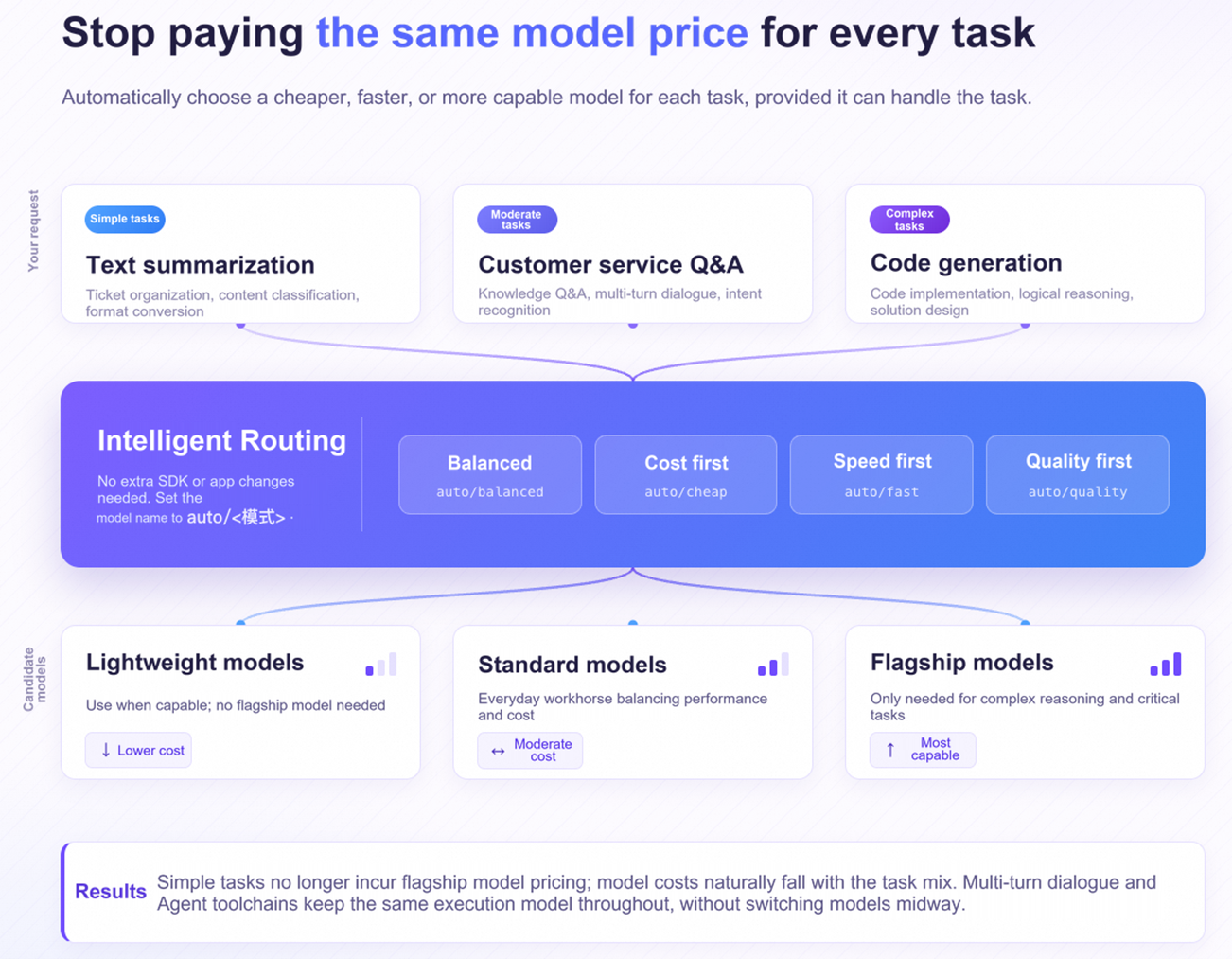
Figure: Intelligent routing automatically selects from candidate models based on the task.
It is also simple to use—no additional SDK or application changes are needed; just change the model name to auto/<mode> to get started. Four out-of-the-box routing modes are available:
- Overall balance: Automatically balances cost, speed, and quality, suitable for most scenarios.
- Cost first: Selects the least expensive model whose capabilities are sufficient for the task.
- Speed first: Prioritizes models that respond faster, suitable for interactive scenarios.
- Quality first: Always uses the most capable candidate for critical tasks.
The new version of intelligent routing also solves two challenges in real-world scenarios:
Multi-turn conversations and Agent toolchains do not "switch brains midway". The model stays consistent when continuing the same task, and the Agent's tool-call chain remains bound to the same execution model throughout. A model is reselected only when a switch to a new task is confirmed. From standalone requests and multi-turn chats to Agent toolchains, one integration covers them all.
Unified decision-making for platform models and your own models. The candidate pool can include built-in platform models at different tiers enabled with one click, as well as model services you have already configured yourself. Your own models continue to use your own services and credentials, and billing attribution remains unchanged—routing is smarter, but the boundaries remain clear.
Conclusion
Search for "AI Gateway" in the Alibaba Cloud console, or visit the official product website for details.
Read previous post:
Best Practices for Skill Evaluation and Optimization Based on Alibaba Cloud AgentLoop
-

-
Alibaba Cloud Native Community
832 posts | 61 followers
Follow
Comments
-
-
Alibaba Cloud Native Community
832 posts | 61 followers
Follow
Related Products
-
 API Gateway
 provides you with high-performance and high-availability API hosting services to deploy and release your APIs on Alibaba Cloud products.
Learn More -
 Qoder
From Assisted to Autonomous — Adapting to Every Programming Need
Learn More -
 AgentBay
Multimodal cloud-based operating environment and expert agent platform, supporting automation and remote control across browsers, desktops, mobile devices, and code.
Learn More -
 AgentCore
 unifies agent construction, governance, and execution capabilities so enterprises can deploy diverse agents with confidence.
Learn More
More Posts by Alibaba Cloud Native Community
- Best Practices for Skill Evaluation and Optimization Based on Alibaba Cloud AgentLoop
- DeepSeek Harness Evaluation Practice Based on Alibaba Cloud AgentLoop
- 97.1% Lower Gateway Latency: Open-Source Higress vs. Alibaba Cloud AI Gateway Serverless Enterprise Edition
- Alibaba Cloud's Open-Source AI Agent Handbook, 3K+ GitHub Stars
- DeepSeek Harness: A Practical Guide to Comprehensive Observability
- Alibaba Cloud AI Gateway Intelligent Routing Is Now Live
- After Everything Becomes a Plugin: A New Paradigm for Agent Engineering
- AgentScope Service: Open-Source Agent Control Plane with DeepSeek Harness Support
- Seamless AI Safety: Integrating Qwen3Guard into Higress with Zero Code Changes