QwenWork × AgentBridge: Connecting Enterprise Data and Bringing Intelligent Analysis Within Reach
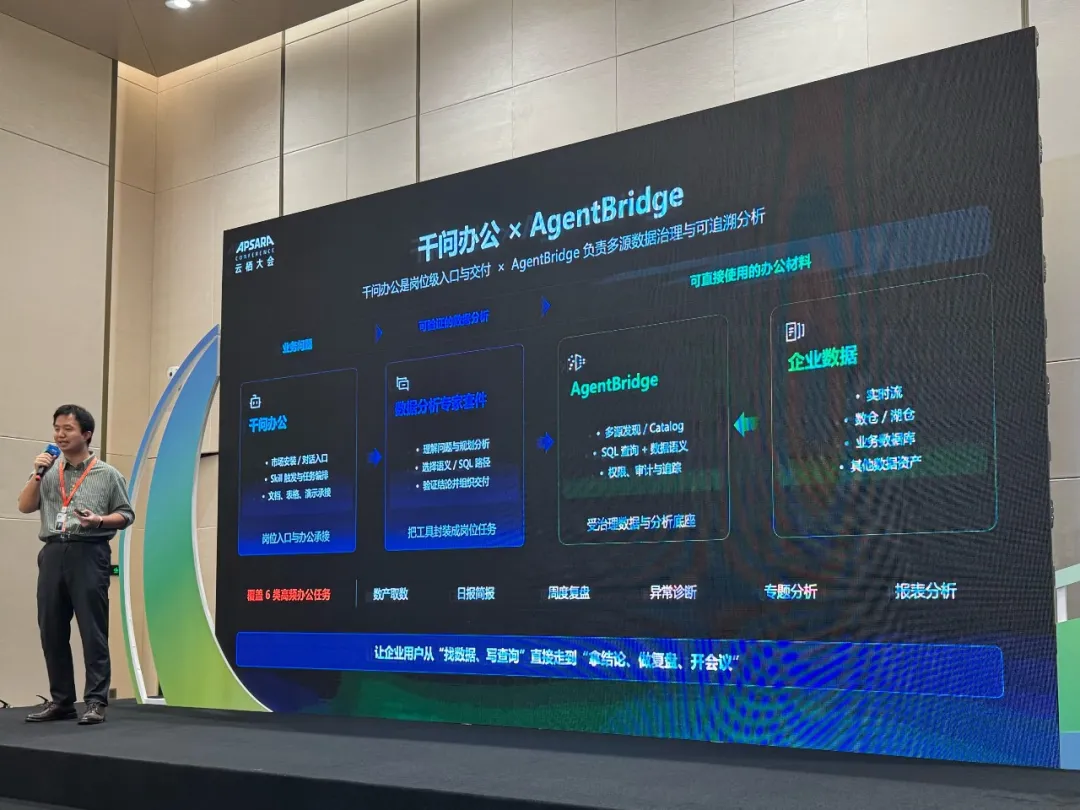
At the AI Real-Time Data Intelligence Forum of the 2026 Apsara Conference, QwenWork and AgentBridge officially released the Data Analysis Expert suite. Business users can ask a question in natural language and securely access multi-source enterprise data. They then receive an analyzed and verified report, ready for delivery.
"Why did refunds increase this week?"
One question in a weekly meeting often starts a series of preparation steps. It covers locating order data, checking logistics status, reviewing customer complaints, and confirming statistical definitions. The analysis results are then organized into a report. Enterprises have already accumulated large volumes of data. Business users still need to spend considerable time before they can turn that data into a decision and a document they can use.
The Data Analysis Expert suite from QwenWork and AgentBridge is designed to shorten the path from question to conclusion. A business user asks one question in natural language. Within the permissions the enterprise grants, the suite accesses multi-source data and completes the analysis and verification. As needed, it extends into diagnostic dashboards, analysis reports, and handling recommendations. Data analysis then becomes part of daily office work, rather than a manual consolidation effort across systems and definitions.
QwenWork: Letting Agents Understand Enterprise Business
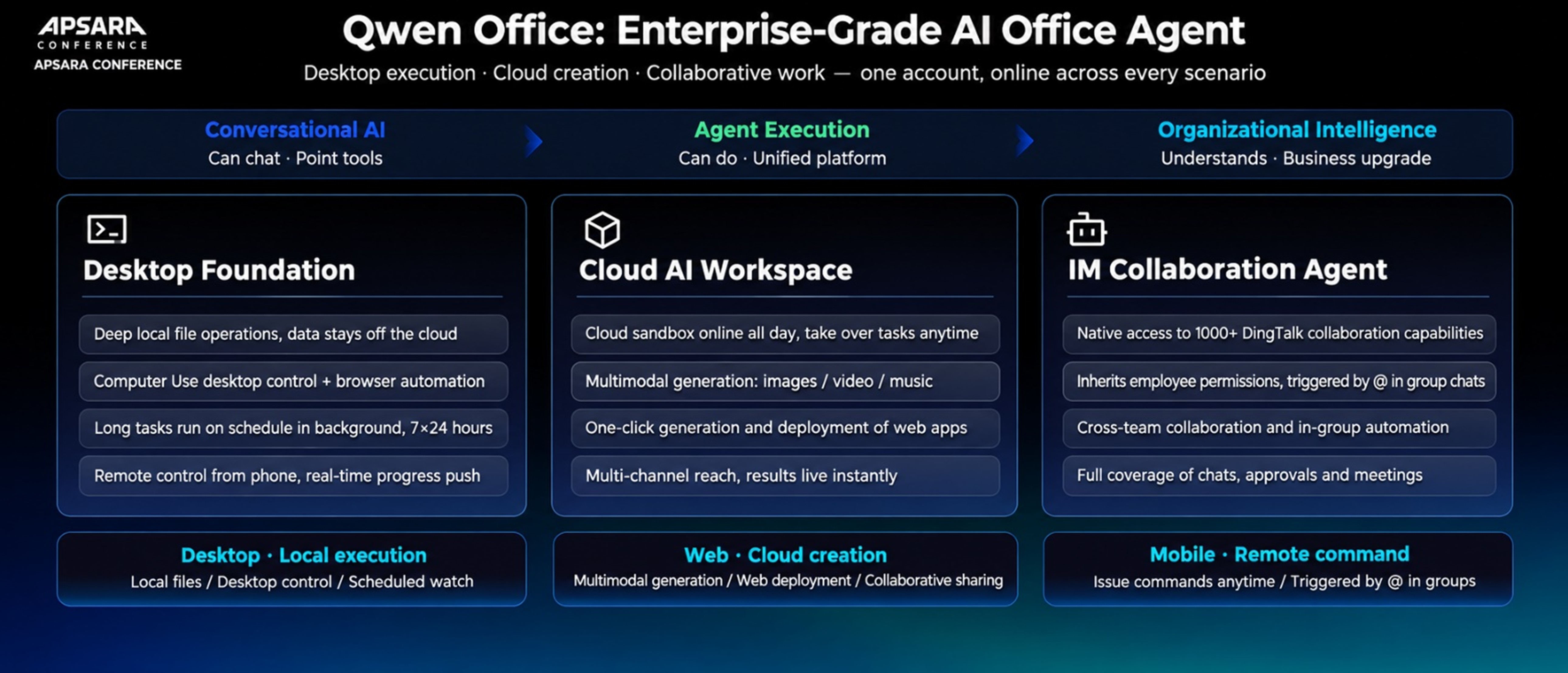
QwenWork is an enterprise-grade workplace AI Agent covering task execution on the desktop, content creation in the cloud, and collaborative office work. The desktop client supports local file operations, browser and desktop automation, and background scheduled tasks. The cloud AI workspace handles work such as content creation and web application generation. Collaboration Agents are built into office entry points such as mobile clients and DingTalk. This lets users start tasks and track progress in the working environment they already know.
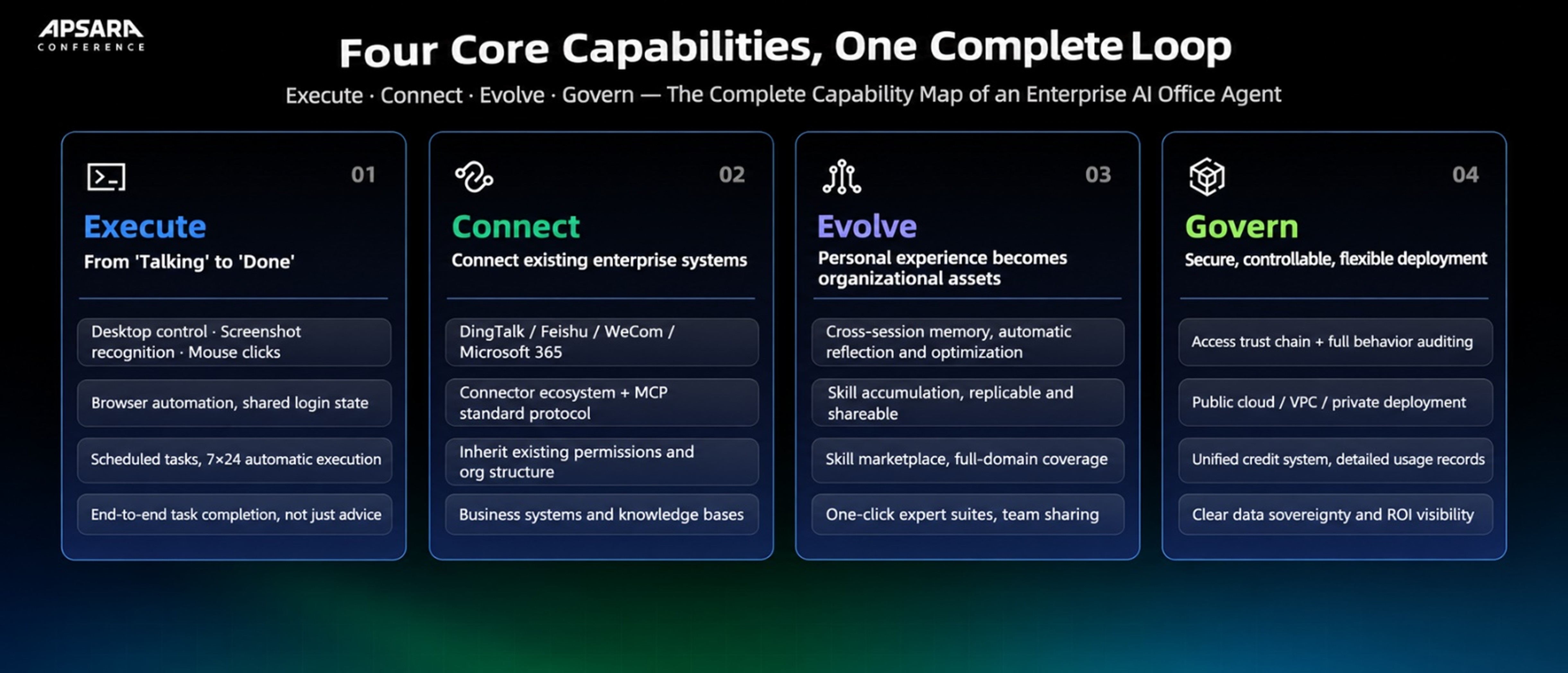
Across execution, connectivity, evolution, and control, QwenWork links existing enterprise systems through connectors and MCP. It captures work experience as reusable Skills and Expert Suites, and it manages Agent usage with permissions and behavior auditing. For enterprises, these capabilities offer one further benefit. They let team members reuse working methods that are already proven, just as the widely quoted phrase puts it: "Context is All You Need".
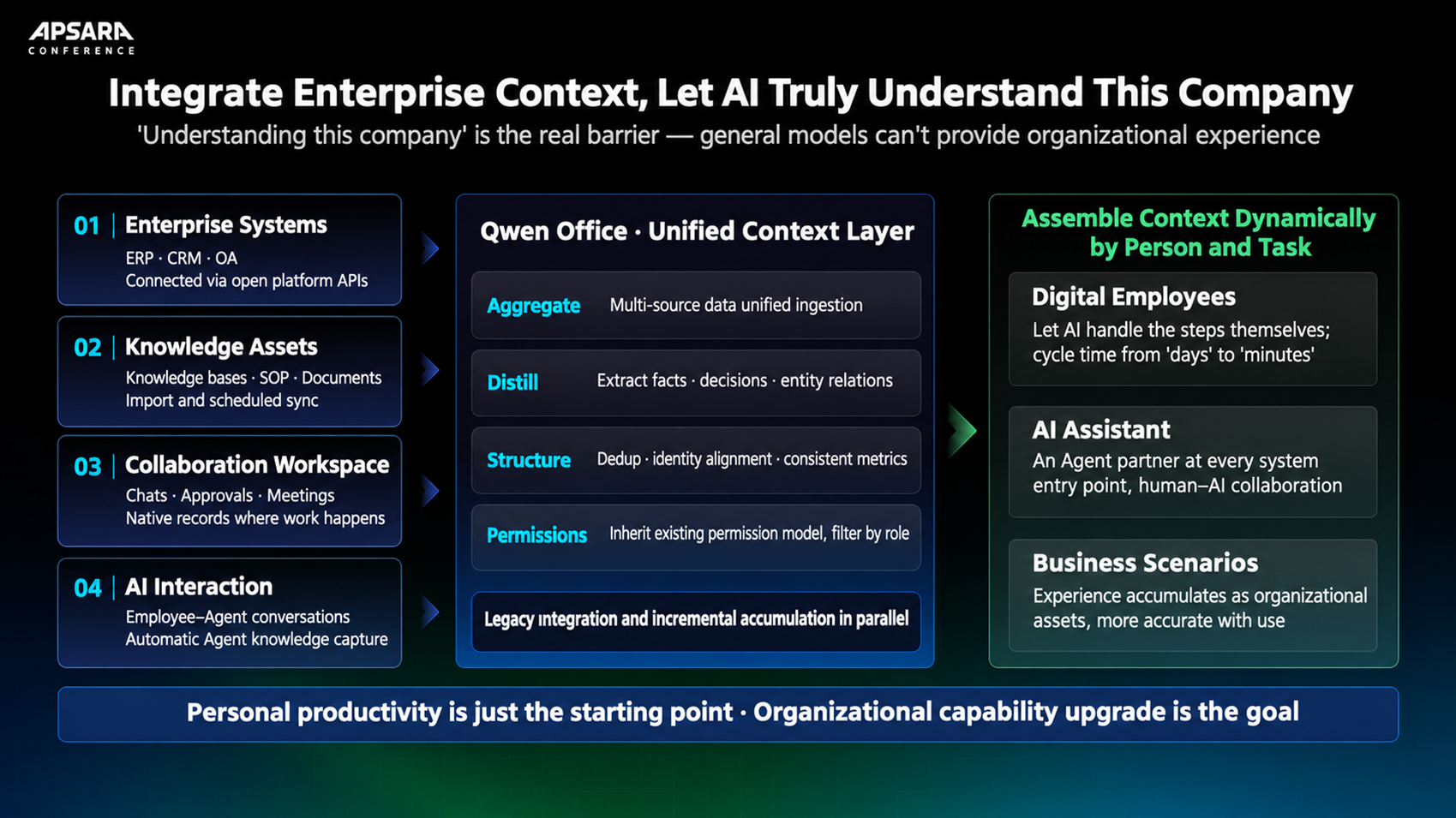
To do this, an Agent needs to understand the enterprise's own business. The same "refund rate" may mean the refund application rate in one team and the successful refund rate in another. The same customer complaint may also call for different handling, because order status, membership benefits, and historical resolution records differ. Beyond general knowledge, the facts in enterprise systems, the rules in knowledge bases, and the experience gained on the job together form the context an Agent needs to complete a task.
QwenWork × AgentBridge: Business Analysis in Tandem
With enterprise context at the center, QwenWork connects business systems such as ERP, CRM, and OA, together with knowledge bases, SOPs, and collaboration records. It organizes the relevant information according to what each task requires. Existing data helps an Agent understand the underlying business, and continuously accumulated experience provides a reference for later tasks. QwenWork and AgentBridge chose data analysis, a frequent scenario, as their point of combination. This allows the data assets an enterprise already has to serve business users more directly.
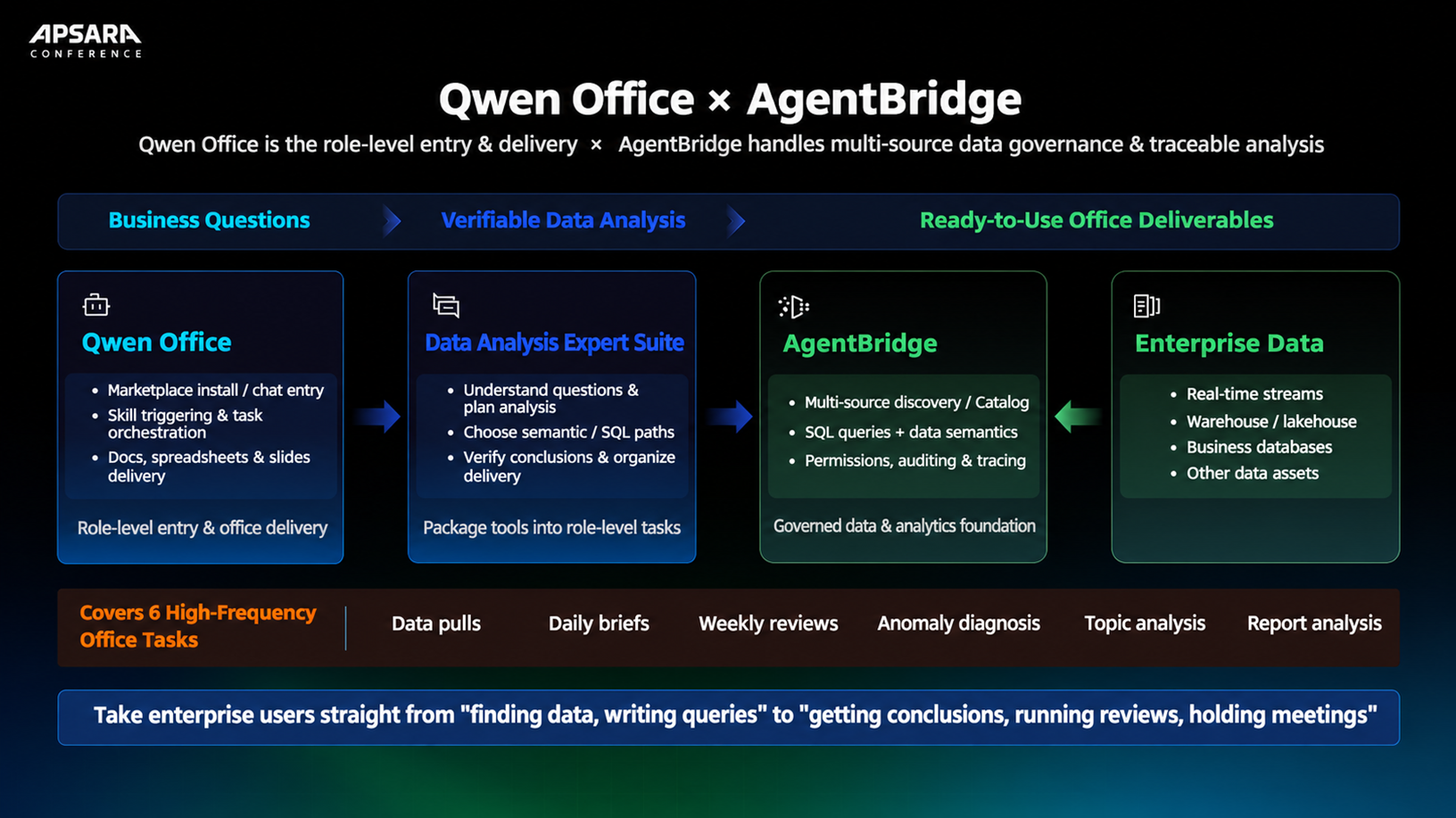
In this solution, QwenWork provides the task entry point for each role, and it receives both the user's questions and the final office output. The Data Analysis Expert suite organizes the analysis steps: it understands the question, plans the task, invokes the required capabilities, and assembles the deliverables. AgentBridge provides multi-source data ingestion (Connector), a unified data catalog (Catalog), query analysis (Analysis), and data intelligence that combines business semantics with knowledge retrieval (Luma). These capabilities help the suite find usable data and complete the analysis within permission boundaries.
This division of labor covers everyday office tasks such as ad-hoc data questions and data pulls, daily reports and briefings, weekly reviews, anomaly diagnosis, deep-dive analysis, and report analysis. Users can keep asking questions toward a business goal until they have a conclusion, a dashboard, or a report. This reduces the repetitive work of consolidating information between query tools and office software.
Customer Refund Scenario: Correlating Multi-Source Facts with Enterprise Rules
This demonstration uses customer refund analysis and retention to show how the solution works. Sample customer C10001 encountered a logistics delay and filed multiple complaints. The customer service lead needs to know what went wrong with the order and what the customer has already raised. The lead also needs to know what handling and retention recommendations can be proposed under the enterprise's current policy.
This information is scattered across different systems. Here, the refund events in RocketMQ serve as the analysis entry point. MySQL provides business facts such as customers, orders, products, and logistics, and Elasticsearch stores customer service conversation records. AgentBridge organizes these resources through the Connector and Catalog capabilities, so the analysis service can find the relevant databases, tables, and fields. The service can then continue gathering evidence for the same customer and order. After-sales policies, compensation rules, membership benefits, and historical cases are loaded into the knowledge base and provide citable rules for later recommendations.
From One Question to a Delivery-Ready Report
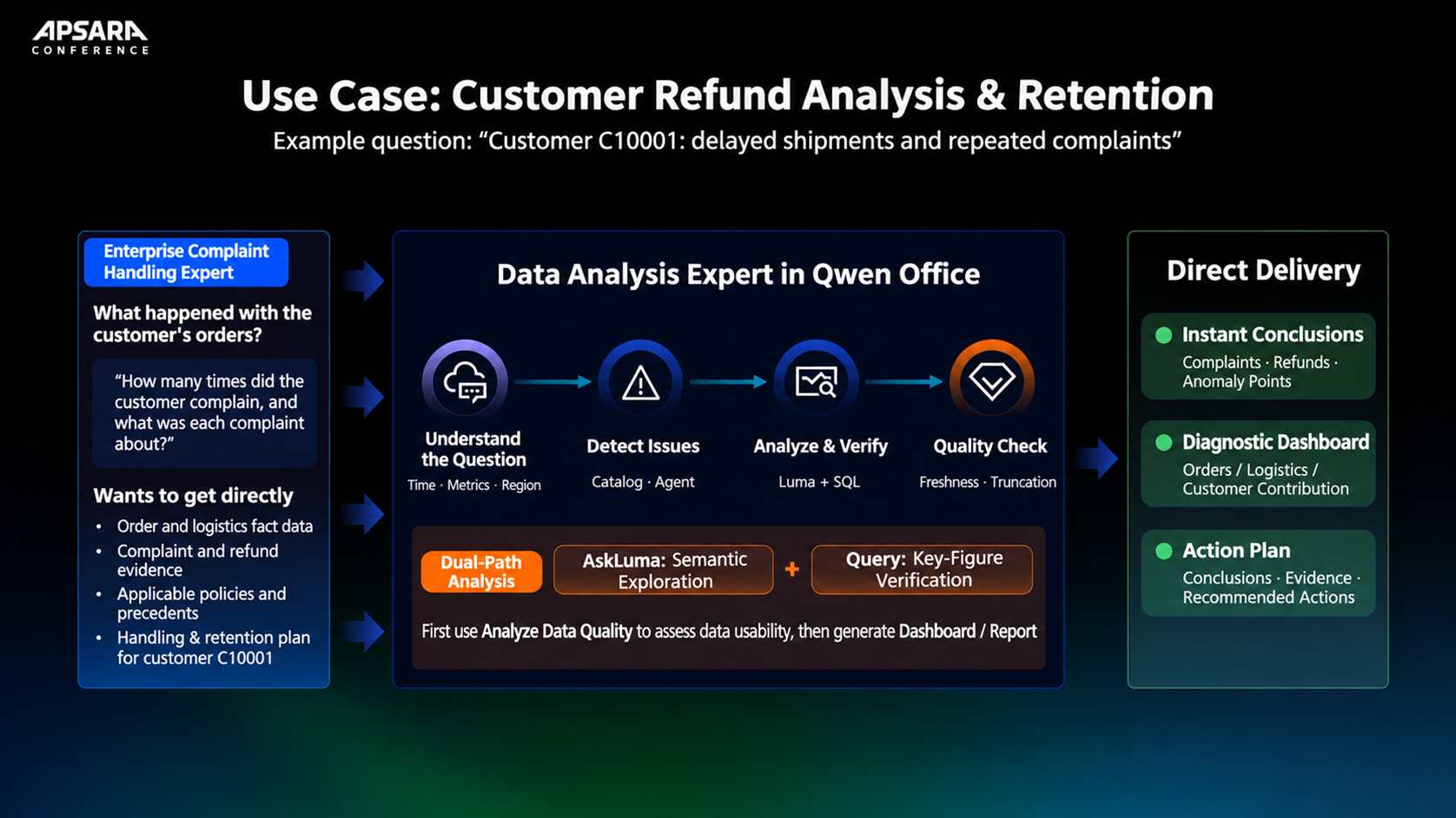
Once the data and analysis services are ready, business users can ask questions directly in QwenWork. For example: "How many times did the customer complain, and what was each complaint about?" They can also ask for further analysis of the refund causes and for retention recommendations based on the compensation rules.
For these questions, the solution pairs semantic exploration with SQL verification. Luma interprets a question against the configured business semantics. When a key definition is unclear, it asks for clarification before querying. Natural language analysis helps reveal the correlations among complaints, refunds, and the timing of anomalies. SQL queries then verify the key numbers. They check the time range, metric definitions, and join conditions, which provides a verifiable calculation basis for the conclusion.
Before generating dashboards and reports, the Data Analysis Expert suite also runs data quality analysis (Analyze Data Quality). It checks whether the data fits the current task, covering issues such as data freshness and truncated query results. These checks help users understand the scope and limitations of the data behind a conclusion. They also keep incomplete information from being treated directly as complete business fact.
The deliverables are also organized around the way business users work. The immediate conclusion summarizes the complaints and refunds. It also states which information has been verified and which is still to be confirmed. The diagnostic dashboard further shows related information such as orders, logistics, and customer contribution. The action plan brings the conclusion, the evidence, and the recommended actions together. Where compensation or retention measures are involved, it cites the policies and cases the enterprise has already provided. Business users can then check them and move the follow-up work forward.
From a Single Customer to a Capability the Team Can Reuse
The analysis of a single customer can extend further. The customer service lead follows up: "Have similar refund problems been widespread in the past month?" The analysis scope then expands from one customer to the monthly refund and complaint situation. QwenWork picks up the follow-up analysis task. It organizes the results into charts and a report file that can be opened directly, which serve as material for team discussion, business review, and reporting to management. When someone asks "where does this number come from", users can trace it back to the data source and the analysis behind it.
This workflow depends on the earlier data ingestion, knowledge preparation, and analysis service configuration. In the demonstration, the relevant data and knowledge bases are first associated with the Luma analysis service. After the workflow is validated, they are connected to QwenWork through MCP. The configured connections and analysis resources can be reused in later office tasks, and the Connector Marketplace also provides the entry point for adding data sources. The Data Analysis Expert suite organizes steps such as data quality checks, dashboard building, and report generation into a repeatable task flow.
For teams that repeatedly run business reviews, customer analysis, or anomaly diagnosis, this means data connections, business definitions, and analysis methods can become a shared foundation. Business users start a task on the current question and continue the analysis on top of existing data and rules. They can then put more effort into confirming conclusions, discussing plans, and driving the resulting business actions.
Getting Started in QwenWork
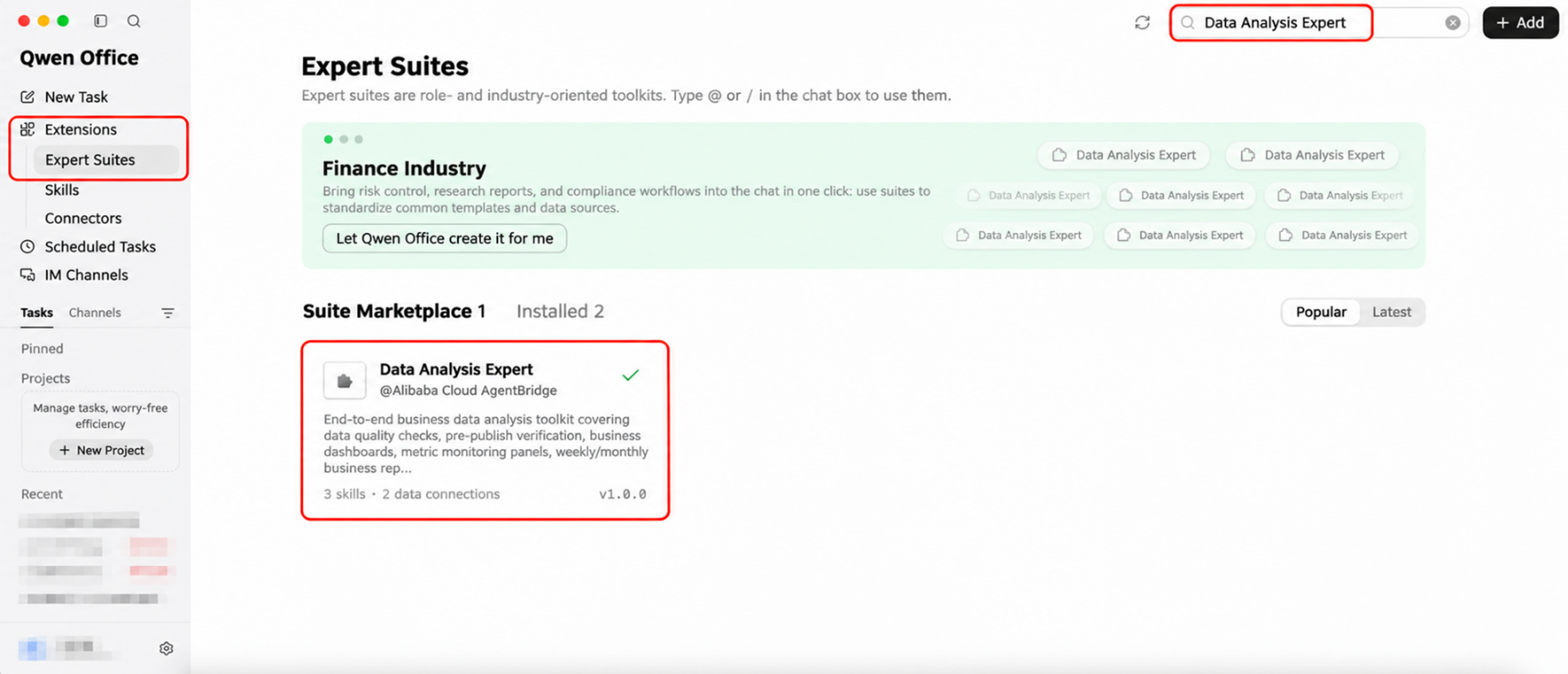
The AgentBridge Data Analysis Expert suite is now available in the QwenWork Expert Suite Marketplace. In the QwenWork left navigation pane, choose Extensions > Expert Suites and search for "Data Analysis Expert". In the suite gallery, find "Data Analysis Expert" provided by Alibaba Cloud AgentBridge and click Install.
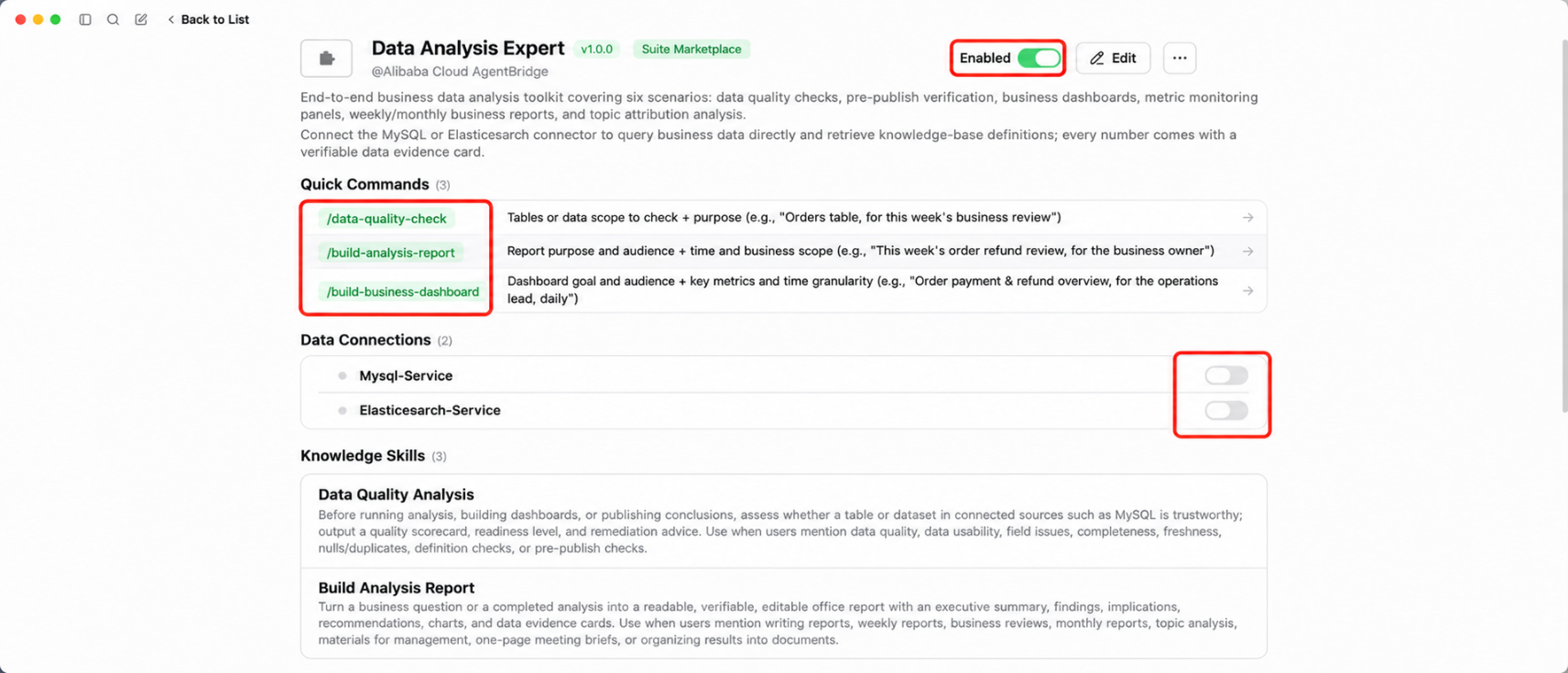
After installation, the suite is enabled by default. Once a MySQL or Elasticsearch connector is in place, users can type / in the chat box to run the shortcut commands of the three Skills below. They can then ask questions directly in natural language. The suite queries business data and retrieves definitions from the knowledge base. Each number carries a verifiable data evidence card.
-
Analyze Data Quality (
/Analyze Data Quality, then the table or data range to check + the purpose, for example "orders table, for this week's business review"). Before running an analysis, building a dashboard, or publishing a conclusion, this Skill assesses whether the data is trustworthy. It examines a single table or a single dataset in a connected source such as MySQL. It outputs a quality scorecard, a readiness level, and remediation recommendations. Use it when the user asks about data quality, data usability, field problems, completeness, freshness, null values and duplicates, definition checks, or pre-publication checks. -
Build Analysis Report (
/Build Analysis Report, then the report purpose and audience + the time and business scope, for example "this week's order refund review, for the business lead"). This Skill turns a business question or a completed analysis into a business report that is readable, verifiable, and editable afterwards. The report contains an executive summary, findings, implications, recommendations, charts, and data evidence cards. Use it when the user mentions writing a report or producing a weekly report. It also applies to business reviews, monthly reports, deep-dive analysis, materials for management, a one-page meeting summary, or organizing results into a document. -
Build Business Dashboard (
/Build Business Dashboard, then the dashboard goal and audience + the metrics and time granularity of interest, for example "order, payment, and refund overview for the operations lead, by day"). Based on connected business data sources such as MySQL, this Skill builds business dashboards backed by their data sources. The dashboards monitor core metrics, track changes, and identify what drives a change. It outputs chart specifications, metric definitions, and data evidence cards. Use it when the user wants a dashboard, a metrics board, an overview, a monitoring panel, or an executive dashboard. It also applies to metric monitoring and to watching a small set of metrics on an ongoing basis.
Enterprises with customer service, business analysis, and cross-system data analysis needs are welcome to talk with the QwenWork and AgentBridge teams. Bring concrete business questions and data sources.

AgentBridge DingTalk discussion group
Read previous post:
AgentTeams 1.2.8: A Brand-New Workbench and Website—Start Team Collaboration with One Click
Read next post:
The Data Foundation for Agent Self-Improvement: Alibaba Cloud SLS Session Store
-

-
Alibaba Cloud Native Community
840 posts | 61 followers
Follow
Comments
-
-
Alibaba Cloud Native Community
840 posts | 61 followers
Follow
Related Products
-
 Token Plan
Build more, spend less. One plan, every modality.
Learn More -
 Intelligent Robot
A dialogue platform that enables smart dialog (based on natural language processing) through a range of dialogue-enabling clients
Learn More -
 Qwen
Full-range, open-source, multimodal, and multi-functional
Learn More -
 QwenWork
 is dedicated to helping employees strengthen their professional competitiveness in the AI era and to enabling enterprises to improve organizational effectiveness.
Learn More
More Posts by Alibaba Cloud Native Community
- RocketMQ for AI: LiteTopic-Based Agent Asynchronous Communication Architecture and Production Practice
- The Data Foundation for Agent Self-Improvement: Alibaba Cloud SLS Session Store
- AgentTeams 1.2.8: A Brand-New Workbench and Website—Start Team Collaboration with One Click
- From Generation to Decision: An Empirical Evaluation of Decision Models for AgenticOps
- AgentScope Durable: Running Enterprise Agents Continuously and Reliably
- The Three Hidden Bills of an LLM Proxy: Security Incidents, Operational Investment, and Model Selection
- Managing Logs with Natural Language: A Practical Guide to Alibaba Cloud SLS Agent Skills
- Your AI Application Should Have a Traffic Entry Point: AI Gateway Serverless
- Best Practices for Skill Evaluation and Optimization Based on Alibaba Cloud AgentLoop