AgentScope Durable: Running Enterprise Agents Continuously and Reliably
By Liu Jun and Zhu Zhiyu
AgentScope is an enterprise-grade Harness framework that helps developers build distributed enterprise agents. For the long-running tasks common in enterprise scenarios, AgentScope introduces a further abstraction: a set of Durable capabilities that support automatic recovery after task interruptions, session replay, steering during execution, and asynchronous tool execution in independent sandboxes. Even if a user disconnects, a service restarts, or an execution instance is replaced, tasks can retain their progress and continue, providing a reliable execution foundation for enterprises to build a variety of agent services and agent platforms.
01 Why Enterprise Agents Need Durable
A development agent receives a task: locate a fault, modify the code, run tests, and submit the results after obtaining approval. The model has completed its analysis, the tests need to run for twenty minutes, and approval may not arrive until the next day. In the meantime, the user closes the page, the service undergoes a rolling deployment, and the instance that initially executed the task is replaced.
This work should continue. Tests that have already started should be locatable, confirmed results should be reusable, and when approval arrives, an instance that meets the execution requirements should pick up the work. When the user opens the application again, they should still see the same task.
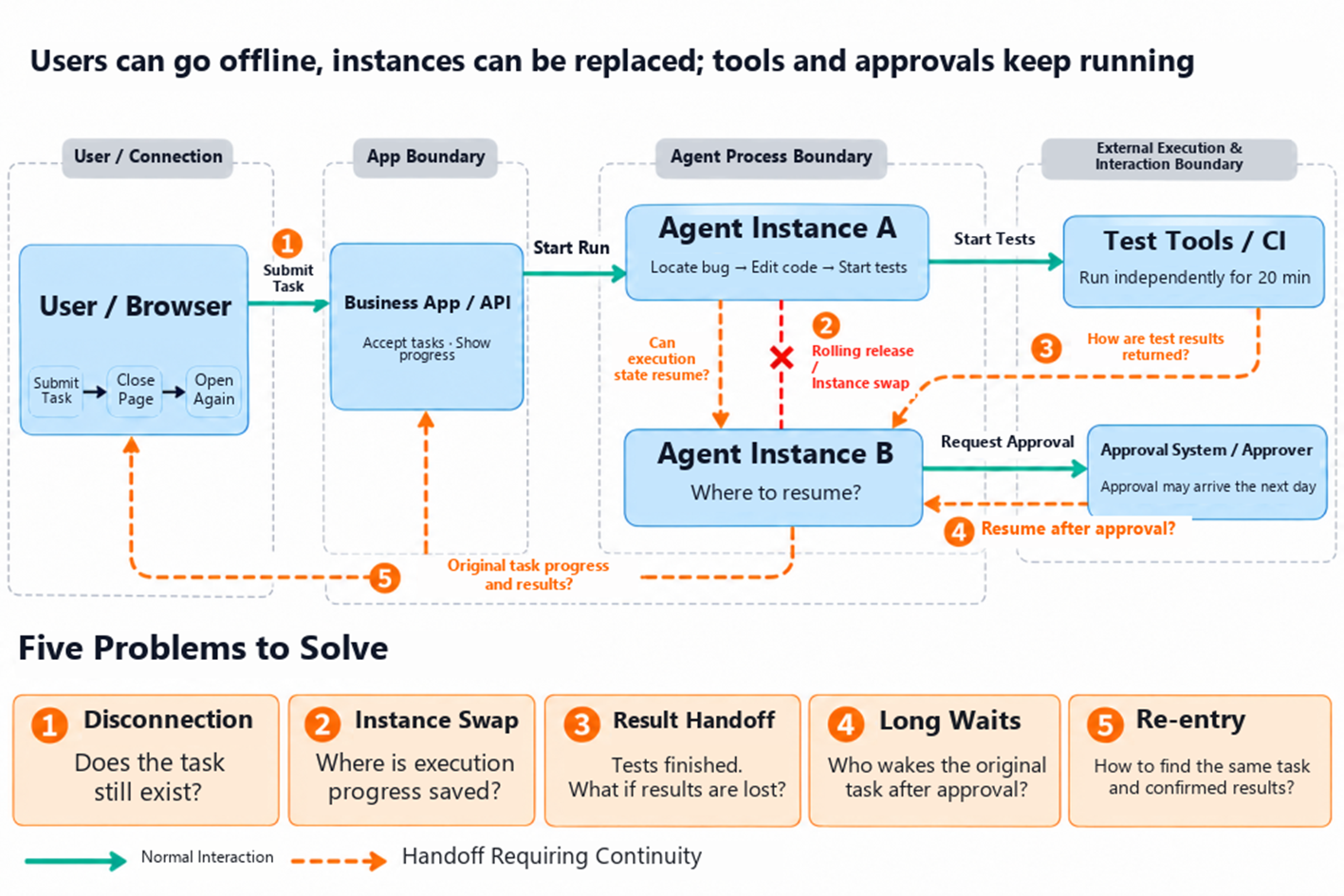
Figure 1: A task spans the user connection, the application, the agent process, and external execution systems. The orange markers identify continuity issues that must be addressed when a connection is lost, an instance is replaced, results are handed off, approval is pending, or the user returns.
These issues become common as agents take on long-term work. A development task involves analysis, modification, testing, and approval; a business operation may pass through multiple systems and wait for external feedback. When a task outlives the browser connection, service request, and execution instance, the application needs to maintain continuity across these boundaries.
Saving session history allows the model to regain context, but 'the decision to run tests has been made' and 'the tests have completed' are different facts. After a connection is interrupted, the system also needs to know whether the test request was accepted, where the original operation is, whether its result has been handed back, and whether the agent has consumed that result. A message saying 'testing in progress' alone cannot determine whether the next step should be to query, wait, or execute.
The five issues in the figure point to the same requirement: persist the task's identity, execution progress, and conditions for continuation outside the process, and establish explicit recovery rules for them. The task still exists after the user goes offline; a compatible executor can take over after an instance is replaced; and when a tool completes or approval arrives, the system can locate the original task and continue the unfinished work.
This is what Durable means in this article: organizing an agent's execution process into state that can be durably saved, confirmed, and recovered, with continuation boundaries at native checkpoints, tool handoffs, waiting conditions, and similar points. Recovery continues from committed logical state, reuses confirmed results, and verifies unfinished external operations.
This definition also establishes the limits of these capabilities. Recovery requires a compatible execution environment and accessible persistent state; whether an external action can be retried safely also depends on the querying and idempotency capabilities provided by the tool. For example, if an email has been sent but its receipt is lost, the system needs to verify the original operation. Durable saves the identities and state needed to handle this uncertainty; it does not automatically make arbitrary business actions execute exactly once.
02 AgentScope Durable: Definition and Architecture
1. Overall Architecture
AgentScope's three core abstraction layers handle the reasoning loop, context management, and durable execution, respectively. Applications can combine these capabilities as needed.
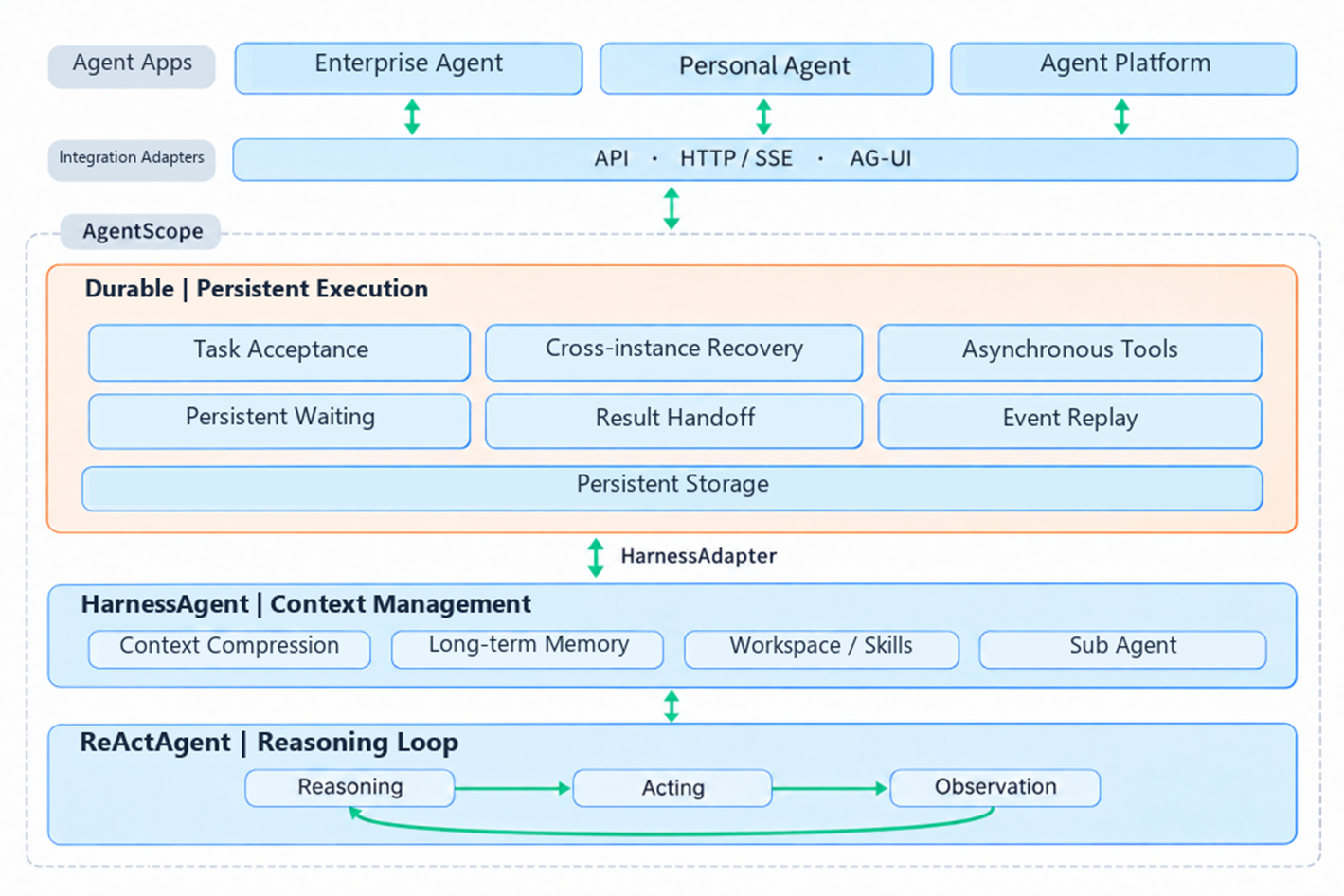
Figure 2: ReActAgent provides the reasoning loop, HarnessAgent organizes context, and Durable manages the lifecycle of durable tasks.
ReActAgent provides a Reasoning–Acting loop: the model decides the next step based on the current input, takes action through tools, and brings the observations into subsequent reasoning.
HarnessAgent builds on these foundational capabilities to organize context and the execution environment, including context construction and compression, long-term memory, workspaces, Skills, and sub-agents. It is responsible for bringing the information and capabilities required by the task into every model decision.
Durable further manages the continuation of work across time and instances: how input is accepted, how tasks are queued, which instance may advance them, where to resume, which results to wait for, and how applications can observe and control tasks again. It connects to native state through HarnessAdapter and currently supports adapters for ReActAgent or HarnessAgent.
On top of the framework, developers can build enterprise agents, Personal Agents, or managed platforms, connecting them to business interfaces through APIs, HTTP/SSE, AG-UI event adaptation, and other approaches. AG-UI handles event format adaptation; business services remain responsible for request entry points, authentication, and resource authorization.
Looking inside Durable's responsibilities reveals the following relationships:
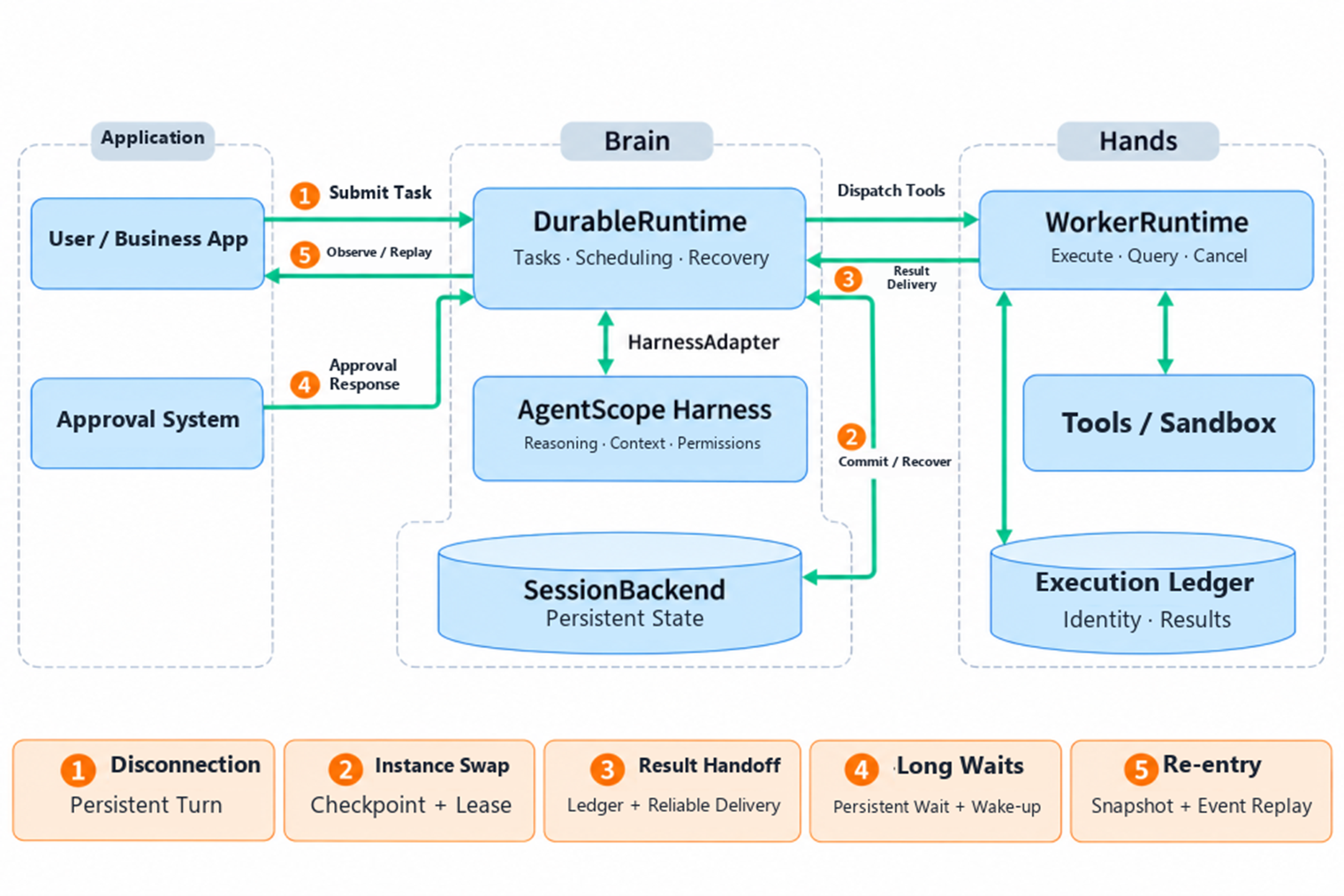
Figure 3: The five numbered markers correspond to the issues in Figure 1. Durable connects the native Harness, persistent state, and independent tool execution to form a task flow that can be resumed.
After a request enters the system, DurableRuntime first saves the task, then schedules agent execution. HarnessAdapter connects the agent's native checkpoints to SessionBackend so that the execution position can be read by the next invocation. When a tool needs to execute independently, Runtime passes the work to Hands through an Executor and resumes the original task when the result returns.
The figure shows boundaries of responsibility. These components can be assembled in the same JVM or deployed separately as needed. An API service that only handles submission, querying, and observation does not need to start the agent execution loop; the execution host explicitly starts Runtime to claim and advance durable tasks. Durable can be embedded independently in an application and does not depend on Managed Agents platform services.
2. Request Queuing and Steering During Execution
A user asks an agent to investigate timeouts in the order service, then adds, 'Prepare a report after the investigation is complete.' The user then remembers a constraint for this task: 'Do not change the production configuration yet.' These three messages require different handling: the report is follow-up work and should be queued, whereas the constraint should enter the investigation that is already running.
Durable uses Turn to represent a task and Thread to retain ongoing context and a task queue. New work creates a Turn through submit and executes within the same Thread in the order it was accepted; additions to the current work are sent to the original Turn through steer. Applications can therefore support both 'what to do next' and 'please adjust this task.'
A steering message is saved first, then enters the agent at a safe boundary in native execution. Tool calls that have already been issued are not retracted as a result, and model responses currently being generated are not forcibly rewritten. The application can use subsequent events to confirm that the request has been applied. Requests and supplementary information that have been accepted can still be found after the user closes the page or the service restarts.
This also clarifies behavior during waiting: while the current investigation is waiting for tests or approval, the subsequent report remains queued. If another piece of work does not need to wait for the investigation to finish, it can be assigned to a separate Thread. When execution needs to stop for inspection first, the application can also pause the original Turn, confirm that it is paused, and then add requirements or resume it.
3. Session Reconnection and Replay
A user closes the page while tests are running and opens it again the next day, expecting to see yesterday's task, execution records, and current results. The application needs to retrieve the original Session rather than create a new conversation and launch the tests again.
Durable manages task execution separately from client connections. Session brings together a business conversation, Thread retains each context within it, and Turn identifies a specific task. By saving these identities, the application can query the original task after reconnecting. If the response to the first submission is lost, it can also retry with the original requestId and original input to obtain the same Turn.
To restore the interface, Durable provides message history, state snapshots, and persistent events with cursors. The page can resume reading progress from the last consumed position; when a historical cursor becomes invalid, it can use a snapshot to restore the current view. This form of session replay reconstructs the process seen by the user without calling the model or executing tools again.
Text being generated can be displayed in real time, while final messages and task status are based on persistent records. Even if some text previews are lost during the connection, the user can still retrieve confirmed content on returning. Browser disconnection, observation timeouts, and closing a subscription do not implicitly cancel background tasks.
4. Asynchronous Execution and Precise Recovery of Long-Running Tools
Running tests, generating reports, or processing large batches of files may take much longer than a single model call. After the agent invokes these tools, it needs to retain information about 'which work it is waiting for' and allow the tools to progress independently until their results are ready to be handed back.
Durable saves a stable executionId, fixed arguments, and execution state for external tools. Before a tool starts, the agent checkpoint and invocation intent are committed together; when the tool result returns, it is saved before being passed to the original agent; confirmation that the result has entered the context is committed together with a new checkpoint. This makes it possible to locate exactly which step is missing after an interruption.
For a twenty-minute test, for example, the recovery approach depends on the actual state of the original operation:
| State Found After the Interruption | How to Continue |
|---|---|
| State Found After the Interruption | How to Continue |
| The test is still running | Continue querying with the original execution identity and wait for the result |
| The test has finished, but the result has not been delivered | Deliver the original result without rerunning the test |
| The result has been delivered, but the agent has not applied it | Restore the original checkpoint and bring that result back into the context |
| The test has definitively failed | Pass the failure result to the agent to decide whether to fix the issue or launch a new test |
| The outcome of the original operation cannot be confirmed | Retain UNKNOWN and continue verification or enter the business handling workflow |
'Precise recovery' here means locating the original operation and the missing handoff step. An error in the test itself, loss of contact with the tool service, and an interruption in result transmission are different problems. Treating all of them as 'execute the tool again' can easily duplicate work or even produce duplicate side effects.
Recovery granularity also depends on the tool's implementation. When an external service provides querying and idempotency capabilities, the original execution can be resumed. For a black-box tool that internally sends five emails, recovering at the fourth email requires the tool to retain an operation identity for each email itself. Durable connects these execution facts; it does not guess at unrecorded progress inside a tool.
5. Event-Driven Wakeups and Automatic Claiming After Long-Running Task Interruptions
The test has not finished, but the service hosting the agent begins a rolling deployment. After instance A exits, another available instance should continue processing the task, without the user having to send another 'continue' message.
In a multi-instance deployment, RocketMQ can carry session-change notifications. After a new request, approval response, or tool result is persisted to the database, a notification wakes Runtime, prompting it to read the current state and look for runnable work. Tool commands and results are handed off through separate execution channels, which handle durable acceptance, deduplication, and redelivery separately.
When claiming a task, Runtime obtains an execution lease through the shared Backend. After instance A becomes unreachable and its lease expires, a compatible instance B can claim the unfinished work, load the checkpoint, and continue the original Turn. A new invocation leaves new Run and Step records, making it easier to investigate the execution attempts this work has undergone. Even if the old instance recovers, Fencing blocks its expired execution authority so it cannot overwrite new progress.
MQ notifications help the system discover changes promptly, while persistent state and leases determine who can continue and from where. An instance may be unable to send a notification when it exits unexpectedly, so Runtime also scans periodically to discover expired leases and overlooked runnable tasks. This means delayed, duplicate, or lost notifications do not, on their own, prevent recovery.
Cross-host takeover requires shared storage, compatible agent definitions and tool bindings, and access to the original workspace. For retryable invocation failures, the retry count and backoff time are also saved, avoiding a restart of the retry sequence from zero every time a different instance takes over.
6. Brain–Hands Separation: Executing Tools in Different Sandboxes
The same development agent may need both to compile a Java project and to run Python data analysis. The two tools require different dependencies, resources, and permissions, and may not be suited to sharing the same environment with the reasoning process.
Durable calls the reasoning side Brain and the tool execution side Hands. Brain retains the Harness, context, and decision-making process, selecting an Executor through tool bindings; Hands receives invocations, manages the state and output of the original execution, and completes the work in the corresponding Sandbox or external system. Tool calls issued by the model still pass through native permission checks before invocation.
An application can route build tools to Hands equipped with a JDK and build caches, and route analysis tools to another set of Hands equipped with Python dependencies. The two sides hand off requests and results through HTTP or RocketMQ and can scale, update their environments, and configure permissions independently. A single Hands can also access multiple Sandboxes according to explicit resource bindings.
SandboxBindings associates logical workspaces with actual Sandboxes and saves those associations. Recovery uses the original binding to connect to the original resource and continue querying previous commands and artifacts. Replacing Brain does not mean rebuilding the test environment; restarting a Hands process must not treat a new empty directory as the original workspace either.
This separation allows computing resources to be configured according to the characteristics of the work: reasoning progresses in response to requests, while long-running tools run in independent environments. The host explicitly manages Sandbox creation, sharing, retention, and cleanup. Environments and execution records that unfinished tasks depend on need to be retained until the work is wrapped up.
7. Using Threads to Advance Fixes and Independent Reviews Concurrently
Returning to the incident-handling scenario: the main agent has generated a patch and is waiting for tests; meanwhile, the team wants another agent to check whether this patch introduces security issues. If the review request enters the same queue, it must wait for the current task to finish. If the contexts of the two pieces of work are mixed together, the investigation process and review findings can easily interfere with each other.
A Session can contain multiple Threads. The main Thread continues the fix and testing, while a review Thread reads a specified version of the patch and checks risks independently. Each has its own history, checkpoints, and task queue. They can progress in parallel when host capacity permits, while the application observes overall progress within the same Session.
After the review, the user can also ask 'Check the exception-handling paths as well' in the original review Thread, reusing the previous review context. When conclusions need to be passed back to the main task, the application explicitly forwards them. If a parent agent initiates work by a sub-agent and waits for it, DelegationExecutor can associate the parent invocation with a durable child Turn so that, after recovery, it continues waiting for the original child task.
Thread addresses context and task organization. Whether files, credentials, and Sandboxes are shared requires separate configuration. In this example, having the review agent read a fixed version of the patch artifact prevents it from reviewing files while also reading changes that the main agent is still making.
03 Using AgentScope Durable
The following examples continue with an incident investigation assistant, first integrating durable tasks, then gradually adding queuing, steering, reconnection, and independent execution. The code snippets show key calls; the application provides the model, credentials, and host lifecycle.
First, consider a Queued deployment with a relatively complete set of components: Brain advances agent tasks, Hands manages tool execution, and the two sides hand off commands and results through RocketMQ. The figure below expands the framework's internal component relationships. Subsequent examples start with local integration and gradually extend to this deployment approach.
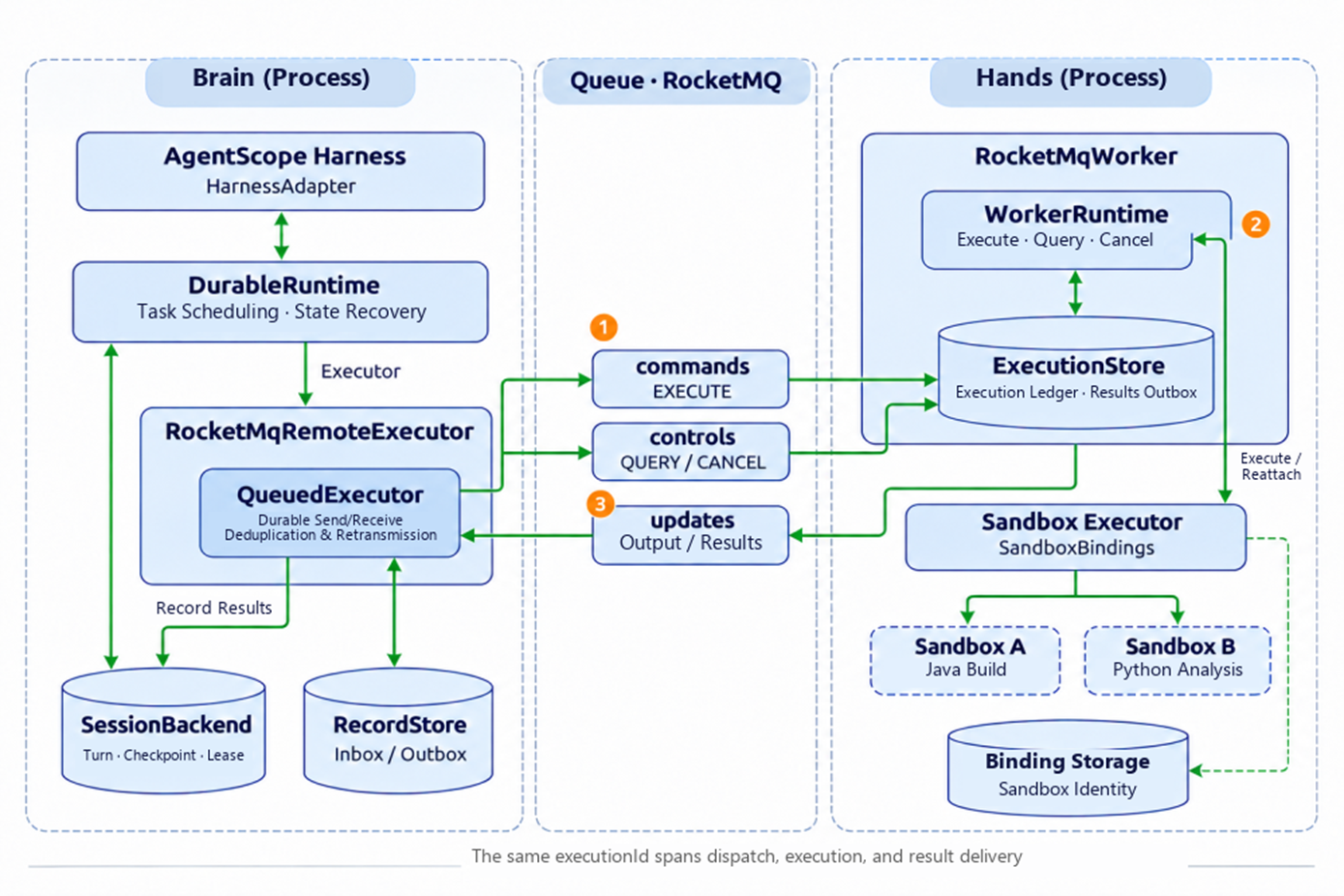
Figure 4: Brain, Queue, and Hands in Queued mode.
The stores in the figure represent boundaries of responsibility; databases can be reused as deployment needs dictate.
① Dispatch tools. DurableRuntime drives the AgentScope Harness through HarnessAdapter, saving task progress and checkpoints in SessionBackend. When a tool needs remote execution, it invokes the registered Executor. RocketMQ mode uses RocketMqRemoteExecutor, whose internal QueuedExecutor saves pending commands and received events through RecordStore to support retries, deduplication, and redelivery.
② Execute in a Sandbox. RocketMqWorker receives and validates commands, then acknowledges messages after writing them to ExecutionStore. The internal WorkerRuntime claims work based on the execution ledger and initiates, queries, or cancels operations through the corresponding tool Executor. The Sandbox Executor in the figure represents execution adaptation provided by SandboxBindings. By configuring resource bindings for different tools, the application can use separate Java build and Python analysis environments. Recovery reuses the durably saved Sandbox identity to connect to the original resource.
③ Bring results back to the original task. Tool output and results first enter the execution ledger on Hands, then RocketMqWorker sends them back through the updates channel. QueuedExecutor on Brain durably receives events and delivers them to SessionBackend in consecutive sequence-number order. Runtime then restores the original Turn, allowing the Harness to consume the result and continue reasoning. The same executionId links the entire flow, allowing duplicate messages to be checked against the original execution.
There are three independent transport channels here: commands handles execution, controls handles querying and cancellation, and updates handles output and results. These operate at a different level from the queuing of user requests within a Thread. Session wakeup notifications are also separate from these tool channels and are discussed further in the MQ takeover section. The basis for task recovery remains stored in the ledgers on both sides and in checkpoints.
1. Hand an Investigation to Durable
Minimal integration requires an agent factory, a persistent Backend, and Runtime. The following uses the application's existing model to save the first investigation as a Turn:
import io.agentscope.core.ReActAgent;
import io.agentscope.durable.DurableRuntime;
import io.agentscope.durable.DurableTypes.SessionKey;
import io.agentscope.durable.agentscope.AgentScopeAdapter;
import io.agentscope.extensions.durable.jdbc.LocalBackend;
import java.nio.file.Path;
import java.util.Map;

var backend = LocalBackend.open(Path.of("./durable-data"));
var adapter = AgentScopeAdapter.forReAct(
 binding -> ReActAgent.builder()
 .name("dev-assistant")
 .model(model),
 Map.of());
var runtime = DurableRuntime.builder()
 .backend(backend)
 .harness("dev-assistant", "v1", adapter)
 .build();
var session = runtime.createSession(
 new SessionKey("demo", "incident-42"), "dev-assistant");
var investigation = session.submit(
 "investigate-1", "Analyze the causes of timeouts in the order service");
runtime.start();
var turnId = investigation.turnId();
The application saves the Session, Thread, and Turn identities; the host keeps Runtime running and closes Runtime followed by Backend when exiting. Retries of the same request reuse the original requestId and original input; new work uses a new requestId.
This first illustrates task acceptance. The application still needs to configure the logs, code, and tools required by the model. When integrating HarnessAgent, use AgentScopeAdapter.forHarness, provide a new Builder, and configure the workspace. The complete offline Quickstart can be run from the repository root:
bash agentscope-examples/durable/integrated/quickstart/run.shIt starts two independent processes that reuse the same request identity. The second retrieves the result of the original Turn without calling the model again, making it easy to observe how the task is retained across restarts.
2. Queue a Report and Add Constraints While the Investigation Is Running
While the investigation is still in progress, submit the report as the next task, then send the constraint into the current investigation:
var report = session.submit(
 "report-1", "Prepare an incident report based on the investigation results");
investigation.steer(
 "constraint-1", "Focus on database access; do not modify the production configuration yet");
report waits in the main Thread for preceding tasks to finish; steer targets the original investigation without creating another queued task. After a steering message is accepted, the application can use events such as signal.applied to confirm that it has taken effect at a safe boundary.
If the follow-up report is no longer needed, the Turn that is still queued can be canceled:
report.cancel("cancel-report-1");Approval should likewise respond to the original task. The application uses pendingInteractions() to find pending approvals and calls respond(requestId, interactionId, approved) after the user makes a decision. This allows even approval arriving the next day to be connected to the original operation.
3. Retrieve the Investigation and Previously Seen Progress After a Page Refresh
When reopening the page, use the saved identities to connect to the original task:
var session = runtime.getSession(
 new SessionKey("demo", "incident-42"));
var thread = session.getThread("main");
var investigation = thread.getTurn(savedTurnId);
var current = investigation.status();
var history = thread.history(null, 100);
These calls only read the original task; they do not launch the investigation again. To display the full conversation, subscribe to the Session; to display only this investigation, subscribe to the original Turn and continue from the saved cursor:
import io.agentscope.durable.EventStreamOptions;
var options = EventStreamOptions.builder()
 .after(savedCursor)
 .build();
try (var stream = investigation.streamEvents(options)) {
 stream.forEach(event -> render(event));
}
render represents the application's own interface-update logic. It needs to handle persistent events and snapshot replacement after a cursor becomes invalid. Saving the consumed cursor allows continuation on the next connection. Close stream when closing the observation connection; the running Brain continues advancing the background task.
4. Run Tests Asynchronously and Retrieve Results from Before the Interruption
After the test tool is configured as an external Executor, the agent issues the invocation, and Durable saves the tool intent and enters a waiting state. When the tool completes, its result is returned to the original Turn. Business code does not need to keep the initial HTTP request open throughout this twenty-minute wait.
The repository's Sandbox example demonstrates this flow:
bash agentscope-examples/durable/integrated/tool-in-sandbox/run.shThe first process has the agent invoke sandbox.exec; after the command starts, it waits for a continuation signal. The example confirms that the Turn is WAITING and tool execution is RUNNING, then exits normally.
The second process reads the same persistent data, finds the original Turn, execution, and Sandbox, then releases the continuation signal. Hands finalizes the command output, and Brain restores the context and consumes the result, ultimately producing Sandbox result applied: recovered.
This process checks whether the Turn ID, Sandbox identity, and tool output can be carried forward, and confirms that the side effect in this example occurs only once. It demonstrates reconnecting to the original operation. If the test itself definitively fails, the agent receives the failure result; whether to modify the code and rerun the test is a subsequent business decision.
5. Integrate MQ So Available Instances Can Take Over Work Promptly
When running across hosts, multiple Brains connect to the same shared state and register compatible agent definitions. The following shows how PostgreSQL and session wakeup notifications are assembled:
import io.agentscope.extensions.durable.jdbc.PostgresBackend;
var backend = PostgresBackend.builder()
 .dataSource(dataSource)
 .notifications(rocketMqWakeups)
 .build();
var runtime = DurableRuntime.builder()
 .backend(backend)
 .harness("dev-assistant", "v1", adapter)
 .build();
runtime.start();
Here, dataSource points to a shared database whose table schema has already been initialized. rocketMqWakeups is a RocketMqWakeups constructed using a configured RocketMQ client and Topic, responsible for transmitting Session-change hints. adapter corresponds to the agent definition shown earlier. After startup, each Brain listens for notifications and scans tasks, claiming work when capacity permits.
When approval arrives or task state changes, notifications can accelerate scheduling. If an instance suddenly becomes unreachable, lease expiration and background scanning identify tasks requiring takeover. The application does not need to iterate through sessions and resubmit user requests. Replacement instances still need access to the original workspace, tool bindings, and required resources.
Remote tool execution requires separate configuration of RocketMqRemoteExecutor and RocketMqWorker, which handle the tool command, control, and result channels. RocketMqWakeups only carries wakeup hints; it does not transport tool results.
6. Place Build and Analysis Tools in Different Sandboxes
Assume that the application has prepared the schemas for the build and analysis tools and deployed two separate sets of Hands. Brain selects the execution location through tool bindings and Executor names:
import java.util.List;
var routedAdapter = AgentScopeAdapter.forReAct(
 binding -> ReActAgent.builder()
 .name("dev-assistant")
 .model(model),
 List.of(
 buildTool.route("build"),
 analysisTool.route("analysis")));
var runtime = DurableRuntime.builder()
 .backend(backend)
 .harness("dev-assistant", "v1", routedAdapter)
 .executor("build", buildExecutor)
 .executor("analysis", analysisExecutor)
 .build();
runtime.start();
This snippet replaces the earlier assembly at deployment time: buildTool and analysisTool are ToolBindings agreed upon by both sides, containing the tool schemas and target configurations. The two Executors are configured remote execution endpoints, each connected to the corresponding Hands.
On Hands, bind build tasks to a Sandbox with a JDK and analysis tasks to a Sandbox with Python dependencies. Save their respective resource identities through SandboxBindings and reuse those identities for both command execution and reconnection. Multiple tools can also deliberately share a workspace; the application explicitly configures whether it is shared and what permissions apply.
For the complete assembly of independent processes, see agentscope-examples/durable/brain-hands/tool-in-sandbox. This example requires a real RocketMQ service, a Topic, and access permissions. The local Sandbox executes commands with host permissions; a production environment should configure an actual isolated environment.
7. Open Another Thread to Review the Patch While Waiting for Tests
The main investigation is still waiting for tests, and the application has obtained a fixed version of the patch. It can now create an independent review Thread within the same Session:
var reviewThread = session.createThread("review", "dev-assistant");
var review = reviewThread.submit(
 "review-1", "Review the provided patch snapshot, focusing on security and compatibility issues");
// Subsequent follow-up questions continue using the review thread's own context.
session.getThread("review").submit(
 "review-2", "Also check the exception-handling paths in this patch");
The application configures the patch snapshot and read permissions in the review tools or workspace. This example reuses the same agent definition, but the review Thread has independent context and is not blocked by the Turn waiting for tests in the main Thread. The two requests within the same review Thread are still processed in order.
The application can display the status of both Threads together and pass confirmed review conclusions to the original investigation as supplementary information. Creating an ordinary Thread does not automatically place the review conversation in the main agent's context. When the agent needs to delegate autonomously and wait for results, integrate the delegation tool with DelegationExecutor so Durable maintains the parent–child task association.
04 From Durable Execution to Continuous Service
Once an agent can reliably complete a long-running task, the next step is to have it fulfill an ongoing responsibility. For example, a development agent can expand from 'handle this incident' to 'continuously monitor service operation, investigate anomalies when they appear, drive fixes, and follow up on verification results.' At this point, the product needs to organize the relationships between successive pieces of work: when to start, when to wait, which information to retain, and when user participation is required.
In Building always-on agents, Anthropic describes this experience as a recurring cycle: an incoming event wakes the agent, which completes the current work, saves information, and then waits for the next action. An event inbox, timers, memory, permissions, and a message outbox jointly support this cycle. Being 'always on' emerges from cooperation among these components; the agent can sleep when there is no work.
With AgentScope's design, this cycle can be built on Durable's persistent tasks. For ongoing incident follow-up, for example, alerts, user messages, and external callbacks first enter the application's event entry point. The application saves events and their processing state, associates each event with a specific business conversation, and submits it to Durable using a stable request identity. Redelivery of the same event can locate the original Turn; new work is queued in the corresponding Thread, while supplementary requirements during execution are sent to the current task through steering. The event entry point determines the business association, and Durable handles durable acceptance and execution, avoiding separate, hard-to-track work being launched by each event source.
After a task starts, the Harness organizes logs, code, memory, and tools to advance analysis and decision-making. Time-consuming tests are handed to Hands for execution in a Sandbox, while Durable saves the waiting position and original execution identity. For operations requiring user approval, the corresponding pending interaction is retained, and the approval response is connected to the original task when it arrives. There is no need to keep the initial reasoning invocation active during the wait. A compatible Brain can continue when the result is ready to be handed back. Whether an operation may execute is still determined by the application's authorization policies and the Harness's permission mechanisms.
Ongoing follow-up also requires representing future actions. For example, after a fix is completed, the agent may want to check thirty minutes later whether the error rate has fallen. The application can durably save the check time and business objective, have a scheduler generate an event when the time is due, and then hand it to Durable to execute a new check task. Two forms of continuation must be distinguished here: test results and approval responses reconnect to an unfinished Turn, whereas a scheduled inspection creates a new Turn. Business timers schedule the next action; Durable's execution retries, leases, and recovery mechanisms keep accepted work progressing reliably.
Across multiple tasks, the Harness's long-term memory can retain service background, user preferences, and incident-handling experience, loading them as needed for subsequent decisions. Durable records where a specific task's execution has reached, which tool results have been confirmed, and what it is still waiting for. Continuous service needs both types of information: the former helps the agent understand its responsibilities and business context; the latter provides an explicit execution basis for task recovery. Facts already present in tickets, code repositories, or monitoring systems can also be retrieved again through references and tool queries.
Work results also need to be delivered to users. The application can set up a message outbox according to business needs, saving content awaiting delivery and its delivery status so delivery can continue after a send failure. A resolved incident, escalated risk, or required approval are all moments worth notifying the user about; routine checks may simply update status. Message delivery here and the tool-result Outbox in Queued mode have separate responsibilities: tool results are returned to the agent, while the product selects the channels and notification cadence for user-facing messages. 'Task completed' and 'user has received the notification' should be recorded separately.
AgentScope's reasoning and context capabilities, Durable's persistent execution capabilities, and the event integration, business scheduling, and message delivery provided by the application can thus form a complete continuous-service flow. During deployment, teams can first embed these components in existing business systems, then separate Brain, Hands, and Sandbox as scale requires, while centrally managing credentials, quotas, resources, and auditing. Whether the final form is an enterprise business assistant, a Personal Agent, or a service hosted on a Managed Agents platform, the same design can be reused: every action has an origin, execution has tracked progress, waiting has an associated task, and subsequent work can continue when needed.
Conclusion
The core problem enterprise agents face in long-running tasks is that execution progress can easily become tied to a single connection, process, or instance: results are difficult to track after a connection is lost, tasks are difficult to resume after a service restarts, and time-consuming tools and approval waits extend execution over longer periods. Through persistent task state, asynchronous tool execution, and interruption recovery, AgentScope Durable allows work to outlive the lifecycles of connections and instances and continue when execution conditions are met, while also supporting request queuing, steering during execution, and session replay. Around this goal, AgentScope establishes three core abstraction layers: ReActAgent handles the reasoning and action loop, HarnessAgent handles context management and organization of the working environment, and Durable handles persistent execution and recovery. Together, these three layers provide a unified foundation for developers to build interactive, recoverable, continuously running distributed enterprise agents.
AgentScope Durable open-source implementation: https://github.com/agentscope-ai/agentscope-java
Read previous post:
Read next post:
From Generation to Decision: An Empirical Evaluation of Decision Models for AgenticOps
-

-
Alibaba Cloud Native Community
837 posts | 61 followers
Follow
Comments
-
-
Alibaba Cloud Native Community
837 posts | 61 followers
Follow
Related Products
-
 Qoder
From Assisted to Autonomous — Adapting to Every Programming Need
Learn More -
 AgentCore
 unifies agent construction, governance, and execution capabilities so enterprises can deploy diverse agents with confidence.
Learn More -
 Qwen
Full-range, open-source, multimodal, and multi-functional
Learn More -
 Token Plan
Build more, spend less. One plan, every modality.
Learn More
More Posts by Alibaba Cloud Native Community
- AgentTeams 1.2.8: A Brand-New Workbench and Website—Start Team Collaboration with One Click
- From Generation to Decision: An Empirical Evaluation of Decision Models for AgenticOps
- The Three Hidden Bills of an LLM Proxy: Security Incidents, Operational Investment, and Model Selection
- Managing Logs with Natural Language: A Practical Guide to Alibaba Cloud SLS Agent Skills
- Your AI Application Should Have a Traffic Entry Point: AI Gateway Serverless
- Best Practices for Skill Evaluation and Optimization Based on Alibaba Cloud AgentLoop
- DeepSeek Harness Evaluation Practice Based on Alibaba Cloud AgentLoop
- 97.1% Lower Gateway Latency: Open-Source Higress vs. Alibaba Cloud AI Gateway Serverless Enterprise Edition
- Alibaba Cloud's Open-Source AI Agent Handbook, 3K+ GitHub Stars