AgentTeams 1.2.8: A Brand-New Workbench and Website—Start Team Collaboration with One Click
By Liu Zunfei (Yiyan)
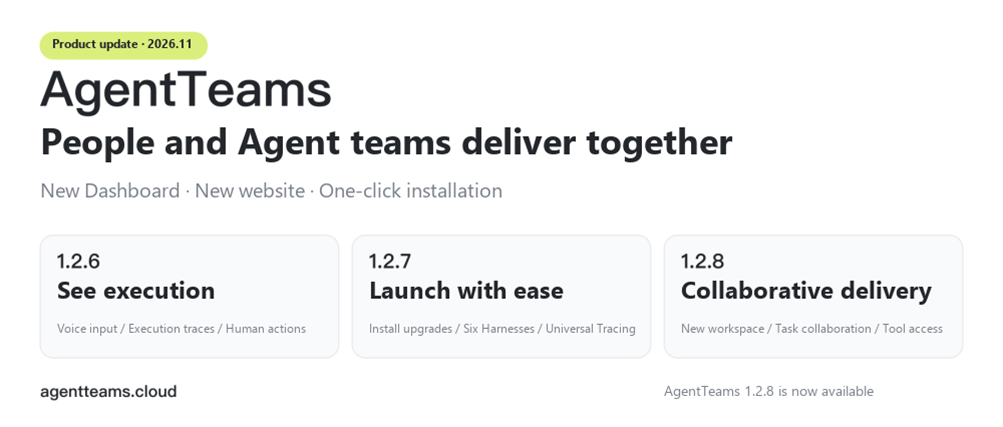
From 1.2.6 to 1.2.8: gain visibility into execution, make the most of different Harness options, and organize collaboration in a single workbench.
When several Agents work together, the everyday questions that matter most are often these: Who has been assigned the request? How far has the task progressed? When is my confirmation needed? Where are the final deliverable files?
The three most recent versions of AgentTeams have continued to improve around these practical questions: 1.2.6 makes execution more transparent, 1.2.7 makes installation and runtime selection easier, and 1.2.8 introduces a brand-new workbench and upgrades to Team collaboration, making task delivery more reliable while reducing collaboration time and context usage.
Meanwhile, the new official website, agentteams.cloud, is now live, providing a single entry point for product demos, installation, user documentation, and the open-source community.
AgentTeams 1.2.8 is now available. This article reviews the key updates in versions 1.2.6, 1.2.7, and 1.2.8. All interface illustrations use the new visual design from 1.2.8; the tasks and members shown in the screenshots are demo data.
01 Meet AgentTeams: You Set the Goal, the Team Divides the Work, and You Can Participate at Any Time
AgentTeams is an open-source multi-Agent collaboration system. You can give the assistant a goal: the Manager coordinates the team, the Leader breaks down tasks and reviews them for acceptance, and the Workers carry out their respective work. You can also communicate directly with the team assistant to follow up on tasks you are responsible for.
Different Agents can use different runtimes and models. Collaboration messages flow through Matrix rooms, work files are saved in shared storage, and access to models and MCP tools is managed by the Higress AI gateway. The Dashboard brings these capabilities together in a single workspace.
You can use it to organize tasks such as code development, research, and content creation, adding background information, handling approvals, and reviewing the final results along the way.
02 1.2.6: More Natural Input and Visibility into Execution
This version focuses on one question: Once a task has been handed off, how do you know what the Agent is doing?
Voice Input: Edit Before Sending
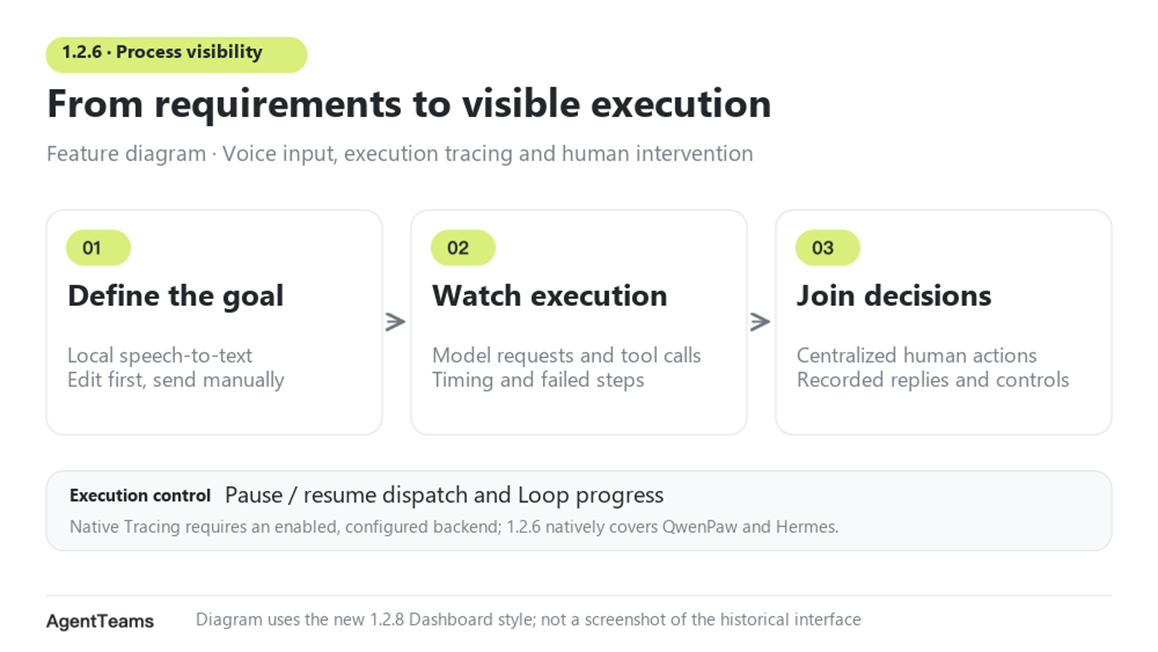
Chat supports Chinese and English speech-to-text, using local recognition in the browser by default; the model is cached after it is first loaded. The recognized text goes into the input field first, so you can revise the wording and add conditions before manually sending it. Administrators can also configure Bailian speech recognition.
When providing a longer background explanation or adding a few constraints on the fly, you can say them aloud first, then refine the request for accuracy.
Execution Tracing: See How Much Time Models and Tools Take
1.2.6 adds optional native Worker session tracing, supporting the correlation of execution turns, model requests, and tool calls in QwenPaw and Hermes. The Dashboard provides a session list and an execution waterfall chart to help you see where time is spent and which step failed.
For example, if a research task is taking a long time to respond, you can follow the execution records to determine whether the Agent is waiting for the model or a tool request has failed. This gives you concrete clues for troubleshooting.
Clear Action Items and Records When Human Intervention Is Needed
TeamHarness improves pause and resume controls for task dispatch and Loop progression, and records the related operations. A team-level human-action inbox gives questions requiring confirmation a single destination, while human responses can also be retained in a structured form.
Model authorization, team permissions, personal file areas, and storage synchronization have also been improved. In multi-user use, there are clearer boundaries around who can configure models, who can manage resources, and which files can be accessed.
This version is suited to teams already running collaborative tasks that want visibility into execution and the points where human intervention is needed. Native Tracing requires a separately configured backend and must be enabled; runtime coverage depends on the support available for each runtime.
03 1.2.7: Start with One Click and Bring Six Harness Options into One Team
1.2.7 further lowers the barrier to getting started: launch the workspace first, then enter the Dashboard to configure the Manager model. The upgrade process for preserving data and configuration has also been improved.
Six Harness Options with Unified Image Naming and Versioning
OpenClaw, QwenPaw, Hermes, DeepSeek Harness, OpenHuman, and Codex all use shared Harness image naming and versioning, with images available for amd64 and arm64. The Manager and Worker reuse the corresponding Harness images, reducing the number of image types that need to be distinguished during deployment.
As a user, you can choose different runtimes according to task requirements and bring Agents with different strengths into the same collaboration system.
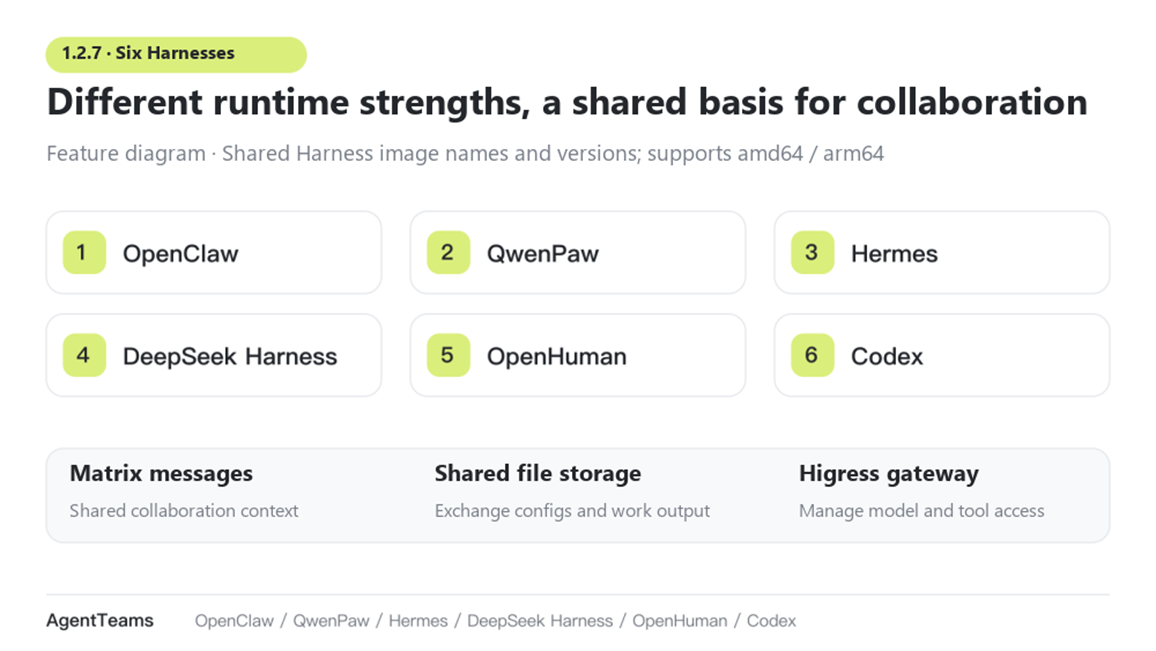
By 1.2.8, all six Harness options are supported. You can choose the appropriate runtime for each task and have different Agents collaborate within the same team.
Tracing Extends to Regular Agent Conversations
Diagnostics are no longer limited to scenarios where a formal task has already been created. General-purpose Tracing in 1.2.7 supports queries by dimensions such as Agent, team, Session, and Task, with execution details viewable within a selected time range.
The Dashboard workbench adds a Tracing entry point, with the Controller centrally managing the related configuration. Even for a direct conversation with an Agent, you can locate model requests, tool calls, and failed steps by session. This capability still requires a configured Collector and observability backend.
Smoother Day-to-Day Use Across Multiple Teams
Management entry points for teams, Managers, and unassigned Workers are more centralized, and team topology and Agent details can be viewed within the page. Model selection, human-action to-dos, personal file sharing, and first-login guidance continue to improve.
Chat groups the thinking and tool calls from the same turn together, provides a live preview during execution, and automatically collapses them when execution ends. Project completion requirements are also stricter: a project can be marked complete only after its tasks are finished and its deliverable artifacts are registered.
04 1.2.8: A Brand-New Dashboard and Upgraded Team Collaboration
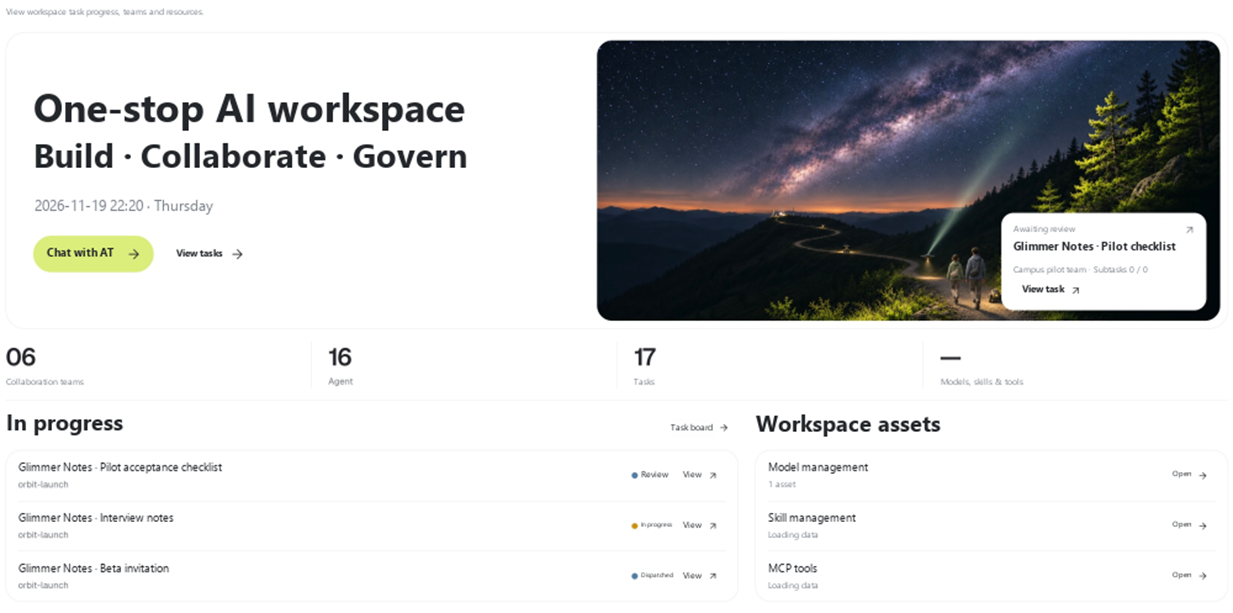
The most immediately noticeable change in 1.2.8 is the visual and interaction update across the workspace. White backgrounds, dark gray text, thin borders, and yellow-green primary actions bring the page's key elements into sharper focus. The home, assistant, task board, team, and asset pages use more consistent layouts and interaction patterns.
More importantly, common actions now flow more smoothly from one to the next: stating requirements, checking the division of work, joining collaboration, handling approvals, and reviewing results.
Workspace Home: Check Progress First, Then Open a Task
The new home page is built around the theme “A One-Stop AI Workbench: Build–Collaborate–Govern,” bringing ongoing tasks, collaborating teams, and workspace assets together in one view. Once you enter the workspace, you can talk directly with the AT assistant or open a task to continue following up.
Global search covers pages, tasks, Agents, skills, and tools, reducing the need to search through multiple management pages layer by layer.
Conversations and Tasks Together for Easier Access to Context
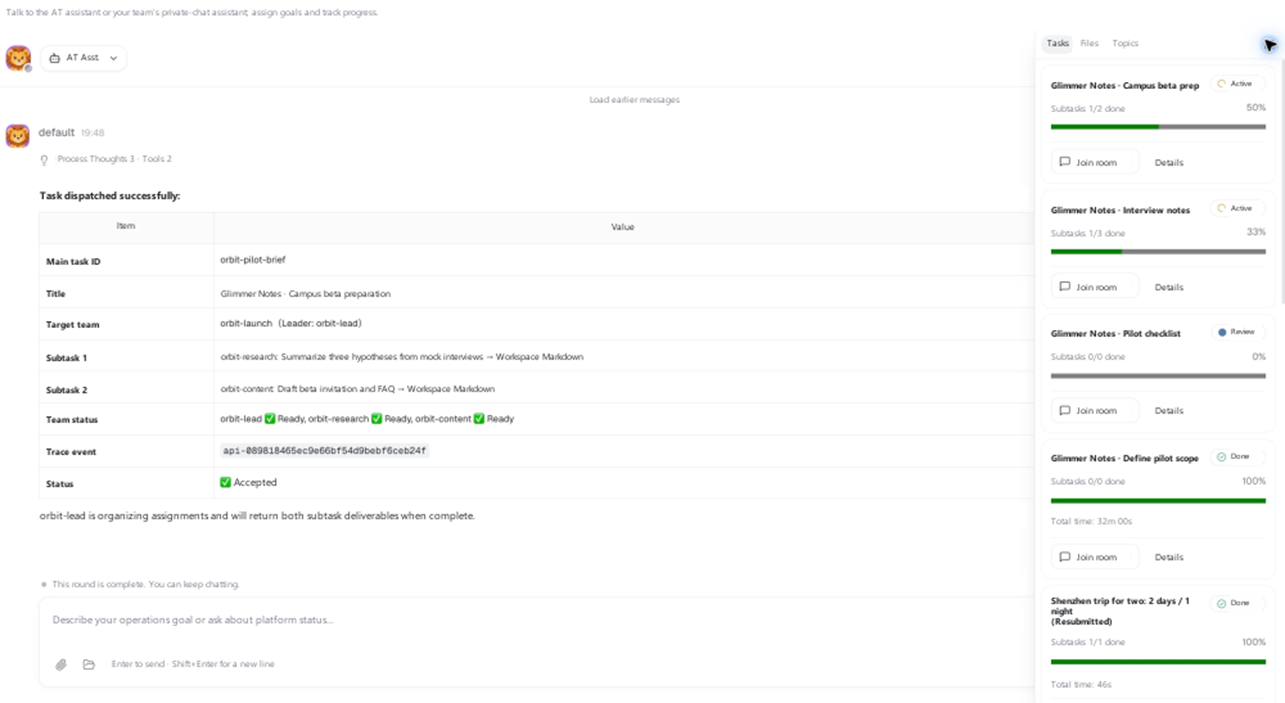
In an assistant session, you can view related tasks from the sidebar and also look at files and topics. Conversation context remains available while you view a task; when you need to participate in execution, you can enter the corresponding collaboration room.
The new version also unifies task details, dependency graphs, and activity records across the task board and collaboration sessions. When you open the same task from different entry points, you see consistent task information.
Upgraded Team Collaboration: Higher Delivery Success Rates, Less Time and Context Usage
The upgrades in 1.2.8 also extend into the Team's internal collaboration workflows. Across task dispatch, divided execution, progress synchronization, and acceptance review of results, the new version further improves coordination among the Manager, Leader, and Worker, increasing the success rate of collaborative task delivery and significantly reducing collaboration time and context usage.
More reliable delivery. Main tasks, execution subtasks, and deliverable artifacts are linked more clearly, with tighter coordination between dispatch, submission, acceptance review, and revision. The Leader can organize acceptance reviews around clearly defined task states and delivered results, and stages requiring additional information or human confirmation are easier to identify and handle.
Less time spent moving work forward. The Manager focuses on clarifying requirements, selecting teams, and reporting results; the Leader handles task breakdown, dispatch, and acceptance review; and the Worker focuses on execution. Together with task states and collaboration notifications, this reduces repeated requests for progress updates, multi-layer relaying of information, and unnecessary waiting for coordination.
Leaner context. Task requirements, execution progress, and deliverable files are organized by main task and subtask. Agents obtain the information needed for their own responsibilities and exchange results through structured progress updates and shared files, reducing the context usage caused by repeatedly passing along long conversations and rereading unrelated history.
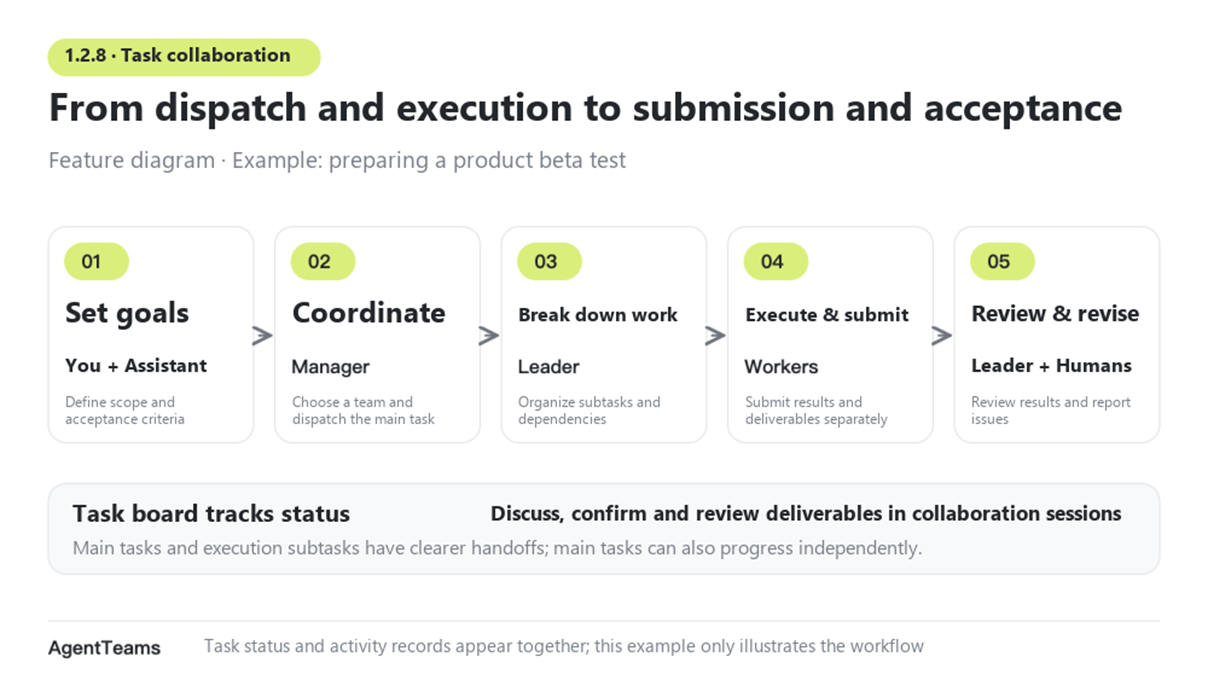
Main tasks can progress independently or be organized within a project. The Leader breaks them down and dispatches subtasks; the Worker submits results, which then enter acceptance review or revision. You can see the division of work clearly on the board and follow actual delivery in collaboration sessions.
Take “prepare an internal product test” as an example: you first state the goal and acceptance requirements, then the team divides the work of organizing interview notes, drafting invitation copy, and preparing an acceptance checklist. The board shows the main task's status and subtask completion, while items requiring confirmation are handled back in the collaboration session.
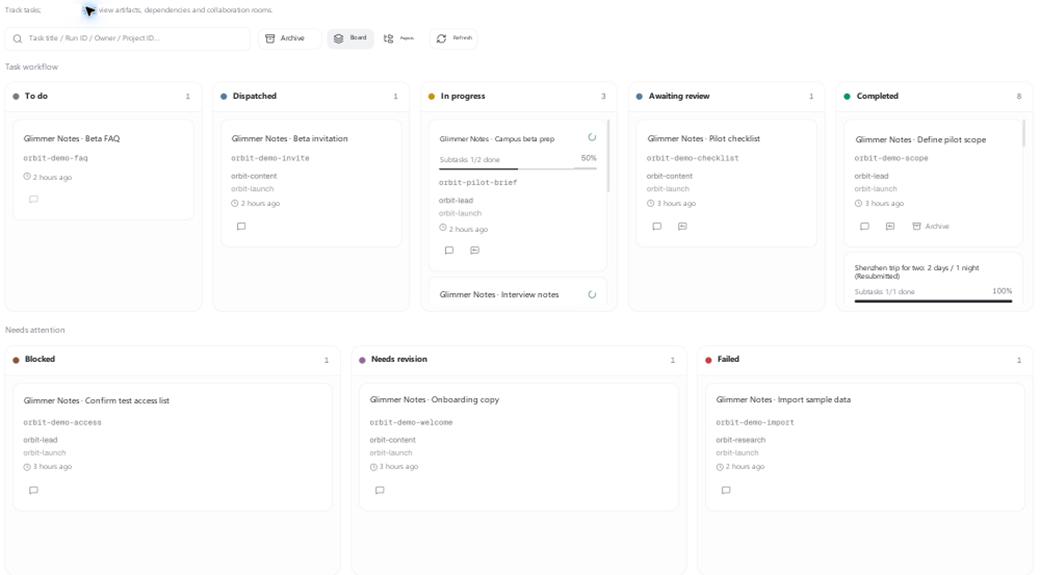
The task board places “To Do, Dispatched, In Progress, Awaiting Acceptance, Completed” in the main workflow and groups “Blocked, Revision Required, Failed” together, making it easier to identify tasks that need attention first. From a task card, you can continue into the collaboration session to view execution context and delivery status.
Need to Change Direction? Stop Execution and Add Instructions
When talking directly with an Agent, you can issue a stop command or add instructions for the current execution. For example, if the Agent is preparing a report with an overly broad scope, you can add “focus on deployment and tool integration first” so that subsequent execution continues around the new requirements.
The stopped state is confirmed only after the native runtime has completed the corresponding cleanup; external actions that have already taken place are not automatically undone. This interaction applies to direct conversations between a person and an Agent. Team-delegated tasks still use their corresponding task-control workflows.
Approvals are also more closely aligned with actual execution: native approval requests from all six Harness options are linked to Dashboard cards, and processing results are updated based on runtime acknowledgments. Member read status is linked to mentioned members to help determine whether a message has been read; read status and task completion are displayed separately.
More Complete Workflows for Configuring Models and Connecting Tools
Model management centers on “model connections”: enter the platform, API address, Key, and model ID, then test the connection with a short generation request and check the result and elapsed time. The test checks the selected upstream model connection; Agent authorization and actual tool calls still need to be verified during use.
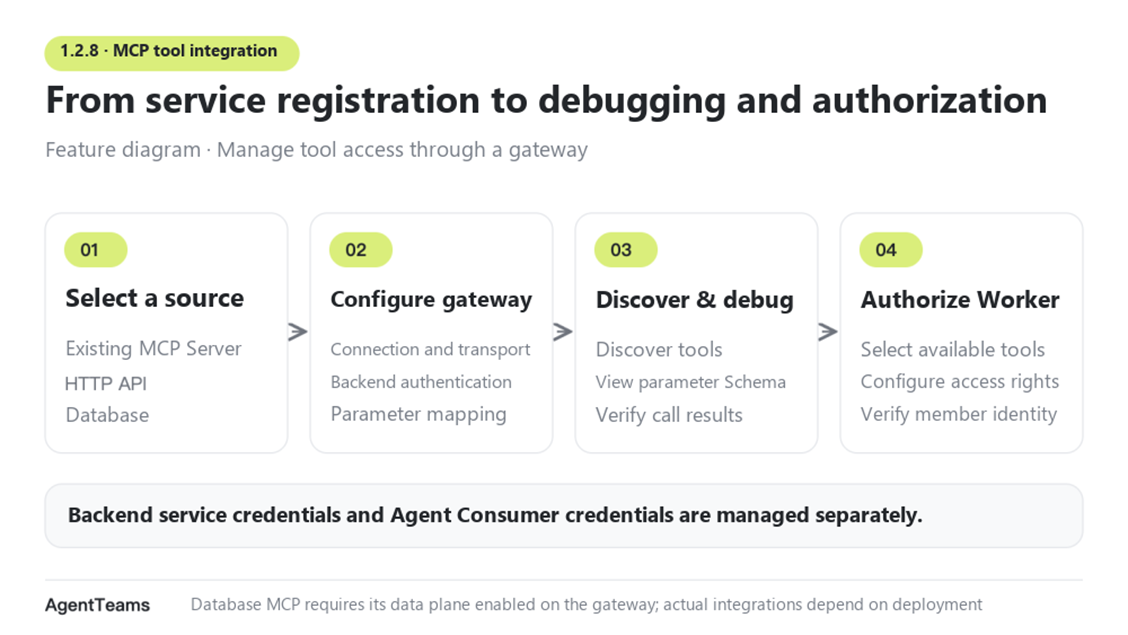
MCP tool integration is more complete: you can connect an existing MCP Server or integrate through an HTTP API or a database, then discover tools through the gateway, debug them using their parameter Schema, and configure authorization for the Worker. Database integration requires the corresponding data-plane capabilities to be enabled in the gateway.
Continued Improvements to Team Management and Runtime Diagnostics
The team page supports switching between card and topology views, making it easier to inspect member relationships, configuration, and status. Runtime monitoring cards, container logs, Manager diagnostics, and access to associated evidence help move troubleshooting beyond “no response” to a specific runtime state.
Completed task sessions can be archived and restored, preserving historical messages and artifacts while reducing the overhead of keeping past tasks involved in ongoing message synchronization.
In addition, 1.2.8 introduces controlled Worker Harness switching, along with task checkpoints, recovery isolation, and continuation mechanisms. Some real-world continuation scenarios have been verified, while the full scope of cross-Harness recovery is still being improved; this is not a promise of lossless switching between arbitrary runtimes.
05 New Website Now Live: From Watching a Demo to Running Your First Task
The new AgentTeams official website is now live: https://agentteams.cloud
You can start with the new Dashboard's product demo to learn how to use tasks, teams, skills, and collaboration sessions, then use the same entry point to install, consult the documentation, or visit the GitHub community.
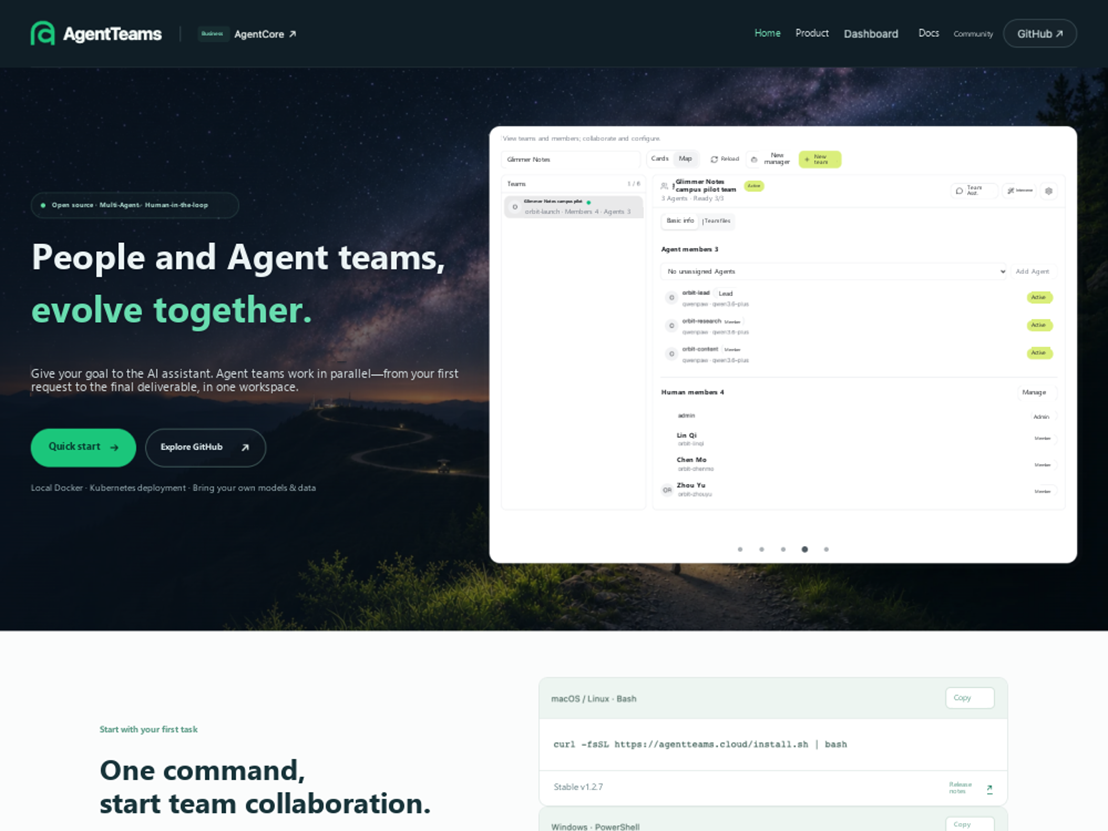
Launch AgentTeams and the Dashboard with a Single Command Line
Prepare a container runtime environment such as Docker and a valid model API Key, run the installation command for your operating system, and then follow the wizard to complete the configuration.
macOS / Linux:
curl -fsSL https://agentteams.cloud/install.sh | bashWindows PowerShell:
iwr -UseBasicParsing https://agentteams.cloud/install.ps1 | iexAfter installation, open the Dashboard address provided by the wizard, configure the Manager model, and give the assistant your first goal. For example:
Help me assemble a research team to compare three open-source knowledge base solutions. Investigate their deployment requirements, retrieval capabilities, and maintenance costs, and produce a comparison report with sources. If you encounter conditions that require my confirmation, ask me first.
Then check the division of work on the task board, add constraints in the collaboration session, and review the final delivered report. This is also a complete workflow for trying out the new Dashboard.
The installation script installs the version recommended by the official website. Before upgrading an existing deployment, back up your configuration and persistent data, then follow the upgrade wizard to retain your existing accounts, model configuration, and workspace.
Try It Out—and Help Build It Together
AgentTeams aims to enable Agents on different runtimes to collaborate within the same team, while ensuring that people can always see the process, participate in decisions, and inspect deliverables.
Start by trying it with a real task. If you have a new Harness, tool integration, or collaboration scenario, or encounter issues during use, you are welcome to submit an Issue on GitHub, join discussions, and contribute a PR. You are also welcome to Star the project and follow future releases.
- Official website and product demo: https://agentteams.cloud
- Main GitHub repository: https://github.com/agentscope-ai/AgentTeams
- Report issues: https://github.com/agentscope-ai/AgentTeams/issues
Read previous post:
From Generation to Decision: An Empirical Evaluation of Decision Models for AgenticOps
-

-
Alibaba Cloud Native Community
837 posts | 61 followers
Follow
Comments
-
-
Alibaba Cloud Native Community
837 posts | 61 followers
Follow
Related Products
-
 Qoder
From Assisted to Autonomous — Adapting to Every Programming Need
Learn More -
 Managed Service for Prometheus
Multi-source metrics are aggregated to monitor the status of your business and services in real time.
Learn More -
 AgentCore
 unifies agent construction, governance, and execution capabilities so enterprises can deploy diverse agents with confidence.
Learn More -
 Qwen
Full-range, open-source, multimodal, and multi-functional
Learn More
More Posts by Alibaba Cloud Native Community
- From Generation to Decision: An Empirical Evaluation of Decision Models for AgenticOps
- AgentScope Durable: Running Enterprise Agents Continuously and Reliably
- The Three Hidden Bills of an LLM Proxy: Security Incidents, Operational Investment, and Model Selection
- Managing Logs with Natural Language: A Practical Guide to Alibaba Cloud SLS Agent Skills
- Your AI Application Should Have a Traffic Entry Point: AI Gateway Serverless
- Best Practices for Skill Evaluation and Optimization Based on Alibaba Cloud AgentLoop
- DeepSeek Harness Evaluation Practice Based on Alibaba Cloud AgentLoop
- 97.1% Lower Gateway Latency: Open-Source Higress vs. Alibaba Cloud AI Gateway Serverless Enterprise Edition
- Alibaba Cloud's Open-Source AI Agent Handbook, 3K+ GitHub Stars