Qwen Work
Qwen Work (also known as QoderWork) is an AI-powered desktop application developed by Alibaba Cloud, designed to act as an intelligent agent for everyday productivity and non-coding tasks. While its sibling product, Qoder, is strictly focused on software development and code generation, Qwen Work is tailored for general office workflows, enabling users to automate routine operations, process documents, analyze data, and manage daily administrative duties through natural language commands. Powered by Alibaba's advanced Qwen large language models, it brings agentic AI capabilities directly to the user's desktop, serving as a comprehensive digital assistant that significantly enhances professional efficiency across a wide variety of daily work scenarios beyond just programming.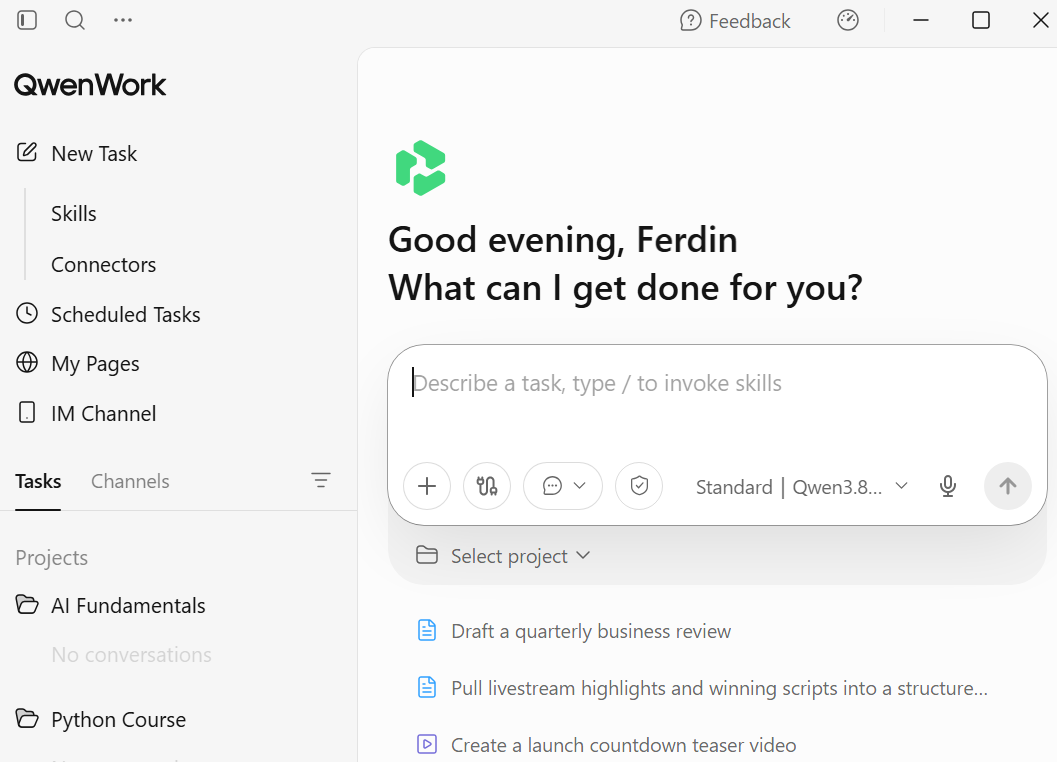
Pricing
Qwen Work offers a scalable pricing structure tailored for both individuals and organizations. The Free tier ($0/month) provides limited monthly credits and basic AI model access for lightweight, everyday tasks. The Pro plans (approximately $14 to $28 per month) unlock advanced AI models, higher credit allocations, and enhanced productivity features for power users. Finally, the Enterprise tier (starting at around $28 per seat per month, with custom pricing for flagship plans) is built for businesses, offering unified credit pools, advanced security, and the ability to share reusable AI workflows across entire teams.
Qwen Work for Educators
Qwen Work is highly beneficial for educators by significantly reducing their administrative workload and streamlining instructional design. Teachers can leverage its AI capabilities to rapidly generate customized lesson plans, grading rubrics, and interactive quizzes simply by describing their learning objectives in plain language. Its robust document processing and data analysis features allow educators to easily evaluate student performance trends, summarize extensive educational research, or draft personalized feedback and report cards. Furthermore, Qwen Work’s no-code web app generation enables teachers to instantly create and share interactive class portals, assignment submission forms, or study guides without needing any technical expertise. Ultimately, by automating these time-consuming tasks and allowing entire departments to share reusable teaching workflows, Qwen Work empowers educators to reclaim their time and focus on what truly matters: direct student engagement and mentorship.
Solution Scenario
Rapid Development and Structuring of a 12-Week "Python Fundamentals" Course using AI-Assisted Content Generation.
Secondary Users (Beneficiaries): Undergraduate university students in Southeast Asia (diverse learning backgrounds, requiring engaging and accessible content).
Legacy lecture notes and syllabus outlines (PDF format).
Curriculum Structuring: Automatically map the extracted content into a logical 12-week progression (e.g., Week 1: Syntax & Variables, Week 2: Control Flow, Week 3: Functions, etc.), ensuring a smooth learning curve.
Presentation Generation: Generate structured, visually clean slide deck outlines or actual presentation files (PPTX/PDF) for each of the 12 weekly lectures, summarizing the PDF content into digestible bullet points and code examples.
Assessment & Engagement Creation: For each week, automatically generate:
In-class Activities: Interactive coding exercises or pair-programming prompts.
Quizzes: Multiple-choice and short-answer questions to test theoretical understanding.
Homework: Practical Python coding assignments with clear problem statements and expected outputs.
Contextual Localization: Adapt examples, datasets, and word problems to be culturally and economically relevant to Southeast Asian students (e.g., using local currencies, regional tech scenarios, or local geographic data).
Course File Compilation: Package all generated materials (syllabus, weekly slides, quizzes, assignments, and grading rubrics) into a unified, standardized "Course File" structure ready for direct upload to the university’s Learning Management System (LMS).
Accuracy: All generated Python code snippets, syntax explanations, and logical concepts must be 100% technically accurate and free of hallucinations.
Format Compatibility: Outputs must be compatible with standard university software (e.g., PowerPoint for slides, standard formats for LMS import like CSV/ZIP for quizzes).
Academic Integrity: The solution must ensure that generated homework and quiz questions are original and not directly plagiarized from the source PDFs to prevent students from simply searching the internet for the exact answers.
The course materials are highly engaging, moving beyond static reading to include interactive and practical coding elements.
The time saved on this single course allows Dr. Acutis to dedicate the remainder of his week to preparing the other three assigned courses and settling into his new role at the university.
Solution
Qwen Work serves as an autonomous, desktop-based AI agent perfectly suited for Dr. Carlo Acutis’s high-pressure scenario. Unlike standard cloud-based chatbots, Qwen Work operates directly on his local machine, granting it secure access to his local "Working Folder" to read, process, and save files. By combining local document ingestion, real-time web search, and specialized document generation skills (like PPTX creation), Qwen Work can autonomously execute Dr. Acutis’s curriculum design workflow.
Here is the detailed, step-by-step procedure on how Dr. Acutis will use Qwen Work to build his 12-week "Python Fundamentals" course in under a week.
Step 1: Initialize the Working Folder
Dr. Acutis opens the Qwen Work desktop application and creates a dedicated local directory on his computer: D:\University_Courses\Python_Fundamentals. He sets this as his active "Working Folder" within Qwen Work.
Step 2: Upload Source Materials
He drags and drops his existing PDF textbooks, legacy lecture notes, and the university’s standard syllabus template into this Working Folder.
Step 3: Command the Agent
Dr. Acutis types a comprehensive prompt into the Qwen Work chat interface:
"Read all the PDFs in my working folder. Based on these materials, design a 12-week 'Python Fundamentals' course for Southeast Asian undergraduates. Create a week-by-week syllabus. For each week, generate a lecture presentation (PPTX), a 10-question multiple-choice quiz, and a practical coding homework assignment. Use web search to include localized, real-world examples relevant to our region. Save all generated files neatly organized in subfolders within my working folder."
Step 4: Local PDF Parsing and Structuring
Qwen Work’s local file reader ingests the PDFs, extracting core Python concepts, syntax rules, and structural outlines. The agent analyzes the density of the material and automatically maps it into a logical 12-week progression, ensuring a smooth learning curve from basic variables to object-oriented programming.
Step 5: Web Search for Localized Engagement
To meet the requirement of keeping the class engaging and relevant, Qwen Work triggers its web search capability. It searches for current tech trends, datasets, and case studies in Southeast Asia. For example, it finds open datasets from local ride-hailing apps (like Grab or Gojek), regional e-commerce sales data, or local agricultural tech scenarios. It integrates these real-world contexts into the planned coding exercises, making the abstract Python concepts highly relatable for the students.
Step 6: Drafting the Lecture Content
For Week 1, Qwen Work synthesizes the extracted PDF knowledge and the web search results into a structured lecture script. It breaks the content down into digestible slides: Learning Objectives, Core Concepts, Syntax Examples, and the newly generated localized case studies.
Step 7: Executing the PPTX Skill
Using its built-in presentation generation skill, Qwen Work translates the structured lecture content into an actual PowerPoint file. It applies a clean, professional academic template, formats code snippets with syntax highlighting, and inserts placeholder boxes for diagrams. The agent saves this file as Week_01_Lecture_Slides.pptx.
Step 8: Generating Quizzes and Homework
Moving beyond the slides, Qwen Work generates the weekly assessments.
Quizzes: It creates a 10-question multiple-choice quiz based strictly on the week's lecture content, ensuring a mix of theoretical and syntax-based questions. It saves this as Week_01_Quiz.docx.
Homework & Activities: It designs a practical coding assignment. For Week 1, instead of a generic "calculate the area of a rectangle" task, it creates an assignment where students write a script to calculate the conversion of local currencies (e.g., SGD to MYR or PHP to IDR) based on web-scraped daily exchange rates. It also generates a grading rubric.
Phase 5: Compilation and Loading into the Working Folder
Step 9: Automated File Organization
As it finishes generating the materials for each of the 12 weeks, Qwen Work automatically interacts with the local file system. It creates a structured directory tree inside the Working Folder:
01_Syllabus_and_Planning/ (Contains the master 12-week schedule)02_Weekly_Lectures/ (Contains Week 1 to 12 PPTX files)03_Assessments/ (Subfolders for Quizzes and Homework for each week)04_Activities_and_Labs/ (Contains in-class interactive coding prompts)Step 10: Final Review and Handoff
Once the execution is complete, Qwen Work presents Dr. Acutis with a summary dashboard in the chat, listing all the files it has created and saved. Dr. Acutis can simply open his Windows File Explorer or Mac Finder, navigate to D:\University_Courses\Python_Fundamentals, and see the fully populated, LMS-ready course file.
The Result
By leveraging Qwen Work’s ability to read local files, search the web for contextual relevance, execute PPTX generation skills, and autonomously save files to the local drive, Dr. Acutis transforms a multi-week administrative burden into a single afternoon's work. He now has a fully localized, highly engaging, and meticulously organized 12-week Python course, leaving him ample time to prepare his remaining three courses.
Image and Video Generation from Text Prompts Using Wan 2.5 Preview Model from Model Studio
Alibaba Cloud Project Hub - March 19, 2024
Alibaba Cloud Community - October 12, 2026
Alibaba Cloud Community - July 22, 2024
Alibaba Cloud Community - October 25, 2024
Alibaba Cloud Community - September 23, 2025
Alibaba Cloud Community - September 9, 2024
 Qoder
Qoder
From Assisted to Autonomous — Adapting to Every Programming Need
Learn More Alibaba Cloud Drive Solution
Build your cloud drive to store, share, and manage photos and files online for your enterprise customers
Learn More Token Plan
Build more, spend less. One plan, every modality.
Learn More Qwen
Qwen
Full-range, open-source, multimodal, and multi-functional
Learn MoreMore Posts by ferdinjoe


