By Huaxiong Song
AliSQL open-source version 8.0.44-2 is officially released recently.
Based on MySQL 8.0.44, this release upgrades DuckDB to v1.4.4 and introduces the native vector index VIDX, Native Flashback, Persist Binlog Into Redo, and Binlog Cache Free Flush.
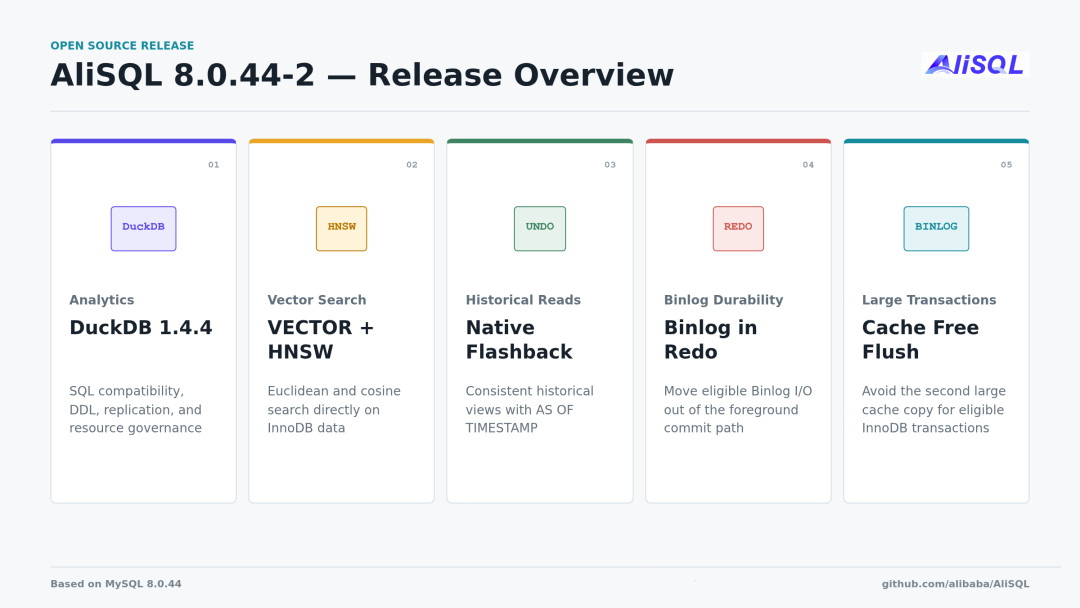
Figure 1: Overview of key features in AliSQL 8.0.44-2
This update highlights five key features:
AliSQL embeds DuckDB directly into the server process as an analytical storage engine. Applications can use DuckDB's columnar execution capability through existing MySQL connections without connecting to a separate analytical service. We ran TPC-H SF100 on a 32-core, 128 GB memory machine, where DuckDB outperformed InnoDB by over 200x in multiple queries.
The application-side access method remains unchanged: clients still use the MySQL protocol, and authentication, connection management, and SQL parsing continue to be handled by the MySQL server layer. After necessary syntax compatibility processing, analytical queries are handed off to DuckDB for execution. Transactional tables, system tables, and the data dictionary are still managed by InnoDB.
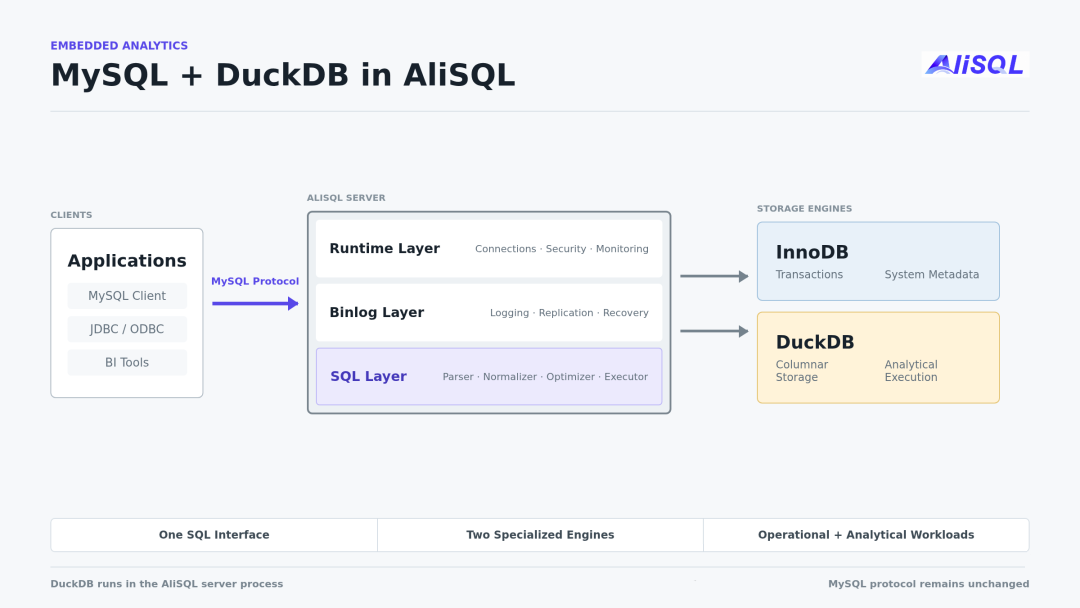
Figure 2: DuckDB embedded as an analytical storage engine in AliSQL, applications continue using the MySQL protocol
DuckDB supports two common deployment modes. Within a single AliSQL instance, InnoDB tables and DuckDB tables can share the same MySQL entry point. When you need to isolate transactional and analytical workloads, the InnoDB primary handles online transactions while a DuckDB analytical node synchronizes data through Row-format Binlog and handles queries such as scans, aggregations, and joins.
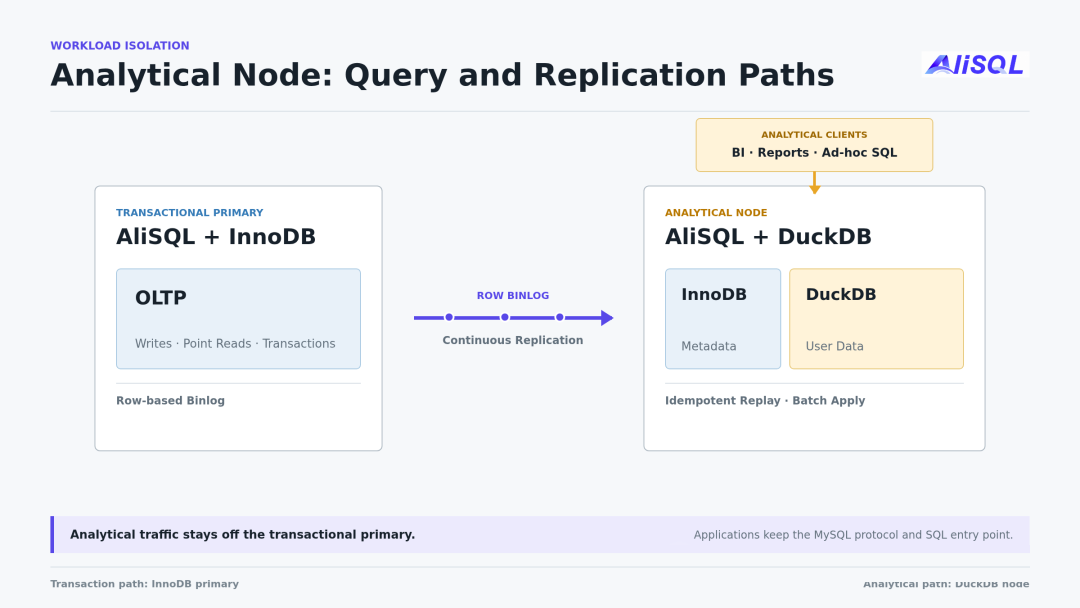
Figure 3: Analytical queries access the DuckDB analytical node, with data synchronized from the InnoDB primary via Row Binlog
Once deployed independently, the CPU, memory, and I/O used by analytical queries no longer consume primary resources, while the business side continues to use the familiar MySQL protocol. This architecture is already running on over 1,000 RDS MySQL production nodes. This release also incorporates optimizations we have accumulated in production, primarily related to replication lag, DDL stability, resource control, and restart recovery.
The DuckDB component also adds the following capabilities in this release:
In addition, this release fixes several issues that could cause mysqld crashes and further improves the replication pipeline.
This release introduces the native vector index VIDX. Users can define VECTOR(N) columns and create HNSW indexes directly in InnoDB tables, without first syncing business data to a separate vector database.
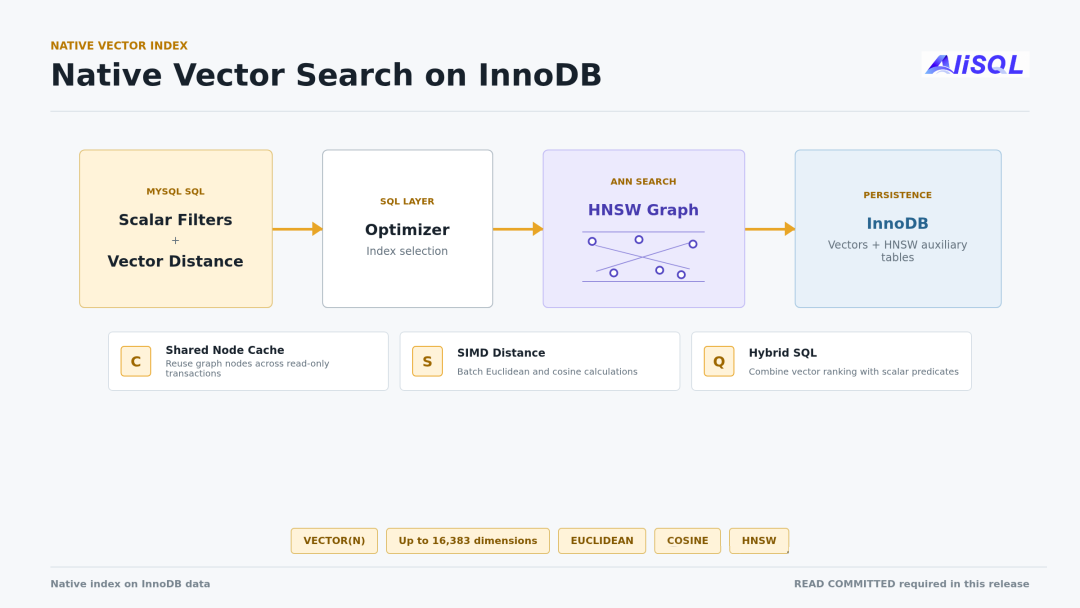
Figure 4: A single SQL query can combine HNSW search, vector distance sorting, and regular column filtering
VECTOR(N) stores a fixed-dimension floating-point array, currently supporting up to 16,383 dimensions. Vectors and regular business columns can reside in the same InnoDB table. After index creation, the HNSW graph is stored in an InnoDB auxiliary table, where each row records a graph node and its adjacency.
During a query, HNSW first quickly locates candidates in the upper layers, then expands the search scope at layer 0. The index parameter M determines how many connections each node maintains, and vidx_hnsw_ef_search determines how many candidates to retain during the query. More candidates generally lead to higher recall, but also increase the number of distance computations and node visits.
To avoid re-reading graph nodes from the auxiliary table on every query, VIDX uses a two-level cache. Read-only transactions share a node cache attached to TABLE_SHARE, while read-write transactions use a session-private cache that stores nodes accessed and modified within the transaction, updating the shared cache upon commit. Both graph data and cache updates follow InnoDB transaction rules.
The optimizer decides whether to use the vector index based on cost, or you can specify it explicitly with an Index Hint. After HNSW finds candidate nodes, the executor completes regular column filtering and distance sorting. On supported CPUs, distance computation uses SIMD instructions, and a Bloom Filter is used during the search to reduce redundant candidate checks.
Here is a simplified cosine distance query:
SELECT id, content,
VEC_DISTANCE_COSINE(
  embedding, VEC_FROMTEXT('[0.1,0.2,0.3]')
) AS distance
FROM documents
ORDER BY distance
LIMIT 10;
Currently, only InnoDB tables can create vector indexes, and the session isolation level must be set to READ COMMITTED. HNSW graph construction uses randomized and heuristic algorithms, so even if two nodes have identical data, the generated graph structures may not be byte-for-byte identical.
VIDX is disabled by default. For enablement methods, index parameters, and usage restrictions, refer to the VIDX documentation linked later in this article.
After an accidental update or deletion, the common approach is to restore from a backup set and replay Binlog to the point before the error. However, preparing the recovery environment and rebuilding data often takes considerable time.
Native Flashback can directly query historical versions retained in InnoDB, without relying on backup recovery. Background tasks periodically record transaction visibility snapshots and retain the corresponding Undo. Snapshots only store the information needed to construct a historical Read View, while the actual old row content is still read from Undo.
When executing an AS OF TIMESTAMP query, AliSQL first determines the target time point, then finds a Read View from existing snapshots that meets the time gap requirement. InnoDB then follows MVCC rules to traverse the Undo chain for the row version visible at that time, and the entire query still goes through InnoDB's consistent read.
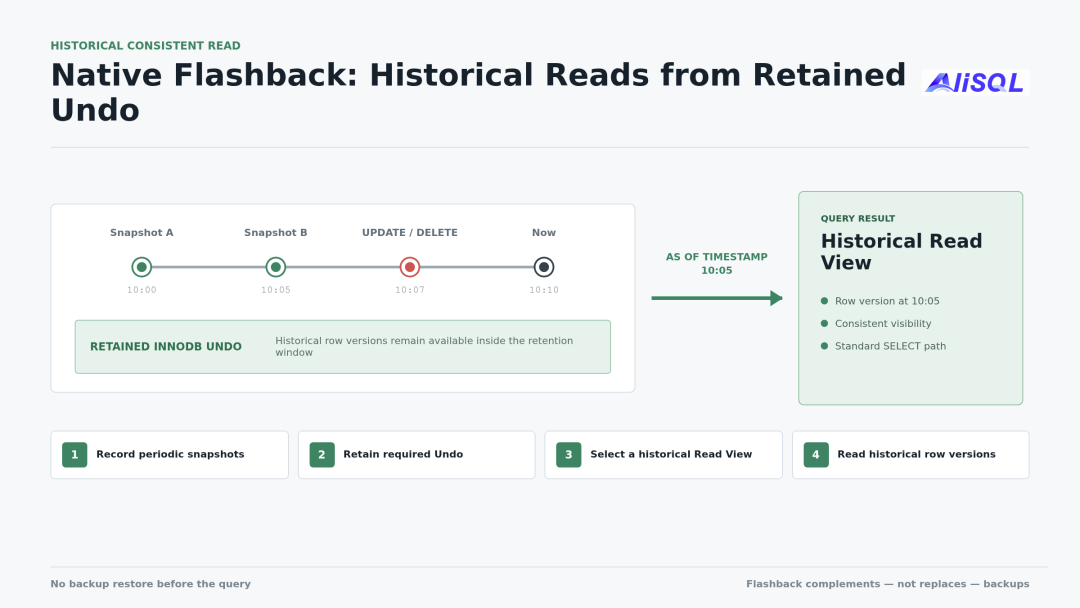
Figure 5: AliSQL reads historical row versions based on transaction visibility snapshots and retained Undo
SELECT id,status
FROM orders AS OF TIMESTAMP DATE_SUB(NOW(), INTERVAL 5 MINUTE)
WHERE customer_id = 1001;
There may be a slight discrepancy between the query time and the selected snapshot time. The parameter innodb_rds_flashback_allow_gap sets the maximum allowed time gap. To retain queryable historical versions, you need to enable the Flashback snapshot task and set Undo Retention to a non-zero value.
Native Flashback is well suited for quickly verifying data after an accidental operation. If you need to recover data, you can first write the query results to a separate table, verify the row count and business constraints, and then write back.
AliSQL's Native Flashback currently supports querying InnoDB base tables only. It does not support temporary tables, views, or locking reads. Note that insufficient Undo space will shorten the actual queryable time range, DDL changes to a table's primary key may render old snapshots unreadable, and Native Flashback is for historical data queries only — it cannot replace backups, Binlog, or disaster recovery solutions.
Persist Binlog Into Redo (also known as Binlog in Redo) involves two optimization steps: first moving Binlog Sync to the background, then further offloading Binlog Write to a background thread.
Typically, transaction commit requires syncing both InnoDB Redo and Binlog, and the foreground must wait for two disk syncs. After enabling Persist Binlog Into Redo, eligible Binlog Events are first written to the Redo. When the Redo sync completes, both the data modifications and the corresponding Binlog content have been flushed to disk. The foreground can commit after completing the Binlog Flush, while Binlog Sync is handed off to the background Syncer Thread.
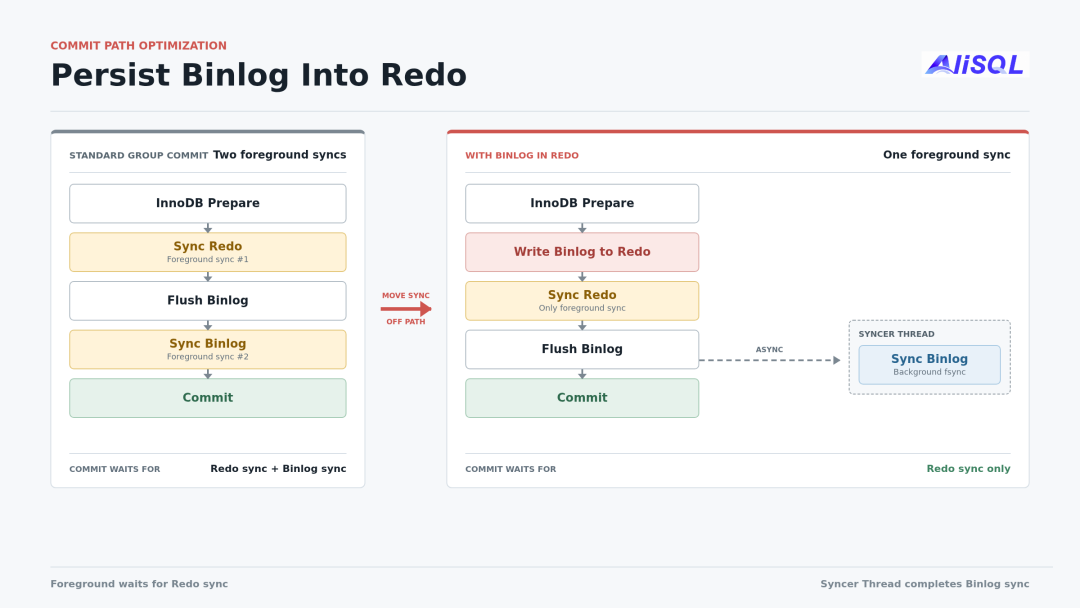
Figure 6: Foreground commit only needs to wait for Redo Sync
This optimization does not eliminate Binlog files. Replication and recovery continue to use Binlog as usual. In the event of a crash, if the Binlog file tail falls behind the already-flushed Redo, AliSQL first supplements the missing Binlog from the Redo before continuing recovery. This process is similar to recovering InnoDB pages from the Redo.
Building on the background Binlog Sync, AliSQL further moves Binlog Write out of the foreground commit process. The previously serial transaction commit and Binlog write can now proceed in parallel, reducing wait times caused by Binlog writes in high-concurrency, small-transaction scenarios.
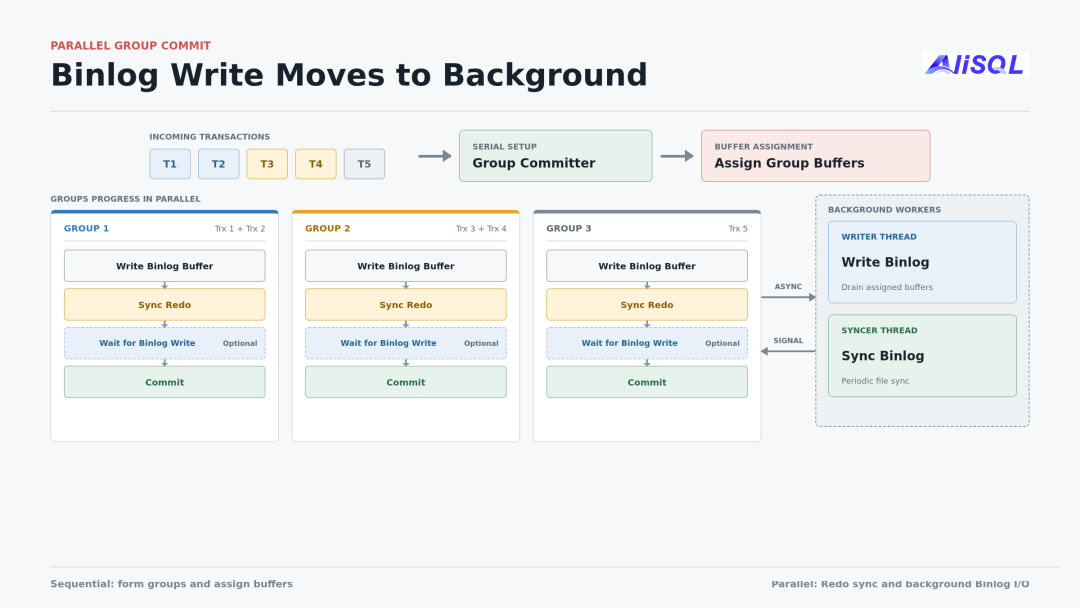
Figure 7: Binlog Write moved to background
The parameter wait_binlog_flush determines whether to wait for the corresponding content to be written to the Binlog file before Commit returns. It is optional: even when set to ON, the wait is for Binlog Write, not Binlog Sync. Eligible transactions still rely on the already-synced Redo for crash recovery.
Not all transactions use this optimization. AliSQL only uses Binlog in Redo when the Redo can guarantee that both data and Binlog have been flushed to disk and the commit order is not affected. Other transactions continue to use the standard Binlog Group Commit.
When a transaction's Binlog Cache exceeds the memory threshold, it is written to a temporary file. During a standard commit, this temporary file must be completely copied to the formal Binlog. The copy process holds the Binlog lock continuously, forcing subsequent small transactions to wait. When the large transaction is big enough, the instance cannot complete new write transaction commits for an extended period.
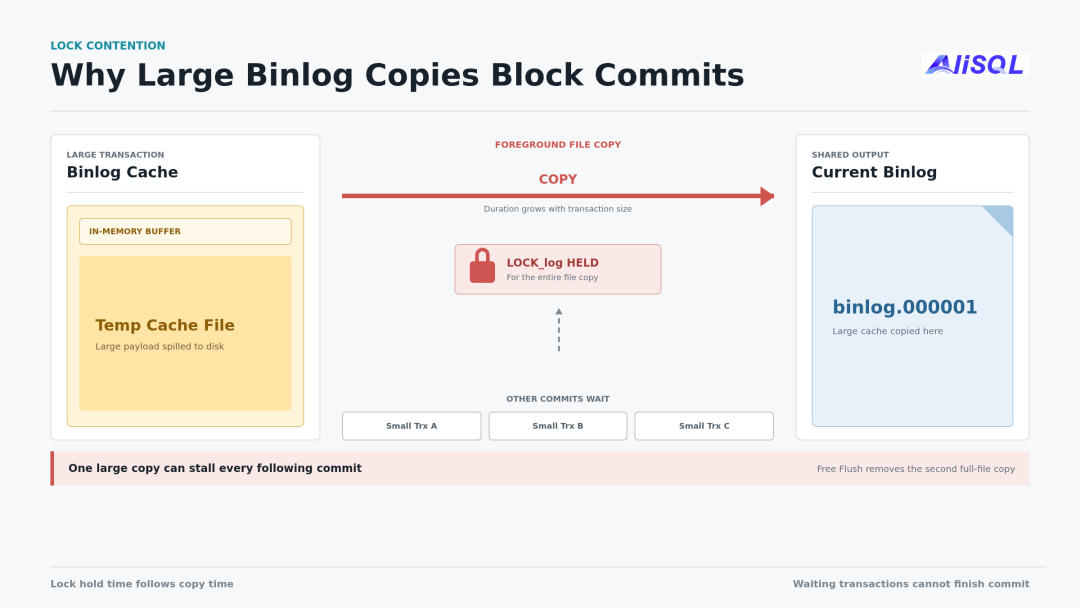
Figure 8: Large transaction holds the Binlog lock while copying the temporary Cache file, blocking subsequent small transactions
Free Flush reserves space for the Binlog file header when creating the Cache file. At commit time, it only needs to fill in the file header and tail, then directly renames the file to the new Binlog, without re-copying the entire data.
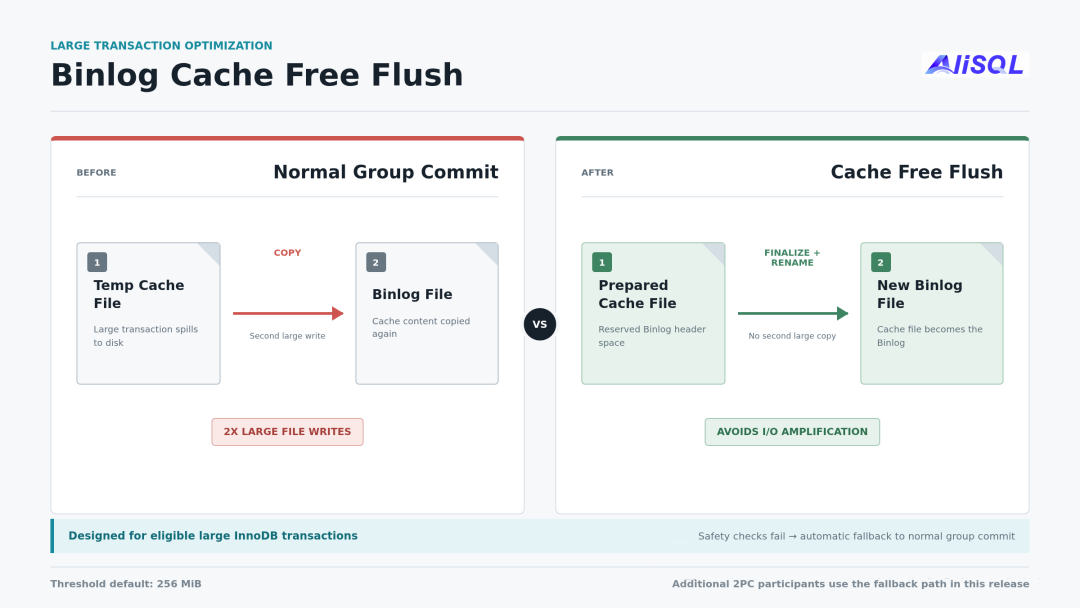
Figure 9: Free Flush fills in the file header and tail, then directly renames
AliSQL automatically determines whether to use Free Flush at commit time, without requiring applications to change their transaction logic. For large transactions involving only InnoDB, if conditions such as Binlog Cache status, encryption settings, and Statement Cache are all met, the Cache file is directly completed and renamed. Otherwise, the standard Group Commit is used.
Whether to use Free Flush depends only on the current transaction and is independent of whether the instance supports DuckDB. If the same transaction also writes to DuckDB, DuckDB registers as an additional 2PC participant, and the current version still uses standard Group Commit. This does not affect transaction commit but means the Free Flush performance benefit is temporarily unavailable. Subsequent versions will continue to improve large-transaction optimization for DuckDB transactions.
When we started integrating DuckDB into the MySQL storage engine layer, few others had explored this path. Recently, MariaDB and Percona have also announced their own implementations. MariaDB released a new DuckDB Storage Engine that allows creating ENGINE=DuckDB tables within the same MariaDB Server, exploring the hybrid use of InnoDB and DuckDB. Percona also demonstrated an experimental implementation based on MySQL 9.7, similarly attempting to offload analytical queries to DuckDB within the MySQL process. The implementation details differ across these approaches, but the core idea is similar: retain MySQL's existing protocol, tools, and usage patterns, and use DuckDB to handle analytical queries.
We began practicing this approach early and have already deployed it in large-scale production. Going forward, AliSQL will continue to optimize replication, DDL, resource isolation, and fault recovery, and we look forward to exchanging implementation experiences with the MariaDB, Percona, and DuckDB communities.
This release provides precompiled binaries for Linux x86_64 and ARM64. Docker images are also available for both linux/amd64 and linux/arm64. For more information, click the original article link below.
docker pull songhuaxiong/alisql:8.0.44-2We welcome you to try AliSQL 8.0.44-2. If you encounter issues, you can file them directly on GitHub. If you have real-world use cases or benchmark results, we would love to hear from you. Subsequent versions will continue to optimize DuckDB and open-source more practical features.
Harness Engineering: A New Paradigm for Software Production in the AI Era
ApsaraDB - May 13, 2026
ApsaraDB - June 4, 2026
Alibaba Clouder - May 9, 2018
ApsaraDB - May 13, 2026
ApsaraDB - September 10, 2025
ApsaraDB - February 24, 2026
 PolarDB for MySQL
Alibaba Cloud PolarDB for MySQL is a cloud-native relational database service 100% compatible with MySQL.
Learn More Database for FinTech Solution
Leverage cloud-native database solutions dedicated for FinTech.
Learn More Oracle Database Migration Solution
Migrate your legacy Oracle databases to Alibaba Cloud to save on long-term costs and take advantage of improved scalability, reliability, robust security, high performance, and cloud-native features.
Learn More Database Migration Solution
Migrating to fully managed cloud databases brings a host of benefits including scalability, reliability, and cost efficiency.
Learn MoreMore Posts by ApsaraDB


