Imagine a basic kitchen with just a multipurpose knife and a single pot. While you can handle basic cooking tasks, creating sophisticated dishes feels like an uphill battle. This mirrors the early days of Flink's Table API - it could handle basic data processing, but when faced with complex scenarios, the tools felt inadequate.
FLIP-29 is comparable to a complete kitchen renovation, equipping Flink's Table API with a suite of handy "utensils" that make data processing more intuitive. This improvement was implemented in Flink 1.9, so let's explore what this kitchen makeover brought to the table.
Let's first look at a diagram showing different data processing scenarios:
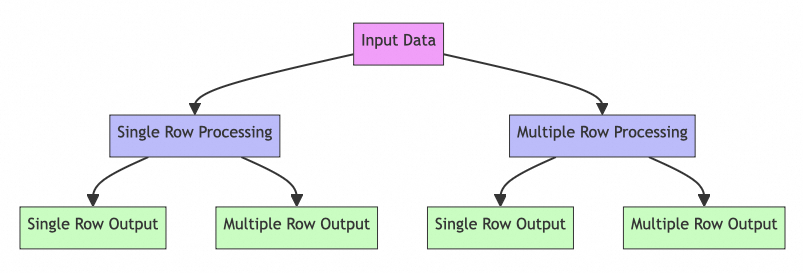
Much like a kitchen needs various tools for different ingredients, data processing requires different operators for various types of data. The original Table API had some limitations:
This upgrade brought five new tools to the Table API's "kitchen":
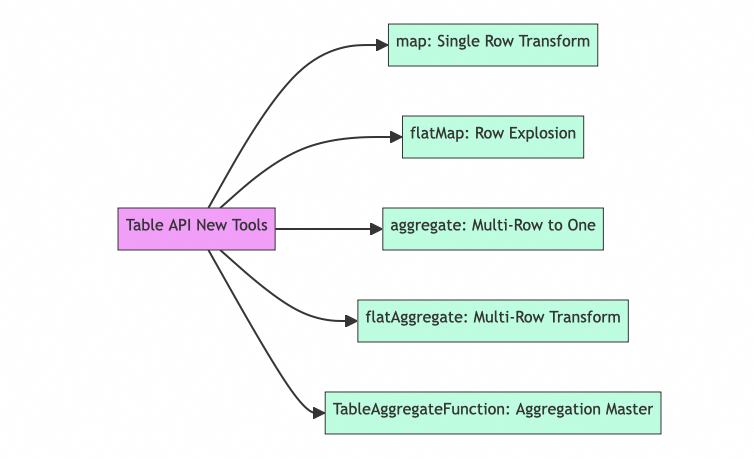
Like having a food processor that can slice carrots into multiple shapes at once, the new map operator lets you transform a single row into multiple columns:
val result = table
  .map(new MultiOutputFunction())  // Transform to multiple columns
.select('name, 'age, 'address) // Select needed columnsSimilar to a dough divider that can split one piece into many, flatMap allows you to transform a single row into multiple rows:
val result = table
  .flatMap(new OneToManyFunction())  // One row to many
.select('id, 'value) // Select needed columnsResembling a blender that can combine various ingredients into a smoothie, the new aggregate operator enables multi-row aggregation with multiple output columns:
val result = table
  .groupBy('category)               // Group by category
  .aggregate(new MultiColumnAgg())  // Aggregate to multiple columns
.select('category, 'avg, 'max) // Select needed columnsLike a wok that can both combine ingredients and portion them out, flatAggregate allows you to transform multiple input rows into multiple output rows:
val result = table
  .groupBy('category)                    // Group by category
  .flatAggregate(new Top3Function())     // Calculate top 3 per group
.select('category, 'value, 'rank) // Select needed columnsComparable to a multi-function food processor, TableAggregateFunction provides a complete interface for precise control over the aggregation process:
Here are some practical tips for using these new tools:
Grouping and Windowing When using aggregate and flatAggregate, pay attention to group key handling:
val result = table
  .window(Tumble.over("10.minutes").on('rowtime).as('w))
  .groupBy('w, 'category)
  .aggregate(new MultiColumnAgg())
.select('w.start, 'category, 'value)FLIP-29's renovation of Flink Table API is comparable to equipping a kitchen with modern appliances. Through the addition of map, flatMap, aggregate, flatAggregate operators, and the powerful TableAggregateFunction, data processing became more flexible and efficient.
These new tools not only make code more concise and elegant but also handle more complex data processing scenarios. Just as a well-equipped kitchen can produce more varied dishes, the upgraded Table API can better handle various data processing requirements.
This feature was implemented in Flink 1.9, significantly enhancing Flink's data processing capabilities. However, like a chef choosing the right tool for different dishes, these powerful new tools should be used appropriately based on specific scenarios.

219 posts | 60 followers
FollowApache Flink Community China - September 27, 2019
Apache Flink Community China - September 27, 2019
Apache Flink Community China - January 9, 2020
Apache Flink Community China - November 6, 2020
Apache Flink Community China - July 28, 2020
Apache Flink Community - October 17, 2025
219 posts | 60 followers
Follow Realtime Compute for Apache Flink
 offers a highly integrated platform for real-time data processing, which optimizes the computing of Apache Flink.
Learn More Big Data Consulting for Data Technology Solution
Alibaba Cloud provides big data consulting services to help enterprises leverage advanced data technology.
Learn More Big Data Consulting Services for Retail Solution
Alibaba Cloud experts provide retailers with a lightweight and customized big data consulting service to help you assess your big data maturity and plan your big data journey.
Learn More Quick BI
A new generation of business Intelligence services on the cloud
Learn MoreMore Posts by Apache Flink Community

