For long-running jobs such as batch inference and multimodal preprocessing, Ray Data checkpoints preserve the processing progress that has already been committed. When you resubmit the same job, the system filters out the committed IDs after reading the input and continues computing the remaining records.
The problem this mechanism solves is very specific. Ray's built-in task-level retries absorb occasional worker hiccups, but once an entire job fails and exits, resubmitting it means rerunning the whole pipeline from scratch—hours of computation wasted. A checkpoint records which records have already been processed, not the processing results; the results still land intact in the output directory you specify. During recovery, the framework loads the set of committed IDs, filters them out after reading the input, and sends only the remaining records into the processing logic and the write stage. Because the filtering happens after the read, recovery still reads the entire input once; what you save is the downstream computation and writes.
This article applies to Ray jobs in the EMR Serverless Spark product (Ray version >= err-1.2.0), running on the product runtime that includes CheckpointConfig and OSS support.
Pipelines that are a good fit for checkpoints are those where the input can be re-read, each record is processed independently, and the output retains a stable, non-empty, globally unique id. For example: read a batch of text or images, preprocess or run inference on each record, then write out the results.
These three conditions are not style recommendations; each maps to a link in the recovery path. The input must be re-readable because the recovery run still has to scan the input to obtain the records left to process. Records must be processed independently because progress is committed at record granularity—"this record is done" cannot describe aggregations or cross-record dependencies. IDs must be stable and unique because the entire recovery decision relies on exactly one thing: whether this ID has appeared before.
Assign each business batch its own output and checkpoint paths, and make sure the execution nodes have OSS access. In the following, run-001 denotes the same business batch and stays unchanged across failed-and-resubmitted runs.
oss://<bucket>/snapshots/input-001/          Input snapshot
oss://<bucket>/jobs/run-001/output/          Processing results
oss://<bucket>/jobs/run-001/checkpoint/      Committed progress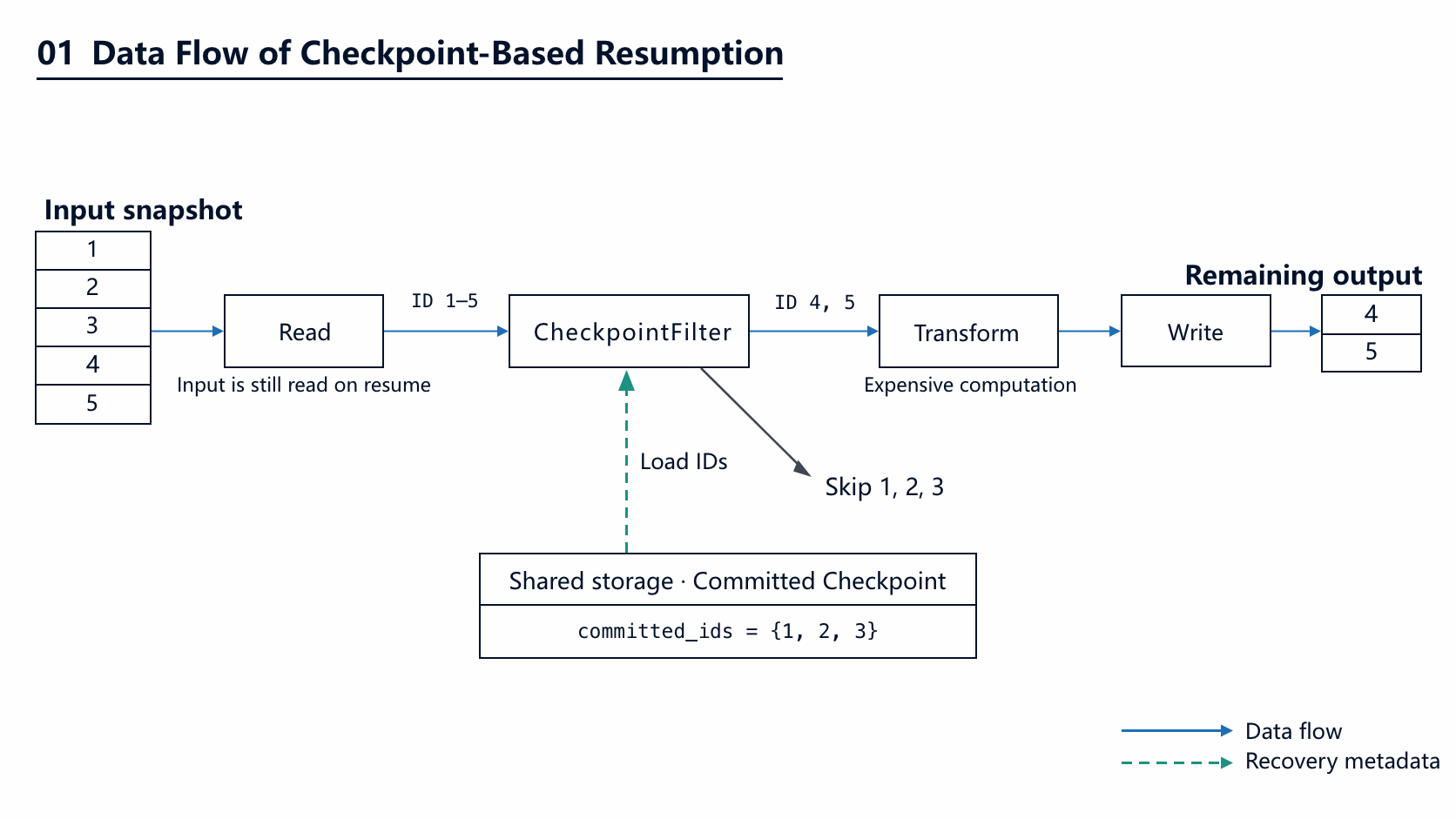
What you save is the downstream computation and writes; recovery still reads the input. Breaking a failed-then-resubmitted run down by stage:
| Stage | Without checkpoint | Resubmitted with checkpoint (assuming 70% completed last round) |
|---|---|---|
| Read input | Full scan | Still a full scan |
| Per-record processing / inference | Recompute everything | Compute only the remaining ~30% |
| Write results | Rewrite everything | Append only the remaining results |
| Manual intervention | Track progress by hand, or rerun the whole batch | Just resubmit the original command |
If the processing logic itself is not cheap, this table is exactly where the value of checkpoints lies. If the bottleneck is reading the input, checkpoints cannot help—more on that later.
The example below assumes the input Parquet has two columns—a unique id and a string text—and uses text length computation to demonstrate the complete data flow. When you replace process_batch with your own preprocessing or model inference, keep the original ID. Save it as job.py:
import numpy as np
import ray
from ray.data.checkpoint import CheckpointConfig


def process_batch(batch):
    return {
        "id": batch["id"],
        "text_length": np.asarray(
            [len(text) for text in batch["text"]], dtype=np.int64
        ),
    }


ray.init(address="auto")
ctx = ray.data.DataContext.get_current()
ctx.checkpoint_config = CheckpointConfig(
    id_column="id",
    checkpoint_path="oss://<bucket>/jobs/run-001/checkpoint",
    delete_checkpoint_on_success=False,
)

ds = ray.data.read_parquet("oss://<bucket>/snapshots/input-001")
ds = ds.map_batches(process_batch, batch_format="numpy", batch_size=64)
ds.write_parquet("oss://<bucket>/jobs/run-001/output", mode="append")
Four actions in this script deserve individual explanation. ray.init(address="auto") connects the script to the Ray cluster the runtime has already started. CheckpointConfig is attached to the global DataContext, so it never needs to be redeclared at each operator. map_batches holds your preprocessing or inference logic—the example uses text length. Finally, write_parquet is what actually triggers execution: Ray Data is lazy, and the previous steps merely assemble the DAG.
Three settings determine how recovery works:
| Setting | Recommendation |
|---|---|
| id_column | Use a unique ID that already exists in the input, and preserve its value and type throughout processing. |
| checkpoint_path | Reuse the same path for a business batch and its failed resubmissions; do not share it with other batches. |
| delete_checkpoint_on_success=False | Keep the progress after success, and clean it up later according to your retention policy once the results are confirmed and downstream work is done. |
Here mode="append" is set explicitly so the recovery run keeps appending the remaining results. While the checkpoint is retained, do not clear or overwrite the original output.
CheckpointConfig also has optional parameters such as override_filesystem and write_num_threads: the former takes a custom OSS filesystem with credentials, and the latter controls the number of threads that write progress records; the defaults are fine for common scenarios. Also note that the checkpoint APIs in Ray are still marked beta—when upgrading across major runtime versions, run a regression check on a test batch first.
Submit job.py the way the product supports. If you use the Ray Jobs CLI, first configure the gateway and authentication according to the invocation information in the console, then run from the script directory:
# ray address and headers must be set before ray job submit
export RAY_ADDRESS='https://emr-spark-ray-gateway-cn-hangzhou.aliyuncs.com'
export RAY_JOB_HEADERS='{"ray-token": "<RAY_TOKEN>"}'

ray job submit --working-dir . -- python job.py
After a job fails, first fix whatever caused the failure and confirm the old job and its write tasks have finished. Keep the input snapshot, processing logic, model version, output path, and checkpoint path unchanged, and simply rerun the same submit command. Loading the progress and filtering committed IDs is done by the framework—no manual tracking of completed rows and no application-side recovery stage are needed.
If the fix changes the output semantics—for example, swapping the model or modifying the processing logic—run it as a new batch with new output and checkpoint paths, so results from different versions never get mixed.
1. What is stored in the checkpoint directory?
The IDs of committed records plus the progress metadata required—not the processing results, which land intact in the output directory. Its footprint therefore grows mainly with the number of completed records and is usually far smaller than the input and output data themselves.
2. Why does recovery still read the entire input?
Because the filtering happens after the read: the framework must see a record before it can know whether it was committed. Two implications follow. Checkpoints cannot eliminate the cost of the read stage—if the bottleneck is exactly there (for example, a huge number of small files on OSS), you need to optimize how the input is organized. And "re-readable input" is a precondition, not a suggestion: once the input is deleted or overwritten, recovery is off the table.
3. Will resubmission produce duplicate results?
Not on the normal path—committed records are never processed again—as long as the checkpoint still exists, the output directory has not been cleared, and writes stay in append mode. Conversely, if you manually delete the checkpoint and then append to the original output directory, duplicates are nearly guaranteed. Note also that Ray Data does not guarantee output order, and checkpoints do not change that; if you need ordered results, do the sorting downstream.
4. What happens to the batch being processed at the moment of failure?
It gets reprocessed. Progress is not flushed to storage per record in real time; the last uncommitted segment is recomputed after resubmission. This is exactly why external side effects must be idempotent: upserts for database writes, plus deduplication or retry strategies around model service calls, make this recomputation harmless.
5. I only fixed a bug—do I need a new batch?
The criterion is whether the output semantics changed. Changes that merely make previously crashing records compute successfully, tune concurrency, or add logging can reuse the original path for recovery—committed records are unaffected. Swapping the model, changing the preprocessing logic, or redefining field meanings calls for a new batch; otherwise one output directory ends up holding results from two versions with no field to tell them apart.
6. When should checkpoints not be used?
For short jobs that finish in minutes, the overhead of recovery may not be smaller than a plain rerun. For processing with cross-record dependencies—aggregating by key, joins, one input row producing multiple outputs—"record completed" cannot express the correct recovery semantics and needs a separate design. And if processing is cheap while reading is expensive, there was never much for a checkpoint to save in the first place.
Want to see how EMR powers elastic, fully managed big data analytics with Spark, StarRocks, Ray, and lakehouse-native AI? 👉 Try EMR on Alibaba Cloud or talk to our solution architect to explore how you can build data lakes, real-time warehouses, and Data + AI workflows with seamless scalability.
More Resources:
E-MapReduce Serverless Spark Free Trial:1000 CU*H 3 months !

29 posts | 0 followers
FollowAlibaba Cloud Big Data and AI - July 17, 2026
Alibaba Cloud Big Data and AI - May 15, 2026
Alibaba Cloud Big Data and AI - April 24, 2026
Alibaba Container Service - April 8, 2025
Alibaba EMR - November 8, 2024
Alibaba EMR - November 22, 2024
29 posts | 0 followers
Follow Big Data Consulting for Data Technology Solution
Alibaba Cloud provides big data consulting services to help enterprises leverage advanced data technology.
Learn More Big Data Consulting Services for Retail Solution
Alibaba Cloud experts provide retailers with a lightweight and customized big data consulting service to help you assess your big data maturity and plan your big data journey.
Learn More Quick BI
A new generation of business Intelligence services on the cloud
Learn More ApsaraDB for HBase
ApsaraDB for HBase is a NoSQL database engine that is highly optimized and 100% compatible with the community edition of HBase.
Learn MoreMore Posts by Alibaba Cloud Big Data and AI

