Configure SLO for Application Service in Alibaba Cloud Service Mesh (2): SLO Definition in ASM
Abstract: Part 2 of this series explains how service level objectives (SLO) works in Alibaba Cloud Service Mesh (ASM).
By Xining Wang (xining.wxn@alibaba-inc.com)
This is the second article in the series:
- Configure SLO for Application Service in Alibaba Cloud Service Mesh (1): SLO Overview
- Configure SLO for Application Service in Alibaba Cloud Service Mesh (2): SLO Definition in ASM
- Configure SLO for Application Service in Alibaba Cloud Service Mesh (3): Configure SLOs for Applications in ASM
- Configure SLO for Application Service in Alibaba Cloud Service Mesh (4): Import the Generated Rules to Prometheus to Execute SLO
- Configure SLO for Application Service in Alibaba Cloud Service Mesh (5): Use Grafana to View SLO
Alibaba Cloud Service Mesh (ASM) allows you to configure service level objectives (SLOs) and alert rules by creating custom resource definitions (CRDs). This simplifies your configuration process. This topic describes fields in an SLO CRD.
Sample Files
The following sample file shows you how to configure an SLO for the httpbin application service in the default namespace to specify the service availability. In the file, the objective is 99.9% and the period of time during which the SLO takes effect is 30 days. Two severity levels of alerts are configured: pageAlert and ticketAlert. Custom labels and annotations are added to alerts.
apiVersion: istio.alibabacloud.com/v1beta1
kind: ServiceLevelObjective
metadata:
  name: asm-slo-default-httpbin
  namespace: default # The namespace of the custom resources
spec:
  service: httpbin # The name of the target service
  period: 30d # SLO duration
  labels:
    owner: "finance-team"
  slos:
  - name: asm-slo2 # SLO name
    objective: "99.9" # The target value
    labels:
      description: "service availability description"
    sli:
      plugin:
        id: availability # The type of the plugin
        options: # Plugin options
          filter: request_protocol="http"
    alerting:
      name: asm-alert # The name of the alert rule
      labels:
        category: "availability"
      annotations:
        summary: "High error rate on requests"
      pageAlert:
        labels:
          severity: "10"
      ticketAlert:
        labels:
          channel: "channel - call"
When you customize a configuration file, you need to focus on the following fields:
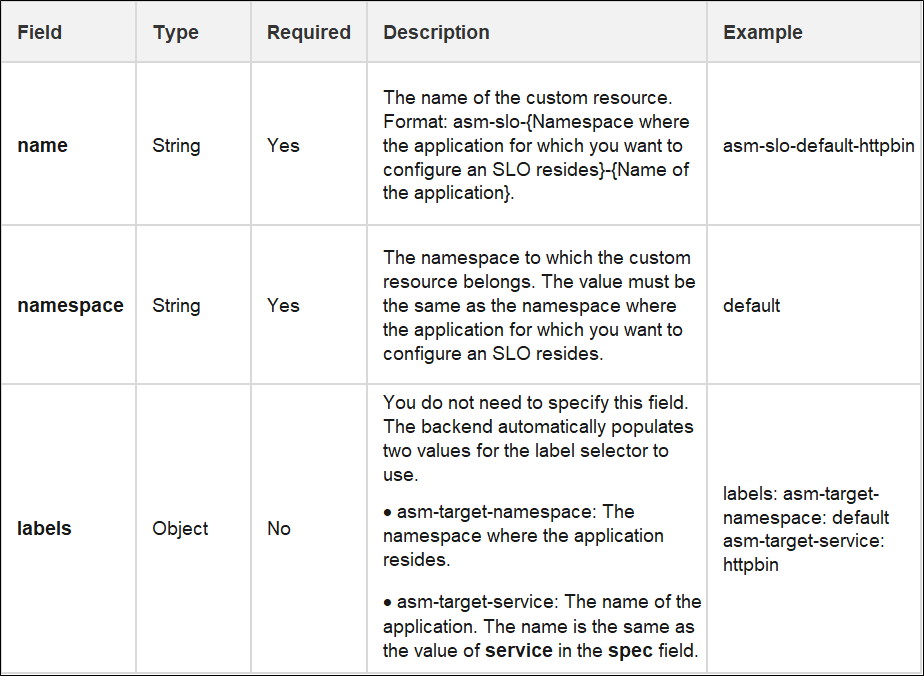
• namespace: The namespace to which the custom resource belongs, which is also the namespace where the application for which you want to configure an SLO resides.
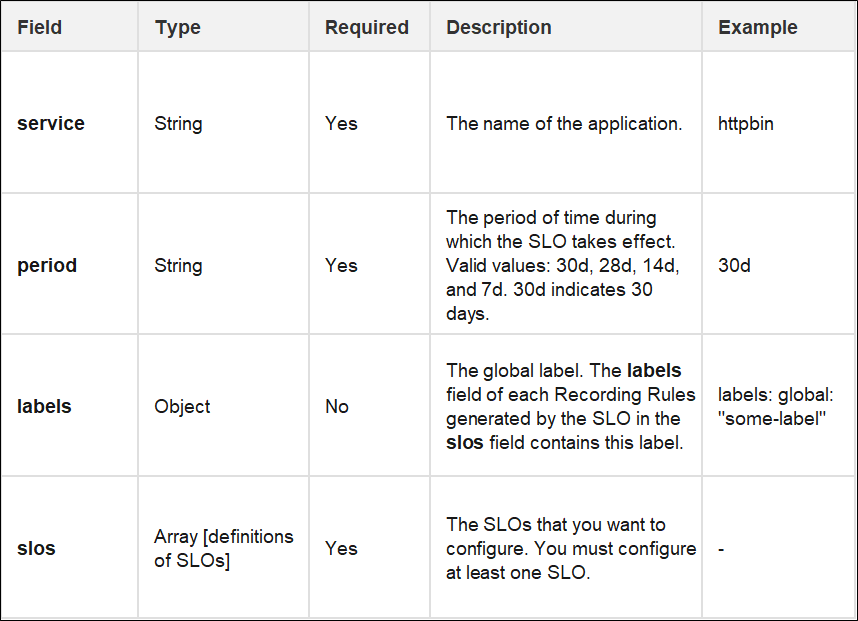
• service: The name of the application.
• period: The period of time during which the SLO takes effect. The unit is d, which indicates days. Valid values: 30d, 28d, 14d, and 7d.
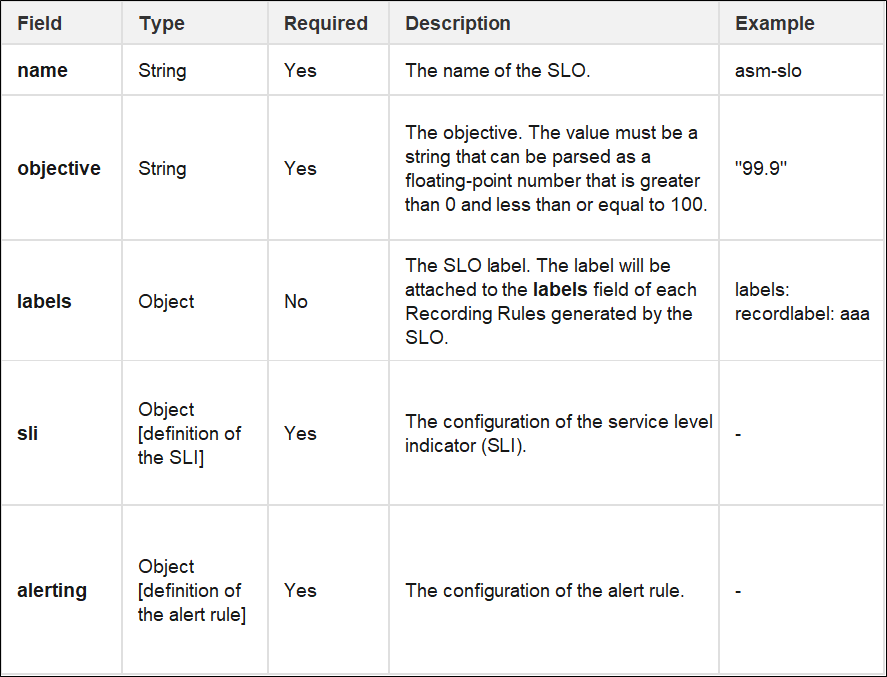
• objective: The objective
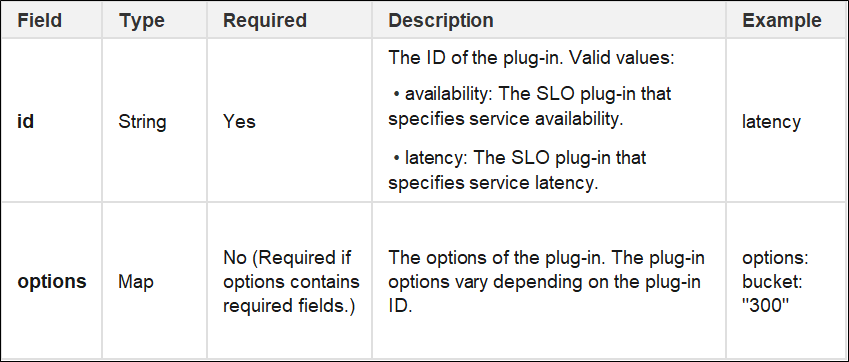
• plugin: id means the type of the plug-in. options mean the options of the plug-in. Skip this field if no option is available.
Please refer to the field details below to fill in other fields
Description of CRD fields
Refer to the meaning of each field in the following table:
Metadata Field
Spec Field
SLO Field
SLI Field
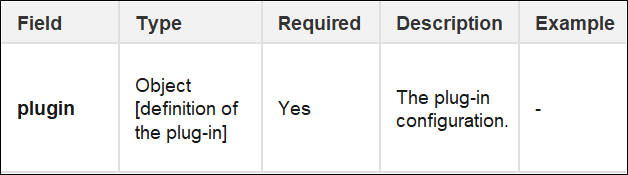
Plugin Field
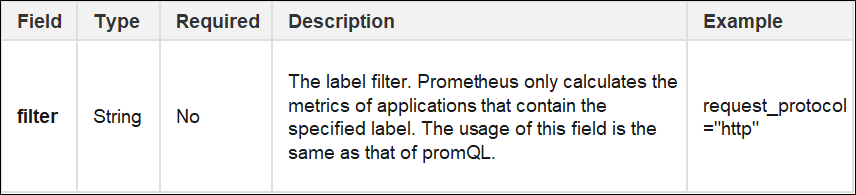
- The following table describes the options field when id is availability.
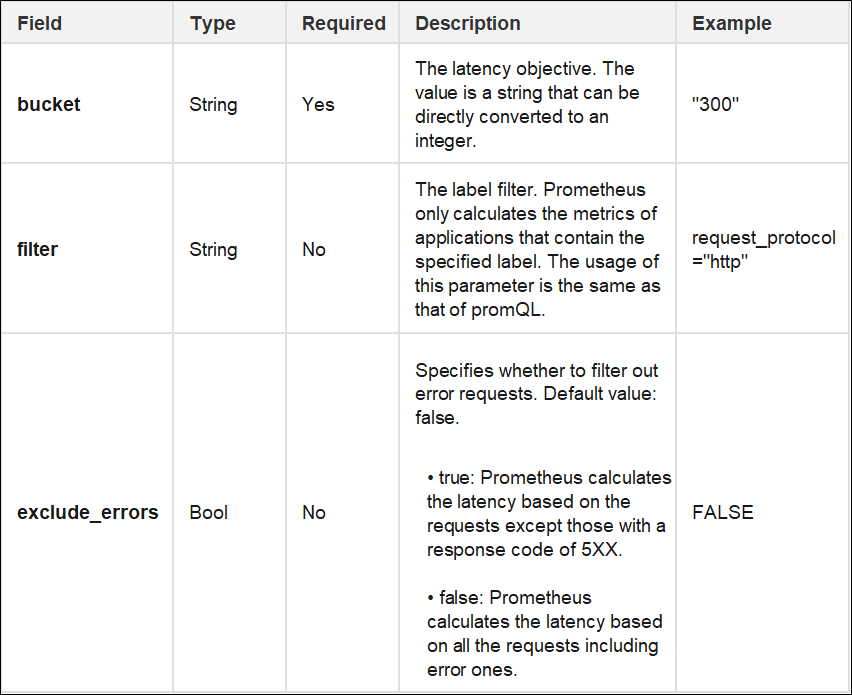
- The following table describes the options field when id is latency.
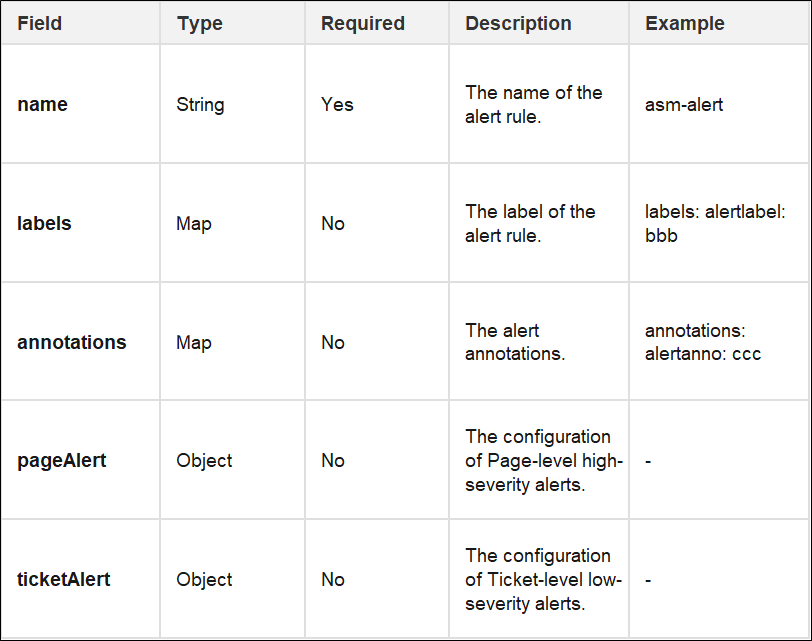
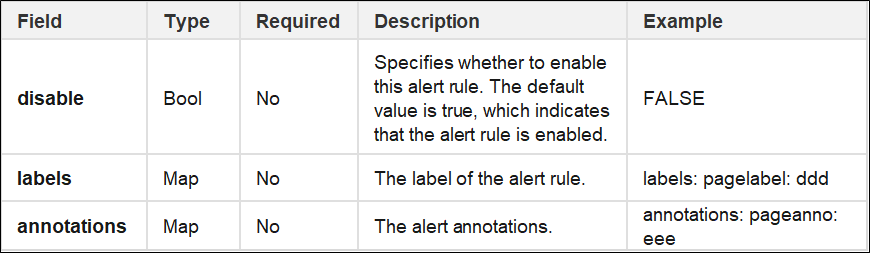
Alerting Field Definition
pageAlert Field Definition
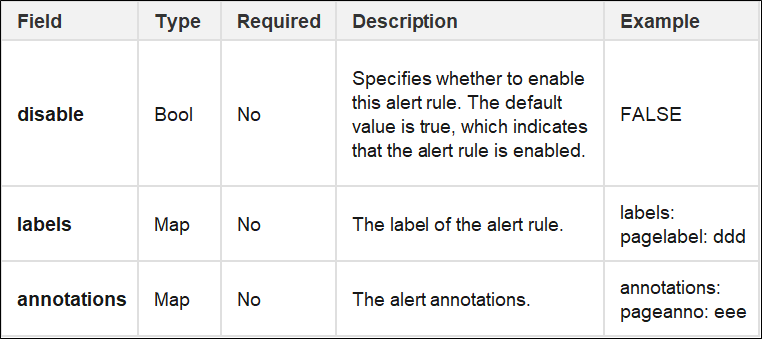
ticketAlert Field Definition
Read previous post:
Configure SLO for Application Service in Alibaba Cloud Service Mesh (1): SLO Overview
Read next post:
-

-
Xi Ning Wang(王夕宁)
56 posts | 8 followers
Follow
Comments
-
-
Xi Ning Wang(王夕宁)
56 posts | 8 followers
Follow
Related Products
-
 Alibaba Cloud Service Mesh
 (ASM) is a fully managed service mesh platform that is compatible with Istio.
Learn More -
 Enterprise Distributed Application Service
A PaaS platform for a variety of application deployment options and microservices solutions to help you monitor, diagnose, operate and maintain your applications
Learn More -
 Mobile Testing
Provides comprehensive quality assurance for the release of your apps.
Learn More -
 Application High availability Service
Application High Available Service is a SaaS-based service that helps you improve the availability of your applications.
Learn More
More Posts by Xi Ning Wang(王夕宁)
- Deploy a ASM Serverless Gateway to Support Elastic Business Scenarios
- Schedule the Pods of an ASM Gateway to a Specified Node
- Enable cgroup V2 on Alibaba Cloud Container Service for Kubernetes
- Traffic Labeling and Routing of ASM (4): Implement an End-to-end Canary Release Based on ASM
- Traffic Labeling and Routing of ASM (3): Use Lanes to Manage Traffic
- Traffic Labelling and Routing of ASM (2): Define a Routing Rule Based on Traffic Labels
- Traffic Labelling and Routing of ASM (1): The Definition of Traffic Label
- Use ASM to Manage Knative Services (6): Auto Scaling Based on the Number of Traffic Requests
- Use ASM to Manage Knative Services (5): Canary Deployment of Services Based on Traffic in Knative on ASM
- Use ASM to Manage Knative Services (4): Use the ASM Gateway to Access Knative Services over HTTPS