基於 Tablestore 向量檢索能力與阿里雲百鍊多模態 Embedding 模型,構建多模態圖片檢索系統。系統支援自然語言搜圖和以圖搜圖功能,適用於電商商品搜尋、智能相簿管理、媒體資產檢索等情境。
方案概覽
多模態圖片檢索系統構建流程包括以下核心步驟:
建立表和索引:建立Tablestore資料表格儲存體圖片資料,建立多元索引支援向量檢索功能。
圖片向量化處理:使用百鍊多模態 Embedding 模型將圖片轉換為高維向量表示。
向量資料寫入:將產生的圖片向量資料及相關中繼資料批量儲存至 Tablestore。
執行多模態檢索:將查詢圖片或自然語言轉換為向量,在多元索引中執行相似性搜尋,支援通過中繼資料條件進行精準過濾。
準備工作
開始構建檢索系統前,需要完成開發環境配置、憑證設定和資料準備。
1. 安裝 SDK
確保已安裝 Python 3.12 及以上版本。
執行以下命令安裝 Tablestore Python SDK 和阿里雲百鍊 SDK。
pip install tablestore
pip install dashscope
pip install Pillow
2. 配置環境變數
將訪問憑證配置為環境變數,確保代碼安全性與跨環境可移植性。
配置前請先擷取百鍊平台的API Key、AccessKey,前往Table Store控制台建立執行個體並擷取執行個體名稱和訪問地址。
出於安全考慮,新建立的Table Store執行個體預設不開啟公網訪問,如需使用公網訪問地址,請在執行個體的網絡管理中設定允許公網訪問。
export DASHSCOPE_API_KEY=<百鍊平台的API KEY>
export tablestore_end_point=<Tablestore執行個體訪問地址>
export tablestore_instance_name=<Tablestore執行個體名稱>
export tablestore_access_key_id=<AccessKey ID>
export tablestore_access_key_secret=<AccessKey Secret>
3. 準備圖片資料
支援使用自訂圖片資料或教程提供的示範資料集。
git clone https://github.com/aliyun/alibabacloud-tablestore-ai-demo.git也可直接下載示範專案檔:alibabacloud-tablestore-ai-demo-main
步驟一:建立表和索引
建立儲存圖片向量資料的資料表和支援向量檢索的多元索引。根據業務需求和資料特點自訂表格結構和索引配置。如需快速體驗示範效果,可直接使用以下樣本配置。
1. 建立資料表
# -*- coding: utf-8 -*-
"""
建立 Tablestore 資料表
"""

import os

import tablestore


def main():
    # 初始化 Tablestore 用戶端
    client = tablestore.OTSClient(
        os.getenv("tablestore_end_point"),
        os.getenv("tablestore_access_key_id"),
        os.getenv("tablestore_access_key_secret"),
        os.getenv("tablestore_instance_name"),
        retry_policy=tablestore.WriteRetryPolicy(),
    )

    # 建立資料表,定義主鍵
    table_name = "multi_modal_retrieval"
    table_meta = tablestore.TableMeta(table_name, [("image_id", "STRING")])
    table_options = tablestore.TableOptions()
    reserved_throughput = tablestore.ReservedThroughput(tablestore.CapacityUnit(0, 0))

    try:
        client.create_table(table_meta, table_options, reserved_throughput)
        print(f"資料表 '{table_name}' 建立成功")
    except tablestore.OTSServiceError as e:
        if "OTSObjectAlreadyExist" in str(e):
            print(f"資料表 '{table_name}' 已存在")
        else:
            raise


if __name__ == "__main__":
    main()
2. 建立多元索引
向量資料在 Tablestore 資料表中以字串格式儲存。要啟用向量檢索功能,必須建立多元索引並配置向量欄位類型,以支援高維向量的相似性計算和快速檢索。
# -*- coding: utf-8 -*-
"""
建立 Tablestore 多元索引(含向量欄位)
"""

import os

import tablestore


def main():
    # 初始化 Tablestore 用戶端
    client = tablestore.OTSClient(
        os.getenv("tablestore_end_point"),
        os.getenv("tablestore_access_key_id"),
        os.getenv("tablestore_access_key_secret"),
        os.getenv("tablestore_instance_name"),
        retry_policy=tablestore.WriteRetryPolicy(),
    )

    table_name = "multi_modal_retrieval"
    index_name = "index"

    # 定義索引欄位
    field_schemas = [
        tablestore.FieldSchema("image_id", tablestore.FieldType.KEYWORD, index=True, enable_sort_and_agg=True),
        tablestore.FieldSchema("city", tablestore.FieldType.KEYWORD, index=True, enable_sort_and_agg=True),
        tablestore.FieldSchema("height", tablestore.FieldType.LONG, index=True, enable_sort_and_agg=True),
        tablestore.FieldSchema("width", tablestore.FieldType.LONG, index=True, enable_sort_and_agg=True),
        tablestore.FieldSchema(
            "vector",
            tablestore.FieldType.VECTOR,
            vector_options=tablestore.VectorOptions(
                data_type=tablestore.VectorDataType.VD_FLOAT_32,
                dimension=1024,
                metric_type=tablestore.VectorMetricType.VM_COSINE,
            ),
        ),
    ]

    try:
        index_meta = tablestore.SearchIndexMeta(field_schemas)
        client.create_search_index(table_name, index_name, index_meta)
        print(f"多元索引 '{index_name}' 建立成功")
    except tablestore.OTSServiceError as e:
        if "OTSObjectAlreadyExist" in str(e):
            print(f"多元索引 '{index_name}' 已存在")
        else:
            raise


if __name__ == "__main__":
    main()
步驟二:圖片向量化處理
調用阿里雲百鍊多模態向量化模型對圖片進行向量化處理。以下樣本示範本地圖片向量化方法,更多使用方式請參見多模態向量。
大量圖片向量化處理耗時較長,示範專案提供預先處理的向量資料檔案data.json,可在步驟三中直接使用。# -*- coding: utf-8 -*-
"""
本地圖片向量化示範
展示如何使用百鍊多模態向量化模型對本地圖片進行向量化
輸出原始圖片資訊、向量維度、向量的前幾個元素等關鍵資訊
"""
import base64
import os
from pathlib import Path
import dashscope
from PIL import Image
def image_to_base64(image_path):
"""將圖片檔案轉換為 base64 編碼"""
with open(image_path, "rb") as f:
image_data = f.read()
return base64.b64encode(image_data).decode("utf-8")
def get_image_embedding(image_path):
"""
調用百鍊多模態向量化模型,以本地圖片方式進行向量化
"""
# 將本地圖片轉換為 base64
base64_image = image_to_base64(image_path)
# 擷取圖片格式
suffix = Path(image_path).suffix.lower()
if suffix in [".jpg", ".jpeg"]:
mime_type = "image/jpeg"
elif suffix == ".png":
mime_type = "image/png"
elif suffix == ".gif":
mime_type = "image/gif"
elif suffix == ".webp":
mime_type = "image/webp"
else:
mime_type = "image/jpeg" # 預設使用 jpeg
# 構造 data URI
data_uri = f"data:{mime_type};base64,{base64_image}"
# 調用多模態向量化 API
resp = dashscope.MultiModalEmbedding.call(
model="multimodal-embedding-v1",
input=[{"image": data_uri, "factor": 1.0}]
)
if resp.status_code == 200:
return resp.output["embeddings"][0]["embedding"]
else:
raise Exception(f"向量化失敗: {resp.code} - {resp.message}")
def get_image_info(image_path):
"""擷取圖片基本資料"""
with Image.open(image_path) as img:
return {
"filename": os.path.basename(image_path),
"format": img.format,
"mode": img.mode,
"width": img.width,
"height": img.height,
"size_bytes": os.path.getsize(image_path),
}
def main():
# 路徑配置
current_dir = Path(__file__).parent
project_root = current_dir
image_dir = project_root / "data" / "photograph"
print("=" * 60)
print("本地圖片向量化示範")
print("=" * 60)
# 擷取圖片列表
image_files = [f for f in os.listdir(image_dir) if f.lower().endswith(('.jpg', '.jpeg', '.png', '.gif', '.webp'))]
if not image_files:
print("未找到圖片檔案")
return
# 選擇第一張圖片進行示範
demo_image = image_files[0]
image_path = image_dir / demo_image
print(f"\n[1/3] 讀取圖片資訊")
print("-" * 60)
# 擷取圖片資訊
image_info = get_image_info(image_path)
print(f"檔案名稱: {image_info['filename']}")
print(f"格式: {image_info['format']}")
print(f"模式: {image_info['mode']}")
print(f"寬度: {image_info['width']} px")
print(f"高度: {image_info['height']} px")
print(f"檔案大小: {image_info['size_bytes']:,} bytes")
print(f"\n[2/3] 調用向量化 API")
print("-" * 60)
print("正在調用百鍊多模態向量化模型...")
# 向量化
vector = get_image_embedding(str(image_path))
print(f"\n[3/3] 向量化結果")
print("-" * 60)
print(f"向量維度: {len(vector)}")
print(f"向量類型: {type(vector[0]).__name__}")
print(f"向量前10個元素:")
for i, v in enumerate(vector[:10]):
print(f" [{i}] {v:.8f}")
print(" ...")
print(f"向量後5個元素:")
for i, v in enumerate(vector[-5:], start=len(vector)-5):
print(f" [{i}] {v:.8f}")
# 計算向量範數
import math
norm = math.sqrt(sum(v * v for v in vector))
print(f"\n向量L2範數: {norm:.8f}")
print("\n" + "=" * 60)
print("向量化示範完成!")
print("=" * 60)
if __name__ == "__main__":
main()
步驟三:向量資料寫入
大量匯入圖片向量資料至 Tablestore 資料表。以下樣本直接讀取示範專案中預先處理的向量資料進行批量寫入。如使用自訂業務資料,可將圖片向量化處理與資料寫入操作結合執行。
# -*- coding: utf-8 -*-
"""
批量寫入圖片資料到 Tablestore
"""

import json
import os
from pathlib import Path

import tablestore


def main():
    # 初始化 Tablestore 用戶端
    client = tablestore.OTSClient(
        os.getenv("tablestore_end_point"),
        os.getenv("tablestore_access_key_id"),
        os.getenv("tablestore_access_key_secret"),
        os.getenv("tablestore_instance_name"),
        retry_policy=tablestore.WriteRetryPolicy(),
    )

    table_name = "multi_modal_retrieval"
    batch_size = 100

    # 從 JSON 檔案載入資料
    data_path = Path(__file__).parent / "data" / "data.json"
    with open(data_path, "r", encoding="utf-8") as f:
        data_array = json.load(f)

    print(f"已載入 {len(data_array)} 條記錄")

    # 批量寫入 Tablestore
    put_row_items = []
    success_count = 0

    for idx, item in enumerate(data_array):
        primary_key = [("image_id", item["image_id"])]
        attribute_columns = [
            ("city", item.get("city", "unknown")),
            ("vector", json.dumps(item["vector"])),
            ("width", item.get("width", 0)),
            ("height", item.get("height", 0)),
        ]
        row = tablestore.Row(primary_key, attribute_columns)
        condition = tablestore.Condition(tablestore.RowExistenceExpectation.IGNORE)
        put_row_items.append(tablestore.PutRowItem(row, condition))

        # 批量寫入
        if len(put_row_items) >= batch_size or idx == len(data_array) - 1:
            request = tablestore.BatchWriteRowRequest()
            request.add(tablestore.TableInBatchWriteRowItem(table_name, put_row_items))
            result = client.batch_write_row(request)
            if result.is_all_succeed():
                success_count += len(put_row_items)
                print(f"進度: {idx + 1}/{len(data_array)} - 寫入 {len(put_row_items)} 行成功")
            put_row_items = []

    print(f"完成: 成功寫入 {success_count} 行")


if __name__ == "__main__":
    main()
步驟四:執行多模態檢索
多模態圖片檢索系統支援兩種檢索模式:自然語言搜圖和以圖搜圖。系統將查詢內容轉換為向量表示,在向量索引中執行相似性計算,返回語義最匹配的圖片結果,同時支援結合中繼資料條件(如城市、圖片尺寸等)進行精準過濾。
自然語言檢索
# -*- coding: utf-8 -*-
"""
語義檢索樣本
包含多種查詢情境:
1. 僅使用查詢文本進行語義檢索
2. 使用查詢文本 + 過濾條件(城市、高度、寬度)
"""

import os

import dashscope
import tablestore
from dashscope import MultiModalEmbeddingItemText


def get_client():
    """建立 Tablestore 用戶端"""
    endpoint = os.getenv("tablestore_end_point")
    instance_name = os.getenv("tablestore_instance_name")
    access_key_id = os.getenv("tablestore_access_key_id")
    access_key_secret = os.getenv("tablestore_access_key_secret")

    client = tablestore.OTSClient(
        endpoint,
        access_key_id,
        access_key_secret,
        instance_name,
        retry_policy=tablestore.WriteRetryPolicy(),
    )
    return client


def text_to_embedding(text: str) -> list[float]:
    """將文本轉換為向量"""
    resp = dashscope.MultiModalEmbedding.call(
        model="multimodal-embedding-v1",
        input=[MultiModalEmbeddingItemText(text=text, factor=1.0)]
    )
    if resp.status_code == 200:
        return resp.output["embeddings"][0]["embedding"]
    else:
        raise Exception(f"文本向量化失敗: {resp.code} - {resp.message}")


def search_by_text_only(client, table_name, index_name, query_text: str, top_k: int = 10):
    """
    情境1: 僅使用查詢文本進行語義檢索
    """
    print(f"\n{'='*60}")
    print(f"情境1: 僅使用查詢文本檢索")
    print(f"查詢文本: '{query_text}'")
    print(f"返回數量: {top_k}")
    print("="*60)

    # 文本向量化
    query_vector = text_to_embedding(query_text)

    # 構建向量查詢
    query = tablestore.KnnVectorQuery(
        field_name='vector',
        top_k=top_k,
        float32_query_vector=query_vector,
    )

    # 按分數排序
    sort = tablestore.Sort(sorters=[tablestore.ScoreSort(sort_order=tablestore.SortOrder.DESC)])
    search_query = tablestore.SearchQuery(
        query,
        limit=top_k,
        get_total_count=False,
        sort=sort
    )

    # 執行搜尋
    search_response = client.search(
        table_name=table_name,
        index_name=index_name,
        search_query=search_query,
        columns_to_get=tablestore.ColumnsToGet(
            column_names=["image_id", "city", "height", "width"],
            return_type=tablestore.ColumnReturnType.SPECIFIED
        )
    )

    print(f"\nRequest ID: {search_response.request_id}")
    print(f"\n檢索結果:")
    print("-" * 60)

    for idx, hit in enumerate(search_response.search_hits):
        row_item = parse_search_hit(hit)
        print(f"{idx + 1}. 得分: {hit.score:.4f} | {row_item}")

    return search_response.search_hits


def search_with_city_filter(client, table_name, index_name, query_text: str, city: str, top_k: int = 10):
    """
    情境2: 使用查詢文本 + 城市過濾條件
    """
    print(f"\n{'='*60}")
    print(f"情境2: 查詢文本 + 城市過濾")
    print(f"查詢文本: '{query_text}'")
    print(f"城市過濾: {city}")
    print(f"返回數量: {top_k}")
    print("="*60)

    query_vector = text_to_embedding(query_text)

    # 構建帶城市過濾的向量查詢
    query = tablestore.KnnVectorQuery(
        field_name='vector',
        top_k=top_k,
        float32_query_vector=query_vector,
        filter=tablestore.TermQuery(field_name='city', column_value=city)
    )

    sort = tablestore.Sort(sorters=[tablestore.ScoreSort(sort_order=tablestore.SortOrder.DESC)])
    search_query = tablestore.SearchQuery(query, limit=top_k, get_total_count=False, sort=sort)

    search_response = client.search(
        table_name=table_name,
        index_name=index_name,
        search_query=search_query,
        columns_to_get=tablestore.ColumnsToGet(
            column_names=["image_id", "city", "height", "width"],
            return_type=tablestore.ColumnReturnType.SPECIFIED
        )
    )

    print(f"\nRequest ID: {search_response.request_id}")
    print(f"\n檢索結果:")
    print("-" * 60)

    for idx, hit in enumerate(search_response.search_hits):
        row_item = parse_search_hit(hit)
        print(f"{idx + 1}. 得分: {hit.score:.4f} | {row_item}")

    return search_response.search_hits


def search_with_size_filter(client, table_name, index_name, query_text: str,
                             height_range: tuple = None, width_range: tuple = None, top_k: int = 10):
    """
    情境3: 使用查詢文本 + 尺寸過濾條件(高度、寬度)
    """
    print(f"\n{'='*60}")
    print(f"情境3: 查詢文本 + 尺寸過濾")
    print(f"查詢文本: '{query_text}'")
    print(f"高度範圍: {height_range}")
    print(f"寬度範圍: {width_range}")
    print(f"返回數量: {top_k}")
    print("="*60)

    query_vector = text_to_embedding(query_text)

    # 構建過濾條件
    must_queries = []
    if height_range:
        must_queries.append(tablestore.RangeQuery(
            field_name='height',
            range_from=height_range[0],
            range_to=height_range[1],
            include_lower=True,
            include_upper=True
        ))
    if width_range:
        must_queries.append(tablestore.RangeQuery(
            field_name='width',
            range_from=width_range[0],
            range_to=width_range[1],
            include_lower=True,
            include_upper=True
        ))

    vector_filter = tablestore.BoolQuery(must_queries=must_queries) if must_queries else None

    query = tablestore.KnnVectorQuery(
        field_name='vector',
        top_k=top_k,
        float32_query_vector=query_vector,
        filter=vector_filter
    )

    sort = tablestore.Sort(sorters=[tablestore.ScoreSort(sort_order=tablestore.SortOrder.DESC)])
    search_query = tablestore.SearchQuery(query, limit=top_k, get_total_count=False, sort=sort)

    search_response = client.search(
        table_name=table_name,
        index_name=index_name,
        search_query=search_query,
        columns_to_get=tablestore.ColumnsToGet(
            column_names=["image_id", "city", "height", "width"],
            return_type=tablestore.ColumnReturnType.SPECIFIED
        )
    )

    print(f"\nRequest ID: {search_response.request_id}")
    print(f"\n檢索結果:")
    print("-" * 60)

    for idx, hit in enumerate(search_response.search_hits):
        row_item = parse_search_hit(hit)
        print(f"{idx + 1}. 得分: {hit.score:.4f} | {row_item}")

    return search_response.search_hits


def search_with_combined_filters(client, table_name, index_name, query_text: str,
                                  cities: list = None, height_range: tuple = None,
                                  width_range: tuple = None, top_k: int = 10):
    """
    情境4: 使用查詢文本 + 組合過濾條件(城市列表、高度、寬度)
    """
    print(f"\n{'='*60}")
    print(f"情境4: 查詢文本 + 組合過濾條件")
    print(f"查詢文本: '{query_text}'")
    print(f"城市列表: {cities}")
    print(f"高度範圍: {height_range}")
    print(f"寬度範圍: {width_range}")
    print(f"返回數量: {top_k}")
    print("="*60)

    query_vector = text_to_embedding(query_text)

    # 構建組合過濾條件
    must_queries = []

    if cities and len(cities) > 0:
        must_queries.append(tablestore.TermsQuery(field_name='city', column_values=cities))

    if height_range:
        must_queries.append(tablestore.RangeQuery(
            field_name='height',
            range_from=height_range[0],
            range_to=height_range[1],
            include_lower=True,
            include_upper=True
        ))

    if width_range:
        must_queries.append(tablestore.RangeQuery(
            field_name='width',
            range_from=width_range[0],
            range_to=width_range[1],
            include_lower=True,
            include_upper=True
        ))

    vector_filter = tablestore.BoolQuery(must_queries=must_queries) if must_queries else None

    query = tablestore.KnnVectorQuery(
        field_name='vector',
        top_k=top_k,
        float32_query_vector=query_vector,
        filter=vector_filter
    )

    sort = tablestore.Sort(sorters=[tablestore.ScoreSort(sort_order=tablestore.SortOrder.DESC)])
    search_query = tablestore.SearchQuery(query, limit=top_k, get_total_count=False, sort=sort)

    search_response = client.search(
        table_name=table_name,
        index_name=index_name,
        search_query=search_query,
        columns_to_get=tablestore.ColumnsToGet(
            column_names=["image_id", "city", "height", "width"],
            return_type=tablestore.ColumnReturnType.SPECIFIED
        )
    )

    print(f"\nRequest ID: {search_response.request_id}")
    print(f"\n檢索結果:")
    print("-" * 60)

    for idx, hit in enumerate(search_response.search_hits):
        row_item = parse_search_hit(hit)
        print(f"{idx + 1}. 得分: {hit.score:.4f} | {row_item}")

    return search_response.search_hits


def parse_search_hit(hit):
    """解析搜尋結果"""
    row_item = {}
    primary_key = hit.row[0]
    row_item["image_id"] = primary_key[0][1]
    attribute_columns = hit.row[1]
    for col in attribute_columns:
        key = col[0]
        val = col[1]
        row_item[key] = val
    return row_item


def main():
    # 配置參數
    table_name = "multi_modal_retrieval"
    index_name = "index"

    print("=" * 60)
    print("Tablestore 多模態語義檢索樣本")
    print("=" * 60)

    # 建立用戶端
    client = get_client()
    print("Tablestore 用戶端建立成功")

    # 情境1: 僅使用自然語言描述進行語義檢索
    # 使用完整的自然語言句子,而不是簡單的關鍵詞
    search_by_text_only(
        client, table_name, index_name,
        "一隻毛茸茸的小狗在草地上奔跑",
        top_k=5
    )

    # 情境2: 自然語言描述 + 城市過濾
    search_with_city_filter(
        client, table_name, index_name,
        "湖邊有一棵柳樹,遠處是連綿的山脈",
        city="hangzhou",
        top_k=5
    )

    # 情境3: 自然語言描述 + 尺寸過濾
    # 尋找高解析度的橫向圖片
    search_with_size_filter(
        client, table_name, index_name,
        "夜晚燈火通明的現代化城市天際線",
        height_range=(500, 1024),
        width_range=(800, 1024),
        top_k=5
    )

    # 情境4: 自然語言描述 + 組合過濾條件
    search_with_combined_filters(
        client, table_name, index_name,
        "遠處是白雪覆蓋的山峰,陽光灑在雪地上閃閃發光",
        cities=["hangzhou", "shanghai", "beijing"],
        height_range=(0, 1024),
        width_range=(0, 1024),
        top_k=5
    )

    print("\n" + "=" * 60)
    print("所有檢索情境示範完成!")
    print("=" * 60)


if __name__ == "__main__":
    main()
以圖搜圖
# -*- coding: utf-8 -*-
"""
以圖搜圖樣本
使用本地圖片進行向量化,然後在 Tablestore 中檢索相似圖片
"""

import base64
import os
from pathlib import Path

import dashscope
import tablestore


def get_client():
    """建立 Tablestore 用戶端"""
    endpoint = os.getenv("tablestore_end_point")
    instance_name = os.getenv("tablestore_instance_name")
    access_key_id = os.getenv("tablestore_access_key_id")
    access_key_secret = os.getenv("tablestore_access_key_secret")

    client = tablestore.OTSClient(
        endpoint,
        access_key_id,
        access_key_secret,
        instance_name,
        retry_policy=tablestore.WriteRetryPolicy(),
    )
    return client


def image_to_embedding(image_path: str) -> list[float]:
    """
    將本地圖片轉換為向量
    """
    # 讀取圖片並轉換為 base64
    with open(image_path, "rb") as f:
        image_data = f.read()
    base64_image = base64.b64encode(image_data).decode("utf-8")

    # 根據檔案尾碼確定 MIME 類型
    suffix = Path(image_path).suffix.lower()
    if suffix in [".jpg", ".jpeg"]:
        mime_type = "image/jpeg"
    elif suffix == ".png":
        mime_type = "image/png"
    elif suffix == ".gif":
        mime_type = "image/gif"
    elif suffix == ".webp":
        mime_type = "image/webp"
    else:
        mime_type = "image/jpeg"  # 預設使用 jpeg

    # 構造 data URI
    data_uri = f"data:{mime_type};base64,{base64_image}"

    # 調用多模態向量化 API
    resp = dashscope.MultiModalEmbedding.call(
        model="multimodal-embedding-v1",
        input=[{"image": data_uri, "factor": 1.0}]
    )

    if resp.status_code == 200:
        return resp.output["embeddings"][0]["embedding"]
    else:
        raise Exception(f"圖片向量化失敗: {resp.code} - {resp.message}")


def search_by_image(client, table_name, index_name, image_path: str, top_k: int = 10):
    """
    以圖搜圖: 使用本地圖片進行語義檢索
    """
    print(f"\n{'='*60}")
    print(f"以圖搜圖")
    print(f"查詢圖片: {image_path}")
    print(f"返回數量: {top_k}")
    print("="*60)

    # 圖片向量化
    print("正在對查詢圖片進行向量化...")
    query_vector = image_to_embedding(image_path)
    print(f"向量化完成,維度: {len(query_vector)}")

    # 構建向量查詢
    query = tablestore.KnnVectorQuery(
        field_name='vector',
        top_k=top_k,
        float32_query_vector=query_vector,
    )

    # 按分數排序
    sort = tablestore.Sort(sorters=[tablestore.ScoreSort(sort_order=tablestore.SortOrder.DESC)])
    search_query = tablestore.SearchQuery(
        query,
        limit=top_k,
        get_total_count=False,
        sort=sort
    )

    # 執行搜尋
    search_response = client.search(
        table_name=table_name,
        index_name=index_name,
        search_query=search_query,
        columns_to_get=tablestore.ColumnsToGet(
            column_names=["image_id", "city", "height", "width"],
            return_type=tablestore.ColumnReturnType.SPECIFIED
        )
    )

    print(f"\nRequest ID: {search_response.request_id}")
    print(f"\n檢索結果:")
    print("-" * 60)

    for idx, hit in enumerate(search_response.search_hits):
        row_item = parse_search_hit(hit)
        print(f"{idx + 1}. 得分: {hit.score:.4f} | {row_item}")

    return search_response.search_hits


def search_by_image_with_filter(client, table_name, index_name, image_path: str,
                                 cities: list = None, height_range: tuple = None,
                                 width_range: tuple = None, top_k: int = 10):
    """
    以圖搜圖 + 過濾條件: 使用本地圖片進行語義檢索,同時應用過濾條件
    """
    print(f"\n{'='*60}")
    print(f"以圖搜圖 + 過濾條件")
    print(f"查詢圖片: {image_path}")
    print(f"城市列表: {cities}")
    print(f"高度範圍: {height_range}")
    print(f"寬度範圍: {width_range}")
    print(f"返回數量: {top_k}")
    print("="*60)

    # 圖片向量化
    print("正在對查詢圖片進行向量化...")
    query_vector = image_to_embedding(image_path)
    print(f"向量化完成,維度: {len(query_vector)}")

    # 構建過濾條件
    must_queries = []

    if cities and len(cities) > 0:
        must_queries.append(tablestore.TermsQuery(field_name='city', column_values=cities))

    if height_range:
        must_queries.append(tablestore.RangeQuery(
            field_name='height',
            range_from=height_range[0],
            range_to=height_range[1],
            include_lower=True,
            include_upper=True
        ))

    if width_range:
        must_queries.append(tablestore.RangeQuery(
            field_name='width',
            range_from=width_range[0],
            range_to=width_range[1],
            include_lower=True,
            include_upper=True
        ))

    vector_filter = tablestore.BoolQuery(must_queries=must_queries) if must_queries else None

    # 構建向量查詢
    query = tablestore.KnnVectorQuery(
        field_name='vector',
        top_k=top_k,
        float32_query_vector=query_vector,
        filter=vector_filter
    )

    # 按分數排序
    sort = tablestore.Sort(sorters=[tablestore.ScoreSort(sort_order=tablestore.SortOrder.DESC)])
    search_query = tablestore.SearchQuery(query, limit=top_k, get_total_count=False, sort=sort)

    # 執行搜尋
    search_response = client.search(
        table_name=table_name,
        index_name=index_name,
        search_query=search_query,
        columns_to_get=tablestore.ColumnsToGet(
            column_names=["image_id", "city", "height", "width"],
            return_type=tablestore.ColumnReturnType.SPECIFIED
        )
    )

    print(f"\nRequest ID: {search_response.request_id}")
    print(f"\n檢索結果:")
    print("-" * 60)

    for idx, hit in enumerate(search_response.search_hits):
        row_item = parse_search_hit(hit)
        print(f"{idx + 1}. 得分: {hit.score:.4f} | {row_item}")

    return search_response.search_hits


def parse_search_hit(hit):
    """解析搜尋結果"""
    row_item = {}
    primary_key = hit.row[0]
    row_item["image_id"] = primary_key[0][1]
    attribute_columns = hit.row[1]
    for col in attribute_columns:
        key = col[0]
        val = col[1]
        row_item[key] = val
    return row_item


def main():
    # 配置參數
    table_name = "multi_modal_retrieval"
    index_name = "index"

    print("=" * 60)
    print("Tablestore 以圖搜圖樣本")
    print("=" * 60)

    # 建立用戶端
    client = get_client()
    print("Tablestore 用戶端建立成功")

    # 擷取專案根目錄
    current_dir = Path(__file__).parent
    data_dir = current_dir / "data" / "photograph"

    # 擷取一張樣本圖片作為查詢圖片
    sample_images = list(data_dir.glob("*.jpg"))
    if not sample_images:
        print("錯誤: 未找到樣本圖片,請確保 data/photograph 目錄下有 jpg 圖片")
        return

    # 使用第一張圖片作為查詢樣本
    query_image_path = str(sample_images[0])
    print(f"\n使用樣本圖片: {query_image_path}")

    # 情境1: 僅使用圖片進行以圖搜圖
    search_by_image(client, table_name, index_name, query_image_path, top_k=5)

    # 情境2: 以圖搜圖 + 過濾條件
    # 只搜尋特定城市的相似圖片
    search_by_image_with_filter(
        client, table_name, index_name,
        query_image_path,
        cities=["hangzhou", "shanghai"],
        top_k=5
    )

    # 情境3: 以圖搜圖 + 尺寸過濾
    # 只搜尋橫向的相似圖片(寬度大於高度)
    search_by_image_with_filter(
        client, table_name, index_name,
        query_image_path,
        width_range=(800, 1024),
        top_k=5
    )

    print("\n" + "=" * 60)
    print("以圖搜圖示範完成!")
    print("=" * 60)


if __name__ == "__main__":
    main()
可視化檢索介面
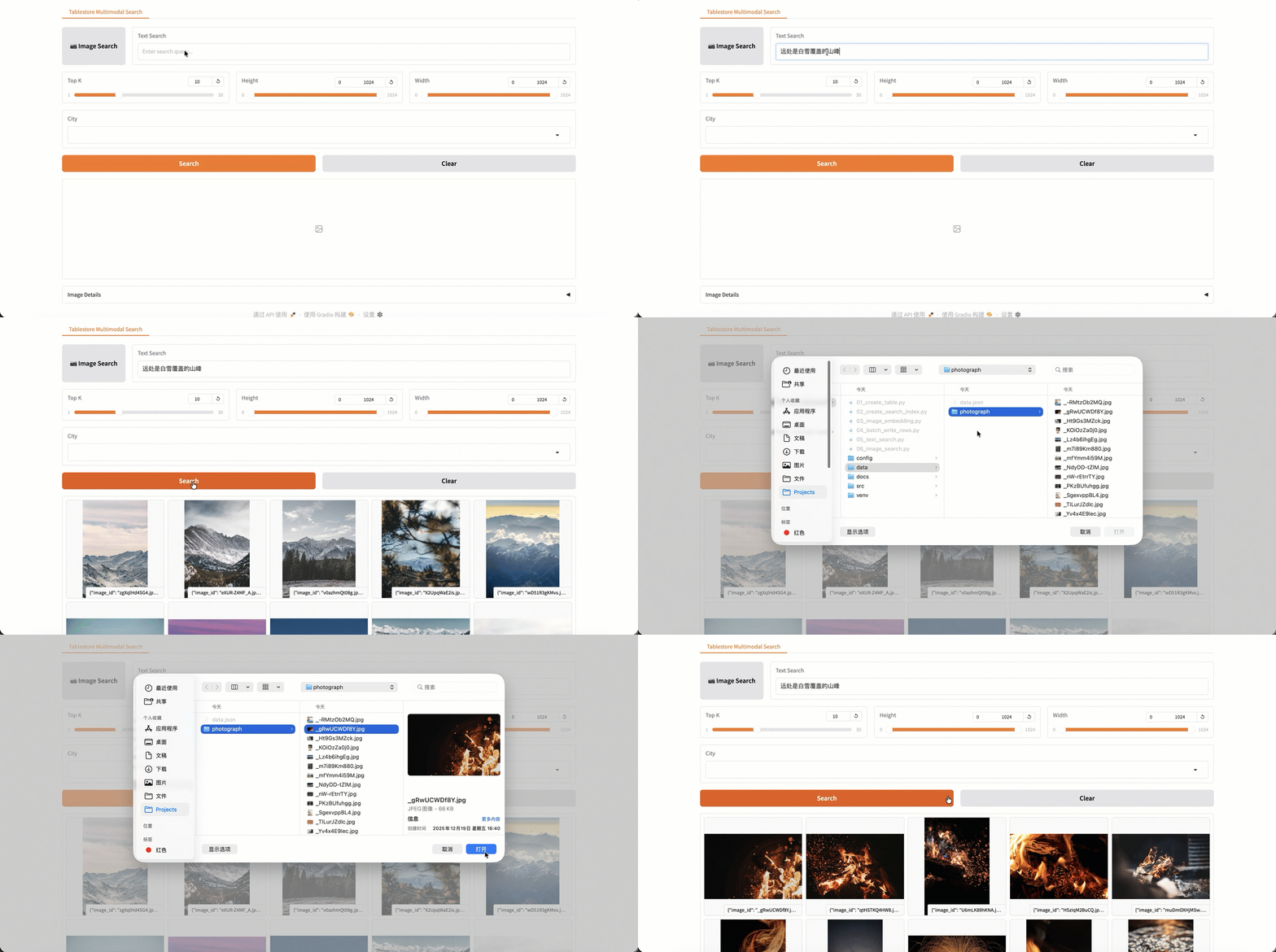
構建基於 Gradio 的互動式檢索介面,提供直觀的圖形化操作體驗。此介面依賴示範專案中的本地圖片目錄,適用於快速體驗和示範。使用自訂資料時,可參考代碼實現相應的介面功能。
安裝 Gradio 相關依賴。
pip install gradio gradio_rangeslider啟動可視化介面。
python src/gradio_app.py啟動成功後,訪問應用地址(如
http://localhost:7860)進入檢索介面。功能
說明
以圖搜圖
上傳本地圖片,查詢相似的圖片。
自然語言搜尋
輸入自然語言描述,如“遠處是白雪覆蓋的山峰”、“一隻毛茸茸的小狗在草地上奔跑”等。
Top K
設定返回結果數量(1-30)。
高度/寬度範圍
按圖片尺寸進行篩選。
城市過濾
按城市過濾(支援多選)。