QR 碼辨識功能可偵測各種影像中的多個 QR 碼或條碼,並傳回每個偵測到的碼的邊界框和文字內容。系統會標註每個 QR 碼或條碼的邊界框,並在輸出中顯示其文字內容。
概覽
智慧媒體管理(IMM)提供 QR 碼辨識功能,可用於從照片和螢幕截圖等影像檔案中偵測一個或多個 QR 碼或條碼的位置和內容,並傳回碼所傳達的位置資訊和文字資訊。位置資訊包含左上角 x 軸、左上角 y 軸、寬度和高度,如下圖所示。
-
QR 碼
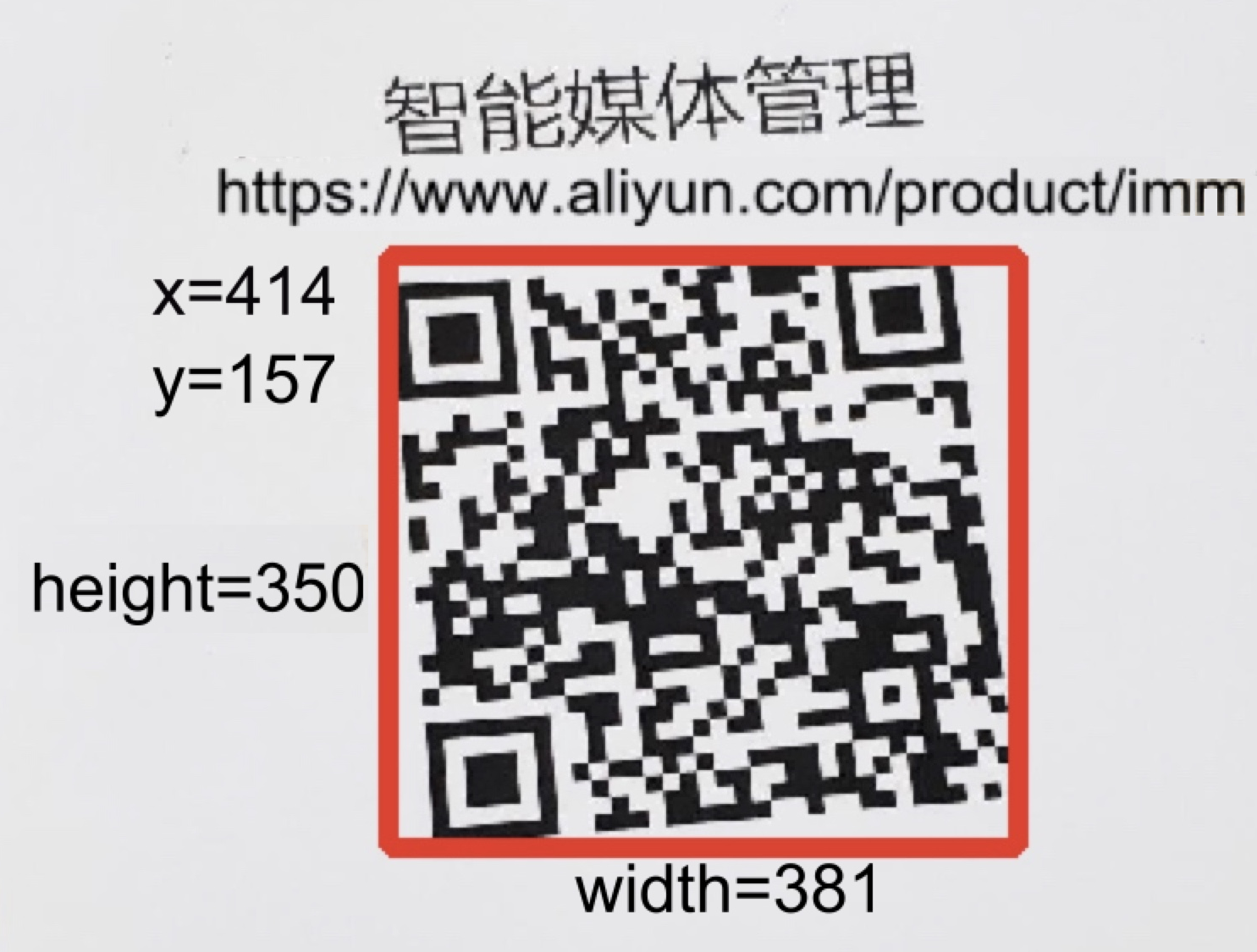
-
條碼

您可以使用 QR 碼辨識功能在您的業務應用程式中實現 QR 碼或條碼的掃描和讀取。您還可以基於 QR 碼辨識功能開發遮擋或馬賽克處理影像中 QR 碼或條碼的功能。
應用場景
-
QR 碼支付:付款者可以掃描 QR 碼完成支付。
-
QR 碼行銷與廣告:行銷人員和廣告商可以在海報和產品包裝上新增 QR 碼來推廣產品。
使用須知
僅支援同步處理(x-oss-process)。
單張影像最多可偵測五個 QR 碼。
-
匿名存取將被拒絕。
使用方式
前提條件
繫結 IMM 專案。有關如何在物件儲存服務(OSS)主控台中繫結專案的說明,請參見快速入門。若要使用 API 繫結專案,請參見 AttachOSSBucket - 繫結 OSS 儲存桶。
QR 碼辨識
Action: image/codes
Java
使用 Java SDK 3.17.4 或更高版本。
import com.aliyun.oss.ClientBuilderConfiguration;
import com.aliyun.oss.OSS;
import com.aliyun.oss.OSSClientBuilder;
import com.aliyun.oss.common.auth.CredentialsProviderFactory;
import com.aliyun.oss.common.auth.EnvironmentVariableCredentialsProvider;
import com.aliyun.oss.common.comm.SignVersion;
import com.aliyun.oss.model.OSSObject;
import com.aliyun.oss.model.GetObjectRequest;
import com.aliyuncs.exceptions.ClientException;

import java.io.ByteArrayOutputStream;
import java.io.IOException;

public class Demo {
    public static void main(String[] args) throws ClientException {
        // Set endpoint to the endpoint of the region where the bucket is located.
        String endpoint = "https://oss-cn-hangzhou.aliyuncs.com";
        // Specify the region information that corresponds to the endpoint, for example, cn-hangzhou.
        String region = "cn-hangzhou";
        // Obtain access credentials from environment variables. Before you run this sample code, make sure that the OSS_ACCESS_KEY_ID and OSS_ACCESS_KEY_SECRET environment variables are set.
        EnvironmentVariableCredentialsProvider credentialsProvider = CredentialsProviderFactory.newEnvironmentVariableCredentialsProvider();
        // Specify the bucket name.
        String bucketName = "examplebucket";
        // If the image is in the root directory of the bucket, specify the image name. If the image is not in the root directory, specify the full path, such as exampledir/example.jpg.
        String key = "example.jpg";

        // Create an OSSClient instance.
  // When the OSSClient instance is no longer in use, call the shutdown method to release resources.
        ClientBuilderConfiguration clientBuilderConfiguration = new ClientBuilderConfiguration();
        clientBuilderConfiguration.setSignatureVersion(SignVersion.V4);
        OSS ossClient = OSSClientBuilder.create()
                .endpoint(endpoint)
                .credentialsProvider(credentialsProvider)
                .clientConfiguration(clientBuilderConfiguration)
                .region(region)
                .build();

        try {
            // Build the processing instruction for QR code recognition.
            GetObjectRequest getObjectRequest = new GetObjectRequest(bucketName, key);
            getObjectRequest.setProcess("image/codes");

            // Use the getObject method and pass the processing instruction in the process parameter.
            OSSObject ossObject = ossClient.getObject(getObjectRequest);

            // Read and print the information.
            ByteArrayOutputStream baos = new ByteArrayOutputStream();
            byte[] buffer = new byte[1024];
            int bytesRead;
            while ((bytesRead = ossObject.getObjectContent().read(buffer)) != -1) {
                baos.write(buffer, 0, bytesRead);
            }
            String imageCodes = baos.toString("UTF-8");
            System.out.println("Image Codes:");
            System.out.println(imageCodes);
        } catch (IOException e) {
            System.out.println("Error: " + e.getMessage());
        } finally {
            // Shut down the OSSClient.
            ossClient.shutdown();
        }
    }
}
Python
使用 Python SDK 2.18.4 或更高版本。
# -*- coding: utf-8 -*-
import oss2
from oss2.credentials import EnvironmentVariableCredentialsProvider

# Obtain access credentials from environment variables. Before you run this sample code, make sure that the OSS_ACCESS_KEY_ID and OSS_ACCESS_KEY_SECRET environment variables are set.
auth = oss2.ProviderAuthV4(EnvironmentVariableCredentialsProvider())

# Set endpoint to the endpoint of the region where the bucket is located. For example, if the bucket is in the China (Hangzhou) region, set the endpoint to https://oss-cn-hangzhou.aliyuncs.com.
endpoint = 'https://oss-cn-hangzhou.aliyuncs.com'
# Specify the general-purpose region ID of Alibaba Cloud.
region = 'cn-hangzhou'
bucket = oss2.Bucket(auth, endpoint, 'examplebucket', region=region)

# If the image is in the root directory of the bucket, specify the image name. If the image is not in the root directory, specify the full path, such as exampledir/example.jpg.
key = 'example.jpg'

# Build the processing instruction for QR code recognition.
process = 'image/codes'

try:
    # Use the get_object method and pass the processing instruction in the process parameter.
    result = bucket.get_object(key, process=process)

    # Read and print the information.
    image_codes = result.read().decode('utf-8')
    print("Image Codes:")
    print(image_codes)
except oss2.exceptions.OssError as e:
    print("Error:", e)
Go
使用 Go SDK 3.0.2 或更高版本。
package main

import (
	"fmt"
	"io"
	"os"

	"github.com/aliyun/aliyun-oss-go-sdk/oss"
)

func main() {
	// Obtain temporary access credentials from environment variables. Before you run this sample code, make sure that the OSS_ACCESS_KEY_ID and OSS_ACCESS_KEY_SECRET environment variables are set.
	provider, err := oss.NewEnvironmentVariableCredentialsProvider()
	if err != nil {
		fmt.Println("Error:", err)
		os.Exit(-1)
	}
	// Create an OSSClient instance.
	// Set endpoint to the endpoint of the bucket. For example, if the bucket is in the China (Hangzhou) region, set the endpoint to https://oss-cn-hangzhou.aliyuncs.com. Set the endpoint based on your actual region.
	// Specify the general-purpose region ID of Alibaba Cloud, for example, cn-hangzhou.
	client, err := oss.New("https://oss-cn-hangzhou.aliyuncs.com", "", "", oss.SetCredentialsProvider(&provider), oss.AuthVersion(oss.AuthV4), oss.Region("cn-hangzhou"))
	if err != nil {
		fmt.Println("Error:", err)
		os.Exit(-1)
	}
	// Specify the bucket name, for example, examplebucket.
	bucketName := "examplebucket"

	bucket, err := client.Bucket(bucketName)
	if err != nil {
		fmt.Println("Error:", err)
		os.Exit(-1)
	}
	// If the image is in the root directory of the bucket, specify the image name. If the image is not in the root directory, specify the full path, such as exampledir/example.jpg.
	// Use the oss.Process method to build the processing instruction for QR code recognition.
	body, err := bucket.GetObject("example.jpg", oss.Process("image/codes"))
	if err != nil {
		fmt.Println("Error:", err)
		os.Exit(-1)
	}

	defer body.Close()

	data, err := io.ReadAll(body)
	if err != nil {
		fmt.Println("Error:", err)
		os.Exit(-1)
	}
	fmt.Println("data:", string(data))
}
PHP
使用 PHP SDK 2.7.0 或更高版本。
<?php
if (is_file(__DIR__ . '/../autoload.php')) {
    require_once __DIR__ . '/../autoload.php';
}
if (is_file(__DIR__ . '/../vendor/autoload.php')) {
    require_once __DIR__ . '/../vendor/autoload.php';
}
use OSS\Credentials\EnvironmentVariableCredentialsProvider;
use OSS\OssClient;

try {
    // Obtain access credentials from environment variables. Before you run this sample code, make sure that the OSS_ACCESS_KEY_ID and OSS_ACCESS_KEY_SECRET environment variables are set.
    $provider = new EnvironmentVariableCredentialsProvider();
    // Set endpoint to the endpoint of the region where the bucket is located. For example, if the bucket is in the China (Hangzhou) region, set the endpoint to https://oss-cn-hangzhou.aliyuncs.com.
    $endpoint = 'https://oss-cn-hangzhou.aliyuncs.com';
    // Specify the bucket name, for example, examplebucket.
    $bucket = 'examplebucket';
    // If the image is in the root directory of the bucket, specify the image name. If the image is not in the root directory, specify the full path, such as exampledir/example.jpg.
    $key = 'example.jpg';

    $config = array(
        "provider" => $provider,
        "endpoint" => $endpoint,
        "signatureVersion" => OssClient::OSS_SIGNATURE_VERSION_V4,
        // Specify the general-purpose region ID of Alibaba Cloud.
        "region" => "cn-hangzhou"
    );
    $ossClient = new OssClient($config);
  // Build the processing instruction for QR code recognition.
  $options[$ossClient::OSS_PROCESS] = "image/codes";
  $result = $ossClient->getObject($bucket,$key,$options);
  var_dump($result);
} catch (OssException $e) {
  printf($e->getMessage() . "\n");
  return;
}
參數
Action: image/codes
有關回應參數的更多資訊,請參見 DetectImageCodes - 偵測影像中的 QR 碼。
相關 API 操作
如果您的應用程式需要高度自訂,您可以直接傳送 REST API 請求。您必須手動撰寫程式碼來計算簽章。有關如何計算 Authorization 請求標頭的更多資訊,請參見簽章 V4(建議)。
您可以透過向 GetObject 操作新增 x-oss-process 參數來處理影像。更多資訊,請參見 GetObject。
處理範例
GET /example.jpg?x-oss-process=image/codes HTTP/1.1
Host: image-demo.oss-cn-hangzhou.aliyuncs.com
Date: Fri, 21 Jul 2023 08:56:50 GMT
Authorization: SignatureValue
回應範例
HTTP/1.1 200 OK
Server: AliyunOSS
Date: Fri, 21 Jul 2023 08:56:52 GMT
Content-Type: application/json;charset=utf-8
Content-Length: 64
Connection: keep-alive
x-oss-request-id: 64BA48531253C5383707D5B3
ETag: "2CE2EA370531B7CC1D23BE6015CF5DA5"
Last-Modified: Mon, 10 Jul 2023 13:07:30 GMT
x-oss-object-type: Normal
x-oss-hash-crc64ecma: 13420962247653419692
x-oss-storage-class: Standard
x-oss-ec: 0048-00000104
Content-Disposition: attachment
x-oss-force-download: true
x-oss-server-time: 453

{
  "RequestId" : "3B7BD09F-18D8-56F0-90B7-889FBD9FFF70",
  "Codes": [
    {
      "Content": "https://www.aliyun.com/product/imm",
      "Boundary": {
        "Width": 741,
        "Height": 706,
        "Left": 460,
        "Top": 295
      }
    }
  ]
}
權限
阿里雲帳號預設擁有全部權限。資源存取管理(RAM)使用者或 RAM 角色預設無權限。您可以透過 RAM 政策或儲存桶政策向 RAM 使用者或 RAM 角色授予權限。
授予使用者存取相關資源的權限。
授予使用者使用 OSS 進行資料處理的權限。
API
操作
描述
GetObject
oss:GetObject下載物件。
kms:Decrypt如果物件中繼資料包含 X-Oss-Server-Side-Encryption: KMS,則需要此權限才能下載物件。
None
oss:ProcessImm透過 OSS 使用 IMM 進行資料處理的權限。
PostProcessTask
oss:PostProcessTask透過傳送 POST 請求使用資料處理功能的權限,例如非同步處理(
x-oss-async-process)。授予使用者使用 IMM QR 碼辨識功能的權限。
API
操作
描述
DetectImageCodes
imm:DetectImageCodes使用 IMM 進行 QR 碼辨識的權限。
授予 IMM 的服務角色(預設角色為
AliyunIMMDefaultRole,其 ARN 為acs:ram:*:<account-id>:role/aliyunimmdefaultrole)存取相關資源以進行資料處理的權限。API
操作
描述
GetObject
oss:GetObject下載物件。
kms:Decrypt如果物件中繼資料包含 X-Oss-Server-Side-Encryption: KMS,則需要此權限才能下載物件。
計費
辨識 QR 碼涉及呼叫 IMM 服務,會產生 OSS 和 IMM 的費用。會產生以下費用:
OSS:以下計費項目適用。有關定價的更多資訊,請參見OSS 定價:
API
計費項目
描述
GetObject
GET 請求
根據成功請求的數量收取請求費用。
公網流出流量
如果您透過公網端點(如 oss-cn-hangzhou.aliyuncs.com)或加速端點(如 oss-accelerate.aliyuncs.com)呼叫 GetObject 操作,則會根據資料大小收取公網流出流量費用。
低頻存取物件取回
如果取回低頻存取物件,則會根據取回的低頻存取資料大小收取低頻存取資料取回費用。
從已啟用即時存取的儲存桶中取回歸檔物件
如果您從已啟用即時存取的儲存桶中取回歸檔物件,則會根據取回的歸檔物件大小收取歸檔資料取回費用。
傳輸加速費用
如果您啟用傳輸加速並使用加速端點存取您的儲存桶,則會根據資料大小收取傳輸加速費用。
IMM:以下 IMM 計費項目適用:
API
計費項目
描述
DetectImageCodes
ImageQRCodes
根據成功請求的數量收取請求費用。