全部產品
Search
文件中心

OpenAPI Explorer:私網串連訪問 API MCP Server

更新時間:Mar 25, 2026

API MCP Server 提供公網和 VPC 兩種訪問端點。通過私網串連(PrivateLink),可從 VPC 內經由阿里雲內網訪問 API MCP Server,無需經由公網,從而提升訪問的安全性和網路穩定性。本文介紹如何建立介面終端節點以通過 PrivateLink 訪問 API MCP Server。

應用情境

  • 部署在 ECS、ECI 或Function Compute中的 AI Agent 通過私網調用 API MCP Server,避免流量經由公網。

  • 在安全合規情境下,敏感業務的出站流量通過私網傳輸,以降低資料泄露風險。

  • 私網串連具有低延遲和高頻寬穩定性的特點,適合高頻 API 呼叫情境。

配置 PrivateLink 後,公網端點不受影響,兩種訪問方式可並存。

費用說明

PrivateLink 按實際使用量計費(小時出賬),包含終端節點執行個體費和資料處理費。開通時不產生費用。詳情請參見私網串連計費說明

前提條件

  • 已在與終端節點相同的地區建立Virtual Private Cloud和交換器。具體操作,請參見專用網路與交換器

  • 用於訪問 API MCP Server 的雲資源(例如 ECS 執行個體)已部署在目標 VPC 中,或已與目標 VPC 網路互連。

操作步驟

步驟一:建立介面終端節點

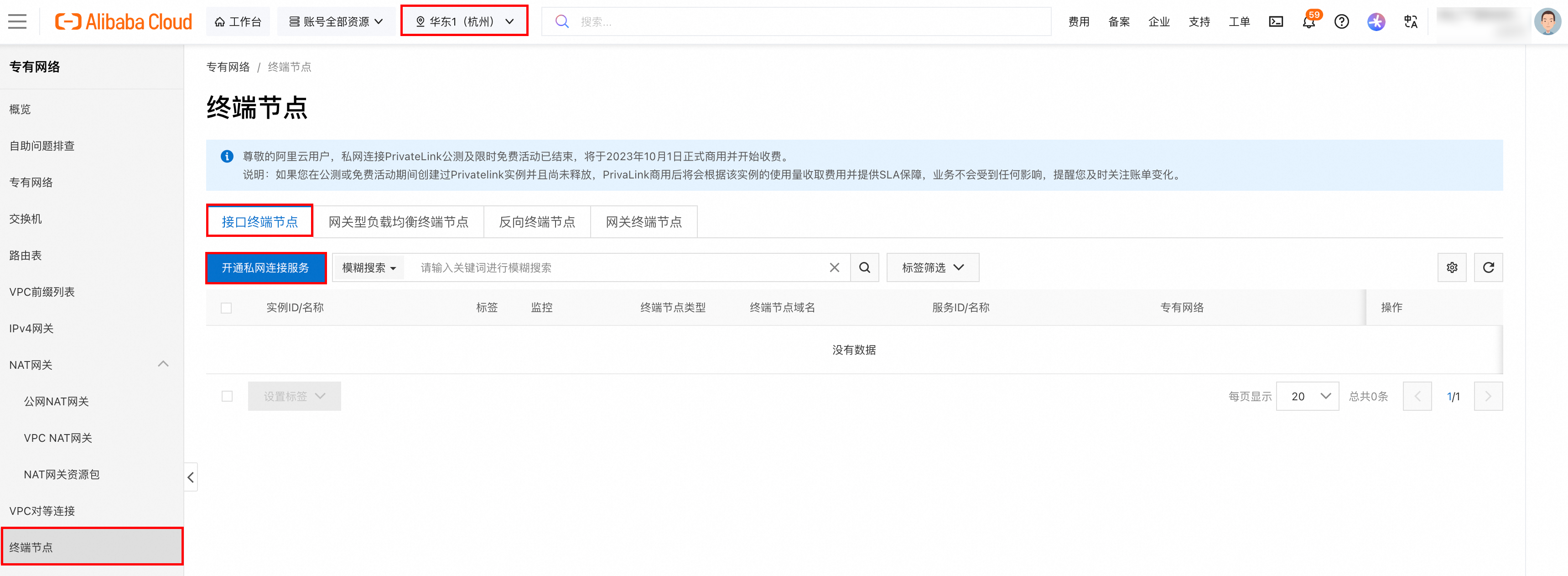
  1. 登入控制台,進入專用網路 > 終端節點

  2. 在頂部功能表列,選擇一個支援通過終端節點私網訪問 API MCP Server 的地區。

  3. 介面終端節點頁簽,單擊建立終端節點。如果首次使用,請先單擊開通私網串連服務

    image

  4. 在建立終端節點頁面,配置以下參數,其餘參數保持預設值。

    • 所屬地區:已根據當前操作地區自動填入,無需修改。

    • 終端節點類型:選擇介面終端節點

    • 節點名稱:輸入自訂終端節點的名稱。

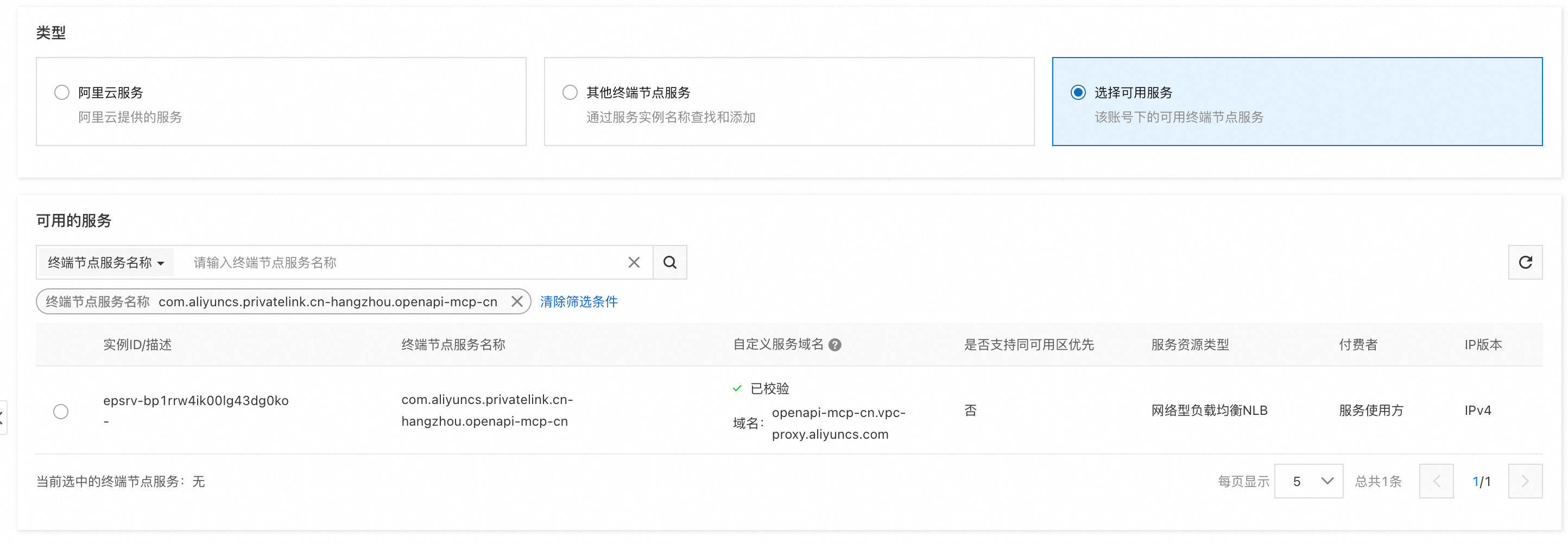
    • 類型:選擇選擇可用服務

    • 可用的服務:在終端節點服務名稱輸入框中,精確搜尋並選擇目標服務。一個終端節點僅支援關聯一個終端節點服務。各地區對應的終端節點服務名稱,請參見下表。

      根據地區查詢終端節點服務名稱

      地區

      支援的 zone

      端點名稱

      cn-hongkong

      B/C/D

      com.aliyuncs.privatelink.cn-hongkong.openapi-mcp-intl

      eu-central-1

      A/B

      com.aliyuncs.privatelink.eu-central-1.openapi-mcp-intl

      ap-southeast-1

      A/B

      com.aliyuncs.privatelink.ap-southeast-1.openapi-mcp-intl

      ap-southeast-7

      A/B

      com.aliyuncs.privatelink.ap-southeast-7.openapi-mcp-intl

      ap-southeast-6

      A

      com.aliyuncs.privatelink.ap-southeast-6.openapi-mcp-intl

      ap-southeast-5

      A/B

      com.aliyuncs.privatelink.ap-southeast-5.openapi-mcp-intl

      ap-southeast-3

      A/B

      com.aliyuncs.privatelink.ap-southeast-3.openapi-mcp-intl

      ap-northeast-1

      A/B

      com.aliyuncs.privatelink.ap-northeast-1.openapi-mcp-intl

      ap-northeast-2

      A/B

      com.aliyuncs.privatelink.ap-northeast-2.openapi-mcp-intl

      eu-west-1

      A/B

      com.aliyuncs.privatelink.eu-west-1.openapi-mcp-intl

      cn-shanghai

      B/G

      com.aliyuncs.privatelink.cn-shanghai.openapi-mcp-intl

      cn-hangzhou

      K/J

      com.aliyuncs.privatelink.cn-hangzhou.openapi-mcp-intl

      cn-shenzhen

      E/F

      com.aliyuncs.privatelink.cn-shenzhen.openapi-mcp-intl

      cn-heyuan

      A/B

      com.aliyuncs.privatelink.cn-heyuan.openapi-mcp-intl

      cn-guangzhou

      A/B

      com.aliyuncs.privatelink.cn-guangzhou.openapi-mcp-intl

      cn-chengdu

      A/B

      com.aliyuncs.privatelink.cn-chengdu.openapi-mcp-intl

      cn-qingdao

      B/C

      com.aliyuncs.privatelink.cn-qingdao.openapi-mcp-intl

      cn-wulanchabu

      A/B

      com.aliyuncs.privatelink.cn-wulanchabu.openapi-mcp-intl

      cn-zhangjiakou

      A/B

      com.aliyuncs.privatelink.cn-zhangjiakou.openapi-mcp-intl

      cn-beijing

      F/G/H/L/K/I/J

      com.aliyuncs.privatelink.cn-beijing.openapi-mcp-intl

      cn-hangzhou地區的終端節點服務名稱為例:

      image

    • 專用網路:選擇用於建立終端節點的專用網路。

    • 可用區與交換器:選擇終端節點服務支援的可用性區域,然後選擇該可用性區域下的交換器。系統會在每個選定的交換器下建立一個終端節點網卡。

    • 安全性群組:為終端節點網卡關聯安全性群組,用於控制資料通訊。

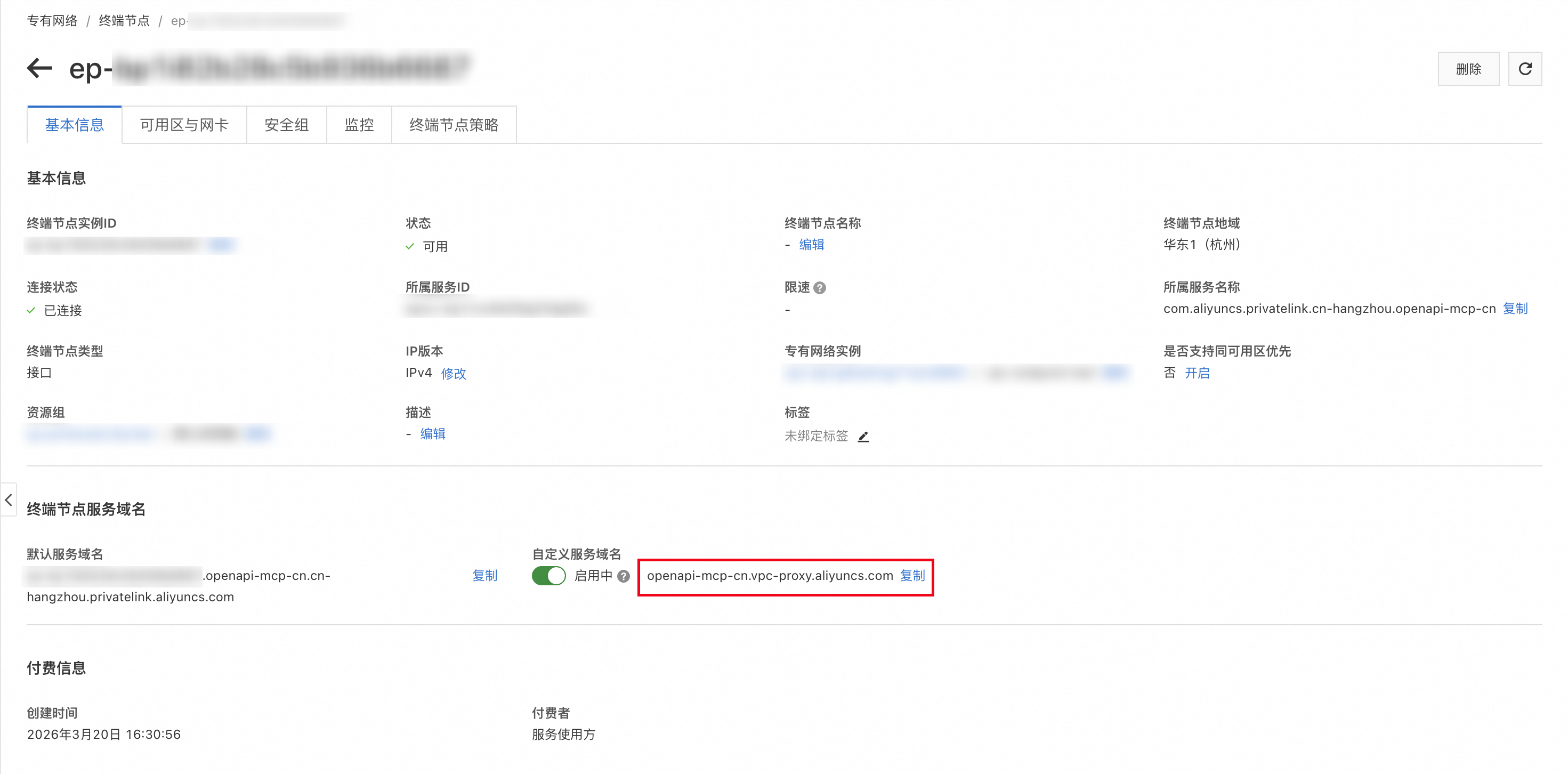
  5. 單擊確定建立。建立成功後,在終端節點列表頁面記錄自訂終端節點網域名稱,用於後續訪問 API MCP Server。
    image

步驟二:驗證串連

配置成功後,即可在 VPC 內的雲資源(例如 ECS 執行個體)中使用終端節點網域名稱訪問 API MCP Server。例如,在可訪問該終端節點的 ECS 執行個體上執行ping命令,驗證網路連通性:

[root@11111118111111111Z ~]# ping openapi-mcp-cn.vpc-proxy.aliyuncs.com
PING openapi-mcp-cn.vpc-proxy.aliyuncs.com (10.0.0.32) 56(84) bytes of data.
64 bytes from 10.0.0.32: icmp_seq=1 ttl=102 time=0.570 ms
64 bytes from 10.0.0.32: icmp_seq=2 ttl=102 time=0.382 ms
64 bytes from 10.0.0.32: icmp_seq=3 ttl=102 time=0.423 ms
64 bytes from 10.0.0.32: icmp_seq=4 ttl=102 time=0.395 ms
64 bytes from 10.0.0.32: icmp_seq=5 ttl=102 time=0.457 ms

相關文檔