視覺理解模型可以根據您傳入的圖片或視頻進行回答,支援單圖或多圖的輸入,適用於映像描述、視覺問答、物體定位等多種任務。
線上體驗:訪問阿里雲百鍊控制台,在頁面右上方選擇目標地區,進入視覺模型頁面進行體驗。
快速開始
您需要先擷取與配置 API Key。若通過OpenAI SDK進行調用,需要安裝SDK。
以下樣本示範了如何調用模型描述映像內容。關於本地檔案和映像限制的說明,請參見如何傳入本地檔案、映像限制章節。
OpenAI相容
Python
from openai import OpenAI
import os

client = OpenAI(
    # 各地區的API Key不同。擷取API Key:https://www.alibabacloud.com/help/zh/model-studio/get-api-key
    api_key=os.getenv("DASHSCOPE_API_KEY"),
    # 以下為新加坡地區URL,調用時請將 {WorkspaceId} 替換為真實的業務空間ID,各地區的URL不同。
    base_url="https://{WorkspaceId}.ap-southeast-1.maas.aliyuncs.com/compatible-mode/v1"
)

completion = client.chat.completions.create(
    model="qwen3.8-max",  # 此處以qwen3.8-max為例,可按需更換模型名稱。模型列表:https://www.alibabacloud.com/help/model-studio/getting-started/models
    messages=[
        {
            "role": "user",
            "content": [
                {
                    "type": "image_url",
                    "image_url": {
                        "url": "https://help-static-aliyun-doc.aliyuncs.com/file-manage-files/zh-CN/20241022/emyrja/dog_and_girl.jpeg"
                    },
                },
                {"type": "text", "text": "圖中描繪的是什麼景象?"},
            ],
        },
    ],
)
print(completion.choices[0].message.content)
返回結果
這是一張在海灘上拍攝的照片。照片中,一個人和一隻狗坐在沙灘上,背景是大海和天空。人和狗似乎在互動,狗的前爪搭在人的手上。陽光從畫面的右側照射過來,給整個情境增添了一種溫暖的氛圍。
Node.js
import OpenAI from "openai";

const openai = new OpenAI({
  // 各地區的API Key不同。擷取API Key:https://www.alibabacloud.com/help/zh/model-studio/get-api-key
  // 若沒有配置環境變數,請用百鍊API Key將下行替換為:apiKey: "sk-xxx"
  apiKey: process.env.DASHSCOPE_API_KEY,
  // 以下為新加坡地區URL,調用時請將 {WorkspaceId} 替換為真實的業務空間ID,各地區的URL不同。
  baseURL: "https://{WorkspaceId}.ap-southeast-1.maas.aliyuncs.com/compatible-mode/v1"
});

async function main() {
  const response = await openai.chat.completions.create({
    model: "qwen3.8-max",   // 此處以qwen3.8-max為例,可按需更換模型名稱。模型列表:https://www.alibabacloud.com/help/model-studio/getting-started/models
    messages: [
      {
        role: "user",
        content: [{
            type: "image_url",
            image_url: {
              "url": "https://help-static-aliyun-doc.aliyuncs.com/file-manage-files/zh-CN/20241022/emyrja/dog_and_girl.jpeg"
            }
          },
          {
            type: "text",
            text: "圖中描繪的是什麼景象?"
          }
        ]
      }
    ]
  });
  console.log(response.choices[0].message.content);
}
main()
返回結果
這是一張在海灘上拍攝的照片。照片中,一個人和一隻狗坐在沙灘上,背景是大海和天空。人和狗似乎在互動,狗的前爪搭在人的手上。陽光從畫面的右側照射過來,給整個情境增添了一種溫暖的氛圍。
Java
import com.openai.client.OpenAIClient;
import com.openai.client.okhttp.OpenAIOkHttpClient;
import com.openai.core.http.StreamResponse;
import com.openai.models.chat.completions.*;

import java.util.List;

public class Main {
    public static void main(String[] args) {
        // 建立用戶端,使用環境變數中的API密鑰
        OpenAIClient client = OpenAIOkHttpClient.builder()
                // 各地區的API Key不同。擷取API Key:https://www.alibabacloud.com/help/zh/model-studio/get-api-key
                // 若沒有配置環境變數,請用百鍊API Key將下行替換為:.apiKey("sk-xxx")
                .apiKey(System.getenv("DASHSCOPE_API_KEY"))
                // 以下為新加坡地區URL,調用時請將 {WorkspaceId} 替換為真實的業務空間ID,各地區的URL不同。
                .baseUrl("https://{WorkspaceId}.ap-southeast-1.maas.aliyuncs.com/compatible-mode/v1")
                .build();

        // 構造多模態訊息內容:圖片 + 文本
        ChatCompletionContentPart imagePart = ChatCompletionContentPart.ofImageUrl(
                ChatCompletionContentPartImage.builder()
                        .imageUrl(ChatCompletionContentPartImage.ImageUrl.builder()
                                .url("https://help-static-aliyun-doc.aliyuncs.com/file-manage-files/zh-CN/20241022/emyrja/dog_and_girl.jpeg")
                                .build())
                        .build());
        ChatCompletionContentPart textPart = ChatCompletionContentPart.ofText(
                ChatCompletionContentPartText.builder()
                        .text("圖中描繪的是什麼景象?")
                        .build());

        // 建立聊天請求
        ChatCompletionCreateParams chatParams = ChatCompletionCreateParams.builder()
                // 此處以qwen3.8-max為例,可按需更換模型名稱。模型列表:https://www.alibabacloud.com/help/model-studio/getting-started/models
                .model("qwen3.8-max")
                .addUserMessageOfArrayOfContentParts(List.of(imagePart, textPart))
                .build();

        StringBuilder fullResponse = new StringBuilder();

        // 所有程式碼範例均採用流式輸出,以清晰和直觀地展示模型輸出過程。如果您希望查看非流式輸出的案例,請參見https://www.alibabacloud.com/help/zh/model-studio/text-generation
        try (StreamResponse<ChatCompletionChunk> streamResponse = client.chat().completions().createStreaming(chatParams)) {
            streamResponse.stream().forEach(chunk -> {
                System.out.println(chunk);
                String content = chunk.choices().get(0).delta().content().orElse("");
                if (!content.isEmpty()) {
                    fullResponse.append(content);
                }
            });
            System.out.println(fullResponse);
        } catch (Exception e) {
            System.err.println("錯誤資訊:" + e.getMessage());
            System.err.println("請參考文檔:https://www.alibabacloud.com/help/zh/model-studio/developer-reference/error-code");
        }
    }
}
返回結果
這是一張在海灘上拍攝的照片。照片中,一個人和一隻狗坐在沙灘上,背景是大海和天空。人和狗似乎在互動,狗的前爪搭在人的手上。陽光從畫面的右側照射過來,給整個情境增添了一種溫暖的氛圍。
curl
# ======= 重要提示 =======
# 以下為新加坡地區URL,調用時請將 {WorkspaceId} 替換為真實的業務空間ID,各地區的URL不同。
# 各地區的API Key不同。擷取API Key:https://www.alibabacloud.com/help/zh/model-studio/get-api-key
# === 執行時請刪除該注釋 ===

curl --location 'https://{WorkspaceId}.ap-southeast-1.maas.aliyuncs.com/compatible-mode/v1/chat/completions' \
--header "Authorization: Bearer $DASHSCOPE_API_KEY" \
--header 'Content-Type: application/json' \
--data '{
  "model": "qwen3.8-max",
  "messages": [
    {"role": "user",
     "content": [
        {"type": "image_url", "image_url": {"url": "https://help-static-aliyun-doc.aliyuncs.com/file-manage-files/zh-CN/20241022/emyrja/dog_and_girl.jpeg"}},
        {"type": "text", "text": "圖中描繪的是什麼景象?"}
    ]
  }]
}'
返回結果
{
  "choices": [
    {
      "message": {
        "content": "這是一張在海灘上拍攝的照片。照片中,一個人和一隻狗坐在沙灘上,背景是大海和天空。人和狗似乎在互動,狗的前爪搭在人的手上。陽光從畫面的右側照射過來,給整個情境增添了一種溫暖的氛圍。",
        "role": "assistant"
      },
      "finish_reason": "stop",
      "index": 0,
      "logprobs": null
    }
  ],
  "object": "chat.completion",
  "usage": {
    "prompt_tokens": 1270,
    "completion_tokens": 54,
    "total_tokens": 1324
  },
  "created": 1725948561,
  "system_fingerprint": null,
  "model": "qwen3.8-max",
  "id": "chatcmpl-0fd66f46-b09e-9164-a84f-3ebbbedbac15"
}
DashScope
Python
import os
import dashscope

# 以下為新加坡地區URL,調用時請將 {WorkspaceId} 替換為真實的業務空間ID,各地區的URL不同。
dashscope.base_http_api_url = 'https://{WorkspaceId}.ap-southeast-1.maas.aliyuncs.com/api/v1'

messages = [
{
    "role": "user",
    "content": [
    {"image": "https://help-static-aliyun-doc.aliyuncs.com/file-manage-files/zh-CN/20241022/emyrja/dog_and_girl.jpeg"},
    {"text": "圖中描繪的是什麼景象?"}]
}]

response = dashscope.MultiModalConversation.call(
    # 各地區的API Key不同。擷取API Key:https://www.alibabacloud.com/help/zh/model-studio/get-api-key
    # 若沒有配置環境變數,請用百鍊API Key將下行替換為:api_key="sk-xxx"
    api_key=os.getenv('DASHSCOPE_API_KEY'),
    model='qwen3.7-plus',   # 此處以qwen3.7-plus為例,可按需更換模型名稱。模型列表:https://www.alibabacloud.com/help/model-studio/getting-started/models
    messages=messages
)

print(response.output.choices[0].message.content[0]["text"])
返回結果
是一張在海灘上拍攝的照片。照片中有一位女士和一隻狗。女士坐在沙灘上,微笑著與狗互動。狗戴著項圈,似乎在與女士握手。背景是大海和天空,陽光灑在她們身上,營造出溫馨的氛圍。
Java
import java.util.Arrays;
import java.util.Collections;

import com.alibaba.dashscope.aigc.multimodalconversation.MultiModalConversation;
import com.alibaba.dashscope.aigc.multimodalconversation.MultiModalConversationParam;
import com.alibaba.dashscope.aigc.multimodalconversation.MultiModalConversationResult;
import com.alibaba.dashscope.common.MultiModalMessage;
import com.alibaba.dashscope.common.Role;
import com.alibaba.dashscope.exception.ApiException;
import com.alibaba.dashscope.exception.NoApiKeyException;
import com.alibaba.dashscope.exception.UploadFileException;
import com.alibaba.dashscope.utils.Constants;

public class Main {

    // 以下為新加坡地區URL,調用時請將 {WorkspaceId} 替換為真實的業務空間ID,各地區的URL不同。
    static {
        Constants.baseHttpApiUrl="https://{WorkspaceId}.ap-southeast-1.maas.aliyuncs.com/api/v1";
    }

    public static void simpleMultiModalConversationCall()
            throws ApiException, NoApiKeyException, UploadFileException {
        MultiModalConversation conv = new MultiModalConversation();
        MultiModalMessage userMessage = MultiModalMessage.builder().role(Role.USER.getValue())
                .content(Arrays.asList(
                        Collections.singletonMap("image", "https://help-static-aliyun-doc.aliyuncs.com/file-manage-files/zh-CN/20241022/emyrja/dog_and_girl.jpeg"),
                        Collections.singletonMap("text", "圖中描繪的是什麼景象"))).build();
        MultiModalConversationParam param = MultiModalConversationParam.builder()
                // 各地區的API Key不同。擷取API Key:https://www.alibabacloud.com/help/zh/model-studio/get-api-key
                // 若沒有配置環境變數,請用百鍊API Key將下行替換為:.apiKey("sk-xxx")
                .apiKey(System.getenv("DASHSCOPE_API_KEY"))
                .model("qwen3.8-max")  //  此處以qwen3.8-max為例,可按需更換模型名稱。模型列表:https://www.alibabacloud.com/help/model-studio/getting-started/models
                .messages(Arrays.asList(userMessage))
                .build();
        MultiModalConversationResult result = conv.call(param);
        System.out.println(result.getOutput().getChoices().get(0).getMessage().getContent().get(0).get("text"));
    }
    public static void main(String[] args) {
        try {
            simpleMultiModalConversationCall();
        } catch (ApiException | NoApiKeyException | UploadFileException e) {
            System.out.println(e.getMessage());
        }
        System.exit(0);
    }
}
返回結果
這是一張在海灘上拍攝的照片。照片中有一個穿著格子襯衫的人和一隻戴著項圈的狗。人和狗面對面坐著,似乎在互動。背景是大海和天空,陽光灑在他們身上,營造出溫暖的氛圍。
curl
# ======= 重要提示 =======
# 以下為新加坡地區URL,調用時請將 {WorkspaceId} 替換為真實的業務空間ID,各地區的URL不同。
# 各地區的API Key不同。擷取API Key:https://www.alibabacloud.com/help/zh/model-studio/get-api-key
# === 執行時請刪除該注釋 ===

curl -X POST https://{WorkspaceId}.ap-southeast-1.maas.aliyuncs.com/api/v1/services/aigc/multimodal-generation/generation \
-H "Authorization: Bearer $DASHSCOPE_API_KEY" \
-H 'Content-Type: application/json' \
-d '{
    "model": "qwen3.8-max",
    "input":{
        "messages":[
            {
                "role": "user",
                "content": [
                    {"image": "https://help-static-aliyun-doc.aliyuncs.com/file-manage-files/zh-CN/20241022/emyrja/dog_and_girl.jpeg"},
                    {"text": "圖中描繪的是什麼景象?"}
                ]
            }
        ]
    }
}'
返回結果
{
  "output": {
    "choices": [
      {
        "finish_reason": "stop",
        "message": {
          "role": "assistant",
          "content": [
            {
              "text": "這是一張在海灘上拍攝的照片。照片中有一個穿著格子襯衫的人和一隻戴著項圈的狗。他們坐在沙灘上,背景是大海和天空。陽光從畫面的右側照射過來,給整個情境增添了一種溫暖的氛圍。"
            }
          ]
        }
      }
    ]
  },
  "usage": {
    "output_tokens": 55,
    "input_tokens": 1271,
    "image_tokens": 1247
  },
  "request_id": "ccf845a3-dc33-9cda-b581-20fe7dc23f70"
}
模型效果
映像問答
描述映像中的內容或者對其進行分類打標,如識別人物、地點、動植物等。
如果太陽很刺眼,我應該用這張圖中的什麼物品? | 當太陽很刺眼時,你應該使用圖中的粉色太陽鏡。太陽鏡可以有效阻擋強光、減少紫外線對眼睛的傷害,協助你在陽光強烈時保護視力並提升視覺舒適度。 |
|---|

創意寫作
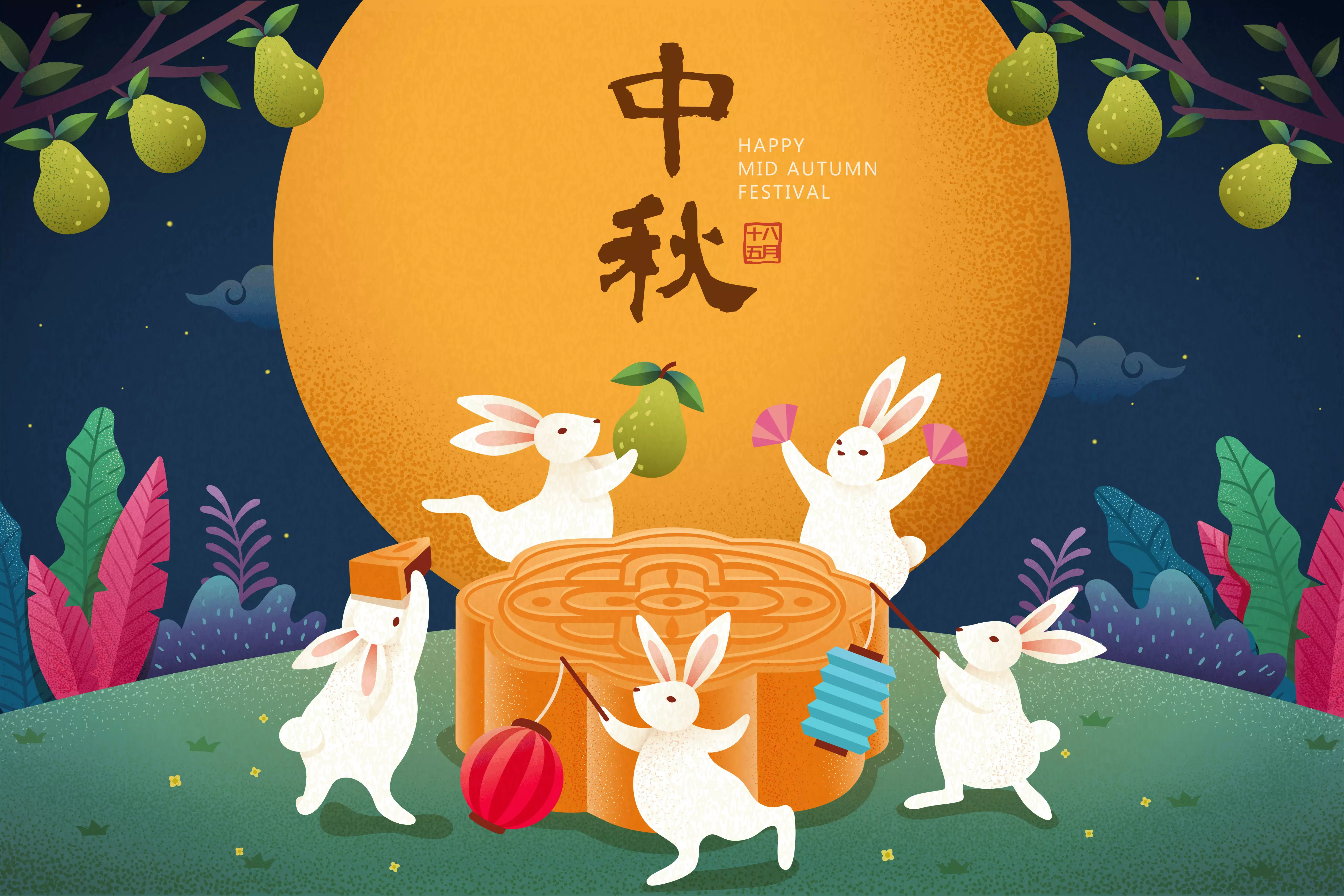
根據圖片或視頻內容產生生動的文字描述,適用於故事創作、文案撰寫、短視頻指令碼等創意情境。
請根據圖片內容,幫我寫一段有意思的朋友圈文案。 | 好的,這張圖片充滿了濃鬱的中秋節日氛圍,古典與現代元素結合得非常巧妙。根據圖片中的主要元素,我為你準備了幾個不同風格的朋友圈文案,你可以根據自己的喜好選擇。 詩意唯美風 今夜月明人盡望,不知秋思落誰家。ECS Operations and Maintenance System奔月,玉兔搗藥,古人的浪漫在今夜被點亮。願這輪明月,能照亮你回家的路,也能寄去我最深的思念。中秋節快樂! 溫馨祝福風 月圓人團圓,中秋夜最溫柔。看煙花綻放,賞圓月當空,吃一口月餅,道一聲安康。願你我心中所念,皆能如願以償。祝大家中秋快樂,闔家幸福! |
文字識別與資訊抽取
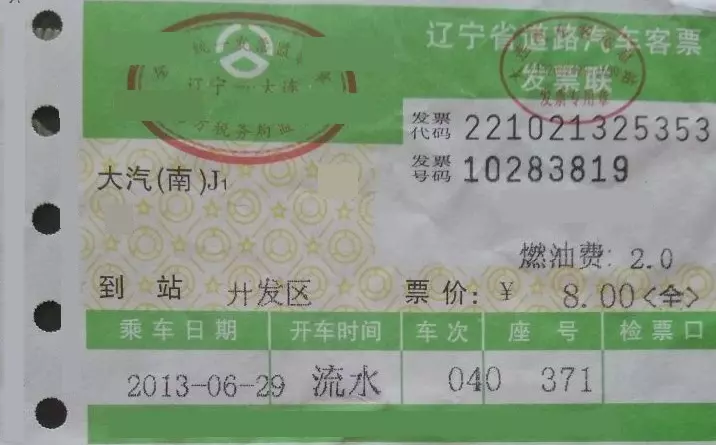
識別映像中的文字、公式或抽取票據、證件、表單中的資訊,支援格式化輸出文本。
提取圖中的:['發票代碼','發票號碼','到站','燃油費','票價','乘車日期','開車時間','車次','座號'],請你以JSON格式輸出。 | { "發票代碼": "221021325353", "發票號碼": "10283819", "到站": "開發區", "燃油費": "2.0", "票價": "8.00<全>", "乘車日期": "2013-06-29", "開車時間": "流水", "車次": "040", "座號": "371" } |
多學科題目解答
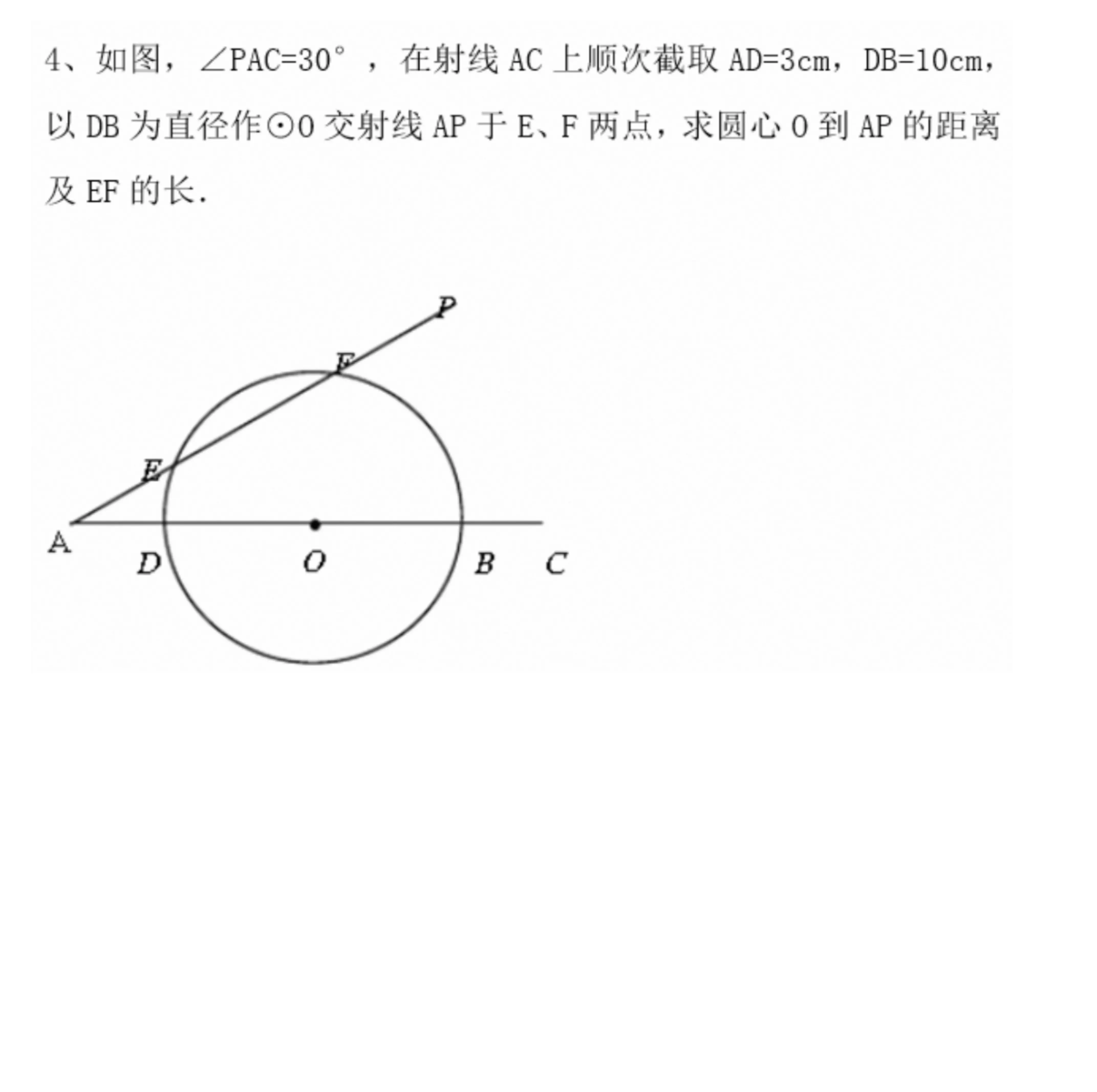
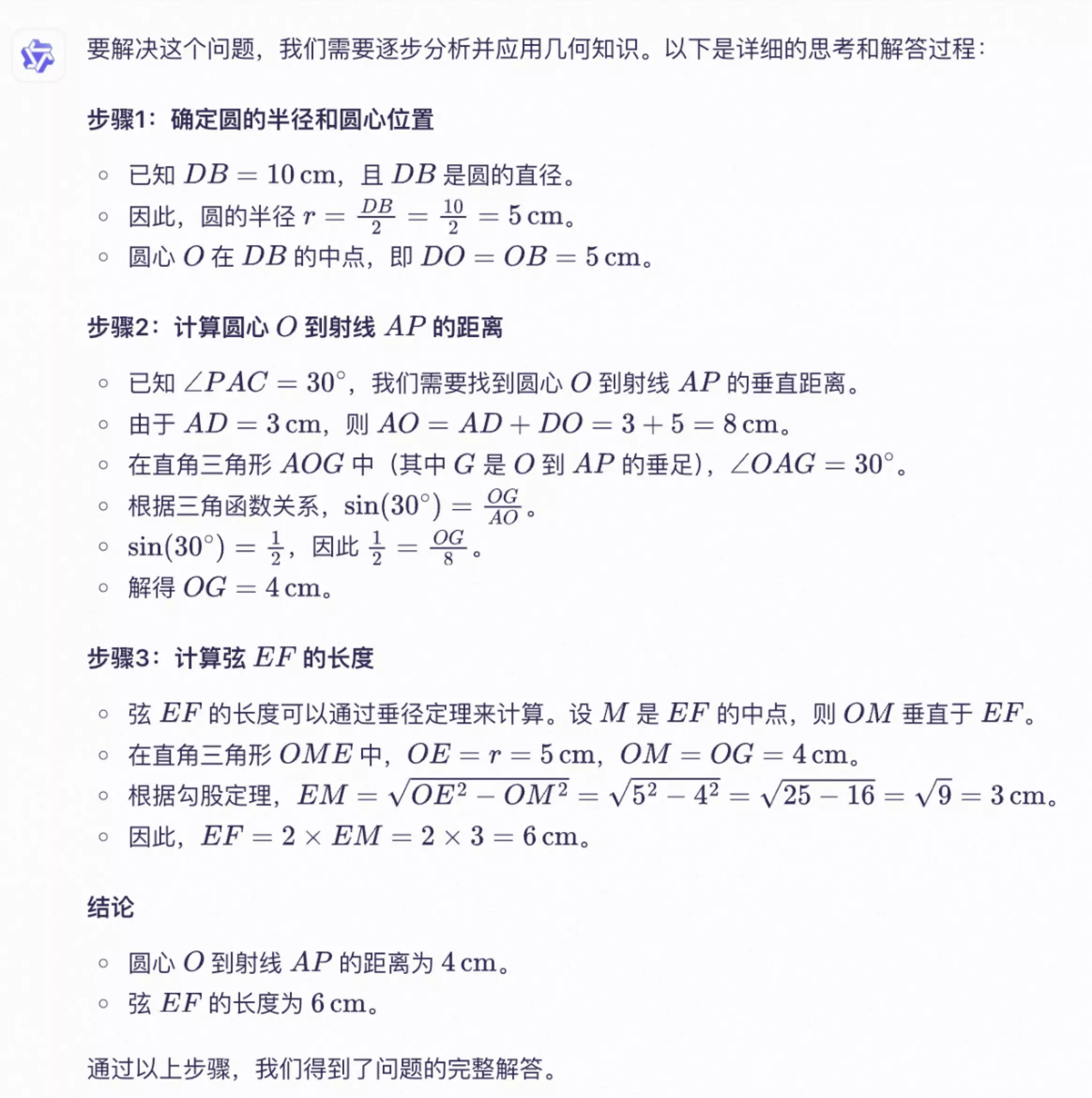
解答映像中的數學、物理、化學等問題,適用於中小學、大學以及成人教育階段。
請你分步驟解答圖中的數學題。 |
|
|---|
視覺編程
可通過映像或視頻產生代碼,可用於將設計圖、網站截圖等產生HTML、CSS、JS 代碼。
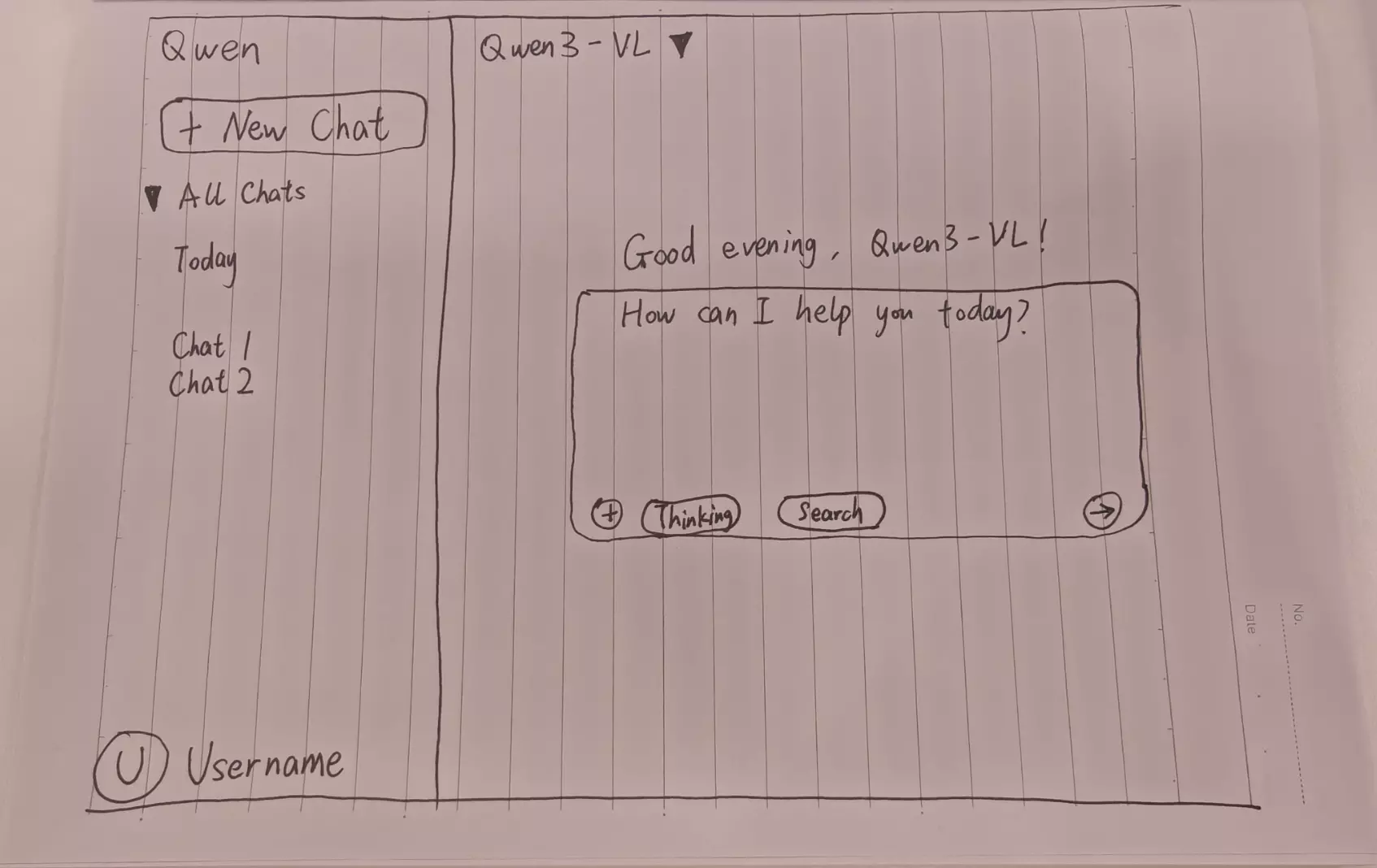
根據我的草圖設計使用HTML、CSS建立網頁,主色調為黑色。 |
網頁預覽效果 |
|---|

物體定位
支援二維和三維定位,可用於判斷物體方位、視角變化、遮擋關係。三維定位為Qwen3-VL模型新增能力。
Qwen2.5-VL模型 480480~* 2560*2560 解析度範圍內,物體定位效果較為魯棒,在此範圍之外檢測精度可能會下降(偶發檢測框漂移現象)。
如需將定位結果繪製到原圖可參見 常見問題 。
二維定位
| 可視化展示二維定位效果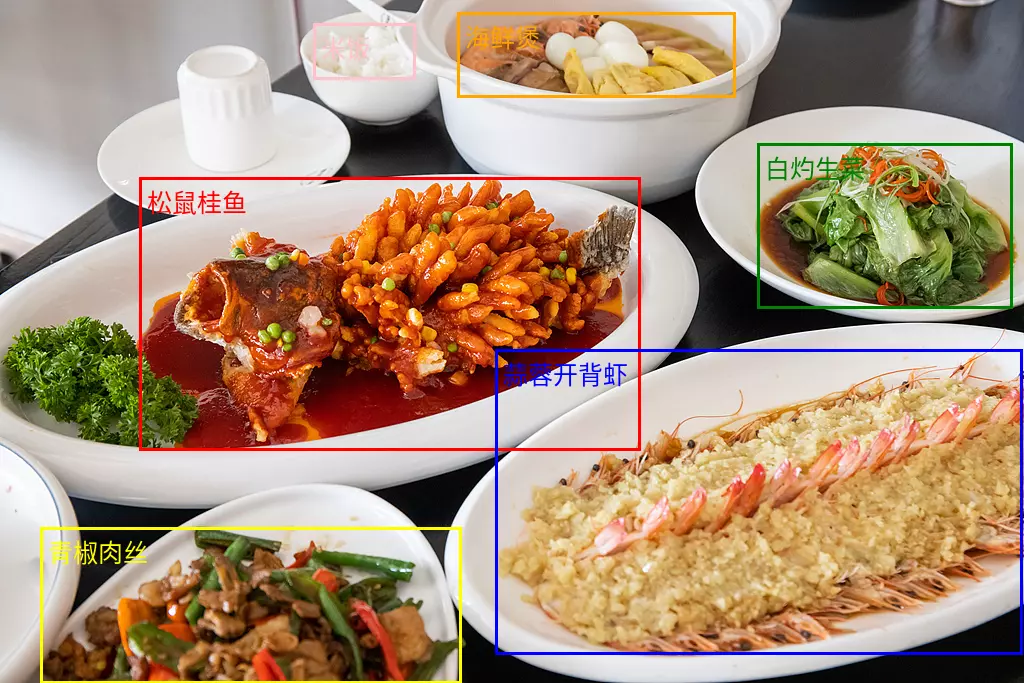 |
三維定位 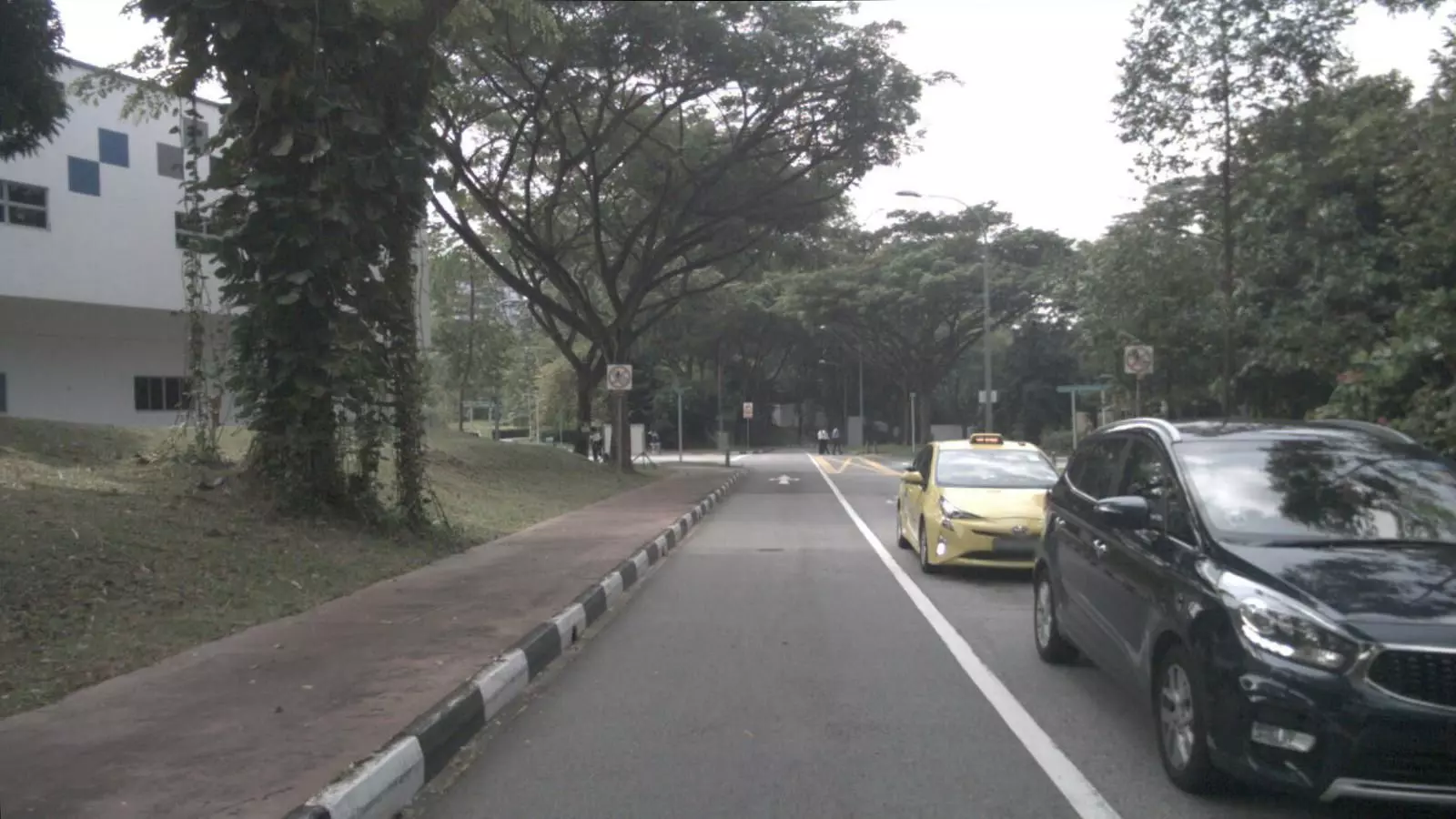 檢測映像中的汽車並預測3D位置。輸出JSON: | 可視化展示三維定位效果 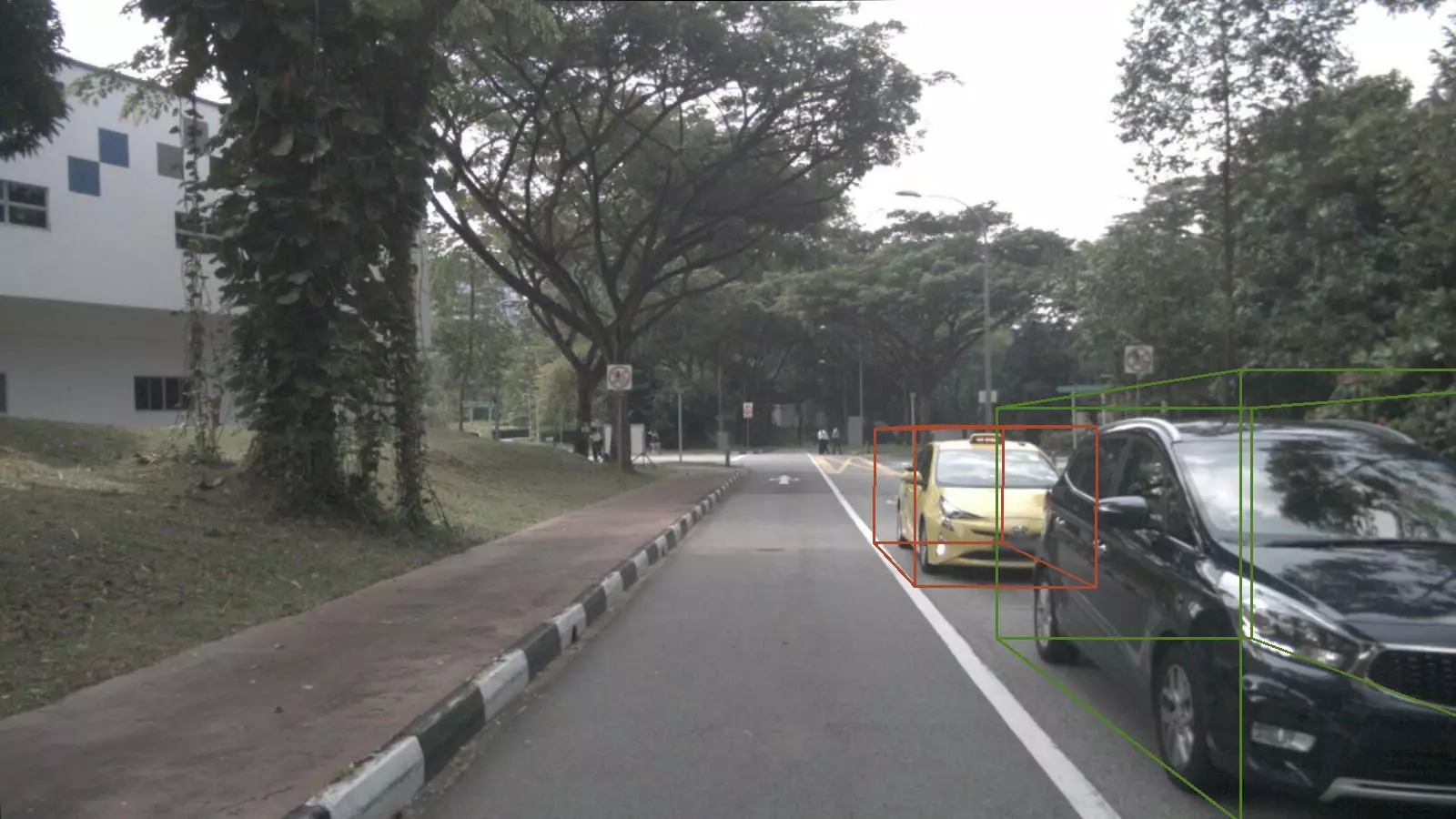 |
文檔解析
將映像類的文檔(如掃描件/圖片PDF)解析為 QwenVL HTML 或 QwenVL Markdown 格式,該格式不僅能精準識別文本,還能擷取映像、表格等元素的位置資訊。Qwen3-VL模型新增解析為 Markdown 格式的能力。
推薦提示詞如下:
qwenvl html(解析為HTML格式)或qwenvl markdown(解析為Markdown格式)
qwenvl markdown。 |
可視化展示效果 |
|---|

視頻理解
分析視頻內容,如對具體事件進行定位並擷取時間戳記、產生關鍵時間段的摘要等。
請你描述下視頻中的人物的一系列動作,以JSON格式輸出開始時間(start_time)、結束時間(end_time)、事件(event),請使用HH:mm:ss表示時間戳記。 | { "events": [ { "start_time": "00:00:00", "end_time": "00:00:05", "event": "人物手持一個紙箱走向桌子,並將紙箱放在桌上。" }, { "start_time": "00:00:05", "end_time": "00:00:15", "event": "人物拿起掃描槍,對準紙箱上的標籤進行掃描。" }, { "start_time": "00:00:15", "end_time": "00:00:21", "event": "人物將掃描槍放回原位,然後拿起筆在筆記本上記錄資訊。"}] } |
核心能力
開啟/關閉思考模式
-
qwen3.8、qwen3.7、qwen3.6、qwen3.5、qwen3-vl-plus、qwen3-vl-flash系列模型屬於混合思考模型,模型可以在思考後回複,也可直接回複;通過enable_thinking參數控制是否開啟思考模式:true:開啟思考模式。qwen3.8、qwen3.7、qwen3.6、qwen3.5系列模型預設為true。false:關閉思考模式。qwen3-vl-plus、qwen3-vl-flash系列模型預設為false。
-
qwen3-vl-235b-a22b-thinking等帶thinking尾碼的屬於僅思考模型,模型總會在回複前進行思考,且無法關閉。
重要
- 模型配置:在非 Agent 工具調用的通用對話情境下,為保持最佳效果,建議不設定
System Message,可將模型角色設定、輸出格式要求等指令通過User Message傳入。 - 優先使用流式輸出: 開啟思考模式時,支援流式和非流式兩種輸出方式。為避免因響應內容過長導致逾時,建議優先使用流式輸出方式。
- 限制思考長度:深度思考模型有時會輸出冗長的推理過程,可使用
thinking_budget參數限制思考過程的長度。若模型思考過程產生的 Token 數超過thinking_budget,推理內容會進行截斷並立刻開始產生最終回複內容。thinking_budget預設值為模型的最大思維鏈長度,請參見模型列表。
OpenAI 相容
enable_thinking非 OpenAI 標準參數,若使用 OpenAI Python SDK請通過 extra_body傳入。
import os
from openai import OpenAI

client = OpenAI(
    # 各地區的API Key不同。擷取API Key:https://www.alibabacloud.com/help/zh/model-studio/get-api-key
    api_key=os.getenv("DASHSCOPE_API_KEY"),
    # 以下為新加坡地區URL,調用時請將 {WorkspaceId} 替換為真實的業務空間ID,各地區的URL不同。
    base_url="https://{WorkspaceId}.ap-southeast-1.maas.aliyuncs.com/compatible-mode/v1"
)

reasoning_content = ""  # 定義完整思考過程
answer_content = ""     # 定義完整回複
is_answering = False   # 判斷是否結束思考過程並開始回複
enable_thinking = True
# 建立聊天完成請求
completion = client.chat.completions.create(
    model="qwen3.8-max",
    messages=[
        {
            "role": "user",
            "content": [
                {
                    "type": "image_url",
                    "image_url": {
                        "url": "https://img.alicdn.com/imgextra/i1/O1CN01gDEY8M1W114Hi3XcN_!!6000000002727-0-tps-1024-406.jpg"
                    },
                },
                {"type": "text", "text": "這道題怎麼解答?"},
            ],
        },
    ],
    stream=True,
    # enable_thinking 參數開啟思考過程,thinking_budget 參數設定最大推理過程 Token 數
    # 通過enable_thinking參數切換思考模式
    extra_body={
        'enable_thinking': enable_thinking,
        "thinking_budget": 81920},

    # 解除以下注釋會在最後一個chunk返回Token使用量
    # stream_options={
    #     "include_usage": True
    # }
)

if enable_thinking:
    print("\n" + "=" * 20 + "思考過程" + "=" * 20 + "\n")

for chunk in completion:
    # 如果chunk.choices為空白,則列印usage
    if not chunk.choices:
        print("\nUsage:")
        print(chunk.usage)
    else:
        delta = chunk.choices[0].delta
        # 列印思考過程
        if hasattr(delta, 'reasoning_content') and delta.reasoning_content is not None:
            print(delta.reasoning_content, end='', flush=True)
            reasoning_content += delta.reasoning_content
        else:
            # 開始回複
            if delta.content != "" and is_answering is False:
                print("\n" + "=" * 20 + "完整回複" + "=" * 20 + "\n")
                is_answering = True
            # 列印回複過程
            print(delta.content, end='', flush=True)
            answer_content += delta.content

# print("=" * 20 + "完整思考過程" + "=" * 20 + "\n")
# print(reasoning_content)
# print("=" * 20 + "完整回複" + "=" * 20 + "\n")
# print(answer_content)
import OpenAI from "openai";

// 初始化 openai 用戶端
const openai = new OpenAI({
  // 各地區的API Key不同。擷取API Key:https://www.alibabacloud.com/help/zh/model-studio/get-api-key
  // 若沒有配置環境變數,請用百鍊API Key將下行替換為:apiKey: "sk-xxx"
  apiKey: process.env.DASHSCOPE_API_KEY,
  // 以下為新加坡地區URL,調用時請將 {WorkspaceId} 替換為真實的業務空間ID,各地區的URL不同。
  baseURL: "https://{WorkspaceId}.ap-southeast-1.maas.aliyuncs.com/compatible-mode/v1"
});

let reasoningContent = '';
let answerContent = '';
let isAnswering = false;
let enableThinking = true;

let messages = [
    {
        role: "user",
        content: [
        { type: "image_url", image_url: { "url": "https://img.alicdn.com/imgextra/i1/O1CN01gDEY8M1W114Hi3XcN_!!6000000002727-0-tps-1024-406.jpg" } },
        { type: "text", text: "解答這道題" },
    ]
}]

async function main() {
    try {
        const stream = await openai.chat.completions.create({
            model: 'qwen3.7-plus',
            messages: messages,
            stream: true,
          // 注意:在 Node.js SDK,enableThinking 這樣的非標準參數作為頂層屬性傳遞的,無需放在 extra_body 中
          enable_thinking: enableThinking,
          thinking_budget: 81920

        });

        if (enableThinking){console.log('\n' + '='.repeat(20) + '思考過程' + '='.repeat(20) + '\n');}

        for await (const chunk of stream) {
            if (!chunk.choices?.length) {
                console.log('\nUsage:');
                console.log(chunk.usage);
                continue;
            }

            const delta = chunk.choices[0].delta;

            // 處理思考過程
            if (delta.reasoning_content) {
                process.stdout.write(delta.reasoning_content);
                reasoningContent += delta.reasoning_content;
            }
            // 處理正式回複
            else if (delta.content) {
                if (!isAnswering) {
                    console.log('\n' + '='.repeat(20) + '完整回複' + '='.repeat(20) + '\n');
                    isAnswering = true;
                }
                process.stdout.write(delta.content);
                answerContent += delta.content;
            }
        }
    } catch (error) {
        console.error('Error:', error);
    }
}

main();
# ======= 重要提示 =======
# 以下為新加坡地區URL,調用時請將 {WorkspaceId} 替換為真實的業務空間ID,各地區的URL不同。
# 各地區的API Key不同。擷取API Key:https://www.alibabacloud.com/help/zh/model-studio/get-api-key
# === 執行時請刪除該注釋 ===

curl --location 'https://{WorkspaceId}.ap-southeast-1.maas.aliyuncs.com/compatible-mode/v1/chat/completions' \
--header "Authorization: Bearer $DASHSCOPE_API_KEY" \
--header 'Content-Type: application/json' \
--data '{
    "model": "qwen3.8-max",
    "messages": [
    {
      "role": "user",
      "content": [
        {
          "type": "image_url",
          "image_url": {
            "url": "https://img.alicdn.com/imgextra/i1/O1CN01gDEY8M1W114Hi3XcN_!!6000000002727-0-tps-1024-406.jpg"
          }
        },
        {
          "type": "text",
          "text": "請解答這道題"
        }
      ]
    }
  ],
    "stream":true,
    "stream_options":{"include_usage":true},
    "enable_thinking": true,
    "thinking_budget": 81920
}'
DashScope
import os
import dashscope
from dashscope import MultiModalConversation

# 以下為新加坡地區URL,調用時請將 {WorkspaceId} 替換為真實的業務空間ID,各地區的URL不同。
dashscope.base_http_api_url = "https://{WorkspaceId}.ap-southeast-1.maas.aliyuncs.com/api/v1"

enable_thinking=True

messages = [
    {
        "role": "user",
        "content": [
            {"image": "https://img.alicdn.com/imgextra/i1/O1CN01gDEY8M1W114Hi3XcN_!!6000000002727-0-tps-1024-406.jpg"},
            {"text": "解答這道題?"}
        ]
    }
]

response = MultiModalConversation.call(
    # 若沒有配置環境變數,請用百鍊API Key將下行替換為:api_key="sk-xxx",
    # 各地區的API Key不同。擷取API Key:https://www.alibabacloud.com/help/zh/model-studio/get-api-key
    api_key=os.getenv('DASHSCOPE_API_KEY'),
    model="qwen3.8-max",
    messages=messages,
    stream=True,
    # enable_thinking 參數開啟思考過程
    # 通過enable_thinking參數切換思考模式
    enable_thinking=enable_thinking,
    # thinking_budget 參數設定最大推理過程 Token 數
    thinking_budget=81920,

)

# 定義完整思考過程
reasoning_content = ""
# 定義完整回複
answer_content = ""
# 判斷是否結束思考過程並開始回複
is_answering = False

if enable_thinking:
    print("=" * 20 + "思考過程" + "=" * 20)

for chunk in response:
    # 如果思考過程與回複皆為空白,則忽略
    message = chunk.output.choices[0].message
    reasoning_content_chunk = message.get("reasoning_content", None)
    if (chunk.output.choices[0].message.content == [] and
        reasoning_content_chunk == ""):
        pass
    else:
        # 如果當前為思考過程
        if reasoning_content_chunk is not None and chunk.output.choices[0].message.content == []:
            print(chunk.output.choices[0].message.reasoning_content, end="")
            reasoning_content += chunk.output.choices[0].message.reasoning_content
        # 如果當前為回複
        elif chunk.output.choices[0].message.content != []:
            if not is_answering:
                print("\n" + "=" * 20 + "完整回複" + "=" * 20)
                is_answering = True
            print(chunk.output.choices[0].message.content[0]["text"], end="")
            answer_content += chunk.output.choices[0].message.content[0]["text"]

# 列印完整思考過程與回複
# print("=" * 20 + "完整思考過程" + "=" * 20 + "\n")
# print(f"{reasoning_content}")
# print("=" * 20 + "完整回複" + "=" * 20 + "\n")
# print(f"{answer_content}")
// dashscope SDK的版本 >= 2.21.10
import java.util.*;

import org.slf4j.Logger;
import org.slf4j.LoggerFactory;

import com.alibaba.dashscope.common.Role;
import com.alibaba.dashscope.exception.ApiException;
import com.alibaba.dashscope.exception.NoApiKeyException;
import io.reactivex.Flowable;

import com.alibaba.dashscope.aigc.multimodalconversation.MultiModalConversation;
import com.alibaba.dashscope.aigc.multimodalconversation.MultiModalConversationParam;
import com.alibaba.dashscope.aigc.multimodalconversation.MultiModalConversationResult;
import com.alibaba.dashscope.common.MultiModalMessage;
import com.alibaba.dashscope.exception.UploadFileException;
import com.alibaba.dashscope.exception.InputRequiredException;
import java.lang.System;
import com.alibaba.dashscope.utils.Constants;

public class Main {
    // 以下為新加坡地區URL,調用時請將 {WorkspaceId} 替換為真實的業務空間ID,各地區的URL不同。
    static {Constants.baseHttpApiUrl="https://{WorkspaceId}.ap-southeast-1.maas.aliyuncs.com/api/v1";}

    private static final Logger logger = LoggerFactory.getLogger(Main.class);
    private static StringBuilder reasoningContent = new StringBuilder();
    private static StringBuilder finalContent = new StringBuilder();
    private static boolean isFirstPrint = true;

    private static void handleGenerationResult(MultiModalConversationResult message) {
        String re = message.getOutput().getChoices().get(0).getMessage().getReasoningContent();
        String reasoning = Objects.isNull(re)?"":re; // 預設值

        List<Map<String, Object>> content = message.getOutput().getChoices().get(0).getMessage().getContent();
        if (!reasoning.isEmpty()) {
            reasoningContent.append(reasoning);
            if (isFirstPrint) {
                System.out.println("====================思考過程====================");
                isFirstPrint = false;
            }
            System.out.print(reasoning);
        }

        if (Objects.nonNull(content) && !content.isEmpty()) {
            Object text = content.get(0).get("text");
            finalContent.append(content.get(0).get("text"));
            if (!isFirstPrint) {
                System.out.println("\n====================完整回複====================");
                isFirstPrint = true;
            }
            System.out.print(text);
        }
    }
    public static MultiModalConversationParam buildMultiModalConversationParam(MultiModalMessage Msg)  {
        return MultiModalConversationParam.builder()
                // 若沒有配置環境變數,請用百鍊API Key將下行替換為:.apiKey("sk-xxx")
                // 各地區的API Key不同。擷取API Key:https://www.alibabacloud.com/help/zh/model-studio/get-api-key
                .apiKey(System.getenv("DASHSCOPE_API_KEY"))
                .model("qwen3.8-max")
                .messages(Arrays.asList(Msg))
                .enableThinking(true)
                .thinkingBudget(81920)
                .incrementalOutput(true)
                .build();
    }

    public static void streamCallWithMessage(MultiModalConversation conv, MultiModalMessage Msg)
            throws NoApiKeyException, ApiException, InputRequiredException, UploadFileException {
        MultiModalConversationParam param = buildMultiModalConversationParam(Msg);
        Flowable<MultiModalConversationResult> result = conv.streamCall(param);
        result.blockingForEach(message -> {
            handleGenerationResult(message);
        });
    }
    public static void main(String[] args) {
        try {
            MultiModalConversation conv = new MultiModalConversation();
            MultiModalMessage userMsg = MultiModalMessage.builder()
                    .role(Role.USER.getValue())
                    .content(Arrays.asList(Collections.singletonMap("image", "https://img.alicdn.com/imgextra/i1/O1CN01gDEY8M1W114Hi3XcN_!!6000000002727-0-tps-1024-406.jpg"),
                            Collections.singletonMap("text", "請解答這道題")))
                    .build();
            streamCallWithMessage(conv, userMsg);
//             列印最終結果
//            if (reasoningContent.length() > 0) {
//                System.out.println("\n====================完整回複====================");
//                System.out.println(finalContent.toString());
//            }
        } catch (ApiException | NoApiKeyException | UploadFileException | InputRequiredException e) {
            logger.error("An exception occurred: {}", e.getMessage());
        }
        System.exit(0);
    }
}
# ======= 重要提示 =======
# 各地區的API Key不同。擷取API Key:https://www.alibabacloud.com/help/zh/model-studio/get-api-key
# 以下為新加坡地區URL,調用時請將 {WorkspaceId} 替換為真實的業務空間ID,各地區的URL不同。
# === 執行時請刪除該注釋 ===

curl -X POST https://{WorkspaceId}.ap-southeast-1.maas.aliyuncs.com/api/v1/services/aigc/multimodal-generation/generation \
-H "Authorization: Bearer $DASHSCOPE_API_KEY" \
-H 'Content-Type: application/json' \
-H 'X-DashScope-SSE: enable' \
-d '{
    "model": "qwen3.8-max",
    "input":{
        "messages":[
            {
                "role": "user",
                "content": [
                    {"image": "https://img.alicdn.com/imgextra/i1/O1CN01gDEY8M1W114Hi3XcN_!!6000000002727-0-tps-1024-406.jpg"},
                    {"text": "請解答這道題"}
                ]
            }
        ]
    },
    "parameters":{
        "enable_thinking": true,
        "incremental_output": true,
        "thinking_budget": 81920
    }
}'
多映像輸入
視覺理解模型支援在單次請求中傳入多張圖片,可用於商品對比、多頁文檔處理等任務。實現時只需在user message 的content數組中包含多個圖片對象即可。
重要圖片數量受模型圖文總 Token 上限的限制,所有圖片和文本的總 Token 數必須小於模型的最大輸入。
OpenAI相容
Python
import os
from openai import OpenAI

client = OpenAI(
    # 各地區的API Key不同。擷取API Key:https://www.alibabacloud.com/help/zh/model-studio/get-api-key
    api_key=os.getenv("DASHSCOPE_API_KEY"),
    # 以下為新加坡地區URL,調用時請將 {WorkspaceId} 替換為真實的業務空間ID,各地區的URL不同。
    base_url="https://{WorkspaceId}.ap-southeast-1.maas.aliyuncs.com/compatible-mode/v1",
)

completion = client.chat.completions.create(
    model="qwen3.8-max",  #  此處以qwen3.8-max為例,可按需更換模型名稱。模型列表:https://www.alibabacloud.com/help/model-studio/getting-started/models
    messages=[
        {"role": "user","content": [
            {"type": "image_url","image_url": {"url": "https://help-static-aliyun-doc.aliyuncs.com/file-manage-files/zh-CN/20241022/emyrja/dog_and_girl.jpeg"},},
            {"type": "image_url","image_url": {"url": "https://dashscope.oss-cn-beijing.aliyuncs.com/images/tiger.png"},},
            {"type": "text", "text": "這些圖描繪了什麼內容?"},
            ],
        }
    ],
)

print(completion.choices[0].message.content)
返回結果
圖1中是一位女士和一隻拉布拉多犬在海灘上互動的情境。女士穿著格子襯衫,坐在沙灘上,與狗進行握手的動作,背景是海浪和天空,整個畫面充滿了溫馨和愉快的氛圍。

圖2中是一隻老虎在森林中行走的情境。老虎的毛色是橙色和黑色條紋相間,它正向前邁步,周圍是茂密的樹木和植被,地面上覆蓋著落葉,整個畫面給人一種野生自然的感覺。
Node.js
import OpenAI from "openai";

const openai = new OpenAI(
    {
        // 各地區的API Key不同。擷取API Key:https://www.alibabacloud.com/help/zh/model-studio/get-api-key
        // 若沒有配置環境變數,請用百鍊API Key將下行替換為:apiKey: "sk-xxx"
        apiKey: process.env.DASHSCOPE_API_KEY,
        // 以下為新加坡地區URL,調用時請將 {WorkspaceId} 替換為真實的業務空間ID,各地區的URL不同。
        baseURL: "https://{WorkspaceId}.ap-southeast-1.maas.aliyuncs.com/compatible-mode/v1"
    }
);

async function main() {
    const response = await openai.chat.completions.create({
        model: "qwen3.8-max",  // 此處以qwen3.8-max為例,可按需更換模型名稱。模型列表:https://www.alibabacloud.com/help/model-studio/getting-started/models
        messages: [
          {role: "user",content: [
            {type: "image_url",image_url: {"url": "https://help-static-aliyun-doc.aliyuncs.com/file-manage-files/zh-CN/20241022/emyrja/dog_and_girl.jpeg"}},
            {type: "image_url",image_url: {"url": "https://dashscope.oss-cn-beijing.aliyuncs.com/images/tiger.png"}},
            {type: "text", text: "這些圖描繪了什麼內容?" },
        ]}]
    });
    console.log(response.choices[0].message.content);
}

main()
返回結果
第一張圖片中,一個人和一隻狗在海灘上互動。人穿著格子襯衫,狗戴著項圈,他們似乎在握手或擊掌。

第二張圖片中,一隻老虎在森林中行走。老虎的毛色是橙色和黑色條紋,背景是綠色的樹木和植被。
curl
# ======= 重要提示 =======
# 各地區的API Key不同。擷取API Key:https://www.alibabacloud.com/help/zh/model-studio/get-api-key
# 以下為新加坡地區URL,調用時請將 {WorkspaceId} 替換為真實的業務空間ID,各地區的URL不同。
# === 執行時請刪除該注釋 ===

curl -X POST https://{WorkspaceId}.ap-southeast-1.maas.aliyuncs.com/compatible-mode/v1/chat/completions \
-H "Authorization: Bearer $DASHSCOPE_API_KEY" \
-H 'Content-Type: application/json' \
-d '{
  "model": "qwen3.8-max",
  "messages": [
    {
      "role": "user",
      "content": [
        {
          "type": "image_url",
          "image_url": {
            "url": "https://help-static-aliyun-doc.aliyuncs.com/file-manage-files/zh-CN/20241022/emyrja/dog_and_girl.jpeg"
          }
        },
        {
          "type": "image_url",
          "image_url": {
            "url": "https://dashscope.oss-cn-beijing.aliyuncs.com/images/tiger.png"
          }
        },
        {
          "type": "text",
          "text": "這些圖描繪了什麼內容?"
        }
      ]
    }
  ]
}'
返回結果
{
  "choices": [
    {
      "message": {
        "content": "圖1中是一位女士和一隻拉布拉多犬在海灘上互動的情境。女士穿著格子襯衫,坐在沙灘上,與狗進行握手的動作,背景是海景和日落的天空,整個畫面顯得非常溫馨和諧。\n\n圖2中是一隻老虎在森林中行走的情境。老虎的毛色是橙色和黑色條紋相間,它正向前邁步,周圍是茂密的樹木和植被,地面上覆蓋著落葉,整個畫面充滿了自然的野性和生機。",
        "role": "assistant"
      },
      "finish_reason": "stop",
      "index": 0,
      "logprobs": null
    }
  ],
  "object": "chat.completion",
  "usage": {
    "prompt_tokens": 2497,
    "completion_tokens": 109,
    "total_tokens": 2606
  },
  "created": 1725948561,
  "system_fingerprint": null,
  "model": "qwen3.8-max",
  "id": "chatcmpl-0fd66f46-b09e-9164-a84f-3ebbbedbac15"
}
DashScope
Python
import os
import dashscope

# 以下為新加坡地區URL,調用時請將 {WorkspaceId} 替換為真實的業務空間ID,各地區的URL不同。
dashscope.base_http_api_url = 'https://{WorkspaceId}.ap-southeast-1.maas.aliyuncs.com/api/v1'

messages = [
    {
        "role": "user",
        "content": [
            {"image": "https://help-static-aliyun-doc.aliyuncs.com/file-manage-files/zh-CN/20241022/emyrja/dog_and_girl.jpeg"},
            {"image": "https://dashscope.oss-cn-beijing.aliyuncs.com/images/tiger.png"},
            {"text": "這些圖描繪了什麼內容?"}
        ]
    }
]

response = dashscope.MultiModalConversation.call(
    # 各地區的API Key不同。擷取API Key:https://www.alibabacloud.com/help/zh/model-studio/get-api-key
    # 若沒有配置環境變數,請用百鍊API Key將下行替換為:api_key="sk-xxx"
    api_key=os.getenv('DASHSCOPE_API_KEY'),
    model='qwen3.7-plus', #  此處以qwen3.7-plus為例,可按需更換模型名稱。模型列表:https://www.alibabacloud.com/help/zh/model-studio/getting-started/models
    messages=messages
)

print(response.output.choices[0].message.content[0]["text"])
返回結果
這些圖片展示了一些動物和自然情境。第一張圖片中,一個人和一隻狗在海灘上互動。第二張圖片是一隻老虎在森林中行走
Java
import java.util.Arrays;
import java.util.Collections;
import com.alibaba.dashscope.aigc.multimodalconversation.MultiModalConversation;
import com.alibaba.dashscope.aigc.multimodalconversation.MultiModalConversationParam;
import com.alibaba.dashscope.aigc.multimodalconversation.MultiModalConversationResult;
import com.alibaba.dashscope.common.MultiModalMessage;
import com.alibaba.dashscope.common.Role;
import com.alibaba.dashscope.exception.ApiException;
import com.alibaba.dashscope.exception.NoApiKeyException;
import com.alibaba.dashscope.exception.UploadFileException;
import com.alibaba.dashscope.utils.Constants;

public class Main {
    static {
    // 以下為新加坡地區URL,調用時請將 {WorkspaceId} 替換為真實的業務空間ID,各地區的URL不同。
        Constants.baseHttpApiUrl="https://{WorkspaceId}.ap-southeast-1.maas.aliyuncs.com/api/v1";
    }
    public static void simpleMultiModalConversationCall()
            throws ApiException, NoApiKeyException, UploadFileException {
        MultiModalConversation conv = new MultiModalConversation();
        MultiModalMessage userMessage = MultiModalMessage.builder().role(Role.USER.getValue())
                .content(Arrays.asList(
                        Collections.singletonMap("image", "https://help-static-aliyun-doc.aliyuncs.com/file-manage-files/zh-CN/20241022/emyrja/dog_and_girl.jpeg"),
                        Collections.singletonMap("image", "https://dashscope.oss-cn-beijing.aliyuncs.com/images/tiger.png"),
                        Collections.singletonMap("text", "這些圖描繪了什麼內容?"))).build();
        MultiModalConversationParam param = MultiModalConversationParam.builder()
                // 各地區的API Key不同。擷取API Key:https://www.alibabacloud.com/help/zh/model-studio/get-api-key
                .apiKey(System.getenv("DASHSCOPE_API_KEY"))
                .model("qwen3.8-max")  //  此處以qwen3.8-max為例,可按需更換模型名稱。模型列表:https://www.alibabacloud.com/help/model-studio/getting-started/models
                .messages(Arrays.asList(userMessage))
                .build();
        MultiModalConversationResult result = conv.call(param);
        System.out.println(result.getOutput().getChoices().get(0).getMessage().getContent().get(0).get("text"));    }
    public static void main(String[] args) {
        try {
            simpleMultiModalConversationCall();
        } catch (ApiException | NoApiKeyException | UploadFileException e) {
            System.out.println(e.getMessage());
        }
        System.exit(0);
    }
}
返回結果
這些圖片展示了一些動物和自然情境。

1. 第一張圖片:一個女人和一隻狗在海灘上互動。女人穿著格子襯衫,坐在沙灘上,狗戴著項圈,伸出爪子與女人握手。
2. 第二張圖片:一隻老虎在森林中行走。老虎的毛色是橙色和黑色條紋,背景是樹木和樹葉。
curl
# ======= 重要提示 =======
# 以下為新加坡地區URL,調用時請將 {WorkspaceId} 替換為真實的業務空間ID,各地區的URL不同。
# 各地區的API Key不同。擷取API Key:https://www.alibabacloud.com/help/zh/model-studio/get-api-key
# === 執行時請刪除該注釋 ===

curl --location 'https://{WorkspaceId}.ap-southeast-1.maas.aliyuncs.com/api/v1/services/aigc/multimodal-generation/generation' \
--header "Authorization: Bearer $DASHSCOPE_API_KEY" \
--header 'Content-Type: application/json' \
--data '{
    "model": "qwen3.8-max",
    "input":{
        "messages":[
            {
                "role": "user",
                "content": [
                    {"image": "https://help-static-aliyun-doc.aliyuncs.com/file-manage-files/zh-CN/20241022/emyrja/dog_and_girl.jpeg"},
                    {"image": "https://dashscope.oss-cn-beijing.aliyuncs.com/images/tiger.png"},
                    {"text": "這些圖展現了什麼內容?"}
                ]
            }
        ]
    }
}'
返回結果
{
  "output": {
    "choices": [
      {
        "finish_reason": "stop",
        "message": {
          "role": "assistant",
          "content": [
            {
              "text": "這些圖片展示了一些動物和自然情境。第一張圖片中,一個人和一隻狗在海灘上互動。第二張圖片是一隻老虎在森林中行走。"
            }
          ]
        }
      }
    ]
  },
  "usage": {
    "output_tokens": 81,
    "input_tokens": 1277,
    "image_tokens": 2497
  },
  "request_id": "ccf845a3-dc33-9cda-b581-20fe7dc23f70"
}
視頻理解
視覺理解模型支援對視頻內容進行理解,檔案形式包括映像列表(視訊框架)或視頻檔案。以下是理解線上視頻或映像列表(通過URL指定)的範例程式碼。關於視頻限制或可傳入的映像列表數量限制,請參見視頻限制章節。
建議使用效能較優的最新版或近期快照版模型理解視頻檔案。
視頻檔案
視覺理解模型通過從視頻中提取幀序列進行內容分析。您可以通過以下兩個參數控制抽幀策略:
-
fps:控制抽幀頻率,每隔 1/fps 秒抽取一幀。取值範圍為 [0.1, 10],預設值為 2.0。
- 高速運動情境:建議設定較高的 fps 值,以捕捉更多細節
- 靜態或長視頻:建議設定較低的 fps 值,以提高處理效率
-
max_frames:限制視頻抽取幀的上限。當按 fps 計算的總幀數超過此限制時,系統將自動在 max_frames 內均勻抽幀。此參數僅在使用 DashScope SDK時可用。
OpenAI相容
使用OpenAI SDK或HTTP方式向視覺理解模型直接輸入視頻檔案時,需要將使用者訊息中的
"type"參數設為"video_url"。
import os
from openai import OpenAI

client = OpenAI(
    # 各地區的API Key不同。擷取API Key:https://www.alibabacloud.com/help/zh/model-studio/get-api-key
    # 若沒有配置環境變數,請用百鍊API Key將下行替換為:api_key="sk-xxx",
    api_key=os.getenv("DASHSCOPE_API_KEY"),
    # 以下為新加坡地區URL,調用時請將 {WorkspaceId} 替換為真實的業務空間ID,各地區的URL不同。
    base_url="https://{WorkspaceId}.ap-southeast-1.maas.aliyuncs.com/compatible-mode/v1",
)
completion = client.chat.completions.create(
    model="qwen3.8-max",
    messages=[
        {
            "role": "user",
            "content": [
                # 直接傳入的視訊檔案時,請將type的值設定為video_url
                {
                    "type": "video_url",
                    "video_url": {
                        "url": "https://help-static-aliyun-doc.aliyuncs.com/file-manage-files/zh-CN/20241115/cqqkru/1.mp4"
                    },
                    "fps": 2
                },
                {
                    "type": "text",
                    "text": "這段視頻的內容是什麼?"
                }
            ]
        }
    ]
)

print(completion.choices[0].message.content)
import OpenAI from "openai";

const openai = new OpenAI(
    {
        // 各地區的API Key不同。擷取API Key:https://www.alibabacloud.com/help/zh/model-studio/get-api-key
        // 若沒有配置環境變數,請用百鍊API Key將下行替換為:apiKey: "sk-xxx"
        apiKey: process.env.DASHSCOPE_API_KEY,
        // 以下為新加坡地區URL,調用時請將 {WorkspaceId} 替換為真實的業務空間ID,各地區的URL不同。
        baseURL: "https://{WorkspaceId}.ap-southeast-1.maas.aliyuncs.com/compatible-mode/v1"
    }
);

async function main() {
    const response = await openai.chat.completions.create({
        model: "qwen3.8-max",
        messages: [
            {
                role: "user",
                content: [
                    // 直接傳入的視訊檔案時,請將type的值設定為video_url
                    {
                        type: "video_url",
                        video_url: {
                            "url": "https://help-static-aliyun-doc.aliyuncs.com/file-manage-files/zh-CN/20241115/cqqkru/1.mp4"
                        },
                        "fps": 2
                    },
                    {
                        type: "text",
                        text: "這段視頻的內容是什麼?"
                    }
                ]
            }
        ]
    });

    console.log(response.choices[0].message.content);
}

main();
# ======= 重要提示 =======
# 各地區的API Key不同。擷取API Key:https://www.alibabacloud.com/help/zh/model-studio/get-api-key
# 以下為新加坡地區URL,調用時請將 {WorkspaceId} 替換為真實的業務空間ID,各地區的URL不同。
# === 執行時請刪除該注釋 ===

curl -X POST https://{WorkspaceId}.ap-southeast-1.maas.aliyuncs.com/compatible-mode/v1/chat/completions \
  -H "Authorization: Bearer $DASHSCOPE_API_KEY" \
  -H 'Content-Type: application/json' \
  -d '{
    "model": "qwen3.8-max",
    "messages": [
      {
        "role": "user",
        "content": [
          {
            "type": "video_url",
            "video_url": {
              "url": "https://help-static-aliyun-doc.aliyuncs.com/file-manage-files/zh-CN/20241115/cqqkru/1.mp4"
            },
            "fps":2
          },
          {
            "type": "text",
            "text": "這段視頻的內容是什麼?"
          }
        ]
      }
    ]
  }'
DashScope
import dashscope
import os

# 以下為新加坡地區URL,調用時請將 {WorkspaceId} 替換為真實的業務空間ID,各地區的URL不同。
dashscope.base_http_api_url = 'https://{WorkspaceId}.ap-southeast-1.maas.aliyuncs.com/api/v1'
messages = [
    {"role": "user",
        "content": [
            # fps 可參數控制視頻抽幀頻率,表示每隔 1/fps 秒抽取一幀,完整用法請參見:https://www.alibabacloud.com/help/zh/model-studio/use-qwen-by-calling-api?#2ed5ee7377fum
            {"video": "https://help-static-aliyun-doc.aliyuncs.com/file-manage-files/zh-CN/20241115/cqqkru/1.mp4","fps":2},
            {"text": "這段視頻的內容是什麼?"}
        ]
    }
]

response = dashscope.MultiModalConversation.call(
    # 各地區的API Key不同。擷取API Key:https://www.alibabacloud.com/help/zh/model-studio/get-api-key
    # 若沒有配置環境變數, 請用百鍊API Key將下行替換為: api_key ="sk-xxx"
    api_key=os.getenv('DASHSCOPE_API_KEY'),
    model='qwen3.7-plus',
    messages=messages
)

print(response.output.choices[0].message.content[0]["text"])
import java.util.Arrays;
import java.util.Collections;
import java.util.HashMap;
import java.util.Map;

import com.alibaba.dashscope.aigc.multimodalconversation.MultiModalConversation;
import com.alibaba.dashscope.aigc.multimodalconversation.MultiModalConversationParam;
import com.alibaba.dashscope.aigc.multimodalconversation.MultiModalConversationResult;
import com.alibaba.dashscope.common.MultiModalMessage;
import com.alibaba.dashscope.common.Role;
import com.alibaba.dashscope.exception.ApiException;
import com.alibaba.dashscope.exception.NoApiKeyException;
import com.alibaba.dashscope.exception.UploadFileException;
import com.alibaba.dashscope.utils.Constants;

public class Main {
   static {
            // 以下為新加坡地區URL,調用時請將 {WorkspaceId} 替換為真實的業務空間ID,各地區的URL不同。
            Constants.baseHttpApiUrl="https://{WorkspaceId}.ap-southeast-1.maas.aliyuncs.com/api/v1";
        }
    public static void simpleMultiModalConversationCall()
            throws ApiException, NoApiKeyException, UploadFileException {
        MultiModalConversation conv = new MultiModalConversation();
        // fps參數控制視頻抽幀頻率,表示每隔 1/fps 秒抽取一幀,完整用法請參見:https://www.alibabacloud.com/help/zh/model-studio/use-qwen-by-calling-api?#2ed5ee7377fum
        Map<String, Object> params = new HashMap<>();
        params.put("video", "https://help-static-aliyun-doc.aliyuncs.com/file-manage-files/zh-CN/20241115/cqqkru/1.mp4");
        params.put("fps", 2);
        MultiModalMessage userMessage = MultiModalMessage.builder().role(Role.USER.getValue())
                .content(Arrays.asList(
                        params,
                        Collections.singletonMap("text", "這段視頻的內容是什麼?"))).build();
        MultiModalConversationParam param = MultiModalConversationParam.builder()
                // 如果使用北京地區的模型,需要使用北京地區的 API Key,擷取連結:https://www.alibabacloud.com/help/zh/model-studio/get-api-key
                // 若沒有配置環境變數,請用百鍊API Key將下行替換為:.apiKey("sk-xxx")
                .apiKey(System.getenv("DASHSCOPE_API_KEY"))
                .model("qwen3.8-max")
                .messages(Arrays.asList(userMessage))
                .build();
        MultiModalConversationResult result = conv.call(param);
        System.out.println(result.getOutput().getChoices().get(0).getMessage().getContent().get(0).get("text"));
    }
    public static void main(String[] args) {
        try {
            simpleMultiModalConversationCall();
        } catch (ApiException | NoApiKeyException | UploadFileException e) {
            System.out.println(e.getMessage());
        }
        System.exit(0);
    }
}
# ======= 重要提示 =======
# 以下為新加坡地區URL,調用時請將 {WorkspaceId} 替換為真實的業務空間ID,各地區的URL不同。
# 各地區的API Key不同。擷取API Key:https://www.alibabacloud.com/help/zh/model-studio/get-api-key
# === 執行時請刪除該注釋 ===

curl -X POST https://{WorkspaceId}.ap-southeast-1.maas.aliyuncs.com/api/v1/services/aigc/multimodal-generation/generation \
-H "Authorization: Bearer $DASHSCOPE_API_KEY" \
-H 'Content-Type: application/json' \
-d '{
    "model": "qwen3.8-max",
    "input":{
        "messages":[
            {"role": "user","content": [{"video": "https://help-static-aliyun-doc.aliyuncs.com/file-manage-files/zh-CN/20241115/cqqkru/1.mp4","fps":2},
            {"text": "這段視頻的內容是什麼?"}]}]}
}'
映像列表
當視頻以映像列表(即預先抽取的視訊框架)傳入時,可通過fps參數告知模型視訊框架之間的時間間隔,這能協助模型更準確地理解事件的順序、期間和動態變化。模型支援通過 fps 參數指定原始視頻的抽幀率,表示視訊框架是每隔 1/fps 秒從原始視頻中抽取的。該參數支援Qwen3.6、Qwen3-VL、Qwen2.5-VL模型。
OpenAI相容
使用OpenAI SDK或HTTP方式向視覺理解模型輸入圖片列表形式的視頻時,需要將使用者訊息中的
"type"參數設為"video"。
import os
from openai import OpenAI

client = OpenAI(
    # 各地區的API Key不同。擷取API Key:https://www.alibabacloud.com/help/zh/model-studio/get-api-key
    # 若沒有配置環境變數,請用百鍊API Key將下行替換為:api_key="sk-xxx",
    api_key=os.getenv("DASHSCOPE_API_KEY"),
    # 以下為新加坡地區URL,調用時請將 {WorkspaceId} 替換為真實的業務空間ID,各地區的URL不同。
    base_url="https://{WorkspaceId}.ap-southeast-1.maas.aliyuncs.com/compatible-mode/v1",
)

completion = client.chat.completions.create(
    model="qwen3.8-max", # 此處以qwen3.8-max為例,可按需更換模型名稱。模型列表:https://www.alibabacloud.com/help/zh/model-studio/models
    messages=[{"role": "user","content": [
        # 傳入映像列表時,使用者訊息中的"type"參數為"video"
         {"type": "video","video": [
         "https://help-static-aliyun-doc.aliyuncs.com/file-manage-files/zh-CN/20241108/xzsgiz/football1.jpg",
         "https://help-static-aliyun-doc.aliyuncs.com/file-manage-files/zh-CN/20241108/tdescd/football2.jpg",
         "https://help-static-aliyun-doc.aliyuncs.com/file-manage-files/zh-CN/20241108/zefdja/football3.jpg",
         "https://help-static-aliyun-doc.aliyuncs.com/file-manage-files/zh-CN/20241108/aedbqh/football4.jpg"],
         "fps":2},
         {"type": "text","text": "描述這個視頻的具體過程"},
    ]}]
)

print(completion.choices[0].message.content)
// 確保之前在 package.json 中指定了 "type": "module"
import OpenAI from "openai";

const openai = new OpenAI({
    // 各地區的API Key不同。擷取API Key:https://www.alibabacloud.com/help/zh/model-studio/get-api-key
    // 若沒有配置環境變數,請用百鍊API Key將下行替換為:apiKey: "sk-xxx",
    apiKey: process.env.DASHSCOPE_API_KEY,
    // 以下為新加坡地區URL,調用時請將 {WorkspaceId} 替換為真實的業務空間ID,各地區的URL不同。
    baseURL: "https://{WorkspaceId}.ap-southeast-1.maas.aliyuncs.com/compatible-mode/v1"
});

async function main() {
    const response = await openai.chat.completions.create({
        model: "qwen3.8-max",  // 此處以qwen3.8-max為例,可按需更換模型名稱。模型列表:https://www.alibabacloud.com/help/zh/model-studio/models
        messages: [{
            role: "user",
            content: [
                {
                    // 傳入映像列表時,使用者訊息中的"type"參數為"video"
                    type: "video",
                    video: [
                        "https://help-static-aliyun-doc.aliyuncs.com/file-manage-files/zh-CN/20241108/xzsgiz/football1.jpg",
                        "https://help-static-aliyun-doc.aliyuncs.com/file-manage-files/zh-CN/20241108/tdescd/football2.jpg",
                        "https://help-static-aliyun-doc.aliyuncs.com/file-manage-files/zh-CN/20241108/zefdja/football3.jpg",
                        "https://help-static-aliyun-doc.aliyuncs.com/file-manage-files/zh-CN/20241108/aedbqh/football4.jpg"],
                        "fps": 2
                },
                {
                    type: "text",
                    text: "描述這個視頻的具體過程"
                }
            ]
        }]
    });
    console.log(response.choices[0].message.content);
}

main();
# ======= 重要提示 =======
# 各地區的API Key不同。擷取API Key:https://www.alibabacloud.com/help/zh/model-studio/get-api-key
# 以下為新加坡地區URL,調用時請將 {WorkspaceId} 替換為真實的業務空間ID,各地區的URL不同。
# === 執行時請刪除該注釋 ===

curl -X POST https://{WorkspaceId}.ap-southeast-1.maas.aliyuncs.com/compatible-mode/v1/chat/completions \
-H "Authorization: Bearer $DASHSCOPE_API_KEY" \
-H 'Content-Type: application/json' \
-d '{
    "model": "qwen3.8-max",
    "messages": [{"role": "user","content": [{"type": "video","video": [
                  "https://help-static-aliyun-doc.aliyuncs.com/file-manage-files/zh-CN/20241108/xzsgiz/football1.jpg",
                  "https://help-static-aliyun-doc.aliyuncs.com/file-manage-files/zh-CN/20241108/tdescd/football2.jpg",
                  "https://help-static-aliyun-doc.aliyuncs.com/file-manage-files/zh-CN/20241108/zefdja/football3.jpg",
                  "https://help-static-aliyun-doc.aliyuncs.com/file-manage-files/zh-CN/20241108/aedbqh/football4.jpg"],
                  "fps":2},
                {"type": "text","text": "描述這個視頻的具體過程"}]}]
}'
DashScope
import os
import dashscope

# 以下為新加坡地區URL,調用時請將 {WorkspaceId} 替換為真實的業務空間ID,各地區的URL不同。
dashscope.base_http_api_url = 'https://{WorkspaceId}.ap-southeast-1.maas.aliyuncs.com/api/v1'
messages = [{"role": "user",
             "content": [
                  # 傳入映像列表時,fps 參數適用於Qwen3.6、Qwen3-VL 和 Qwen2.5-VL系列模型
                 {"video":["https://help-static-aliyun-doc.aliyuncs.com/file-manage-files/zh-CN/20241108/xzsgiz/football1.jpg",
                           "https://help-static-aliyun-doc.aliyuncs.com/file-manage-files/zh-CN/20241108/tdescd/football2.jpg",
                           "https://help-static-aliyun-doc.aliyuncs.com/file-manage-files/zh-CN/20241108/zefdja/football3.jpg",
                           "https://help-static-aliyun-doc.aliyuncs.com/file-manage-files/zh-CN/20241108/aedbqh/football4.jpg"],
                   "fps":2},
                 {"text": "描述這個視頻的具體過程"}]}]
response = dashscope.MultiModalConversation.call(
    # 各地區的API Key不同。擷取API Key:https://www.alibabacloud.com/help/zh/model-studio/get-api-key
    # 若沒有配置環境變數,請用百鍊API Key將下行替換為:api_key="sk-xxx",
    api_key=os.getenv("DASHSCOPE_API_KEY"),
    model='qwen3.7-plus',  # 此處以qwen3.7-plus為例,可按需更換模型名稱。模型列表:https://www.alibabacloud.com/help/model-studio/getting-started/models
    messages=messages
)
print(response.output.choices[0].message.content[0]["text"])
// DashScope SDK版本需要不低於2.21.10
import java.util.Arrays;
import java.util.Collections;
import java.util.HashMap;
import java.util.Map;

import com.alibaba.dashscope.aigc.multimodalconversation.MultiModalConversation;
import com.alibaba.dashscope.aigc.multimodalconversation.MultiModalConversationParam;
import com.alibaba.dashscope.aigc.multimodalconversation.MultiModalConversationResult;
import com.alibaba.dashscope.common.MultiModalMessage;
import com.alibaba.dashscope.common.Role;
import com.alibaba.dashscope.exception.ApiException;
import com.alibaba.dashscope.exception.NoApiKeyException;
import com.alibaba.dashscope.exception.UploadFileException;
import com.alibaba.dashscope.utils.Constants;

public class Main {
    static {
        // 以下為新加坡地區URL,調用時請將 {WorkspaceId} 替換為真實的業務空間ID,各地區的URL不同。
        Constants.baseHttpApiUrl="https://{WorkspaceId}.ap-southeast-1.maas.aliyuncs.com/api/v1";
    }
    private static final String MODEL_NAME = "qwen3.8-max";  // 此處以qwen3.8-max為例,可按需更換模型名稱。模型列表:https://www.alibabacloud.com/help/model-studio/getting-started/models
    public static void videoImageListSample() throws ApiException, NoApiKeyException, UploadFileException {
        MultiModalConversation conv = new MultiModalConversation();
        // 傳入映像列表時,fps 參數適用於Qwen3.6、Qwen3-VL 和 Qwen2.5-VL系列模型
        Map<String, Object> params = new HashMap<>();
        params.put("video", Arrays.asList("https://help-static-aliyun-doc.aliyuncs.com/file-manage-files/zh-CN/20241108/xzsgiz/football1.jpg",
                        "https://help-static-aliyun-doc.aliyuncs.com/file-manage-files/zh-CN/20241108/tdescd/football2.jpg",
                        "https://help-static-aliyun-doc.aliyuncs.com/file-manage-files/zh-CN/20241108/zefdja/football3.jpg",
                        "https://help-static-aliyun-doc.aliyuncs.com/file-manage-files/zh-CN/20241108/aedbqh/football4.jpg"));
        params.put("fps", 2);
        MultiModalMessage userMessage = MultiModalMessage.builder()
                .role(Role.USER.getValue())
                .content(Arrays.asList(
                        params,
                        Collections.singletonMap("text", "描述這個視頻的具體過程")))
                .build();
        MultiModalConversationParam param = MultiModalConversationParam.builder()
                // 各地區的API Key不同。擷取API Key:https://www.alibabacloud.com/help/zh/model-studio/get-api-key
                // 若沒有配置環境變數,請用百鍊API Key將下行替換為:.apiKey("sk-xxx")
                .apiKey(System.getenv("DASHSCOPE_API_KEY"))
                .model(MODEL_NAME)
                .messages(Arrays.asList(userMessage)).build();
        MultiModalConversationResult result = conv.call(param);
        System.out.print(result.getOutput().getChoices().get(0).getMessage().getContent().get(0).get("text"));
    }
    public static void main(String[] args) {
        try {
            videoImageListSample();
        } catch (ApiException | NoApiKeyException | UploadFileException e) {
            System.out.println(e.getMessage());
        }
        System.exit(0);
    }
}
# ======= 重要提示 =======
# 以下為新加坡地區URL,調用時請將 {WorkspaceId} 替換為真實的業務空間ID,各地區的URL不同。
# 各地區的API Key不同。擷取API Key:https://www.alibabacloud.com/help/zh/model-studio/get-api-key
# === 執行時請刪除該注釋 ===

curl -X POST https://{WorkspaceId}.ap-southeast-1.maas.aliyuncs.com/api/v1/services/aigc/multimodal-generation/generation \
-H "Authorization: Bearer $DASHSCOPE_API_KEY" \
-H 'Content-Type: application/json' \
-d '{
  "model": "qwen3.8-max",
  "input": {
    "messages": [
      {
        "role": "user",
        "content": [
          {
            "video": [
              "https://help-static-aliyun-doc.aliyuncs.com/file-manage-files/zh-CN/20241108/xzsgiz/football1.jpg",
              "https://help-static-aliyun-doc.aliyuncs.com/file-manage-files/zh-CN/20241108/tdescd/football2.jpg",
              "https://help-static-aliyun-doc.aliyuncs.com/file-manage-files/zh-CN/20241108/zefdja/football3.jpg",
              "https://help-static-aliyun-doc.aliyuncs.com/file-manage-files/zh-CN/20241108/aedbqh/football4.jpg"
            ],
            "fps":2

          },
          {
            "text": "描述這個視頻的具體過程"
          }
        ]
      }
    ]
  }
}'
傳入本地檔案(Base 64 編碼或檔案路徑)
視覺理解模型提供兩種本地檔案上傳方式:Base 64 編碼上傳和檔案路徑直接上傳。可根據檔案大小、SDK類型選擇上傳方式,具體建議請參見如何選擇檔案上傳方式;兩種方式均需滿足映像限制中對檔案的要求。
Base64 編碼上傳
將檔案轉換為 Base 64 編碼字串,再傳入模型。適用於 OpenAI 和 DashScope SDK及HTTP方式
傳入 Base 64 編碼字串的步驟(以映像為例)
-
檔案編碼:將本地映像轉換為 Base 64 編碼;
映像轉換為 Base 64 編碼的範例程式碼
# 編碼函數: 將本地檔案轉換為 Base 64 編碼的字串 import base64 def encode_image(image_path): with open(image_path, "rb") as image_file: return base64.b64encode(image_file.read()).decode("utf-8") # 將xxxx/eagle.png替換為你本地映像的絕對路徑 base64_image = encode_image("xxx/eagle.png") -
構建 Data URL:格式如下:
data:[MIME_type];base64,{base64_image};MIME_type需替換為實際的媒體類型,確保與支援的映像格式表格中MIME Type的值匹配(如image/jpeg、image/png);base64_image為上一步產生的 Base64 字串;
-
調用模型:通過
image或image_url參數傳遞Data URL並調用模型。
檔案路徑上傳
直接向模型傳入本地檔案路徑。僅 DashScope Python 和 Java SDK支援,不支援 DashScope HTTP和OpenAI 相容方式。
請您參考下表,結合您的程式設計語言與作業系統指定檔案的路徑。
指定檔案路徑(以映像為例)
系統 | SDK | 傳入的檔案路徑 | 樣本 |
|---|---|---|---|
Linux或macOS系統 | Python SDK | file://{檔案的絕對路徑} | file:///home/images/test.png |
Java SDK | |||
Windows系統 | Python SDK | file://{檔案的絕對路徑} | file://D:/images/test.png |
Java SDK | file:///{檔案的絕對路徑} | file:///D:/images/test.png |
映像
檔案路徑傳入
import os
import dashscope

# 以下為新加坡地區URL,調用時請將 {WorkspaceId} 替換為真實的業務空間ID,各地區的URL不同。
dashscope.base_http_api_url = 'https://{WorkspaceId}.ap-southeast-1.maas.aliyuncs.com/api/v1'

# 將xxx/eagle.png替換為你本地映像的絕對路徑
local_path = "xxx/eagle.png"
image_path = f"file://{local_path}"
messages = [
                {'role':'user',
                'content': [{'image': image_path},
                            {'text': '圖中描繪的是什麼景象?'}]}]
response = dashscope.MultiModalConversation.call(
    # 各地區的API Key不同。擷取API Key:https://www.alibabacloud.com/help/zh/model-studio/get-api-key
    # 若沒有配置環境變數,請用百鍊API Key將下行替換為:api_key="sk-xxx"
    api_key=os.getenv('DASHSCOPE_API_KEY'),
    model='qwen3.7-plus',  # 此處以qwen3.7-plus為例,可按需更換模型名稱。模型列表:https://www.alibabacloud.com/help/model-studio/getting-started/models
    messages=messages)
print(response.output.choices[0].message.content[0]["text"])
import java.util.Arrays;
import java.util.Collections;
import java.util.HashMap;
import com.alibaba.dashscope.aigc.multimodalconversation.MultiModalConversation;
import com.alibaba.dashscope.aigc.multimodalconversation.MultiModalConversationParam;
import com.alibaba.dashscope.aigc.multimodalconversation.MultiModalConversationResult;
import com.alibaba.dashscope.common.MultiModalMessage;
import com.alibaba.dashscope.common.Role;
import com.alibaba.dashscope.exception.ApiException;
import com.alibaba.dashscope.exception.NoApiKeyException;
import com.alibaba.dashscope.exception.UploadFileException;
import com.alibaba.dashscope.utils.Constants;

public class Main {

    static {
        // 以下為新加坡地區URL,調用時請將 {WorkspaceId} 替換為真實的業務空間ID,各地區的URL不同。
        Constants.baseHttpApiUrl="https://{WorkspaceId}.ap-southeast-1.maas.aliyuncs.com/api/v1";
    }

    public static void callWithLocalFile(String localPath)
            throws ApiException, NoApiKeyException, UploadFileException {
        String filePath = "file://"+localPath;
        MultiModalConversation conv = new MultiModalConversation();
        MultiModalMessage userMessage = MultiModalMessage.builder().role(Role.USER.getValue())
                .content(Arrays.asList(new HashMap<String, Object>(){{put("image", filePath);}},
                        new HashMap<String, Object>(){{put("text", "圖中描繪的是什麼景象?");}})).build();
        MultiModalConversationParam param = MultiModalConversationParam.builder()
                // 各地區的API Key不同。擷取API Key:https://www.alibabacloud.com/help/zh/model-studio/get-api-key
                // 若沒有配置環境變數,請用百鍊API Key將下行替換為:.apiKey("sk-xxx")
                .apiKey(System.getenv("DASHSCOPE_API_KEY"))
                .model("qwen3.8-max")  // 此處以qwen3.8-max為例,可按需更換模型名稱。模型列表:https://www.alibabacloud.com/help/model-studio/getting-started/models
                .messages(Arrays.asList(userMessage))
                .build();
        MultiModalConversationResult result = conv.call(param);
        System.out.println(result.getOutput().getChoices().get(0).getMessage().getContent().get(0).get("text"));}

    public static void main(String[] args) {
        try {
            // 將xxx/eagle.png替換為你本地映像的絕對路徑
            callWithLocalFile("xxx/eagle.png");
        } catch (ApiException | NoApiKeyException | UploadFileException e) {
            System.out.println(e.getMessage());
        }
        System.exit(0);
    }
}
Base 64 編碼傳入
OpenAI相容
Python
from openai import OpenAI
import os
import base64

#  編碼函數: 將本地檔案轉換為 Base 64 編碼的字串
def encode_image(image_path):
    with open(image_path, "rb") as image_file:
        return base64.b64encode(image_file.read()).decode("utf-8")

# 將xxxx/eagle.png替換為你本地映像的絕對路徑
base64_image = encode_image("xxx/eagle.png")
client = OpenAI(
    # 各地區的API Key不同。擷取API Key:https://www.alibabacloud.com/help/zh/model-studio/get-api-key
    # 若沒有配置環境變數,請用百鍊API Key將下行替換為:api_key="sk-xxx"
    api_key=os.getenv('DASHSCOPE_API_KEY'),
    # 以下為新加坡地區URL,調用時請將 {WorkspaceId} 替換為真實的業務空間ID,各地區的URL不同。
    base_url="https://{WorkspaceId}.ap-southeast-1.maas.aliyuncs.com/compatible-mode/v1",
)
completion = client.chat.completions.create(
    model="qwen3.8-max", # 此處以qwen3.8-max為例,可按需更換模型名稱。模型列表:https://www.alibabacloud.com/help/model-studio/getting-started/models
    messages=[
        {
            "role": "user",
            "content": [
                {
                    "type": "image_url",
                    # 傳入Base64映像資料, 需要注意,映像格式(即image/{format})需要與支援的圖片列表中的Content Type保持一致。"f"是字串格式化的方法。
                    # PNG映像:  f"data:image/png;base64,{base64_image}"
                    # JPEG映像: f"data:image/jpeg;base64,{base64_image}"
                    # WEBP映像: f"data:image/webp;base64,{base64_image}"
                    "image_url": {"url": f"data:image/png;base64,{base64_image}"},
                },
                {"type": "text", "text": "圖中描繪的是什麼景象?"},
            ],
        }
    ],
)
print(completion.choices[0].message.content)
Node.js
import OpenAI from "openai";
import { readFileSync } from 'fs';

const openai = new OpenAI(
    {
        // 各地區的API Key不同。擷取API Key:https://www.alibabacloud.com/help/zh/model-studio/get-api-key
        // 若沒有配置環境變數,請用百鍊API Key將下行替換為:apiKey: "sk-xxx"
        apiKey: process.env.DASHSCOPE_API_KEY,
        // 以下為新加坡地區URL,調用時請將 {WorkspaceId} 替換為真實的業務空間ID,各地區的URL不同。
        baseURL: "https://{WorkspaceId}.ap-southeast-1.maas.aliyuncs.com/compatible-mode/v1"
    }
);

const encodeImage = (imagePath) => {
    const imageFile = readFileSync(imagePath);
    return imageFile.toString('base64');
  };
// 將xxx/eagle.png替換為你本地映像的絕對路徑
const base64Image = encodeImage("xxx/eagle.png")
async function main() {
    const completion = await openai.chat.completions.create({
        model: "qwen3.8-max",  // 此處以qwen3.8-max為例,可按需更換模型名稱。模型列表:https://www.alibabacloud.com/help/model-studio/getting-started/models
        messages: [
            {"role": "user",
            "content": [{"type": "image_url",
                            // 需要注意,傳入Base64,映像格式(即image/{format})需要與支援的圖片列表中的Content Type保持一致。
                           // PNG映像:  data:image/png;base64,${base64Image}
                          // JPEG映像: data:image/jpeg;base64,${base64Image}
                         // WEBP映像: data:image/webp;base64,${base64Image}
                        "image_url": {"url": `data:image/png;base64,${base64Image}`},},
                        {"type": "text", "text": "圖中描繪的是什麼景象?"}]}]
    });
    console.log(completion.choices[0].message.content);
}

main();
curl
- 將檔案轉換為 Base 64 編碼的字串的方法可參見範例程式碼;
- 為了便於展示,代碼中的
"data:image/jpeg;base64,/9j/4AAQSkZJRgABAQAAAQABAAD/2wBDAA...",該Base 64 編碼字串是截斷的。在實際使用中,請務必傳入完整的編碼字串。
# ======= 重要提示 =======
# 各地區的API Key不同。擷取API Key:https://www.alibabacloud.com/help/zh/model-studio/get-api-key
# 以下為新加坡地區URL,調用時請將 {WorkspaceId} 替換為真實的業務空間ID,各地區的URL不同。
# === 執行時請刪除該注釋 ===

curl --location 'https://{WorkspaceId}.ap-southeast-1.maas.aliyuncs.com/compatible-mode/v1/chat/completions' \
--header "Authorization: Bearer $DASHSCOPE_API_KEY" \
--header 'Content-Type: application/json' \
--data '{
  "model": "qwen3.8-max",
  "messages": [
  {
    "role": "user",
    "content": [
      {"type": "image_url", "image_url": {"url": "data:image/jpeg;base64,/9j/4AAQSkZJRgABAQAAAQABAAD/2wBDAA"}},
      {"type": "text", "text": "圖中描繪的是什麼景象?"}
    ]
  }]
}'
DashScope
Python
import base64
import os
import dashscope

# 以下為新加坡地區URL,調用時請將 {WorkspaceId} 替換為真實的業務空間ID,各地區的URL不同。
dashscope.base_http_api_url = 'https://{WorkspaceId}.ap-southeast-1.maas.aliyuncs.com/api/v1'

#  編碼函數: 將本地檔案轉換為 Base 64 編碼的字串
def encode_image(image_path):
    with open(image_path, "rb") as image_file:
        return base64.b64encode(image_file.read()).decode("utf-8")

# 將xxxx/eagle.png替換為你本地映像的絕對路徑
base64_image = encode_image("xxxx/eagle.png")

messages = [
    {
        "role": "user",
        "content": [
            # 需要注意,傳入Base64,映像格式(即image/{format})需要與支援的圖片列表中的Content Type保持一致。"f"是字串格式化的方法。
            # PNG映像:  f"data:image/png;base64,{base64_image}"
            # JPEG映像: f"data:image/jpeg;base64,{base64_image}"
            # WEBP映像: f"data:image/webp;base64,{base64_image}"
            {"image": f"data:image/png;base64,{base64_image}"},
            {"text": "圖中描繪的是什麼景象?"},
        ],
    },
]

response = dashscope.MultiModalConversation.call(
    # 各地區的API Key不同。擷取API Key:https://www.alibabacloud.com/help/zh/model-studio/get-api-key
    # 若沒有配置環境變數,請用百鍊API Key將下行替換為:api_key="sk-xxx"
    api_key=os.getenv("DASHSCOPE_API_KEY"),
    model="qwen3.8-max",  # 此處以qwen3.8-max為例,可按需更換模型名稱。模型列表:https://www.alibabacloud.com/help/model-studio/getting-started/models
    messages=messages,
)
print(response.output.choices[0].message.content[0]["text"])
Java
import java.io.IOException;
import java.util.Arrays;
import java.util.Collections;
import java.util.HashMap;
import java.util.Base64;
import java.nio.file.Files;
import java.nio.file.Path;
import java.nio.file.Paths;

import com.alibaba.dashscope.aigc.multimodalconversation.*;
import com.alibaba.dashscope.common.MultiModalMessage;
import com.alibaba.dashscope.common.Role;
import com.alibaba.dashscope.exception.ApiException;
import com.alibaba.dashscope.exception.NoApiKeyException;
import com.alibaba.dashscope.exception.UploadFileException;
import com.alibaba.dashscope.utils.Constants;

public class Main {

    static {
        // 以下為新加坡地區URL,調用時請將 {WorkspaceId} 替換為真實的業務空間ID,各地區的URL不同。
        Constants.baseHttpApiUrl="https://{WorkspaceId}.ap-southeast-1.maas.aliyuncs.com/api/v1";
    }

    private static String encodeImageToBase64(String imagePath) throws IOException {
        Path path = Paths.get(imagePath);
        byte[] imageBytes = Files.readAllBytes(path);
        return Base64.getEncoder().encodeToString(imageBytes);
    }

    public static void callWithLocalFile(String localPath) throws ApiException, NoApiKeyException, UploadFileException, IOException {

        String base64Image = encodeImageToBase64(localPath); // Base64編碼

        MultiModalConversation conv = new MultiModalConversation();
        MultiModalMessage userMessage = MultiModalMessage.builder().role(Role.USER.getValue())
                .content(Arrays.asList(
                        new HashMap<String, Object>() {{ put("image", "data:image/png;base64," + base64Image); }},
                        new HashMap<String, Object>() {{ put("text", "圖中描繪的是什麼景象?"); }}
                )).build();

        MultiModalConversationParam param = MultiModalConversationParam.builder()
                // 各地區的API Key不同。擷取API Key:https://www.alibabacloud.com/help/zh/model-studio/get-api-key
                .apiKey(System.getenv("DASHSCOPE_API_KEY"))
                .model("qwen3.8-max")
                .messages(Arrays.asList(userMessage))
                .build();

        MultiModalConversationResult result = conv.call(param);
        System.out.println(result.getOutput().getChoices().get(0).getMessage().getContent().get(0).get("text"));
    }

    public static void main(String[] args) {
        try {
            // 將 xxx/eagle.png 替換為你本地映像的絕對路徑
            callWithLocalFile("xxx/eagle.png");
        } catch (ApiException | NoApiKeyException | UploadFileException | IOException e) {
            System.out.println(e.getMessage());
        }
        System.exit(0);
    }
}
curl
- 將檔案轉換為 Base 64 編碼的字串的方法可參見範例程式碼;
- 為了便於展示,代碼中的
"data:image/jpeg;base64,/9j/4AAQSkZJRgABAQAAAQABAAD/2wBDAA...",該Base 64 編碼字串是截斷的。在實際使用中,請務必傳入完整的編碼字串。
# ======= 重要提示 =======
# 以下為新加坡地區URL,調用時請將 {WorkspaceId} 替換為真實的業務空間ID,各地區的URL不同。
# 各地區的API Key不同。擷取API Key:https://www.alibabacloud.com/help/zh/model-studio/get-api-key
# === 執行時請刪除該注釋 ===

curl -X POST https://{WorkspaceId}.ap-southeast-1.maas.aliyuncs.com/api/v1/services/aigc/multimodal-generation/generation \
-H "Authorization: Bearer $DASHSCOPE_API_KEY" \
-H 'Content-Type: application/json' \
-d '{
    "model": "qwen3.8-max",
    "input":{
        "messages":[
            {
             "role": "user",
             "content": [
               {"image": "data:image/jpeg;base64,/9j/4AAQSkZJRgABAQAAAQABAAD/2wBDAA..."},
               {"text": "圖中描繪的是什麼景象?"}
                ]
            }
        ]
    }
}'
視頻檔案
以儲存在本地的test.mp4為例。
檔案路徑傳入
import os
import dashscope

# 以下為新加坡地區URL,調用時請將 {WorkspaceId} 替換為真實的業務空間ID,各地區的URL不同。
dashscope.base_http_api_url = 'https://{WorkspaceId}.ap-southeast-1.maas.aliyuncs.com/api/v1'

# 將xxxx/test.mp4替換為你本地視頻的絕對路徑
local_path = "xxx/test.mp4"
video_path = f"file://{local_path}"
messages = [
                {'role':'user',
                # fps參數控制視頻抽幀數量,表示每隔1/fps 秒抽取一幀
                'content': [{'video': video_path,"fps":2},
                            {'text': '這段視頻描繪的是什麼景象?'}]}]
response = MultiModalConversation.call(
    # 各地區的API Key不同。擷取API Key:https://www.alibabacloud.com/help/zh/model-studio/get-api-key
    # 若沒有配置環境變數,請用百鍊API Key將下行替換為:api_key="sk-xxx"
    api_key=os.getenv('DASHSCOPE_API_KEY'),
    model='qwen3.7-plus',
    messages=messages)
print(response.output.choices[0].message.content[0]["text"])
import java.util.Arrays;
import java.util.Collections;
import java.util.HashMap;
import com.alibaba.dashscope.aigc.multimodalconversation.MultiModalConversation;
import com.alibaba.dashscope.aigc.multimodalconversation.MultiModalConversationParam;
import com.alibaba.dashscope.aigc.multimodalconversation.MultiModalConversationResult;
import com.alibaba.dashscope.common.MultiModalMessage;
import com.alibaba.dashscope.common.Role;
import com.alibaba.dashscope.exception.ApiException;
import com.alibaba.dashscope.exception.NoApiKeyException;
import com.alibaba.dashscope.exception.UploadFileException;
import com.alibaba.dashscope.utils.Constants;

public class Main {

    static {
        // 以下為新加坡地區URL,調用時請將 {WorkspaceId} 替換為真實的業務空間ID,各地區的URL不同。
        Constants.baseHttpApiUrl="https://{WorkspaceId}.ap-southeast-1.maas.aliyuncs.com/api/v1";
    }

    public static void callWithLocalFile(String localPath)
            throws ApiException, NoApiKeyException, UploadFileException {
        String filePath = "file://"+localPath;
        MultiModalConversation conv = new MultiModalConversation();
        MultiModalMessage userMessage = MultiModalMessage.builder().role(Role.USER.getValue())
                .content(Arrays.asList(new HashMap<String, Object>()
                                       {{
                                           put("video", filePath);// fps參數控制視頻抽幀數量,表示每隔1/fps 秒抽取一幀
                                           put("fps", 2);
                                       }},
                        new HashMap<String, Object>(){{put("text", "這段視頻描繪的是什麼景象?");}})).build();
        MultiModalConversationParam param = MultiModalConversationParam.builder()
                // 各地區的API Key不同。擷取API Key:https://www.alibabacloud.com/help/zh/model-studio/get-api-key
                // 若沒有配置環境變數,請用百鍊API Key將下行替換為:.apiKey("sk-xxx")
                .apiKey(System.getenv("DASHSCOPE_API_KEY"))
                .model("qwen3.8-max")
                .messages(Arrays.asList(userMessage))
                .build();
        MultiModalConversationResult result = conv.call(param);
        System.out.println(result.getOutput().getChoices().get(0).getMessage().getContent().get(0).get("text"));}

    public static void main(String[] args) {
        try {
            // 將xxxx/test.mp4替換為你本地視頻的絕對路徑
            callWithLocalFile("xxx/test.mp4");
        } catch (ApiException | NoApiKeyException | UploadFileException e) {
            System.out.println(e.getMessage());
        }
        System.exit(0);
    }
}
Base 64 編碼傳入
OpenAI相容
Python
from openai import OpenAI
import os
import base64

# 編碼函數: 將本地檔案轉換為 Base 64 編碼的字串
def encode_video(video_path):
    with open(video_path, "rb") as video_file:
        return base64.b64encode(video_file.read()).decode("utf-8")

# 將xxxx/test.mp4替換為你本地視頻的絕對路徑
base64_video = encode_video("xxx/test.mp4")
client = OpenAI(
    # 各地區的API Key不同。擷取API Key:https://www.alibabacloud.com/help/zh/model-studio/get-api-key
    # 若沒有配置環境變數,請用百鍊API Key將下行替換為:api_key="sk-xxx"
    api_key=os.getenv('DASHSCOPE_API_KEY'),
    # 以下為新加坡地區URL,調用時請將 {WorkspaceId} 替換為真實的業務空間ID,各地區的URL不同。
    base_url="https://{WorkspaceId}.ap-southeast-1.maas.aliyuncs.com/compatible-mode/v1",
)
completion = client.chat.completions.create(
    model="qwen3.8-max",
    messages=[
        {
            "role": "user",
            "content": [
                {
                    # 直接傳入的視訊檔案時,請將type的值設定為video_url
                    "type": "video_url",
                    "video_url": {"url": f"data:video/mp4;base64,{base64_video}"},
                    "fps":2
                },
                {"type": "text", "text": "這段視頻描繪的是什麼景象?"},
            ],
        }
    ],
)
print(completion.choices[0].message.content)
Node.js
import OpenAI from "openai";
import { readFileSync } from 'fs';

const openai = new OpenAI(
    {
        // 各地區的API Key不同。擷取API Key:https://www.alibabacloud.com/help/zh/model-studio/get-api-key
        // 若沒有配置環境變數,請用百鍊API Key將下行替換為:apiKey: "sk-xxx"
        apiKey: process.env.DASHSCOPE_API_KEY,
        // 以下為新加坡地區URL,調用時請將 {WorkspaceId} 替換為真實的業務空間ID,各地區的URL不同。
        baseURL: "https://{WorkspaceId}.ap-southeast-1.maas.aliyuncs.com/compatible-mode/v1"
    }
);

const encodeVideo = (videoPath) => {
    const videoFile = readFileSync(videoPath);
    return videoFile.toString('base64');
  };
// 將xxxx/test.mp4替換為你本地視頻的絕對路徑
const base64Video = encodeVideo("xxx/test.mp4")
async function main() {
    const completion = await openai.chat.completions.create({
        model: "qwen3.8-max",
        messages: [
            {"role": "user",
             "content": [{
                 // 直接傳入的視訊檔案時,請將type的值設定為video_url
                "type": "video_url",
                "video_url": {"url": `data:video/mp4;base64,${base64Video}`},
                "fps":2},
                 {"type": "text", "text": "這段視頻描繪的是什麼景象?"}]}]
    });
    console.log(completion.choices[0].message.content);
}

main();
curl
- 將檔案轉換為 Base 64 編碼的字串的方法可參見範例程式碼;
- 為了便於展示,代碼中的
"data:video/mp4;base64,/9j/4AAQSkZJRgABAQAAAQABAAD/2wBDAA...",該Base 64 編碼字串是截斷的。在實際使用中,請務必傳入完整的編碼字串。
# ======= 重要提示 =======
# 各地區的API Key不同。擷取API Key:https://www.alibabacloud.com/help/zh/model-studio/get-api-key
# 以下為新加坡地區URL,調用時請將 {WorkspaceId} 替換為真實的業務空間ID,各地區的URL不同。
# === 執行時請刪除該注釋 ===

curl --location 'https://{WorkspaceId}.ap-southeast-1.maas.aliyuncs.com/compatible-mode/v1/chat/completions' \
--header "Authorization: Bearer $DASHSCOPE_API_KEY" \
--header 'Content-Type: application/json' \
--data '{
  "model": "qwen3.8-max",
  "messages": [
  {
    "role": "user",
    "content": [
      {"type": "video_url", "video_url": {"url": "data:video/mp4;base64,/9j/4AAQSkZJRgABAQAAAQABAAD/2wBDAA..."},"fps":2},
      {"type": "text", "text": "圖中描繪的是什麼景象?"}
    ]
  }]
}'
DashScope
Python
import base64
import os
import dashscope

# 以下為新加坡地區URL,調用時請將 {WorkspaceId} 替換為真實的業務空間ID,各地區的URL不同。
dashscope.base_http_api_url = 'https://{WorkspaceId}.ap-southeast-1.maas.aliyuncs.com/api/v1'

# 編碼函數: 將本地檔案轉換為 Base 64 編碼的字串
def encode_video(video_path):
    with open(video_path, "rb") as video_file:
        return base64.b64encode(video_file.read()).decode("utf-8")

# 將xxxx/test.mp4替換為你本地視頻的絕對路徑
base64_video = encode_video("xxxx/test.mp4")

messages = [{'role':'user',
                # fps參數控制視頻抽幀數量,表示每隔1/fps 秒抽取一幀
             'content': [{'video': f"data:video/mp4;base64,{base64_video}","fps":2},
                            {'text': '這段視頻描繪的是什麼景象?'}]}]
response = dashscope.MultiModalConversation.call(
    # 各地區的API Key不同。擷取API Key:https://www.alibabacloud.com/help/zh/model-studio/get-api-key
    # 若沒有配置環境變數,請用百鍊API Key將下行替換為:api_key="sk-xxx"
    api_key=os.getenv('DASHSCOPE_API_KEY'),
    model='qwen3.7-plus',
    messages=messages)

print(response.output.choices[0].message.content[0]["text"])
Java
import java.io.IOException;
import java.util.*;
import java.nio.file.Files;
import java.nio.file.Path;
import java.nio.file.Paths;

import com.alibaba.dashscope.aigc.multimodalconversation.*;
import com.alibaba.dashscope.common.MultiModalMessage;
import com.alibaba.dashscope.common.Role;
import com.alibaba.dashscope.exception.ApiException;
import com.alibaba.dashscope.exception.NoApiKeyException;
import com.alibaba.dashscope.exception.UploadFileException;
import com.alibaba.dashscope.utils.Constants;

public class Main {

    static {
        // 以下為新加坡地區URL,調用時請將 {WorkspaceId} 替換為真實的業務空間ID,各地區的URL不同。
        Constants.baseHttpApiUrl="https://{WorkspaceId}.ap-southeast-1.maas.aliyuncs.com/api/v1";
    }

    private static String encodeVideoToBase64(String videoPath) throws IOException {
        Path path = Paths.get(videoPath);
        byte[] videoBytes = Files.readAllBytes(path);
        return Base64.getEncoder().encodeToString(videoBytes);
    }

    public static void callWithLocalFile(String localPath)
            throws ApiException, NoApiKeyException, UploadFileException, IOException {

        String base64Video = encodeVideoToBase64(localPath); // Base64編碼

        MultiModalConversation conv = new MultiModalConversation();
        MultiModalMessage userMessage = MultiModalMessage.builder().role(Role.USER.getValue())
                .content(Arrays.asList(new HashMap<String, Object>()
                                       {{
                                           put("video", "data:video/mp4;base64," + base64Video);// fps參數控制視頻抽幀數量,表示每隔1/fps 秒抽取一幀
                                           put("fps", 2);
                                       }},
                        new HashMap<String, Object>(){{put("text", "這段視頻描繪的是什麼景象?");}})).build();

        MultiModalConversationParam param = MultiModalConversationParam.builder()
                // 各地區的API Key不同。擷取API Key:https://www.alibabacloud.com/help/zh/model-studio/get-api-key
                // 若沒有配置環境變數,請用百鍊API Key將下行替換為:.apiKey("sk-xxx")
                .apiKey(System.getenv("DASHSCOPE_API_KEY"))
                .model("qwen3.8-max")
                .messages(Arrays.asList(userMessage))
                .build();

        MultiModalConversationResult result = conv.call(param);
        System.out.println(result.getOutput().getChoices().get(0).getMessage().getContent().get(0).get("text"));
    }

    public static void main(String[] args) {
        try {
            // 將 xxx/test.mp4 替換為你本地視頻的絕對路徑
            callWithLocalFile("xxx/test.mp4");
        } catch (ApiException | NoApiKeyException | UploadFileException | IOException e) {
            System.out.println(e.getMessage());
        }
        System.exit(0);
    }
}
curl
- 將檔案轉換為 Base 64 編碼的字串的方法可參見範例程式碼;
- 為了便於展示,代碼中的
"f"data:video/mp4;base64,/9j/4AAQSkZJRgABAQAAAQABAAD/2wBDAA...",該Base 64 編碼字串是截斷的。在實際使用中,請務必傳入完整的編碼字串。
# ======= 重要提示 =======
# 以下為新加坡地區URL,調用時請將 {WorkspaceId} 替換為真實的業務空間ID,各地區的URL不同。
# 各地區的API Key不同。擷取API Key:https://www.alibabacloud.com/help/zh/model-studio/get-api-key
# === 執行時請刪除該注釋 ===

curl -X POST https://{WorkspaceId}.ap-southeast-1.maas.aliyuncs.com/api/v1/services/aigc/multimodal-generation/generation \
-H "Authorization: Bearer $DASHSCOPE_API_KEY" \
-H 'Content-Type: application/json' \
-d '{
    "model": "qwen3.8-max",
    "input":{
        "messages":[
            {
             "role": "user",
             "content": [
               {"video": "data:video/mp4;base64,/9j/4AAQSkZJRgABAQAAAQABAAD/2wBDAA..."},
               {"text": "這段視頻描繪的是什麼景象? "}
                ]
            }
        ]
    }
}'
映像列表
以儲存在本地的football1.jpg、football2.jpg、football3.jpg、football4.jpg為例。


檔案路徑傳入
import os
import dashscope

# 以下為新加坡地區URL,調用時請將 {WorkspaceId} 替換為真實的業務空間ID,各地區的URL不同。
dashscope.base_http_api_url = 'https://{WorkspaceId}.ap-southeast-1.maas.aliyuncs.com/api/v1'

local_path1 = "football1.jpg"
local_path2 = "football2.jpg"
local_path3 = "football3.jpg"
local_path4 = "football4.jpg"

image_path1 = f"file://{local_path1}"
image_path2 = f"file://{local_path2}"
image_path3 = f"file://{local_path3}"
image_path4 = f"file://{local_path4}"

messages = [{'role':'user',
              #  傳入映像列表時,fps 參數適用於Qwen3.6、Qwen3-VL 和 Qwen2.5-VL系列模型
             'content': [{'video': [image_path1,image_path2,image_path3,image_path4],"fps":2},
                         {'text': '這段視頻描繪的是什麼景象?'}]}]
response = MultiModalConversation.call(
    # 各地區的API Key不同。擷取API Key:https://www.alibabacloud.com/help/zh/model-studio/get-api-key
    # 若沒有配置環境變數,請用百鍊API Key將下行替換為:api_key="sk-xxx"
    api_key=os.getenv('DASHSCOPE_API_KEY'),
    model='qwen3.7-plus',  # 此處以qwen3.7-plus為例,可按需更換模型名稱。模型列表:https://www.alibabacloud.com/help/model-studio/getting-started/models
    messages=messages)

print(response.output.choices[0].message.content[0]["text"])
// DashScope SDK版本需要不低於2.21.10
import java.util.Arrays;
import java.util.Map;
import java.util.Collections;
import java.util.HashMap;
import com.alibaba.dashscope.aigc.multimodalconversation.MultiModalConversation;
import com.alibaba.dashscope.aigc.multimodalconversation.MultiModalConversationParam;
import com.alibaba.dashscope.aigc.multimodalconversation.MultiModalConversationResult;
import com.alibaba.dashscope.common.MultiModalMessage;
import com.alibaba.dashscope.common.Role;
import com.alibaba.dashscope.exception.ApiException;
import com.alibaba.dashscope.exception.NoApiKeyException;
import com.alibaba.dashscope.exception.UploadFileException;
import com.alibaba.dashscope.utils.Constants;

public class Main {

    static {
        // 以下為新加坡地區URL,調用時請將 {WorkspaceId} 替換為真實的業務空間ID,各地區的URL不同。
        Constants.baseHttpApiUrl="https://{WorkspaceId}.ap-southeast-1.maas.aliyuncs.com/api/v1";
    }

    private static final String MODEL_NAME = "qwen3.8-max";  // 此處以qwen3.8-max為例,可按需更換模型名稱。模型列表:https://www.alibabacloud.com/help/model-studio/getting-started/models
    public static void videoImageListSample(String localPath1, String localPath2, String localPath3, String localPath4)
            throws ApiException, NoApiKeyException, UploadFileException {
        MultiModalConversation conv = new MultiModalConversation();
        String filePath1 = "file://" + localPath1;
        String filePath2 = "file://" + localPath2;
        String filePath3 = "file://" + localPath3;
        String filePath4 = "file://" + localPath4;
        Map<String, Object> params = new HashMap<>();
        params.put("video", Arrays.asList(filePath1,filePath2,filePath3,filePath4));
        //  傳入映像列表時,fps 參數適用於Qwen3.6、Qwen3-VL 和 Qwen2.5-VL系列模型
        params.put("fps", 2);
        MultiModalMessage userMessage = MultiModalMessage.builder()
                .role(Role.USER.getValue())
                .content(Arrays.asList(params,
                        Collections.singletonMap("text", "描述這個視頻的具體過程")))
                .build();
        MultiModalConversationParam param = MultiModalConversationParam.builder()
                // 各地區的API Key不同。擷取API Key:https://www.alibabacloud.com/help/zh/model-studio/get-api-key
                // 若沒有配置環境變數,請用百鍊API Key將下行替換為:.apiKey("sk-xxx")
                .apiKey(System.getenv("DASHSCOPE_API_KEY"))
                .model(MODEL_NAME)
                .messages(Arrays.asList(userMessage)).build();
        MultiModalConversationResult result = conv.call(param);
        System.out.print(result.getOutput().getChoices().get(0).getMessage().getContent().get(0).get("text"));
    }
    public static void main(String[] args) {
        try {
            videoImageListSample(
                    "xxx/football1.jpg",
                    "xxx/football2.jpg",
                    "xxx/football3.jpg",
                    "xxx/football4.jpg");
        } catch (ApiException | NoApiKeyException | UploadFileException e) {
            System.out.println(e.getMessage());
        }
        System.exit(0);
    }
}
Base 64 編碼傳入
OpenAI相容
Python
import os
from openai import OpenAI
import base64

# 編碼函數: 將本地檔案轉換為 Base 64 編碼的字串
def encode_image(image_path):
    with open(image_path, "rb") as image_file:
        return base64.b64encode(image_file.read()).decode("utf-8")

base64_image1 = encode_image("football1.jpg")
base64_image2 = encode_image("football2.jpg")
base64_image3 = encode_image("football3.jpg")
base64_image4 = encode_image("football4.jpg")
client = OpenAI(
    # 各地區的API Key不同。擷取API Key:https://www.alibabacloud.com/help/zh/model-studio/get-api-key
    # 若沒有配置環境變數,請用百鍊API Key將下行替換為:api_key="sk-xxx",
    api_key=os.getenv("DASHSCOPE_API_KEY"),
    # 以下為新加坡地區URL,調用時請將 {WorkspaceId} 替換為真實的業務空間ID,各地區的URL不同。
    base_url="https://{WorkspaceId}.ap-southeast-1.maas.aliyuncs.com/compatible-mode/v1",
)
completion = client.chat.completions.create(
    model="qwen3.8-max",  # 此處以qwen3.8-max為例,可按需更換模型名稱。模型列表:https://www.alibabacloud.com/help/model-studio/getting-started/models
    messages=[
    {"role": "user","content": [
        {"type": "video","video": [
            f"data:image/jpeg;base64,{base64_image1}",
            f"data:image/jpeg;base64,{base64_image2}",
            f"data:image/jpeg;base64,{base64_image3}",
            f"data:image/jpeg;base64,{base64_image4}",]},
        {"type": "text","text": "描述這個視頻的具體過程"},
    ]}]
)
print(completion.choices[0].message.content)
Node.js
import OpenAI from "openai";
import { readFileSync } from 'fs';

const openai = new OpenAI(
    {
        // 各地區的API Key不同。擷取API Key:https://www.alibabacloud.com/help/zh/model-studio/get-api-key
        // 若沒有配置環境變數,請用百鍊API Key將下行替換為:apiKey: "sk-xxx"
        apiKey: process.env.DASHSCOPE_API_KEY,
        // 以下為新加坡地區URL,調用時請將 {WorkspaceId} 替換為真實的業務空間ID,各地區的URL不同。
        baseURL: "https://{WorkspaceId}.ap-southeast-1.maas.aliyuncs.com/compatible-mode/v1"
    }
);

const encodeImage = (imagePath) => {
    const imageFile = readFileSync(imagePath);
    return imageFile.toString('base64');
  };

const base64Image1 = encodeImage("football1.jpg")
const base64Image2 = encodeImage("football2.jpg")
const base64Image3 = encodeImage("football3.jpg")
const base64Image4 = encodeImage("football4.jpg")
async function main() {
    const completion = await openai.chat.completions.create({
        model: "qwen3.8-max",  // 此處以qwen3.8-max為例,可按需更換模型名稱。模型列表:https://www.alibabacloud.com/help/model-studio/getting-started/models
        messages: [
            {"role": "user",
             "content": [{"type": "video",
                        "video": [
                            `data:image/jpeg;base64,${base64Image1}`,
                            `data:image/jpeg;base64,${base64Image2}`,
                            `data:image/jpeg;base64,${base64Image3}`,
                            `data:image/jpeg;base64,${base64Image4}`]},
                        {"type": "text", "text": "這段視頻描繪的是什麼景象?"}]}]
    });
    console.log(completion.choices[0].message.content);
}

main();
curl
- 將檔案轉換為 Base 64 編碼的字串的方法可參見範例程式碼;
- 為了便於展示,代碼中的
"data:image/jpeg;base64,/9j/4AAQSkZJRgABAQAAAQABAAD/2wBDAA...",該Base 64 編碼字串是截斷的。在實際使用中,請務必傳入完整的編碼字串。
# ======= 重要提示 =======
# 以下為新加坡地區URL,調用時請將 {WorkspaceId} 替換為真實的業務空間ID,各地區的URL不同。
# 各地區的API Key不同。擷取API Key:https://www.alibabacloud.com/help/zh/model-studio/get-api-key
# === 執行時請刪除該注釋 ===

curl -X POST https://{WorkspaceId}.ap-southeast-1.maas.aliyuncs.com/compatible-mode/v1/chat/completions \
-H "Authorization: Bearer $DASHSCOPE_API_KEY" \
-H 'Content-Type: application/json' \
-d '{
    "model": "qwen3.8-max",
    "messages": [{"role": "user",
                "content": [{"type": "video",
                "video": [
                          "data:image/jpeg;base64,/9j/4AAQSkZJRgABAQAAAQABAAD/2wBDAA...",
                          "data:image/jpeg;base64,nEpp6jpnP57MoWSyOWwrkXMJhHRCWYeFYb...",
                          "data:image/jpeg;base64,JHWQnJPc40GwQ7zERAtRMK6iIhnWw4080s...",
                          "data:image/jpeg;base64,adB6QOU5HP7dAYBBOg/Fb7KIptlbyEOu58..."
                          ]},
                {"type": "text",
                "text": "描述這個視頻的具體過程"}]}]
}'
DashScope
Python
import base64
import os
import dashscope

# 以下為新加坡地區URL,調用時請將 {WorkspaceId} 替換為真實的業務空間ID,各地區的URL不同。
dashscope.base_http_api_url = 'https://{WorkspaceId}.ap-southeast-1.maas.aliyuncs.com/api/v1'

#  編碼函數: 將本地檔案轉換為 Base 64 編碼的字串
def encode_image(image_path):
    with open(image_path, "rb") as image_file:
        return base64.b64encode(image_file.read()).decode("utf-8")

base64_image1 = encode_image("football1.jpg")
base64_image2 = encode_image("football2.jpg")
base64_image3 = encode_image("football3.jpg")
base64_image4 = encode_image("football4.jpg")

messages = [{'role':'user',
            'content': [
                    {'video':
                         [f"data:image/jpeg;base64,{base64_image1}",
                          f"data:image/jpeg;base64,{base64_image2}",
                          f"data:image/jpeg;base64,{base64_image3}",
                          f"data:image/jpeg;base64,{base64_image4}"
                         ]
                    },
                    {'text': '請描繪這個視頻的具體過程?'}]}]
response = dashscope.MultiModalConversation.call(
    # 各地區的API Key不同。擷取API Key:https://www.alibabacloud.com/help/zh/model-studio/get-api-key
    api_key=os.getenv("DASHSCOPE_API_KEY"),
    model='qwen3.7-plus',  # 此處以qwen3.7-plus為例,可按需更換模型名稱。模型列表:https://www.alibabacloud.com/help/model-studio/getting-started/models
    messages=messages)

print(response.output.choices[0].message.content[0]["text"])
Java
import java.io.IOException;
import java.util.*;
import java.nio.file.Files;
import java.nio.file.Path;
import java.nio.file.Paths;

import com.alibaba.dashscope.aigc.multimodalconversation.*;
import com.alibaba.dashscope.common.MultiModalMessage;
import com.alibaba.dashscope.common.Role;
import com.alibaba.dashscope.exception.ApiException;
import com.alibaba.dashscope.exception.NoApiKeyException;
import com.alibaba.dashscope.exception.UploadFileException;
import com.alibaba.dashscope.utils.Constants;

public class Main {

    static {
        // 以下為新加坡地區URL,調用時請將 {WorkspaceId} 替換為真實的業務空間ID,各地區的URL不同。
        Constants.baseHttpApiUrl="https://{WorkspaceId}.ap-southeast-1.maas.aliyuncs.com/api/v1";
    }

    private static String encodeImageToBase64(String imagePath) throws IOException {
        Path path = Paths.get(imagePath);
        byte[] imageBytes = Files.readAllBytes(path);
        return Base64.getEncoder().encodeToString(imageBytes);
    }

    public static void videoImageListSample(String localPath1,String localPath2,String localPath3,String localPath4)
            throws ApiException, NoApiKeyException, UploadFileException, IOException {

        String base64Image1 = encodeImageToBase64(localPath1); // Base64編碼
        String base64Image2 = encodeImageToBase64(localPath2);
        String base64Image3 = encodeImageToBase64(localPath3);
        String base64Image4 = encodeImageToBase64(localPath4);

        MultiModalConversation conv = new MultiModalConversation();
        Map<String, Object> params = new HashMap<>();
        params.put("video", Arrays.asList(
                        "data:image/jpeg;base64," + base64Image1,
                        "data:image/jpeg;base64," + base64Image2,
                        "data:image/jpeg;base64," + base64Image3,
                        "data:image/jpeg;base64," + base64Image4));
        //  傳入映像列表時,fps 參數適用於Qwen3.6、Qwen3-VL 和 Qwen2.5-VL系列模型
        params.put("fps", 2);
        MultiModalMessage userMessage = MultiModalMessage.builder()
                .role(Role.USER.getValue())
                .content(Arrays.asList(params,
                        Collections.singletonMap("text", "描述這個視頻的具體過程")))
                .build();

        MultiModalConversationParam param = MultiModalConversationParam.builder()
                // 各地區的API Key不同。擷取API Key:https://www.alibabacloud.com/help/zh/model-studio/get-api-key
                .apiKey(System.getenv("DASHSCOPE_API_KEY"))
                .model("qwen3.8-max")
                .messages(Arrays.asList(userMessage))
                .build();

        MultiModalConversationResult result = conv.call(param);
        System.out.println(result.getOutput().getChoices().get(0).getMessage().getContent().get(0).get("text"));
    }

    public static void main(String[] args) {
        try {
            // 將 xxx/football1.png 等替換為你本地映像的絕對路徑
            videoImageListSample(
                    "xxx/football1.jpg",
                    "xxx/football2.jpg",
                    "xxx/football3.jpg",
                    "xxx/football4.jpg"
            );
        } catch (ApiException | NoApiKeyException | UploadFileException | IOException e) {
            System.out.println(e.getMessage());
        }
        System.exit(0);
    }
}
curl
- 將檔案轉換為 Base 64 編碼的字串的方法可參見範例程式碼;
- 為了便於展示,代碼中的
"data:image/jpeg;base64,/9j/4AAQSkZJRgABAQAAAQABAAD/2wBDAA...",該Base 64 編碼字串是截斷的。在實際使用中,請務必傳入完整的編碼字串。
# ======= 重要提示 =======
# 以下為新加坡地區URL,調用時請將 {WorkspaceId} 替換為真實的業務空間ID,各地區的URL不同。
# 各地區的API Key不同。擷取API Key:https://www.alibabacloud.com/help/zh/model-studio/get-api-key
# === 執行時請刪除該注釋 ===

curl -X POST https://{WorkspaceId}.ap-southeast-1.maas.aliyuncs.com/api/v1/services/aigc/multimodal-generation/generation \
-H "Authorization: Bearer $DASHSCOPE_API_KEY" \
-H 'Content-Type: application/json' \
-d '{
  "model": "qwen3.8-max",
  "input": {
    "messages": [
      {
        "role": "user",
        "content": [
          {
            "video": [
                      "data:image/jpeg;base64,/9j/4AAQSkZJRgABAQAAAQABAAD/2wBDAA...",
                      "data:image/jpeg;base64,nEpp6jpnP57MoWSyOWwrkXMJhHRCWYeFYb...",
                      "data:image/jpeg;base64,JHWQnJPc40GwQ7zERAtRMK6iIhnWw4080s...",
                      "data:image/jpeg;base64,adB6QOU5HP7dAYBBOg/Fb7KIptlbyEOu58..."
            ],
            "fps":2
          },
          {
            "text": "描述這個視頻的具體過程"
          }
        ]
      }
    ]
  }
}'
處理高解析度映像
視覺理解模型API對單張映像編碼後的視覺 Token 數量設有限制,預設配置下,高解析度映像會被壓縮,可能丟失細節,影響理解準確性。啟用 vl_high_resolution_images 或調整 max_pixels 可增加視覺 Token 數量,從而保留更多映像細節,提升理解效果。
查看每個模型視覺 Token 對應的像素、Token 上限和像素上限
當輸入映像像素大於模型的像素上限時,會將映像進行縮小至像素上限內。
模型 | 每Token 對應像素 | vl_high_resolution_images | max_pixels | Token 上限 | 像素上限 |
|
|
|
|
|
|
| 可自訂,預設為 | 由 |
| ||
|
|
|
|
|
|
| 可自訂,預設為 | 由 |
| ||
|
|
|
|
|
|
| 可自訂,預設為 | 由 |
|
-
當
vl_high_resolution_images=true時,API 使用固定解析度策略,忽略max_pixels設定。適合用於識別映像中的精細文本、微小物體或豐富細節。 -
當
vl_high_resolution_images=false時,最終的像素上限取決於max_pixels參數值。- 對成本敏感(希望減少視覺 Token 消耗):使用
max_pixels的預設值或設定為更小的值。max_pixels主要影響視覺 Token 數量與調用成本,實測對端到端回應時間沒有顯著影響;如需降低時延,請參見下方響應速度與模型選型。 - 需要關注一定的細節,可接受較低的處理速度:適當提高
max_pixels的值
- 對成本敏感(希望減少視覺 Token 消耗):使用
響應速度與模型選型
在延遲敏感的情境中,回應時間主要由所選模型決定,而不是由max_pixels決定。qwen-vl-max與qwen-vl-plus在相同輸入條件下的回應時間對比如下:
模型 | 平均回應時間 | 特點 |
|---|---|---|
| 約 12s | 識別精度更高,適合細節密集、容錯要求低的映像 |
| 約 8s | 速度與精度平衡,比 |
上表為單張 2480x3508 像素映像在預設參數(vl_high_resolution_images=false)下的實測參考值:qwen-vl-max兩次調用分別為 12.75s、11.84s,平均 12.29s;qwen-vl-plus兩次調用分別為 8.29s、6.75s,平均 7.52s。實際耗時隨映像尺寸、輸出長度和網路狀況變化,僅供量級參考,不構成效能承諾。
- 啟用流式輸出(
stream=True)可顯著降低首字延遲:同一請求下首個 Token 約 0.95s 返回,完整響應的總耗時不變。適合需要儘快向使用者反饋的互動式情境。 - 工作流程等對時延敏感的圖片識別情境:建議使用
qwen-vl-plus並開啟stream=True,可在約 1 秒內拿到首字響應;僅當qwen-vl-plus的識別準確度不滿足要求時,再切換到qwen-vl-max。調小max_pixels不是提速手段——實測中max_pixels=16384為 18.59s、max_pixels=65536為 13.22s,與預設值下的 12.29s 基本持平甚至更慢。
OpenAI 相容
vl_high_resolution_images非 OpenAI 標準參數,在不同語言的SDK中傳遞方式存在差異:
- Python SDK:必須通過
extra_body字典傳遞 - Node.js SDK:可作為頂層參數直接傳遞
import os
import time
from openai import OpenAI

client = OpenAI(
    # 各地區的API Key不同。擷取API Key:https://www.alibabacloud.com/help/zh/model-studio/get-api-key
    api_key=os.getenv("DASHSCOPE_API_KEY"),
    # 以下為新加坡地區URL,調用時請將 {WorkspaceId} 替換為真實的業務空間ID,各地區的URL不同。
    base_url="https://{WorkspaceId}.ap-southeast-1.maas.aliyuncs.com/compatible-mode/v1",
)

completion = client.chat.completions.create(
    model="qwen3.8-max",
    messages=[
        {"role": "user","content": [
            {"type": "image_url","image_url": {"url": "https://help-static-aliyun-doc.aliyuncs.com/file-manage-files/zh-CN/20250212/earbrt/vcg_VCG211286867973_RF.jpg"},
            # max_pixels表示輸入映像的最大像素閾值,在vl_high_resolution_images=True,無效,vl_high_resolution_images=False,支援自訂,不同模型最大值不同
            # "max_pixels": 16384 * 32 * 32
            },
           {"type": "text", "text": "這張圖表現的是哪個節日的氛圍"},
            ],
        }
    ],
    extra_body={"vl_high_resolution_images":True}

)
print(f"模型輸出結果: {completion.choices[0].message.content}")
print(f"輸入總Tokens: {completion.usage.prompt_tokens}")
import OpenAI from "openai";

const openai = new OpenAI(
    {
        // 各地區的API Key不同。擷取API Key:https://www.alibabacloud.com/help/zh/model-studio/get-api-key
        // 若沒有配置環境變數,請用百鍊API Key將下行替換為:apiKey: "sk-xxx"
        apiKey: process.env.DASHSCOPE_API_KEY,
        // 以下為新加坡地區URL,調用時請將 {WorkspaceId} 替換為真實的業務空間ID,各地區的URL不同。
        baseURL: "https://{WorkspaceId}.ap-southeast-1.maas.aliyuncs.com/compatible-mode/v1"
    }
);

const response = await openai.chat.completions.create({
        model: "qwen3.8-max",
        messages: [
        {role: "user",content: [
            {type: "image_url",
            image_url: {"url": "https://help-static-aliyun-doc.aliyuncs.com/file-manage-files/zh-CN/20250212/earbrt/vcg_VCG211286867973_RF.jpg"},
            // max_pixels表示輸入映像的最大像素閾值,在vl_high_resolution_images=True,不生效,vl_high_resolution_images=False,支援自訂,不同模型最大值不同
            // "max_pixels": 2560 * 32 * 32
            },
            {type: "text", text: "這張圖表現的是哪個節日的氛圍?" },
        ]}],
        vl_high_resolution_images:true
    })

console.log("模型輸出結果:",response.choices[0].message.content);
console.log("輸入總Tokens",response.usage.prompt_tokens);
# ======= 重要提示 =======
# 各地區的API Key不同。擷取API Key:https://www.alibabacloud.com/help/zh/model-studio/get-api-key
# 以下為新加坡地區URL,調用時請將 {WorkspaceId} 替換為真實的業務空間ID,各地區的URL不同。
# === 執行時請刪除該注釋 ===

curl -X POST https://{WorkspaceId}.ap-southeast-1.maas.aliyuncs.com/compatible-mode/v1/chat/completions \
-H "Authorization: Bearer $DASHSCOPE_API_KEY" \
-H 'Content-Type: application/json' \
-d '{
  "model": "qwen3.8-max",
  "messages": [
    {
      "role": "user",
      "content": [
        {
          "type": "image_url",
          "image_url": {
            "url": "https://help-static-aliyun-doc.aliyuncs.com/file-manage-files/zh-CN/20250212/earbrt/vcg_VCG211286867973_RF.jpg"
          }
        },
        {
          "type": "text",
          "text": "這張圖表現的是哪個節日的氛圍?"
        }
      ]
    }
  ],
  "vl_high_resolution_images":true
}'
DashScope
import os
import time

import dashscope

# 以下為新加坡地區URL,調用時請將 {WorkspaceId} 替換為真實的業務空間ID,各地區的URL不同。
dashscope.base_http_api_url = 'https://{WorkspaceId}.ap-southeast-1.maas.aliyuncs.com/api/v1'

messages = [
    {
        "role": "user",
        "content": [
            {"image": "https://help-static-aliyun-doc.aliyuncs.com/file-manage-files/zh-CN/20250212/earbrt/vcg_VCG211286867973_RF.jpg",
            # max_pixels表示輸入映像的最大像素閾值,在vl_high_resolution_images=True,無效,vl_high_resolution_images=False,支援自訂,不同模型最大值不同
            # "max_pixels": 16384 * 32 * 32
            },
            {"text": "這張圖表現的是哪個節日的氛圍?"}
        ]
    }
]

response = dashscope.MultiModalConversation.call(
        # 若沒有配置環境變數,請用百鍊API Key將下行替換為:api_key="sk-xxx"
        # 各地區的API Key不同。擷取API Key:https://www.alibabacloud.com/help/zh/model-studio/get-api-key
        api_key=os.getenv('DASHSCOPE_API_KEY'),
        model='qwen3.7-plus',
        messages=messages,
        vl_high_resolution_images=True
    )

print("模型輸出",response.output.choices[0].message.content[0]["text"])
print("輸入總Tokens:",response.usage.input_tokens)
import java.util.Arrays;
import java.util.Collections;
import java.util.Map;
import java.util.HashMap;
import com.alibaba.dashscope.aigc.multimodalconversation.MultiModalConversation;
import com.alibaba.dashscope.aigc.multimodalconversation.MultiModalConversationParam;
import com.alibaba.dashscope.aigc.multimodalconversation.MultiModalConversationResult;
import com.alibaba.dashscope.common.MultiModalMessage;
import com.alibaba.dashscope.common.Role;
import com.alibaba.dashscope.exception.ApiException;
import com.alibaba.dashscope.exception.NoApiKeyException;
import com.alibaba.dashscope.exception.UploadFileException;
import com.alibaba.dashscope.utils.Constants;

public class Main {

    static {
        // 以下為新加坡地區URL,調用時請將 {WorkspaceId} 替換為真實的業務空間ID,各地區的URL不同。
        Constants.baseHttpApiUrl="https://{WorkspaceId}.ap-southeast-1.maas.aliyuncs.com/api/v1";
    }

    public static void simpleMultiModalConversationCall()
            throws ApiException, NoApiKeyException, UploadFileException {
        MultiModalConversation conv = new MultiModalConversation();
        Map<String, Object> map = new HashMap<>();
        map.put("image", "https://help-static-aliyun-doc.aliyuncs.com/file-manage-files/zh-CN/20250212/earbrt/vcg_VCG211286867973_RF.jpg");
        // max_pixels表示輸入映像的最大像素閾值,在vl_high_resolution_images=True,無效,vl_high_resolution_images=False,支援自訂,不同模型最大值不同
        // map.put("max_pixels", 2621440);
        MultiModalMessage userMessage = MultiModalMessage.builder().role(Role.USER.getValue())
                .content(Arrays.asList(
                        map,
                        Collections.singletonMap("text", "這張圖表現的是哪個節日的氛圍?"))).build();
        MultiModalConversationParam param = MultiModalConversationParam.builder()
                // 若沒有配置環境變數,請用百鍊API Key將下行替換為:.apiKey("sk-xxx")
                .apiKey(System.getenv("DASHSCOPE_API_KEY"))
                .model("qwen3.8-max")
                .message(userMessage)
                .vlHighResolutionImages(true)
                .build();
        MultiModalConversationResult result = conv.call(param);
        System.out.println(result.getOutput().getChoices().get(0).getMessage().getContent().get(0).get("text"));
        System.out.println(result.getUsage().getInputTokens());
    }

    public static void main(String[] args) {
        try {
            simpleMultiModalConversationCall();
        } catch (ApiException | NoApiKeyException | UploadFileException e) {
            System.out.println(e.getMessage());
        }
        System.exit(0);
    }
}
# ======= 重要提示 =======
# 各地區的API Key不同。擷取API Key:https://www.alibabacloud.com/help/zh/model-studio/get-api-key
# 以下為新加坡地區URL,調用時請將 {WorkspaceId} 替換為真實的業務空間ID,各地區的URL不同。
# === 執行時請刪除該注釋 ===

curl -X POST https://{WorkspaceId}.ap-southeast-1.maas.aliyuncs.com/api/v1/services/aigc/multimodal-generation/generation \
-H "Authorization: Bearer $DASHSCOPE_API_KEY" \
-H 'Content-Type: application/json' \
-d '{
    "model": "qwen3.8-max",
    "input":{
        "messages":[
            {
             "role": "user",
             "content": [
               {"image": "https://help-static-aliyun-doc.aliyuncs.com/file-manage-files/zh-CN/20250212/earbrt/vcg_VCG211286867973_RF.jpg"},
               {"text": "這張圖表現的是哪個節日的氛圍?"}
                ]
            }
        ]
    },
    "parameters": {
        "vl_high_resolution_images": true
    }
}'
更多用法
使用限制
輸入檔案限制
映像限制
-
映像解析度:
-
最小尺寸:映像的寬度和高度均須大於
10像素。 -
寬高比:原圖及縮放後的映像,長邊與短邊的比值不得超過
200:1。映像縮放邏輯請參見 計算映像的Token 中
smart_resize函數。 -
像素上限:
- 推薦將映像解析度控制在
8K(7680x4320)以內。超過此解析度的映像可能因檔案過大、網路傳輸耗時過長而導致API調用逾時。 - 自動縮放機制:模型可通過
max_pixels和min_pixels調整映像大小;因此,提供超高解析度的映像並不會提升識別精度,反而會增加調用失敗的風險,建議在用戶端提前將映像縮放至合理大小。
- 推薦將映像解析度控制在
-
-
支援的映像格式
-
解析度在4K
(3840x2160)以下,支援的映像格式如下:映像格式
常見副檔名
MIME Type
BMP
.bmp
image/bmp
JPEG
.jpe, .jpeg, .jpg
image/jpeg
PNG
.png
image/png
TIFF
.tif, .tiff
image/tiff
WEBP
.webp
image/webp
HEIC
.heic
image/heic
-
解析度處於
4K(3840x2160)到8K(7680x4320)範圍,僅支援 JPEG、JPG 、PNG 格式
-
-
映像大小:
- 以公網URL傳入時:Qwen3.8系列、Qwen3.7系列、Qwen3.6系列、Qwen3.5系列、Qwen3-VL系列單個映像不超過
20MB,其他模型單個映像不超過10MB - 以本地路徑傳入時:單個映像不超過
10MB - 以 Base 64 編碼傳入時(OpenAI 相容介面或DashScope):Qwen3.8系列、Qwen3.7系列、Qwen3.6系列、Qwen3.5、Qwen3-VL系列編碼前的原始影像檔不超過
20MB,其他模型不超過10MB;且編碼後的 Data URI 字串不超過20MB。 - 以 Base 64 編碼傳入時(Anthropic 相容介面):受請求體整體不超過
6MB的限制,多張映像時需共用此額度。
上述限制取決於所選模型,不支援通過購買進階套餐或升級模型版本提升。
如需壓縮檔體積請參見 如何將映像或視頻壓縮到滿足要求的大小 。
- 以公網URL傳入時:Qwen3.8系列、Qwen3.7系列、Qwen3.6系列、Qwen3.5系列、Qwen3-VL系列單個映像不超過
-
圖片數量限制:多圖輸入時根據傳入方式不同,支援的圖片數量上限有所區別:
-
以公網URL或本地路徑傳入時:
- Qwen3.8-Max、Qwen3.7-Plus:最多 2048 張
- Qwen3.7-Flash、Qwen3.6-Plus、Qwen3.6-Flash、Qwen3.5-Plus、Qwen3.5-Flash、Qwen3-VL、Qwen-VL、QVQ系列:最多 256 張
-
以 Base 64 編碼傳入時:最多 250 張
Qwen-Omni系列模型請參考全模態。
-
同時受模型圖文總 Token 上限(即最大輸入)的限制,所有圖片的總 Token 數必須小於模型的最大輸入。
視頻限制
-
以映像列表傳入,映像列表的數量有如下限制:
qwen3.8系列、qwen3.7系列、qwen3.6系列、qwen3.5系列:最少傳入 4 張圖片,最多 8000 張圖片qwen3-vl-plus系列、qwen3-vl-flash系列、qwen3-vl-235b-a22b-thinking、qwen3-vl-235b-a22b-instruct:最少傳入 4 張圖片,最多 2000 張圖片- 其他
Qwen3-VL開源、Qwen2.5-VL(包括商業版和開源版)和QVQ系列模型:最少傳入 4 張圖片,最多 512 張圖片 - 其他模型:最少傳入 4 張圖片,最多 80 張圖片
-
以視頻檔案傳入時:
-
視頻大小:
-
以公網URL傳入時:
qwen3.8系列、qwen3.7系列、qwen3.6系列、qwen3.5系列、Qwen3-VL系列、qwen-vl-max:不超過 2GB;qwen-vl-plus系列、其他qwen-vl-max模型、Qwen2.5-VL開源系列及QVQ系列模型:不超過 1GB;- 其他模型不超過 150MB
-
以 Base 64 編碼傳入時:編碼後的字串小於 10MB;
-
以本地檔案路徑傳入時:視頻本身不超過 100MB。
如需壓縮檔體積請參見 如何將映像或視頻壓縮到滿足要求的大小 。
-
-
視頻時間長度:
qwen3.8系列、qwen3.7系列、qwen3.6系列、qwen3.5系列:2秒至2小時;qwen3-vl-plus系列、qwen3-vl-flash系列、qwen3-vl-235b-a22b-thinking、qwen3-vl-235b-a22b-instruct:2 秒至 1 小時;- 其他
Qwen3-VL開源系列、qwen-vl-max:2 秒至 20 分鐘; qwen-vl-plus系列、 其他qwen-vl-max模型、Qwen2.5-VL開源系列及QVQ系列模型:2 秒至 10 分鐘;- 其他模型:2 秒至 40 秒。
-
視頻格式: MP4、AVI、MKV、MOV、FLV、WMV 等。
-
視頻尺寸:無特定限制,模型可通過
max_pixels和min_pixels自動調整視頻尺寸,更大尺寸的視頻檔案不會有更好的理解效果。 -
視頻數量限制:最多可傳入 64 個視頻。
-
音頻理解:不支援對視頻檔案的音頻進行理解。
-
視頻大小:
檔案傳入方式
-
公網URL:提供一個公網可訪問的檔案地址,支援HTTP或HTTPS協議。為獲得最佳穩定性和效能,可將檔案上傳至OSS,擷取公網 URL。百鍊服務無法訪問 OSS 內網地址(endpoint 中帶
-internal,如https://<bucket>.oss-cn-hangzhou-internal.aliyuncs.com/image.jpg),傳入內網地址會導致檔案下載失敗,返回InvalidParameter,message 為Failed to download multimodal content。請改用 OSS 公網網域名稱(如https://<bucket>.oss-cn-hangzhou.aliyuncs.com/image.jpg)或 OSS 臨時簽名 URL 傳入檔案。重要為確保模型能成功下載檔案,提供的公網URL的回應標頭中必須包含 Content-Length(檔案大小)和 Content-Type(媒體類型,如 image/jpeg)。任一欄位缺失或者錯誤將會導致檔案下載失敗。
-
Base64編碼傳入:將檔案轉換為 Base 64 編碼字串再傳入。
-
本地檔案路徑傳入(僅限 DashScope SDK):傳入本地檔案的路徑。
關於檔案傳入方式的建議,請參見 如何選擇檔案上傳方式?
應用於生產環境
-
映像/視頻預先處理:視覺理解模型對輸入的檔案有大小限制,如需壓縮檔請參見映像或視頻壓縮方法。
-
處理文字檔:視覺理解模型僅支援輸入文本、映像和視頻,不支援直接處理 TXT、Word(.doc/.docx)、PDF 等文字檔。如需處理文字檔,可使用以下替代方案:
-
容錯與穩定性
- 逾時處理:非流式調用的最大逾時時間不少於300秒,實際時間長度因部署地區與選用模型存在差異。為了提升使用者體驗,逾時後響應體中會將已產生的內容返回。如果回應標頭包含
x-dashscope-partialresponse:true,表示本次響應觸發了逾時。您可以使用首碼續寫功能(支援部分模型),將已產生的內容添加到 messages 數組並再次發出請求,使大模型繼續產生內容。詳情請參見:基於不完整輸出進行續寫。 - 用戶端逾時配置:上文的逾時是服務端限制,SDK 用戶端本身也有預設逾時時間。處理大尺寸圖片(如 4000x4000 像素)時,請求耗時可能超過用戶端預設逾時時間,從而拋出
APITimeoutError。用戶端逾時與服務端逾時是兩個獨立的限制,需要分別處理。使用 OpenAI Python SDK 時,可通過with_options延長用戶端逾時時間:
- 逾時處理:非流式調用的最大逾時時間不少於300秒,實際時間長度因部署地區與選用模型存在差異。為了提升使用者體驗,逾時後響應體中會將已產生的內容返回。如果回應標頭包含
client = client.with_options(timeout=1800.0)
response = client.chat.completions.create(
    model="qwen-vl-plus",
    messages=[...]
)
- 使用流式輸出:將
stream參數設定為True後,內容會逐步返回,避免長時間等待單個完整響應而觸發用戶端逾時:
stream = client.chat.completions.create(
    model="qwen-vl-plus",
    messages=[...],
    stream=True
)
for chunk in stream:
    print(chunk.choices[0].delta.content)
- 重試機制:設計合理的API調用重試邏輯(如指數退避),以應對網路波動或服務瞬時停用情況。
計費與限流
-
計費 :總費用根據輸入和輸出的總 Token 數計算;輸入和輸出價格可參見百鍊控制台。
-
Token 構成:輸入 Token 由文本 Token 和映像或視頻轉換後的 Token 組成;輸出 Token 為模型產生的文本。在思考模式下,模型的思考過程也會計入輸出 Token。若思考模式下未輸出思考過程,按照非思考模式價格計費。
-
計算映像與視頻的Token:可通過以下代碼計算映像或視頻的 Token 消耗。估算結果僅供參考,實際用量以API響應為準。
計算映像與視頻的Token
映像
計算公式:
映像 Token = h_bar * w_bar / token_pixels + 2-
h_bar、w_bar:縮放後的映像長寬,模型在處理映像前會進行預先處理,會將映像縮小至特定像素上限內,像素上限與max_pixels和vl_high_resolution_images參數的取值有關,相關章節:處理高解析度映像。 -
token_pixels:每視覺Token對應的像素值,不同模型情況不同:qwen3.8系列、qwen3.7系列、qwen3.6系列、qwen3.5系列、Qwen3-VL、qwen-vl-max、qwen-vl-plus:每個Token對應32x32像素QVQ及其他Qwen2.5-VL模型:每個Token對應28x28像素
以下代碼示範了模型內部對映像的大致縮放邏輯,可用於估算一張映像的Token,實際計費請以API響應為準。
import math
from PIL import Image  # pip install Pillow

def smart_resize(image_path, max_pixels, vl_high_resolution_images):
    """根據模型參數,計算映像縮放後的尺寸,用於估算映像 Token。"""
    image = Image.open(image_path)
    height, width = image.height, image.width

    # Qwen3.6、Qwen3.5、Qwen3-VL 等模型的縮放因子為 32;其他模型為 28
    factor = 32
    h_bar = round(height / factor) * factor
    w_bar = round(width / factor) * factor

    # Token 下限:4 個 Token
    min_pixels = 4 * factor * factor

    # vl_high_resolution_images=True 時,Token 上限固定為 16384,忽略 max_pixels
    if vl_high_resolution_images:
        max_pixels = 16384 * factor * factor

    # 將總像素數約束在 [min_pixels, max_pixels] 範圍內
    if h_bar * w_bar > max_pixels:
        beta = math.sqrt((height * width) / max_pixels)
        h_bar = math.floor(height / beta / factor) * factor
        w_bar = math.floor(width / beta / factor) * factor
    elif h_bar * w_bar < min_pixels:
        beta = math.sqrt(min_pixels / (height * width))
        h_bar = math.ceil(height * beta / factor) * factor
        w_bar = math.ceil(width * beta / factor) * factor

    return h_bar, w_bar

if __name__ == "__main__":
    # 注意:max_pixels 和 vl_high_resolution_images 的值需要與調用模型時傳入的參數保持一致
    h_bar, w_bar = smart_resize("xxx/test.jpg", max_pixels=2560 * 32 * 32, vl_high_resolution_images=False)
    print(f"縮放後的映像尺寸:高度 {h_bar},寬度 {w_bar}")

    # 每張映像額外包含 <vision_bos> 和 <vision_eos> 各 1 個 Token
    token = int(h_bar * w_bar / (32 * 32)) + 2
    print(f"映像的 Token 數:{token}")
視頻
-
視頻檔案:
模型處理視頻檔案時,會先進行抽幀,然後計算所有視訊框架的總 Token 數。由於該計算過程較為複雜,可使用以下代碼,通過傳入的視訊路徑來估算視頻消耗的總 Token 數:
# 使用前安裝:pip install opencv-python import math import os import logging import cv2 logger = logging.getLogger(__name__) FRAME_FACTOR = 2 # Qwen3.6、Qwen3.5、Qwen3-VL、qwen-vl-max-0813、qwen-vl-plus-0815、qwen-vl-plus-0710等模型,映像縮放因子為32 IMAGE_FACTOR = 32 # 其他模型,映像縮放因子為28 # IMAGE_FACTOR = 28 # 視訊框架的最大長寬比 MAX_RATIO = 200 # 視訊框架的像素下限 VIDEO_MIN_PIXELS = 4 * 32 * 32 # 視訊框架的像素上限,使用Qwen3-VL-Plus模型,VIDEO_MAX_PIXELS為640 * 32 * 32,其他模型為768 * 32 * 32 VIDEO_MAX_PIXELS = 640 * 32 * 32 # 使用者未傳入FPS參數,則fps使用預設值 FPS = 2.0 # 最少抽取幀數 FPS_MIN_FRAMES = 4 # 最大抽取幀數(根據模型選擇設定值) FPS_MAX_FRAMES = 2000 # 視頻輸入的最大像素值,使用Qwen3-VL-Plus模型,請將VIDEO_TOTAL_PIXELS設定為131072 * 32 * 32,其他模型設定為65536 * 32 * 32 VIDEO_TOTAL_PIXELS = int(float(os.environ.get('VIDEO_TOTAL_PIXELS', 131072 * 32 * 32))) def round_by_factor(number: int, factor: int) -> int: """返回與”number“最接近的整數,該整數可被”factor“整除。""" return round(number / factor) * factor def ceil_by_factor(number: int, factor: int) -> int: """返回大於或等於“number”且可被“factor”整除的最小整數。""" return math.ceil(number / factor) * factor def floor_by_factor(number: int, factor: int) -> int: """返回小於或等於“number”且可被“factor”整除的最大整數。""" return math.floor(number / factor) * factor def extract_vision_info(conversations): vision_infos = [] if isinstance(conversations[0], dict): conversations = [conversations] for conversation in conversations: for message in conversation: if isinstance(message["content"], list): for ele in message["content"]: if ( "image" in ele or "image_url" in ele or "video" in ele or ele.get("type","") in ("image", "image_url", "video") ): vision_infos.append(ele) return vision_infos def smart_nframes(ele,total_frames,video_fps): """用於計算抽取的視訊框架數。 Args: ele (dict): 包含視頻配置的字典格式 - fps: fps用於控制提模數型輸入幀的數量。 total_frames (int): 視頻的原始總幀數。 video_fps (int | float): 視頻的原始幀率 Raises: nframes應該在[FRAME_FACTOR,total_frames]間隔內,否則會報錯 Returns: 用於模型輸入的視訊框架數。 """ assert not ("fps" in ele and "nframes" in ele), "Only accept either `fps` or `nframes`" fps = ele.get("fps", FPS) min_frames = ceil_by_factor(ele.get("min_frames", FPS_MIN_FRAMES), FRAME_FACTOR) max_frames = floor_by_factor(ele.get("max_frames", min(FPS_MAX_FRAMES, total_frames)), FRAME_FACTOR) duration = total_frames / video_fps if video_fps != 0 else 0 if duration-int(duration)>(1/fps): total_frames = math.ceil(duration * video_fps) else: total_frames = math.ceil(int(duration)*video_fps) nframes = total_frames / video_fps * fps if nframes > total_frames: logger.warning(f"smart_nframes: nframes[{nframes}] > total_frames[{total_frames}]") nframes = int(min(min(max(nframes, min_frames), max_frames), total_frames)) if not (FRAME_FACTOR <= nframes and nframes <= total_frames): raise ValueError(f"nframes should in interval [{FRAME_FACTOR}, {total_frames}], but got {nframes}.") return nframes def get_video(video_path): # 擷取視頻資訊 cap = cv2.VideoCapture(video_path) frame_width = int(cap.get(cv2.CAP_PROP_FRAME_WIDTH)) # 擷取視頻高度 frame_height = int(cap.get(cv2.CAP_PROP_FRAME_HEIGHT)) total_frames = int(cap.get(cv2.CAP_PROP_FRAME_COUNT)) video_fps = cap.get(cv2.CAP_PROP_FPS) return frame_height, frame_width, total_frames, video_fps def smart_resize(ele, path, factor=IMAGE_FACTOR): # 擷取原視頻的寬和高 height, width, total_frames, video_fps = get_video(path) # 視訊框架的Token下限 min_pixels = VIDEO_MIN_PIXELS total_pixels = VIDEO_TOTAL_PIXELS # 抽取的視訊框架數 nframes = smart_nframes(ele, total_frames, video_fps) max_pixels = max(min(VIDEO_MAX_PIXELS, total_pixels / nframes * FRAME_FACTOR),int(min_pixels * 1.05)) # 視頻的長寬比不應超過200:1或1:200 if max(height, width) / min(height, width) > MAX_RATIO: raise ValueError( f"absolute aspect ratio must be smaller than {MAX_RATIO}, got {max(height, width) / min(height, width)}" ) h_bar = max(factor, round_by_factor(height, factor)) w_bar = max(factor, round_by_factor(width, factor)) if h_bar * w_bar > max_pixels: beta = math.sqrt((height * width) / max_pixels) h_bar = floor_by_factor(height / beta, factor) w_bar = floor_by_factor(width / beta, factor) elif h_bar * w_bar < min_pixels: beta = math.sqrt(min_pixels / (height * width)) h_bar = ceil_by_factor(height * beta, factor) w_bar = ceil_by_factor(width * beta, factor) return h_bar, w_bar def token_calculate(video_path, fps): # 傳入的視訊路徑和fps抽幀參數 messages = [{"content": [{"video": video_path, "fps": fps}]}] vision_infos = extract_vision_info(messages)[0] resized_height, resized_width = smart_resize(vision_infos, video_path) height, width, total_frames, video_fps = get_video(video_path) num_frames = smart_nframes(vision_infos, total_frames, video_fps) print(f"原視頻尺寸:{height}*{width}, 輸入模型的尺寸:{resized_height}*{resized_width},視頻總幀數:{total_frames},fps等於{fps}時,抽取的總幀數:{num_frames}", end=",") video_token = int(math.ceil(num_frames / 2) * resized_height / 32 * resized_width / 32) video_token += 2 # 系統會自動添加<|vision_bos|>和<|vision_eos|>視覺標記(各計1個Token) return video_token video_token = token_calculate("xxx/test.mp4", 1) print("視頻tokens:", video_token)-
映像列表:
當以映像列表形式傳入的視訊時,表示已預先完成視頻抽幀,可使用以下代碼,通過傳入映像的路徑和數量來計算傳入映像列表時消耗的Token數:
# 使用前安裝:pip install Pillow import math import os import logging from typing import Tuple from PIL import Image logger = logging.getLogger(__name__) # ==================== 常量定義 ==================== FRAME_FACTOR = 2 # Qwen3-VL、qwen-vl-max-0813、qwen-vl-plus-0815、qwen-vl-plus-0710模型,縮放因子為32 IMAGE_FACTOR = 32 # 其他模型,縮放因子為28 # IMAGE_FACTOR = 28 # Token計算相關常量 TOKEN_DIVISOR = 32 # token計算時的除數 VISION_SPECIAL_TOKENS = 2 # <|vision_bos|>和<|vision_eos|>標記 # 視訊框架的最大長寬比 MAX_RATIO = 200 # 視訊框架的像素下限 VIDEO_MIN_PIXELS = 4 * 32 * 32 # 視訊框架的像素上限,使用Qwen3-VL-Plus模型,VIDEO_MAX_PIXELS為640 * 32 * 32,其他模型為768 * 32 * 32 VIDEO_MAX_PIXELS = 640 * 32 * 32 # 視頻輸入的最大像素值,使用Qwen3-VL-Plus模型,請將VIDEO_TOTAL_PIXELS設定為131072 * 32 * 32,其他模型設定為65536 * 32 * 32 VIDEO_TOTAL_PIXELS = int(float(os.environ.get('VIDEO_TOTAL_PIXELS', 131072 * 32 * 32))) def round_by_factor(number: int, factor: int) -> int: """返回與”number“最接近的整數,該整數可被”factor“整除。""" return round(number / factor) * factor def ceil_by_factor(number: int, factor: int) -> int: """返回大於或等於“number”且可被“factor”整除的最小整數。""" return math.ceil(number / factor) * factor def floor_by_factor(number: int, factor: int) -> int: """返回小於或等於“number”且可被“factor”整除的最大整數。""" return math.floor(number / factor) * factor def get_image_size(image_path: str) -> Tuple[int, int]: if not os.path.exists(image_path): raise FileNotFoundError(f"影像檔不存在: {image_path}") try: image = Image.open(image_path) height = image.height width = image.width image.close() # 及時關閉檔案 return height, width except Exception as e: raise ValueError(f"無法讀取影像檔 {image_path}: {str(e)}") def smart_resize(height: int, width: int, nframes: int, factor: int = IMAGE_FACTOR) -> Tuple[int, int]: """ 計算映像縮放後的尺寸 Args: height: 原始映像高度 width: 原始映像寬度 nframes: 視訊框架數 factor: 縮放因子,預設為IMAGE_FACTOR Returns: (resized_height, resized_width) 縮放後的高度和寬度 Raises: ValueError: 長寬比超過限制 """ # 視訊框架的Token下限 min_pixels = VIDEO_MIN_PIXELS total_pixels = VIDEO_TOTAL_PIXELS # 抽取的視訊框架數 max_pixels = max(min(VIDEO_MAX_PIXELS, total_pixels / nframes * FRAME_FACTOR), int(min_pixels * 1.05)) # 視頻的長寬比不應超過200:1或1:200 aspect_ratio = max(height, width) / min(height, width) if aspect_ratio > MAX_RATIO: raise ValueError( f"映像長寬比必須小於 {MAX_RATIO}:1,當前為 {aspect_ratio:.2f}:1" ) h_bar = max(factor, round_by_factor(height, factor)) w_bar = max(factor, round_by_factor(width, factor)) if h_bar * w_bar > max_pixels: beta = math.sqrt((height * width) / max_pixels) h_bar = floor_by_factor(height / beta, factor) w_bar = floor_by_factor(width / beta, factor) elif h_bar * w_bar < min_pixels: beta = math.sqrt(min_pixels / (height * width)) h_bar = ceil_by_factor(height * beta, factor) w_bar = ceil_by_factor(width * beta, factor) return h_bar, w_bar def calculate_video_tokens(image_path: str, nframes: int = 1, factor: int = IMAGE_FACTOR, verbose: bool = True) -> int: """ Args: image_path: 視訊框架檔案路徑 nframes: 視訊框架數, factor: 縮放因子,預設為IMAGE_FACTOR verbose: 是否列印詳細資料 Returns: 所消耗的token數量 Raises: FileNotFoundError: 檔案不存在 ValueError: 檔案格式無效或長寬比超限 """ # 擷取原始映像尺寸(唯讀取一次) height, width = get_image_size(image_path) # 計算縮放後的尺寸 resized_height, resized_width = smart_resize(height, width, nframes, factor) # 計算token數量 # 公式:⌈幀數/2⌉ × (高度/TOKEN_DIVISOR) × (寬度/TOKEN_DIVISOR) + VISION_SPECIAL_TOKENS video_token = int( math.ceil(nframes / 2) * (resized_height / TOKEN_DIVISOR) * (resized_width / TOKEN_DIVISOR) ) # 添加視覺標記token(<|vision_bos|>和<|vision_eos|>) video_token += VISION_SPECIAL_TOKENS if verbose: print(f"原視訊框架尺寸:{height}×{width},輸入模型的尺寸:{resized_height}×{resized_width},", end="") return video_token if __name__ == "__main__": try: video_token = calculate_video_tokens("xxx/test.jpg", nframes=30) print(f"視頻tokens: {video_token}\n") except Exception as e: print(f"錯誤: {str(e)}\n") -
-
-
查看賬單:您可以在阿里雲控制台的費用與成本頁面查看賬單或進行儲值。
-
限流:視覺理解模型的限流條件參見限流。
-
免費額度(僅新加坡地區):從開通百鍊或模型申請通過之日起計算有效期間,有效期間 90 天內,視覺理解模型提供 100 萬 Token 的免費額度。
API參考
關於視覺理解模型的輸入輸出參數,請參見文本產生。
常見問題
如何選擇檔案上傳方式?
推薦綜合考慮SDK類型、檔案大小以及網路穩定性來選擇最合適的上傳方式。
檔案類型 | 檔案規格 | DashScope SDK(Python、Java) | OpenAI 相容 / DashScope HTTP |
|---|---|---|---|
映像 | 大於 7MB 小於 10MB | 傳入本地路徑 | 僅支援公網 URL,建議使用阿里雲Object Storage Service服務 |
小於 7MB | 傳入本地路徑 | Base 64 編碼 | |
視頻 | 大於 100 MB | 僅支援公網 URL,建議使用阿里雲Object Storage Service服務 | 僅支援公網 URL,建議使用阿里雲Object Storage Service服務 |
大於 7MB 小於 100 MB | 傳入本地路徑 | 僅支援公網 URL,建議使用阿里雲Object Storage Service服務 | |
小於 7MB | 傳入本地路徑 | Base 64 編碼 |
Base 64 編碼會增巨量資料體積,原始檔案大小應小於 7 MB。
使用 Base64 或本地路徑可避免服務端下載逾時,提升穩定性。
如何將映像或視頻壓縮到滿足要求的大小?
視覺理解模型對輸入的檔案有大小限制,可通過以下方法壓縮。
映像壓縮方法
- 線上工具:使用 CompressJPEG 等線上工具進行壓縮。
- 本地軟體:使用 Photoshop 等軟體,在匯出時調整品質。
- 代碼實現:
# pip install pillow

from PIL import Image
def compress_image(input_path, output_path, quality=85):
    with Image.open(input_path) as img:
        img.save(output_path, "JPEG", optimize=True, quality=quality)

# 傳入本地映像
compress_image("/xxx/before-large.jpeg","/xxx/after-min.jpeg")

# 批量壓縮目錄下的映像
import glob
import os

def batch_compress(input_dir, output_dir, quality=85):
    files = (
        glob.glob(os.path.join(input_dir, "*.jpg"))
        + glob.glob(os.path.join(input_dir, "*.jpeg"))
        + glob.glob(os.path.join(input_dir, "*.png"))
    )
    for i, f in enumerate(files, 1):
        try:
            compress_image(f, os.path.join(output_dir, os.path.basename(f)), quality)
            print(f"[{i}/{len(files)}] {os.path.basename(f)} done")
        except Exception as e:
            print(f"[{i}/{len(files)}] {os.path.basename(f)} error: {e}")

batch_compress("/xxx/input_dir", "/xxx/output_dir")
視頻壓縮方法
- 線上工具:使用 FreeConvert 等線上工具進行壓縮。
- 本地軟體:使用 HandBrake 等軟體。
- 代碼實現:使用FFmpeg工具,更多用法請參見FFmpeg官網。
# 基礎轉換命令
# -i,作用:輸入檔案路徑,常用值樣本:input.mp4
# -vcodec,作用 視頻編碼器 ,一般取值有libx264(通用推薦)、libx265(壓縮率更高)、
# -crf,作用:控制視頻品質,取值範圍:[18-28],數值越小,品質越高,檔案體積越大。
# --preset,作用:控制編碼速度與壓縮效率的平衡。一般取值有 slow、fast、faster
# -y,作用:覆蓋已存在檔案(無需賦值)
# output.mp4,作用:輸出檔案路徑

ffmpeg -i input.mp4 -vcodec libx264 -crf 28 -preset slow output.mp4
模型輸出物體定位的結果後,如何將檢測框繪製到原圖上?
視覺理解模型輸出物體定位效果後,可參照以下代碼將檢測框及其標籤資訊繪製到原圖上。
- Qwen2.5-VL:返回的座標相對於縮放後的映像左上方的絕對值,單位為像素。可參見qwen2_5_vl_2d.py代碼繪製檢測框。
- Qwen3-VL、Qwen3.5、Qwen3.6、Qwen3.7、Qwen3.8系列(如 qwen3.5-plus、qwen3.6-plus、qwen3.7-plus 等):返回的座標為相對座標,座標值會歸一化到
[0, 999]。可參見qwen3_vl_2d.py(二維定位)或qwen3_vl_3d.zip(三維定位)中的代碼繪製檢測框。
錯誤碼
如果模型調用失敗並返回報錯資訊,請參見錯誤碼進行解決。