全部產品
Search
文件中心

Alibaba Cloud Model Studio:添加視覺理解能力

更新時間:Mar 05, 2026

百鍊 Coding Plan 中的部分模型(如 qwen3.5-plus、kimi-k2.5)原生支援視覺理解,可直接處理圖片輸入。對於 glm-5、MiniMax-M2.5 等純文字模型,可通過添加本地 Skill 使其獲得視覺能力。

說明

運行圖片理解 Skill 會消耗 Coding Plan 額度,無其他收費項。

前提條件

  1. 已訂閱 Coding Plan,詳情請參見快速開始

  2. 已在 Coding Plan 工具中完成接入配置,且能正常對話,詳情請參見接入AI工具

視覺支援情況

模型

是否支援視覺

說明

  • qwen3.5-plus

  • kimi-k2.5

無需額外配置,可直接傳入圖片

  • qwen3-max-2026-01-23

  • qwen3-coder-next

  • qwen3-coder-plus

  • glm-5

  • glm-4.7

  • MiniMax-M2.5

需通過 Skill 或 Agent 輔助模型獲得視覺能力

方法 1:直接使用視覺模型(推薦)

qwen3.5-plus 和 kimi-k2.5 具備視覺理解能力。如果經常需要處理圖片,直接切換到這些模型是最簡單、推薦的做法。

工具

模型切換方式

Claude Code

/model qwen3.5-plus/model kimi-k2.5

OpenCode

/models→ 搜尋並選擇qwen3.5-pluskimi-k2.5

Qwen Code

/model→ 選擇qwen3.5-pluskimi-k2.5

更多編程工具中的模型切換方式請參考接入AI工具。切換後可直接在對話中引用圖片路徑,或拖拽/粘貼圖片。

方法 2:通過 Skill 或 Agent 添加視覺能力

如需使用 glm-5、MiniMax-M2.5 等不支援視覺的模型處理圖片,可通過配置 Skill 或 Agent 實現。

Claude Code

  1. 添加 Skill

    在專案目錄下的 .claude 檔案夾中建立 skills/image-analyzer 目錄:

    mkdir -p .claude/skills/image-analyzer

    在該目錄下建立 SKILL.md 檔案,並寫入以下內容:

    ---
    name: image-analyzer
    description: 協助沒有視覺能力的模型進行映像理解。當需要分析映像內容、提取圖片中的資訊、文字、介面元素,或理解截圖、圖表、架構圖等任何視覺內容時,使用此技能,傳入圖片路徑即可獲得描述資訊。
    model: qwen3.5-plus
    ---
    qwen3.5-plus具有視覺理解能力,請直接使用qwen3.5-plus模型進行圖片理解。

    建立完成後的目錄結構如下:

    .claude/
    └── skills/
        └── image-analyzer/
            └── SKILL.md
  2. 開始使用

    1. 在專案目錄下運行claude啟動 Claude Code,並運行/model glm-5切換到glm-5模型。

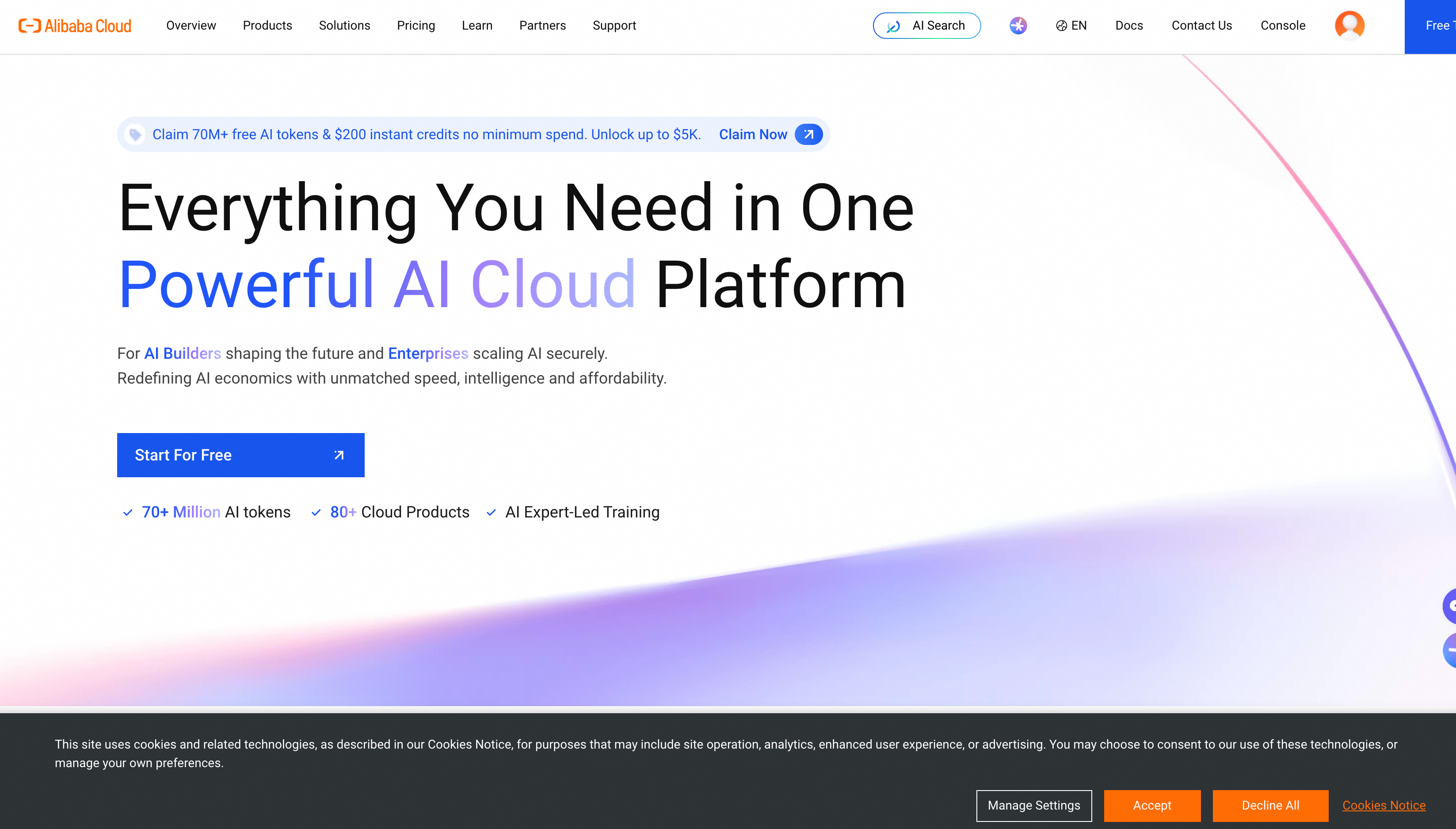
    2. 下載alibabacloud.png到專案目錄下,並提問:Load image-analyzer skill and describe the information displayed at the alibabacloud.png banner location.可收到如下回複:
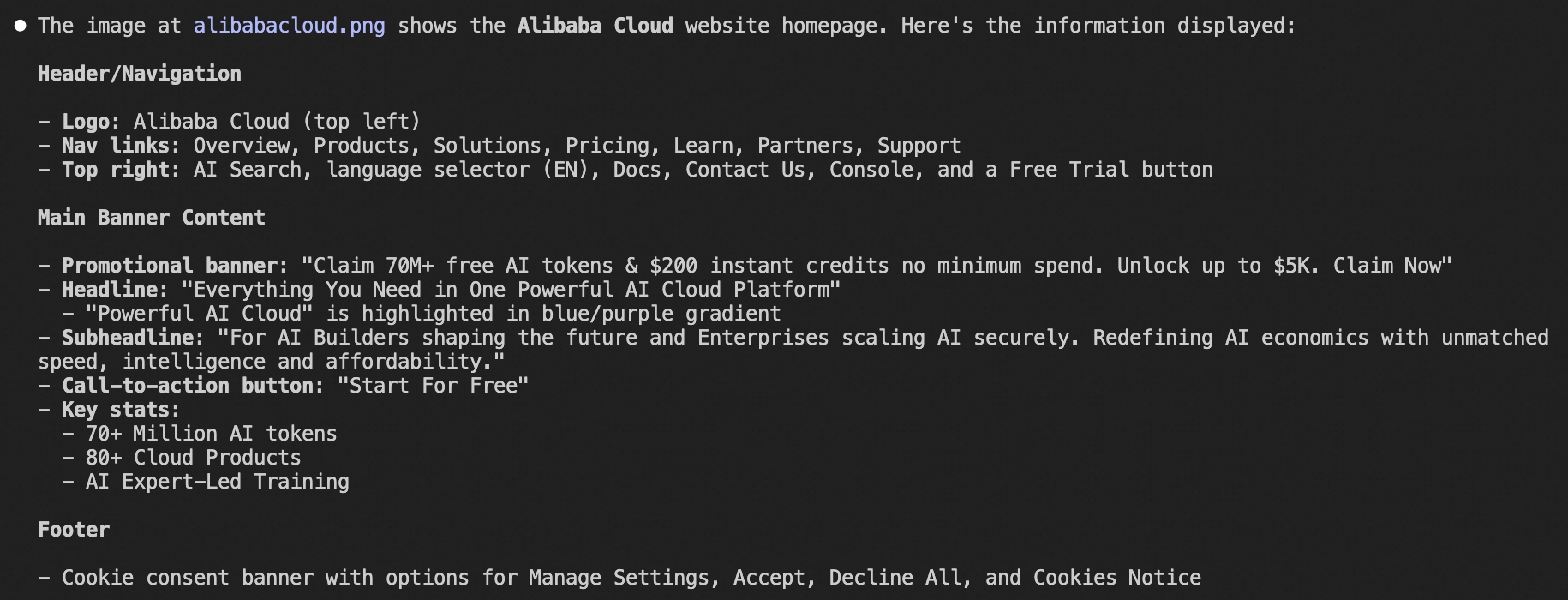
      image.png

OpenCode

  1. 添加 Agent

    在專案目錄下的 .opencode 檔案夾中建立 agents 目錄:

    mkdir -p .opencode/agents

    在該目錄下建立image-analyzer.md檔案,並寫入以下內容:

    說明

    model 欄位必須使用 OpenCode 設定檔中定義的 provider 和模型名稱。參考 OpenCode 文檔的配置樣本,應為bailian-coding-plan/qwen3.5-plus

    ---
    description: Analyzes images using a vision-capable model. Use this agent when the user needs to understand image content, extract information from screenshots, diagrams, UI mockups, or any visual content. Invoke with @image-analyzer followed by the image path and your question.
    mode: subagent
    model: bailian-coding-plan/qwen3.5-plus
    tools:
      write: false
      edit: false
    ---
    You have vision capabilities. Analyze the provided image and return a clear, structured description focused on what the user is asking about.

    建立完成後的目錄結構如下:

    .opencode/
    └── agents/
        └── image-analyzer.md
  2. 開始使用

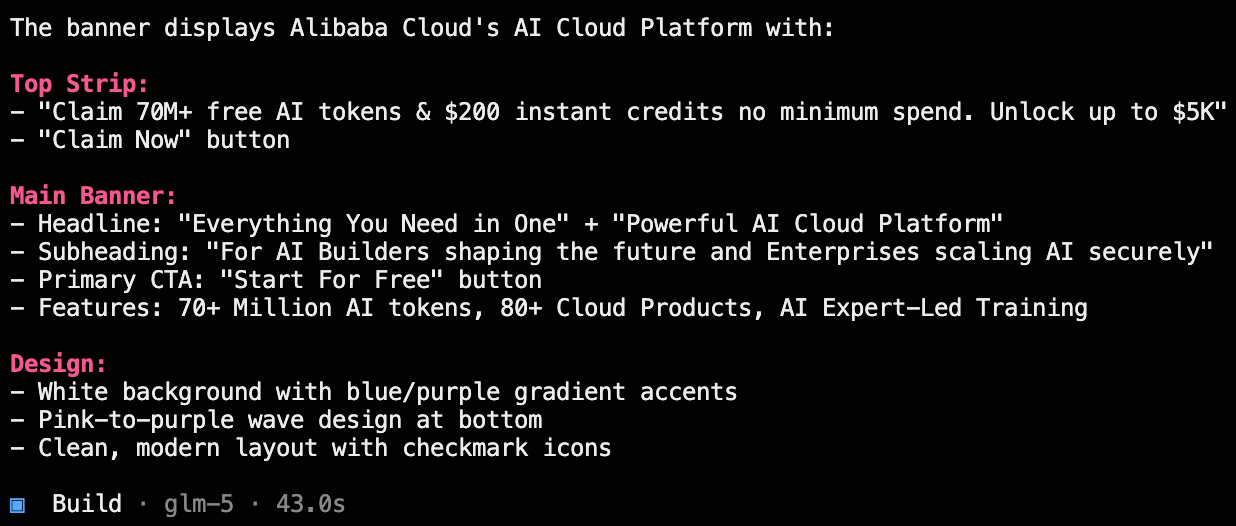
    1. 在專案目錄下運行opencode啟動 OpenCode,並切換到glm-5模型。

    2. 下載alibabacloud.png到專案目錄下,通過@喚起image-analyzer並提問:@image-analyzer describe the information displayed at the alibabacloud.png banner location.可收到如下回複:
      image

常見問題

OpenCode + qwen3.5-plus 為什麼無法理解圖片?

原因:OpenCode 預設不啟用模型的視覺能力,需要在設定檔中顯式聲明 modalities 參數。

解決方案:在 OpenCode 設定檔的模型定義中添加 modalities 欄位,將 input 設為 ["text", "image"],如下所示:

將sk-sp-xxx替換為Coding Plan API Key。
{
  "$schema": "https://opencode.ai/config.json",
  "provider": {
    "bailian-coding-plan-test": {
      "npm": "@ai-sdk/anthropic",
      "name": "Model Studio Coding Plan",
      "options": {
        "baseURL": "https://coding-intl.dashscope.aliyuncs.com/apps/anthropic/v1",
        "apiKey": "sk-sp-xxx"
      },
      "models": {
        "qwen3.5-plus": {
          "name": "Qwen3.5 Plus",
          "modalities": {
            "input": [
              "text",
              "image"
            ],
            "output": [
              "text"
            ]
          },
          "options": {
            "thinking": {
              "type": "enabled",
              "budgetTokens": 1024
            }
          }
        },
        "kimi-k2.5": {
          "name": "Kimi K2.5",
          "modalities": {
            "input": [
              "text",
              "image"
            ],
            "output": [
              "text"
            ]
          },
          "options": {
            "thinking": {
              "type": "enabled",
              "budgetTokens": 1024
            }
          }
        }
      }
    }
  }
}

OpenClaw + qwen3.5-plus 為什麼無法理解圖片?

原因:OpenClaw 需要通過設定檔中的 input 欄位來判斷模型是否支援視覺能力。

解決方案

  1. ~/.openclaw/openclaw.json設定檔中,確保模型定義包含"input": ["text", "image"]欄位。

    {
      "models": {
        "mode": "merge",
        "providers": {
          "bailian": {
            "baseUrl": "https://coding-intl.dashscope.aliyuncs.com/v1",
            "apiKey": "YOUR_API_KEY",
            "api": "openai-completions",
            "models": [
              {
                "id": "qwen3.5-plus",
                "name": "qwen3.5-plus",
                "reasoning": false,
                "input": ["text", "image"],
                "cost": { "input": 0, "output": 0, "cacheRead": 0, "cacheWrite": 0 },
                "contextWindow": 1000000,
                "maxTokens": 65536
              },
              {
                "id": "kimi-k2.5",
                "name": "kimi-k2.5",
                "reasoning": false,
                "input": ["text", "image"],
                "cost": { "input": 0, "output": 0, "cacheRead": 0, "cacheWrite": 0 },
                "contextWindow": 262144,
                "maxTokens": 32768
              }
            ]
          }
        }
      },
      "agents": {
        "defaults": {
          "model": {
            "primary": "bailian/qwen3.5-plus"
          },
          "models": {
            "bailian/qwen3.5-plus": {},
            "bailian/kimi-k2.5": {}
          }
        }
      },
      "gateway": {
        "mode": "local"
      }
    }
  2. 修改配置後,需要清除 OpenClaw 的模型緩衝並重啟,否則舊的配置仍會生效。

    rm ~/.openclaw/agents/main/agent/models.json
    openclaw gateway restart