The security risk feature includes built-in, expert-defined risk check items to help organizations proactively discover potential security threats and non-compliant data operations using preset identification rules. This feature supports visual risk management to improve risk detection and response efficiency. You can also customize risk identification rules based on specific business scenarios to meet different security policies and business requirements.
Overview
The security risk feature consists of three core modules that create a closed loop from "rule definition" to "event discovery" and "alert response".
-
风险检测项
This is the rule library for risk identification. It contains built-in expert rules, such as "Bulk query sensitive data" and "Frequent deletion of sensitive data", and lets you create custom detection rules to define risky behaviors based on your business needs.
-
风险事件
When an operation matches an enabled risk check item, a risk event is generated. All detected risk events are displayed here. You can filter and trace events by criteria such as the risk item name and occurrence time. This is the core interface for daily security audits and post-incident analysis.
-
告警策略
To enable proactive responses, you can configure alert policies. When a risk event that meets specific conditions occurs, such as any "high-risk" event or a specific "Bulk export of sensitive data" event, the system automatically sends an alert notification to specified personnel via email, SMS, or a DingTalk/WeCom robot.
Risk detection results have a T+1 delay. This means that risk detection is not performed in real time but is based on an offline analysis of the previous day's (T) data. Therefore, the risk events you see today (T+1) reflect operations that occurred yesterday. Be aware of this delay during risk analysis and event tracing.
Limitations
-
Applicable users: This feature is available to DataWorks Professional Edition or Enterprise Edition users who have enabled the new version of data security in Security Center.
-
Supported regions: China (Hangzhou), China (Shanghai), China (Beijing), China (Zhangjiakou), China (Ulanqab), China (Shenzhen), China (Chengdu), China (Hong Kong), Japan (Tokyo), Singapore, and Indonesia (Jakarta).
-
Supported compute engines: MaxCompute and Hologres.
Prerequisites
-
The Alibaba Cloud account or a RAM user that you use must meet one of the following conditions:
-
The Alibaba Cloud account or RAM user is attached with the AliyunDataWorksFullAccess policy.
-
The Alibaba Cloud account or RAM user is assigned the tenant security administrator role of DataWorks.
-
The Alibaba Cloud account or RAM user is assigned the tenant administrator role of DataWorks.
-
-
You have completed the new user guide.
Access security risks
-
Log on to the DataWorks console. In the target region, click in the left-side navigation pane. On the page that appears, click 進入 資訊安全中心.
-
In the left-side navigation pane, choose .
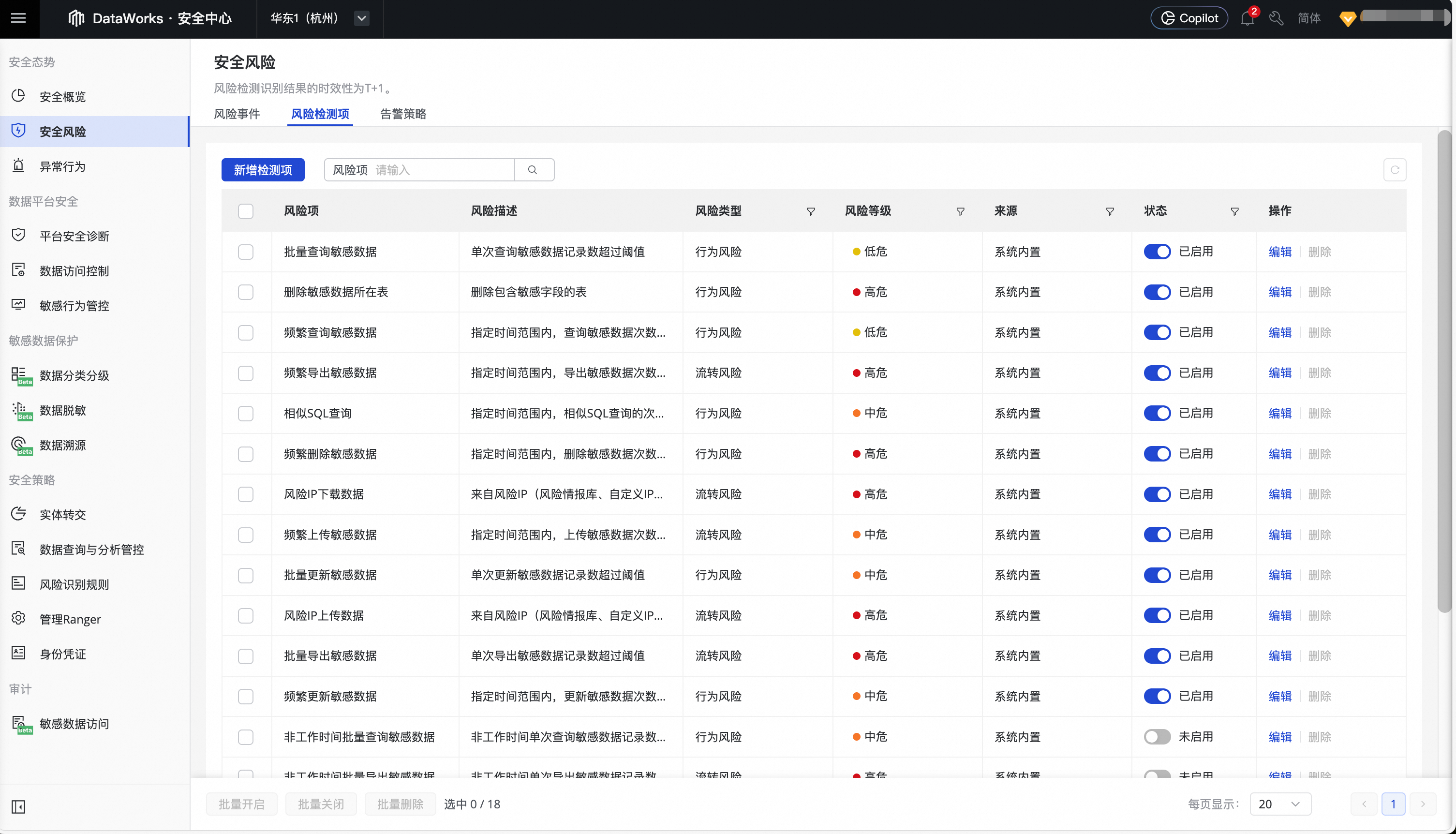
配置风险检测项
Configuring these items lets you identify potential security threats or non-compliant operations as specific, traceable risk events.
Built-in risk check items
You can modify default built-in risk check items, but you cannot delete them.
DataWorks provides built-in risk check items for common scenarios. You can also create custom risk check items based on your data security needs. The following table describes some of the built-in risk check items.
|
Category |
Risk item |
风险描述 |
Condition / Default threshold |
|
Anomalous source |
Cross-border data transfer |
This rule detects data downloads to an IP address outside the Chinese mainland, identified as foreign by a geo-IP library or a custom IP list. 重要
This rule is supported only in regions in the Chinese mainland. It is not supported in other regions, including China (Hong Kong). |
- |
|
Data download from a risk IP |
Data is downloaded from a risky IP address. The IP address is found in a threat intelligence library or a custom IP list. |
- |
|
|
Data upload from a risk IP |
Data is uploaded from a risky IP address. The IP address is found in a threat intelligence library or a custom IP list. |
- |
|
|
Anomalous behavior pattern |
Similar SQL queries |
The number of similar SQL queries within a specified time frame exceeds the threshold. |
10 or more queries within 10 minutes |
|
Bulk query of sensitive data during non-working hours |
The number of sensitive data records in a single query exceeds the threshold outside of working hours. |
|
|
|
Bulk export of sensitive data during non-working hours |
The number of sensitive data records in a single export exceeds the threshold outside of working hours. |
||
|
Deletion of a table containing sensitive data |
A table that contains sensitive fields is deleted. |
- |
|
|
Truncation of a table containing sensitive data |
A table that contains sensitive fields is truncated. |
- |
|
|
High-frequency operations |
Frequent querying of sensitive data |
The number of sensitive data queries exceeds the threshold within a specified time frame. |
5 or more operations within 5 minutes |
|
Frequent updates to sensitive data |
The number of sensitive data updates exceeds the threshold within a specified time frame. |
||
|
Frequent deletion of sensitive data |
The number of sensitive data deletions exceeds the threshold within a specified time frame. |
||
|
Frequent uploads of sensitive data |
The number of sensitive data uploads exceeds the threshold within a specified time frame. |
||
|
Frequent exports of sensitive data |
The number of sensitive data exports exceeds the threshold within a specified time frame. |
||
|
Bulk operations |
Bulk query of sensitive data |
The number of sensitive data records in a single query exceeds the threshold. |
10,000 or more records in a single operation |
|
Bulk update of sensitive data |
The number of sensitive data records in a single update exceeds the threshold. |
||
|
Bulk deletion of sensitive data |
The number of sensitive data records in a single deletion exceeds the threshold. |
||
|
Bulk upload of sensitive data |
The number of sensitive data records in a single upload exceeds the threshold. |
||
|
Bulk export of sensitive data |
The number of sensitive data records in a single export exceeds the threshold. |
The actual list of built-in items may vary and is subject to what is shown in the console. DataWorks continues to add new built-in risk check items in subsequent releases.
Guidance for new built-in items: When the tenant has newly added built-in risk items that have not yet been configured, a banner appears at the top of the 风险检测项 tab that reads "The system detected N new built-in risk items. Configure them now." Click the Configure button on the right to open a guidance dialog that lists all new built-in items pending configuration. You can enable or disable each item and apply your choices in one submission. Skipping this configuration does not affect other risk check items that are already active.
Custom risk check items
This feature allows you to create fine-grained risk identification rules by combining different dimensions, such as monitored targets, operation type, data volume, frequency, operator, and time. The system analyzes data operation logs based on the enabled identification rules and generates corresponding risk events.
-
On the Security Risk page, click the 风险检测项 tab.
-
Click 新增检测项 to configure a custom check item. The following tables describe the parameters.
-
Basic information: Defines the basic properties and metadata of the check item.
Parameter
Required
Description
策略名稱
Yes
The name of the check item, which should clearly reflect its monitoring purpose. Example: "Detection for bulk export of core customer information".
风险类型
Yes
Categorizes the risk for subsequent analysis and management.
-
行为风险: An operation performed by a user or system account that may pose a security risk.
-
流转风险: A risk that may arise when data is transmitted across different systems, applications, or network boundaries.
风险等级
Yes
Defines the severity of the risk that this check item detects. The system uses this level to aggregate risks and trigger alerts.
-
高危: An activity that could lead to a serious data breach, business interruption, or major compliance issue.
-
中危: An activity that may pose a potential security threat and requires attention and auditing from security personnel.
-
低危: A non-standard operation, typically used for auditing or statistical purposes.
备注信息
No
A detailed description of the check item, such as its rationale, the specific business scenario it monitors, or contact information for the relevant owner.
-
-
操作目标: Defines the scope of the rule by specifying which data assets to monitor.
Parameter
Required
Description
检测范围
Yes
Defines the scope of data assets to monitor. You can select and combine one or more dimensions based on your data management policy.
-
按位置: Filters assets by their physical or logical storage location, such as a database instance, project, or Catalog/Schema. Supported engine types include MaxCompute, Hologres, EMR Hive, DLF, DLF Legacy, and StarRocks. The hierarchy varies by engine. For example, MaxCompute is organized as Project > Table, while Hologres is organized as Database > Table. The actual selectable scope depends on the data assets that have been identified in the tenant.
-
按分类: Filters assets by data category.
-
按分级: Filters assets by data sensitivity level, such as S1, S2, or S3.
When you select multiple dimensions, they are combined with an
ANDlogic, meaning only assets that meet all selected criteria are monitored. -
-
Operation rule definition: This is the core of the rule, which defines the specific behavior patterns that are considered risky.
Parameter
Required
Description
数据操作
No
Defines the SQL operation types to monitor. If not specified, all operation types are monitored.
-
行为风险: Supported operations include
Select,Update,Insert,Delete,Alter,Drop, andTruncate. -
流转风险: Supported operations include
TunnelUploadandTunnelDownload.
The subset of supported operations varies by engine. When the selected engine and operation are not compatible, the console displays a gray hint, and no risk events are generated for that combination. Supported operations by engine:
MaxCompute: Behavior (anomalous behavior) supports Select / Update / Insert / Delete / Alter / Drop / Truncate. Circulation (anomalous circulation) supports TunnelUpload / TunnelDownload.
Hologres: Behavior supports Truncate / Drop. Anomalous circulation is not supported.
EMR Hive: Behavior supports Select / Insert / Drop. Anomalous circulation is not supported.
DLF / DLF Legacy: Behavior supports Select / Insert / Drop. Anomalous circulation is not supported.
StarRocks: Behavior supports Insert / Drop. Anomalous circulation is not supported.
操作数据量
No
Sets a threshold for the volume of data involved in an operation. If disabled, no limit is applied. Choose one of the two matching modes:
-
单次操作数据量: Triggers the rule when the number of rows affected by a single operation is greater than or equal to the set value.
-
Cumulative Over Time: Triggers the rule when the cumulative number of rows affected by operations within the specified time window (unit: minute/hour/day) is greater than or equal to the set value.
重要When you select Cumulative Over Time, the 操作频率 and 操作时间 sections below are hidden and their values are cleared, because the cumulative mode already includes a time-window capability. To use frequency or time window together with data volume, switch back to 单次操作数据量.
操作频率
No
Sets a threshold for data operation frequency. If disabled, no limit is applied.
-
Example: Execute
5DELETEoperations within1minute. An alert is generated on the fifth match within the minute.
操作者
No
Specifies the users or user groups that the rule applies to. This field contains two independent switches, which can be enabled separately or together:
-
User Scope: When enabled, the rule applies only to the selected 用戶. When disabled or left empty, the rule applies to all users. Note that applying the rule to all users may generate a large number of risk events.
-
User Whitelist: When enabled, select users or user groups. Operations by users on the whitelist are not identified as risk events. Use this switch to exclude known compliant runtime identities such as ETL accounts or inspection accounts. This switch is independent of User Scope and can be enabled at the same time.
Source IP
No
Displayed only when 风险类型 is set to 流转风险. Filters events by the client IP address from which the operation was initiated. Contains two independent switches:
-
Source IP Blacklist: When enabled, operations from IP addresses in the blacklist are identified as risks.
-
Source IP Whitelist: When enabled, operations from IP addresses in the whitelist are not identified as risks.
Each list supports three input formats: a single IP (for example,
192.0.2.1), an IP range (for example,192.0.2.1-192.0.2.99), or CIDR (for example,10.0.0.0/24). Two preset libraries — Risk IP address library and Overseas IP address library — are also available.說明The two preset IP libraries currently appear as placeholders in the UI and cannot be selected. Their availability will be announced later.
操作时间
No
Defines the time window during which the rule is active. If disabled, the rule is active 24/7. You can select one or more time periods by day of the week and hour (0-23). For example, you can monitor bulk data export activities only during non-working hours, such as from 18:00 to 09:00 the following day.
-
-
-
Action buttons:
-
立即生效: Saves the current configuration and immediately activates the check item. The system begins risk analysis based on this rule from the next detection cycle (T+1).
-
仅保存: Saves the current configuration but does not activate it. The check item is saved in a "Disabled" state and is not used for risk analysis. You can enable it manually later.
-
取消: Discards all configurations in the current session and returns to the list page.
-
Enable or disable risk check items
After you create a check item, you can enable or disable it on the Risk Check Items tab.
-
已啟用: DataWorks identifies events that match the rule and flags them as risk events.
-
未启用: DataWorks retains previously flagged risk events but stops identifying new events.
You can 啟用 or disable an individual risk check item. You can also select multiple items to 批量开启 or 批量关闭 them.
Edit or delete risk check items
After creating a check item, you can edit or delete it on the Risk Check Items tab.
-
编辑: Reconfigures the risk check item. All settings except for the 策略名稱 can be changed.
-
删除: Deletes a configured risk check item. After deletion, no new risk events are generated based on it.
When you 编辑 or 删除 risk check items, you can either 编辑 or 删除 them individually in the Actions column, or select multiple risk check items and click 批量删除.
Manage risk events
View risk events
When an enabled risk check item is triggered, the system generates a corresponding risk event. You can view a detailed list of all events on the 风险事件 tab.
|
字段 |
Description |
|
|
发生时间 |
The date and time when the operator triggered the event. |
|
|
风险类型 |
The risk type associated with the triggered risk check item. |
|
|
风险项 |
The name of the risk check item that the event triggered. |
|
|
操作者 |
The account that triggered the event. This is typically the logon account or the compute engine's default access identity. |
|
|
风险等级 |
The assessed impact and consequences of the risk. |
|
|
处理状态 |
The handling status of the risk event: 已处理 or 未处理. |
|
|
相关事件 |
Click 详情 in the 操作 column to view 相关事件. 相关事件 describe the execution order of a series of events to help security administrators assess the actual impact of the event. |
|
Process risk events
On the 风险事件 tab of the Security Risk page, you can view and process risk events. In the 操作 column, click 立即处理 to update its status.
Alert policy configuration
The alert policy feature allows you to create custom notification rules for various security risk events. This ensures that the relevant personnel receive risk information and can respond promptly.
Use cases
Manually inspecting risk events is inefficient and delays responses. You may need to automatically distribute alerts to different teams based on the severity or type of risk.
-
Scenario 1: Respond to critical risks in real time
When the system detects a 高危 security event, it immediately notifies the security owner via SMS and an IM tool such as DingTalk for an emergency response.
-
Scenario 2: Monitor specific behaviors
The data security team wants to monitor all bulk export of sensitive data events and automatically send email notifications to all team members for auditing.
-
Scenario 3: Categorize alerts by function
Alerts related to 数据行为风险 are sent to the data governance team, while alerts related to 数据流转风险 are sent to the architect team.
Benefits
The core purpose of an alert policy is to enable automated and differentiated notifications for security risks, sending the right information to the right people at the right time.
-
Custom alert rules: You can flexibly define trigger conditions based on 风险等级, 风险类型, or specific 风险事件.
-
Multi-channel real-time delivery: Alerts can be sent through various channels, including email, SMS, email + SMS, DingTalk group, Lark (Feishu) group, and WeCom group robots, to ensure timely delivery.
-
Improved response efficiency: The process shifts from passive risk discovery to proactive identification, shortening the response and resolution time.
Procedure
-
Go to the alert policy page
In the 安全风险 module, select the 告警策略 tab and click 新建告警策略.
-
Enter basic information
-
策略名稱: Enter a name for your policy, such as "High-risk event SMS alert".
-
策略描述 (Optional): Briefly describe the purpose of the policy.
-
-
Define trigger conditions: This is the core of the policy and determines when an alert is triggered.
-
Select a 触发条件类型:
-
安全风险等级: The broadest rule type. Select 高危, 中危, or 低危. All risk events of the selected level will trigger this alert.
-
安全风险类型: A category-based rule type. Select 数据行为风险 or 数据流转风险. All events in the selected category will trigger the alert.
-
安全风险事件: The most fine-grained rule type. You can select one or more specific events, such as bulk query of sensitive data or frequent updates to sensitive data.
-
-
-
配置告警通知
Click the Add notification method drop-down list, select a notification channel, and specify the corresponding 通知对象 for each channel. Two rows — Email and SMS — are added by default. You can add more channels. A single policy supports multiple channels.
Notification channel
Recipient type
Notes
Email
RAM user / RAM role
Added using the user/role selector. Multiple selections are supported.
SMS
RAM user / RAM role
Added using the user/role selector. Multiple selections are supported.
Email and SMS
RAM user / RAM role
A single entry that sends both email and SMS at the same time. This is a standalone combined channel, not the same as separately selecting Email and SMS.
DingTalk group robot
Group robot webhook URL
The URL must start with
https://oapi.dingtalk.com/robot/send.Lark (Feishu) group robot
Group robot webhook URL
The URL must start with
https://open.feishu.cn/open-apis/bot/v2/hook.WeCom group robot
Group robot webhook URL
The URL must start with
https://qyapi.weixin.qq.com/cgi-bin/webhook/send.說明The webhook URL for robot channels is validated against the required prefix. If the URL does not match, the system reports "Invalid URL format" and the policy cannot be saved.
-
Save and manage
-
Click 新建策略 to save the policy.
-
After the policy is saved, it appears in the list, where you can 查看, 编辑, or 移除 it.
-