針對Kubernetes叢集中的LLM推理服務,經典負載平衡方法往往基於簡單的流量分配,無法處理LLM推理過程中的複雜請求和動態流量負載。本文介紹如何使用Gateway with Inference Extension組件配置推理服務擴充,以實現智能路由和高效流量管理。
背景資訊
大語言模型LLM
大語言模型LLM(Large Language Model)指參數數量達到億層級的神經網路語言模型,例如GPT、千問和Llama。模型在超大規模的預訓練資料(預訓練資料類型多樣且覆蓋廣泛,包括大量網路文本、專業書籍和代碼等內容)上進行訓練得到,通常用於文本產生式任務,如補全、對話任務等。
在構建基於LLM的應用時,您可以通過兩種方式擷取LLM提供的文本產生能力:
可以使用類似OpenAI、阿里雲百鍊或Moonshot等平台提供的外部LLM API服務。
也可以基於開源或自研大模型、使用vLLM等推理服務架構構建LLM推理服務,並將LLM推理服務部署在Kubernetes叢集中。這種方式適用於希望自行控制LLM推理服務或對LLM的推理能力有較高定製化需求的情境。
vLLM
vLLM是一個高效易用流行的構建LLM推理服務的架構,支援包括千問在內的多種常見大語言模型。vLLM通過PagedAttention最佳化、動態批量推理(Continuous Batching)模型量化等最佳化技術,可以取得較好的大語言模型推理效率。
KV Cache
操作流程
以下為本文操作流程示意圖。
-
網關inference-gateway中,8080連接埠配置了一個標準的HTTP路由,將請求路由到後端推理服務;而8081連接埠則將請求路由到基於推理服務的擴充(LLM Route),再向後端推理服務轉寄請求。
-
在HTTP Route中,通過配置InferencePool資源來聲明一組在叢集中啟動並執行LLM推理服務工作負載,配置InferenceModel指定InferencePool中具體模型的流量分發策略。從而將經過inference-gateway網關的8081連接埠的請求,通過針對推理服務增強負載平衡演算法路由到InferencePool指定的推理服務工作負載中。
前提條件
已建立帶有GPU節點池的ACK託管叢集。您也可以在ACK託管叢集中安裝ACK Virtual Node組件,以使用ACS GPU算力。
操作步驟
步驟一:部署樣本推理服務
-
使用以下內容,建立vllm-service.yaml。
說明本文使用的鏡像推薦ACK叢集使用A10卡型,ACS GPU算力推薦使用L20(GN8IS)卡型。
同時,由於LLM鏡像體積較大,建議您提前轉存到ACR,使用內網地址進行拉取。直接從公網拉取的速度取決於叢集EIP的頻寬配置,會有較長的等待時間。
-
部署樣本推理服務。
kubectl apply -f vllm-service.yaml
步驟二:安裝Gateway with Inference Extension組件
安裝Gateway with Inference Extension組件,請保持勾選啟用Gateway API推理擴充(需要配合已經部署的推理服務使用)。
在參數配置地區,設定replicas(控制面副本數)為2,envoyGateway資源限制(limits)中cpu為500m、memory為1Gi,資源請求(requests)中cpu為100m、memory為256Mi。
步驟三:部署推理路由
本步驟建立InferencePool資源和InferenceModel資源。
-
建立inference-pool.yaml。
apiVersion: inference.networking.x-k8s.io/v1alpha2 kind: InferencePool metadata: name: vllm-qwen-pool spec: targetPortNumber: 8000 selector: app: qwen extensionRef: name: inference-gateway-ext-proc --- apiVersion: inference.networking.x-k8s.io/v1alpha2 kind: InferenceModel metadata: name: inferencemodel-qwen spec: modelName: /model/qwen criticality: Critical poolRef: group: inference.networking.x-k8s.io kind: InferencePool name: vllm-qwen-pool targetModels: - name: /model/qwen weight: 100 -
部署推理路由。
kubectl apply -f inference-pool.yaml
步驟四:部署並驗證網關
本步驟將建立一個包含8080和8081連接埠的網關。
-
建立inference-gateway.yaml。
apiVersion: gateway.networking.k8s.io/v1 kind: GatewayClass metadata: name: qwen-inference-gateway-class spec: controllerName: gateway.envoyproxy.io/gatewayclass-controller --- apiVersion: gateway.networking.k8s.io/v1 kind: Gateway metadata: name: qwen-inference-gateway spec: gatewayClassName: qwen-inference-gateway-class listeners: - name: http protocol: HTTP port: 8080 - name: llm-gw protocol: HTTP port: 8081 --- apiVersion: gateway.networking.k8s.io/v1 kind: HTTPRoute metadata: name: qwen-backend spec: parentRefs: - name: qwen-inference-gateway sectionName: llm-gw rules: - backendRefs: - group: inference.networking.x-k8s.io kind: InferencePool name: vllm-qwen-pool matches: - path: type: PathPrefix value: / --- apiVersion: gateway.networking.k8s.io/v1 kind: HTTPRoute metadata: name: qwen-backend-no-inference spec: parentRefs: - group: gateway.networking.k8s.io kind: Gateway name: qwen-inference-gateway sectionName: http rules: - backendRefs: - group: "" kind: Service name: qwen port: 8000 weight: 1 matches: - path: type: PathPrefix value: / --- apiVersion: gateway.envoyproxy.io/v1alpha1 kind: BackendTrafficPolicy metadata: name: backend-timeout spec: timeout: http: requestTimeout: 1h targetRef: group: gateway.networking.k8s.io kind: Gateway name: qwen-inference-gateway -
部署網關。
kubectl apply -f inference-gateway.yaml上述配置將在叢集中建立一個名為
envoy-gateway-system的命名空間,以及名為envoy-default-inference-gateway-645xxxxx的服務。 -
擷取網關公網IP。
export GATEWAY_HOST=$(kubectl get gateway/qwen-inference-gateway -o jsonpath='{.status.addresses[0].value}') -
驗證網關在8080連接埠上通過正常HTTP路由到推理服務。
curl -X POST ${GATEWAY_HOST}:8080/v1/chat/completions -H 'Content-Type: application/json' -d '{
    "model": "/model/qwen",
    "max_completion_tokens": 100,
    "temperature": 0,
    "messages": [
      {
        "role": "user",
        "content": "Write as if you were a critic: San Francisco"
      }
    ]
}'
預期輸出:
{"id":"chatcmpl-aa6438e2-d65b-4211-afb8-ae8e76e7a692","object":"chat.completion","created":1747191180,"model":"/model/qwen","choices":[{"index":0,"message":{"role":"assistant","reasoning_content":null,"content":"San Francisco, a city that has long been a beacon of innovation, culture, and diversity, continues to captivate the world with its unique charm and character. As a critic, I find myself both enamored and occasionally perplexed by the city's multifaceted personality.\n\nSan Francisco's architecture is a testament to its rich history and progressive spirit. The iconic cable cars, Victorian houses, and the Golden Gate Bridge are not just tourist attractions but symbols of the city's enduring appeal. However, the","tool_calls":[]},"logprobs":null,"finish_reason":"length","stop_reason":null}],"usage":{"prompt_tokens":39,"total_tokens":139,"completion_tokens":100,"prompt_tokens_details":null},"prompt_logprobs":null} -
驗證網關在8081連接埠上通過推理服務擴充路由到推理服務。
curl -X POST ${GATEWAY_HOST}:8081/v1/chat/completions -H 'Content-Type: application/json' -d '{
    "model": "/model/qwen",
    "max_completion_tokens": 100,
    "temperature": 0,
    "messages": [
      {
        "role": "user",
        "content": "Write as if you were a critic: Los Angeles"
      }
    ]
}'
預期輸出:
{"id":"chatcmpl-cc4fcd0a-6a66-4684-8dc9-284d4eb77bb7","object":"chat.completion","created":1747191969,"model":"/model/qwen","choices":[{"index":0,"message":{"role":"assistant","reasoning_content":null,"content":"Los Angeles, the sprawling metropolis often referred to as \"L.A.,\" is a city that defies easy description. It is a place where dreams are made and broken, where the sun never sets, and where the line between reality and fantasy is as blurred as the smog that often hangs over its valleys. As a critic, I find myself both captivated and perplexed by this city that is as much a state of mind as it is a physical place.\n\nOn one hand, Los","tool_calls":[]},"logprobs":null,"finish_reason":"length","stop_reason":null}],"usage":{"prompt_tokens":39,"total_tokens":139,"completion_tokens":100,"prompt_tokens_details":null},"prompt_logprobs":null}
(可選)步驟五:配置LLM服務可觀測指標與可觀測大盤
本步驟需要您開通和在叢集中接入與配置阿里雲Prometheus監控,可能會產生一些額外的費用。
-
您可以為vLLM服務Pod增加Prometheus指標採集相關的註解,通過Prometheus執行個體預設的服務發現機制來採集vLLM服務相關指標,監控vLLM服務的內部狀態。
...
annotations:
  prometheus.io/path: /metrics # 指標暴露的HTTP Path。
  prometheus.io/port: "8000" # 指標暴露連接埠,即為vLLM Server的監聽連接埠。
  prometheus.io/scrape: "true" # 是否抓取當前Pod的指標。
...
以下為部分vLLM服務提供的監控指標說明:
指標名稱
說明
vllm:gpu_cache_usage_perc
vLLM的GPU緩衝使用百分比。vLLM啟動時,會儘可能多地預先佔有一塊GPU顯存,用於進行KV Cache。對於vLLM伺服器,利用率越低,代表GPU還有充足的空間將資源分派給新來的請求。
vllm:request_queue_time_seconds_sum
請求在等待狀態排隊花費的時間。LLM推理請求在到達vLLM伺服器後,可能不會被立刻處理,而是需要等待被vLLM調度器調度運行預填充和解碼。
vllm:num_requests_running
vllm:num_requests_waiting
vllm:num_requests_swapped
正在運行推理、正在等待和被交換到記憶體的請求數量。可以用來評估vLLM服務當前的請求壓力。
vllm:avg_generation_throughput_toks_per_s
vllm:avg_prompt_throughput_toks_per_s
每秒被預填充階段消耗的Token以及解碼階段產生的Token數量。
vllm:time_to_first_token_seconds_bucket
從請求發送到vLLM服務,到響應第一個Token為止的時延水平。該指標通常代表了用戶端在輸出請求內容後得到首個響應所需的時間,是影響LLM使用者體驗的重要指標。
您可以基於這些監控指標設定具體的警示規則,方便對LLM服務的運行狀態進行即時監控和異常檢測。
-
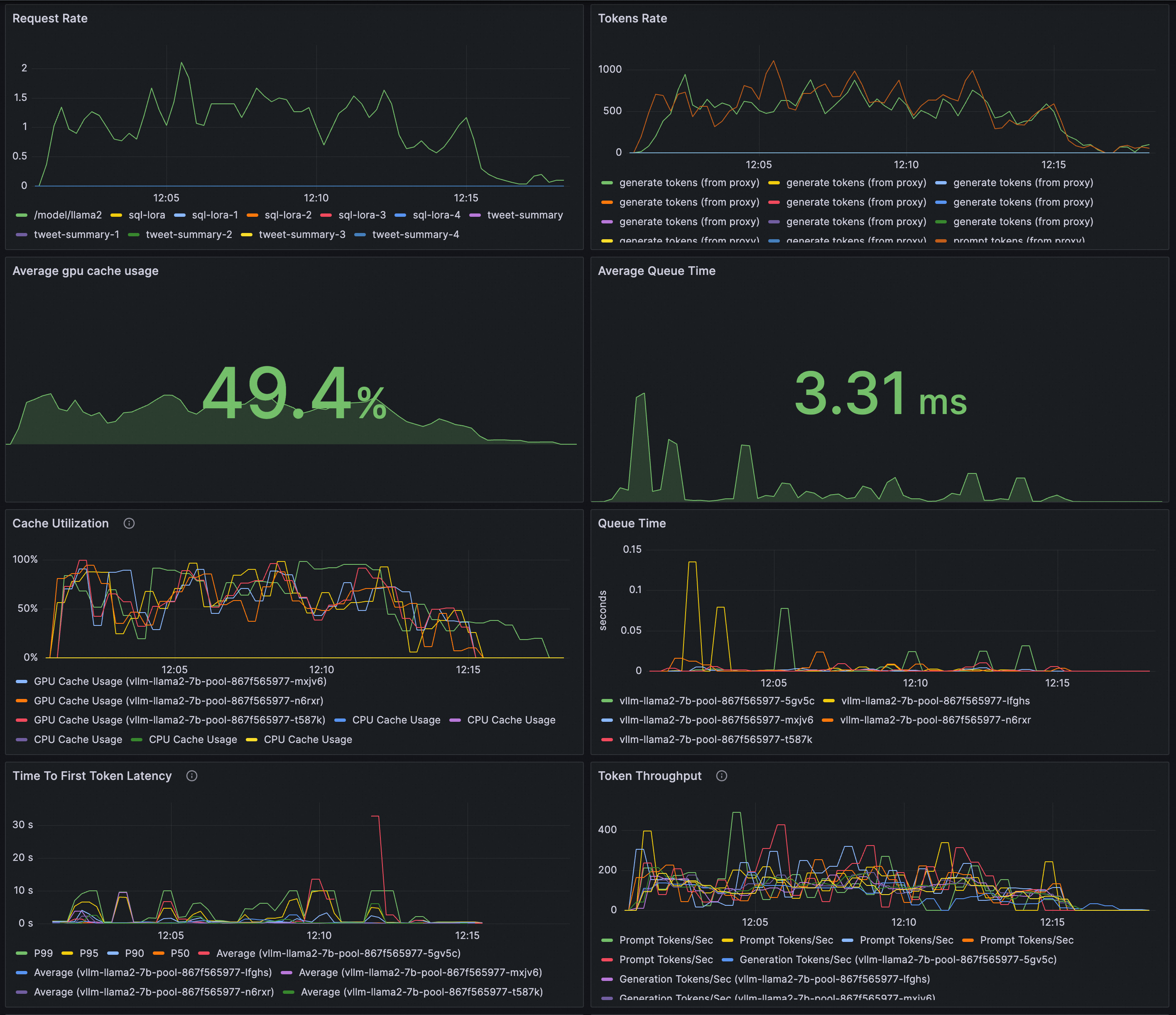
配置Grafana大盤即時監控LLM推理服務。您可以通過Grafana大盤來觀測基於vLLM部署的LLM推理服務:
-
觀測LLM服務的請求速率和整體Token輸送量。
-
觀測推理工作負載的內部狀態。
請確保Grafana使用的資料來源Prometheus執行個體已經採集vLLM的監控指標。將以下內容匯入到Grafana,建立LLM推理服務的可觀測大盤。
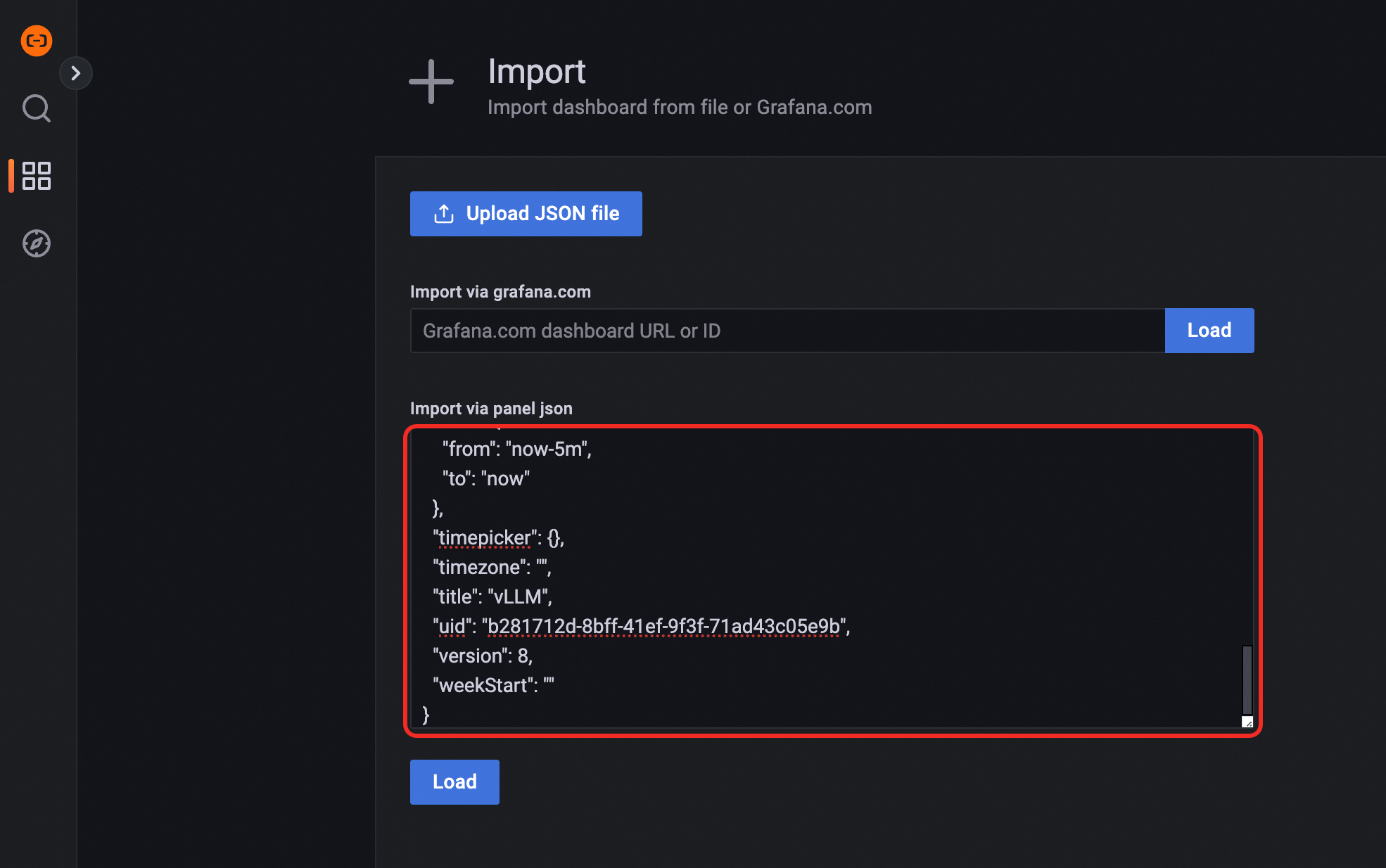
預覽效果:
-
-
以ACK叢集為例,使用vllm benchmark對推理服務進行壓測,對比普通HTTP路由和推理拓展路由提供的負載平衡能力。
-
部署壓測工作負載。
kubectl apply -f- <<EOF apiVersion: apps/v1 kind: Deployment metadata: labels: app: vllm-benchmark name: vllm-benchmark namespace: default spec: progressDeadlineSeconds: 600 replicas: 1 revisionHistoryLimit: 10 selector: matchLabels: app: vllm-benchmark strategy: rollingUpdate: maxSurge: 25% maxUnavailable: 25% type: RollingUpdate template: metadata: creationTimestamp: null labels: app: vllm-benchmark spec: containers: - command: - sh - -c - sleep inf image: registry-cn-hangzhou.ack.aliyuncs.com/dev/llm-benchmark:random-and-qa imagePullPolicy: IfNotPresent name: vllm-benchmark resources: {} terminationMessagePath: /dev/termination-log terminationMessagePolicy: File dnsPolicy: ClusterFirst restartPolicy: Always schedulerName: default-scheduler securityContext: {} terminationGracePeriodSeconds: 30 EOF -
開始壓測。
-
擷取Gateway內網IP。
export GW_IP=$(kubectl get svc -n envoy-gateway-system -l gateway.envoyproxy.io/owning-gateway-namespace=default,gateway.envoyproxy.io/owning-gateway-name=qwen-inference-gateway -o jsonpath='{.items[0].spec.clusterIP}') -
執行壓測。
普通HTTP路由
kubectl exec -it deploy/vllm-benchmark -- env GW_IP=${GW_IP} python3 /root/vllm/benchmarks/benchmark_serving.py \
--backend vllm \
--model /models/DeepSeek-R1-Distill-Qwen-7B \
--served-model-name /model/qwen \
--trust-remote-code \
--dataset-name random \
--random-prefix-len 10 \
--random-input-len 1550 \
--random-output-len 1800 \
--random-range-ratio 0.2 \
--num-prompts 3000 \
--max-concurrency 200 \
--host $GW_IP \
--port 8080 \
--endpoint /v1/completions \
--save-result \
2>&1 | tee benchmark_serving.txt
推理服務路由
kubectl exec -it deploy/vllm-benchmark -- env GW_IP=${GW_IP} python3 /root/vllm/benchmarks/benchmark_serving.py \
--backend vllm \
--model /models/DeepSeek-R1-Distill-Qwen-7B \
--served-model-name /model/qwen \
--trust-remote-code \
--dataset-name random \
--random-prefix-len 10 \
--random-input-len 1550 \
--random-output-len 1800 \
--random-range-ratio 0.2 \
--num-prompts 3000 \
--max-concurrency 200 \
--host $GW_IP \
--port 8081 \
--endpoint /v1/completions \
--save-result \
2>&1 | tee benchmark_serving.txt
-
兩組測試完成後,可以通過大盤看到以下普通HTTP路由和推理服務擴充提供的路由能力對比效果。
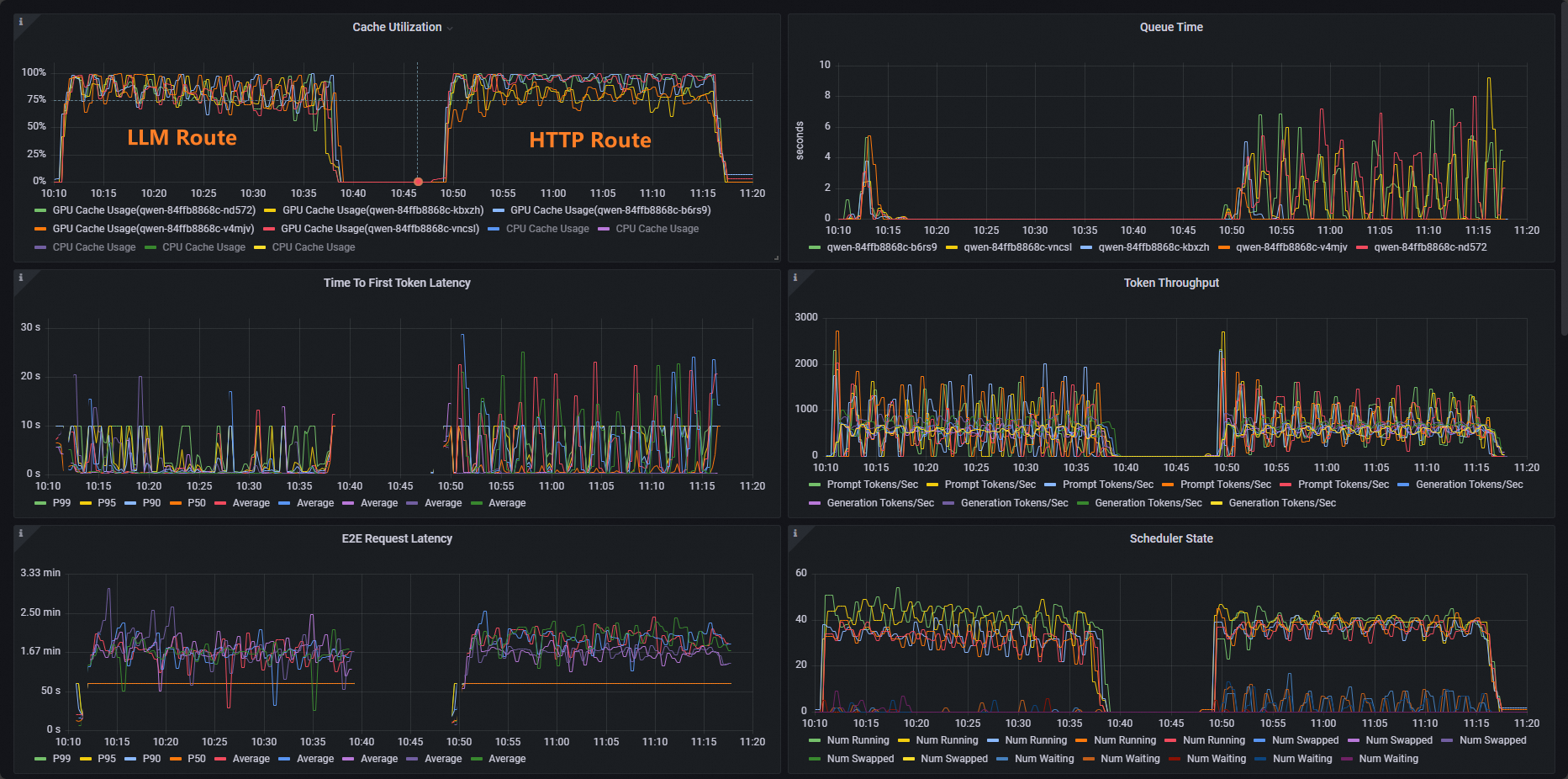
可以看到,使用HTTP Route的工作負載Cache Utillzation使用率分布不平均,而LLM Route的工作負載Cache Utillzation使用率分布正常。
-
相關操作
Gateway with Inference Extension支援配置不同的負載平衡策略,以支援不同的推理服務使用情境。您可以通過為InferencePool資源增加inference.networking.x-k8s.io/routing-strategy註解來配置發往該InferencePool內Pod的推理請求所應用的負載平衡策略。
以下樣本指定了使用app: vllm-app選中推理服務Pod,並將負載平衡策略指定為預設的基於推理伺服器指標的負載平衡策略。
apiVersion: inference.networking.x-k8s.io/v1alpha2
kind: InferencePool
metadata:
  name: vllm-app-pool
  annotations:
    inference.networking.x-k8s.io/routing-strategy: "DEFAULT"
spec:
  targetPortNumber: 8000
  selector:
    app: vllm-app
  extensionRef:
    name: inference-gateway-ext-proc
目前支援的負載平衡策略有:
|
策略名稱稱 |
策略說明 |
|
DEFAULT |
基於推理服務指標的預設負載平衡策略:通過推理伺服器多個維度指標來評估推理伺服器的內部狀態,並根據內部狀態對多個推理伺服器工作負載進行負載平衡(主要包括請求隊列長度和GPU Cache利用率等指標)。 |
|
PREFIX_CACHE |
基於請求首碼匹配的負載平衡策略:將共用同一首碼內容的請求儘可能發送到同一個推理伺服器的Pod。此策略主要適用於有大量共用首碼請求、同時推理伺服器開啟了“自動首碼緩衝”特性的情境。 典型的使用情境如下:
|