本文檔介紹數字員工(Digital Employee)的許可權配置。
本文檔僅適用於 RAM 使用者,如果您使用的是阿里雲主帳號,已預設具備數字員工的所有系統管理權限,無需進行任何配置,可直接開始使用。
權限類別型說明
數字員工許可權分為兩大類,理解這兩類許可權的區別非常重要:
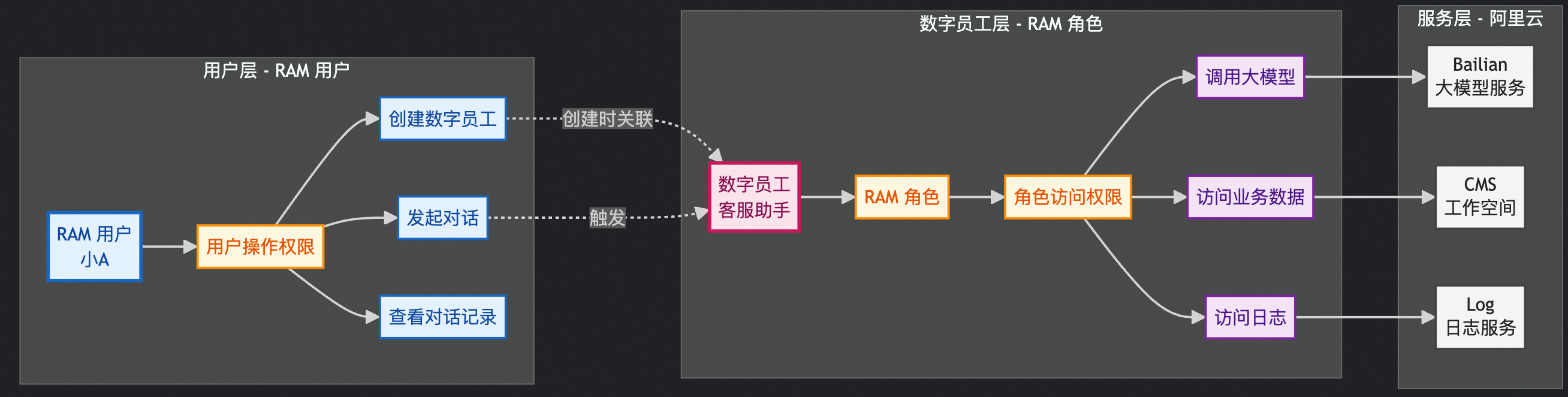
使用者運算元字員工許可權(RAM 使用者權限)
定義:這是授予 RAM 使用者(實際使用數字員工的人)的許可權,控制使用者能否對數字員工進行操作。
許可權範圍:
建立、查看、修改、刪除數字員工
與數字員工進行對話
查看對話記錄
管理數字員工的配置
適用情境:
管理員需要建立和管理數字員工
普通使用者需要使用數字員工進行對話
開發人員需要調試和測試數字員工
授權對象:RAM 使用者
數字員工存取權限(RAM 角色許可權)
定義:這是授予數字員工本身的許可權,控制數字員工能夠訪問哪些資源和資料。
許可權範圍:
訪問工作空間和實體儲存資料
訪問Log Service
訪問雲資源資料
適用情境:
數字員工需要訪問業務資料
數字員工需要記錄日誌
授權對象:RAM 角色(由數字員工扮演)
使用者運算元字員工許可權配置
使用阿里雲主帳號或Resource Access Management員登入RAM控制台。
通過指令碼編輯模式建立自訂權限原則(例如命名為 digitalemployee-manager-policy),在指令碼編輯頁簽,根據不同的使用情境使用如下權限原則:
系統管理權限
允許使用者建立、修改、刪除、查看數字員工和對話。
{
  "Version": "1",
  "Statement": [
    {
      "Effect": "Allow",
      "Action": [
        "cms:CreateChat",
        "cms:GetDigitalEmployee",
        "cms:ListDigitalEmployees",
        "cms:GetThread",
        "cms:GetThreadData",
        "cms:ListThreads",
        "cms:CreateDigitalEmployee",
        "cms:UpdateDigitalEmployee",
        "cms:DeleteDigitalEmployee",
        "cms:CreateThread",
        "cms:UpdateThread",
        "cms:DeleteThread"
      ],
      "Resource": [
        "acs:cms:*:*:digitalemployee/*",
        "acs:cms:*:*:digitalemployee/*/thread/*"
      ]
    },
    {
      "Effect": "Allow",
      "Action": "ram:PassRole",
      "Resource": "*",
      "Condition": {
        "StringEquals": {
          "acs:Service": "cloudmonitor.aliyuncs.com"
        }
      }
    }
  ]
}
唯讀許可權
允許使用者查看數字員工資訊、建立對話、查看對話記錄,但不能修改或刪除數字員工和對話。
{
  "Version": "1",
  "Statement": [
    {
      "Effect": "Allow",
      "Action": [
        "cms:CreateChat",
        "cms:GetDigitalEmployee",
        "cms:ListDigitalEmployees",
        "cms:CreateThread",
        "cms:GetThread",
        "cms:GetThreadData",
        "cms:ListThreads"
      ],
      "Resource": [
        "acs:cms:*:*:digitalemployee/*",
        "acs:cms:*:*:digitalemployee/*/thread/*"
      ]
    },
    {
      "Effect": "Allow",
      "Action": "ram:PassRole",
      "Resource": "*",
      "Condition": {
        "StringEquals": {
          "acs:Service": "cloudmonitor.aliyuncs.com"
        }
      }
    }
  ]
}
僅查看數字員工許可權
適用於只需要查看數字員工資訊,不需要建立對話的情境。
{
  "Version": "1",
  "Statement": [
    {
      "Effect": "Allow",
      "Action": [
        "cms:GetDigitalEmployee",
        "cms:ListDigitalEmployees"
      ],
      "Resource": "acs:cms:*:*:digitalEmployee/*"
    }
  ]
}
僅對話
適用於只需要進行對話操作,不需要管理數字員工的情境。
{
  "Version": "1",
  "Statement": [
    {
      "Effect": "Allow",
      "Action": [
        "cms:CreateChat",
        "cms:GetThread",
        "cms:GetThreadData",
        "cms:ListThreads",
        "cms:CreateThread"
      ],
      "Resource": [
        "acs:cms:*:*:digitalemployee/*",
        "acs:cms:*:*:digitalemployee/*/thread/*"
      ]
    },
    {
      "Effect": "Allow",
      "Action": "ram:PassRole",
      "Resource": "*",
      "Condition": {
        "StringEquals": {
          "acs:Service": "cloudmonitor.aliyuncs.com"
        }
      }
    }
  ]
}
指定數字員工
適用於只需要訪問特定數字員工的情境。
{ "Version": "1", "Statement": [ { "Effect": "Allow", "Action": [ "cms:CreateChat", "cms:GetDigitalEmployee", "cms:ListDigitalEmployees", "cms:GetThread", "cms:GetThreadData", "cms:ListThreads", "cms:CreateThread" ], "Resource": [ "acs:cms:*:*:digitalemployee/<指定的數字員工ID>", "acs:cms:*:*:digitalemployee/<指定的數字員工ID>/thread/*" ] }, { "Effect": "Allow", "Action": "ram:PassRole", "Resource": "*", "Condition": { "StringEquals": { "acs:Service": "cloudmonitor.aliyuncs.com" } } } ] }為RAM使用者添加自訂權限原則。
數字員工存取權限配置
信任主體類型:雲端服務
信任主體名稱:CloudMonitor/Cms
說明建立完成後,請檢查該角色的信任策略,Service至少包含
cloudmonitor.aliyuncs.com。建立自訂權限原則(例如digitalemployee-chat),使其能夠訪問CloudMonitor和Log Service等。權限原則樣本:
允許數字員工訪問所有必要的資源和服務
{
  "Version": "1",
  "Statement": [
    {
      "Effect": "Allow",
      "Action": [
        "log:Get*",
        "log:List*"
      ],
      "Resource": "acs:log:*:*:*"
    },
    {
      "Effect": "Allow",
      "Action": [
        "cms:Get*",
        "cms:List*"
      ],
      "Resource": [
        "acs:cms:*:*:workspace/*",
        "acs:cms:*:*:cloudresource"
      ]
    }
  ]
}
僅訪問指定工作空間許可權
使用情境:
不同業務線的數字員工需要隔離訪問各自的工作空間
需要嚴格控制數字員工的資料存取範圍
多租戶情境下的資料隔離
{
  "Version": "1",
  "Statement": [
    {
      "Effect": "Allow",
      "Action": [
        "log:Get*",
        "log:List*"
      ],
      "Resource": "acs:log:*:*:*"
    },
    {
      "Effect": "Allow",
      "Action": [
        "cms:Get*",
        "cms:List*"
      ],
      "Resource": [
        "acs:cms:*:*:workspace/<指定的工作空間ID>/*",
        "acs:cms:*:*:workspace/<指定的工作空間ID>",
        "acs:cms:*:*:cloudresource"
      ]
    }
  ]
}