本文介紹在 Linux、macOS 和 Windows 上安裝、驗證、更新與卸載阿里雲 CLI 的方法。
版本資訊
阿里雲 CLI 持續發布新版本,建議始終使用最新版本以獲得最佳體驗。執行 aliyun version 可查看當前已安裝版本,訪問 GitHub Releases 頁面可查看最新版本及變更內容。
3.3.0 以下版本已停止維護,不再獲得功能更新和安全修複。如目前的版本低於 3.3.0,請參考從舊版遷移到外掛程式版 CLI完成升級。
前提條件
登入阿里雲帳號。
(可選)已安裝
curl命令列工具。macOS 和大多數 Linux 發行版已預裝。如選擇通過 GUI 或包管理器安裝,可跳過此項。
作業系統支援
作業系統 | 支援版本 | 支援架構 |
Linux | 主流發行版,如 CentOS 8+/RHEL 8+、Ubuntu 16.04+、Debian 9+ 等(CentOS 7 已 EOL,不建議使用) | AMD64、ARM64 |
macOS | macOS 11(Big Sur)及以上 | Intel 和 Apple Silicon(Universal) |
Windows | Windows 10 及以上(64 位元) | AMD64(不支援 32 位及 ARM64) |
安裝阿里雲 CLI
根據作業系統選擇對應 Tab,按步驟完成安裝。每種作業系統均提供多種安裝途徑,選擇其中一種即可。
Linux
通過 Bash 指令碼安裝(推薦)
支援以下選項:
安裝最新版本
若未指定版本,指令碼將自動安裝最新版本。
/bin/bash -c "$(curl -fsSL https://aliyuncli.alicdn.com/install.sh)"安裝歷史版本
使用
-V選項可指定安裝版本。訪問 GitHub Releases 頁面可查看歷史可用版本。/bin/bash -c "$(curl -fsSL https://aliyuncli.alicdn.com/install.sh)" -- -V 3.3.18
通過 TGZ 安裝包(.tar.gz)安裝
下載安裝包。
下載最新版本:
說明執行
uname -m可查看 Linux 系統架構。終端輸出arm64或aarch64表示 ARM64 架構,其他輸出表示 AMD64 架構。AMD64 系統:
curl https://aliyuncli.alicdn.com/aliyun-cli-linux-latest-amd64.tgz -o aliyun-cli-linux-latest.tgzARM64 系統:
curl https://aliyuncli.alicdn.com/aliyun-cli-linux-latest-arm64.tgz -o aliyun-cli-linux-latest.tgz
下載歷史版本:訪問 GitHub Releases 頁面可下載歷史版本安裝包。
Linux 適用安裝包包名格式為
aliyun-cli-linux-<version>-<architecture>.tgz(其中<version>替換為目標版本號碼,如 3.3.18;<architecture>替換為 amd64 或 arm64)。
解壓安裝包以擷取可執行檔
aliyun。tar xzvf aliyun-cli-linux-latest.tgz將可執行檔移動至
/usr/local/bin目錄,使aliyun命令可在任意路徑下運行。sudo mv ./aliyun /usr/local/bin/
macOS
通過 Homebrew 安裝(推薦)
繼續操作前,請確保已安裝並配置 Homebrew。
安裝最新版本的阿里雲 CLI:
brew install aliyun-cli通過圖形介面(PKG)安裝
雙擊安裝,無需命令列工具。
下載安裝包。
下載最新版本:在瀏覽器中開啟下載連結 https://aliyuncli.alicdn.com/aliyun-cli-latest.pkg,下載最新版本安裝包。
下載歷史版本:訪問 GitHub Releases 頁面可查看並下載歷史版本安裝包。
macOS 適用的 PKG(macOS Installer Package,.pkg)安裝包包名格式為
aliyun-cli-<version>.pkg。
雙擊下載好的安裝包,按照說明指引完成安裝。
通過 Bash 指令碼安裝
安裝命令與 Linux 相同,參數說明請參見 Linux 的「通過 Bash 指令碼安裝」方式。
安裝最新版本
/bin/bash -c "$(curl -fsSL https://aliyuncli.alicdn.com/install.sh)"安裝歷史版本
重要版本要求見「版本資訊」章節。
/bin/bash -c "$(curl -fsSL https://aliyuncli.alicdn.com/install.sh)" -- -V 3.3.5
通過 TGZ 安裝包(.tar.gz)安裝
下載安裝包。
下載最新版本:
curl https://aliyuncli.alicdn.com/aliyun-cli-macosx-latest-universal.tgz -o aliyun-cli-macosx-latest-universal.tgz下載歷史版本:訪問 GitHub Releases 頁面可下載歷史版本安裝包。
macOS 適用安裝包包名格式為
aliyun-cli-macosx-<version>-universal.tgz。重要版本要求見「版本資訊」章節。
解壓安裝包以擷取可執行檔
aliyun。tar xzvf aliyun-cli-macosx-latest-universal.tgz將可執行檔移動至
/usr/local/bin目錄,使aliyun命令可在任意路徑下運行。sudo mv ./aliyun /usr/local/bin/
Windows
阿里雲 CLI 當前僅適用於 Windows AMD64 架構系統,暫不支援 32 位及其他非 AMD64 架構(如 ARM64)的 Windows 系統。
通過圖形介面(GUI)安裝
下載並解壓安裝包
下載安裝包。
下載最新版本:在瀏覽器中開啟下載連結 https://aliyuncli.alicdn.com/aliyun-cli-windows-latest-amd64.zip,下載最新版本安裝包。
下載歷史版本:訪問 GitHub Releases 頁面可下載歷史版本安裝包。
Windows 適用安裝包包名格式為
aliyun-cli-windows-<version>-amd64.zip。
將安裝包中的可執行檔
aliyun.exe解壓至目標目錄(建議C:\AliyunCLI),該目錄將作為阿里雲 CLI 的安裝目錄。說明該檔案需要通過命令列終端運行,雙擊檔案無法正常工作。
請記住此安裝路徑,後續配置 PATH 時需要使用。
配置 PATH 環境變數
按下
Windows鍵 +S鍵開啟搜尋介面,輸入搜尋關鍵詞"環境變數"。在搜尋結果中單擊 編輯賬戶的環境變數,開啟 環境變數 設定介面。
在 使用者變數 中選擇鍵為
Path的環境變數,單擊 編輯。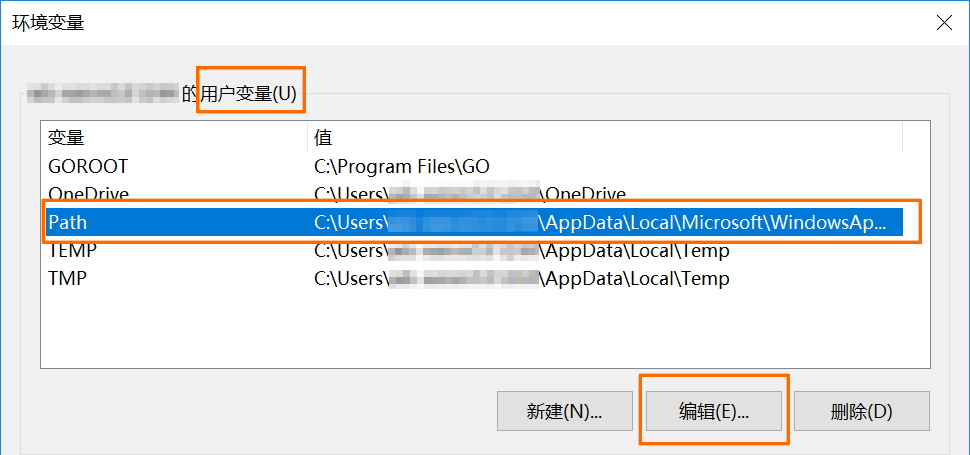
在編輯介面中單擊 建立,輸入阿里雲 CLI 安裝目錄路徑。樣本目錄:
C:\ExampleDir(請替換為實際安裝目錄路徑)。
在所有開啟的對話方塊中依次單擊 確定 以儲存更改。
重新啟動終端會話以使更改生效。
通過 PowerShell 指令碼安裝
建立指令檔
Install-CLI-Windows.ps1。可在 PowerShell 中執行New-Item Install-CLI-Windows.ps1建立,或在檔案總管中建立文字文件後重新命名。將以下代碼複製並儲存到指令檔中。
參考以下樣本,運行指令檔安裝阿里雲 CLI。
說明樣本指令碼路徑為
C:\Example\Install-CLI-Windows.ps1,請將指令碼路徑替換為實際位置後運行命令。若未指定版本,指令碼將自動安裝最新版本。預設安裝路徑為:
C:\Users\<USERNAME>\AppData\Local\AliyunCLI。powershell.exe -ExecutionPolicy Bypass -File C:\Example\Install-CLI-Windows.ps1使用
-Version和-InstallDir選項可指定安裝版本和安裝目錄。訪問 GitHub Releases 頁面可查看歷史可用版本。powershell.exe -ExecutionPolicy Bypass -File C:\Example\Install-CLI-Windows.ps1 -Version 3.3.15 -InstallDir "C:\ExampleDir\AliyunCLI"
驗證安裝結果
安裝完成後,在終端中執行以下命令確認阿里雲 CLI 已安裝成功。
aliyun version如顯示版本號碼(例如 3.3.15),則安裝成功。
進一步確認 CLI 可正常工作:
aliyun configure list如顯示憑證配置列表(即使為空白),則確認 CLI 運行正常。
驗證通過後,下一步需要為阿里雲 CLI 配置訪問憑證,才能開始管理雲資源:
快速入門:瞭解如何配置憑證並執行第一條命令。
配置憑證:為阿里雲 CLI 配置存取金鑰或 RAM 角色等身份憑證。
版本遷移:如果目前的版本低於 3.3.0,參考從舊版遷移到外掛程式版 CLI完成升級。
更新阿里雲 CLI
推薦使用 aliyun upgrade 命令一鍵更新。如目前的版本低於 3.3.5,需先通過重新安裝的方式升級到 3.3.5+,之後即可使用 aliyun upgrade。
通過 aliyun upgrade 更新(推薦)
v3.3.5 及以上版本支援 aliyun upgrade 命令,一鍵更新到最新版本。該命令適用於非Homebrew安裝方式的CLI。
互動式更新(需確認):
aliyun upgrade跳過確認直接更新:
aliyun upgrade --yes
如目前的版本低於 3.3.5(執行 aliyun version 查看),需先通過重新安裝更新,之後即可使用aliyun upgrade。
通過重新安裝更新
Bash 指令碼(Linux/macOS):重新執行安裝命令。
/bin/bash -c "$(curl -fsSL https://aliyuncli.alicdn.com/install.sh)"Homebrew(僅 macOS):
brew update && brew upgrade aliyun-cli && brew cleanup aliyun-cliGUI 安裝包(macOS PKG / Windows ZIP):下載最新安裝包,重新安裝即可覆蓋原版本。macOS 下載連結:aliyun-cli-latest.pkg;Windows 下載連結:aliyun-cli-windows-latest-amd64.zip。
TGZ 安裝包(Linux/macOS):下載最新 TGZ 包,解壓後將
aliyun可執行檔覆蓋至原安裝目錄(執行which aliyun可確認路徑)。PowerShell 指令碼(僅 Windows):以相同參數重新執行安裝指令碼。
如初次安裝時指定了自訂安裝目錄(
-InstallDir),更新時須傳入相同值,否則將安裝到預設目錄。powershell.exe -ExecutionPolicy Bypass -File C:\Example\Install-CLI-Windows.ps1
更新完成後,執行 aliyun version 確認版本號碼已更新為最新版本。
確認當前安裝資訊
如果不確定當前的安裝方式或安裝路徑,可通過以下命令查看可執行檔位置:
Linux/macOS:執行
which aliyun,輸出即為可執行檔路徑。路徑包含
homebrew/Cellar或homebrew/bin→ 通過 Homebrew 安裝。路徑為
/usr/local/bin/aliyun→ 通過 Bash 指令碼或 TGZ 安裝包安裝。
Windows:執行
where aliyun,輸出即為可執行檔路徑。路徑包含
AliyunCLI(如C:\Users\<USERNAME>\AppData\Local\AliyunCLI)→ 通過 PowerShell 指令碼安裝。路徑為自訂目錄 → 通過 GUI 安裝(手動解壓 ZIP 包)。
卸載阿里雲 CLI
根據作業系統選擇對應 Tab,執行卸載操作。
Linux
確認可執行檔路徑:
which aliyun確認路徑無誤後,刪除該檔案:
sudo rm -v $(which aliyun)
macOS
通過 Homebrew 卸載(適用於 Homebrew 安裝方式)
brew uninstall aliyun-cli命令列卸載(適用於 PKG、Bash 指令碼或 TGZ 安裝方式)
通過 PKG 安裝包安裝的 CLI 通常也位於 /usr/local/bin,可使用同一命令刪除。
確認可執行檔路徑:
which aliyun確認路徑無誤後,刪除該檔案:
sudo rm -v $(which aliyun)
Windows
通過檔案管理工具卸載(適用於 GUI 安裝方式)
如忘記安裝目錄,可先在命令列終端中執行 where aliyun 查看可執行檔的完整路徑,再前往該目錄刪除。
在檔案總管中定位 aliyun.exe 所在目錄,刪除該檔案。如需同時從 PATH 中移除安裝目錄,請在系統內容變數中刪除對應路徑條目。
通過 PowerShell 卸載(適用於 PowerShell 指令碼安裝方式)
刪除預設安裝目錄下的阿里雲 CLI 檔案。如使用了自訂安裝路徑,請將 $InstallDir 替換為實際路徑。
$InstallDir = Join-Path $env:LOCALAPPDATA "AliyunCLI"
Remove-Item -Path "$InstallDir\aliyun.exe" -Force
清理設定檔(可選)
如需徹底清理,可刪除阿里雲 CLI 的配置目錄:
Linux/macOS:
~/.aliyunWindows:
C:\Users\<使用者名稱>\.aliyun
驗證卸載結果
卸載完成後,在終端執行 aliyun version。若返回 command not found 或類似提示,則確認卸載成功。
常見問題
執行 aliyun 命令提示 command not found
先關閉並重新開啟終端,再執行一次命令。多數情況下,PATH 變數在安裝後需要重新整理終端才會生效。
如重啟終端後問題依舊,執行 which aliyun(Linux/macOS)或 where aliyun(Windows)檢查可執行檔路徑。若命令無輸出,說明 PATH 未包含安裝目錄,需手動將安裝目錄添加至 PATH:
Bash(Linux):在
~/.bashrc末尾添加export PATH="$PATH:/usr/local/bin",然後執行source ~/.bashrc。Zsh(macOS 預設):在
~/.zshrc末尾添加export PATH="$PATH:/usr/local/bin",然後執行source ~/.zshrc。Windows:參見安裝步驟中的“配置 PATH 環境變數”,將安裝目錄添加至使用者變數 Path,重啟終端後生效。
aliyun version 顯示的版本不是最新安裝的版本
系統中可能存在多個aliyun 可執行檔。執行 which aliyun(Linux/macOS)或 where aliyun(Windows)查看當前調用的路徑,刪除舊版本檔案或將新版本安裝目錄排在 PATH 前面即可解決。
Windows 上雙擊 aliyun.exe 沒有反應
阿里雲 CLI 是命令列工具,不支援雙擊運行。需通過 PowerShell 或 CMD 等命令列終端使用,例如執行 aliyun version 驗證安裝。